Instagram auto DM sends direct messages automatically when someone comments a trigger keyword on your post, replies to your Story, or sends a specific phrase. Setup takes under 5 minutes: connect your Instagram Business account to an automation tool using Meta’s official Graph API, create a trigger keyword, write your message template, and activate. Auto DMs run 24/7 and respond to followers in seconds without manual effort.
You’re getting 30+ comments asking for links. You can’t respond fast enough. By the time you copy-paste your link to everyone, half of them have moved on. That’s money walking away.
Auto DM on Instagram fixes this. Someone comments your trigger word, they get your link in seconds. No manual work. No missed opportunities. Your automation runs 24/7 while you create content, sleep, or live your actual life.
This guide shows you exactly how to set up Instagram auto DM in 5 minutes. No technical skills required. You’ll have your first automation sending messages before you finish reading.
TL;DR
Auto DM on Instagram uses Meta’s official Graph API to send direct messages automatically when followers comment keywords, reply to stories, or engage with your content. Setup takes 5 minutes with tools like CreatorFlow ($15/mo flat rate, creatorflow.so/pricing, February 2026), ManyChat (free up to 1,000 contacts, then $15-65/mo based on contact count, manychat.com/pricing, February 2026), or LinkDM ($19/mo, linkdm.me, February 2026).
What You Need:
- Instagram Business or Creator account (free switch)
- Facebook Page connected to Instagram
- Auto DM tool (CreatorFlow, ManyChat, or LinkDM)
- Link or message to send
Quick Setup:
- Connect Instagram to your auto DM tool (2 min)
- Create automation with trigger word (1 min)
- Write your message with link (2 min)
- Test and activate (30 sec)
Best For: Affiliate marketers, coaches, course creators, and anyone getting “link?” comments daily.
How Auto DM Works on Instagram
Auto DM sends Instagram direct messages automatically based on triggers you set. When someone comments a specific word on your post, replies to your story, or sends you a DM with a keyword, the automation fires. They receive your pre-written message within seconds.

The technology behind it: Meta’s Instagram Graph API. This is Instagram’s official system for approved third-party tools. Your auto DM tool connects to Instagram through this API, watches for your triggers, and sends messages on your behalf.
The trigger : action flow:
- You set a trigger word (like “LINK” or “INFO”)
- Someone comments that word on your post
- Instagram notifies your auto DM tool
- Tool sends your pre-written message to their inbox
- They receive your link in 5-10 seconds
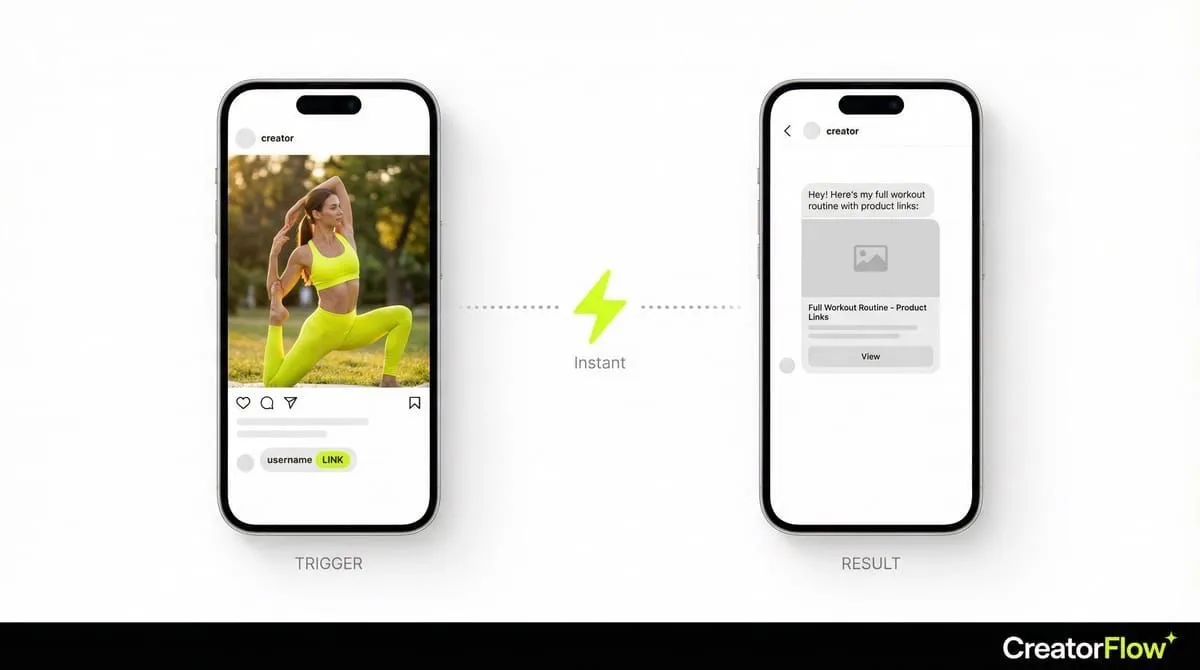
This works 24/7. Someone comments at 3am while you’re asleep? They still get the message instantly.
What auto DM can do:
- Send affiliate links when someone comments “link”
- Deliver lead magnets (PDFs, guides) automatically
- Send booking calendar links (Calendly, Acuity)
- Respond to story replies with personalized messages
- Collect email addresses before sending the main link
- Send follow-up messages to non-responders
What auto DM can’t do:
- Send unsolicited messages to random followers (that’s spam)
- Bypass Instagram’s 200 DM/hour rate limit
- Message people who haven’t engaged with you first
- Work with Personal accounts (Business/Creator only)
What You Need Before Starting
Five things must be in place before setting up auto DM. Missing any of these will block your setup.
1. Instagram Business or Creator Account
Auto DM only works with Business or Creator accounts. Personal accounts don’t have API access.
To switch (30 seconds):
- Go to Instagram Settings
- Tap Account
- Tap “Switch to Professional Account”
- Choose Business or Creator
- Done
You can switch back to Personal anytime, but your automations stop working when you do.
2. Facebook Page Connected to Instagram
Instagram’s API runs through Meta’s system. You need a Facebook Page linked to your Instagram account.
If you don’t have one, Instagram prompts you to create it when switching to Business/Creator. Takes 2 minutes. You never need to post on the Facebook Page. It just needs to exist.
3. Auto DM Tool
Pick one:
CreatorFlow ($15/mo flat, creatorflow.so)
- Best for: Solo creators wanting simple setup
- Pros: Modern UI, flat pricing, no per-contact fees
- Cons: Instagram-only (no WhatsApp, SMS)
ManyChat (Free up to 1,000 contacts, $15-65+/mo for Pro, manychat.com)
- Best for: Multi-platform needs (Instagram + Facebook + WhatsApp)
- Pros: Feature-rich, established platform, advanced workflows
- Cons: Pricing scales with contacts, complex interface
LinkDM ($19/mo, linkdm.me)
- Best for: Creators wanting established track record
- Pros: Simple interface, 20K+ users
- Cons: Limited advanced features
For this guide, I’ll use steps that work across all tools. The buttons look different but the concepts are identical.
4. Your Link or Content to Send
Have your destination ready:
- Amazon/LTK affiliate link
- Google Drive or Dropbox PDF
- Calendly booking link
- Shopify product page
- Landing page for email capture
Test your link before putting it in automation. Sending people broken links wastes their engagement.
5. A Post with Comments (or New Post Ready)
You need content to attach your automation to:
- Existing post that’s still getting comments
- New post you’re about to publish
- Reel with engagement
Start with one post. Once it works, scale to all your content.
Setting Up Auto DMs (5-Minute Guide)
Follow these exact steps. You’ll have auto DM running in 5 minutes.
Step 1: Create Account and Connect Instagram (2 minutes)
Go to your chosen tool’s website. Create an account.
Click “Connect Instagram” or “Add Account.” You’ll see Meta’s official authorization screen. This is Instagram’s login system - you’re not sharing your password with anyone.
Log in with your Instagram credentials. Grant the requested permissions (read comments, send DMs).
Your account is now connected. You’ll see your profile photo and follower count in the dashboard.
Step 2: Create New Automation (30 seconds)
Click “New Automation” or “Create Flow.”
Select “Comment-to-DM” or “Post Comment Trigger.”
Name your automation something descriptive:
- “Skincare Routine Links”
- “Free Meal Plan Delivery”
- “Discovery Call Booking”
Step 3: Choose Your Trigger Post (30 seconds)
Select which post triggers this automation.
Option A: Pick an existing post Browse your recent posts. Click the one you want. Posts with existing engagement work well for testing.
Option B: Apply to next post Some tools let you auto-activate on your next post. Publish content, automation starts immediately.
For your first test, use an existing post with some comments already.
Step 4: Set Your Trigger Keyword (30 seconds)
Enter the word people will comment to receive your DM.
Good trigger words:
- LINK
- INFO
- GUIDE
- FREE
- RECIPE
- WORKOUT
- PRICE
Bad trigger words:
- PLEASESENDMETHECOMPLETEGUIDEWITHALLLINKS (too long)
- link pls (spelling variations cause problems)
- Single emojis (inconsistent triggering)
Settings to enable:
- Case insensitive: “link,” “LINK,” and “Link” all work
- Contains match: Triggers on “yes link!” not just “LINK”
- Multiple keywords: Add variations (LINK, LINKS, SEND LINK)
Step 5: Write Your Auto DM Message (2 minutes)
This determines whether people click your link or ignore it.
Message structure that converts:
Hey! [Acknowledge their request]

[Deliver what they asked for with link]

[One bonus tip or extra value]

[Soft invitation to reply]
Example for affiliate links:
Hey! Here's my full skincare routine with product links:
[your-affiliate-link]

Pro tip: Start with the vitamin C serum. You'll see results in 2-3 weeks.

Let me know what you think!
Example for lead magnets:
Hey! Sending you the Instagram growth guide now:
[your-google-drive-link]

It's the exact strategy I used to grow from 2K to 50K followers.

Questions? Just reply!
Example for booking links:
Hey! You asked about working together.

Here's my calendar to book a free 15-min call:
[your-calendly-link]

I only take 5 clients per month. Talk soon!
Keep it under 100 words. People skim DMs on phones. Deliver value fast.
Step 6: Test Your Automation (1 minute)
Before going live:
- Go to your trigger post
- Comment your trigger word from another account (or have a friend test)
- Wait 5-30 seconds
- Check DMs
You should receive the automated message exactly as written. Click your link to verify it works.
If message didn’t send:
- Is automation toggled ON?
- Did you spell trigger word correctly?
- Is your Instagram connected properly?
- Are you using Business/Creator account?
Step 7: Activate and Go Live (10 seconds)
Click “Activate” or “Publish” or “Go Live.”
Your auto DM is now running. Every time someone comments your trigger word, they get your message automatically.
Auto DM Templates That Convert
Copy-paste these templates. Customize for your brand.
Amazon/LTK Affiliate Template
Hey! Here's my [product category] favorites with links:
[your-affiliate-link]

Everything ships with Prime.

Let me know which products you grab!
Free Lead Magnet Template
Hey! Your [lead magnet name] is ready:
[your-download-link]

This is exactly what I used to [result you achieved].

Let me know how it works for you!
Coaching/Booking Template
Hey! Thanks for your interest in [service name].

Here's my calendar for a free 15-min call:
[your-calendly-link]

We'll talk about your goals and see if my program is a fit.
Course/Digital Product Template
Hey! Here's what you get in [course name]:
[your-sales-page-link]

Use code SAVE40 for 40% off (expires in 48 hours).

Any questions? I'm here!
E-commerce Product Template
Hey! Here's the [product] everyone's asking about:
[your-product-link]

We have sizes [X-X] in stock. Ships same day!

Use code INSTA15 for 15% off.
Recipe/Tutorial Template
Hey! Here's the full [recipe/tutorial]:
[your-link]

The secret is [one quick tip].

Tag me when you try it!
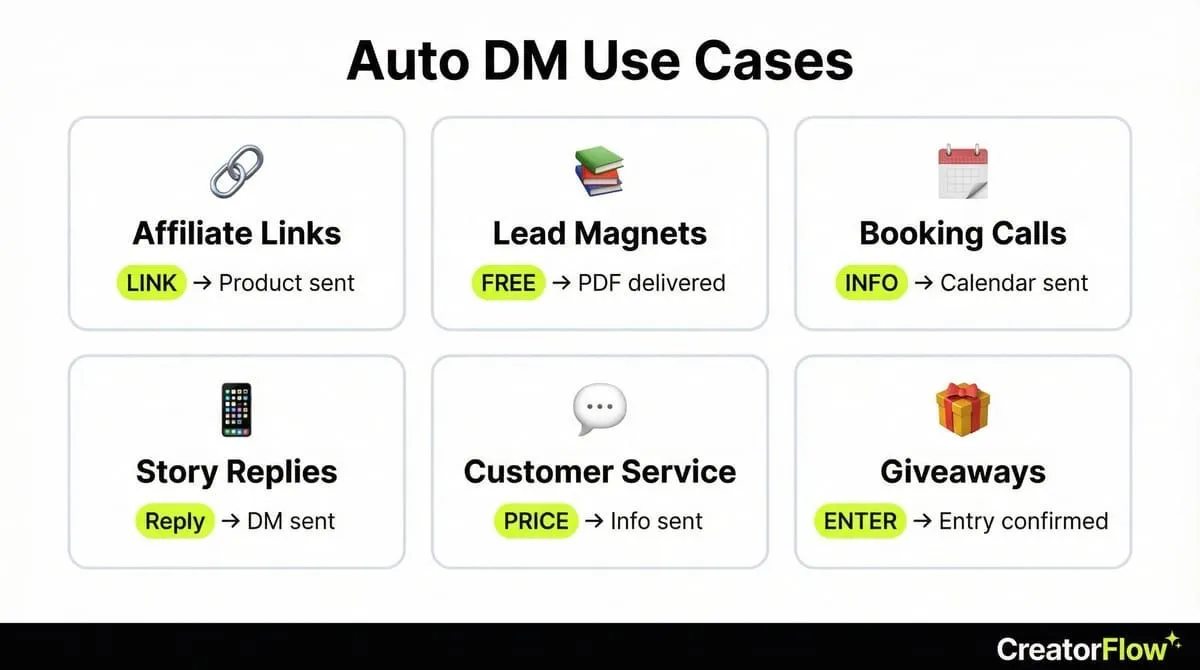
When to Use Auto DMs (Best Use Cases)
Auto DM works best in specific situations. Use it for these:
1. Affiliate Link Distribution
Every “link?” comment is a potential commission. Auto DM sends your affiliate link instantly, before they lose interest.
Best trigger words: LINK, SHOP, BUY, PRODUCT Message focus: Deliver link immediately, add one helpful tip
2. Lead Magnet Delivery
Build your email list while sleeping. Someone wants your free guide? Auto DM delivers it and asks for their email.
Best trigger words: FREE, GUIDE, DOWNLOAD, PDF Message focus: Deliver value first, ask for email second
3. Discovery Call Booking
Coaches and consultants: Stop manually sending Calendly links. Auto DM sends your booking link within seconds.
Best trigger words: INFO, COACHING, WORK, BOOK Message focus: Create urgency (limited spots), make booking easy
4. Story Reply Responses
Stories get quick engagement. Auto DM responds to story replies with relevant links or offers.
Trigger: Someone replies to your story Message focus: Personalized response + relevant offer
5. Keyword-Based Customer Service
Common questions get instant answers. “PRICE” triggers your pricing info. “HOURS” triggers your availability.
Best trigger words: PRICE, HOURS, SIZE, SHIPPING Message focus: Answer the question directly, include next step
6. Contest/Giveaway Entries
Run engagement campaigns. Comment to enter : Auto DM confirms entry and shares additional content.
Best trigger words: ENTER, WIN, GIVEAWAY Message focus: Confirm entry, encourage sharing for bonus entries
Common Mistakes to Avoid
These errors kill your auto DM results. Avoid them.
Mistake #1: Using Complicated Trigger Words
Wrong: “PLEASESENDMETHEINSTAGRAMGROWTHGUIDE2025” Right: “GUIDE”
People type fast on phones. Make it easy. One short word.
Mistake #2: Writing Robot Messages
Wrong: “Your requested link has been processed. Please find the resource at the following URL:” Right: “Hey! Here’s your link”
Sound like a human. Use casual language. Skip the formality.
Mistake #3: Burying Your Link
Wrong: Three paragraphs of intro before the link appears Right: Link in the first 2-3 lines
People scroll fast. Get to the point. Deliver the link immediately.
Mistake #4: No Call-to-Action
Wrong: Just dropping a link with no context Right: “Grab yours before they sell out!” or “Let me know what you think!”
Tell them what to do next. Create urgency when appropriate.
Mistake #5: Sending Broken Links
Test every link before activating automation. Click it yourself. Make sure it loads fast and goes to the right page.
Mistake #6: Ignoring the 24-Hour Window
Instagram’s API only allows automated messages to users who engaged within 24 hours. Set up automation BEFORE posting, not after.
Mistake #7: Spam-Level Follow-Ups
Wrong: 5 follow-up messages over 3 days Right: 1-2 follow-ups max, spread over 24 hours
Respect people’s inboxes. If they’re not responding after 2 messages, move on.
Mistake #8: Bait-and-Switch Content
Wrong: Caption promises “free guide,” DM sends $297 course sales page Right: Deliver exactly what you promised
Bait-and-switch destroys trust and gets you reported for spam.
Mistake #9: Using Browser Bots
Wrong: Tools that log into Instagram and simulate human clicks Right: API-based tools (CreatorFlow, ManyChat, LinkDM)
Browser bots violate Instagram’s Terms of Service. You’ll get banned. Only use official API tools.
Mistake #10: Not Tracking Results
Check your analytics weekly:
- How many triggers fired?
- How many DMs sent successfully?
- What’s your click-through rate?
If CTR is under 5%, your message needs work. Test different versions.
FAQ
Is auto DM safe for my Instagram account?
Yes, if you use tools that work through Meta’s official Instagram Graph API. CreatorFlow, ManyChat, and LinkDM all use this official system. Instagram explicitly allows automation through approved tools. What’s NOT safe: browser bots that log into your account and pretend to be you. Those violate Terms of Service and will get you banned.
How much does Instagram auto DM cost?
Tools range from free to $65+/month. CreatorFlow charges $15/mo flat with 5,000 DMs per workspace (creatorflow.so/pricing, February 2026). ManyChat offers free up to 1,000 contacts, then $15-65/mo based on contact count (manychat.com/pricing, February 2026). LinkDM costs $19/mo flat (linkdm.me, February 2026). Most solo creators pay $15-20/month.
Can I auto DM Instagram for free?
Yes, with limits. ManyChat’s free plan works up to 1,000 contacts. CreatorFlow offers 500 free DMs/month. These free tiers work well when starting. Upgrade when you outgrow them.
How many auto DMs can I send per hour?
Instagram’s API limits automated DMs to 200 per hour (developers.facebook.com/docs/instagram-api, February 2026). This applies across all tools. If you hit the limit, messages queue for the next hour. For context: 200/hour = 4,800/day. Unless you’re going massively viral, you won’t hit this limit.
Will people know my DM is automated?
Done well, no. The message comes from your account, not a bot account. If you write naturally and personalize where possible (using variables like {{first_name}}), messages feel human. Avoid robotic language. Sound like yourself.
Can I collect emails with auto DM?
Yes. Most tools let you add an email collection step before delivering the main content. Flow: trigger word : DM asks for email : user replies : you send the link and save their email. Conversion rate is typically 30-50% for compelling offers.
Does auto DM work for small accounts?
Absolutely. Small accounts often see bigger improvements. Going from manually responding to 100% automated is a huge productivity boost. You don’t need 100K followers. If you’re getting any “link?” comments, automation helps.
What happens if someone replies to my auto DM?
You can reply normally. Auto DM handles the initial response. Ongoing conversation is manual (unless you set up additional keyword triggers). Most tools show a unified inbox where you see all conversations.
Can I use auto DM for multiple Instagram accounts?
Yes. CreatorFlow Pro supports 2 accounts, Growth supports 5 (creatorflow.so/pricing, February 2026). ManyChat Pro supports multiple accounts with team features. Each account needs its own automations set up.
How do I know if auto DM is working?
Check your tool’s analytics dashboard. You’ll see:
- Trigger events (how many people commented your keyword)
- Messages sent (should match triggers)
- Link clicks (if tracking enabled)
- Click-through rate (clicks ÷ messages × 100)
Good CTR: 15-25%. Okay CTR: 10-15%. Needs work: Under 10%.
Ready to Set Up Auto DM?
You now know exactly how Instagram auto DM works, what you need, and how to set it up in 5 minutes.
Start with one automation. Test it on one post. Watch your analytics.
Once you see the time savings and conversion boost, you’ll wonder why you ever manually copy-pasted links.
The setup takes 5 minutes. The results last forever.
Get started: creatorflow.so - Free plan includes 500 DMs/month. No credit card required.
Related Articles:
- Comment-to-DM Automation: Complete Setup Guide - Deep dive into comment triggers
- Instagram DM Automation Templates - 25 copy-paste message templates
- How Instagram DM Automation Works - Technical deep dive into Meta’s API
- Instagram Story Reply Automation - Auto-respond to story mentions
Disclaimer: Performance data represents aggregated user reports and industry benchmarks as of February 2026. Individual results vary based on audience, content quality, and niche. CreatorFlow uses Meta's official Instagram Graph API. Instagram/Meta may change features, limits, or terms at any time. Instagram is a trademark of Meta Platforms, Inc. CreatorFlow is not affiliated with, endorsed by, or sponsored by Meta Platforms, Inc. ManyChat and LinkDM are trademarks of their respective owners. Users are responsible for complying with Instagram's Terms of Service and Community Guidelines.
Sources:
- ManyChat pricing: manychat.com/pricing
- LinkDM pricing: linkdm.com/pricing
- Instagram API limits: Meta Developer Documentation
All external data verified as of February 2026.