
Instagram automation is safe when you use tools built on Meta’s official Instagram API with OAuth login, like CreatorFlow or ManyChat. It is unsafe when you use password-sharing bots, browser extensions, or scrapers that mimic human clicks. Meta explicitly allows automated replies to user-initiated actions (comments, story replies, DMs) but bans cold outreach and unauthorized API access.
You set up DM automation to save hours every day. Then you read three Reddit threads about creators getting their accounts restricted, and the doubt creeps in. Will Instagram flag you for using a bot? Will Meta ban your business account because you replied to comments automatically?
The honest answer depends entirely on which type of tool you pick and how you use it. If you are still mapping the category, start with the four types of Instagram automation and which ones Meta permits. This guide walks through what counts as safe automation, how Meta’s official API actually works, what gets accounts banned in practice, and how to verify a tool is compliant before you connect it.
TL;DR
- Safe: Tools using Meta’s official Instagram API with OAuth login (no password sharing). Examples: CreatorFlow, ManyChat, LinkDM
- Unsafe: Browser extensions, password-sharing bots, scrapers, and any tool promising “unlimited DMs” or auto-follow features
- What Meta actually allows: Automated replies to user-initiated actions inside the 24-hour messaging window. Cold outreach to non-engaged followers is banned.
- Rate limits: Meta’s official limits are per-second (100/sec text and links on the Instagram Login path, 750/hour for post-comment private replies). The “200 DMs/hour” rule most tools enforce is a behavioral pacing convention, not a Meta-published limit.
- Realistic risk: Minimal ban risk when using compliant tools and respecting trigger-based rules. No tool can claim 0% ban risk.

Key Takeaways
- Meta-approved tools dramatically reduce risk: OAuth-based tools cannot do banned actions because the API does not expose them
- Password-sharing bots are the biggest risk: They simulate human clicks, trigger spam detection, and Meta cannot whitelist them
- The 24-hour messaging window is the rule that catches most creators: Auto-DM only people who engaged in the last 24 hours
- Hitting rate limits is not a ban: Messages queue and send in the next window. A block is different from a ban.
- CreatorFlow is a Meta Tech Provider: Official Tech Provider status since December 2025 (a separate Meta program from the Meta Business Partner badge held by tools like ManyChat and LinkDM)
What Counts as “Safe” Instagram Automation
Safe automation means three things at once: the tool uses Meta’s official API, it only sends messages triggered by user actions, and it respects Meta’s published rate and window rules. Miss any one of those, and the safety claim breaks.
A tool can use the official API and still get your account flagged if it lets you spam identical messages to thousands of cold leads. A tool can write conversational messages and still get banned if it logs in with your password and clicks buttons in a Chrome window. Both pieces matter.
The safest setups share these traits:
- OAuth login through Facebook Business (you never hand over your Instagram password)
- Trigger-based sending only (replies to comments, story interactions, keyword DMs)
- 24-hour window enforcement built into the tool
- Rate limit pacing that queues overflow rather than hammering the API
- Listed in the Meta Business Partners directory or marked as a Meta Tech Provider
For the longer version of the safety question, the is DM automation safe guide on creatorflow.so walks through it scenario by scenario.
How Meta’s Official API Works (vs Bots and Scrapers)
The official Instagram API is a structured channel for sending and receiving data. Your tool requests permission through OAuth, the user approves specific scopes, and the tool then operates within whatever Meta explicitly allows. It cannot do anything Meta has not exposed in the API contract.
Bots and scrapers work differently. They log into Instagram with your username and password, render the app in a hidden browser, and click buttons the way a human would. Meta has no contract with them, no rate limits to enforce on their behalf, and no way to distinguish their traffic from a real person until the spam patterns become obvious. When Instagram does spot that pattern, one signal you may see is a warning that it suspects automated behavior.
What this means in practice:
| Approach | Authentication | Allowed actions | Detection method |
|---|---|---|---|
| Official API | OAuth + Facebook Business login | Only what Meta exposes (replies to comments, story DMs, keyword triggers) | Meta whitelists API traffic |
| Password-sharing bot | Your IG username + password | Anything a human can do, including banned actions like auto-follow | Behavioral fingerprinting and spam reports |
| Browser extension | Cookie injection in your active session | Whatever the page allows | Pattern detection on click cadence |
Meta’s published rate limits are per-second, not per-hour. The Graph API rate limiting documentation lists 100 calls per second for text and links on the Instagram API with Instagram Login path, 10 per second for audio and video, and 750 per hour for post-comment private replies (developers.facebook.com, May 2026). The “200 DMs per hour” figure that most automation tools enforce is a behavioral pacing convention designed to stay well under those ceilings and avoid spam triggers. It is not a Meta-published rate limit.
What Actually Gets Accounts Banned
Most automation bans trace back to one of six patterns. None of them happen by accident if you use a compliant tool inside its intended workflow.
- Password-sharing bots. Any tool that asks for your Instagram username and password is operating outside Meta’s API contract. Even when it works, Instagram can flag the login pattern as suspicious and freeze the account.
- Cold outreach to non-engaged users. The 24-hour messaging window exists to prevent prospecting spam. Sending automated DMs to people who never commented, replied to a story, or messaged you first is the fastest way to get reported.
- Identical message blasts. Sending the same exact text to hundreds of users in a short window trips spam detection. Compliant tools rotate variables (first name, product name, keyword matched) to keep messages distinct.
- Auto-follow and auto-like behavior. The official API does not expose follow or like as automatable actions. Tools that offer these features are running browser automation, which Instagram detects and bans.
- Stacking automation with heavy manual activity. Running comment-to-DM automation while you manually DM another 50 people in the same hour looks like a coordinated account takeover.
- Repeat rate-limit offenses. Hitting the queue limit once is normal. Hammering it every hour for weeks signals that you are operating outside the platform’s intended behavior.
If your account is currently flagged, the Instagram automation blocked fix guide walks through diagnosis and recovery for each block type.
How to Verify a Tool Is Meta-Compliant
You can check a tool’s compliance status in five minutes before you connect your account. Skip this step at your own risk.
- Login flow check. When you connect your Instagram, does the tool send you to a Facebook Business login screen? That is OAuth. If the tool asks for your Instagram username and password directly, walk away.
- Meta Business Partners search. Open the Meta Business Partners directory and search the company name. Approved partners and Tech Providers appear there.
- Status language on the homepage. Look for “Meta Tech Provider”, “Meta Business Partner”, or “Tech Provider Program” with a date or year. Vague claims like “officially supported” are red flags.
- API documentation references. Compliant tools cite Meta’s developer docs for rate limits and messaging windows. They do not invent their own numbers.
- What the tool refuses to do. A compliant tool cannot offer auto-follow, auto-like, mass-DM to non-engaged followers, or unlimited messaging. If those features are on the pricing page, the tool is not using the official API.
CreatorFlow is listed as a Meta Tech Provider since December 2025. The Meta API compliance notes on creatorflow.so document the exact OAuth scopes used and how rate limits are enforced inside the product.
Realistic Risk Levels by Tool Type
Not all automation carries equal risk. The honest ranking, from safest to most dangerous:
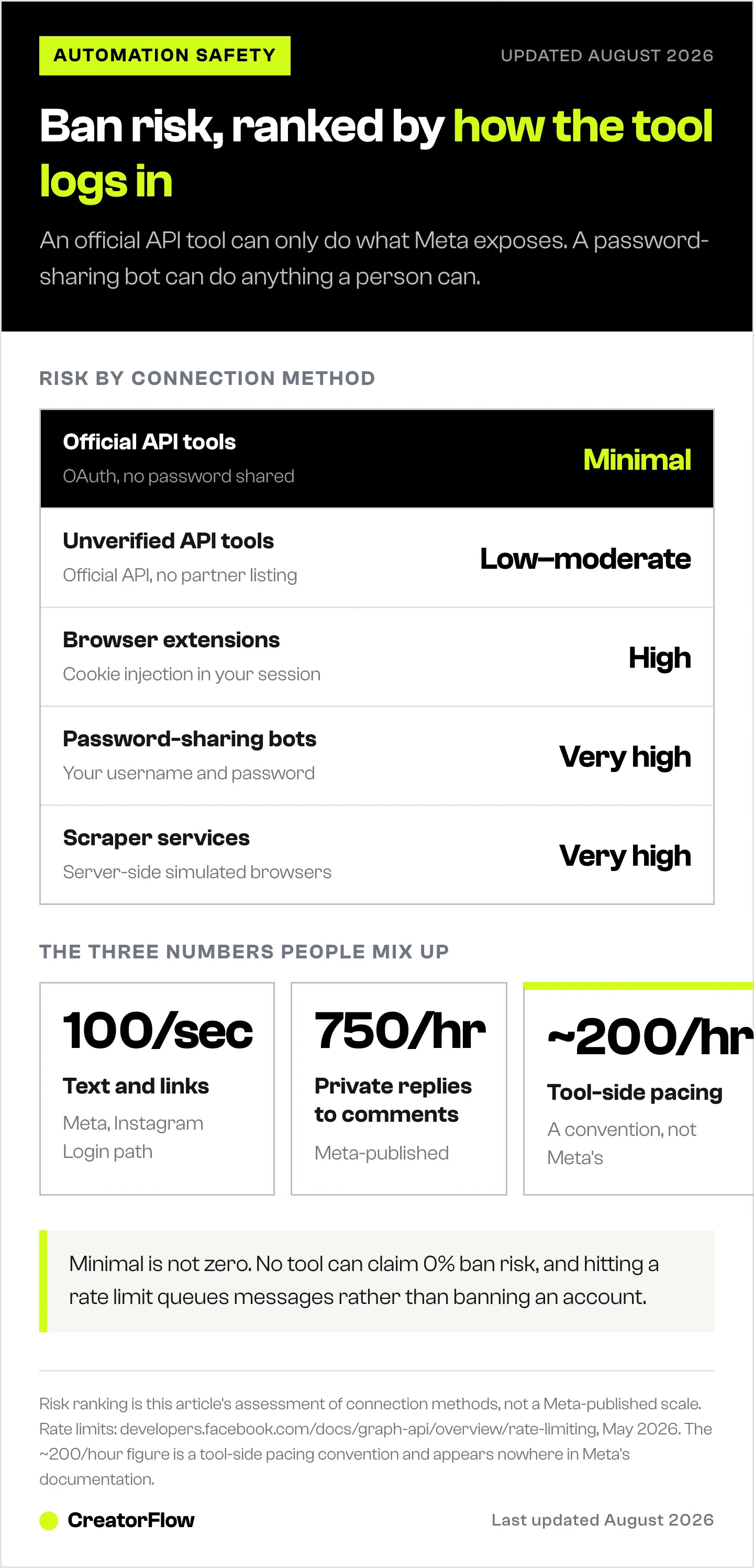
| Tool type | Method | Ban risk | Examples |
|---|---|---|---|
| Meta-approved API tools | OAuth + official Graph API | Minimal when used as designed | CreatorFlow, ManyChat, LinkDM |
| Unverified API tools | Official API but no Meta partnership listing | Low to moderate | Various smaller vendors |
| Browser extensions | Cookie injection in your session | High | Most “free” Instagram growth tools |
| Password-sharing bots | Your IG credentials directly | Very high | Tools advertising “unlimited DMs” or auto-follow |
| Scraper services | Server-side simulated browsers | Very high | Bulk DM senders, follower scrapers |
The risk gap between row 1 and row 4 is the difference between a tool Meta has agreements with and a tool Meta has never seen. Meta-approved tools cannot ban-proof your account, but they remove almost every way to accidentally trip enforcement.
ManyChat, for context, sits in the same Meta-approved category as CreatorFlow. Their pricing structure (Essential $17/month, Pro $39, Business $99, Advanced $199, or $14/$29/$69/$139 per month billed annually, per manychat.com/pricing, July 2026) reflects multi-channel coverage rather than safety differences. If you are weighing options, the ManyChat alternative comparison on creatorflow.so covers both the feature differences and the compliance overlap.
Best Practices to Stay Safe
Treat these as the operating rules for any compliant tool. None of them are optional.
- Use one automation tool per Instagram account. Connecting two tools to the same account doubles the API call volume and confuses rate limit tracking.
- Stay inside the 24-hour messaging window. Only auto-message people who engaged with you in the last 24 hours. Manual follow-ups outside that window are fine, but they cannot be automated.
- Vary your message templates. Use first-name variables, keyword references, and at least two or three template variants per trigger. Identical text at scale is a spam signal.
- Pace your sends below 200 per hour. Queue the rest. Almost all compliant tools handle this automatically. The Instagram API rate limits guide covers exactly how queuing works.
- Avoid “unlimited” promises. Any tool advertising unlimited DMs is either lying about the limit or routing through a non-API method. Both are bad.
- Pause automation during heavy manual activity. If you are doing a manual outreach burst (50+ DMs in an hour), pause the comment-to-DM tool first.
- Review your account status weekly. Instagram now shows account standing under Settings then Account then Account Status. Check it.
- Keep messages conversational. Pretend you are typing the response yourself. If it sounds like a sales blast, rewrite it.
For the long-form version with templates and account-warm-up sequencing, the CreatorFlow Instagram automation guide walks through setup safely from day one. Pricing for the relevant tiers is at creatorflow.so/pricing.
FAQ
Is comment-to-DM automation safe?
Yes, when you use a Meta-approved tool. Comment-to-DM is one of the explicit use cases the official API supports. The user comments first, which opens the 24-hour messaging window, and your tool replies inside that window. This is the textbook example of allowed automation.
Can I get banned for using Instagram automation?
You can, but only in specific scenarios: using password-sharing bots, sending cold DMs to non-engaged users, blasting identical messages at scale, or running auto-follow features. Compliant tools used inside their intended workflow carry minimal ban risk. Meta has not historically flagged accounts using approved API tools for trigger-based replies.
Do automation tools share my Instagram password?
Compliant tools never ask for your password. They use OAuth through Facebook Business login, which means you authorize specific permissions on Meta’s servers and the tool receives a revocable access token. If a tool asks for your IG username and password directly, it is not using the official API. Walk away.
What is the 200 DMs per hour rule?
It is a behavioral pacing convention that automation tools enforce to stay safely below Meta’s per-second rate limits. Meta’s actual published limits are per-second (100 per second for text and links on the Instagram Login path, 750 per hour for post-comment private replies, per developers.facebook.com, May 2026). The 200 per hour figure is what tools queue to in practice, not a Meta-published number. Hitting it pauses sending and queues overflow. It is not a ban.
Is CreatorFlow Meta-approved?
Yes. CreatorFlow is listed as a Meta Tech Provider as of December 2025. It uses Meta’s official Instagram API with OAuth authentication and Facebook Business login. No password sharing, and the tool cannot perform actions Meta has not exposed in the API.
What happens if I hit a rate limit?
Your tool queues remaining messages and sends them in the next available window. The dashboard typically shows something like “47 messages queued, sending in 23 minutes.” This is normal API behavior and not a sign that your account is in trouble. If a queue persists for hours or escalates into an action block, the Instagram API rate limits explainer covers diagnosis next.
Will Instagram unban my account if I switch to a compliant tool?
Possibly, but it depends on why you were banned. If the ban came from a password-sharing bot, switching tools removes the cause and you can appeal through Account Status. If the ban came from policy violations like cold outreach, switching tools alone will not lift the restriction. You will need to wait out the block and change the practice.
Compliance details and rate limits verified from developers.facebook.com, manychat.com/pricing, and creatorflow.so as of May 2026. Individual results vary based on tool, audience size, and message practices.


