VIDEO WALKTHROUGH · 10 MINUTES
How Instagram DM automation works in CreatorFlow
CreatorFlow is an Instagram DM automation tool for creators, brands and agencies. Someone comments DEMO on your Reel, replies to your Story or DMs you the word. They get your link by DM in seconds, while they still want it.
- Meta Tech Provider
- 4.1/5 on Trustpilot


 +35,000 creators & brands+35,000 creators
From Instagram comment to DM in seconds
Instagram DM automation sends a DM for you when someone uses your keyword. This is what your follower sees, in the example from the video.
Your post or Reel
A post that asks for one word
Your caption tells people which word to comment. That word is your keyword.
Watch this part · 4:40Their comment
They comment the keyword
CreatorFlow finds the word in seconds. Capital or small letters both work.
Watch this part · 5:01Their DMs
Your link arrives in a DM
Your message and a link button arrive in their DMs. One tap opens your page.
Watch this part · 7:21

Set up Instagram DM automation in three steps
No code and no flowcharts. Your first automation takes under 2 minutes.
- Before you start
- An Instagram Business or Creator account
- A Google account to sign in
- The link you want to send
- 1
Connect your Instagram
Sign in with Google, then log in on Instagram's own screen. CreatorFlow never sees your Instagram password.
Use Chrome on a computer for this step.
- 2
Choose a post and a keyword
Start from a template or a blank automation. Pick the post or Reel, then type your keyword, like DEMO.
Watch this step · 4:40 - 3
Write the DM and press Start
Write your message and add a button with your link. Press Start Automation. It keeps running when you are offline.
Watch this step · 7:21
 @your.account
Test from a second account. CreatorFlow does not reply to comments from your own account.
Why did my test not work?Instagram auto DM for comments, Story replies and DMs
Each automation has one trigger. Choose the one that fits the post, and run as many automations as you like.
Comment to DM
Comments that send your link
Someone comments your keyword under a post or Reel. Choose one post, your next post, or every post.
Comment to DM on Instagram →Story replies
Story replies that open a chat
Someone replies to your Story or reacts with an emoji. They get your DM at once.
Story reply automation →Keyword DMs
Keyword DMs that answer at any hour
Someone sends you a DM with a word like PRICE. They get the answer you wrote, even at night.
Automatic DM replies →

Collect emails and followers before you send the link
Add one optional step before the DM, or none. The person gets your link right after it.
Opening DM
A hello before the link
A short greeting comes first, then your link. It reads like a reply from you.
Watch this part · 6:02Follow Gate
A follow before the link
The DM asks them to follow you. They tap a button to say they did, because CreatorFlow does not check the follow.
Watch this part · 6:36Email Gate
An email before the link
They type their email, then get your link. Every email is saved in your contacts, ready to export.
Watch this part · 7:02
Instagram DM automation examples you can copy
Each one is a template in the app. Change the words and the link, then start it.
Creators
Send a link
Someone comments LINK and gets your link in a DM.
Sending links in DMs →Affiliates
Share affiliate links
Everyone who asks gets your affiliate link, at any hour.
CreatorFlow for affiliates →Online shops
Send a discount code
Someone comments CODE and gets your discount in a DM.
Discount code template →Coaches
Send a booking link
Someone comments BOOK and gets your booking page.
Booking link template →Guides and PDFs
Send a free guide
Someone comments FREE and gets your PDF or checklist.
Free guide template →Email lists
Collect emails first
Ask for an email first, then send the guide.
Email collection template →




Track DMs, clicks and leads for every automation
Your next post takes the same 2 minutes. Every automation shows its own numbers.
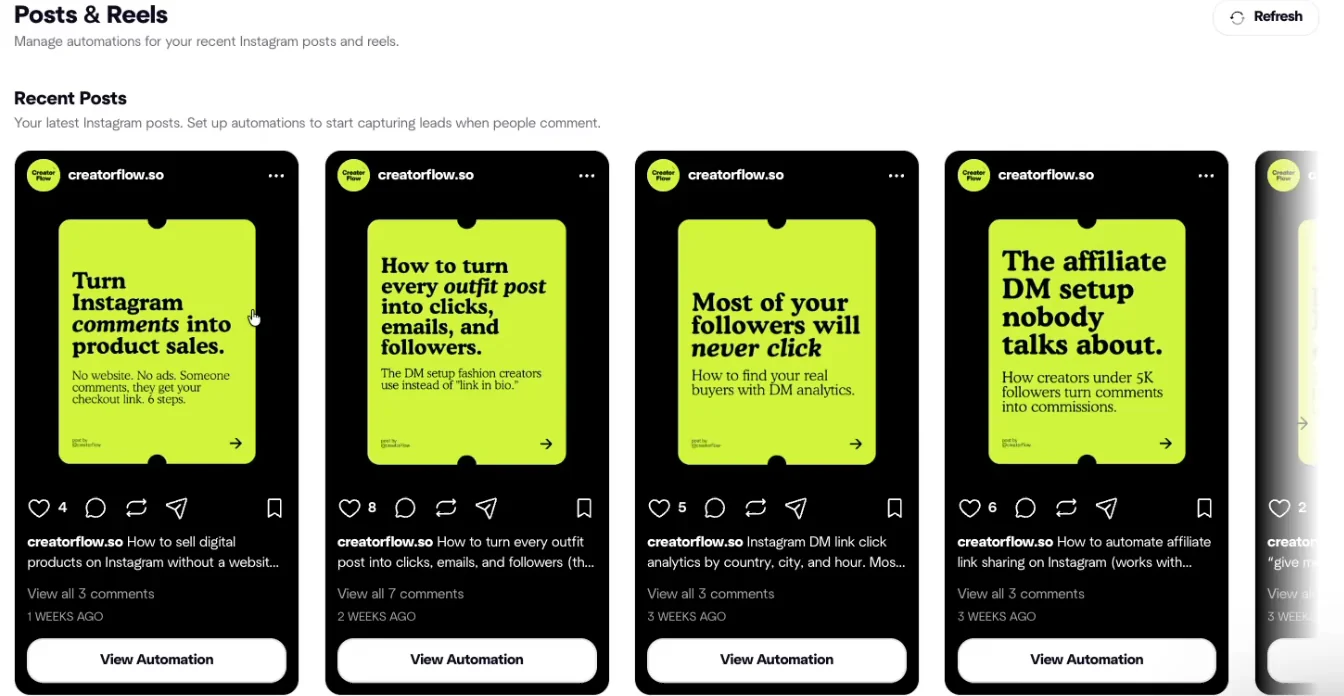
Every post in one place
My Content shows your recent posts and Reels. Press Set up Automation under the one you want.
Watch this part · 1:51Numbers for each automation
See DMs sent, link clicks and new leads for each automation, and the change since last week.
Watch this part · 2:38A template for each goal
Start from a ready message for a link, a code, a guide, a booking or an email list.
Watch this part · 0:59
Safe Instagram DM automation on Meta's official API
CreatorFlow is a Meta Tech Provider. Here is what keeps your account safe, and what it does not do.
How your account stays safe
- Every DM goes through Instagram's official API.
- You log in on Instagram's own screen. CreatorFlow never sees your password.
- It only sends DMs to people who contacted you first.
- No browser extension and no unofficial tricks.
No tool can remove every risk. How we protect your account
What CreatorFlow does not do
- It does not send a DM when someone follows you.
- It sends one DM per trigger, plus the optional step. There are no sequences or follow-ups.
- It works with Instagram only.
- People who do not follow you find the DM in Message Requests.
- Instagram limits DMs per hour. On a busy post, a few DMs may arrive late or not at all.
CreatorFlow reviews from real creators
Creators on Instagram, in their own words. Rated 4.1/5 on Trustpilot. Read all reviews
“Finally have time to create instead of reply.”
@mamimariu121K followers on Instagram“Click-through rate doubled in week one.”
@chic.outfit.studio201K followers on Instagram“Everyone gets an instant response - not hours later.”
@sikusok1.4K followers on Instagram
Instagram DM automation setup questions
Short answers to what people ask before and after their first automation.
Why did my test not work?
CreatorFlow ignores comments from your own account, so comment from a second account. The keyword must be a whole word: "link" works and "linked" does not. Also check that the automation is on.
Do I need a Business or Creator account?
Yes. CreatorFlow needs a professional Instagram account. You can switch for free in Instagram settings, and you keep your followers and posts.
Is my Instagram account safe?
CreatorFlow is a Meta Tech Provider and sends each DM through Instagram's official API. You never give CreatorFlow your Instagram password. No tool can remove every risk.
Which features are on the Free plan?
The Free plan has all three triggers, the Opening DM, unlimited automations and 500 DMs a month. Follow Gate, Email Gate, Public Reply, Rewind, link tracking and CSV export are on Pro and Growth.
Can it answer comments from before I set it up?
Yes, with Rewind on Pro and Growth. Rewind sends your DM to people who commented on a recent post before you set up the automation.
Can one post have two automations?
No. A post can have one active automation. To use a different one, pause the first automation or choose another post.
Can I send a PDF or a video in the DM?
Not as a file. Put the file online and add its link to a button in the DM. A DM can have up to 3 link buttons.
What happens when someone replies to the DM?
Their reply appears in your normal Instagram inbox, and you answer it yourself.
Send your link to every commenter
Connect Instagram, pick a post and write one DM. Your first automation takes under 2 minutes.
- Meta Tech Provider
- 4.1/5 on Trustpilot
- +35,000 creators & brands+35,000 creators