

An Instagram comment bot is software that reacts automatically to comments. Two versions exist: spam bots that post comments on other people’s accounts, which breaks Meta’s rules and risks a ban, and comment-to-DM automation that replies to comments on your own posts through Meta’s official Instagram Graph API. The safe version sends a DM within 1-5 seconds of a trigger word, delivering an affiliate link, lead magnet, or booking calendar.
Most people searching this want one of two things: Either they want a bot to spam comments on other people’s posts (gets you banned), or they want to automatically respond when someone comments on their own posts (safe when used correctly and effective).
This guide explains the critical difference, why one destroys your account while the other grows your business, and how to set up legitimate comment automation in under 5 minutes.
Key Takeaways
- Two types of comment automation exist: Spam bots that auto-comment on other accounts (gets you banned) and comment-to-DM automation on your own posts (safe when used correctly via Meta’s official API)
- Comment-to-DM response time: Automated DMs send within 1-5 seconds of a trigger comment, compared to hours for manual responses
- Rate limits: Most tools pace sends at around 200 DMs/hour to stay well under Meta’s per-second rate limits. Meta allows one private reply per comment, within 7 days of the comment
- What a trigger can deliver: An affiliate link, a lead magnet, a booking calendar or a discount code, with an optional email gate that collects the address before the link is released
- Tool pricing: CreatorFlow costs $15/month flat rate, LinkDM $19/month, ManyChat starts at $17/month (Essential) scaling to $199/month (Advanced) based on contacts
- Bottom line: Skip spam bots entirely and use comment-to-DM automation through Meta’s official API to send affiliate links, lead magnets, and booking calendars safely

What People Mean When They Search “Instagram Comment Bot”
When someone searches “Instagram comment bot,” they’re usually looking for one of three things:
1. Auto-commenting on other accounts (to get followers) You want a bot that comments “Great post!” or “Love this!” on hundreds of accounts to get attention and followers. This is spam. It violates Instagram’s ToS. It will get your account disabled.
2. Responding to comments on your own posts Someone comments “link?” on your Reel. You want to automatically DM them the product link. This is comment-to-DM automation. It’s legitimate, API-approved, and what successful creators use.
3. Moderating/hiding comments You want to automatically hide or delete spam comments, hate speech, or competitor mentions on your posts. This is comment moderation, available through Meta Business Suite and third-party tools.
Most creators searching “comment bot” actually want option #2: comment-to-DM automation. The problem? They don’t know what to call it.
The Two Types of Comment Automation (One Gets You Banned)
Type 1: Spam Bots (DO NOT USE)
What they do: Automatically post comments on other people’s Instagram content. “Nice pic!” “Love your content!” “Check out my page!”
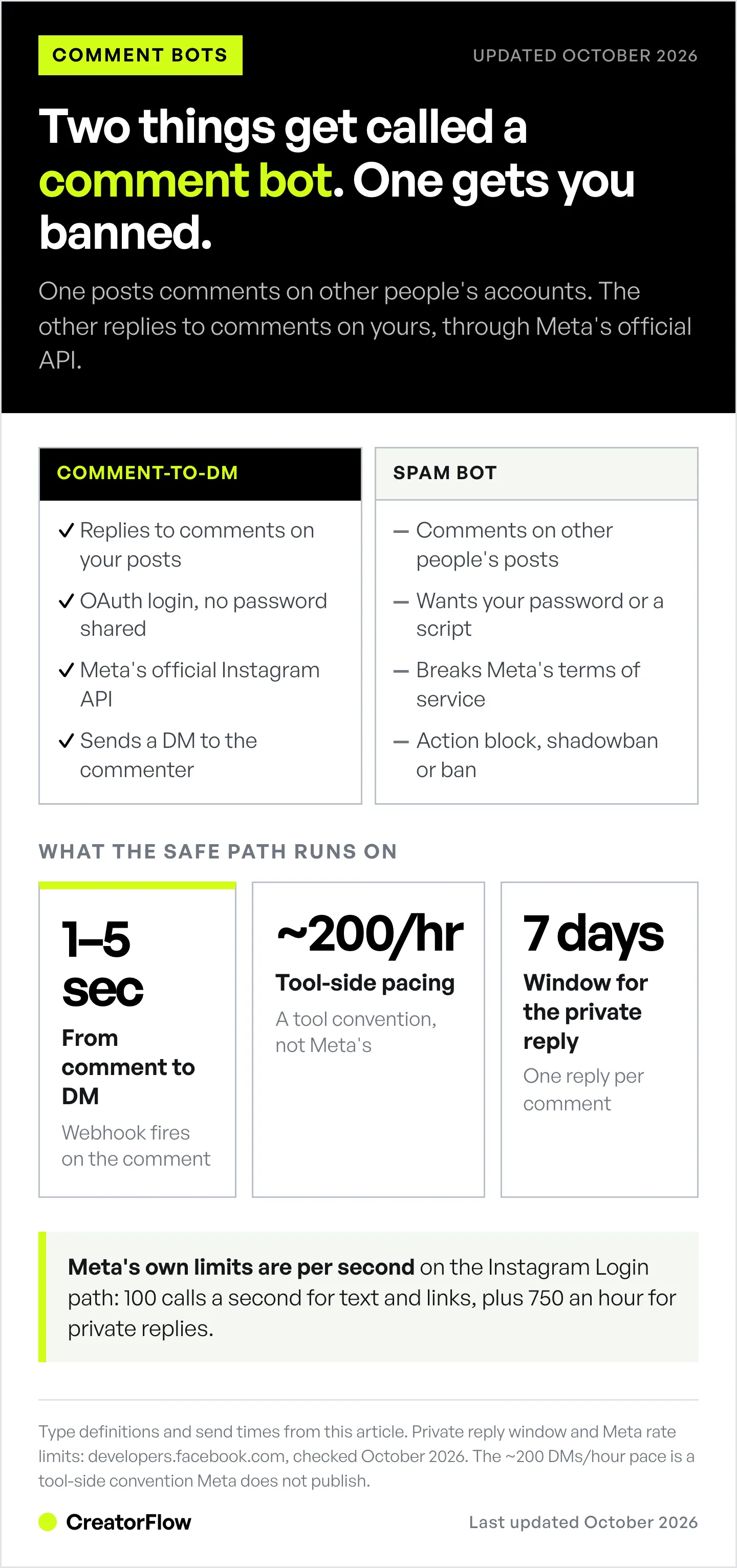
How they work: Browser automation that logs into your account and mimics human behavior. Third-party apps that require your Instagram password. Scripts that run through proxies to avoid detection.
Why they get you banned:
- Instagram’s algorithm detects repetitive comment patterns
- Logging in through unauthorized third-party apps violates ToS
- Commenting at inhuman speeds triggers action blocks
- Multiple reports from annoyed users flag your account
Consequences:
- Action blocks (can’t comment, like, or follow for a period Instagram sets)
- Shadowban (content stops appearing in feeds and hashtags)
- Temporary suspension (locked out of the account)
- Permanent ban (account deleted, no recovery)
Learn how to stay safe in our guide on avoiding Instagram bans with DM automation. The pattern Meta flags is unauthorized third-party logins and activity on accounts that are not yours, neither of which the official API path involves.
Type 2: Comment-to-DM Automation (SAFE)
What it does: Automatically sends a DM when someone comments a specific keyword on YOUR posts.
How it works: Uses Meta’s official Instagram Graph API. You connect your Instagram Professional account via OAuth (no password sharing). When someone comments your trigger word, the API sends your pre-written DM.
Why it’s safe:
- Meta explicitly allows this (it’s their official API)
- No logging in through third-party apps
- No password sharing
- No automation on other accounts, only YOUR content
- Follows the ~200 DMs/hour pacing convention most tools enforce
Example flow:
- You post a Reel: “Comment GUIDE for my free Instagram growth checklist”
- Follower comments: “GUIDE”
- Within 2 seconds, they receive your DM with the download link
- You captured their attention, delivered value, and potentially collected their email
This is what ManyChat, CreatorFlow, LinkDM, and other legitimate tools do. For a full walkthrough of how these tools work, see our Instagram DM automation complete guide.
Comment-to-DM: The Legal Alternative
Comment-to-DM automation isn’t a loophole. It’s a feature Meta built into their API specifically for businesses and creators.
Why Meta allows this:
- It improves engagement (users get faster responses)
- It keeps conversations on Instagram (good for Meta’s metrics)
- It’s opt-in (users initiate by commenting first)
- It follows their rate limits and terms
What you can automate:
- Affiliate links: Someone comments “link” → DM them your Amazon storefront
- Lead magnets: Someone comments “guide” → DM them your free PDF
- Booking calendars: Someone comments “book” → DM them your Calendly link
- Product links: Someone comments “price” → DM them your Shopify product page
- Discount codes: Someone comments “code” → DM them an exclusive coupon
What the DM route changes:
- The message arrives in the recipient’s inbox instead of waiting behind a profile tap
- An email gate turns a comment into a contact record you keep
- The reply goes out in seconds at any hour, without you being at your phone
How Comment Triggers Work
Here’s the technical flow:
Step 1: You create a trigger In your automation tool (CreatorFlow, ManyChat, etc.), you specify:
- The keyword(s) that activate the automation (e.g., “link”, “guide”, “info”)
- The DM message to send when triggered
- Optionally: which posts this applies to (all posts or specific posts)
Step 2: User comments the keyword A follower sees your post asking them to comment “LINK” for something. They comment.
Step 3: API detects the comment Instagram’s Graph API sends a webhook notification to your automation tool: “New comment containing keyword ‘LINK’ on post ID 12345 from user @jane_doe.”
Step 4: Automation sends DM Your tool uses the API to send your pre-written DM to @jane_doe. This happens within 1-5 seconds.
Step 5: User receives DM The follower gets a DM from your account with whatever you configured, link, PDF, booking page, etc.
Some tools also post a short public reply before sending the DM. Our comparison of public comment replies vs DM automation explains when each approach works best.
Rate limits to know:
- Most tools pace sends at around 200 DMs/hour per user as a behavioral safety cap
- Meta publishes no daily DM limit; its published limits are per-second, plus 750 private replies to comments per hour
- Meta allows one private reply per comment, within 7 days of the comment. Further messages are allowed only after the person replies, inside a 24-hour window (developers.facebook.com, October 2026)
Setting Up Comment-to-DM Automation
You can set this up in 5-10 minutes with any legitimate tool. Here’s the process:
Step 1: Choose Your Tool
For solo creators ($15-20/mo):
- CreatorFlow ($15/mo flat rate) - Modern UI, Instagram-focused
- LinkDM ($19/mo) - Established, with 60,000+ creators, brands and agencies reported (linkdm.com, October 2026)
See our full best chatbot for Instagram comparison for detailed feature breakdowns.
For agencies/multi-platform ($17-199/mo):
- ManyChat ($17-199/mo billed monthly, based on contacts) - Instagram, Facebook Messenger, WhatsApp, TikTok, Telegram, SMS and email
Step 2: Connect Your Instagram Account
All legitimate tools use OAuth (Meta’s official login):
- Click “Connect Instagram”
- Log in to Instagram (on Instagram’s website, not the tool’s)
- Grant permissions to send messages
No password sharing. No sketchy browser extensions.
Step 3: Create Your First Automation
Example: Affiliate link automation
- Set the trigger keyword: “LINK”
- Write your DM message:
Hey! Here's the link you asked for: [your-affiliate-link] Let me know if you have any questions! - Choose which posts: All posts (or select specific ones)
- Activate: Turn it on
Step 4: Test It
Comment your keyword on your own post. You should receive the DM within seconds.
Step 5: Promote It
Add a call-to-action to your posts:
- “Comment LINK for the full product list”
- “Type GUIDE to get my free checklist”
- “Drop INFO below for pricing”
FAQ
Is using an Instagram comment bot safe?
Spam bots that auto-comment on other accounts are not safe, they violate Instagram’s Terms of Service and will get your account banned. Comment-to-DM automation that responds to comments on YOUR posts is safe when following Instagram’s guidelines because it uses Meta’s official Instagram Graph API.
What’s the difference between spam bots and comment-to-DM?
Spam bots post automated comments on other people’s content to gain attention or followers, this is against Instagram’s ToS. Comment-to-DM automation sends a private message when someone comments on YOUR content, this is explicitly allowed by Meta’s API and is how tools like CreatorFlow and ManyChat operate.
Will comment-to-DM automation get me banned?
Ban risk is minimal on this path, though no tool can promise zero risk. Comment-to-DM automation uses Meta’s official Instagram Graph API, which is explicitly allowed. You’re not automating activity on other accounts, not sharing your password with third parties, and staying within the ~200 DMs/hour pacing convention most tools enforce. CreatorFlow is a Meta Tech Provider (since December 2025). ManyChat is a Meta Business Partner. Both use Meta’s official API.
How fast do automated DMs send after a comment?
Typically 1-5 seconds. The Instagram Graph API sends a webhook notification to your automation tool the moment a comment is detected, triggering the DM response almost instantly.
Can I use comment automation on Reels?
Yes. Comment-to-DM automation works on all Instagram content types: feed posts, Reels, carousels, and Stories (via story reply automation). Reels often get the highest engagement, making them ideal for comment triggers.
What keywords should I use for triggers?
Keep them simple and obvious: “LINK”, “GUIDE”, “INFO”, “BOOK”, “CODE”, “FREE”. Avoid generic words people might use accidentally. Some creators use unique phrases like “SEND2026” to reduce false triggers.
Is there a limit to how many DMs I can send?
Meta’s official Instagram API limits are per-second on the Instagram Login path (100 calls/sec for text and links, plus 750/hour for private replies to post comments). Tools pace sends at ~200 DMs/hour as a behavioral cap, not a Meta-published hourly limit. There is no Meta-published daily limit. Most creators never come close to these thresholds.
Do I need a business or creator account?
Yes. Comment-to-DM automation requires an Instagram Professional account (either Business or Creator). A linked Facebook Page is needed only for tools on Meta’s Facebook Login API; tools on the Instagram Login API, like CreatorFlow, connect without one. Personal accounts cannot access the API.
How much does comment-to-DM automation cost?
Tools range from about $10 to $199/month. CreatorFlow costs $15/month flat rate. LinkDM costs $19/month. ManyChat starts at $17/month (Essential) but scales to $199/month (Advanced) based on contacts. Most solo creators pay $15-20/month.
Can I use multiple keywords on the same post?
Yes. Most tools let you set up multiple trigger keywords. For example, “LINK” could send your Amazon storefront while “GUIDE” sends your free PDF, both on the same post.
Related Articles
- Comment-to-DM Automation Setup Guide
- How Instagram DM Automation Works
- Best Instagram DM Automation Tools
- Avoid Instagram Bans with DM Automation
- Instagram Graph API Rate Limits Explained
Ready to set up safe comment automation? CreatorFlow offers a 14-day free trial with comment-to-DM automation, story reply automation, and email collection, all using Meta’s official API.
Disclaimer: This article distinguishes between unauthorized automation (spam bots) and legitimate automation (comment-to-DM via official API). CreatorFlow uses Instagram's official API as a Meta Tech Provider (since December 2025). Instagram/Meta may change features, rate limits, or terms at any time. Users are responsible for complying with Instagram's Terms of Service and Community Guidelines. Instagram is a trademark of Meta Platforms, Inc. CreatorFlow is not affiliated with, endorsed by, or sponsored by Meta Platforms, Inc.


