

Key Takeaways
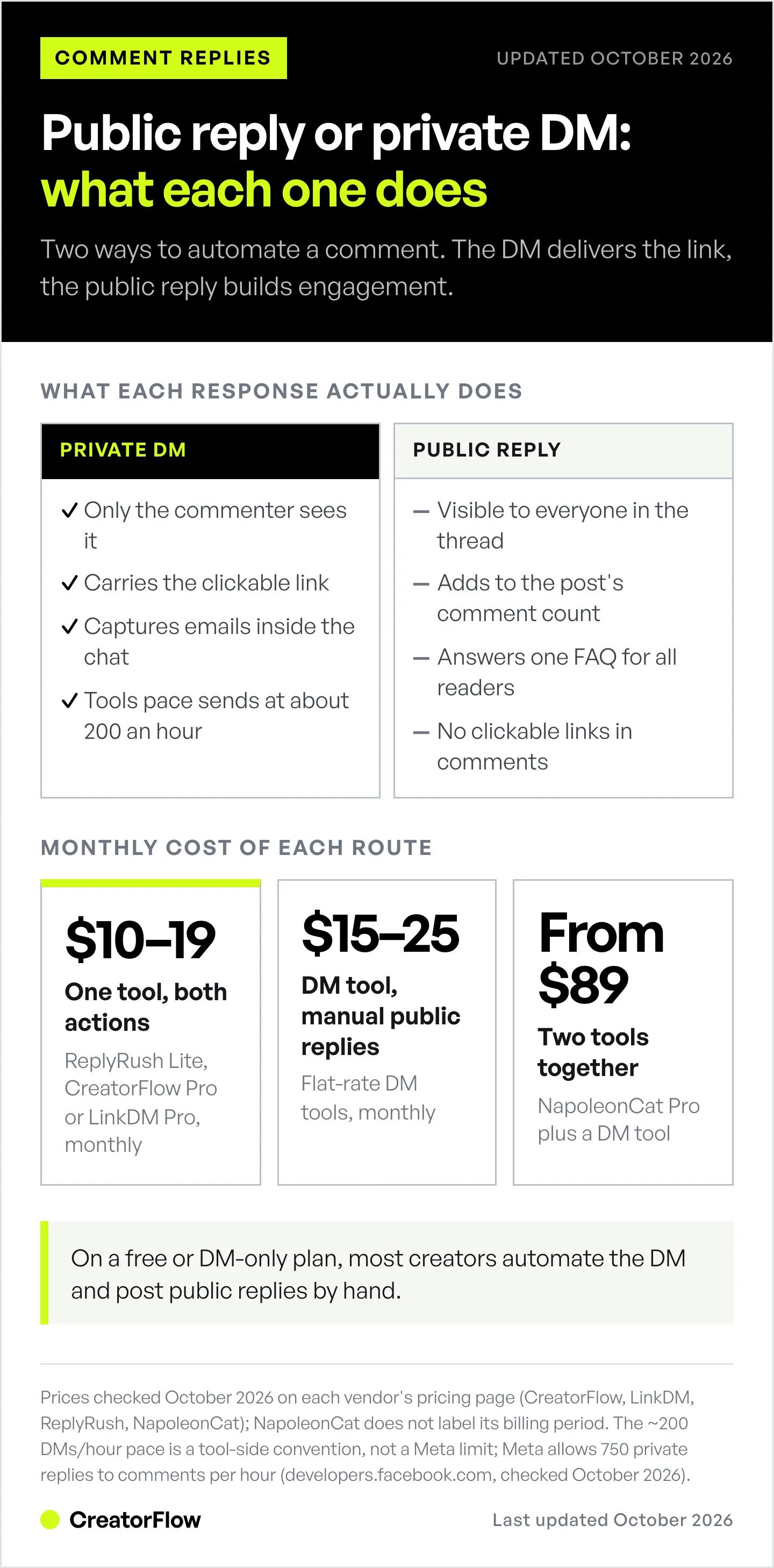
Instagram comment reply automation has two distinct approaches: public replies (responding visibly in the comment section) and private DM automation (sending direct messages when someone comments). Public replies boost engagement and social proof. DM automation captures leads and drives conversions. Most effective strategy: combine both, public acknowledgment + private DM for the actual link/offer. CreatorFlow Pro ($15/mo) does both in one automation; standalone tools like NapoleonCat (from $79/mo) and Kommo (custom pricing) also post public replies.
Key differences:
- Public replies: Everyone sees them, boost algorithm performance, build social proof
- Private DMs: 1:1 conversion opportunities, email capture, affiliate links sent directly
- Hybrid approach: Public reply (“Check your DMs!”) + automated DM with link = best results
Instagram comment reply automation works in two ways: public replies that post visible responses in the comment section, and private DM automation that sends direct messages when someone comments a trigger keyword. Public replies boost engagement and social proof. DM automation drives conversions by delivering links and capturing emails. The most effective approach combines both: a public acknowledgment plus an automated DM with the link or offer.
You get 84 comments on your latest Reel asking “where can I buy this?” Should you reply publicly in the comments or move conversations to DMs? Both can be automated, but they serve completely different purposes.
Public comment replies boost engagement and visibility. DM automation captures leads and drives sales. Stories split along the same line, where story replies are private and story comments are public. Use the wrong strategy and you’ll either leave money on the table or waste time responding when Instagram’s algorithm could be working for you.
This guide shows you exactly when to automate public comment replies vs DM responses, which tools support each approach (many don’t do both), and how to combine them for maximum conversions.

Understanding Instagram Comment Reply Automation
Instagram comment reply automation responds when followers comment on your posts, but HOW it responds depends on the tool you choose:
Option 1: Public Comment Automation
The tool posts a visible reply in the comment section. Everyone sees it. Instagram counts it as engagement, boosting your post’s algorithm performance.
Example flow:
- Follower comments: “Where can I get this?”
- Your automation tool publicly replies: “Hi @follower! We’ll DM you the details”
- The reply appears in the comment thread for everyone to see
Option 2: Private DM Automation (Comment-to-DM)
The tool sends a direct message when someone comments a trigger keyword. Picking the right comment keywords that convert is critical here because the wrong trigger word wastes automation on low-intent comments. The conversation moves to private messages immediately.
Example flow:
- Follower comments: “link please”
- Your automation tool sends a private DM: “Here’s the link you asked for: [URL]”
- No public reply appears, the conversation is entirely in DMs
Option 3: Hybrid Automation (Best Practice)
The tool does BOTH: posts a public acknowledgment AND sends a private DM with the actual information.
Example flow:
- Follower comments: “interested”
- Public reply: “Hi @follower! Check your DMs for details”
- Private DM: “Thanks for your interest! Here’s everything you need: [details + link]”
According to Instagram’s engagement patterns (Socialinsider Instagram Benchmarks 2026), posts with higher comment counts get prioritized by the algorithm. Public replies contribute to that count. Private DMs don’t.
When to Use Public Comment Automation
Public comment automation works best when your goal is visibility, engagement, and social proof, not immediate conversions.
Best Use Cases for Public Replies
1. Building Social Proof
When potential customers see dozens of comments asking about your product AND your brand responding quickly, it validates the product’s popularity.
Example: Fashion brand gets 200+ “love this!” comments. Public replies saying “Thank you!” or “Check your DMs for details!” show responsiveness and reinforce social proof.
2. Answering Common FAQs
If 30 people ask the same question (“Do you ship to Canada?”), answering publicly benefits everyone reading the comments.
Example: E-commerce account automates public replies to “shipping” keyword:
- Comment: “Do you ship internationally?”
- Public reply: “Yes! We ship worldwide. Free shipping on orders over $75. DM us for details!”
This answers the question for all readers, not just the person who asked.
3. Boosting Algorithm Performance
Instagram’s algorithm favors posts with high engagement. Comments and replies count as engagement signals.
Public comment automation increases your engagement rate by:
- Adding more comments to the post (algorithm boost)
- Encouraging others to comment (social proof effect)
- Keeping the conversation on Instagram (platform retention)
How much a public reply adds to reach depends on the post. Instagram does not publish a figure, so treat reply volume as one engagement signal among many.
4. Handling Customer Service Visibly
When someone complains publicly, responding publicly shows you care about customer satisfaction.
Example: Restaurant gets comment: “Waited 40 minutes for service”
- Public reply: “We’re so sorry to hear this! This isn’t our standard. Please check your DMs, we’d like to make this right.”
This demonstrates accountability to all viewers, not just the complainant.
Tools That Support Public Comment Automation
Not all automation tools can post public replies, and free plans usually leave it out. Here’s what supports public comment responses:
| Tool | Public Comment Reply | Pricing | Notes |
|---|---|---|---|
| NapoleonCat | Yes | From $79/mo | Auto-moderation needs the Pro plan ($89/mo), multiple reply variations, sentiment triggers |
| Kommo | Yes | Custom pricing | CRM-focused, requires Advanced plan, choose DM/public/both |
| HighLevel | Yes | Custom pricing | Agency platform, workflows include public replies |
| CreatorFlow | Yes (Pro and Growth) | $15/mo | Public reply and comment-to-DM in the same automation, rotates several reply variations |
| ReplyRush | Yes (paid plans) | From $10/mo | Comment Auto Reply on Lite, Boost and MAX; not on Free |
| LinkDM | Yes (Pro and up) | $19/mo | Comment Auto-Reply posts a public reply once the DM has been sent |
Pricing and features checked October 2026 on each vendor’s pricing page (NapoleonCat, ReplyRush, LinkDM). NapoleonCat does not label its billing period and lists prices excluding VAT.
How public replies work through the API:
Meta’s Instagram API lets approved tools reply to comments on your own posts. DM tools that offer public replies usually post a short acknowledgment (“Check your DMs!”) next to the private reply, because the private reply carries the link.
How to Set Up Public Comment Automation
Using NapoleonCat as an example of a standalone public reply tool:
Step 1: Connect Instagram Business Account
- Sign up for the NapoleonCat Pro plan ($89/month, required for Auto-moderation)
- Connect Instagram via OAuth (no password sharing)
- Grant permissions for posting and messaging
Step 2: Create Auto-moderation Rule
- Go to Auto-moderation section
- Click “Create new rule”
- Choose “Instagram” as platform
- Select “Comments” as trigger type
Step 3: Set Trigger Keywords Define which comments trigger your automation:
- Keywords: “shipping”, “link”, “price”, “interested”, “buy”
- Can use multiple keywords per rule
- Supports “include all words” or “include any word” logic
Step 4: Configure Public Reply
- Choose “Reply as a comment” (not “Send DM”)
- Write your public response template
- Add multiple variations so replies don’t look robotic
- Use variables like {username} for personalization
Example template:
Variation 1: "Hi {username}! We'll DM you the details"
Variation 2: "Thanks for your interest {username}! Check your DMs"
Variation 3: "Hey {username}! Sending you info now"
NapoleonCat rotates randomly between variations so responses don’t appear automated.
Step 5: Optionally Add DM Response If you want hybrid (public + DM), add a second action:
- Click “Add action”
- Choose “Send DM”
- Write your private message with links/details
Step 6: Activate Rule
- Test on a recent comment to verify
- Switch from draft to active
- Monitor performance in analytics dashboard
Setup time: 10-15 minutes for first rule (NapoleonCat), faster for subsequent rules once familiar.
When to Use DM Automation (Comment-to-DM)
DM automation (comment-to-DM) works best when your goal is lead capture, conversions, and personalized sales conversations, not public visibility.
Best Use Cases for DM Automation
1. Sending Affiliate Links
Links in Instagram comments are not clickable. A DM puts a tappable link in front of the exact person who asked for it.
Example: Fashion creator posts Reel showing outfit.
- Follower comments: “link please”
- Automated DM: “Here’s my Amazon storefront with this exact outfit: [affiliate link]”
A DM link is one tap away for the person who asked, while a bio link needs a profile visit first. Our bio link vs DM automation comparison breaks down when each approach makes sense.
2. Capturing Emails for Lead Magnets
Can’t collect emails in public comments. DMs allow two-way conversation where you can ask for email addresses.
Example: Business coach posts about free webinar.
- Follower comments: “interested”
- Automated DM: “Want the free training? Reply with your email and I’ll send the link!”
Tools like CreatorFlow can capture email replies automatically. On Pro and Growth you export them as a CSV file and import it into Klaviyo, Kit or any email platform. See our full guide on collecting emails through Instagram DMs.
3. Qualifying Leads Before Sales Calls
Use DMs to ask qualifying questions before booking discovery calls.
Example: Consultant posts about their services.
- Follower comments: “book call”
- Automated DM: “Let’s chat! What’s your biggest challenge right now?” (conversation starts)
- After response: “Here’s my calendar: [Calendly link]”
This filters out tire-kickers before they book your time.
4. Protecting Privacy for Sensitive Info
Discount codes, order numbers, booking confirmations, anything private belongs in DMs, not public comments.
Example: E-commerce store runs promotion.
- Follower comments: “code”
- Automated DM: “Here’s your exclusive 20% discount code: SAVE20. Valid until [date]!”
Public codes get shared widely, reducing their exclusivity. DM-only codes feel more personal and protected.
5. Handling High Volume (100+ Daily Comments)
When you’re getting hundreds of “link please” comments daily, manually responding is impossible. DM automation handles this at scale.
Worked example: A viral Reel gets 400 link requests. Tools pace sends at around 200 DMs/hour per account (a behavioral cap below Meta’s per-second API limits and its 750 private replies per hour), so automation delivers all 400 links in about 2 hours. Manual replies at 2 minutes each would take over 13 hours.
Tools That Support DM Automation (Comment-to-DM)
These tools automatically send DMs when people comment:
| Tool | DM Automation | Pricing | Best For |
|---|---|---|---|
| CreatorFlow | Yes | Free ($0/mo with 500 DMs/mo) / Pro ($15/mo with 5K DMs/mo) | Solo creators, flat-rate pricing, fastest setup |
| ReplyRush | Yes | Free (1,500 DMs/mo) / Lite ($10/mo) / Boost ($25/mo) / MAX ($100/mo) | Creators wanting a larger free tier to test |
| LinkDM | Yes | Free (1K DMs/mo) / Pro ($19/mo) | Established tool, 60,000+ creators, brands, and agencies (linkdm.com, October 2026) |
| ManyChat | Yes | Free (25 contacts) / Essential $17 / Pro $39 / Business $99 / Advanced $199, billed monthly (manychat.com/pricing, October 2026) | Multi-platform (Instagram + Facebook + WhatsApp + SMS + TikTok + Email), agencies |
| Inro | Yes | Free (100 active contacts) / Pro from €12.99/mo | Budget option, generative AI replies |
Pricing checked October 2026 on each vendor’s pricing page.
Why DMs carry the conversion:
The private reply is where the link, the discount code or the email capture lives. That is why DM automation is the core of most Instagram tools, with public replies added on top where offered.
How to Set Up DM Automation (Comment-to-DM)
Using CreatorFlow as an example (simplest setup for creators):
Step 1: Connect Instagram Business Account
- Go to creatorflow.so and sign up (free plan available)
- Click “Connect Instagram”
- Log in via Instagram OAuth
- Grant messaging permissions
Step 2: Create Comment Trigger
- Go to “Automations” tab
- Click “Create Automation”
- Choose “Comment-to-DM” template
- Name your automation (e.g., “Affiliate Link Delivery”)
Step 3: Set Trigger Keywords Define which comments trigger the DM:
- Primary keywords: “link”, “shop”, “buy”, “interested”
- Variations: “link please”, “send link”, “where to buy”
- CreatorFlow supports up to 20 keywords per automation, matched as whole words and ignoring case (“link” matches “Link please” but not “linked”)
Pro tip: Include common misspellings (“link pls”, “lin”, “lnk”) to catch all variations. Our keyword trigger automation guide covers advanced keyword strategies in depth.
Step 4: Write Your DM Message Compose the message followers will receive:
Template for affiliate links:
Hey! Here's the link you asked for:

[Your Amazon Storefront URL]

Let me know if you have questions!
Template for lead magnets:
Thanks for your interest!

To get the free guide, reply with your email address and I'll send it over!
Template for booking calls:
Let's connect!

Book a free 15-min discovery call here:
[Calendly Link]

Looking forward to chatting!
Best practices:
- Keep under 200 characters (feels more human)
- Include a question or call-to-action
- Test on your phone to verify link formatting
Step 5: Test Your Automation
- Use a second Instagram account (or ask a friend)
- Have them comment your trigger word on a test post
- Verify DM arrives within 10 seconds
- Check link formatting and readability
Step 6: Activate & Monitor
- Activate automation
- Check analytics after 24 hours: DMs sent, click-through rate, failed deliveries
Setup time: 5-7 minutes for CreatorFlow.
The Hybrid Strategy: Public Acknowledgment + Private DM
The most effective approach combines both public and private responses. You get the algorithm boost from public engagement AND the conversion power of private messaging. The same split exists on Facebook Pages, where Meta’s free automations handle only the private half, as covered in the Facebook auto reply tools comparison.
Why Hybrid Works Best
Algorithm benefits: Public reply increases engagement count, boosting post reach.
Conversion benefits: Private DM delivers the actual offer without exposing it to competitors or link restrictions.
Social proof: Others see you’re responsive, encouraging more engagement.
Privacy: Sensitive info (links, codes, prices) stays private.
How to Execute Hybrid Strategy
Free plans usually skip the public reply, so true hybrid (public + DM together) is a paid feature. Here are three ways to run it:
Option 1: One Tool That Does Both Several tools post the public reply and send the DM from one automation:
- CreatorFlow Pro ($15/month): public reply and comment-to-DM in the same automation
- LinkDM Pro ($19/month): Comment Auto-Reply posts a public reply once the DM is sent
- ReplyRush Lite (from $10/month): Comment Auto Reply on paid plans
- NapoleonCat Pro ($89/month): add “Reply as comment” and “Send DM” as two actions in one Auto-moderation rule
Both actions happen automatically when someone comments your trigger word.
Option 2: Use Two Tools Combine a standalone public reply tool with a DM automation tool:
- Tool A (NapoleonCat): Posts public reply
- Tool B (CreatorFlow or ReplyRush): Sends private DM
Both tools detect the same comment and execute their respective actions.
Cost: from $89/month for NapoleonCat Pro plus the DM tool. This mainly makes sense if you already use NapoleonCat for inbox management.
Note: Requires managing two platforms.
Option 3: Manual Public + Automated DM (Most Common) Let your DM automation tool handle the private message. YOU manually reply publicly to high-value comments.
Workflow:
- DM automation runs 24/7 (sends links automatically)
- You check Instagram 2-3X daily
- Manually reply publicly to interesting/popular comments
- Automation already sent them the DM, so your public reply is pure social proof
Cost: Just your DM automation tool ($15-25/mo)
Time investment: 5-10 minutes daily for manual public replies
This is what most creators do on a free or DM-only plan. Full automation (public + DM) starts at $10-19/month with a DM tool that includes public replies.
Example Hybrid Flows
E-commerce Product Link:
- Public reply: “Love that you’re interested! Check your DMs”
- Private DM: “Here’s the direct link to shop: [Shopify URL]. Free shipping on orders $50+!”
Free Lead Magnet:
- Public reply: “Sending you the guide now!”
- Private DM: “Here’s your free Instagram Growth Checklist: [Google Drive link]. Want more tips? Reply with your email for my weekly newsletter!”
Discovery Call Booking:
- Public reply: “Let’s chat! DMing you my calendar”
- Private DM: “Book your free 15-min strategy call here: [Calendly link]. Looking forward to connecting!”
Affiliate Product Recommendation:
- Public reply: “Yes! I’ll DM you the exact products”
- Private DM: “Here are the products from today’s post: [Amazon Storefront link]. I earn a small commission if you purchase, thank you for supporting!”
Instagram Comment Automation Compliance & Safety
Automating Instagram comments and DMs is safe when using Meta’s official Instagram Graph API. Tools that connect via OAuth (not requiring your password) are compliant with Instagram’s Terms of Service.
What’s ALLOWED
- Public comment automation via Meta-approved tools (CreatorFlow Pro, NapoleonCat, Kommo, HighLevel)
- DM automation (comment-to-DM) via Meta Graph API tools (CreatorFlow, ManyChat, ReplyRush, LinkDM)
- Keyword-triggered responses on YOUR posts only
- Comment moderation (hiding spam, deleting inappropriate comments)
- Tools that connect via OAuth without password sharing
- Pacing sends within tool-side caps (around 200 DMs/hour per account, well below Meta’s per-second API limits)
What’s NOT ALLOWED
- Spam commenting on OTHER people’s posts (auto-commenting to gain followers)
- Mass following/unfollowing via automation bots
- Scraping data from accounts without authorization
- Using unofficial/third-party APIs that bypass Meta’s system
- Exceeding Meta’s API rate limits (Instagram will temporarily block your account)
- Using tools that require your Instagram password (violates security guidelines)
Rate Limits to Know
Meta publishes per-second rate limits for the Instagram Platform API. Tools layer their own behavioral pacing on top to stay below those limits and avoid spam triggers.
| Action | Practical Cap | Time Window |
|---|---|---|
| Automated DMs (tool-paced) | ~200 | Per hour per account (tool-side cap) |
| Automated text/sticker messages (Meta API) | 100 | Per second per account |
| Post-comment private replies (Meta API) | 750 | Per hour per account |
| Private replies per comment (Meta API) | 1 | Within 7 days of the comment |
(Source: Meta’s rate-limiting documentation and Instagram Platform messaging docs, checked October 2026)
What happens if you exceed limits:
- First offense: a temporary action block (can’t DM, comment, follow, or like for a period Instagram sets)
- Repeat offenses: longer blocks
- Severe violations: Account disabled permanently
How to stay safe:
- Use Meta-approved automation tools only
- Don’t stack multiple automation tools (they share the same API limits)
- Monitor your daily/hourly activity
- Keep automation conservative (don’t max out limits)
How to Verify a Tool Is Safe
Before using any Instagram automation tool, check:
1. Meta Business Partner Badge Look for “Meta Tech Provider” or “Meta Business Partner” certification on the tool’s website.
Verified tools (as of February 2026):
- CreatorFlow: Meta Tech Provider (since December 2025)
- LinkDM: Meta Business Partner
- ManyChat: Meta Business Partner
- NapoleonCat: Meta Business Partner
2. OAuth Connection (Not Password Login) Safe tools connect via Instagram or Facebook login (OAuth) on Meta’s own page. They NEVER ask for your Instagram password.
- Safe sign: Tool redirects you to Instagram’s official login page
- Unsafe sign: Tool asks you to enter your Instagram password on THEIR website
3. Official Graph API Usage The tool’s documentation should explicitly mention “Instagram Graph API” or “Instagram API with Instagram Login.” If they don’t disclose what API they use, that’s a red flag.
4. Transparent Pricing & Terms Scam tools often hide pricing until you sign up or don’t have clear Terms of Service. Legitimate tools display pricing publicly and link to Instagram’s Developer Terms.
FAQ
Can you automate replies to Instagram comments?
Yes, you can automate both public comment replies and private DMs triggered by comments. Public replies come with CreatorFlow Pro ($15/mo), LinkDM Pro ($19/mo), ReplyRush paid plans (from $10/mo), or standalone tools like NapoleonCat (from $79/mo) and Kommo (custom pricing). DM automation (comment-to-DM) is supported by CreatorFlow ($15/mo), ManyChat ($17-$199/mo billed monthly), ReplyRush (from $10/mo), and LinkDM ($19/mo). Both approaches use Meta’s official Instagram API and are compliant with Instagram’s Terms of Service (checked October 2026).
What’s the difference between public comment automation and comment-to-DM?
Public comment automation posts a visible reply in the comment section that everyone can see, boosting engagement and social proof. Comment-to-DM automation sends a private direct message to the person who commented, ideal for sharing links, capturing emails, or having personalized sales conversations. Public replies help algorithm performance; private DMs drive conversions.
Can CreatorFlow or ManyChat post public comment replies?
Yes. CreatorFlow Pro and Growth post a public reply and send the DM from the same automation, rotating several reply variations, while the link, the follow gate and the email capture stay in the DM. ManyChat can also post public replies and typically pairs them with a DM in the same automation. For public-only comment automation without a DM, use NapoleonCat, Kommo, or HighLevel.
Is Instagram comment automation safe and legal?
Yes, when using Meta-approved tools that connect via the official Instagram Graph API. CreatorFlow is a Meta Tech Provider (since December 2025). ManyChat, NapoleonCat, and LinkDM are Meta Business Partners. Automation is safe as long as you: (1) use official API-based tools, (2) stay within tool-paced caps and Meta’s API limits, (3) only automate on YOUR posts (not spam others’ content), and (4) connect via OAuth (never share your password).
Should I use public replies or DMs for affiliate links?
Always use DMs for affiliate links. Links in public comments are not clickable, so a DM is the only way to put a tappable link in front of the person who asked. Automate a private DM delivery when someone comments “link” or “shop.” Optionally add a public reply like “Check your DMs for the link!” for social proof, but the actual affiliate URL must go via DM.
Can I combine public and private automation responses?
Yes, using a hybrid strategy. CreatorFlow Pro ($15/mo), LinkDM Pro ($19/mo) and ReplyRush paid plans (from $10/mo) post a public reply and send the DM from one automation. NapoleonCat Pro ($89/mo) supports both actions in one Auto-moderation rule. On a free or DM-only plan, many creators post public replies by hand 2-3 times a day while automation handles all private DMs 24/7.
How many comments can Instagram automation handle?
Tool-paced caps run around 200 DMs per hour per account, under Meta’s own limit of 750 private replies to comments per hour. If you post a viral Reel with 500 comments requesting links, your automation will send 200 DMs in hour 1, 200 in hour 2, and 100 in hour 3, all requests fulfilled within 3 hours. For most creators (under 100 comments/day), you’ll never hit these caps.
Does public comment automation help Instagram algorithm?
Yes. Instagram’s algorithm prioritizes posts with high engagement (likes, comments, saves, shares). Public comment replies increase your post’s total comment count, which signals active engagement to the algorithm. Instagram does not publish how much a reply adds to reach. Private DMs don’t contribute to public engagement metrics.
What happens if I automate comments on other people’s posts?
Don’t do this. Automating comments on OTHER accounts’ posts violates Instagram’s Terms of Service and will get your account banned. Instagram’s spam detection identifies repetitive comment patterns (“Nice post!”, “Love this!”) and disables accounts using these tactics. Automation is ONLY safe and legal when responding to activity on YOUR posts, not spamming others’ content.
Can I automate Instagram comments for free?
Yes, several tools offer free tiers for DM automation: CreatorFlow (free plan with 500 DMs/month), ReplyRush (1,500 DMs/month free), and LinkDM (1,000 DMs/month free). For public comment automation, there’s no truly free option: the free plans above leave public replies out. The cheapest paid options are ReplyRush Lite ($10/mo) and CreatorFlow Pro ($15/mo); NapoleonCat starts at $79/mo and offers a 14-day free trial without a card. Instagram’s native features (Quick Replies, Meta Business Suite) are free but don’t offer true automation.
Choose Your Instagram Comment Automation Strategy
The right comment automation approach depends on your goals:
Choose public comment automation if:
- Your priority is visibility and social proof
- You want to boost algorithm performance
- You’re answering FAQs that benefit all readers
- You handle customer service publicly
- Budget allows $10-19/mo for a DM tool with public replies, or from $79/mo for NapoleonCat
Choose DM automation (comment-to-DM) if:
- You send affiliate links or product URLs
- You capture emails for lead magnets
- You book discovery calls or consultations
- You handle high volume (100+ comments daily)
- You prefer flat-rate pricing ($15-25/mo)
Choose hybrid (public + DM) if:
- You want maximum engagement AND conversions
- You pick a tool that does both (CreatorFlow Pro, LinkDM Pro, ReplyRush paid plans or NapoleonCat Pro)
- You have time for manual public replies + automated DMs
- You’re running high-volume campaigns (product launches, giveaways)
Most creators start with DM automation only (CreatorFlow, ReplyRush, or LinkDM, free plans or $10-19/mo flat rate). DM automation alone covers instant link delivery, 24/7 responses and lead capture. See our complete guide to automating Instagram comments for a step-by-step walkthrough with tool comparisons.
Once you’re consistently getting 100+ comments per post and want to maximize algorithm performance, turn on public replies (CreatorFlow Pro, LinkDM Pro, ReplyRush paid plans or NapoleonCat) or manually respond to top comments 2-3X daily.
Ready to automate Instagram comment replies? Start with CreatorFlow’s free plan (500 DMs/month) to test comment-to-DM automation in under 5 minutes.
Sources:
- NapoleonCat Pricing (napoleoncat.com/pricing, checked October 2026)
- NapoleonCat Instagram Auto-Comments Guide (accessed January 28, 2026)
- ManyChat Pricing (manychat.com/pricing, checked October 2026)
- ReplyRush Pricing (replyrush.com/pricing, checked October 2026)
- LinkDM Pricing and features (linkdm.com/pricing, checked October 2026)
- Hootsuite Plans (accessed January 28, 2026)
- Sprout Social Pricing (accessed January 28, 2026)
- Socialinsider Instagram Benchmarks 2026
- Meta Developer Documentation: Instagram Platform rate limits (developers.facebook.com, checked October 2026)
Disclaimer: Instagram automation features, rate limits, and API capabilities may change without notice. Pricing checked October 2026 and subject to change. Users are responsible for complying with Instagram’s Terms of Service and Community Guidelines. Instagram is a trademark of Meta Platforms, Inc. CreatorFlow is not affiliated with, endorsed by, or sponsored by Meta Platforms, Inc.


