
No. A story reply is a direct message. It goes to the story owner’s inbox, and no other viewer of that story can see it or tell that you replied. Story comments are the public option: anyone who can see the story can also see comments left on it. The message box under a story is private, the comment field is not.
Two boxes sit under an Instagram story and they behave in opposite ways. One opens a private chat with one person. The other posts in front of everyone watching. Both accept the same sentence, and neither warns you which one you picked until the message is sent.
This guide answers who sees a story reply, who sees a story comment, what Instagram’s own help pages say about each, and what happens to both after 24 hours. It then covers the settings that control who can reply and who can comment, and what the private channel is worth if you sell anything from Stories.
Key Takeaways
- Story replies are private: a reply sent through the message box is a direct message between you and the story owner, and no other viewer sees it
- Story comments are public: “anyone who can see a Story can also see comments on that Story” (help.instagram.com, September 2026)
- Commenting is restricted, reading is not: on a public account, only people the story owner follows can leave a comment, while every viewer can read the comments that appear
- Comments outlive the story: they stay visible to the creator in their archive, and to everyone else if the story is saved as a Highlight
- Replies fade differently: after 24 hours the story image disappears from the DM thread, while the text sent with it stays (help.instagram.com, September 2026)
- Both are controllable: Story replies has an audience setting in your profile menu, and commenting can be turned off for all stories or one story
- Bottom line: the message box is a private line to one person, which is why story replies convert better than comments for anything that involves a price, a link or a booking
Can people see your story replies on Instagram?
No. When you type into the message box at the bottom of someone’s story and send it, Instagram opens a direct message thread between you and that account, with the story attached at the top. The story owner sees your reply in their inbox. Other people watching the same story see nothing.
The confusion comes from the second field. Instagram also supports comments on stories, and those are public to the story’s audience. Same story, two boxes, two different audiences.
| Story reply | Story comment | |
|---|---|---|
| Where it lands | The creator’s direct messages | On the story itself |
| Who can see it | You and the creator | Anyone who can see the story |
| Who can leave one | Anyone who can see the story, by default | Only people the creator follows, by default |
| After 24 hours | The thread stays, the story image drops out | Visible to the creator in their archive |
| In a Highlight | Not attached | Visible to anyone who views the Highlight |
| Good for | Questions, prices, links, bookings | Public reactions and conversation |
Story reply vs story comment: which one is public
The reply box sends a direct message. The comment field posts to the story frame, where viewers read it the way they would read comments under a post.
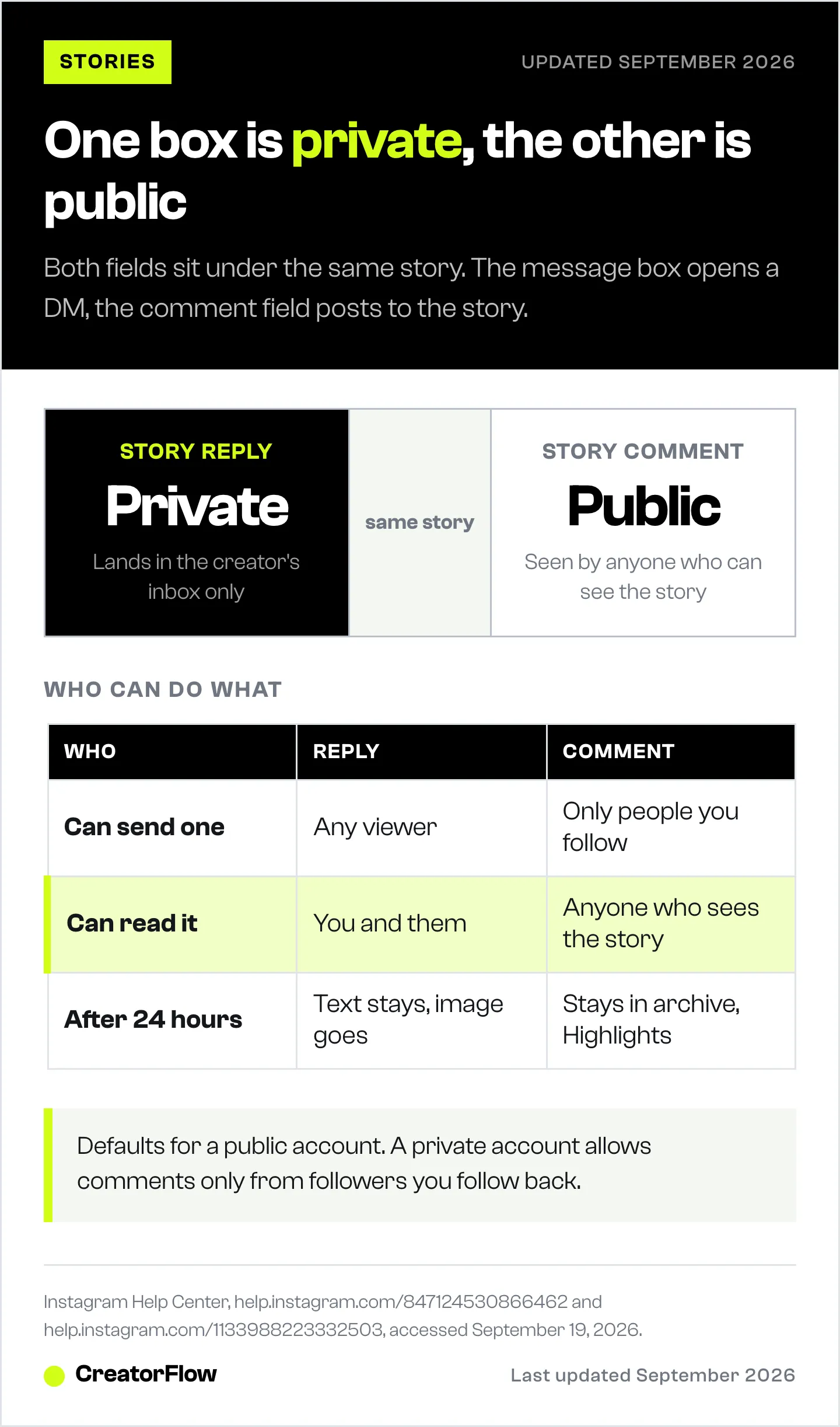
You can tell them apart before you send. A reply is typed into the message bar that says something like “Send message”, and it disappears from the story screen once sent, because it has moved into the DM thread. A comment appears attached to the story for the people watching it.
If you have ever hesitated over replying to a big account’s story because other followers might see it, the hesitation applies to the comment field only. A reply is as private as a normal DM.
Who can comment on a story, and who can see those comments
Instagram separates the right to comment from the right to read comments, and most explanations of this get it backwards.
Here is the rule in Instagram’s own words: “By default, if you have a public account, anyone you follow can leave comments on your stories. If you have a private account, by default, only followers you follow back can leave comments on your stories. Anyone who can see a Story can also see comments on that Story” (help.instagram.com, September 2026).
Read that twice, because it produces a situation people do not expect. On a public account with 40,000 followers, a follower the creator does not follow back cannot comment on the story at all. They can still read every comment that the creator’s own follows have left there.
Two more details in the same help page matter for anyone who posts daily:
- Comments remain visible to the creator after the story expires, if the creator views that story in their archive
- Comments on a story saved as a Highlight remain visible to anyone who can view the Highlight
So a comment written in a hurry on a Tuesday can still be sitting on a Highlight in December. A reply sent on the same Tuesday is in a private thread that only two people can open.
What happens to a story reply after 24 hours
The thread survives. The story does not.
Instagram states it plainly: your story disappears from Feed, your profile and Direct after 24 hours unless you add it as a highlight, and after that the photos and videos from that story are no longer visible in conversations, while “any text that was included with a message will still be visible after the photo or video disappears” (help.instagram.com, September 2026).
In practice, a reply you send today reads as a complete exchange today and as a free-floating sentence in three days. “Yes please, the blue one” with no image above it means nothing to either person.
For a creator, that is a deadline rather than a detail. Replies to a story are worth answering the same day, while the image that prompted them is still in the thread. It is also the reason a delayed answer to a story reply performs worse than a delayed answer to a comment: the context has evaporated on both sides.
How to control who can reply to your stories
By default, anyone who can see your story can reply to it with a message, and when you prevent someone from replying, the option does not appear to them inside your story (help.instagram.com, September 2026).
To change the audience on iPhone or Android:
- Tap your profile picture in the bottom right to open your profile
- Tap the menu in the top right
- Below “How others can interact with you”, tap Messages and story replies
- Tap Story replies, then choose who can reply to your stories
The setting sits in the same place as the rest of your message controls, which is why most people never find it while looking inside the story itself. Note that this feature is not available on computers.
Turning replies off entirely is the wrong move for most business accounts. A reply is the cheapest lead you will ever get: the person watched your story, had a question, and typed it into a private box. Tightening the audience makes sense for a personal account. For a shop, a coaching practice or a creator selling anything, closing that box closes the channel.
How to turn off comments on your stories
Comments are separate from replies and have their own controls (help.instagram.com, September 2026).
For every story you post:
- Tap Add, then tap Story
- Tap Settings in the top right
- Tap Story
- Below Commenting, tap Allow comments
- Tap Off
For one story before you share it, tap Options in the top right while editing and tap Turn off Commenting. For one story that is already live, tap your profile picture to view the story, tap Options in the bottom right, then tap Turn off commenting.
That last path is the useful one. A story that brings in sensitive questions, or a promotion you would rather not have publicly debated on the frame, can run with comments off while replies stay open, so people still reach you privately.
What the private channel means if you sell from Stories
Stories put the question and the answer in the same place. Someone watches, has a question, types it into a private box, and lands in your inbox with context attached. No other platform surface does that with so little friction.
Three consequences follow from the privacy rule itself.
Prices belong in replies. A question about cost gets a straight answer in a DM without the whole audience reading your price list, and without the person feeling watched while they ask.
Polls and question stickers create a queue. Every tap or answer opens a thread you can continue. That queue is worth more than the same number of comments, because each one is a conversation with a named account rather than a public reaction.
Speed decides the outcome. The image sits in the thread for 24 hours, and attention fades faster than that. Answering while the story is still live is the difference between a conversation and a sentence with no context. This is the same reason story reply automation exists at all.
If your problem is the opposite one, too few replies to answer, the fix is upstream in the story itself, and the formats that pull the most story replies are a better starting point than any setting.
How to answer every story reply automatically
A story reply is a DM, so anything that can answer a DM can answer a story reply. CreatorFlow sends the message for you when someone replies to your story, comments a keyword on a post or Reel, or sends you a word you chose.
The setup is one screen: pick the trigger, write the message, attach the link, turn it on. Someone replies to your poll at midnight and gets the booking link at midnight, with the story image still attached to the thread. It runs on Instagram’s official Graph API as a Meta Tech Provider, with no password sharing, and takes under 2 minutes to connect.
The free plan covers one Instagram account with 500 automated DMs a month, story reply automation, comment-to-DM and unlimited keyword triggers. Pro is $15 a month billed monthly, or $12 a month billed annually at $144 a year, and adds 5,000 DMs per workspace across two accounts, an email gate that collects the address before the link goes out, link click tracking, CSV export and geographic analytics. Growth is $30 a month billed monthly, or $24 a month billed annually at $288 a year, with five accounts and five team seats (creatorflow.so/pricing, September 2026).
Paid plans open with a 14-day free trial. A payment method is required to start it, nothing is charged during the trial, and cancelling inside the 14 days costs nothing. If you want the wider picture first, the guide to replying to Instagram DMs covers the manual side, and the breakdown of public comment replies against private DM replies covers when each one converts better.
FAQ
Are Instagram story replies private?
Yes. A story reply is sent as a direct message to the story owner. Only you and that account can see it, and no other viewer of the story is told that you replied.
Can other people see if I replied to someone’s story?
No. The reply exists inside a private DM thread between you and the creator. Other viewers see the story and, if commenting is on, the comments left by people the creator follows, but never your reply.
Are IG story replies public now?
No. The change that caused this question is story comments, which are public to the story’s audience. Replies through the message box work the way they always have and stay private (help.instagram.com/847124530866462, September 2026).
Can people see story replies on a Close Friends story?
The same rule applies. Replies are private messages to the creator. Comments, if they appear, are visible to anyone who can see that story, which for a Close Friends story means the people on that list.
How do I stop people from seeing my story replies on Instagram?
Nobody else can see them in the first place. If you want to limit who can send you a story reply, open your profile, tap the menu, then Messages and story replies, then Story replies, and choose the audience (help.instagram.com/1133988223332503, September 2026).
Does the creator know who replied to their story?
Yes. The reply arrives as a DM from your account, with your username and the story attached, so it is identified the same way any direct message is.
Do story replies disappear after 24 hours?
The message stays in the inbox. The story image attached to it stops being visible in the conversation once the story expires, unless it was saved as a highlight, while any text sent with the message remains (help.instagram.com/1133988223332503, September 2026).
Can I turn off comments but keep story replies on?
Yes. They are separate settings. Commenting is switched off under Settings, then Story, then Allow comments, or per story from Options, while the Story replies audience lives in your profile menu under Messages and story replies.
Instagram behaviour verified at help.instagram.com/847124530866462, help.instagram.com/1133988223332503 and help.instagram.com/524656233265764 on September 19, 2026. CreatorFlow plans and trial terms verified at creatorflow.so/pricing and creatorflow.so/refund-policy the same day. Instagram changes story features often, so re-check the settings paths before relying on them. Individual results vary.


