

To reply to someone’s Instagram story, open the story, tap the message bar at the bottom, type your reply and tap Send. The reply goes to their DMs as a private message, with the story attached above it. You can also answer with an emoji, a photo, a GIF or a voice message. To answer in public instead, tap Comment.
The buttons under a story are small, and each one does something different. One sends a private message, one a like, one a public comment. Tap the wrong one, and your “haha same” lands somewhere you did not plan.
This guide shows each way to reply, step by step, why the reply box is sometimes missing, and how to unsend a reply. The last section is for creators who get more story replies than they can answer by hand.
Key Takeaways
- The basic reply: open the story, tap the message bar, type and tap Send. It arrives in the owner’s DMs with the story attached
- Every reply except a comment is private: text, emoji, photo, video, GIF, sticker and voice replies all land in the same private chat with the story owner
- Comments are the public option: a story comment can be up to 60 characters, and anyone who can see the story can read it
- A missing reply box has a reason: the owner limited replies, the story expired, or you blocked the account. Instagram hides the option instead of showing an error
- You can unsend a reply: tap and hold it in the chat, then tap Unsend. The other person may have seen it already
- The story image does not stay: after 24 hours it leaves the chat, while the text you sent stays
- Bottom line for creators: every reply to your story is a DM, so an automation can answer each one in seconds, even while you sleep
How to reply to someone’s Instagram story
A story reply is a direct message that you send from inside the story. It goes only to the person who posted it, and their story appears above your message in the chat. By default, anyone who can see a story can reply to it.
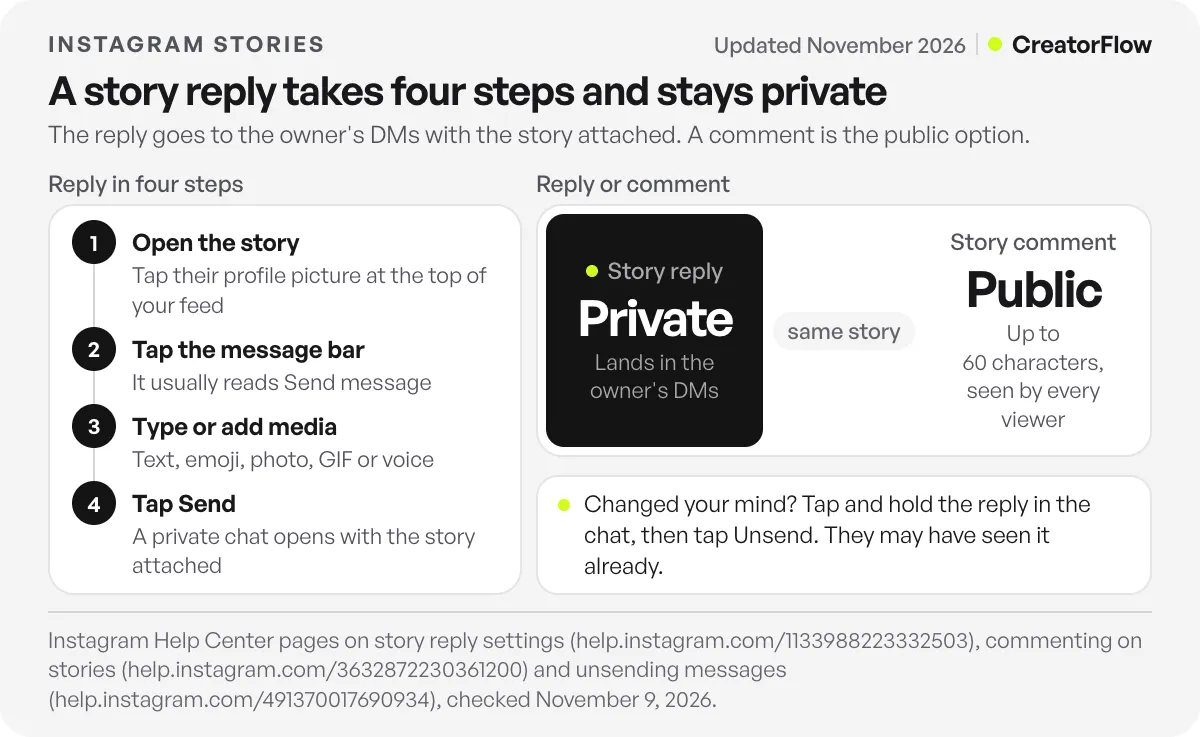
Here are the steps on iPhone or Android:
- Open the story. Tap the person’s profile picture at the top of your feed, or tap it on their profile.
- Tap the message bar at the bottom of the screen. It usually reads “Send message”.
- Type your reply.
- Tap Send.
Your reply opens a chat between you and that account, where you keep talking like in any other DM. Instagram’s page on story reply settings confirms the default reply setting (checked November 2026). If the person does not follow you, your reply may arrive in their message requests, where Instagram puts messages from people they do not follow, according to its page on replying to messages.
Every way to reply to an Instagram story
You have seven ways to answer a story. Five of them send a private message to the owner’s DMs. A like is private too, but it is not a message. A comment is the only public option.
| Reply type | How to send it | Where it lands | Who sees it |
|---|---|---|---|
| Text | Tap the message bar, type, tap Send | Their DMs | You and them |
| Emoji reaction | Tap the message bar, tap an emoji | Their DMs | You and them |
| Photo or video | Camera icon in the story, or Add photo or video in the chat | Their DMs | You and them |
| GIF or sticker | Stickers, then GIFs, in the chat | Their DMs | You and them |
| Voice message | Hold the microphone in the chat | Their DMs | You and them |
| Like | Tap the heart next to the reply bar | On the story | Only the owner |
| Comment | Tap Comment, type up to 60 characters | On the story | Anyone who can see the story |
Instagram’s page on liking stories says only the person who shared the story can see your like. Tap the heart again to remove it.
How to reply to an Instagram story with a photo or video
Send a photo or video reply from your chat with that person:
- Tap Messages at the bottom of Instagram.
- Tap your chat with that person.
- Tap Add photo or video and pick one from your library. Before you send it, you can add stickers, a drawing or text.
- Tap Send.
Those steps come from Instagram’s page on sharing a photo or video in a chat. On many app versions, a camera icon also sits next to the message bar inside the story. Tap it to take a photo or video on the spot, and the story stays attached to your reply. From the chat, send a short text reply to the story first, so the person knows which story your photo answers.
How to send a GIF, sticker or emoji reaction to a story
The fastest reply is one emoji. Tap the message bar under the story. On most app versions, a row of emojis appears above the keyboard. Tap one, and it goes to the owner’s DMs at once, with the story attached.
For a GIF or a sticker, use the chat:
- Tap Messages, then tap your chat with that person.
- Tap Stickers in the bottom right.
- Tap GIFs to search for a GIF, or Stickers to search for a sticker.
- Tap the one you want. It sends at once.
That is the path on Instagram’s page on sending a GIF or sticker. There is no preview, so check before you tap.
How to reply to a story with a voice message
A voice reply works well when your answer is long or tone matters. Instagram’s page on voice messages gives these steps:
- Tap Messages and open your chat with that person.
- Tap and hold the microphone at the bottom and speak.
- Lift your finger to send. The message sends as soon as you let go.
To cancel, slide your finger to Delete before you lift it. To record without holding, slide to Lock, speak, then tap Send.
How to comment on a story, and how to reply to a comment
A story comment is public, so use it only for things every viewer may read. For anything personal, send a reply. Who sees what is covered in our guide on whether people can see your story replies. To leave a comment, Instagram’s page on commenting on stories lists four steps:
- Open the story.
- Tap Comment at the bottom.
- Type your comment.
- Tap Send.
A comment can be 60 characters at most, and emojis count as characters. You can only leave a comment if you and the creator follow each other, or if the creator allows comments from all followers. The creator can also turn comments off.
To answer a comment on your own story, tap your profile picture to view the story, then tap Activity in the bottom left. Depending on your app version, a reply option sits next to each comment. You can also comment on your own story, or send the person a DM for a private answer.
Why can’t I reply to an Instagram story?
When the reply box is missing, Instagram hides it on purpose and shows no error. Instagram’s help pages confirm five reasons:
- The owner limited replies. Story owners choose who can reply. When they stop you from replying, you “won’t see that option from within” the story, according to Instagram’s page on story reply settings.
- The story expired. A story disappears from Feed, the profile and DMs after 24 hours, unless the owner adds it to a highlight.
- You blocked the account. After you block someone, you cannot message them, according to Instagram’s page on blocking, and a story reply is a message.
- The owner hid their story from you. People can hide their story from chosen accounts, as Instagram’s page on hiding stories explains. If you cannot see it, you cannot reply.
- The Comment button is missing. This rule covers comments only. You need a mutual follow, or the creator must allow comments from all followers.
How to delete or unsend a story reply
A story reply is a normal message in a chat, so you remove it the same way you remove any DM:
- Tap Messages at the bottom.
- Open the chat with the person whose story you replied to.
- Tap and hold your reply.
- Tap Unsend.
After you unsend it, people in the chat can no longer see the message. The other person may have read it already, and if someone reports the chat, unsent messages can be included in the report, according to Instagram’s page on unsending messages.
Do not delete the whole chat to remove a reply. Deleting a chat removes it only from your inbox, and it stays in the other person’s inbox, according to Instagram’s page on deleting chats.
Lots of people reply to your stories? Answer every reply automatically
For creators, it works the other way. People reply to your stories, and each reply is a DM waiting for an answer. By hand, that works at ten a day; our guide to replying to Instagram DMs covers that manual side.
Speed matters for two reasons. The story image leaves the chat after 24 hours, so a late answer arrives without context. And tools that answer through Meta’s Instagram API have a time window. Meta’s messaging documentation says that for most user actions, the window to send a message lasts 24 hours. After that, a real person can still answer for up to 7 days with the Human Agent tag (checked November 2026).
With CreatorFlow, you write the DM once, add your link and pick the story. Choose “Any word” as the trigger, and everyone who replies to your story gets your DM in seconds, whether they typed a question, one word or an emoji. Or set a keyword such as LINK, and only people who reply LINK get the link. You can see the full flow on CreatorFlow’s story reply automation page.
A first message you can copy and change:
Hi, thanks for replying to my story. Here is the guide I talked about: [your link]. Do you have a question about it? Reply here and I will read it myself.
Story reply automation runs on every plan, including Free, which sends 500 DMs a month. Pro is $15 a month flat, with no fee per contact. CreatorFlow is a Meta Tech Provider. It connects through Instagram’s official API without your password, and setup takes under 2 minutes.
For more replies to begin with, use these story ideas that get replies. The full setup is in our guide to Instagram story reply automation, and turning story replies into leads matches each reply to the right offer.
FAQ
Can I reply to an Instagram story after it disappears?
No. A story disappears after 24 hours unless the owner saves it to a highlight, and the reply box disappears with it. You can still send the person a normal message from your inbox.
Will the person know if I unsend a story reply?
They may. Instagram says the people you sent a message to may have already seen it before you unsend it. After you unsend it, nobody in the chat can see it anymore.
Does deleting the chat remove my story reply?
No. Deleting a chat removes it from your inbox only, and the other person still has it. To remove the reply for both of you, tap and hold it in the chat and tap Unsend.
How long can a comment on an Instagram story be?
A story comment can be 60 characters at most, and emojis count as characters. For a longer answer, send a private reply through the message bar instead.
Can I answer replies to my own story automatically?
Yes, with a Business or Creator account. A tool on Meta’s official Instagram API, such as CreatorFlow, can DM everyone who replies to your story, within Meta’s 24-hour messaging window.
Sources and checks
Instagram steps and rules come from its Help Center pages on story reply settings, commenting on stories, liking stories, reacting and replying to messages, sharing photos and videos in chats, GIFs and stickers, voice messages, unsending messages, deleting chats, blocking and hiding your story, all checked on November 9, 2026. The emoji row and the camera icon inside the story viewer vary by app version and are described from the app, not from a help page. The messaging window comes from Meta’s messaging documentation, and story reply automation details from CreatorFlow’s story replies page, both checked on November 9, 2026. Instagram changes these screens often, so labels on your phone may differ. Individual results vary.





