

Visual hooks are the part of a post a viewer understands before they hear a sound or read a word: the opening frame of a Reel or the cover of a carousel. A good one makes a clear promise in one glance, at thumbnail size, with the sound off. It works together with your text hook, and it also has to work without it.
Most hook advice is about words: the first line you say, the line you type on screen. On a phone, the picture arrives first. Many Reels open on a fade from black, a person taking a breath before they talk, or a wide shot where the subject is a small dot. Those openings lose people before any line is read, and Instagram now shows that loss as a number.
This guide covers what a visual hook is and how it differs from a text hook, five types with examples by niche, a quick test you can run on a screenshot, how to pair the picture with your words, and how to read skip rate to see if the opening worked.
Key Takeaways
- Definition: A visual hook is the promise a viewer reads from the picture alone, in the first frame of a Reel or on the cover of a carousel.
- Order of reading: The picture is read before the text. Lab research shows people can identify what a picture shows in a fraction of a second, long before they read a sentence.
- Five types: Motion at frame one, an object out of place, the finished result first, a face mid-action, and the before state.
- Thumbnail test: Shrink your first frame to about a third of your phone’s width, look for one second with no sound, and write down what the post promises. If you cannot, change the frame.
- Pairing rule: Let the text say what the picture cannot show (a number, who it is for, a time frame). Use few words, set large.
- Bottom line: Change one visual thing at a time and judge it by skip rate against your own recent Reels, not against numbers from other accounts.
What Is a Visual Hook?
A visual hook is the opening image of a post that tells a viewer, without sound or text, why they should stay. On a Reel it is the first frame and the first second of motion. On a carousel it is the cover slide. It does a different job from the text hook, which names the promise in words, and the spoken hook, which needs the sound on.
The three layers work at once, but they reach the viewer in a fixed order. The table shows where each one acts and what makes it fail.
| Layer | What it is | Needs sound | Needs reading | Usually fails when |
|---|---|---|---|---|
| Visual hook | The first frame, the first motion, the cover | No | No | The frame is empty, dark, or the subject is too small to see in the feed |
| Text hook | Words on screen or on the cover | No | Yes | It is long, small, or sits where the crop cuts it off |
| Spoken hook | The first line you say | Yes | No | It starts after a pause, or says something different from the picture |
The visual layer reaches the widest audience. Some people scroll with the sound off, and some do not read English well, but almost everyone sees the picture.
Why Visual Hooks Work Before Words Do
A picture is understood faster than a sentence, and it pulls the eye no matter how big it is. Text pulls the eye only in proportion to its size. That is why the first frame decides more than the first line, and why short text set large works better than a long line set small.
The speed part comes from vision research. A 2014 MIT study, with Mary Potter as senior author, found that people could identify the content of an image seen for as little as 13 milliseconds. That was a lab test where people were told what to look for in advance, so it does not say how long anyone watches a Reel. It does show that the picture is processed well before a viewer could read even one word on it.
The size part comes from advertising research. Rik Pieters and Michel Wedel’s eye-tracking study in the Journal of Marketing (April 2004) tested 1,363 print ads on more than 3,600 people. The picture was best at capturing attention, independent of its size. Text captured attention in direct proportion to its surface size. These were magazine pages, not phones, but the pattern matches what you see in a feed.
Meta gives the same advice to advertisers. Its guidance on mobile video ads says “The faster you capture attention in video ads, the better” and sums up sound as “Build for sound off. Delight with sound on.” (checked November 2026). For a creator, that means the first frame has to carry the promise alone.
5 Types of Visual Hooks (With Examples)
The five types below cover most strong openings. Each one gives the eye something to resolve in the first second, before any text is read. Pick the type that fits what your post proves, then build the first frame of the Reel or the cover around it.
1. Motion at frame one
Something is already moving when the video starts: liquid pouring, scissors closing, a hand reaching into the frame, the camera pushing in. The eye follows motion before it reads anything. A baker can open on the knife already cutting through the cake, not on the cake sitting still.
This type fails when the motion has no link to the topic. A spinning logo or a random zoom moves, but it promises nothing. The movement should be the first second of the thing the Reel is about.
2. An object out of place
One object sits where it does not belong, and the viewer stays to learn why. A personal finance creator holds a supermarket receipt that reaches the floor. A skincare creator puts a product in the fridge next to the milk, because the Reel is about storing it cold.
The object has to connect to the payoff. If the odd object is only there to surprise, people feel tricked when the Reel moves on to something else. That feeling shows up as a sharp drop on your retention curve after the first few seconds.
3. The finished result first
Open on the end state: the plated dish, the finished room, the edited photo, the full spreadsheet of booked calls. The viewer sees what they could have, and the rest of the Reel shows how. This is often the strongest type for tutorials, because the proof comes before the request for time.
It fails when the result is hard to read at small size. A finished room shot wide and dark looks like nothing in a thumbnail. Frame the result close, in good light, with one clear subject.
4. A face mid-action
A person is caught in the middle of something: mid-sentence, mid-laugh, mid-bite, reacting to a screen. Faces pull attention, but only when something is already happening on them. A face waiting to talk is the classic dead first frame.
Cut the first second of most talking clips. Start on the first word, or on the reaction, so the viewer meets a person who is already in the moment.
5. The before state
Show the problem in its worst form: the messy desk, the raw unedited clip, the bare wall, the overflowing inbox. The viewer recognises their own situation and stays to see it fixed. The before state works best when the after arrives fast, ideally inside the first few seconds.
It fails when the before is too long. A slow tour of the mess with no sign of change looks like a complaint, and people leave before the fix.
Visual Hook Examples by Niche
The same idea can have a weak or a strong first frame. Most weak frames are set-up shots: the person, the room, or the product before anything happens. Most strong frames start at the moment that proves the topic. These examples show the change for six common creator niches.
| Niche | Weak first frame | Stronger first frame | Type |
|---|---|---|---|
| Fitness coach | Coach standing in the gym, about to talk | The bar already moving, mid-rep, from a low angle | Motion at frame one |
| Food creator | Ingredients laid out on the counter | The finished dish, close, with steam visible | Finished result first |
| Home and interiors | Wide shot of the room from the door | The bare wall, then the first picture going up within a second | Before state |
| Beauty | Creator smiling at the camera, no product visible | Half the face done, half not, split down the middle | Before state and result |
| Business coach | Coach at a desk with a laptop | A phone screen full of unread client messages, held close to the lens | Object out of place |
| Affiliate creator | The product box on a table | Hands already using the product, mid-task | Face or hands mid-action |
Each strong frame has one subject, close to the lens, with something already in progress.
If your Reels get early views and then stall, the first frame is one of the first things to check. Our guide on why Reels stop getting views covers the other causes to rule out.
How to Test a Visual Hook at Feed Size
Test the first frame at the size people see it, with the sound off, for about one second. Take a screenshot of the frame, shrink it to roughly a third of your phone’s screen width, look at it briefly, then look away. Write down what the post promises. If you cannot write one clear sentence, the frame is not doing the job.
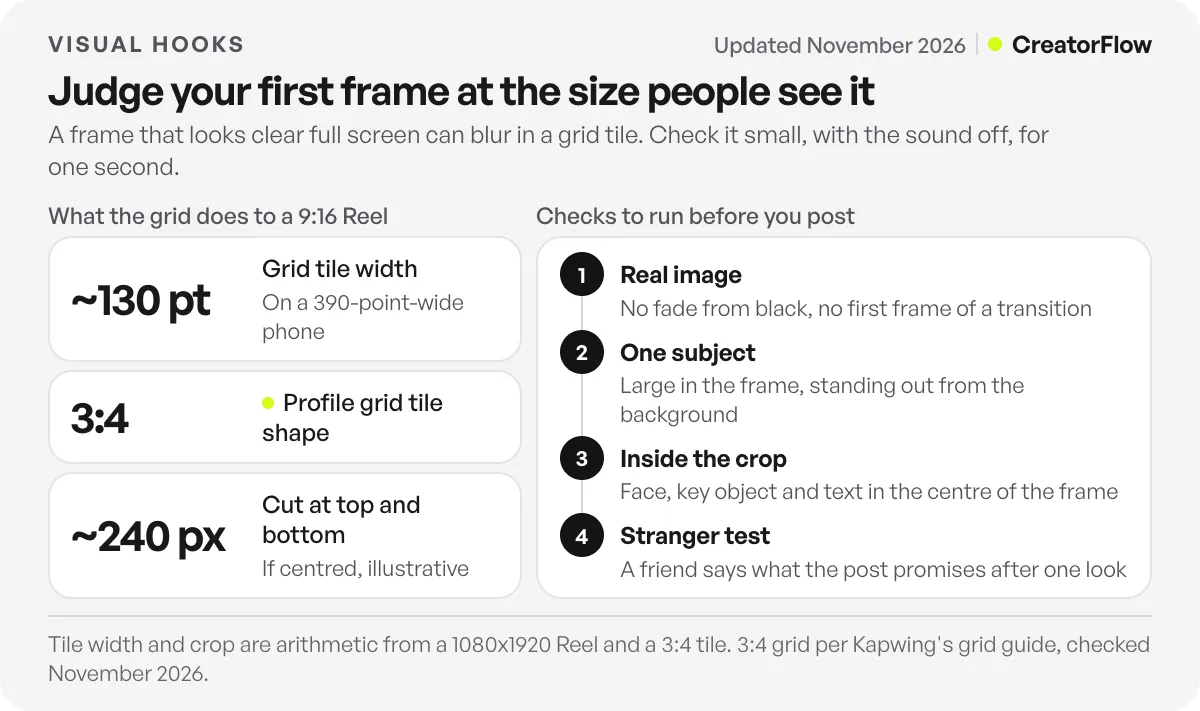
Size matters because a frame that looks fine full screen in your editor can turn into a blur in a grid. On a phone about 390 points wide, a three-column grid tile is about 130 points wide. That is the size of the decision on your profile and in grid views. In the Reels tab the video plays full screen, but the viewer still decides inside the first frame.
The crop matters too. Kapwing’s guide to the new grid explains that since the early 2025 update, the Instagram profile grid shows posts as 3:4 tiles (checked November 2026). A Reel is 9:16, usually 1080 by 1920 pixels. A 3:4 tile at the same width shows 1080 by 1440 pixels, so about a quarter of the height, around 240 pixels at the top and 240 at the bottom when centred, falls outside the tile. Instagram does not publish this figure; it follows from the two ratios. Keep the face, the key object and any cover text inside the middle of the frame.
Run these checks on every first frame before you post:
- The frame is a real image, not a fade from black or the first frame of a transition.
- There is one subject, and it fills a large part of the frame.
- The subject stands out from the background in colour or brightness.
- The face, object and text sit inside the centre area that survives the 3:4 crop.
- A friend who has not seen the Reel can say what it promises after one look.
The last check matters most. You know what the Reel is about, so you read meaning into a frame that a stranger cannot see.
How to Pair a Visual Hook With a Text Hook
The picture makes the promise and the text narrows it. Text should add what the picture cannot show on its own: a number, who the post is for, a time frame, or the stakes. Text that only describes the picture wastes the second line of attention. Keep it short and set it large, because text earns attention by its size.
A Reel that opens on a finished dish does not need “Making pasta” on screen. It needs the thing the picture cannot say, such as “15 minutes, one pan.” A before-state frame of a messy desk can carry “Fixed in one afternoon.” The picture and the words each do one job, and together they make one promise.
The Pieters and Wedel finding is the practical guide here. Only bigger text raised attention to the ad as a whole, while a bigger picture did not. So cut words until the line can be set large enough to read in a thumbnail. Five words that are easy to read beat twelve words nobody can see.
The spoken line comes third. It should say the same promise in different words, starting on the first frame, with no pause. If the picture shows a result and the voice starts with “So, today I want to talk about,” the layers point in two directions. For lines that work as the text layer, our Instagram hook templates list 50 starting points you can fit to your first frame.
Carousel Covers and Reel Covers
A carousel cover is a visual hook without motion. It has to stop the scroll with a still image, so the finished result, the before state, the object out of place and the face mid-action do most of the work. Motion is not available, so contrast, one clear subject and a few large words carry the cover.
Reel covers play a different role from first frames. When a Reel plays in the feed or the Reels tab, the viewer sees the video start from its first frame. The cover you pick appears mainly on your profile grid, where a returning visitor or a new follower scans your past posts. Pick a cover that passes the same thumbnail test, and keep its key parts inside the 3:4 crop.
A simple rule keeps both consistent. Make the cover a frame from the Reel, or a still that shows the same subject, so the promise on the grid matches what the video delivers. A cover that promises one thing and a Reel that opens on another loses trust on the second visit.
For carousels, the cover only earns the first swipe. What happens on the second slide decides whether people keep going, and our guide to carousel structure covers what each slide after the cover has to do.
How to Measure Whether a Visual Hook Worked
For Reels, read skip rate in Reels Insights. Instagram defines it as the share of views where the person skipped within the first 3 seconds, so it is the closest number you have to a grade on your opening. Compare each new Reel against your own recent median, not against figures from other accounts.
Instagram introduced the metric in August 2025. As Social Media Today reported, Instagram described skip rate as “the percentage of views from people who decided to skip your reel during those first 3 seconds.” It added a retention chart at the same time, with the note that “the flatter the line, the more engaged your audience is.”
Read the two together. A high skip rate points at the opening, which is where the visual hook lives. A low skip rate with a sharp drop a few seconds later usually means the first frame promised something the Reel did not deliver quickly. Watch time feeds how Instagram ranks Reels, which our explainer on how the Instagram algorithm ranks content covers in detail.
To learn which visual change helped, change one thing at a time. Keep the topic and the text hook, and post the next Reel with a different type of first frame. After a few Reels you will see which types hold your audience. Carousels have no skip rate, so compare covers by views and interactions against your recent carousel posts.
Views are only the first result. If your Reel ends with a comment keyword, CreatorFlow sends one DM with your link to each person who comments that word. On Pro and Growth it also tracks clicks on that link, so you can see which openings led to clicks as well as views. The comment-to-DM setup for content creators shows how that fits after the hook.
FAQ
What is a visual hook in a video?
A visual hook is the opening image of a video that gives the viewer a reason to stay before any sound or text reaches them. In a Reel it is the first frame and the first second of motion. A strong one shows one clear subject, already in action, and makes a promise the rest of the video keeps.
What is the difference between a visual hook and a text hook?
The visual hook is the picture: what the viewer sees in the first frame. The text hook is the words on screen or on the cover. People take in the picture first, and they read the text only if the picture held them. The best pairs let the text add what the picture cannot show, such as a number or who the post is for.
How long should a visual hook last?
There is no fixed length. Instagram measures skips inside the first 3 seconds, so the first frame should make its promise at once and the payoff should start inside that window. Cut slow openings, pauses before speaking and fades from black. The hook ends when the content it promised begins.
Do visual hooks work for carousels?
Yes. The cover slide is the visual hook of a carousel. Without motion, it relies on a clear subject, strong contrast and a few large words. The finished result and the before state are the two types that tend to suit covers, because both read well as still images.
Should my Reel cover be the same as the first frame?
It does not have to be the same frame, but it should show the same subject and make the same promise. The first frame is what viewers see when the Reel plays in the feed. The cover is what people see on your profile grid. If the two promise different things, people who tap through from your grid feel misled.
How do I know if my visual hook is working?
Check skip rate in Reels Insights. It shows the share of views where people left in the first 3 seconds. Compare it with your own recent Reels. A lower skip rate than usual after a change to the first frame is a good sign that the new opening holds people better.
Can I copy a visual hook format from another creator?
You can use the same type of opening, such as starting on the finished result. Do not reuse their footage, their exact scene or their words. Build the frame from your own subject and your own proof, so the promise belongs to your post.
Sources and checks
Checked November 3, 2026: Instagram’s skip rate and retention chart wording as reported by Social Media Today (August 2025); Meta’s mobile video ad guidance (undated page); the 3:4 profile grid as described in Kapwing’s grid guide; the abstract of Pieters and Wedel (2004) via Crossref; and MIT’s 2014 report on image recognition at 13 milliseconds. The 240-pixel crop figure is arithmetic from the 9:16 and 3:4 ratios.