

A UGC portfolio is a short web page of your best sample videos that helps a brand manager decide whether to reply to you. Build it in the order they check: niche, a video that plays, the hook, ad format, proof, price and contact. Keep 3 to 6 clips, label each one, and aim for a page someone can read in about 60 seconds.
Most guides give you a list of parts: a bio, a story, testimonials, a rate card. A list does not tell you what goes first, and order matters when the reader is busy. If your link asks for access, or the first clip is the wrong category, nobody reads your rate card.
This guide orders the page by those checks, shows three real portfolios that handle parts of it well, and compares four free hosts with their current limits. It also shows how to send the link when someone asks for it on Instagram. If you have not filmed anything yet, read how to become a UGC creator first.
Key Takeaways
- The page has one job: get a reply. Cut anything that does not help a brand manager decide to send one.
- Order beats completeness: category, playback, hook, ad format, proof, price, contact. Each check only runs if the one before it passed.
- Followers do little work here: brands buying UGC pay for the video, and a 2026 CreatorIQ study has brands placing follower count last of eight criteria.
- No brand work is fine: three spec videos, clearly labelled as samples, are enough to ask for a first reply.
- You can host it for $0: Canva, Notion, Google Drive and Wix all have free plans, but their video limits differ a lot.
- Bottom line: test your link on a phone while signed out before you send it, then let a DM keyword send it when people ask.
What is a UGC portfolio for?
A UGC portfolio exists to get one reply. It shows a brand that you can make a video it could run as an ad, in its category, and that you are easy to hire. A brand buying UGC pays for the video and then posts it on its own channels. Your audience is not part of the purchase, so your follower count does little work on this page.

Brand research points the same way. CreatorIQ and Influencers.club’s State of Creators 2026 study, as reported by Net Influencer on August 11, has brands putting creator fit and content performance near the top of their criteria. Follower count came last of eight. That finding covers creator partnerships in general, so read it as support and not as a UGC-only result.
What do brand managers check first?
Brand managers check category fit first, then whether the video plays, then the hook. Format, proof, price and contact come after that, because each check only runs if the one before it passed. The table gives the order, the question behind each step, and a time target for each. The targets add up to about 60 seconds.
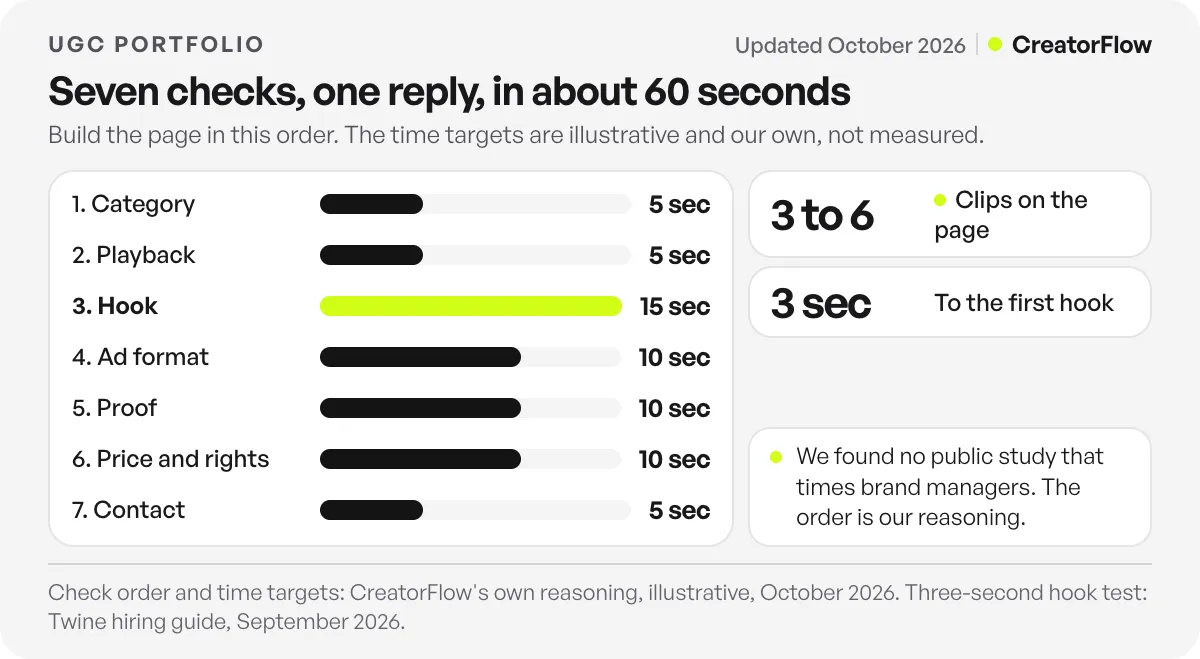
| # | What they check | The question they have | What answers it | Target |
|---|---|---|---|---|
| 1 | Category | Is this person right for my product? | A headline with your niche and formats | 5 sec |
| 2 | Playback | Does this open? | A public link and a clip that plays with no sign-in | 5 sec |
| 3 | Hook | Would this stop a stranger? | A first clip where something happens within 3 seconds | 15 sec |
| 4 | Ad format | Could I run this as an ad? | Vertical video, with text clear of the ad buttons | 10 sec |
| 5 | Proof | Has someone paid for this kind of work? | A label on each clip: paid, gifted or sample | 10 sec |
| 6 | Price and rights | Can I afford this, and can I use it in ads? | A starting price and one line on usage rights | 10 sec |
| 7 | Contact | How do I reply? | One email address and one next step | 5 sec |
The time targets are ours, and nobody measured them. We searched for a public study that times brand managers and did not find one. Guides that quote 10 seconds or under a minute do not cite a source. The order is our reasoning, built on what brands say they weigh and on what they buy UGC for.
What to include in a UGC portfolio
Include a one-line headline, 3 to 6 labelled clips, a proof label for each clip, a starting price with a usage-rights line, and one way to contact you. Put them in that order. Leave out anything that does not answer one of the seven checks, including long origin stories and follower screenshots.
Check 1: a headline that names the category
Write one line under your name that says who you make videos for and which kinds. “UGC videos for skincare and wellness brands: testimonials, demos and unboxings” tells a brand manager in five seconds whether to keep going. “Content creator and storyteller” does not.
Two categories on one page is the most this line can carry. If you work across more, make one page per category and send the page that matches the brand.
Check 2: a link that opens
A shared folder that shows a request-access screen ends the review before it begins. In Google Drive, Google’s sharing help page tells you to set General access to “Anyone with the link” and pick the Viewer role.
Test this every time you change the page. Open the link on your phone in a private window, signed out of everything, and play the first clip. If you have to sign in, so does the brand.
Check 3: a first clip with a fast hook
Put the clip closest to the brand’s category first. Twine, a freelance marketplace, tells brands in its hiring guide to play three or four clips before reading a caption, and to time how long it takes for something to happen. Twine’s test is a question, a visual surprise, a bold claim or a reaction within the first three seconds.
So review your own clips with the sound on and a timer running. Any clip that takes more than three seconds to start goes to the bottom or comes off the page. Our target is three clips at first and six at most, because each extra clip makes it less likely the brand sees your best one.
Check 4: video that could run as an ad
UGC often ends up in paid ads, so the next question is format. Meta’s Reels ad specs recommend a 9:16 ratio and leaving 14% of the top, 35% of the bottom and 6% of each side free of text, logos and other key elements (checked October 2026). A caption that sits inside that area shows you know where the ad buttons go.
Show range as well. Label each clip with its format and category, such as “Testimonial, skincare” or “Unboxing, jewellery”. Include one clip of you talking to camera, because Twine lists “no spoken audio anywhere” among its red flags. To see the same video from the other side of the table, read how brands brief a UGC creator.
Check 5: an honest proof label on every clip
Label each clip with what it was: “Paid ad for [brand]”, “Gifted” or “Sample, not a paid job”. Never let a sample look like a paid job. A brand can check, and one false label costs you more than a thin page does.
Twine tells brands to look for several clips for the same brand, since that usually means the first round worked. If a client rehires you, say so on the page. Add a result only if the client gave it to you and agreed that you can share it. Check your contract before you show client work at all.
Check 6: a starting price and a rights line
You do not need a full rate card here. One line can do the job: “Videos from [your price] each. Paid ad use is quoted separately.” We do not give a number because yours depends on your niche and what the brand wants to do with the video.
Keep the rights line even if you drop the price. Twine lists no mention of usage rights as a red flag, and says that conversation otherwise happens too late.
Check 7: one way to reply
Show your email address as plain text so a brand can copy it, and add one next step. “Send me your product link and I will reply with two video ideas” gives the brand an easy first message. Promise only a reply time you can keep.
UGC portfolio examples worth studying
These three public portfolios each handle one check well, and you can open all of them. We read their page structure on October 30, 2026 and chose them for what you can copy. They are examples of page structure, and none of them is an endorsement of CreatorFlow.
Anna’s Frames is the example to copy for labels and contact. Her email, location and social handles sit at the top of the page, next to “UGC Creator”. Each clip then carries a format and a category, such as a stop-motion unboxing for fashion and a testimonial for a creator gadget. The page runs on a Canva site address.
Kaylee Kwa is the example to copy for proof. Her clips are grouped by category: beauty, food and restaurants, lifestyle, and digital products. Many clips also say what kind of job they were, using labels such as “paid ad” and “PR”. A brand in any of those categories can go straight to its own section.
UGC Joshie is the example to copy for the next step. The page has nine numbered samples named by style, such as “VoiceOver Style” and “Unboxing Reel”, and two reviews that name the reviewer’s brand. The “Work with me” section tells a brand to email a product or website link to begin.
How to build a portfolio with no brand work
Film three spec videos for products you already own, one for each format brands in your category buy. Spec means unpaid work you choose yourself, made to show your skill. Label each video as a sample, add one line on what you were trying to do, and publish. Brands can judge the clip even when nobody paid for it.
A problem-and-fix video, a first-use video and a talking review show a brand you can open an ad, show a product working and talk to camera. That line under each clip is what separates you from someone holding a product up to a camera. “Goal: get a busy parent to try this cleanser in 20 seconds” shows you can work from a brief, which is what Twine tells brands to look for.
Do not add a brand’s logo in a way that suggests it hired you, and do not make product claims you cannot back up. After each paid job, ask whether you can show the video, then swap out your weakest spec clip. The page should stay at six clips or fewer as the quality climbs.
Free places to host your portfolio
Canva suits most people, since it gives you a free site with uploaded video on the page. Notion works if your clips live on YouTube, because free uploads stop at 5 MB per file. Google Drive is the fastest route, and Wix gives you the most room to grow into a full site. All four have a $0 plan as of October 2026.
| Host | Free plan (checked October 2026) | Video on the free plan | Best for |
|---|---|---|---|
| Canva | Up to 5 live sites on a free .canva.site address, with a “Designed with Canva” footer | Search summaries give up to 1 GB per video and 5 GB of total uploads | One page with video on it |
| Notion | Publish a page to the web, with no block limit in a one-person workspace | 5 MB per file, so embed from YouTube, Vimeo or Loom | A plain page you change often |
| Google Drive | 15 GB shared across Drive, Gmail and Photos | Share files or a folder by link | Sending clips today, before you have a page |
| Wix | A wixsite.com address with Wix branding and sometimes ads, and no time limit | Counts toward 500 MB of storage | Growing into a full site later |
Sources for the table: Canva’s free domain help page and uploads help page, Notion’s pricing page and embed guide, Google’s storage page, and Wix’s free plan article. Canva blocks direct reads of its help pages, so its limits come from search summaries of those pages. Check them in your own account before you upload. Those summaries also say Canva’s free address only works with designs made from a Website template, so begin from one.
If you use Notion, upload your clips to YouTube as unlisted. YouTube’s privacy help page says anyone with the link can see an unlisted video, with no Google Account needed, and that it stays out of YouTube search results by default. Notion warns that some sites block embedding, so play each clip on the published page before you send it.
A custom domain is optional for a first reply. Your samples decide that reply, so buy a domain later if you want one.
Portfolio or media kit: which should you send?
Send the portfolio when a brand wants videos to post on its own channels or run as ads. Send a media kit when it wants a post on your account and needs your audience numbers. Creators who do both can keep two links and send the one that matches the question the brand asked.
A media kit sells reach, so it needs Insights numbers with dates and audience details. Our guide on how to make a media kit covers what goes in it, and the free media kit generator builds a first version from your numbers.
How to send your portfolio by Instagram DM
Set a keyword such as PORTFOLIO, and anyone who comments it on your post or DMs it to you gets the link in a private message. This covers people who find you on Instagram and ask, at any hour, while you are filming or asleep.
When you are pitching brands yourself, keep pasting the link into your email as usual. The setup in CreatorFlow takes a few steps. Connect your Instagram account, create an automation, and add your keywords. Matching is whole-word and ignores capital letters, with up to 20 keywords per automation. “Portfolio please” matches the keyword “portfolio”, but “portfolios” does not, so add both, plus words like “samples” and “ugc”. The portfolio link use case shows the same setup with comment and Story reply triggers.
Write the DM as if it is the only message you get. For a comment trigger, Meta’s private replies guide allows a reply within 7 days of the comment, and only one message until the person responds (checked October 2026). So put everything a brand needs in that one DM:
Thanks for asking. Here is my portfolio: [your link]. It opens with skincare and wellness videos. For a quote, email [your address] with your product link.
Send the link straight away with no extra step in front of it, because a brand manager came for the videos. Then test it. Comment your keyword from a second account and open the link on that phone.
If you work in two categories, set a separate automation for each word, so “beauty” sends one page and “food” sends another. Rate questions can get their own keyword too, and these DM workflows for UGC creators cover that setup.
CreatorFlow’s Free plan includes comment-to-DM, Story replies and keyword DMs. Pro, at $15/month or $144/year, adds link click tracking, so you can see how many people opened the link after they asked for it. If many ask and few open it, change the DM. If many open it and nobody writes, change the page.
FAQ
How many videos should a UGC portfolio have?
Begin with three and stop at six. That range is our recommendation, based on keeping the page readable in about a minute. Other guides suggest more, but each extra clip makes it less likely the brand watches your best one. Keep extra samples in a folder and send them if a brand asks.
Do I need a website for my portfolio?
No. A free Canva site, a published Notion page or a shared Google Drive folder can all get a first reply. What matters is that the link opens with no sign-in and the first clip plays on a phone. Buy a domain later if you want one.
Should I put my rates on the page?
We suggest a single starting price and one line on usage rights. It saves a round of messages and filters out brands with a much smaller budget. Keep custom quotes for the reply. If you would rather not show a price, keep the rights line and tell brands to email for a quote.
Can I make spec videos for brands that never hired me?
Yes, if the label is clear. Write “Sample, not a paid job” next to the clip, film a product you bought or own, and do not use a logo in a way that suggests the brand hired you. Do not make product claims you cannot back up.
Should my portfolio be a PDF or a link?
Use a link. Video plays on the page, you can change it without sending a new file, and the same address keeps working in your bio and your DMs. A PDF sends the reader to another site for every clip. Keep one as a backup only if a brand asks for a file.
How often should I update it?
Swap a clip after each paid job you have permission to show, and keep the total at six or fewer. Test the link once a month on a signed-out phone, because file permissions and embeds can change without any warning from the host. Update your price line when your rates change.
Sources and checks
Hosting limits (sources under the table, with Canva’s read through search summaries), YouTube’s unlisted rules, Meta’s Reels ad specs and private replies guide checked on October 30, 2026, as were the three example portfolios. Survey finding as reported by Net Influencer on August 11, 2026. Twine’s advice is a marketplace’s guidance to its own customers. The check order and time targets are CreatorFlow’s own reasoning and were not measured.