

Instagram DM automation for UGC creators sends portfolios, rate cards, and booking links instantly when brands inquire. Brands often contact several creators at once, so the first complete reply has an edge. UGC rates vary widely: Insense’s UGC rate guide (September 2026) puts beginners at $50-400 per video and premium creators at $500-3,000+. Speed and professionalism decide who wins the deal, not follower count.
A brand DMs you at 2 AM asking for your portfolio. You’re asleep. They DM three other creators. One responds instantly with portfolio, rate card, and availability. That creator gets the deal.
This guide covers the 5 automations every UGC creator needs, ready-to-use DM templates, and how to build a system that lands more brand deals while you sleep.
Key Takeaways
- Response speed wins deals: Brands often contact several creators at once, and the creator who answers first with a portfolio and rates gets the first conversation
- 5 workflows for UGC creators: Portfolio delivery, rate card sharing and brand inquiry qualification run automatically. Application follow-ups and testimonial requests are saved templates you send yourself
- UGC creator rates: Insense’s rate guide (September 2026) puts beginners at $50-400 per video, mid-level creators at $150-1,000 and premium creators at $500-3,000+
- Usage rights pricing: Charge for usage separately from creation. This guide’s suggested starting points: +$150-300 for 30 days of paid ad usage, and +100-150% of the base rate for perpetual buyout rights
- Follow-up matters: Send saved follow-ups at Day 7, Day 14, and Day 30. Meta lets automation reply only within 24 hours of the brand’s last message, so these are manual sends
- Bottom line: Set up portfolio, rate card, and qualification automations in 30-60 minutes to respond instantly to brand inquiries 24/7 and land more deals while you sleep

What Is a UGC Creator on Instagram?
A UGC creator makes content that brands post on their own channels and run as ads. You are paid for the content, not for audience access, so speed and professionalism decide who wins the deal rather than follower count. On Instagram the work arrives as a DM: a brand asks for your portfolio, your rates, and your availability, and the creator who answers first usually gets the job.
Why UGC Creators Need DM Automation
The UGC creator market keeps growing. More creators means more competition for every brand deal.
For more strategies on how to make money on Instagram beyond UGC deals, see our full monetization guide. It also helps to know what the other side is working from: our guide to how brands brief a UGC creator covers the specs, rights, and revision terms that show up in the briefs you receive.
Here’s what separates UGC creators who land steady brand work from those who don’t:
Response time. Brands often reach out to several creators at once. The creator who responds first with a professional portfolio gets the meeting. The creator who responds 6 hours later gets ghosted.
Professional systems. Brands want to work with creators who have their act together. A creator who instantly sends a polished portfolio, clear rate card, and easy booking link signals professionalism. A creator who takes days to send basic information signals headaches.
Consistent follow-up. Many deals need more than one message. Most UGC creators send one pitch and never follow up. Saved follow-up templates turn each follow-up into a few seconds of work.
The UGC Creator’s DM Problem
Every UGC creator deals with the same inbox chaos:
Portfolio requests: “Can you send your portfolio?” arrives 10x/day. You copy-paste the same link, customize the intro, repeat endlessly.
Rate questions: “What are your rates?” You type out the same pricing tiers, explain usage rights for the hundredth time, clarify what’s included.
Qualification gaps: You hop on calls with brands that have $50 budgets when your minimum is $300. Wasted time you could spend creating content.
Missed opportunities: Brands DM at midnight, weekends, holidays. By the time you respond, they’ve moved on.
Application tracking: You pitch dozens of brands before landing a deal. Which ones did you follow up with? When? What did they say? No idea.
DM automation solves all of this. One setup, infinite responses, zero copy-pasting.
5 Automation Workflows for UGC Creators
These are the exact workflows that professional UGC creators use to land more brand deals. Set them up once, run them forever.
Workflow 1: Portfolio Delivery
Trigger: Brand DMs “portfolio,” “work,” “samples,” or “examples”
Auto-response:
Hey! Thanks for reaching out about my UGC work.

Here's my portfolio with my latest brand collaborations: [PORTFOLIO_LINK]

Quick stats:
- 50+ videos delivered for brands like [BRAND], [BRAND], [BRAND]
- Niches: [YOUR_NICHES]
- Average turnaround: 5-7 days

Want to see my rate card? Just reply "rates" and I'll send it over.

Looking forward to potentially working together!
Why it works: Brands get exactly what they asked for instantly. No waiting. The message also plants a seed for the rate card (your next upsell) and establishes credibility with social proof.
Pro tip: Create different portfolio links for different niches. Tech brands get your tech portfolio. Beauty brands get your beauty portfolio. Use keyword triggers like “tech portfolio” vs “beauty portfolio” to send the right one.
Workflow 2: Rate Card Delivery
Trigger: Brand DMs “rates,” “pricing,” “cost,” or “how much”
Auto-response:
Great question! Here's my current rate card:

CONTENT PACKAGES:

Single Video (15-60 sec):
- Vertical UGC video: $200
- + Paid ad usage (30 days): +$150
- + Perpetual usage rights: +$300

Bundle Package (3 videos):
- 3 UGC videos: $500 (save $100)
- Same add-ons available

WHAT'S INCLUDED:
- Concept ideation
- Scripting
- Filming & editing
- 1 round of revisions
- Raw footage available (+$75)

I'm currently booking for [MONTH]. Want to chat about your project? Book a quick call here: [CALENDLY_LINK]
Why it works: You answer the question completely. No back-and-forth. Brands see exactly what they get and what it costs. The booking link removes friction for serious inquiries.
Pro tip: Always separate creation fees from usage fees. This is standard in the UGC industry and ensures you get paid fairly if brands run your content as paid ads. It helps to know what the other side is working from: our guide to collecting user-generated content on Instagram sets out the rights request brands are told to send.
Workflow 3: Brand Inquiry Qualification
Trigger: DM contains “collab,” “partnership,” or “work together”
Auto-response:
Hey! Thanks for reaching out about a potential collaboration.

To make sure I'm a good fit for your campaign, could you share:

1. What's the product/brand?
2. What type of content do you need? (unboxing, review, tutorial, testimonial)
3. What's your timeline?
4. What's your budget range?

This helps me send you the most relevant info and see if our schedules align.

In the meantime, here's my portfolio: [PORTFOLIO_LINK]
Why it works: You qualify leads before investing time. Brands with $50 budgets self-select out when they see you ask about budget. Serious brands appreciate the professionalism.
Next step: When the brand answers, reply with one of two saved replies. Under your minimum budget (for example $150), send a polite decline. At or above it, send your rate card and booking link.
Workflow 4: Application Follow-Up
Trigger: You send it yourself, 7 days after pitching. Meta lets automation reply only within 24 hours of the brand’s last message, so a follow-up days later is a manual send. Save the text as a saved reply in Instagram so it takes seconds.
Saved message:
Hey [BRAND]! Following up on my application from last week.

I'm still excited about the opportunity to create UGC for [PRODUCT]. My schedule just opened up for [MONTH] and I'd love to chat if you're still looking for creators.

Here's my portfolio again in case it's helpful: [PORTFOLIO_LINK]

Let me know if you have any questions!
Why it works: Most creators pitch once and forget. Following up at 7 days catches brands who were busy, lost your message, or are now ready to decide.
Pro tip: Schedule 3 follow-ups: Day 7, Day 14, Day 30. After that, move on. Don’t be annoying, be persistent.
Workflow 5: Testimonial Collection
Trigger: You send it yourself, 14 days after delivery (a manual send, for the same 24-hour reason as Workflow 4).
Saved message:
Hey [BRAND]! Hope the content is performing well for you.

Quick favor: Would you be open to sharing a brief testimonial about working together? Just 2-3 sentences about the experience.

It really helps me land future brand deals and I'd be happy to tag your brand when I share it.

No pressure either way. Thanks again for the opportunity!
Why it works: Social proof closes deals. Brands trust other brands. A portfolio with testimonials converts better than content samples alone. A saved message and a calendar reminder mean you never forget to collect them.
Pro tip: Make it easy. Offer to write a draft testimonial they can approve/edit. Most brands are busy and appreciate the shortcut.
Building Your UGC Brand on Instagram
Automation amplifies your reach, but you need the foundation first. Here’s how to position your Instagram profile to attract brand inquiries.
Bio Optimization for UGC Creators
Your bio has 150 characters to answer: “Should I DM this creator?”
Must-have elements:
-
Name field (30 chars): Include “UGC Creator” + niche
- Example: “Sarah | UGC Creator | Beauty”
-
Value proposition: What do you create and for whom?
- Example: “Scroll-stopping UGC for skincare & wellness brands”
-
Social proof: Quick credibility marker
- Example: “50+ videos for Sephora, Glossier, The Ordinary”
-
CTA: Tell brands exactly what to do
- Example: “DM ‘portfolio’ for samples”
-
Contact: Email visible for formal inquiries
Bio template:
[NAME] | UGC Creator | [NICHE]
[WHAT YOU CREATE] for [WHO]
Featured: [BRAND], [BRAND], [BRAND]
DM "portfolio" for samples
[EMAIL]
Content That Attracts Brand Inquiries
Brands scroll your feed looking for:
Production quality. Can you light a shot? Is audio clean? Is editing smooth?
Authenticity. Does your content feel real or overly polished? UGC is valued because it looks organic.
Versatility. Can you do unboxings, reviews, tutorials, testimonials? The more formats you demonstrate, the more opportunities.
Niche expertise. A beauty brand wants a creator who knows beauty. Demonstrate your knowledge in your niche.
What to post:
- UGC samples (even unpaid spec work counts)
- Behind-the-scenes of your filming setup
- Before/after editing transformations
- Tips for brands working with UGC creators
- Results from past collaborations (with permission)
Profile Setup for Automation
To use Instagram DM automation, you need:
- Business or Creator account (not personal)
- Connected Facebook Page only if your tool uses Meta’s Facebook Login API. Tools on the Instagram Login API, like CreatorFlow, connect without one
- Automation tool connected via Meta’s official process
The setup takes 5 minutes. No coding required. For a complete walkthrough, see our Instagram DM Automation Complete Guide.
UGC Creator DM Templates
Copy these templates directly into your automation tool. Customize the bracketed sections. Working outside UGC too? Our creator DM templates cover five setups that work in any niche.
Initial Inquiry Response
Hey! Thanks for reaching out.

I'm [NAME], a UGC creator specializing in [NICHE] content.

What type of content are you looking for? I do:
- Product unboxings
- Reviews & testimonials
- Tutorials & how-tos
- Lifestyle/aesthetic videos

Portfolio: [LINK]
Rates: Reply "rates" and I'll send them over

Looking forward to chatting!
Cold Pitch Template
Hey [BRAND]!

I've been using [PRODUCT] for [TIME] and love [SPECIFIC THING]. Your content on Instagram is great, but I noticed you're not running much UGC-style content.

I create scroll-stopping UGC that converts for brands like [SIMILAR_BRAND_1] and [SIMILAR_BRAND_2].

Would you be open to seeing some content ideas I have for [PRODUCT]?

Here's my portfolio: [LINK]

Either way, keep crushing it!
[NAME]
Rate Negotiation Response
Thanks for sharing your budget!

I typically work within the $[X]-$[Y] range for [CONTENT_TYPE], but I'm flexible depending on the scope.

Here's what I can do at your budget of $[THEIR_BUDGET]:

Option A: [REDUCED_SCOPE]
Option B: [ALTERNATIVE_FORMAT]
Option C: Bundle deal for future content

Which sounds most interesting? Happy to jump on a quick call to discuss: [CALENDLY]
Post-Delivery Check-In
Hey [NAME]! Just wanted to check in.

How's the content performing? Any feedback from your team?

If you need any tweaks or have another project coming up, I'm here.

Also, if you're happy with the collaboration, I'd love a quick testimonial for my portfolio. No pressure!

Thanks again for the opportunity.
Testimonial Request
Hey [NAME]!

Hope [PRODUCT] is crushing it!

Quick ask: Would you be open to sharing a 2-3 sentence testimonial about our collaboration? Something like:

"[NAME] delivered [X VIDEOS] for our [CAMPAIGN]. The content was [QUALITY DESCRIPTOR] and [RESULT]. Would definitely work with them again."

Feel free to tweak that however you'd like. It really helps me land future brand deals.

Thanks!
For more DM templates across different use cases, check out our Instagram DM Automation Templates resource.
There is a page built specifically for UGC creators that walks through the setup end to end: CreatorFlow for UGC creators.
Pair the pitch with a proper one-pager: the Instagram media kit generator turns your stats into something brand-ready.
Setting Up Your UGC Automation Stack
Here’s the tech stack most professional UGC creators use:
Essential Tools
DM Automation (pick one):
- CreatorFlow: Free plan with 500 DMs/month; Pro $15/mo and Growth $30/mo flat rate. Best for solo creators who want simple setup. Includes keyword triggers, auto-replies, and link tracking on Pro and Growth.
- ManyChat: $17-199/mo billed monthly, based on contacts. More advanced workflows and multi-platform support.
- LinkDM: $19/mo Pro. Instagram-first, used by 60,000+ creators, brands and agencies (linkdm.com, October 2026).
Portfolio Hosting:
- Notion (free): Clean, easy to update
- Contra (free): Built for creators
- Canva (free): Visual, brandable
Booking:
- Calendly (free tier available)
- Cal.com (free, open source)
- TidyCal (one-time payment)
Invoicing:
- Wave (free)
- Stripe Invoicing
- HoneyBook (paid, all-in-one)
Setup Checklist
- Switch to Creator/Business account on Instagram
- Connect a Facebook Page if your tool needs one (Instagram Login tools like CreatorFlow do not)
- Sign up for CreatorFlow or preferred automation tool
- Create portfolio link with 5-10 best samples
- Write rate card with clear pricing tiers
- Set up Calendly with available booking slots
- Configure 3 automations and 2 saved replies (automations: portfolio, rates, qualification; saved replies: follow-up, testimonials)
- Add “DM portfolio for samples” to your bio
- Test all automations by DMing yourself
Total setup time: 30-60 minutes for everything.
UGC Creator Rates Reference
Use these starting points when setting your rate card. Rates vary by niche, experience, and usage rights. Published rate guides disagree: Insense’s UGC rate guide (September 2026) puts beginners at $50-400 per video, mid-level creators at $150-1,000 and premium creators at $500-3,000+. The tables below sit at the conservative end of those ranges.
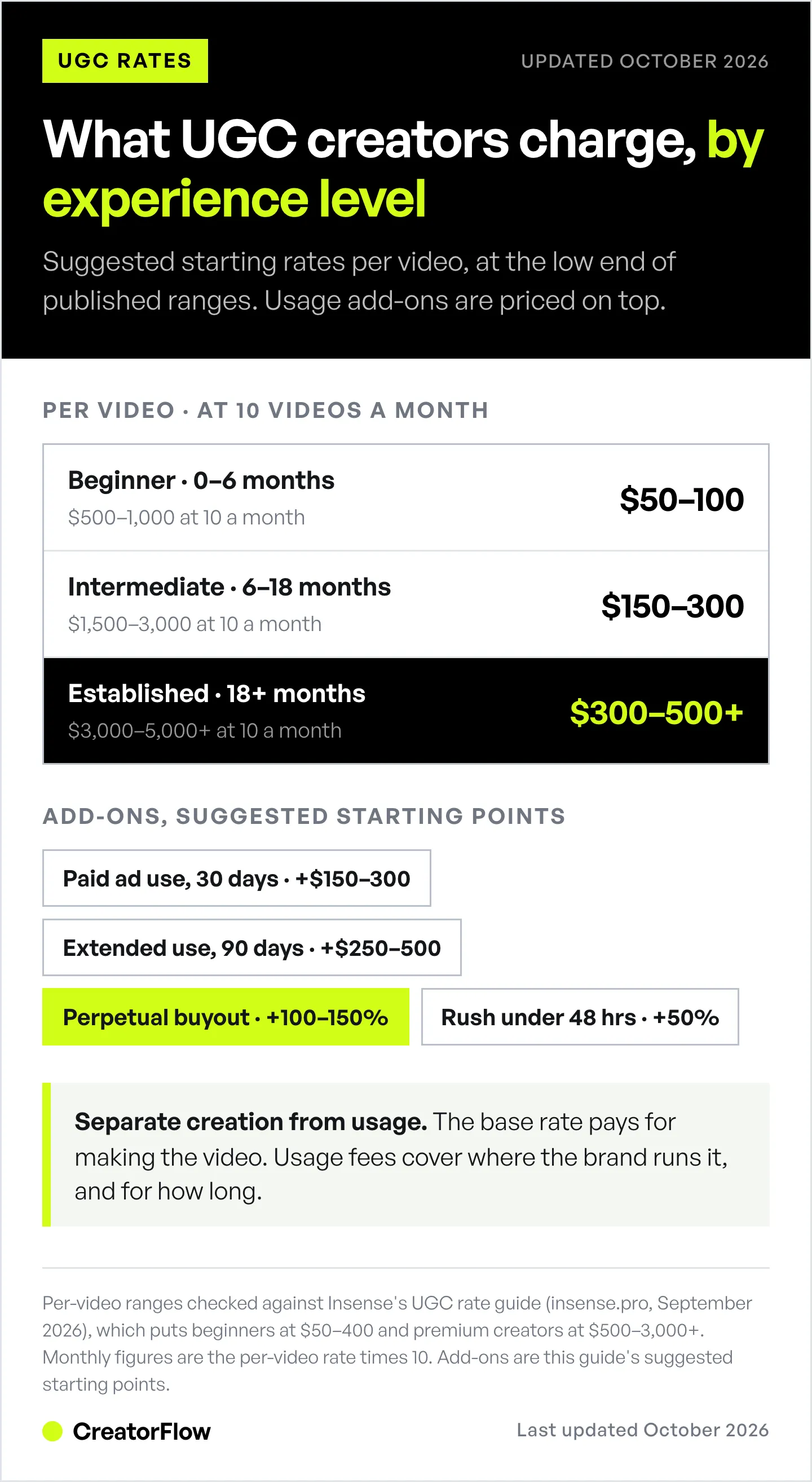
Base Rates by Experience
| Level | Per Video | At 10 videos a month |
|---|---|---|
| Beginner (0-6 months) | $50-100 | $500-1,000 |
| Intermediate (6-18 months) | $150-300 | $1,500-3,000 |
| Established (18+ months) | $300-500+ | $3,000-5,000+ |
Common Add-Ons
| Add-On | Suggested starting point |
|---|---|
| Paid ad usage (30 days) | +$150-300 |
| Extended usage (90 days) | +$250-500 |
| Perpetual/buyout rights | +100-150% of base |
| Whitelisting/Spark Ads | +$100-200/month |
| Raw footage | +$50-100 |
| Additional hook/CTA | +$50 each |
| Rush delivery (<48 hrs) | +50% |
Bundle Discounts
Brands love bundles. Offer 15-20% off for multi-video packages:
- 3 videos: 15% off
- 5 videos: 20% off
- 10+ videos: Custom quote
Source: Per-video ranges checked against Insense’s UGC rate guide (September 2026). The monthly column is the per-video rate times 10. Add-on and bundle figures are this guide’s suggested starting points, not survey data.
FAQ
Do I need a large following to be a UGC creator?
No. UGC creators are paid for content creation, not audience access. Brands distribute UGC through their own channels. Many successful UGC creators have under 1,000 followers. What matters is your ability to create authentic, high-quality content that converts.
Is Instagram DM automation safe for my account?
Yes, with low risk, when using tools that connect through Meta’s official Instagram API. Tools like CreatorFlow, ManyChat, and LinkDM use the official API, follow Meta’s messaging rules, and pace sends to stay under Meta’s limits. No tool can promise zero risk. Avoid browser bots or tools that require your Instagram password.
How much can UGC creators realistically make?
UGC income depends on your per-video rate and how many videos you sell. Insense’s September 2026 rate guide puts beginners at $50-400 per video, mid-level creators at $150-1,000 and premium creators at $500-3,000+. Worked example: 10 videos a month at $200 each is $2,000 a month, before usage fees.
How many brands should I pitch before landing a deal?
Expect to pitch many brands before your first paid deal. No reliable published number exists, so track how many you pitch and how many reply. Focus on quality pitches to aligned brands rather than mass-blasting generic messages. Follow up 2-3 times per brand over 30 days.
What’s the difference between UGC creators and influencers?
UGC creators produce content for brands to use on the brand’s channels. Influencers post branded content to their own audience. UGC creators are paid for content creation only. Influencers are paid for content + audience access. You don’t need followers to be a UGC creator.
What should I include in my UGC portfolio?
Include 5-10 of your best content samples organized by type (unboxing, review, tutorial, testimonial). Add a cover page with your name, niches, and contact info. Include 2-3 testimonials from past clients. List the brands you’ve worked with (with permission). Keep it updated monthly.
How do I handle usage rights in contracts?
Always separate creation fees from usage fees. Base rate = content creation. Usage fees = how/where the brand uses it. As a starting point, this guide suggests +$150-300 for 30 days of paid ad usage and +100-150% of the base rate for perpetual or buyout rights. Adjust for your niche. Never give perpetual rights without additional compensation.
Ready to automate your UGC creator workflow? Start your free CreatorFlow trial and set up your first portfolio automation in 5 minutes. 500 free DMs/month.


