

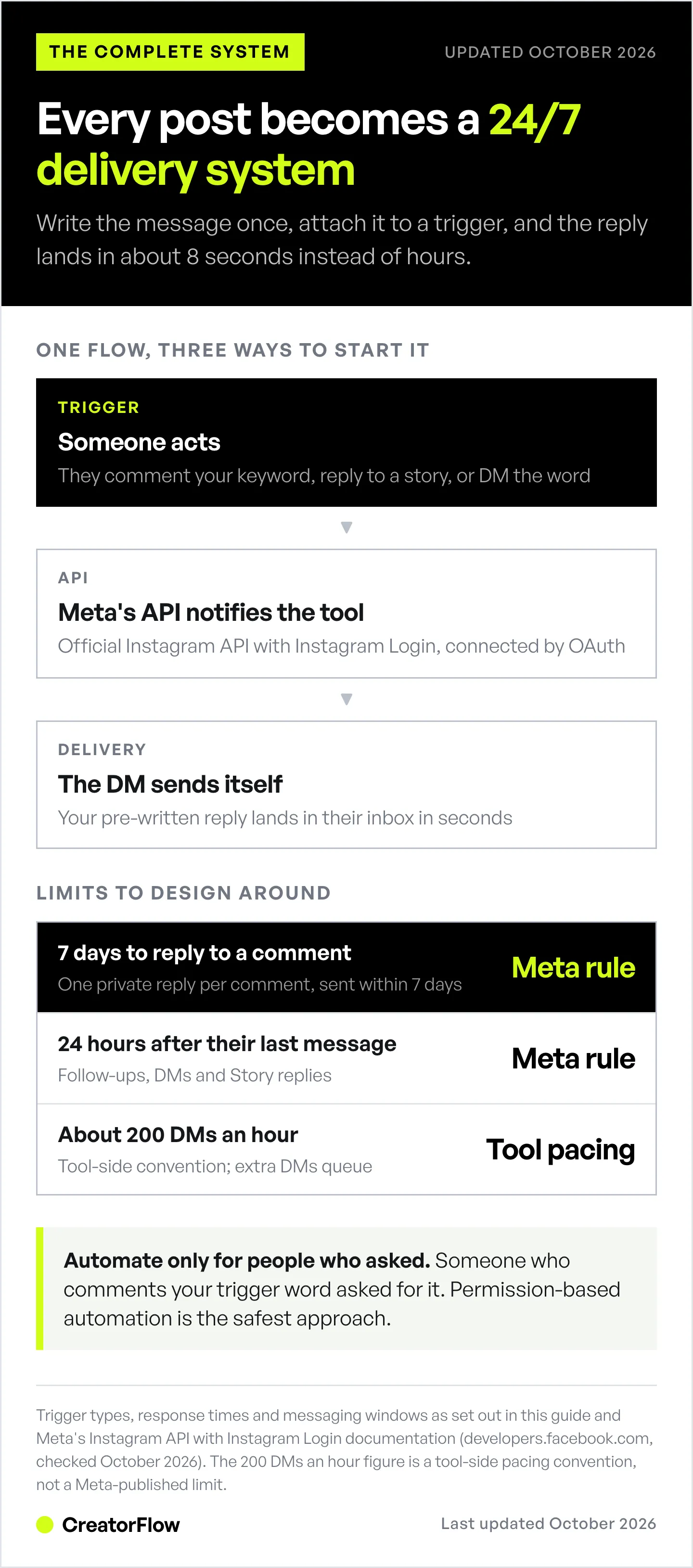
Instagram DM automation is software that sends direct messages automatically when followers comment trigger words, reply to Stories, or DM specific keywords. It connects through Meta’s official Instagram Graph API (as of October 2026), responds in 1-8 seconds versus 2-6 hours manually, and is paced by tools at up to about 200 automated DMs per hour. Tools like CreatorFlow ($15/month), ManyChat ($17–$199/month billed monthly), and LinkDM ($19/month) handle comment-to-DM, email capture, and link delivery on autopilot.
You post a Reel. Get 50 comments asking “link please?” By the time you respond 4 hours later, they’ve moved on to the next creator. You just lost 47 potential sales. DM automation fixes this by sending your message instantly when someone comments your trigger word. Someone comments “recipe”? They get your PDF in 8 seconds, not 4 hours.
This guide covers how Instagram automation works, which Instagram DM automation tools keep ban risk minimal, how to set auto DM on Instagram in 5 minutes, and practical setups by niche for automated DMs on Instagram. Whether you’re an Amazon affiliate tired of sending product links manually or a fitness coach drowning in “How much is your program?” messages, you’re about to get your time back. DMs are one of four things the word automation covers, mapped in what Instagram automation means. For a product-side overview, see how Instagram DM automation works inside CreatorFlow.
See it in action:
Key Takeaways
- What it does: Instagram DM automation sends messages automatically when someone comments a trigger word, replies to a Story, or DMs a keyword, using Meta’s official Instagram Graph API
- Response speed matters: Automated DMs arrive in 8 seconds vs. 2-6 hours for manual replies, preventing lost sales from delayed responses
- Safe tools use the official API: CreatorFlow ($15/month flat rate), ManyChat ($17–$199/month, priced per active contact), and LinkDM ($19/month) all connect through Meta’s sanctioned Graph API with OAuth authentication and no password sharing
- Rate limits: automation tools pace sends at about 200 automated DMs per hour (a tool-side convention), and Meta allows one private reply per comment within 7 days, with follow-ups only inside 24 hours of the person’s last message
- Setup takes 5 minutes: Connect your Instagram Business or Creator account, set trigger keywords, write your DM response, and activate
- Bottom line: DM automation turns every Instagram post into a 24/7 lead capture system for affiliate links, booking calendars, lead magnets, and product links
Master Instagram DM Automation with CreatorFlow
Follow us on Instagram: @creatorflow.so
Join the conversation on Threads: @creatorflow.so
What Is Instagram DM Automation?
Instagram DM automation is software that sends direct messages automatically when someone takes a specific action on your Instagram account. Also called Instagram message automation, it covers everything from comment-triggered replies to keyword-based DM responses. If you’re completely new to this, our Instagram automation beginners guide walks you through your first auto-reply in 15 minutes. New to the terminology? The Instagram DM automation glossary defines 25 core terms in plain language.
📚 Quick start resource: For a concise overview with setup instructions, visit our Instagram DM Automation Guide on the main site.
How it works:
- Someone comments “link” on your post → automation tool instantly sends them a DM with your link
- Someone replies to your Story → they get your pre-written message
- Someone DMs you “price” → they receive your pricing details automatically
The key word here is automatic. You write the message once. Set up the trigger once. Then it runs 24/7 while you sleep, work out, create content, or spend time with your family.
How it stays safe:
Instagram DM automation works through Instagram’s official Graph API. This is Meta’s sanctioned system that lets approved tools send messages on your behalf.
Safe tools (API-based):
- CreatorFlow
- ManyChat
- LinkDM
Unsafe tools (browser bots):
- Chrome extensions that control your account
- Tools that ask for your Instagram password
- Tools that claim Meta’s messaging rules don’t apply to them
Using the official API keeps ban risk minimal because you’re playing by Instagram’s rules. Browser bots that log into your account and pretend to be you? Those get accounts suspended. API-based tools? Those stay inside the rules.
Here’s what Instagram DM automation can do:
- Send automatic replies when someone comments a specific word on your posts
- Respond instantly when someone mentions you in their Story
- Auto-reply to keywords in incoming DMs (“price,” “info,” “help”)
- Deliver product links, discount codes, or downloadable files automatically
- Ask for email addresses before sending your main message
- Send a follow-up after the person replies (inside Meta’s 24-hour window)
- Track who clicked your links and who didn’t (segmentation)
Instagram’s API has limits. Here’s what you need to know:
~200 DMs per hour (tool-side pacing convention, not a Meta-published limit):
- Maximum automated DMs most tools will send per hour
- Applies to total messages across all automations
- If exceeded, messages queue and send in the next hour
- Meta’s own limit for private replies to comments is 750 per hour on the Instagram Login API
Messaging windows:
- A comment gets one private reply, sent within 7 days of the comment
- After that, you can message the person only within 24 hours of their last message (DMs and Story replies open the same 24-hour window)
- You can still message manually in the app, but automation won’t work outside these windows
These limits exist to prevent spam, and every legit tool respects them. If a tool says it can message anyone, any time, it is not working through Meta’s official API.
How Instagram DM Automation Actually Works (Technical Breakdown for Non-Technical People)
When someone comments on your Instagram post, Instagram’s system registers that action. If you’ve connected an automation tool like CreatorFlow to your Instagram account through the official API, Instagram notifies the tool: “Hey, user @emma_fitness just commented ‘workout plan’ on post 12345.”
Your automation tool checks: Do I have a rule for this? If you set up a trigger that says “When someone comments ‘workout plan,’ send them this DM,” the tool immediately sends that pre-written message to @emma_fitness’s inbox. This happens in 1-5 seconds. Instagram sees this as you sending a message through a partner tool, not as spam, because you’re using the official system.
Let me break down the three main automation types:
Comment-to-DM Automation
Someone comments on your post. Instagram notifies your automation tool. Tool sends the DM.
Example: You’re a beauty creator with an Amazon storefront. You post a Reel showing your skincare routine. In the caption: “Comment ROUTINE for my full product list.” When someone comments “ROUTINE,” they instantly get a DM with your Amazon affiliate links.
Why this works: People are already engaged with your content. They want what you have. You’re giving them what they asked for, immediately. This is the most popular automation type because the link arrives in the DM, with no searching through a bio page.
Story Reply-to-DM Automation
Someone mentions you in their Story or replies to your Story. Instagram notifies your automation tool. Tool sends the DM.
Example: You’re a course creator. You post a Story with a poll: “Would you take a $297 Instagram course?” Someone votes “Yes” and replies “Tell me more.” They instantly get a DM with your course landing page link and a discount code.
Why this works: Story interactions are private and feel personal. When you respond instantly, it feels like a 1-on-1 conversation, not a broadcast.
Keyword Trigger Automation (Direct DMs)
Someone sends you a DM with a specific keyword. Instagram notifies your automation tool. Tool sends the automatic reply.
Example: You’re a realtor. Someone DMs you “open house schedule.” They automatically get your calendar link and this week’s listings. Or they DM “sold homes” and get your portfolio PDF.
Why this works: When people DM you directly, they’re already qualified leads. They found your profile, read your content, and reached out. An instant reply reaches them while they’re still on your profile.
The beautiful thing about all three types: they work while you’re doing literally anything else. Creating content. Training clients. Sleeping. Your automation is working 24/7.
Instagram Graph API Limits and Safety (Don’t Get Banned)
Meta’s Instagram Graph API exists to keep the platform safe from spam. Meta (Instagram’s parent company) sets strict limits on how many messages you can send and who you can message. Every legitimate automation tool respects these limits. Here’s what you need to know:
The ~200 DMs Per Hour Pacing Convention
Automation tools pace sends at about 200 DMs per hour, a tool-side convention that keeps you well under Meta’s per-second API limits. This isn’t per tool or per feature. This is total. If you send 150 DMs through one automation and 100 through another, you’ve hit 250, and your tool queues the overflow. Those messages send in the next hour.
Why tools pace this way: Spam prevention. If someone could send 10,000 DMs per hour, Instagram would become unusable.
What this means for you: If you’re getting more than 200 comments/replies per hour (lucky you), some people will get your message 1-3 hours later instead of instantly. That’s still way better than responding manually 8 hours later.
Real talk: Most creators never hit this limit. You need a viral post with more than 200 trigger comments in an hour to bump up against it. Meta’s own ceiling for private replies to comments is higher, at 750 per hour on the Instagram Login API (developers.facebook.com, October 2026). If you regularly hit this limit, you’ve got bigger problems (good problems): you need a team to handle all the sales coming in.
The 24-Hour Messaging Window
Instagram’s API only lets you message people who reached out first, and only for a limited time. A comment gets one private reply, sent within 7 days of the comment. After that, you can message the person again only if they reply, and only within 24 hours of their last message. DMs and Story replies open the same 24-hour window. Since 28 September 2026, chats that start from a Click-to-Direct ad get up to 7 days (developers.facebook.com, October 2026).
Example: Someone comments on your post Monday at 2pm. Your automation can send its one private reply any time until the following Monday at 2pm. If they reply Tuesday at 9am, you can keep the conversation going until Wednesday at 9am.
Why this limit exists: Prevents creators from building massive lists and spamming people weeks later. Instagram wants conversations to be timely and relevant.
What this means for you: You can’t send “Did you get that link?” to someone who never replied, and you can’t set up a 7-day nurture sequence through Instagram DMs alone. For longer nurture sequences, you need to capture emails through your DM automation and move them to an email platform like Kit.com (formerly ConvertKit).
Safe vs. Unsafe Automation Tools
Safe (API-based):
- CreatorFlow
- ManyChat
- LinkDM
- InstantDM
- LinktoDM
These tools use Instagram’s official Graph API. Instagram knows they exist and reviews their app access. Using them keeps ban risk minimal.
Unsafe (Browser bots):
- Any tool that asks for your Instagram username and password
- Chrome extensions that “log in as you”
- Desktop software that “acts like you’re using Instagram”
- Services promising “unlimited DMs” or “no restrictions”
These tools violate Instagram’s Terms of Service. Instagram actively hunts for accounts using them. When caught, you get a warning, then a temporary ban, then a permanent ban. Not worth it.
How to tell if a tool is safe: Check if it uses Facebook/Instagram login. When you connect your account, you should see an official Instagram authorization screen asking for permissions. If a tool asks for your password directly, run away.
What Instagram Considers Spammy (and How to Avoid It)
Instagram’s algorithm watches for spam patterns:
Red flags:
- Sending identical messages to 100+ people within minutes (sounds like spam)
- Using aggressive language (“BUY NOW!” “LIMITED TIME!” with all caps)
- Sending messages to people who never engaged with you (how did you get their info?)
- Sending the same message repeatedly to the same person (annoying)
Green flags:
- Responding to people who asked for something (they commented your trigger word)
- Personalized messages with the person’s name or reference to their comment
- Natural, conversational language (not salesy spam)
- Respecting when people stop engaging (don’t send 5 follow-ups if they ignored the first one)
Your best protection: Only use automation for people who explicitly asked for information. If someone comments “link,” send them the link. If someone replies to your Story, send them relevant info. This is called “permission-based automation,” and it’s the safest approach.
Types of Instagram DM Automation (And When to Use Each)
Not all automation is created equal. Different types serve different purposes. Here’s how to match the automation type to your specific goal.
1. Comment-to-DM Automation (Link Delivery)
What it does: Monitors your post comments for trigger words. When someone comments the word, they get a DM.
Best for:
- Amazon affiliates sending product links
- LTK creators sharing outfit links
- Course creators delivering free lead magnets
- Coaches sending discovery call links
- Anyone tired of DMing “link in bio” 50 times a day
Setup: Pick your trigger word (link, recipe, guide, workout). Write your DM. Connect the automation to your post. Done.
Conversion stats: Based on user reports from automation tools, comment-to-DM typically achieves 10-25% click-through rates on links, compared to 2-5% for bio link clicks. Individual results vary based on audience quality and offer value.
Example message:
“Hey! Thanks for asking about my skincare routine. Here’s the full product list with links to everything I use: [link]
Use code SKIN15 for 15% off your first order. Let me know if you have questions!”
If DMs land in Message Requests: People who don’t follow you may find your DM in their Message Requests folder. Tell them where to look in a public reply (“Sent! Check your DMs and Message Requests”).
2. Story Reply-to-DM Automation (Engagement)
What it does: When someone replies to your Story, they get an automatic DM response.
Best for:
- Building deeper relationships (Stories feel personal)
- Qualifying leads (“Are you interested in coaching?” → instant reply with booking link)
- Running polls or quizzes and following up based on answers
- Exclusive offers for engaged followers
Setup: Post your Story with a call-to-action (“Reply with YES if you want this guide”). Set up automation to respond to replies containing “YES.” For more CTA ideas that drive replies and comments, see our Instagram call-to-action examples.
Conversion stats: Story reply automations typically show higher engagement than post-based automation, with user-reported open rates of 35-65% and click-through rates of 12-28%. Results vary by audience engagement and content quality.
Example message:
“I saw you replied to my Story about meal prep! I’m sending you my free 7-day meal plan PDF. It’s got recipes, shopping lists, and macro breakdowns.
[PDF link]
Any questions? Just reply to this message!”
Advanced move: Ask people to reply to your Story with one word and trigger a different DM for each keyword. “Home workouts or gym? Reply HOME or GYM” → HOME = home workout automation. GYM = gym workout automation.
3. Keyword Trigger Automation (Scalable Support)
What it does: Watches incoming DMs for keywords. When someone types the keyword, they get an automatic response.
Best for:
- Frequently asked questions (people DM “price” constantly)
- Support automation (people asking “How do I reset my password?”)
- Menu-style navigation (“Reply 1 for pricing, 2 for testimonials, 3 to book”)
- Filtering leads before you respond manually
Setup: Create a list of keywords (price, info, help, appointment, consultation). Write responses for each. Turn it on.
Conversion stats: Track your own: compare bookings or sales from keyword replies before and after you turn automation on. Results vary based on response speed and message quality.
Example keywords and responses:
Keyword: “PRICE”
“My coaching packages:
- 4-week program: $497
- 12-week transformation: $1,297
- 1-on-1 VIP: $2,500
Want to chat about which is right for you? Book a free 15-min call: [Calendly link]”
Keyword: “TESTIMONIALS”
“Here’s what clients are saying: [Screenshot 1] [Screenshot 2] [Screenshot 3]
Ready to get started? Reply START and I’ll send you my onboarding form.”
Keyword: “HELP”
“I’m here! What do you need help with? Reply SHIPPING for order tracking Reply RETURN for our return policy Reply HUMAN if you need to talk to me directly”
4. Email Gate Automation (List Building)
What it does: Before sending your main message (link, PDF, offer), it asks for the person’s email address.
Best for:
- Building an email list from Instagram (the holy grail)
- Long-term nurturing beyond Instagram’s 24-hour window
- Creating a retargeting list for ads
- Moving people from a rented platform (Instagram) to an owned platform (email)
Setup: Add an email collection step before your main message. Tool asks “What’s your email?” Person replies with email. Tool sends the promised content and saves the email.
Why this matters: Instagram owns your audience. If your account gets hacked or banned tomorrow, you lose everything. If you have emails, you keep your audience.
Conversion stats: Email capture rates through DM automation vary widely (typically 20-60%) depending on offer quality and audience engagement. This is generally higher than landing page opt-in rates (commonly 2-8%). Individual results vary significantly.
Example flow:
User comments: “GUIDE”
DM #1 (automatic):
“I’m sending you my Instagram Growth Guide (42 pages, free). What’s the best email to send it to?”
User replies: “emma@gmail.com”
DM #2 (automatic):
“Perfect! I just sent the guide to emma@gmail.com. Check your inbox (and spam folder just in case).
I also send weekly Instagram tips to that email. You’ll get my next newsletter Thursday. Reply STOP anytime if you don’t want emails.”
Tool saves: emma@gmail.com to your email list, tags her as “Instagram Growth Guide” for future segmentation.
Then you: Export the contacts as a CSV weekly, import them into Kit.com or your email platform, and add them to a proper nurture sequence.
Since 5 October 2026, Instagram no longer shows a one-tap email button in DMs, so people type their address, as in this example (developers.facebook.com, October 2026).
5. Follow-Up Sequences (Nurturing Leads)
What it does: Sends a second message after the person replies to the first one.
The rule that shapes it: Meta allows a follow-up only after the person replies, and only within 24 hours of their last message. A “did you get my link?” message to someone who never replied is not allowed. For people who stay silent, the follow-up belongs in email.
Best for:
- Answering the next question when someone replies (“Does this work for beginners?”)
- Qualifying a lead who replied YES to your first message
- Sending the next step (booking link, checkout link) once they say they’re ready
Setup: In tools with multi-step flows (ManyChat, for example), add a step that waits for the person’s reply, then sends the next message. For everyone who doesn’t reply, collect the email in the first message and follow up from your email platform.
Example:
Message 1 (immediate):
“Here’s your free meal plan: [link]. Want the shopping list too? Reply YES.”
Message 2 (only after they reply YES):
“Here you go: [shopping list link]. Any questions? Just reply!”
Warning: Don’t chase people who didn’t reply. That’s spam, and it breaks Meta’s messaging rules. If they don’t engage, move on, or follow up by email if they gave you their address.
Tool Comparisons: ManyChat vs LinkDM vs CreatorFlow vs InstantDM
You’ve got options. Here’s the honest comparison of the top Instagram DM automation tools. Prices were checked on each company’s pricing page in October 2026. If you’re weighing only the two best-known names, we break down ManyChat vs LinkDM side by side.
👉 Want a deeper dive? Check out our full comparison of the best Instagram DM automation tools with detailed feature breakdowns, pros/cons, and use-case recommendations.
🤖 Looking for AI chatbots? If you want conversational AI that holds actual conversations (not just trigger-based automation), see our 10 Best Instagram Chatbots Compared.
ManyChat (The Multi-Platform Option)
Pricing: Contact-based. ManyChat’s pricing page lists a free plan up to 25 contacts and, billed monthly, Essential $17/month (250 contacts), Pro $39/month (2,500), Business $99/month (7,500), Advanced $199/month (25,000). Billed annually those work out to $14/$29/$69/$139 per month (checked October 2026).
Best for: Agencies managing multiple clients, businesses needing complex chatbot workflows across multiple platforms (Facebook, Instagram, WhatsApp, SMS, TikTok, Telegram, email).
Strengths:
- Multi-platform (Facebook, Instagram, WhatsApp, SMS, TikTok, Telegram, email)
- Workflow builder with conditional logic and branching
- Advanced segmentation and tagging
- Integrations with hundreds of tools (Shopify, Zapier, Google Sheets)
- Large user base means extensive tutorials and community support
Considerations:
- Depth of the flow builder fits agencies and multi-channel marketers more than solo creators
- Contact-based pricing scales with audience size rather than flat-rate
ManyChat’s workflow builder is a visual canvas. Each step, condition and branch appears as a block you connect. That structure suits multi-step journeys across channels. A single comment-to-link automation needs only one trigger and one message.
Who should use ManyChat: Agencies, ecommerce brands with big budgets, businesses that need automation across multiple platforms, teams comfortable building in a flow-builder canvas.
Who may prefer a simpler tool: Solo creators who only need one comment trigger and one message per post.
📊 Want a detailed comparison? See our CreatorFlow vs ManyChat breakdown with feature-by-feature analysis.
LinkDM (The Market Leader)
Pricing: Free (1,000 DMs/month), Pro $19/month (25,000 DMs), Platinum+ $99/month (300,000 DMs).
Users: 60,000+ creators, brands and agencies, per LinkDM’s homepage (checked October 2026).
Best for: Instagram-focused creators who want reliable automation without complexity.
Pros:
- Flat-rate pricing (doesn’t increase as you grow)
- Instagram-only focus (no feature bloat)
- Quick setup (10-15 minutes for first automation)
- Proven track record (60,000+ users)
- Meta Business Partner since 2021 (as LinkDM states)
- Multiple accounts by plan: Pro covers 3 accounts, Platinum+ covers 10 (linkdm.com/pricing, October 2026)
Considerations:
- Support runs through email (linkdm.com, July 2026)
LinkDM is the safe bet. 60,000+ creators, brands and agencies use it. If you want something proven and Instagram-focused, LinkDM is solid.
Who should use LinkDM: Creators who want proven reliability, budget-conscious creators ($19/mo is fair).
Who should skip LinkDM: Agencies running more than 10 accounts on one plan.
CreatorFlow (The Design-Forward Option)
Pricing: Free plan (500 DMs/month), then $15-30/month flat rate (5,000 or 10,000 DMs a month per workspace, unlimited contacts, unlimited automations).
Best for: Creators who want comment, Story and keyword automation without a flow builder, plus a clean design.
Pros:
- Real-time phone preview (see exactly what your DM looks like as you write it)
- Template-first approach (pick a template, customize, launch in 5 minutes)
- Multi-brand workspaces (2 on Pro, 5 on Growth, all from one dashboard)
- Modern, beautiful UI (built for creators who care about aesthetics)
- Flat-rate pricing at $15/mo ($4 a month less than LinkDM Pro)
- Link tracking and geographic analytics (Pro and Growth)
Scope:
- 20,000+ creators & brands
- Instagram-first, with every feature built around how Instagram behaves
- Contacts export by CSV into whichever email platform you already use
CreatorFlow shows a real-time phone preview. As you type your message in the editor, you see exactly how it’ll look in someone’s Instagram inbox. No guessing. No “oops, I forgot to add the link.” You see it live.
Who should use CreatorFlow: Female creators in beauty/fitness/fashion, multi-brand creators or agencies, people who want simple setup without sacrificing power, budget-conscious creators.
If you need Facebook, WhatsApp, and SMS in one dashboard, or enterprise-grade integrations: ManyChat is built for that spread.
InstantDM (The Budget Option)
Pricing: InstantDM’s pricing page lists a free plan (500 automations a month), Legend Pro at $12/month, or $9.99/month billed annually, and Trendsetter at $29.99/month, or $24.99 billed annually (checked October 2026).
Users: 30,000+ creators and brands (as reported on their website, October 2026).
Best for: Creators who want a free plan and a low monthly price.
Pros:
- Low entry price ($12/month, or $9.99 billed annually)
- Simple interface
- Safety-focused messaging (they emphasize API compliance)
- Higher tiers add API, webhooks and Meta Ads automation (Trendsetter)
Hourly pacing by plan. InstantDM lists Legend Pro as “unlimited automation, up to 800/hour”, Trendsetter up to 2,000 per hour, and Trendsetter Pro ($59.99/month, or $49.99 billed annually) with no hourly cap. When your post goes viral with 1,000 comments in 30 minutes, the plan’s hourly pace decides how fast everyone gets the DM.
Who should use InstantDM: Creators who want to start free and keep costs low.
Who should skip InstantDM: Brands that need WhatsApp, SMS or email in the same tool (InstantDM covers Instagram and Facebook).
Quick Recommendation Guide
If you’re an agency or need multi-platform: ManyChat (expect to pay $39–$99/month as you grow).
If you want the proven market leader: LinkDM ($19/month).
If you’re a solo creator who values design and wants flat-rate pricing: CreatorFlow ($15/month).
If you want the lowest entry price: InstantDM ($12/month, or $9.99/month billed annually).
Our pick for most creators: CreatorFlow or LinkDM. Both are Instagram-focused, both use flat-rate pricing (no surprises as you grow), both are API-safe. CreatorFlow costs less at $15/month and includes geographic click analytics. LinkDM has the larger user base and longer track record. You can’t go wrong with either.
Advanced Features: Workspaces, Analytics, and Multi-Brand Management
Once you’ve mastered basic automation, these advanced features separate hobbyists from professionals.
Multi-Brand Workspaces
What it is: Manage multiple Instagram accounts or brands from one dashboard, with separate automation and contacts for each.
Who needs this:
- Agencies managing client accounts
- Creators with multiple brands (fitness account + meal prep account)
- Couples or families sharing one tool for different businesses
- Anyone running more than one Instagram account
Example: You have a personal brand Instagram (50K followers) and a side business Instagram (10K followers). Without workspaces, you’d need two separate tool subscriptions or risk mixing up contacts and automations. With workspaces, you switch between them with one click. Each workspace has its own automations, contacts, and analytics.
Multi-account options (October 2026): CreatorFlow (2 workspaces on Pro, 5 on Growth), LinkDM (3 accounts on Pro, 10 on Platinum+), InstantDM (two multi-account plans), ManyChat (each connected account runs on its own plan).
Advanced Analytics and Attribution
What it is: Tracking exactly which posts, automations, and messages drive clicks, leads, and sales.
Metrics to track:
- DMs sent per automation
- Click-through rate (CTR) on links sent via DM
- Email capture rate (how many people gave you their email)
- Geographic data (where your engaged audience lives)
- Time-based heatmaps (when people engage most with your DMs)
- Post performance (which posts triggered the most DMs)
- Automation performance (which automation converts best)
📈 Know your baseline first: Calculate your current engagement rate with our free Instagram Engagement Calculator before setting up automation. For tactics to lift that rate, read 10 ways to increase Instagram engagement.
Why this matters: You can’t improve what you don’t measure. If you’re sending 500 DMs per week but only getting 10 clicks, your message sucks. If you’re getting 150 clicks but no sales, your landing page sucks. Analytics tell you where the problem is.
Example: You run three automations: one for skincare links (CTR: 23%), one for makeup links (CTR: 12%), one for haircare links (CTR: 8%). Data tells you: double down on skincare content, fix your makeup messaging, maybe drop haircare. This is how you 3X your income with the same audience.
Tools with built-in analytics: ManyChat (flow-level reporting), CreatorFlow (click tracking and geographic analytics on Pro and Growth), LinkDM (campaign-level reporting).
Email Capture and CRM Integration
What it is: Collecting emails through DM automation and syncing them to your email marketing platform.
The process:
- User triggers your automation (comments “GUIDE”)
- DM asks for their email
- User replies with email
- Tool saves email to internal database
- You export emails weekly (CSV download)
- Import to Kit.com, Mailchimp, or your email platform
- Add to nurture sequence
Why this is critical: Instagram is a rented platform. Meta owns your audience. If your account gets hacked, shadowbanned, or suspended tomorrow, you lose everyone. If you have emails, you keep your audience forever. Own your audience.
Advanced version: ManyChat connects to email platforms through Zapier and native integrations, so a captured email can land in your Kit.com list in real time. CreatorFlow takes a different route: emails collected by the Email Gate land in Contacts, and you move them with a CSV export on Pro and Growth (creatorflow.so, October 2026).
Best practices:
- Always ask permission (“I’ll send you weekly tips to this email. Reply STOP anytime.”)
- Follow CAN-SPAM and GDPR rules (required by law)
- Use double opt-in for EU users (send confirmation email, they click to confirm)
- Tag where the email came from (“Instagram - Skincare Guide - Mar 2026”)
- Send first email within 24 hours (strike while they’re hot)
Segmentation and Tagging
What it is: Organizing your contacts based on what they engaged with, so you can send targeted messages later.
Example tags:
- “Interested in meal prep” (commented on meal prep post)
- “Downloaded workout guide” (got your PDF)
- “Asked about coaching” (sent DM with keyword “coaching”)
- “High intent” (clicked 3+ links, opened 5+ messages)
- “Los Angeles” (from local creator using location-based strategy)
Why this matters: Not everyone is at the same stage. Someone who just discovered you needs different messaging than someone who’s engaged with 10 of your posts. Segmentation lets you treat them differently.
Example use case: Black Friday sale. You email everyone tagged “Interested in meal prep” offering 40% off your meal prep course. (A DM blast to old contacts would break Meta’s 24-hour rule.) You don’t spam your entire list with irrelevant offers. You target people who’ve already shown interest.
Real Use Cases: How Creators Actually Use Instagram DM Automation
Theory is nice. Examples are better. Here’s how creators in different niches set up Instagram DM automation, and what to measure.
Amazon Influencer / LTK Creator (Affiliate Marketing)
The problem: Getting 100+ comments daily asking “Where did you buy that?” Manually responding takes 2+ hours. By the time you respond, half the people have moved on.
The automation:
- Posts Reel showing outfit or product
- Caption: “Comment LINKS for everything tagged”
- Automation sends instant DM: “Here’s the full outfit breakdown: [Amazon links] Use code FALL15 for extra savings!”
- Includes affiliate disclosure: “I earn from qualifying purchases”
What to measure: Clicks per post in your affiliate dashboard before and after automation. People get the links they asked for, immediately, instead of searching a bio page.
Advanced move: Email gate before sending links. “What’s your email? I’ll send you this outfit + exclusive weekly style guides.” Build email list for future promotions when Instagram inevitably changes the algorithm again.
Fitness Coach (High-Ticket Services)
The problem: Getting constant DMs asking “How much is your program?” or “Do you do online coaching?” Responding individually takes too long, and delayed responses mean lost sales.
The automation:
- Posts transformation Story
- Caption: “Want results like this? DM me READY”
- Automation sends: “My 12-week transformation program is $1,297 and includes: custom meal plan, 3x/week training calls, 24/7 text support. I only take 5 clients per month. Book a free 15-min call to see if we’re a fit: [Calendly link]”
- Keyword triggers in DMs: “PRICE” → pricing info, “TESTIMONIALS” → client results, “START” → onboarding form
What to measure: Discovery calls booked per week from DM links, and the share of those calls that become clients. Leads who DM you READY have already self-selected.
Advanced move: Ask for the email before sending the booking link. If they don’t book, follow up by email, since Meta doesn’t allow a DM reminder to someone who hasn’t replied.
Course Creator (Digital Products)
The problem: Want to sell a $297 course, but Instagram doesn’t allow direct links in captions. Bio link gets low clicks. People comment asking for info but lose interest if you respond later.
The automation:
- Posts carousel teaching Instagram growth tip
- Last slide: “Want my full Instagram Growth Course? Comment COURSE”
- Automation sends: “I teach everything I know in my Instagram Growth Course ($297). Here’s what you get: [course details]. Using code REDDIT40 you get 40% off (expires in 48 hours): [course link]”
- Also captures email before sending: “What’s your email? I’ll send course details + a free Instagram audit checklist”
What to measure: Course sales and new email subscribers per post, compared with sales from your bio link.
Advanced move: Send a free “mini-course” via email first (5-day email sequence with actionable tips), then pitch the paid course on Day 6. People who got value first are more likely to trust you and buy.
Realtor (Local Business)
The problem: Posting property listings, but leads slip through the cracks. People comment “Interested!” but by the time you respond hours later, they’ve contacted 3 other realtors.
The automation:
- Posts property listing photo
- Caption: “3BR/2BA in West LA, $1.2M. Comment TOUR for details and open house schedule”
- Automation sends: “Thanks for your interest in [property address]! Here’s the full listing: [link]. Open house is Saturday 1-4pm. Want to schedule a private showing? Book here: [Calendly link]. Text me with questions: [phone number]”
What to measure: Showings booked per listing post, and deals you can trace back to a DM.
Advanced move: Segment leads by property type. Tag people who engaged with “luxury condo” posts separately from “family home” posts. When you get a new listing, email only the people who’ve shown interest in that property type.
Product-Based Small Business (E-commerce)
The problem: Running small business Instagram, people ask “Do you have this in size M?” or “What’s your return policy?” or “Do you ship to Canada?” Answering the same questions 30 times per day.
The automation:
- Keyword triggers: “SIZE” → sizing chart image + link to size guide
- “SHIPPING” → shipping policy + “We ship to US, Canada, UK”
- “RETURN” → return policy + link to return portal
- “TRACK” → “What’s your order number?” → look up order (manual), send tracking link
- “HELP” → “I’m here! What do you need help with? Reply SIZE, SHIPPING, RETURN, or TRACK”
What to measure: Hours per week spent answering FAQs, before and after. Instant replies free that time for content and new customers.
Advanced move: Collect emails from everyone who asks questions. Add them to a weekly newsletter with new product drops and exclusive discounts, so more of your sales come from email instead of just Instagram.
Common Problems and Troubleshooting
You’re going to run into issues. Here’s how to fix them.
”Instagram Won’t Let Me Send DMs to People Who Commented”
Common causes:
- The comment is older than 7 days. Meta allows one private reply per comment, within 7 days.
- You’re testing from the connected account itself. A comment from your own account won’t trigger your automation; use a second account.
- The keyword doesn’t match. In CreatorFlow, keywords match whole words and ignore case: “link” matches “link please”, not “linked”.
- The person has restricted who can message them.
Solution: Check these four in order. Most “no DM” reports are a test from your own account or a keyword that isn’t a whole word.
”People Aren’t Getting My DMs”
Possible causes:
-
Message Requests folder: If you don’t follow each other, your DM might land in their Message Requests folder (not their main inbox). Many people never check this folder.
- Solution: Include “Check your Message Requests folder!” in your comment reply before sending the DM.
-
Instagram’s spam filter: If your message looks too sales-y, Instagram might hide it.
- Solution: Write natural, conversational messages. Avoid ALL CAPS, excessive emojis, or aggressive sales language.
-
User has DMs turned off: Some accounts don’t accept DMs from people they don’t follow.
- Solution: Nothing you can do. Move on.
-
You hit your tool’s ~200/hour pacing: sends were throttled and queued.
- Solution: Messages will send eventually. If you regularly hit this limit, stagger your posts or use Instagram ads to drive traffic to a landing page instead.
”My Click-Through Rate Is Really Low”
Your message probably sucks. Sorry, but it’s true. Here’s how to fix it:
Bad message example:
“Here’s the link you asked for: [link]”
Why it’s bad: No context, no personality, no reason to click now instead of later (or never).
Good message example:
“Hey! Thanks for asking about my skincare routine. I just sent you the full product list (14 products I’ve used for 2+ years).
Quick tip: Start with the cleanser and moisturizer. Everything else is optional until you nail the basics.
Questions? Just reply to this message!”
Why it’s good: Personalized, provides extra value (pro tip), invites conversation. People are more likely to click because it feels like a friend helping them, not a robot spamming a link.
Other reasons for low CTR:
- Link doesn’t work: Test your links before going live with automation.
- Landing page is slow or broken: If your link takes 10 seconds to load, people bail.
- Message is too long: Keep it under 100 words. People skim DMs on their phones.
- You didn’t deliver what you promised: Caption said “free workout plan,” but link goes to a $297 course sales page. That’s bait-and-switch. Don’t do it.
”I’m Getting Spam Complaints or People Are Annoyed”
You’re automating too aggressively. Pull back.
Aggressive (bad):
- Sending DMs to everyone who likes your post (they didn’t ask for anything)
- Sending follow-up messages to people who never replied
- Using pushy sales language (“BUY NOW! LIMITED TIME!”)
- Messaging people who engaged weeks ago (outside Meta’s messaging windows, probably using shady tools)
Permission-based (good):
- Only DMing people who commented your trigger word (they explicitly asked)
- Sending a follow-up only after they reply
- Using helpful, conversational language
- Respecting when people don’t engage (don’t keep messaging them)
If someone replies “stop” or “unsubscribe” or anything negative: Remove them from all automations immediately. Most tools have a “stop word” feature that automatically blocks future messages to that person.
”Instagram Suspended My Account”
This is rare if you’re using API-based tools correctly. But it happens. Common causes:
- Using browser bots or unauthorized tools: Switch to API-based tools immediately.
- Violating Instagram’s Community Guidelines: Selling banned products, posting spam content, buying fake followers.
- Getting mass-reported by users: If 50 people report your DMs as spam, Instagram will investigate.
- Using aggressive automation strategies: Sending DMs to people who didn’t engage with you, messaging outside Meta’s messaging windows using shady workarounds.
How to appeal:
- Go to Instagram settings → Help → Report a Problem
- Explain: “I’m using Instagram’s official Graph API through [tool name] to respond to people who comment on my posts. I’m not spamming. Here’s proof: [screenshots of your automations]”
- Wait. Instagram reviews take 1-7 days.
- If denied, try again with more detail.
Prevention:
- Only use API-based tools (CreatorFlow, ManyChat, LinkDM, InstantDM)
- Only message people who engaged with you first
- Avoid spammy language in your DMs
- Include an easy opt-out (“Reply STOP anytime”)
- Don’t buy followers or use engagement pods (Instagram watches for this)
Step-by-Step: Set Up Your First Automation in 5 Minutes
Enough theory. Here’s exactly how to set up your first comment-to-DM automation right now.
Step 1: Choose Your Tool
Pick one: CreatorFlow ($15/mo), LinkDM ($19/mo), or ManyChat (free up to 25 contacts). For this tutorial, I’ll use generic steps that work for all three.
Create an account. Most tools offer either a free tier or a 7-14 day trial. Check the card policy before you sign up: free tiers usually need no card, paid trials usually do.
Step 2: Connect Your Instagram Account
Click “Connect Instagram” or “Add Account.” You’ll see an official Instagram/Facebook authorization screen. Log in with your Instagram credentials. Grant permissions when asked.
Important: Make sure you’re connecting a Business or Creator account, not a Personal account. Instagram’s API only works with Business/Creator accounts. If you have a Personal account, go to Instagram app → Settings and activity → Account type and tools → Switch to professional account (takes 30 seconds).
Step 3: Create Your First Automation
Click “New Automation” or “Create Automation.” Choose “Comment-to-DM” or “Post Trigger” (wording varies by tool).
Select trigger type: Comment on Post
Choose post: Pick a post from your feed (recent posts work best because they’re still getting engagement). Or schedule the automation to activate when you post next.
Enter trigger word: Type the word people will comment. Examples: LINK, GUIDE, RECIPE, WORKOUT, INFO, PRICE.
Pro tip: Pick a simple word. “LINK” works better than “PLEASESENDMETHEFULLFOODLIST” because people are lazy and typing on phones.
Step 4: Write Your DM Message
This is the message people will receive when they comment your trigger word. Keep it:
- Personal (use “Hey!” or “Thanks for asking!”)
- Short (under 100 words)
- Clear (deliver what you promised)
- Actionable (include the link or next step)
Template:
“Hey [Name]! Here’s [what they asked for]: [link]
[One helpful tip or bonus]
Questions? Just reply to this message!”
Example:
“Hey! Here’s my Amazon skincare routine (full list with links): [URL]
Pro tip: Start with the cleanser and vitamin C serum. You’ll see results in 2-3 weeks.
Let me know if you have questions!”
Most tools let you insert the person’s name automatically with a variable like {{first_name}}. Use it. Seeing their own name makes the DM feel written for them.
Step 5: Add a Link (If Applicable)
Paste your link in the message. Most tools will automatically track clicks so you can measure performance.
Link options:
- Direct product link (Amazon, Shopify, Etsy)
- Landing page (for email capture or course sales)
- Google Drive or Dropbox (for PDFs or downloadable files)
- Calendly or booking tool (for service businesses)
- Link-in-bio tool (Linktree, Beacons, Stan Store)
Pro tip: Use a URL shortener like Bitly if your link is ugly or super long. Shorter links look cleaner in messages and are easier to click on mobile. For Amazon affiliate links, use Amazon’s own amzn.to short links instead: Amazon’s Operating Agreement does not allow shorteners that hide the Amazon destination.
Step 6: (Optional) Add Email Collection
If your tool supports it, turn on “Collect Email Before Sending Message.” The flow will be:
- User comments trigger word
- DM #1: “What’s your email?”
- User replies with email
- DM #2: Sends your main message with link
This adds one extra step but gets you emails (worth it). The best moment to ask for an email is right after someone asks for your link.
Step 7: (Optional) Point People to Their Message Requests
DMs to people who don’t follow you can land in their Message Requests folder. Add a public reply such as “Sent! Check your DMs and Message Requests” so they know where to look.
Step 8: Preview and Test
Most tools have a preview feature showing exactly what your DM will look like. Check it.
Test it yourself:
- Go to the Instagram post you chose, logged in to a second account (a comment from the connected account itself won’t trigger the automation)
- Comment your trigger word
- Wait 5-30 seconds
- Check your Instagram DMs
- You should receive the automated message
If you got it, congrats. Your automation is live. If not, troubleshoot: Did you comment from a second account? Did you connect the right account? Is the trigger word spelled exactly right? Is the automation turned ON?
Step 9: Go Live
Activate the automation. Post on Instagram (if you haven’t already). Watch as comments come in and DMs send automatically.
Monitor for the first hour: Check that messages are sending correctly, links work, and people aren’t reporting spam. If everything looks good, let it run.
Step 10: Check Analytics After 24 Hours
Go to your automation tool’s analytics dashboard. Look at:
- How many people commented your trigger word
- How many DMs sent successfully
- How many people clicked your link (CTR)
- Any errors or failures
Benchmark CTRs:
- 15-25% = great
- 10-15% = good
- 5-10% = okay, but improve your message
- Under 5% = your message or link is broken
How to improve: Test different messages. Change your wording. Add more personality. Make the offer clearer. Test different links. Iterate.
FAQ
How do I set up auto DM on Instagram?
To set auto DM on Instagram, you need a Business or Creator account and an API-based automation tool. Sign up for a tool like CreatorFlow, ManyChat, or LinkDM, connect your Instagram account through the official API, and create your first trigger. Pick a keyword (like “LINK”), write the DM you want to send, and activate. The entire process to send automated DM on Instagram takes under 5 minutes with template-based tools.
Is Instagram DM automation safe?
Yes. Instagram DM automation is safe when you use tools that connect through Meta’s official Instagram Graph API. These tools (CreatorFlow, ManyChat, LinkDM) follow Instagram’s rate limits and messaging rules. DM automation Instagram accounts get banned only when using unauthorized browser bots that log in with your password. Stick to API-based tools and ban risk stays minimal.
Is Instagram DM automation legal and safe?
Yes, if you use tools that work through Instagram’s official Graph API. Instagram explicitly allows automation through approved partner tools. Tools like CreatorFlow, ManyChat, LinkDM, and InstantDM use the official API, so they’re safe when following Instagram’s guidelines and minimize ban risk.
What’s NOT safe: Browser bots that log into your Instagram account and send messages pretending to be you. These violate Instagram’s Terms of Service and will get you banned. Avoid any tool that asks for your Instagram password directly (API tools use Facebook/Instagram login, which is different and safe).
How much does Instagram DM automation cost?
Paid plans range from $12/month (InstantDM Legend Pro, or $9.99/month billed annually) to $199/month (ManyChat Advanced, billed monthly). ManyChat starts at $17/month (Essential, 250 active contacts) and increases with contact count (manychat.com/pricing, October 2026).
Free options exist: CreatorFlow (500 DMs a month), LinkDM (1,000 DMs a month), InstantDM (500 automations a month) and ManyChat (25 contacts) all have free plans. For most creators, expect to budget $12-19/month billed monthly for an entry paid plan.
Will Instagram ban me for using DM automation?
No, if you’re using API-based tools and following Instagram’s rules. Instagram only bans accounts using unauthorized browser bots or violating Community Guidelines (spam, selling illegal products, fake engagement).
Safe practices:
- Only message people who engaged with you first (commented, replied to your Story, DM’d you)
- Use conversational language (not aggressive sales spam)
- Respect the ~200 DMs/hour pacing convention (API tools do this automatically)
- Only message inside Meta’s windows: one private reply per comment within 7 days, then 24 hours after the person’s last message (API tools enforce this)
- Provide an easy opt-out (“Reply STOP anytime”)
As long as you only message people who asked for it, your ban risk stays low. No tool can promise zero risk.
Can I automate Instagram DMs for free?
Yes, with limitations. CreatorFlow’s free plan sends 500 DMs a month on one Instagram account. LinkDM’s free plan covers 1,000 DMs a month, InstantDM’s 500 automations a month, and ManyChat’s 25 active contacts (each vendor’s pricing page, October 2026).
For most creators, free plans work well when starting out. Once you grow past the free tier limits, you’ll need to upgrade to a paid plan ($12-19/month billed monthly).
How many DMs can I send per hour with automation?
Most automation tools pace you to approximately 200 automated DMs per hour. That figure is a tool-side convention rather than a Meta-published limit, and it applies across all your automations on an account. If you send 150 DMs through one automation and 100 through another, you’ve hit 250 total, and your tool queues the extra 50 for the next hour.
Tools pace this way to prevent spam. Meta’s own published limits sit higher: 100 calls per second for text and links, and 750 private replies to comments per hour on the Instagram Login API (developers.facebook.com, October 2026). Unless you’re consistently going viral with posts getting more than 200 trigger comments per hour, you’ll never reach the pacing ceiling.
If you regularly hit that ceiling, congratulations-you have a good problem (too much engagement). Consider hiring a VA to handle overflow, or use Instagram ads to drive traffic to landing pages instead.
Can I use DM automation to collect email addresses?
Yes, this is one of the most valuable uses of Instagram DM automation. The flow works like this:
- User comments your trigger word
- Automation sends: “What’s your email? I’ll send you [promised thing]”
- User replies with their email
- Automation sends the promised content and saves the email
Most tools (CreatorFlow on Pro and Growth, ManyChat, LinkDM) support email collection. You’ll export the emails weekly as a CSV and import them into your email marketing platform (Kit.com, Mailchimp, etc.) for long-term nurturing.
Capture works best when the offer is compelling (free PDF, discount code, exclusive access). Since 5 October 2026, Instagram no longer shows a one-tap email button in DMs, so people type their address.
Does Instagram DM automation work for small accounts?
Absolutely. DM automation works even better for small accounts because you’re maximizing every interaction. When you only get 10-20 comments per post, responding instantly to all of them (via automation) dramatically increases conversion rates.
Small accounts often see bigger percentage improvements: going from 0 DMs automated to 100% automated is a massive productivity boost. You’re not “too small” for automation. If you’re manually responding to DMs, you need automation.
Many tools offer free trials. Test it for 7-14 days and see the impact on your time and conversions.
What is Instagram DM automation and how does it work?
Instagram DM automation is software that automatically sends direct messages when someone interacts with your Instagram account. It works through Instagram’s official Graph API. When someone comments a trigger word (like “LINK”) on your post, the automation tool instantly sends them a pre-written DM with your link. Setup takes 5 minutes: connect your Business/Creator account, choose a trigger word, write your message, and activate.
What are the Instagram Graph API limits for DM automation?
Automation tools pace sends at about 200 DMs per hour across all automations, a tool-side convention rather than a Meta-published limit. Meta’s own limits on the Instagram Login API are 100 calls per second for text and links, 10 per second for audio and video, and 750 private replies to comments per hour. A comment gets one private reply within 7 days; after that, you can message someone only within 24 hours of their last message. If you exceed your tool’s pacing, messages queue and send in the next hour. Your account must be Business or Creator type (Personal accounts don’t have API access) (developers.facebook.com, October 2026).
Does Instagram DM automation work for comments on Reels?
Yes, Instagram DM automation works for comments on Reels, static posts, carousels, and Story replies. When someone comments your trigger word on any post type, they instantly get your automated DM. This works identically across all Instagram content formats. Most creators see highest engagement on Reels (more comments = more automated DMs sent).
How do I set up my first Instagram DM automation?
Set up Instagram DM automation in 5 steps: (1) Switch to Business/Creator account (free, Settings and activity → Account type and tools → Switch to professional account). (2) Sign up for automation tool (CreatorFlow, ManyChat, or LinkDM). (3) Connect your Instagram account via API permissions. (4) Create automation: choose trigger (comment word), write message, add your link. (5) Activate and test. Takes 5-10 minutes total for first automation.
What’s the difference between comment-to-DM and Story reply automation?
Comment-to-DM automation responds when someone comments on your posts/Reels. Story reply automation responds when someone replies to your Instagram Story. Both send automated DMs but trigger differently. Comment-to-DM is better for product links and lead gen (higher volume). Story automation is better for engagement and conversation (more personal, since the person is already replying to you). Most creators use both.
Can I use DM automation to send affiliate links?
Yes, Instagram DM automation is perfect for affiliate links (Amazon, LTK, Mavely, etc.). When someone comments “LINK,” they instantly get your affiliate URL. DM links usually get more clicks than bio links because the exact product arrives in their DMs immediately (no searching through Linktree). Disclose the affiliate relationship in the DM.
Do I need a Business account for Instagram DM automation?
Yes, Instagram DM automation requires a Business or Creator account. Personal accounts don’t have Graph API access. To switch: Settings and activity → Account type and tools → Switch to professional account → Choose Creator or Business. This is free, takes 30 seconds, and reversible anytime. You keep all followers and content. Only Business/Creator accounts can connect to automation tools.
Conclusion: Your Next Steps
Instagram DM automation isn’t a hack or a shortcut. It’s a tool that respects your time and your audience’s time. Someone asked for your link. You sent it immediately. That’s good service, not spam.
You now know:
- How Instagram DM automation works (API-based, instant replies to comments/Stories/DMs)
- What the rules cover (Meta’s 7-day private reply and 24-hour messaging windows, permission-based automation, and the ~200 DMs/hour tool-side pacing)
- Which tools are safe (CreatorFlow, ManyChat, LinkDM, InstantDM)
- How to set up your first automation in 5 minutes
- Use cases by niche, with what to measure in each
- How to troubleshoot common problems
- Advanced features like email capture, segmentation, and multi-brand workspaces
Your next step:
Pick one automation to set up this week. Start simple:
- If you’re an affiliate, set up comment-to-DM for product links
- If you’re a coach, set up keyword triggers for “PRICE” and “TESTIMONIALS”
- If you’re a course creator, set up Story reply automation offering a free lead magnet
Test it. Watch the analytics. See how many hours you save and how much your CTR improves versus manual responses or bio links.
Then expand. Add email collection. Add follow-ups for people who reply. Try Story automation. Layer in advanced segmentation.
Within 30 days, you’ll wonder how you ever ran your Instagram without automation. Within 90 days, you’ll have a growing email list built from people who asked for your content. Within 6 months, DM automation will feel like having a full-time assistant who works for $15/month.
Stop manually copy-pasting the same message 50 times a day. Automate it once. Let it run forever.
Explore CreatorFlow’s solutions:
- Drive more conversions with automated Instagram DM workflows
- Built for content creators who want to save time and increase revenue
- See the full Instagram automation feature set and how it pairs with story replies and keyword triggers
Ready to automate your Instagram DMs? CreatorFlow’s Free plan includes 500 DMs a month, and new accounts start with a 14-day Pro trial (a card verifies your account at checkout and is not charged until it ends). Set up your first automation in 5 minutes, see results in 24 hours, and never manually respond to “link please” again. Compare plans on the CreatorFlow pricing page before you sign up.
👉 Start your free trial at creatorflow.so
Related Articles
Want to go deeper on specific automation strategies? Check out these guides:
- Comment-to-DM Automation Setup Guide - Step-by-step tutorial with screenshots and message templates
- Instagram Story Reply Automation Guide - Story-specific automation tactics
- Instagram Keyword Trigger Automation - Set up auto-replies for “price,” “info,” and other keywords
- Collect Emails via Instagram DMs - Build your email list from Instagram DMs
- Instagram DM Automation Tool Comparison - In-depth feature, pricing, and user experience comparison
- Instagram DM Automation for Amazon Influencers - Specific strategies for LTK creators and Amazon influencers
- Instagram DM Automation for Fitness Coaches - Book more discovery calls and close more clients
- Course Creator Instagram Launch Funnel - Sell digital products with automated sales sequences
- Instagram Graph API Rate Limits Explained - Complete guide to Meta’s published rate limits, the ~200/hour tool-side pacing convention, and the 24-hour window
- Avoid Instagram Bans with DM Automation - Safe practices to protect your account
- Instagram DM Automation Templates - 25 proven message templates that convert
- Best Instagram DM Automation Tools - Compare costs: CreatorFlow vs ManyChat vs LinkDM vs InstantDM
- Instagram Content Hooks Templates - Drive discovery and engagement with proven hooks
- Instagram Automation for E-commerce - Social commerce automation for product-based businesses
- Bio Link vs DM Automation - How DM link delivery compares with bio links for affiliate clicks
Disclaimer: Figures in this article come from the sources cited in it. Individual results vary based on audience size, content quality, engagement rates, and niche. CreatorFlow uses Meta's official Instagram API. Instagram/Meta may change features, rate limits, or terms at any time. Instagram is a trademark of Meta Platforms, Inc. CreatorFlow is not affiliated with, endorsed by, or sponsored by Meta Platforms, Inc. ManyChat, LinkDM, and InstantDM are trademarks of their respective owners. Users are responsible for complying with Instagram's Terms of Service and Community Guidelines.


