
An Instagram DM automation glossary defines the vocabulary behind automated direct messaging: the triggers that start a message, the gates that capture a lead, the links that get delivered, and the metrics that measure it all. Core terms include comment-to-DM, keyword trigger, follow gate, email gate, DM funnel, and click-through rate. This guide defines 25 of them in plain language.
You read a caption that says “comment LINK and I’ll DM you the guide.” You wonder how the creator sends that message in 8 seconds without touching their phone. Then you open a tool and get buried in words like opt-in, private reply, ice breakers, and 24-hour window. The jargon is the real barrier to starting, not the software.
This glossary fixes that. It covers the 25 terms you will actually meet when you set up how Instagram DM automation works, grouped by the job each term does. Read it top to bottom once, or jump to the section you need. Every definition is written for creators, not developers.
Key Takeaways
- DM automation has four moving parts: a trigger fires the message, a gate captures the lead, a link delivers the payoff, and metrics measure the result. Every term below fits one of those four stages.
- Triggers are the entry point: comment-to-DM, keyword triggers, Story reply automation, and ice breakers all start a conversation the moment a follower engages.
- Gates turn engagement into leads: a follow gate asks for a follow, an email gate asks for an address, both before the link is sent.
- The Instagram Graph API is the safe rail: legitimate tools connect through Meta’s official API and respect its published rate limits and the 24-hour messaging window. Browser bots that need your password do not.
- Metrics decide what to keep: click-through rate, conversion rate, and engagement rate tell you which trigger words and offers are worth repeating.
Instagram DM Automation Glossary at a Glance
| Term | One-line meaning | Funnel stage |
|---|---|---|
| Comment-to-DM | Auto-DM sent when someone comments a trigger word | Trigger |
| Keyword trigger | The word or phrase that fires the automation | Trigger |
| Story reply automation | Auto-DM sent when someone replies to your Story | Trigger |
| Ice breakers | Tappable question prompts shown to first-time DMers | Trigger |
| Follow gate | Asks for a follow before the link is sent | Gate |
| Email gate | Collects an email before the link is sent | Gate |
| Lead magnet | The free resource you trade for engagement | Gate |
| DM funnel | The full path from comment to customer | Gate |
| Affiliate link | A tracked link that pays you a commission | Deliver |
| Broadcast | A message sent to many opted-in contacts at once | Deliver |
| CTR | Share of people who clicked your delivered link | Measure |
| Conversion rate | Share of people who took the goal action | Measure |
| Instagram Graph API | Meta’s official system for sending DMs | Platform |
| 24-hour window | The window in which automated replies are allowed | Platform |
Core DM Automation Terms
These are the mechanics. They describe what fires a message and what the message is.
Instagram DM Automation
Software that sends a direct message automatically when a follower takes a specific action, such as commenting a word, replying to a Story, or messaging a keyword. It connects to your account through Meta’s official API, so you never share your password. The point is speed: a reply that would take you hours arrives in seconds.
Comment-to-DM Automation
The most common automation type. When someone comments a trigger word on your post or Reel, they instantly receive a DM with your link or resource. You set it up once in a comment-to-DM automation flow, and it runs on every future comment. This converts better than a bio link because you reach people at the exact moment they raise their hand.
Keyword Trigger
The specific word or phrase that tells the automation to fire. If your caption says “comment RECIPE,” then RECIPE is the keyword. Good keyword trigger automation supports variations and misspellings, so “recipe,” “Recipe,” and “recipie” all work. Pick short, obvious words your audience will actually type.
Story Reply Automation
An automation that fires when someone replies to your Instagram Story or reacts with a message. Story reply automation is useful for polls, “DM me for the link” stickers, and quick offers, because Story viewers are among your warmest followers.
Auto-Reply and Welcome Message
An auto-reply is any pre-written response sent without you typing it. A welcome message is the specific auto-reply someone gets the first time they DM you. A clear Instagram auto-reply sets expectations, answers the common question, and points to the next step.
Ice Breakers
A native Instagram feature that shows up to four tappable question prompts to someone opening your DMs for the first time. When they tap a prompt, they get an instant automated answer. Ice breakers appear only in the Instagram app, and they disappear once a person has messaged you before (help.instagram.com, July 2026). Think of them as a menu that starts the conversation for you.
Chatbot
A tool that holds a back-and-forth conversation using pre-set rules or AI. On Instagram, a chatbot for Instagram usually means rule-based flows: someone taps or types, and the bot responds with the matching message. Most creator automation is simple rule-based flow, not open-ended AI conversation.
Lead Capture and Gating Terms
Triggers start the conversation. Gates decide what you get in return before you hand over the link.
Follow Gate
A step that asks someone to follow you before the automation sends the link. It turns a one-time link request into a new follower. Deciding when to use a follow gate is a judgment call: it grows your audience but adds friction, so it fits giveaways and lead magnets better than fast affiliate sends.
Email Gate
A step that asks for an email address before the link is delivered. It lets you collect emails through Instagram DMs so you own the audience even if your reach drops. Email is the one channel no algorithm can throttle.
Lead Magnet
The free resource you offer in exchange for a comment, follow, or email. Common examples are a PDF checklist, a discount code, a mini-course, or a template. Automation is what makes it scale: you deliver a lead magnet by DM the instant someone asks, at any hour.
Opt-In and Consent
Opt-in is the moment a person agrees to hear from you, usually by commenting, replying, or submitting their email. Consent matters for compliance: under privacy rules, automated marketing messages generally require a clear opt-in. Keeping GDPR-compliant opt-in records protects you if a follower later objects.
DM Funnel
The full path a follower travels from first engagement to a completed goal, whether that is a sale, a booking, or a signup. A DM funnel usually chains several terms from this glossary: a trigger, a gate, a delivered link, and a follow-up. Mapping it on paper before you build it prevents dead ends.
Delivery and Monetization Terms
Once someone is through the gate, the automation delivers the payoff. These terms describe what gets sent and how you make money from it.
Affiliate Link
A tracked link that credits you a commission when someone buys through it. DM automation is a natural fit because you can send the right affiliate link the second a follower asks about a product, instead of directing everyone to a crowded bio. Always disclose affiliate relationships per platform and FTC rules.
Link in Bio
The single clickable link in your Instagram profile, often a landing page with several destinations. It works, but it makes every follower hunt for the right link. Comparing link in bio versus DM capture shows the trade-off: the bio is passive and shared, a DM is direct and personal.
Broadcast
A single message sent to many contacts who have opted in, similar to an email blast but inside Instagram. Used well, broadcast channels re-engage warm followers with a launch or a drop. Used carelessly, they feel like spam, so segment and pace them.
Drip Sequence
A series of automated messages sent over time rather than all at once, also called a nurture sequence. A drip might send the resource today, a tip in two days, and an offer on day five. Sequences respect the platform’s messaging window, so much of the nurture happens by email once you have the address.
CRM
Customer relationship management: the record of who engaged, what they asked for, and where they are in your funnel. An Instagram CRM built from DM automation tags contacts by trigger word or interest, so you can follow up with the right people instead of blasting everyone.
Metrics and Measurement Terms
Delivery is not the finish line. These terms tell you what worked.
CTR (Click-Through Rate)
The share of people who clicked the link you delivered, out of everyone who received it. If 100 people get your DM and 40 click, your CTR is 40 percent. Setting up DM link tracking is what makes CTR visible, and it is the fastest signal of whether your offer matches your audience.
Conversion Rate
The share of people who completed your goal action: a purchase, a booking, an email signup. Conversion rate sits one step past CTR, and it is the number that ties automation to revenue. Tracking the DM metrics that matter keeps you focused on conversions instead of vanity counts.
Link Tracking and UTM
Link tracking records who clicked and, with UTM parameters, which post or campaign sent them. UTMs are small tags added to a URL that show up in your analytics. Together they answer “which Reel actually drove sales,” so you can make more of what works.
Engagement Rate
The share of your audience that interacts with a post through likes, comments, saves, and shares. Engagement rate matters for automation because comment-to-DM only fires when people comment, so a post that earns a healthy engagement rate feeds more people into the funnel.
Instagram Platform and Compliance Terms
Everything above runs on Instagram’s official rails. These terms describe those rails and the rules that keep your account safe.
Instagram Graph API
Meta’s official system that lets approved tools send and receive messages on your behalf. Its current name is the Instagram API with Instagram Login, and “Instagram Graph API” remains the widely-used term. Safe automation runs on this API with OAuth, meaning no password sharing. The Instagram API rate limits below define what tools are allowed to do.
API Rate Limits and Private Replies
Rate limits cap how fast an app can act on your account. A private reply is a DM sent automatically in response to a public comment. Meta publishes these limits per professional account:
| API action | Meta’s published limit |
|---|---|
| Text, links, reactions, stickers | 100 calls per second |
| Audio or video messages | 10 calls per second |
| Private replies to post and Reel comments | 750 calls per hour |
| Private replies to Live comments | 100 calls per second |
Source: developers.facebook.com, July 2026. The often-quoted “200 DMs per hour” is not a Meta figure. It is a conservative pace that tools apply to stay well inside these limits and avoid looking spammy. For the practical version, see how many DMs you can send.
24-Hour Messaging Window
Meta’s rule that automated replies can only be sent within 24 hours of a person’s last interaction with you. After the window closes, the automation stops, though a follower can reopen it by engaging again. This is why email capture matters: it moves the relationship to a channel with no such window. The full ruleset lives in Meta’s messaging rules.
Business and Creator Account
The two Instagram professional account types. DM automation requires one of them, because personal accounts cannot connect to the API. Both work for most creators; the practical difference is in the insights and category labels, not the automation.
Shadowban and Ban Risk
A shadowban is a claimed reduction in reach without a formal notice; Instagram does not officially confirm the term. Ban risk is the real concern, and it comes almost entirely from unofficial browser bots, not from API-based tools. The honest answer to is Instagram automation safe is that official-API tools carry minimal risk when they respect the limits above.
How the Terms Connect: The DM Automation Funnel
The glossary is not a flat list. Every term fits one of four stages, and the stages run in order.
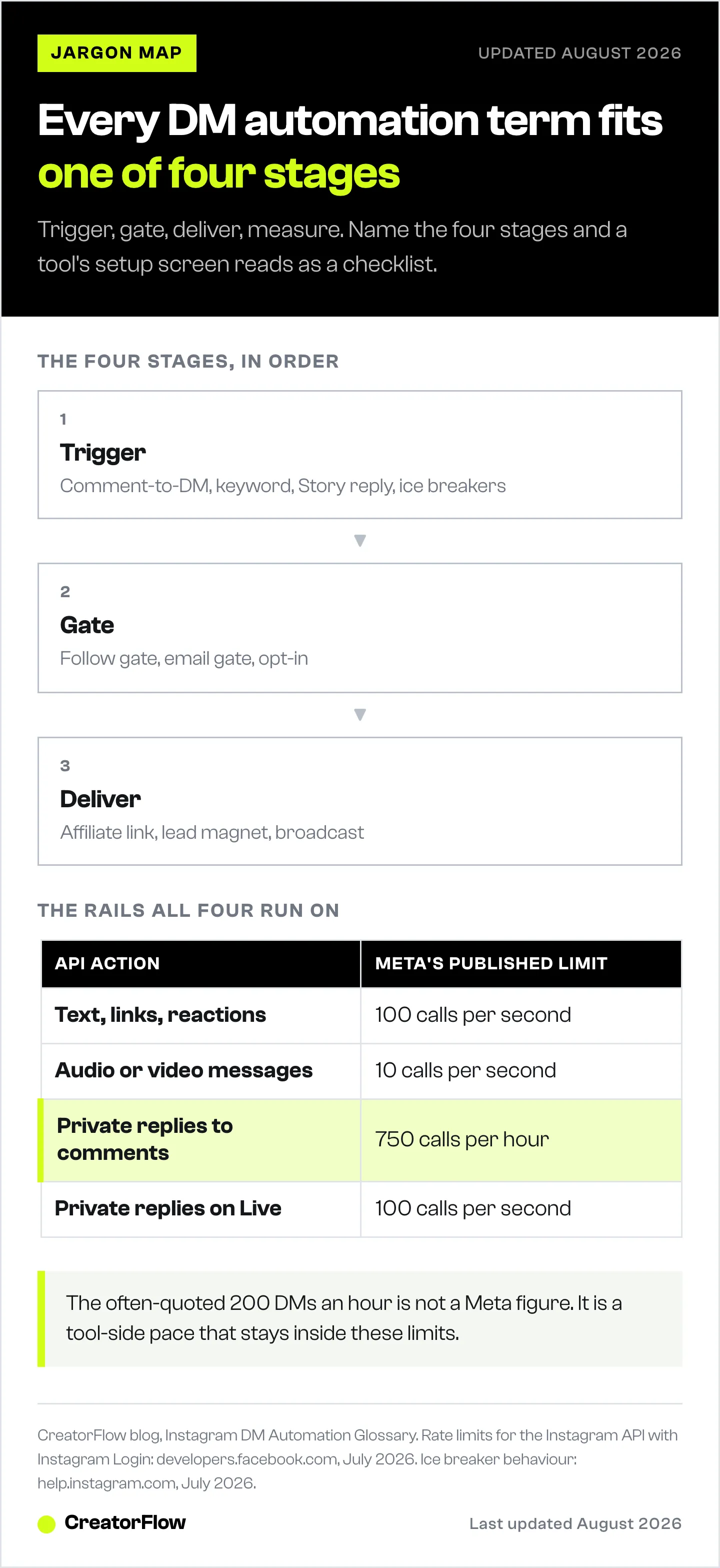
Stage 1, Trigger. A follower engages and starts the automation. Comment-to-DM, keyword triggers, Story reply automation, and ice breakers all live here.
Stage 2, Gate. Before the payoff, you ask for something in return. A follow gate earns a follower, an email gate earns an address, an opt-in earns consent.
Stage 3, Deliver. The automation sends the payoff: an affiliate link, a lead magnet, a booking page, or a broadcast to people who already opted in.
Stage 4, Measure. CTR, conversion rate, and link tracking tell you which trigger words and offers to repeat, and which to cut.
All four stages run on the Instagram Graph API, inside the 24-hour window, at a pace that respects Meta’s rate limits. Once you can name the four stages, every tool’s setup screen stops looking like jargon and starts looking like a checklist. That is the whole point of a DM funnel: a repeatable path you can measure and improve. Tools like CreatorFlow package these stages into a single flow so you set the trigger, the gate, and the link once, then let it run.
FAQ
What is Instagram DM automation in simple terms?
It is software that sends a direct message automatically when a follower does something specific, like commenting a word or replying to a Story. You write the message once and set the trigger once. After that, the tool sends it in seconds, every time, without you touching your phone.
What is the difference between a comment-to-DM and a keyword trigger?
They work together. The keyword trigger is the word that fires the automation, such as “GUIDE.” Comment-to-DM is the delivery method: the DM that gets sent when someone comments that keyword on your post. One is the signal, the other is the action.
What does a follow gate do?
A follow gate asks a person to follow your account before the automation delivers the link they requested. It converts a one-time link request into a new follower. It adds a small step, so it fits giveaways and free resources better than fast affiliate link sends.
Is DM automation against Instagram’s rules?
No, when it uses Meta’s official Instagram Graph API. Meta built the API specifically to let approved tools send messages on your behalf, within published rate limits and a 24-hour messaging window. The tools that break the rules are unofficial browser bots that ask for your password.
What is the 24-hour messaging window?
It is Meta’s rule that an automated reply can only be sent within 24 hours of a follower’s last interaction with you. After 24 hours the automation stops for that person until they engage again. This is why creators capture emails: email has no such window.
Which metrics should a beginner track first?
Start with click-through rate, the share of people who clicked your delivered link, then conversion rate, the share who completed your goal. CTR tells you if the offer lands. Conversion rate tells you if it makes money. Ignore vanity counts until those two are solid.
Do I need a business or creator account for DM automation?
Yes. DM automation connects through the Instagram API, and only professional accounts, business or creator, can make that connection. Personal accounts cannot. Switching is free and takes a minute in your Instagram settings.
Meta API limits and messaging rules verified from developers.facebook.com and help.instagram.com as of July 2026. Individual results vary.


