
Instagram broadcast channels paired with DM automation create a two-step conversion system: broadcast messages build anticipation and reach your most engaged followers directly in their inbox, then DM automation captures that interest the moment someone takes action. Brands like Shake Shack, Cava, and Tony’s Chocolonely are already using broadcast channels to gather feedback from superfans and drive product decisions (Marketing Brew, October 2025). When you layer comment-to-DM and keyword-trigger automation on top of that engagement, you turn every broadcast announcement into a conversion event.
Feed posts reach 10-20% of followers on a good day. Broadcast channel messages land directly in the DM inbox of everyone who opted in. No algorithm filtering, no reach lottery. The problem? Broadcast channels are one-way. You can send announcements, run polls, share links, but you can not have a two-way conversation at scale. DM automation fills that gap. It turns broadcast-generated interest into personalized 1:1 conversations that deliver links, capture emails, answer questions, and close sales without you touching your phone.
This playbook breaks down exactly how to set up the broadcast-to-DM funnel, what to send in your broadcasts to trigger the most automation responses, and real strategies you can steal from brands and creators doing this today.
Key Takeaways
- Broadcast channels bypass the algorithm: Messages go directly to followers’ DM inboxes with no algorithmic filtering, compared to feed posts that reach only 10-20% of followers
- Two-step system: Use broadcast for awareness and anticipation (one-to-many), then DM automation for conversion (one-to-one personalized responses)
- Real brands are doing this: Shake Shack uses its 4,000-member channel for product feedback and early access; Cava’s “Tzatziki Town Hall” (2,400 members) drives exclusive offers and menu input (Marketing Brew, October 2025)
- Broadcast channel engagement data: Message open rates range from 45-65% for active channels, compared to 15-25% average email open rates (SeenUP, 2025)
- The conversion gap: Broadcast channels alone have 5-12% subscriber-to-customer conversion rates; adding DM automation to capture intent can push this significantly higher by eliminating friction between interest and action
- Bottom line: Broadcast builds the audience and primes the intent. DM automation captures it. Neither works as well alone as they do together.

Can You Automate Instagram Broadcast Channels?
Broadcast messages go out by hand. As of April 2026 Instagram offers no native scheduling for them, and the feature has no third-party API for sending, so you type each one in the app. Everything after the broadcast automates. When a member comments your keyword on the post you pointed them to, DM automation sends the link, code, or booking page in seconds and can collect an email in the same conversation.
Why Broadcast Channels Alone Are Not Enough
Instagram broadcast channels are powerful distribution tools. You send a message, and it lands in the DM inbox of every subscriber. No algorithm, no competition with other creators for attention in the feed. That direct access is why broadcast channel open rates (45-65% for active channels) dwarf typical email open rates (SeenUP analysis of 25,000 businesses, 2025).
But broadcast channels have a structural limitation: they are one-way. You talk, followers react with emojis and poll votes. That is the extent of the interaction.
When Shake Shack sends a broadcast message asking “Which cheese fry should we bring back?” and gets 2,000 poll votes, that is great data. But it does not directly drive sales. There is no mechanism within the broadcast to send each voter a purchase link, capture their email, or route them to a booking page.
That is where DM automation enters.
What broadcast channels do well:
- Bypass algorithm filtering (100% delivery to subscribers)
- Build anticipation for launches, drops, and announcements
- Gather audience feedback through polls and prompts
- Create an “insider” feeling that increases loyalty
- Drive followers to take specific actions (comment, DM, visit link)
What broadcast channels cannot do:
- Have personalized two-way conversations at scale
- Automatically respond to follower actions
- Capture email addresses within the DM flow
- Send different content based on individual behavior
- Track individual conversion from interest to purchase
DM automation fills every gap on that second list.
How the Two-Step Funnel Works
The playbook is straightforward. Broadcast creates demand. DM automation captures it.
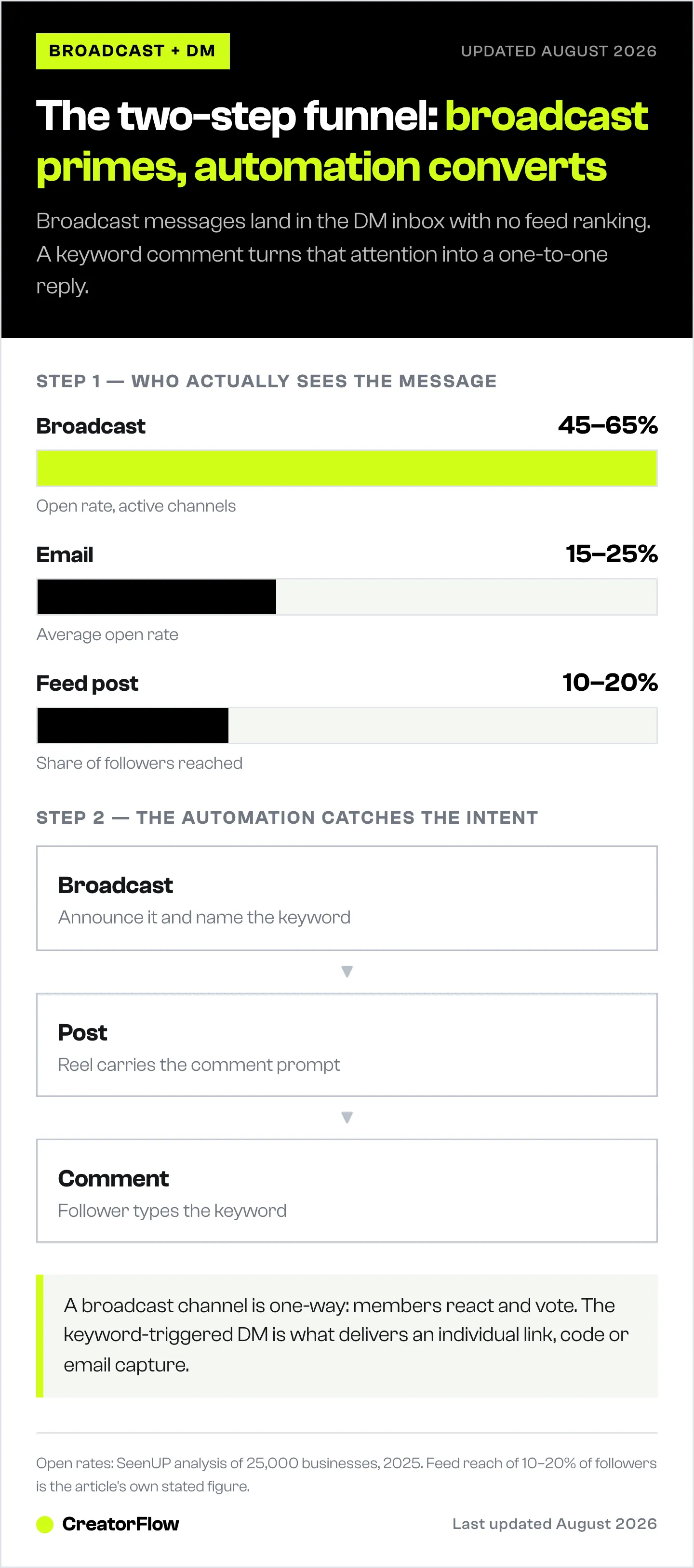
Step 1: Broadcast Primes the Audience
You send a message to your broadcast channel that creates interest and gives followers a clear next action. The message includes a call-to-action that points to your feed, Stories, or a specific keyword they can DM.
Example broadcast message:
“New collection drops tomorrow at 10am EST. Channel members get early access. When I post the Reel tomorrow, comment EARLY for the direct link before anyone else.”
This does three things:
- Creates urgency (tomorrow, early access)
- Rewards channel membership (exclusive benefit)
- Sets up the automation trigger (comment “EARLY”)
Step 2: DM Automation Captures the Intent
When followers see your Reel and comment “EARLY,” your DM automation tool instantly sends them a personalized message with the product link, discount code, or whatever you promised in the broadcast.
Example automated DM response:
“You’re in! Here’s your early access link: [product link]. Use code INSIDER15 for 15% off. This code expires in 24 hours. Reply SIZING if you need help picking the right fit.”
This DM is personalized, instant (arrives in 1-8 seconds), and opens up a two-way conversation through keyword triggers. The broadcast got them interested. The automation got them buying.
Why This Beats Either Channel Alone
| Metric | Broadcast Only | DM Automation Only | Broadcast + DM Automation |
|---|---|---|---|
| Reach | High (direct to inbox) | Depends on post reach | High (broadcast primes, post triggers) |
| Personalization | None (same message to all) | High (per-trigger responses) | High (targeted follow-up) |
| Conversion path | Indirect (link in message) | Direct (link in DM) | Direct + primed intent |
| Email capture | Not possible | Yes (email gate) | Yes, with warmed-up leads |
| Scalability | Unlimited subscribers | Limited by post engagement | Both channels reinforce each other |
Five Broadcast-to-DM Playbooks You Can Run This Week
Playbook 1: Product Launch Sequence
Best for: E-commerce, course creators, SaaS launches
Day 1 (Broadcast): “Something new is coming Thursday. I’ve been working on this for 3 months. Channel members find out first. React with fire if you want early access.”
Day 2 (Broadcast): Share a behind-the-scenes photo or voice note. “Here’s a sneak peek. Thursday at 12pm EST I’m posting the announcement Reel.”
Day 3 (Post + Automation): Post the launch Reel. Caption: “It’s here! Comment LAUNCH for the direct link + channel-member discount.”
When someone comments “LAUNCH,” your automation sends:
“Thanks for being in the channel! Here’s your link: [URL]. Use code CHANNEL20 for 20% off. Only for broadcast channel members. Reply DETAILS for the full specs.”
Day 4 (Broadcast): “284 people grabbed the channel discount yesterday. If you missed it, the code is still active for 24 more hours. Comment LAUNCH on the pinned Reel.”
Why this works: The broadcast creates anticipation over multiple days. By the time the automation-triggered post goes live, followers are primed to act immediately. You are not cold-selling. You are delivering something they have been waiting for.
Playbook 2: Affiliate Link Distribution
Best for: Amazon influencers, LTK creators, affiliate marketers
Broadcast: “Found the best under-$30 gym bag on Amazon. I’ve been using it for 2 weeks and it holds everything. Posting a Reel review in 1 hour. Comment BAG to get the link sent straight to your DMs.”
Post + Automation: Reel showing the product in use. Caption: “Comment BAG for the Amazon link.”
Automated DM:
“Here’s the gym bag link: [Amazon affiliate link]. I also put together my full gym bag essentials list. Reply ESSENTIALS if you want that too.”
Second keyword trigger (ESSENTIALS):
“Here’s my full gym essentials list with links to everything: [link]. What’s your email? I’ll send you my weekly Amazon finds every Friday.”
This two-step keyword chain (BAG then ESSENTIALS) does three things: delivers the affiliate link, cross-sells related products, and captures the email for long-term monetization beyond Instagram’s 24-hour messaging window.
Playbook 3: Coaching and Service Booking
Best for: Coaches, consultants, service businesses
Broadcast: “I opened 5 spots for 1:1 coaching next month. Last time I posted this publicly, they filled in 3 hours. Channel members get 24-hour head start. When I post tomorrow, comment COACHING for the application.”
Post + Automation: Post a testimonial Reel or results showcase. Caption: “Limited spots open. Comment COACHING for the application link.”
Automated DM:
“Here’s the coaching application: [Calendly/form link]. Before you apply, quick question: what’s your biggest challenge right now? Reply with one sentence and I’ll make sure we’re a good fit.”
The broadcast creates scarcity (limited spots) and exclusivity (early access). The automation qualifies leads by asking a question, which also resets the 24-hour messaging window for follow-up.
Playbook 4: Email List Building
Best for: Anyone building an email list from Instagram
Broadcast: “I created a 47-page Instagram Growth Playbook. It took me 3 weeks. I’m giving it away free this week. When I post about it tomorrow, comment PLAYBOOK and I’ll DM it to you.”
Post + Automation: Post a carousel showing 3-4 highlights from the playbook. Caption: “Comment PLAYBOOK for the free download.”
Automated DM (with email gate):
“I’m sending you the Instagram Growth Playbook. What’s the best email to send it to?”
After email reply:
“Sent to [email]. Check your inbox (and spam just in case). I also send weekly Instagram tips. Reply STOP anytime. Enjoy the playbook!”
Why broadcast + email gate is powerful: The broadcast pre-sells the lead magnet value. By the time followers comment the trigger word, they already want the resource. Email capture rates through DM automation after a broadcast typically run higher than cold captures because the audience is warmed up and expects value.
Playbook 5: Flash Sale and Limited Offer
Best for: E-commerce, digital products, any time-sensitive offer
Broadcast (morning): “24-hour flash sale starting at noon. 40% off everything. I’m only announcing this here. When I post the sale Reel, comment SALE for the direct shop link + an extra 10% off that’s only for channel members.”
Post + Automation (noon): Post the sale Reel. Caption: “Flash sale is LIVE. Comment SALE for the link.”
Automated DM:
“Flash sale link: [URL]. Your channel-exclusive code for an extra 10% off: VIPSALE. Expires midnight tonight. Reply BESTSELLER for my top 3 picks.”
Broadcast (evening): “6 hours left. 147 channel members already grabbed the deal. If you haven’t yet, comment SALE on the Reel.”
The evening broadcast re-engages members who saw the morning message but did not act. This second touchpoint typically drives a significant portion of total conversions because it creates urgency without being spammy since they opted into the channel.
Real Brand Strategies to Learn From
Shake Shack: Product Feedback Loop
Shake Shack created its broadcast channel to spotlight its Innovation Kitchen, where it tests new menu items. The channel now has nearly 4,000 members. The social team collaborates with consumer insights to use polls for decisions like naming new burgers or choosing cheese-fry innovations. Some channel members have been invited to the Innovation Kitchen to try items and share feedback in person (Marketing Brew, October 2025).
The playbook in action: Shake Shack uses broadcast for audience participation in product development. The conversion layer? Driving members to try new menu items first, creating social content about the experience, and building a superfan community that amplifies launches organically.
What you can steal: Use polls and prompts in your broadcast to involve your audience in product decisions. When you launch the winning option, they feel ownership. “You voted for it. It’s here. Comment WINNER for the link.”
Cava: Exclusive Access and Content Creation
Cava’s “Tzatziki Town Hall” broadcast channel has about 2,400 members. The brand uses it to collect customer photos, generate social content (asking members to build the social team’s lunch bowls), solicit input on new flavors, and offer exclusive early access to new menu items. As their CMO Andy Rebhun told Marketing Brew: the channel “allows secret information and news to get to [members] first” (Marketing Brew, October 2025).
The playbook in action: Cava turns broadcast members into content co-creators. The “build our lunch bowl” prompt generates UGC that feeds their social content calendar while making members feel like insiders.
What you can steal: Ask broadcast members to create content for you. “Show me how you use [product]. Best photo gets featured on our main feed. Comment FEATURE on tomorrow’s post to submit yours.”
Tony’s Chocolonely: Product Decision Input
Tony’s Chocolonely launched its broadcast channel in 2025 and immediately used it for product decisions. When the brand needed to rename its Dark Milk Chocolate Pretzel Toffee bar (because US consumers did not understand “dark milk chocolate”), they asked broadcast members to suggest names (Marketing Brew, October 2025).
The playbook in action: Using the channel for real business decisions, not performative engagement. Members feel their input matters because it does.
What you can steal: When you have a genuine decision to make (product name, packaging color, feature priority), take it to your broadcast channel first. Then announce the winner with an automation trigger: “You named it. Comment [WINNING NAME] to get first access.”
Setting Up the Technical Integration
If you are using CreatorFlow for DM automation, here is the workflow for connecting broadcast announcements to automated DM responses.
Step 1: Plan Your Broadcast Content Calendar
Map out what you are announcing and when. Each broadcast should have a clear purpose and a path to conversion:
| Day | Broadcast Message | Trigger Action | Automation Response |
|---|---|---|---|
| Monday | Tease new product | Generate curiosity | None yet |
| Wednesday | Reveal + set up trigger word | ”Comment REVEAL on tomorrow’s post” | Link + discount code |
| Thursday | Post goes live | Automation active | Instant DM delivery |
| Friday | Results + social proof | Re-engage non-converters | Same automation still active |
Step 2: Create Matching Automation Triggers
For each broadcast that drives a specific action, set up the corresponding keyword trigger in CreatorFlow:
- Choose your trigger keyword (keep it simple: one word, all caps)
- Write the automated DM response with the promised content
- Add an email gate if you want to capture emails before delivering
- Set up a follow-up message for 4 hours later (within the 24-hour window)
- Test the flow before your broadcast goes out
Step 3: Coordinate Timing
The sequence matters:
- Broadcast goes out (creates anticipation)
- Post goes live 1-24 hours later (gives time for broadcast to be seen)
- Automation activates (catches comments immediately)
- Follow-up broadcast (re-engages members who did not act)
Do not post the content and broadcast simultaneously. The broadcast needs to land first so channel members feel they got advance notice.
Step 4: Track What Works
Monitor these metrics to refine your playbook:
- Broadcast open rate: What percentage of channel members see each message?
- Trigger word usage: How many broadcast viewers comment the keyword?
- Automation conversion rate: How many people who receive the DM click the link?
- Email capture rate: If using an email gate, what percentage provide their email?
- Revenue attribution: Which broadcast-to-DM sequences generate the most revenue?
Common Mistakes That Kill Conversions
Mistake 1: Broadcasting Without a Clear Next Step
A broadcast message that says “New product dropping soon! Stay tuned!” generates zero conversions. There is no action to take.
Fix: Every broadcast should end with a specific instruction: “Comment [KEYWORD] on tomorrow’s post” or “DM me [KEYWORD] when it goes live.”
Mistake 2: Using the Same Trigger Word for Everything
If every post says “comment LINK,” followers stop paying attention. The trigger loses its specificity.
Fix: Use unique trigger words that match the content. RECIPE for recipes, WORKOUT for workout plans, DEAL for sales. Specific words feel intentional, not automated.
Mistake 3: Over-Broadcasting
Sending 2-3 broadcast messages per day will get you muted fast. Retention rates drop significantly when you over-message (SeenUP, 2025).
Fix: 2-5 messages per week maximum. Each one should deliver value or drive a specific action. If you would not open it yourself, do not send it.
Mistake 4: No Follow-Up Broadcast
You broadcast the announcement, post the content, automation runs. Done? Not yet. A follow-up broadcast 6-24 hours later re-engages members who saw the first message but did not act.
Fix: Send a results-focused follow-up: “247 people already grabbed the guide. If you missed it, comment GUIDE on the pinned Reel. Link expires tomorrow.”
Mistake 5: Ignoring the 24-Hour Window
Instagram’s messaging window means your automation can only reach people who engaged with you in the last 24 hours. If you broadcast on Monday and post on Thursday, the engagement window from Monday’s broadcast is long closed.
Fix: Post the automation-triggered content within 24 hours of your broadcast. Tighter timing means warmer leads.
FAQ
Can I automate my broadcast channel messages?
As of April 2026, Instagram does not offer native scheduling for broadcast channel messages. You need to send them manually. Some third-party tools offer scheduling for regular posts, but broadcast messages require manual sending through the Instagram app. This is one reason to keep your broadcast frequency manageable (2-5 per week).
Do I need separate tools for broadcast channels and DM automation?
Yes. Broadcast channels are a native Instagram feature with no third-party API access for sending messages. DM automation tools like CreatorFlow, ManyChat, and LinkDM handle the automated response side through Meta’s Instagram Graph API. You send the broadcast manually, then the automation handles everything that follows.
How many followers do I need for this strategy?
You need at least 1,000 followers and a professional (Creator or Business) Instagram account to create a broadcast channel. DM automation has no follower minimum. If you do not yet have 1,000 followers, focus on growing your engagement and use DM automation with your existing posts while you build to the broadcast channel threshold.
What if my broadcast channel is small (under 500 members)?
Small channels can still drive conversions. A 200-person channel where everyone is a genuine fan will outperform a 5,000-person channel full of casual followers. Focus on quality over quantity. The conversion rate from a small, engaged channel to DM automation will be higher because these subscribers opted in specifically to hear from you.
Will this strategy work for service businesses, not just product sellers?
Yes. Service businesses replace product links with booking links. Instead of “Comment SHOP for the link,” use “Comment BOOK for my calendar link” or “Comment QUOTE for a custom pricing estimate.” Coaches, consultants, realtors, and agencies all use this pattern. The broadcast builds trust and authority, and the automation captures the lead while interest is high.
How do I measure if the broadcast-to-DM funnel is working?
Track the chain: broadcast views, trigger word comments, automation DM delivery rate, link clicks, and final conversion (purchase, booking, email capture). Most DM automation tools provide click tracking. Compare conversion rates from broadcast-primed posts versus regular posts to see the lift.


