
An Instagram to email funnel automatically captures email addresses from your Instagram followers using DM automation. When someone comments a keyword on your post, they receive an instant DM asking for their email in exchange for a lead magnet. DM automation captures 3-5x more emails than link-in-bio because it keeps everything inside Instagram with only two steps instead of five.
Your Instagram followers are rented. The algorithm decides who sees your content, and organic reach has collapsed to 2-3% for business accounts. One algorithm change, one account restriction, and your audience disappears. Email is the only channel you fully own, with 100% delivery and $36 ROI per $1 spent.
This guide shows you how to build the complete funnel: the content hook that drives comments, the DM automation that captures emails, and the 5-email nurture sequence that turns subscribers into customers.
Key Takeaways
- Organic reach collapsed to 2-3%: Business accounts now reach only 2-3% of followers organically, down from 10-15% in 2020 (Social.Plus, April 2026). Email delivers 100% to inboxes.
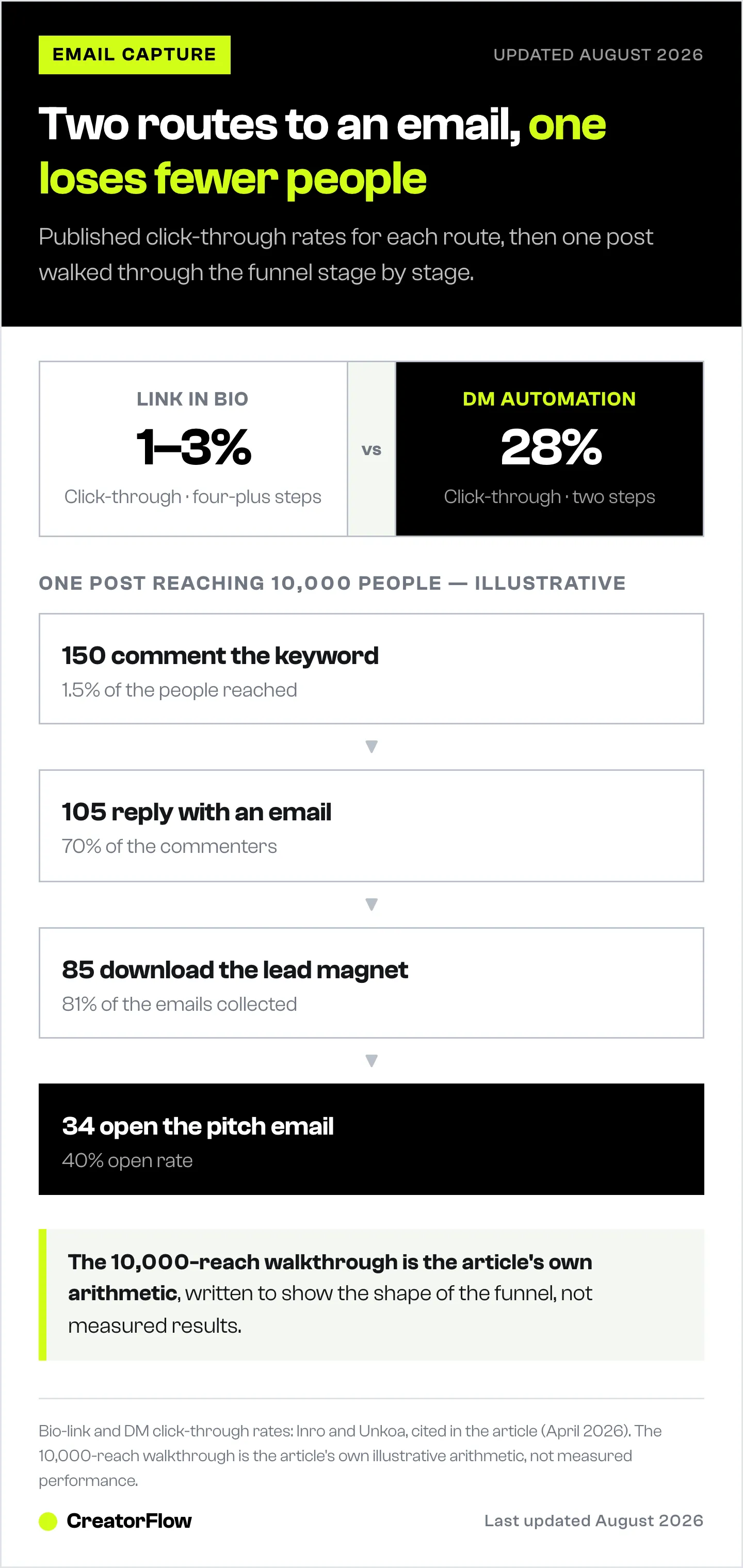
- DM automation captures 3-5x more emails than bio links: DM automation achieves 28% click-through rates vs 1-3% for link-in-bio (Inro, Unkoa, April 2026).
- Email capture rate benchmark is 60-85%: When the lead magnet is specific and valuable, 60-85% of commenters provide their email in the DM conversation.
- Email ROI is $36 per $1 spent: Email marketing delivers 36:1 returns (Litmus, 2025), and automated sequences generate 320% more revenue than one-off broadcasts (Campaign Monitor, 2025).
- The funnel takes 15 minutes to set up: Post with keyword CTA, automate DM with email gate, deliver lead magnet, then nurture via 5-email sequence.
- Bottom line: Your Instagram followers are rented. Your email list is owned. Set up DM automation with an email gate to convert engagement into subscribers you control.

Why Instagram to Email Still Matters in 2026
You have 15,000 Instagram followers. You post consistently. But here’s the uncomfortable truth:
Only 2-3% of your followers see your posts. According to Social.Plus research (April 2026), business accounts now average 2-3% organic reach - down from 10-15% in 2020. Your 15,000 followers? Only 300-450 see your content organically.
Instagram’s engagement rate has collapsed alongside reach. SocialInsider’s benchmark data shows engagement dropped from 2.94% in January 2024 to 0.45% by mid-2025 - a decline of 85% in 18 months.
The algorithm isn’t broken. It’s working exactly as designed. Meta wants you paying for reach.
Meanwhile, email delivers:
- 100% delivery (no algorithm decides who sees it)
- 20-40% open rates (vs 2-3% organic reach)
- $36 ROI per $1 spent (according to Litmus, 2025)
- Complete ownership (you can export your list anytime)
At Social Media Marketing World 2025, when marketers were asked “10,000 social followers or 1,000 email subscribers?” - not a single one chose followers.
The math is simple: Social media is discovery. Email is ownership.
Link in Bio vs DM Automation: The Data
Most creators rely on “link in bio” to build their email list. It’s the default. It’s also leaving 90%+ of potential subscribers on the table.
| Method | Conversion Rate | Friction Level | Personalization |
|---|---|---|---|
| Link in bio | 1-3% CTR | High (4+ steps) | None |
| DM automation | 28% CTR | Low (2 steps) | High |
| Story link stickers | 15-25% CTR | Medium | None |
Why link-in-bio underperforms: The user journey kills conversion. They see your post, tap your profile, find the bio link, click through to your landing page, then finally sign up. Four friction points. Each one loses 30-50% of potential subscribers.
Why DM automation wins: The user comments. They get an instant DM. They reply with their email. Done. Two steps. The conversation happens where they already are.
Response time matters more than you think. According to HubSpot’s 2025 Lead Response Management data, leads contacted within 5 minutes are 9x more likely to convert than those contacted after 30 minutes. With DM automation, response time is under 5 seconds. Newsletter operators now treat this channel as a primary acquisition source; the newsletter growth via Instagram DMs playbook breaks down the channel economics and capture rates.
The Instagram Email Capture Funnel
Here’s the complete funnel structure that converts Instagram engagement into email subscribers automatically.
The funnel below starts at the comment. For the short version that stops at the first email address, see how to turn Instagram comments into subscribers.
Stage 1: Hook
Goal: Get comments with your trigger word.
Your Instagram post needs a clear call-to-action that prompts comments. This is your traffic source.
Best-performing hooks:
- “Comment GUIDE and I’ll DM you my free [specific resource]”
- “Want the exact [template/checklist/strategy] I used? Comment SEND”
- “Comment FREE for instant access to my [lead magnet name]”
What works in 2026:
- Carousels with value upfront (save-worthy content)
- Reels under 60 seconds with clear CTA in voiceover
- Static posts with bold, simple graphics
Important: Your trigger word should be simple (GUIDE, SEND, FREE, LINK, YES). Complex phrases reduce comments.
Stage 2: Capture
Goal: Collect their email address before delivering value.
When someone comments your trigger word, your automation sends an instant DM asking for their email. This is the “email gate” - they provide their email to get access.
Example DM sequence:
Message 1 (Instant):
Hey! Thanks for commenting.

I'm sending you [Lead Magnet Name] - what's your best email?

(I'll also send a backup copy to your inbox)
Message 2 (After they reply with email):
Perfect! Here's your instant access:
[Download Link]

I just sent a backup to [their email]. Check your inbox in the next 5 minutes.

Quick question: What's your biggest challenge with [topic]?
Conversion rate benchmark: 60-85% of people who comment will provide their email when the lead magnet is specific and valuable. Food creators see some of the strongest numbers with this exact flow; here is how to grow a recipe newsletter with Instagram DMs.
Stage 3: Nurture
Goal: Build relationship via email sequence.
The email sequence that follows determines whether your subscriber becomes a customer or unsubscribes.
Proven 5-email nurture sequence:
| Day | Email Type | Goal |
|---|---|---|
| 0 | Delivery | Send lead magnet, set expectations |
| 2-3 | Value | Share one actionable tip, build trust |
| 5 | Story/Proof | Case study or testimonial |
| 7 | Soft pitch | Introduce paid offer as next step |
| 10-14 | Direct offer | Clear CTA, address objections |
Performance benchmarks (Instagram-sourced leads):
- Open rate: 30-50% (higher than cold traffic)
- Click rate: 5-12%
- Reply rate: 2-5%
Key insight: Automated email sequences generate 320% more revenue than one-off broadcasts, according to Campaign Monitor (2025).
Lead Magnet Ideas by Niche
Not all lead magnets convert equally. The best ones deliver immediate, specific value your audience can use today.
High-Converting Lead Magnet Types
| Lead Magnet Type | Opt-in Rate | Best For |
|---|---|---|
| Checklists | 50-65% | Quick wins, actionable steps |
| Templates | 45-60% | Copy-paste frameworks |
| Quizzes | 40-60% | Personalized results |
| PDF Guides | 40-55% | Educational authority |
| Discount codes | 70-80% | E-commerce, product sellers |
Source: Focus Digital, GetResponse
Lead Magnets by Creator Niche
Fitness Creators:
- 7-Day Workout Plan (no equipment)
- Meal Prep Template with Macros
- Progress Tracker PDF
- “My Exact Routine” Video Walkthrough
Coaches & Consultants:
- Discovery Call Prep Worksheet
- Goal-Setting Framework Template
- 5-Day Email Challenge on [Outcome]
- Self-Assessment Quiz (see how to turn one into subscribers with an Instagram quiz funnel)
Course Creators:
- Module 1 Preview (free chapter)
- Resource List for [Outcome]
- Quick-Start Checklist
- Behind-the-Scenes Launch Breakdown
E-commerce / Product Sellers:
- 15% Discount Code
- Style Guide PDF
- Product Comparison Chart
- Early Access to New Launches
Affiliate Marketers:
- “My Favorite Products” Curated List
- Comparison Spreadsheet (with your links)
- Buying Guide PDF
- Discount Code Aggregator
Key principle: Your lead magnet should be “Step 0” that naturally leads to your paid offer as “Step 1.”
Setting Up Email Capture Automation
Here’s the technical setup to capture emails automatically when someone comments on your Instagram post.
Step 1: Choose Your Automation Tool
| Tool | Price | Email Capture | Best For |
|---|---|---|---|
| CreatorFlow | $15/mo | Built-in email gate | Solo creators, simple setup |
| ManyChat | Free, then $17-199/mo | Advanced + integrations | Multi-platform, agencies |
| LinkDM | $19/mo | Basic capture | Budget-conscious |
For this guide, we’ll use CreatorFlow - it has the simplest email gate setup and flat-rate pricing (no per-contact fees).
Step 2: Connect Instagram
- Sign up at creatorflow.so
- Click “Connect Instagram”
- Authorize via Facebook/Instagram
- Select your Instagram Business or Creator account
Time required: 2 minutes
Step 3: Create Email Gate Automation
- Go to Automations > Create from Template > Comment to DM
- Name it: “Email List - [Lead Magnet Name]”
- Select trigger post (or set to “any post” for evergreen)
- Set trigger keyword: GUIDE (or your chosen word)
- Enable “Email Gate” toggle
- Write your DM messages (see templates above)
- Add your lead magnet download link
- Click “Go Live”
Time required: 5-10 minutes
Step 4: Test the Flow
- Use a friend’s account to comment your trigger word
- Verify instant DM arrives
- Reply with a test email
- Confirm second message with download link appears
- Check that email was captured in your dashboard
Time required: 5 minutes
Email Platform Integrations
Once you capture emails via Instagram DMs, you need them in your email marketing platform for nurture sequences.
Best Email Platforms for Creators (April 2026)
| Platform | Free Tier | Paid From | Best For |
|---|---|---|---|
| Kit (ConvertKit) | 10,000 subs | $39/mo | Course creators, coaches |
| Beehiiv | 2,500 subs | $49/mo | Newsletter creators |
| Mailchimp | 500 subs | $13/mo | Beginners, e-commerce |
| Klaviyo | 250 contacts | $20/mo | Shopify stores |
| EmailOctopus | 2,500 subs | $24/mo | Budget-conscious |
Integration Options
Option A: Manual CSV Export (Simple)
- Export contacts from CreatorFlow weekly
- Import CSV to your email platform
- Tag as “Instagram Lead Magnet - [Month]”
- Add to nurture sequence
Option B: Zapier Automation (Intermediate)
- Connect CreatorFlow to Zapier
- Set trigger: “New email captured”
- Action: Add subscriber to ConvertKit/Mailchimp
- Apply tag automatically
- Trigger welcome sequence
Option C: Native Integration (Advanced) ManyChat offers native integrations with ConvertKit, Mailchimp, and ActiveCampaign. Emails sync automatically in real-time.
Measuring Your Funnel Performance
Track these metrics to optimize your Instagram to email funnel:
Funnel Metrics
| Stage | Metric | Benchmark |
|---|---|---|
| Hook | Comments per post | 1-3% of reach |
| Capture | Email capture rate | 60-80% of commenters |
| Delivery | Download click rate | 70-90% |
| Nurture | Email open rate | 30-50% |
| Convert | Email to sale | 2-10% |
Example Funnel Math
Your Instagram post reaches 10,000 people:
- 150 comment your trigger word (1.5%)
- 105 provide their email (70%)
- 85 download the lead magnet (81%)
- 34 open your pitch email (40%)
- 3-10 purchase your $197 product (3-10% of openers)
Revenue: 3-10 sales x $197 = $591-$1,970 from one Instagram post
Compare that to link-in-bio: 10,000 reach x 1.5% click x 20% landing page conversion = 30 emails. Same post, 3.5x fewer emails.
Common Mistakes That Kill Email Capture
Mistake 1: Vague Lead Magnet
Bad: “Download my free ebook” Good: “Get my 10-Point Instagram Audit Checklist (2 pages, 5-minute read)”
Specific beats generic. Tell them exactly what they’re getting and how long it takes.
Mistake 2: Asking for Too Much
Bad: “Give me your email, phone number, and birthday” Good: “What’s your email?”
One field. You already have their Instagram handle.
Mistake 3: No Privacy Reassurance
Add: “Your email stays private - I never share it” or “No spam, just helpful content.”
People worry about spam. Address it directly.
Mistake 4: Slow Delivery
If you promise instant access, deliver instantly. Use automation. Manual DM replies hours later lose 80%+ of interested leads.
Mistake 5: No Follow-Up
Capturing the email is step 1. The money is in the nurture sequence. No follow-up = wasted leads. Build that sequence with the Instagram welcome flow.
FAQ
How many emails can I capture per day with Instagram automation?
Automation tools pace DMs at around 200 per hour, which means up to 4,800 per day. Most creators capture 20-100 emails daily. If your post goes viral, messages queue and send over several hours to stay within limits.
Is this method legal and compliant with GDPR?
Yes, when done correctly. Users voluntarily provide their email (explicit consent). Include easy unsubscribe in all emails. State clearly how their email will be used. For EU subscribers, GDPR requires clear opt-in and data protection. Always consult legal counsel for your specific situation.
Do I need a Business or Creator Instagram account?
Yes. Instagram DM automation requires a Business or Creator account connected to a Facebook Page. Personal accounts can’t use the Graph API. Converting is free and takes 2 minutes in Instagram settings.
What if people provide fake emails?
Expect 10-20% invalid emails (industry standard). Solutions: Send backup delivery to confirm email works, use email verification tools (NeverBounce, ZeroBounce) to clean lists, accept that some leads aren’t serious.
How often should I promote my lead magnet?
Create 2-3 dedicated posts per month with your trigger word CTA. Include it in Stories 1-2x per week. Don’t overuse it on every post - that feels spammy. Rotate between different lead magnets if you have multiple.
Should I use the same lead magnet forever?
Test different lead magnets to see which attracts your best customers (highest email-to-sale conversion). Keep winners, retire underperformers. Update content quarterly to keep it current.
The Bottom Line
Building an email list from Instagram doesn’t require you to manually DM hundreds of people or hope they click your bio link.
The Instagram to email funnel:
- Create valuable lead magnet (specific, immediately useful)
- Post with clear trigger word CTA
- Set up DM automation with email gate
- Deliver value instantly
- Nurture via email sequence
- Convert to customers
DM automation captures 3-5x more emails than link-in-bio. The data is clear. The setup takes 15 minutes. And you’ll own your audience forever - no algorithm can take it away.
Your Instagram followers are rented. Your email list is owned.
Next step: Choose your lead magnet, set up your email gate, and start building a list you actually control.
Related Articles
- Collect Emails via Instagram DMs: Complete Guide - Full guide on email capture mechanics
- Instagram Lead Magnet Automation: Setup Guide - Step-by-step PDF delivery automation
- Instagram Sales Funnel Complete Guide - Full funnel from follower to customer
- Comment-to-DM Automation Setup Guide - Technical setup walkthrough
Disclaimer: Performance results mentioned in this article are based on aggregated user data and industry research. Individual results vary based on audience size, content quality, engagement rates, and niche. Statistics sourced from Litmus, Social.Plus, SocialInsider, Unkoa, GetResponse, Focus Digital, and HubSpot (all verified April 2026). CreatorFlow uses Instagram's official Graph API. Instagram/Meta may change features, rate limits, or terms at any time. Instagram is a trademark of Meta Platforms, Inc. CreatorFlow is not affiliated with, endorsed by, or sponsored by Meta Platforms, Inc.
Email Marketing Legal Compliance: Users are responsible for complying with all applicable email marketing laws including GDPR (EU), CAN-SPAM Act (US), and CASL (Canada). Always obtain explicit permission before collecting emails, provide clear opt-out options, and respect user privacy.