You grow a recipe newsletter on Instagram by capturing emails inside the DM. A follower comments for a recipe, an automation sends the link, and the same DM offers to email the full recipe card. They drop their address, the link delivers, and you keep a subscriber you own. The newsletter becomes the audience the Instagram algorithm cannot take away.
You posted a sheet-pan dinner Reel that took off. Four thousand saves, a flood of comments asking for the recipe, and a real spike in followers. Then the algorithm moved on, the next Reel landed flat, and the people who loved that dinner had no way to hear from you again. They are not gone because they lost interest. They are gone because the only line between you ran through a feed you do not control.
An email list fixes that. It is the one audience you own outright, and for food creators it is the most reliable path to repeat blog visits, product launches, and a following that survives a slow algorithm month. This guide shows how to turn Instagram DMs into newsletter signups without adding a single step to your day. If you want the mechanics of email capture first, start with this walkthrough on how to collect emails from Instagram DMs with automation.
Key Takeaways
- Email is the audience you own: Followers live on Instagram’s terms; subscribers live on yours. A list keeps reaching people when reach drops.
- The DM is where the signup happens: When a follower comments for a recipe, the DM that delivers the link can ask for their email first, at the exact moment they want what you offer.
- A lead magnet does the convincing: A free meal plan or recipe pack gives followers a clear reason to hand over an address, instead of trading it for nothing.
- Capture, then export, then send: CreatorFlow’s email gate collects the address, CSV export moves your contacts out, and your newsletter tool handles the sending.
- Cadence builds the habit: A weekly recipe, a behind-the-scenes note, and the occasional product pick keep your list warm and your open rates high.
- The numbers are simple: Track signups per week, open rate, click rate, and how many blog visits the email drives. Four numbers tell you if it works.

See how the comment-to-DM flow looks inside the product in the short video above, and follow CreatorFlow on Instagram for more examples.
Why a Recipe Newsletter Beats Instagram Reach Alone
Your Instagram following is rented. The platform decides who sees your Reel, when, and how often, and that decision shifts with every algorithm change. A creator with 80,000 followers can post the same quality video two weeks apart and reach 200,000 people one time and 9,000 the next. You did nothing different. The feed did.
An email list is owned. When you send a newsletter, it lands in every inbox that subscribed, full stop. No ranking, no shadow throttle, no guessing whether your best people saw it. For a recipe creator, that ownership pays off in three ways.
Product launches. When you sell a cookbook, a meal-plan PDF, a course, or a course bundle, email outsells social by a wide margin. People who handed you their address already raised their hand. A launch email reaches them directly, on a day you choose, with a link they can tap. A Reel announcing the same launch has to win the algorithm lottery first.
Repeat blog visits. Most food creators make real money from a blog, through ad revenue and affiliate links inside recipe posts. A new follower visits your blog once and forgets you exist. A newsletter subscriber comes back every week, because every issue carries a link to a fresh recipe on your site. The list turns one-time visitors into a returning audience, which is what blog income depends on. The mechanics of routing followers to your site are covered in this guide on driving blog traffic as a food creator.
Survival through a slow month. Reach is volatile. Email is steady. When Instagram buries your content for three weeks, your newsletter keeps the relationship alive, keeps people cooking your food, and keeps revenue moving. The list is the floor under your business.
None of this means abandon Instagram. Instagram is where you find people. Email is where you keep them. The whole point of the system below is to move followers from the first to the second without losing either.
The Email Gate Inside the DM
Here is the mechanic that makes this work without extra effort. You already run, or are about to run, a comment-to-DM automation: a follower comments a keyword like RECIPE, and the link gets sent to their DMs automatically. The email gate adds one step to that same flow.
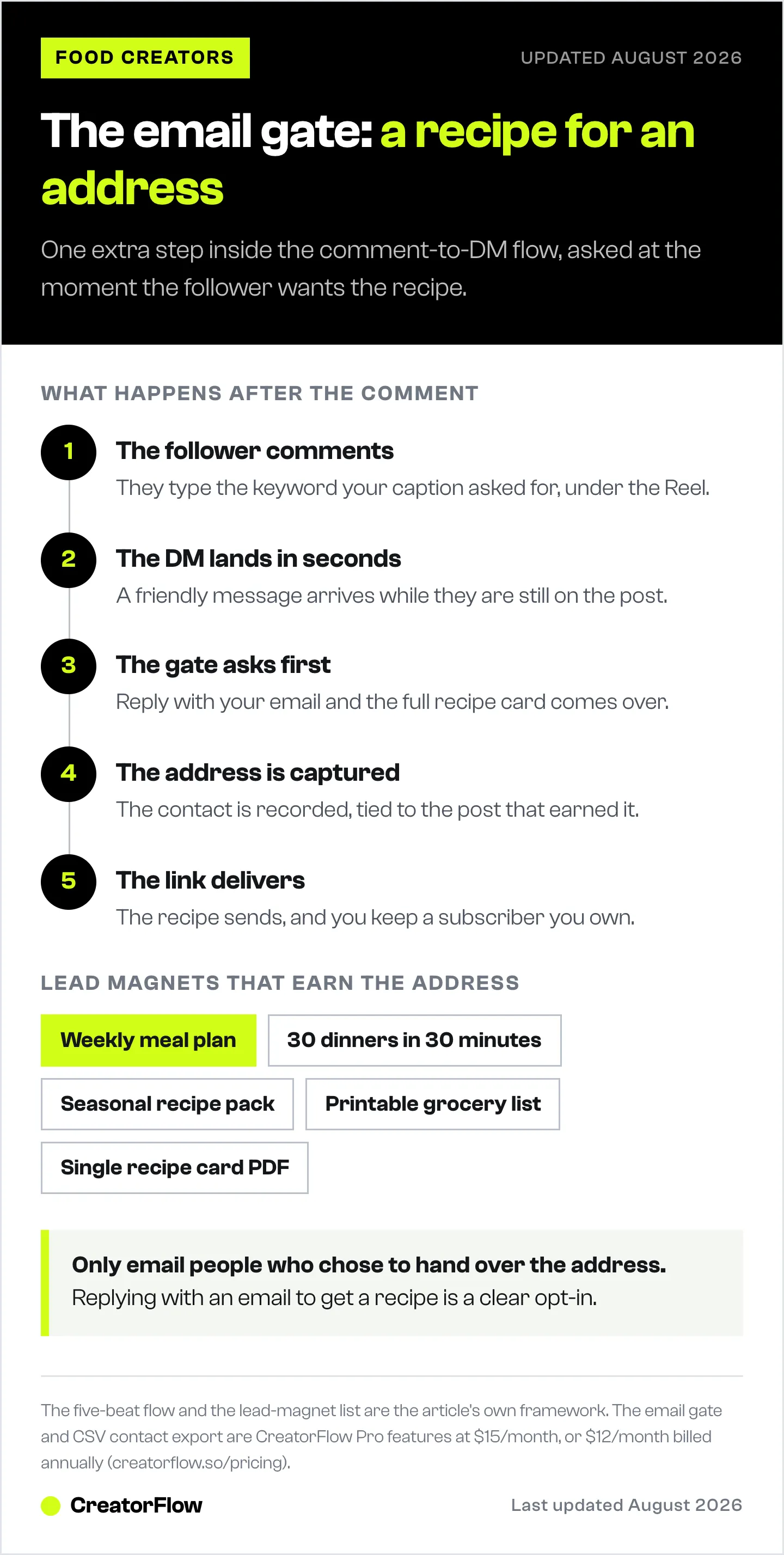
When the follower comments, the DM does not hand over the link right away. It offers a choice: tap to get the recipe link now, or drop your email and get the full recipe card sent to your inbox. Some take the email option. Some skip it and grab the link. Either way, the recipe gets delivered and nobody leaves empty-handed.
The flow looks like this:
- Follower comments for a recipe. They watch your Reel, want the dish, and type the keyword you asked for in the caption.
- The DM opens with an offer. A friendly message appears in their inbox within seconds, while they are still on the post.
- The email gate asks first. The message offers the recipe by email, and asks the follower to reply with their address to get it.
- The address is captured. The follower replies with their email. The tool records it as a contact, tied to the post that earned it.
- The link delivers. The recipe link sends, the follower starts cooking, and you have a new subscriber.
The timing is what makes the email gate convert. You are not asking for an address out of nowhere. You ask at the exact second the follower wants something specific from you, and the recipe is the trade. That is a far easier yes than a link-in-bio that says “join my newsletter” with no reason attached.
In CreatorFlow, this is the email gate feature on the Pro plan ($15/month, or $12/month billed annually). You set the keyword, write the DM, turn the email gate on, and the automation runs on Meta’s official Instagram API. For the full funnel view, here is how to build an Instagram-to-email funnel automatically.
Lead Magnets That Work for Food Creators
“Join my newsletter” converts poorly because it offers nothing today. A lead magnet flips that. You give the follower something useful right now, and the email is the price. For recipe creators, the best lead magnets are small, instantly useful, and tied to the content the follower already engaged with.
| Lead magnet | Why it converts | Best paired with |
|---|---|---|
| Free weekly meal plan | Solves the “what’s for dinner” problem people open Instagram to escape | A meal-prep or batch-cooking Reel |
| ”30 Dinners in 30 Minutes” pack | Promises speed, which is the top thing busy cooks want | A quick-dinner or weeknight Reel |
| Seasonal recipe pack | Feels timely and limited, so people grab it now | A holiday, summer, or harvest-themed post |
| Printable grocery list | Practical, saves a real chore, prints in one tap | A pantry-staples or shopping-haul Reel |
| Single recipe card (PDF) | The exact thing they asked for, in a saveable format | Any single-dish recipe Reel |
The pattern that works: match the lead magnet to the Reel that earns it. If the video is a 20-minute pasta dinner, the email offer is “30 Dinners in 30 Minutes,” because the person who watched already cares about fast meals. A holiday cookie Reel pairs with a seasonal recipe pack. The closer the offer sits to the content they watched, the higher the signup rate. This pairing is the core of the comment-for-recipe setup for food creators.
Keep the magnet small enough to make and reuse. A meal plan you build once works on every weeknight-dinner Reel for months. You are not creating a new freebie per post. You are building three or four evergreen magnets and pointing the right one at the right content.
One rule that protects your reputation: deliver what you promised, fast. If the DM says “the full recipe card lands in your inbox,” it needs to land in your inbox, the same day, formatted the way you said. A broken promise on the first email teaches the subscriber to ignore the rest.
Choosing a Newsletter Platform
CreatorFlow captures the email inside the DM and exports your contacts. For the sending side, you connect an email tool. Several platforms suit food creators well, and the right one depends on how you like to work. These are options to consider, not a ranking.
- Beehiiv is built for newsletter-first creators and includes growth and monetization features aimed at people who treat the newsletter as the product.
- Kit (formerly ConvertKit) is popular with creators and food bloggers, with automation flows and tagging that suit a content-driven list.
- Mailchimp is a widely used general-purpose option with templates and a long track record, familiar to many small businesses.
- Flodesk leans into design, with visually polished templates that fit a food brand where the photos do the selling.
Pricing and plan limits change often across all four, so check each platform’s current pricing page before you commit. Most offer a free or low-cost starter tier that covers a small list, which is enough to begin. Pick one, get comfortable, and grow into it. The platform matters far less than the habit of emailing your list every week, which is where most newsletters fail.
What to look for, whatever you choose: a clean signup and import flow, the ability to send a welcome email automatically, and templates that make your food photos look good. You do not need advanced automation on day one. You need to collect addresses and send a recipe every week.
A Simple Newsletter Cadence
A newsletter dies from neglect, not from bad design. The creators who keep subscribers are the ones who show up on a schedule. You do not need daily. You need consistent. A weekly issue is the sweet spot for food creators, frequent enough to stay top of mind, rare enough that you can keep it good.
Here is a simple structure for a weekly issue that takes under an hour to write once you have the rhythm:
- One recipe. Lead with a single recipe, linked to the full post on your blog. This is the core of the issue and the thing that drives the blog visit. Use one strong photo and a short, warm intro.
- A behind-the-scenes note. Two or three sentences on what you cooked this week, a kitchen fail, a seasonal ingredient you are excited about. This is the part that builds the relationship. It is why they subscribed to you and not a recipe database.
- A product pick. Now and then, a tool, pantry item, or piece of gear you use yourself, with an affiliate link where it fits. Keep it honest and occasional. Subscribers tolerate a recommendation from someone they trust. They unsubscribe from a creator who sells in every issue.
Send on the same day each week. A reader who learns your newsletter arrives Thursday morning starts looking for it. That expectation is what lifts your open rate over time. The first issue a subscriber gets should be a welcome email that delivers the lead magnet they signed up for and tells them what to expect. That welcome is your highest-open email all year. Make it count.
Exporting and Connecting Your Contacts
The contacts you capture inside CreatorFlow do not need to sit there. You move them to your newsletter tool with a CSV export, and from there the email platform handles the sending. The steps are short.
- Capture addresses with the email gate. As followers reply with their emails, CreatorFlow records each one as a contact in your workspace, tagged to the automation that earned it.
- Export to CSV. From your CreatorFlow dashboard, export your contacts to a CSV file. This is a Pro-plan feature, included alongside the email gate.
- Import into your newsletter tool. In Beehiiv, Kit, Mailchimp, or Flodesk, use the import or “add subscribers” flow and upload the CSV. Map the email column, confirm, and your contacts land in the list.
- Set the import to trigger a welcome. Where your platform allows it, set new imported contacts to receive the welcome email automatically, so the lead magnet still lands even though the signup came through Instagram.
- Repeat on a schedule. Export and import on a weekly or biweekly rhythm. New addresses collect between exports, so a regular cadence keeps your list current without you watching it daily.
This handoff is the one manual touch in the system, and it takes a few minutes. Everything before it, the comment, the DM, the email gate, the capture, runs on its own. You are moving a list, not building one by hand.
A note on consent and trust: only email people who knowingly gave you their address. The email gate works because the follower chose to reply with their email to get a recipe. That is a clear opt-in. Keep an unsubscribe link in every issue, which your newsletter platform adds by default, and honor it instantly. A clean, willing list outperforms a big, annoyed one every time.
The Metrics That Tell You It Works
You do not need a dashboard full of charts. Four numbers tell you whether the recipe-newsletter system is working, and each one points at a fix when it is low.
- Signups per week. How many new addresses your email gate captures. If this is low, the problem is upstream: your Reels are not getting reach, your caption is not asking clearly, or your lead magnet is not compelling. CreatorFlow’s link tracking and contact records show which posts drive the most captures, so you can make more of what works.
- Open rate. The share of subscribers who open your newsletter. A healthy open rate means your subject lines land and your list trusts you. A falling open rate means your subject lines are weak or you have gone quiet too long. Email weekly and write subject lines like a friend, not a brand.
- Click rate. The share of openers who click through to your blog or product. This is the number that turns the newsletter into blog income. If opens are high but clicks are low, your recipe lead is not enticing enough, or the link is buried. Lead with one recipe and one clear photo.
- Blog visits from email. How much traffic your newsletter sends to your site, visible in your blog analytics as referral or campaign traffic. This is the bottom-line proof that the list earns its keep. Rising email-driven blog visits mean the whole system is paying off.
Watch these monthly, not hourly. Email is a slow-compounding asset. A list of 1,200 engaged subscribers, growing 40 a week, sending steady blog traffic, is worth more than a viral Reel that vanishes in a day. The list is what your business stands on.
Common Mistakes to Avoid
Most recipe newsletters stall for the same handful of reasons. Each one is easy to fix once you see it.
No lead magnet. Asking for an email with nothing in return converts poorly. “Subscribe to my newsletter” gives the follower no reason to act today. Pair every email ask with something useful they get immediately: a meal plan, a recipe pack, a grocery list. The trade is what earns the address.
Asking for the email with no value framing. Even with a magnet, weak wording loses people. “Enter your email” is a chore. “Want the full recipe card sent to your inbox? Reply with your email” is an offer tied to something they already want. Frame the ask around what they get, not what you collect.
Never emailing the list. This is the most common and most costly mistake. Creators capture hundreds of addresses, then go silent for months. A cold list forgets you, marks you as spam, and tanks your open rate the day you finally send. A list you never email is worth nothing. Send weekly from the start, even to ten subscribers. The habit matters more than the size.
Treating the list like a megaphone. A newsletter that only sells, launches, and pitches gets unsubscribed. The behind-the-scenes note and the genuine recipe are what keep people. Give far more than you ask. The trust you build is what makes the occasional product pick land.
Letting captures pile up unexported. Addresses sitting in your DM tool are not subscribers yet. Export and import on a schedule so new people start receiving your newsletter. A few minutes a week closes that gap.
Avoid these five, and the system runs cleanly: Instagram finds the people, the DM captures the email, the lead magnet earns the trust, and the weekly newsletter keeps the relationship alive. For the broader automation picture across your food account, here is the overview of Instagram automation for food bloggers.

FAQ
How do I turn Instagram followers into newsletter subscribers?
Capture their email inside the DM. When a follower comments for a recipe, your comment-to-DM automation sends the link, but first offers to email the full recipe card. The follower replies with their address to get it, and that address becomes a subscriber. You are asking for the email at the exact moment they want something from you, which is why it converts far better than a link-in-bio newsletter pitch.
What is an email gate and how does it grow my list?
An email gate is a step in your DM automation that asks for an email before delivering a link. The follower comments, the DM opens, and the message offers the recipe by email in exchange for their address. They reply, the tool records the contact, and the link sends. It grows your list because every recipe request becomes a chance to capture a subscriber, automatically, on every post that asks for a comment. In CreatorFlow, the email gate is a Pro-plan feature.
What lead magnet works best for a food newsletter?
The one that matches the Reel earning it. A quick-dinner Reel pairs with a “30 Dinners in 30 Minutes” pack. A meal-prep Reel pairs with a free weekly meal plan. A holiday post pairs with a seasonal recipe pack. Other strong options are a printable grocery list and a single printable recipe card. Build three or four evergreen magnets and point the right one at the right content, rather than making a new freebie for every post.
Which newsletter platform should a recipe creator use?
Beehiiv, Kit (formerly ConvertKit), Mailchimp, and Flodesk all suit food creators. Beehiiv is newsletter-first, Kit is popular with content creators, Mailchimp is a familiar general-purpose tool, and Flodesk leans into polished design that flatters food photos. Pricing changes often, so check each platform’s current pricing page. CreatorFlow handles the Instagram side: it captures the email inside the DM and exports your contacts to whichever tool you choose.
How do I move my captured emails into my newsletter tool?
Use CSV export. CreatorFlow records each captured email as a contact, and the Pro plan lets you export those contacts to a CSV file. You then import that file into Beehiiv, Kit, Mailchimp, or Flodesk using their add-subscribers flow, map the email column, and confirm. Run the export and import on a weekly or biweekly schedule so new addresses keep flowing into your list without daily effort.
How often should I send my recipe newsletter?
Weekly is the sweet spot for food creators. It keeps you top of mind without burning you out or overwhelming subscribers. Send on the same day each week so readers start expecting it, which lifts your open rate over time. Each issue can carry one recipe linked to your blog, a short behind-the-scenes note, and an occasional product pick. The first email a subscriber gets should be a welcome that delivers their lead magnet.
Is capturing emails through Instagram DMs allowed?
Yes, when the follower knowingly opts in. The email gate works because the follower chooses to reply with their address to get a recipe, which is a clear opt-in. CreatorFlow runs on Meta’s official Instagram API through OAuth, so there is no password sharing, and it is a Meta Tech Provider as of December 2025. Keep an unsubscribe link in every newsletter, which your email platform adds automatically, and honor it instantly to stay compliant and trusted.
What metrics show my recipe newsletter is working?
Four numbers. Signups per week show whether your capture flow is feeding the list. Open rate shows whether subscribers trust you and your subject lines land. Click rate shows whether your recipes pull readers to your blog. Blog visits from email, visible in your site analytics, show the bottom-line payoff. Watch them monthly. Email compounds slowly, so steady growth across these four matters more than any single big spike.
Sources: CreatorFlow pricing and features verified at creatorflow.so (June 2026). Meta Tech Provider status as of December 2025, per the CreatorFlow site. Newsletter platforms (Beehiiv, Kit/ConvertKit, Mailchimp, Flodesk) referenced as third-party options; check each provider’s current pricing page for plan details.