
Instagram Story automation for recipe creators sends a DM the moment a follower replies to your food Story or types a keyword like “RECIPE.” It uses Meta’s official Instagram API to deliver your recipe link and capture an email in seconds, hands-free. So when you post a Story of that 30-minute pasta and someone replies “want it,” they get the link instantly while their craving is still hot.
You filmed the dish, plated it, shot the Story, and added a “want the recipe?” prompt. Then the replies start. Fifteen, forty, a hundred “yes please” and “link?” messages pile up in your inbox. By the time you sit down to answer, half of them have scrolled past, the Story has expired, and your recipe link never landed where it mattered.
Story replies are the warmest signal a food creator gets. Someone watched your dish, felt the craving, and raised their hand. The window to convert that craving into a saved recipe, an email subscriber, or a click on your affiliate cookware link is measured in minutes, not hours. Story automation closes that gap. This guide covers what Story reply automation is, why Stories work so well for food content, the full reply-to-link flow, the Story formats that pull the most replies, a 5-minute CreatorFlow setup, copy-paste DM templates, and a weekly cadence that pairs Stories with comment-to-DM. If you want the broader mechanics first, our complete guide to Instagram Story reply automation breaks down both trigger types.
Key Takeaways
- Story reply automation triggers on a Story reply or a keyword inside one — not a feed or Reel comment. A follower replies to your recipe Story, your tool sends the recipe link by DM in seconds.
- Stories are built for food cravings. They sit at the top of the feed, reach your most engaged followers first, and let you ask “want the recipe?” with a poll or question sticker that begs a reply.
- The full flow is four steps: post a recipe Story with a clear prompt, follower replies a keyword, auto-DM the recipe link, optional email capture before the link.
- CreatorFlow does this on the Free plan. Story reply automation, comment-to-DM, keyword triggers, templates, and link tracking are all included at $0/month for up to 500 DMs (creatorflow.so, June 2026).
- DMs feel personal, not robotic. You write the message in your own voice, so the follower reads a real reply from you, not a generic bot blast.
- Setup takes about 5 minutes. Connect your account through Meta’s official login, pick a keyword, paste a template, activate. No password sharing, no code.
- Bottom line: Stop hand-typing your recipe link forty times a day. Let a Story reply send it automatically while the craving is fresh.

See how the comment-to-DM flow looks inside the product in the short video above, and follow CreatorFlow on Instagram for more examples.
What Instagram Story Automation Is for Recipe Creators
Story reply automation sends a pre-written DM when a follower replies to one of your Instagram Stories. The trigger is the reply itself, or a specific keyword inside that reply. When the reply lands, Meta sends your automation tool a webhook, and the tool delivers your message within seconds.
Comment-to-DM works the same way but fires from a different place. Comment automation triggers when someone comments on a feed post or a Reel. Story automation triggers when someone replies to a Story. Same outcome, an instant DM, but two separate entry points on your account.
The difference matters for food creators because Stories and feed posts pull different behavior:
- Feed posts and Reels are public and evergreen. A comment sits there for anyone to see, and the post keeps collecting comments for days. Comment-to-DM is your “always on” recipe delivery for content that lives in the grid.
- Stories are private-feeling and expire in 24 hours, the same instinct behind Instagram Instants, the disappearing photos you send inside DMs. A Story reply lands straight in your DMs, one to one, and carries a sense of “I’m replying to you directly.” Story automation captures that warm, time-boxed moment.
Both run through Meta’s official Instagram API. CreatorFlow connects through Meta’s login with no password sharing, which keeps you inside Meta’s rules and lowers ban risk (creatorflow.so, June 2026). For a side-by-side on the comment side, see our breakdown of comment-for-recipe automation for food creators.
One rule applies to both: Meta’s 24-hour messaging window. Once a follower replies to your Story, you have 24 hours to message them through the API. That is plenty of time for an instant auto-DM, and it is exactly why automation beats checking your inbox at the end of the day.
Why Stories Work So Well for Recipe Creators
Stories are the most underused conversion surface for food creators. Most people post them, watch the view count, and move on. The replies are where the money sits.
Stories reach your top fans first. Instagram surfaces Stories from accounts a follower engages with most, right at the top of the feed. For a recipe creator, that means the people who already cook your food see your Story before anyone else. They are primed to want the recipe.
Food triggers an immediate “I want that” reaction. A plated dish on a feed post gets a save. The same dish in a Story, with sound, steam, and a quick hand-plating shot, gets a reply. Stories are casual and in-the-moment, which is exactly how cravings work.
The swipe-up era moved to replies and links. Link stickers and reply prompts replaced the old swipe-up for most accounts. Instead of swiping to a link, a follower now replies to your prompt, and you send the link by DM. That reply is a gift: it opens the 24-hour window and gives you a direct line to that person.
Stickers turn passive viewers into repliers. A poll, a question box, or a quiz invites action. “Want the recipe? Tap yes” converts a viewer into a reply, and the reply triggers your DM. You are designing the interaction, not hoping someone happens to comment.
Stories are low-pressure for you. A feed post needs a polished photo and a caption. A Story can be a 10-second clip of you tasting the sauce. Lower production, higher reply rate, and automation handles the follow-up so the casual format does not create more inbox work.
For the full food-creator playbook beyond Stories, our guide to Instagram automation for food bloggers covers the grid and Reels side too.
The Full Flow: Recipe Story to Recipe Link
Here is the entire loop, start to finish, the way it runs once you set it up.
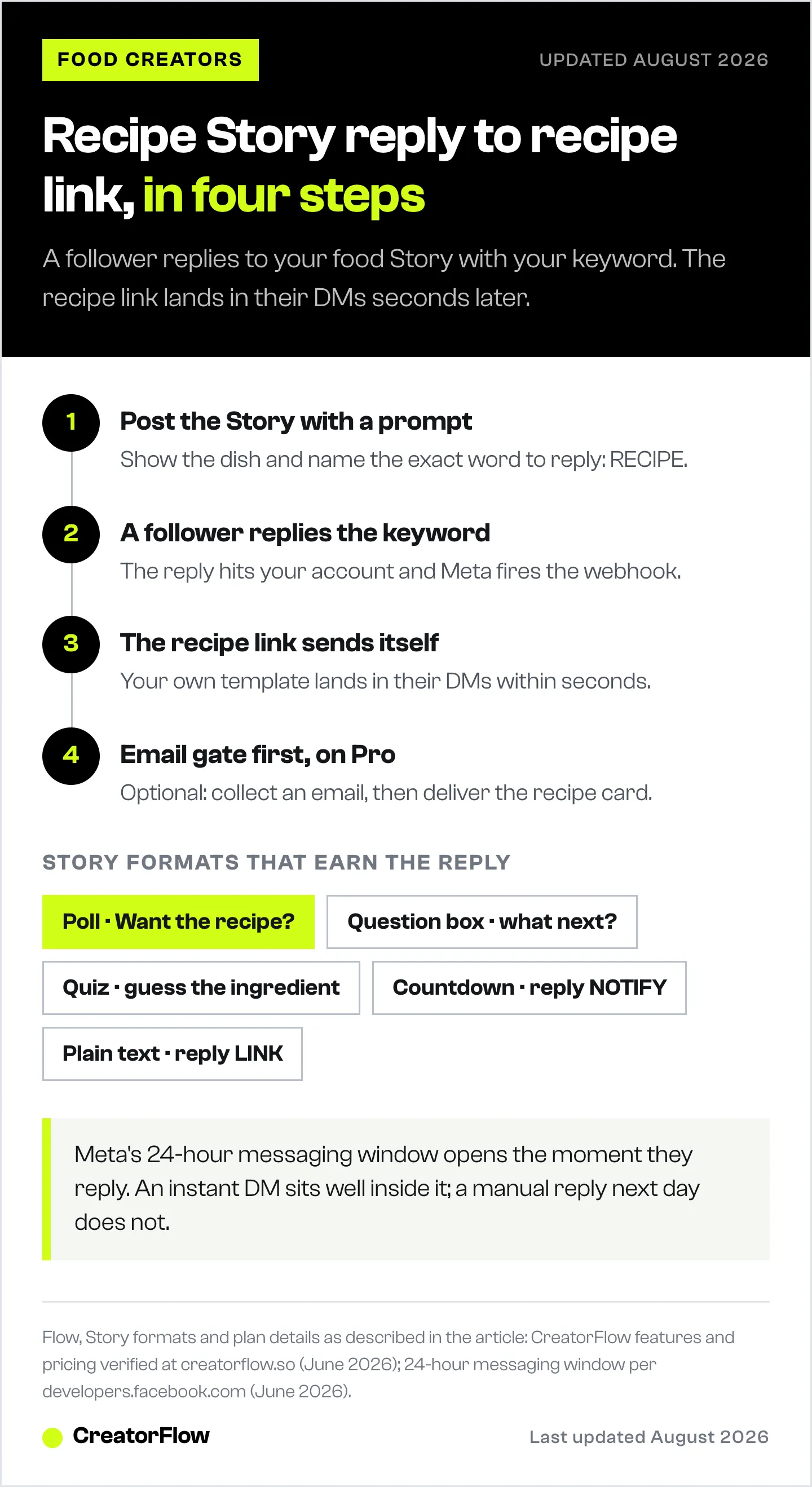
- Post a recipe Story with a clear prompt. You share a clip or photo of the dish and add a direct call to reply. “Want the full recipe? Reply RECIPE and I’ll send it.” The keyword is the trigger. Without a clear word to type, replies scatter and automation has nothing to match.
- A follower replies the keyword or to a sticker. They type “RECIPE,” or they tap “yes” on your poll and follow up with a reply. Either way, the reply hits your account and Meta fires the webhook to CreatorFlow.
- CreatorFlow sends the recipe link by DM, instantly. Your pre-written message lands in their inbox within seconds. It carries the link, a friendly line in your voice, and whatever else you set up.
- Optional email capture before the link. On the Pro plan, the email gate asks for an email first, then delivers the recipe. You grow a newsletter list from the same Story that drove the craving (creatorflow.so, June 2026).
That is it. No swiping between apps, no copy-pasting your link forty times, no follower left waiting. The craving and the link meet in the same minute.
The optional email step is where recipe creators build a real asset. A follower who hands over an email for your “5 weeknight dinners” recipe is a subscriber you own, not a follower the algorithm rents to you. Our guide on collecting emails through Instagram DM automation walks through the gate in detail.
Story Formats That Drive Replies
The Story has one job: earn the reply. These formats do it best for food content.
The “want the recipe?” poll. Post the finished dish, slap a poll on it: “Want the recipe?” with “Yes please” and “Already saving it.” Both options are wins. The poll tap is a micro-commitment, and you follow with a Story slide telling them to reply your keyword.
The question sticker: “What should I make next?” Drop a question box on a Story of your fridge or pantry. Followers reply with requests. You capture intent, plan content, and every reply opens a messaging window you can use to send a related recipe or your link-in-bio roundup.
The quiz sticker. “Guess the secret ingredient.” A quiz is playful and food-perfect. Each guess is a reply. Tease that the full recipe goes to anyone who replies the keyword, and you convert the game into link sends.
The countdown sticker for a drop. Launching an ebook, a meal-prep guide, or a new cookware affiliate code? A countdown sticker builds anticipation, and you prompt: “Reply NOTIFY and I’ll DM you the second it’s live.” When the countdown ends, you have a warm list of repliers to message inside the window.
The plain reply prompt. No sticker, only text on the Story: “Reply RECIPE for the full ingredient list.” Simple, clear, and it works because the instruction is unmistakable. Never assume followers will guess. Tell them the exact word to type.
Across all of these, the keyword does the heavy lifting. Pick a short, obvious word, RECIPE, MENU, LINK, COOK, and use the same one consistently so your audience learns the pattern.
Story Formats Compared
| Story format | Best for | What the follower does | Keyword prompt |
|---|---|---|---|
| ”Want the recipe?” poll | Single dish recipe drops | Taps poll, then replies keyword | ”Reply RECIPE” |
| Question sticker | Content planning + warm leads | Types a request or question | ”What should I make next?” |
| Quiz sticker | Playful engagement spikes | Submits a guess | ”Reply COOK for the answer + recipe” |
| Countdown sticker | Ebook or product drops | Replies to opt in | ”Reply NOTIFY” |
| Plain text prompt | Fast, no-frills delivery | Replies the keyword | ”Reply LINK” |
Match the format to the goal. Recipe drop? Poll or plain prompt. Building a list before a launch? Countdown. Planning next week’s content while collecting leads? Question sticker.
Setting It Up in CreatorFlow (About 5 Minutes)
CreatorFlow is template-first, so most of this is picking options, not building flows. Here is the full setup.
- Connect your Instagram account. Sign in at creatorflow.so and connect through Meta’s official login. You authorize via OAuth, so you never share your password. CreatorFlow is a Meta Tech Provider, a status it has held since December 2025 (creatorflow.so, June 2026).
- Create a Story reply automation. Pick the Story reply trigger. This tells CreatorFlow to watch for replies to your Stories rather than comments on feed posts.
- Set your keyword. Type the word followers will reply with, RECIPE, LINK, MENU. You can add variations so “recipe,” “Recipe,” and “RECIPE” all match.
- Write your DM template. Paste your message and drop in the recipe link. Write it in your own voice so it reads like you, not a bot. Templates below.
- Add the email gate (Pro, optional). If you want to grow a list, turn on the email gate so the recipe link goes out after the follower shares an email (creatorflow.so, June 2026).
- Activate and test. Turn it on, then reply to your own Story with the keyword from a second account or ask a friend. Confirm the DM lands. Done.
That is the whole thing. No code, no complex branching, no password sharing. The Free plan covers Story reply automation, keyword triggers, templates, and link tracking for up to 500 DMs a month, so you can run this without paying anything (creatorflow.so, June 2026). When you outgrow 500 DMs or want the email gate and geographic analytics, Pro is $15/month, or $12/month billed annually, with 5,000 DMs per workspace.
For the complete mechanics across every trigger type, the full Instagram DM automation guide is the reference.
DM Templates That Feel Personal
These are written to sound like a creator, not a help desk. Keep the link visible, keep the tone warm, and add one line of personality. Use bold labels so each template’s purpose is clear.
Template 1 — Recipe link delivery
Hey! Here’s that recipe you asked for: “creatorflow.so/your-recipe-link”
It’s one of my favorites for a busy weeknight. If you make it, reply with a photo, I love seeing your plates. Enjoy!
Template 2 — Newsletter opt-in (paired with the email gate)
So glad you want this one! Drop your email and I’ll send the full recipe card plus my “5 dinners in 30 minutes” guide straight to your inbox:
Once you’re in, you’ll get a new recipe from me every week. No spam, only food.
Template 3 — Product or affiliate recommendation
Here you go! “creatorflow.so/your-recipe-link”
A few people asked about the pan I used, here’s the exact one: “creatorflow.so/your-affiliate-link”
It’s the only nonstick I’ve stuck with. Tag me if you cook this!
Notice what these do. They lead with the thing the follower wanted, the recipe. They sound like a person. They add one genuine line, not a sales pitch. The link sits on its own line so it is easy to tap. Swap the quoted placeholder lines for your real links before you save the template.
Keep your messages short. A follower replied because they wanted a recipe, not a newsletter essay. Deliver the link, add warmth, get out of the way.
How Stories and Comment-to-DM Work Together
Story automation and comment-to-DM are not competitors. Run both, and you cover every place a craving shows up. Here is a weekly cadence that pairs them.
- Monday, feed post + comment-to-DM. Post the week’s hero recipe to the grid. Add “comment RECIPE for the link” to the caption. Comment-to-DM delivers the link to everyone who comments, for days, because the post lives in the feed.
- Tuesday through Thursday, Stories + Story reply automation. Share behind-the-scenes clips: prepping, tasting, plating. Add “reply RECIPE” prompts. Story automation catches the warm, in-the-moment cravings from your most engaged followers.
- Friday, question sticker. Drop “what should I cook this weekend?” Collect requests, open messaging windows, and tee up next week’s content.
- Weekend, countdown or drop. Promoting a guide or a product? Run a countdown Story with “reply NOTIFY,” then message your warm list of repliers when it goes live.
The feed post is your evergreen net. Stories are your daily, high-intent touchpoints. Together they mean a follower can ask for your recipe from a Reel comment, a feed comment, or a Story reply, and get the link instantly every time. CreatorFlow runs all three triggers from one dashboard, so this is one setup, not three tools.
Working with food creators? We keep a dedicated setup page for exactly that: CreatorFlow for food creators.
Common Mistakes to Avoid
A few missteps kill Story automation results. Avoid these.
No clear prompt. The biggest failure is assuming followers will reply on their own. They will not. Tell them the exact word: “Reply RECIPE.” A Story without an instruction gets views and no replies, and automation has nothing to trigger on.
Expecting Stories to reach everyone. Stories reach a slice of your followers, not all of them. That is fine, the slice is your most engaged audience. Do not measure a Story by total follower count. Measure it by replies and link clicks. A Story that reaches 2,000 of your warmest fans and converts 200 replies beats a feed post that reaches everyone and converts forty.
No keyword, or a different keyword every time. If you say “reply RECIPE” on Monday and “reply LINK” on Wednesday, you confuse your audience and split your automations. Pick one keyword per campaign and keep it consistent so followers learn the pattern.
Burying the link in a wall of text. A DM that opens with three sentences before the link loses people. Lead with the link or put it on its own line near the top. The follower asked for it; give it to them fast.
Forgetting the 24-hour window. Automation handles this for you, but understand it: once a follower replies, you have 24 hours to message through the API (creatorflow.so, June 2026). Instant auto-DMs stay well inside that window. Manual replies a day later do not.
Robotic copy. A DM that reads like a system notification breaks the trust a Story builds. Write in your voice. One warm line, the link, done. CreatorFlow lets you write every word yourself, so the message feels like you, because it is.

FAQ
What is the difference between Story reply automation and comment-to-DM?
Story reply automation triggers when a follower replies to your Instagram Story, or types a keyword inside that reply. Comment-to-DM triggers when someone comments on a feed post or a Reel. Both send an automatic DM in seconds, but they fire from different places. Recipe creators usually run both, Stories for warm daily cravings and comments for evergreen grid posts.
Do I need a paid plan to automate Story replies for my recipes?
No. CreatorFlow’s Free plan includes Story reply automation, comment-to-DM, keyword triggers, templates, and link tracking for up to 500 DMs per month at $0 (creatorflow.so, June 2026). You only need Pro ($15/month, or $12/month billed annually) if you want the email gate for list-building, CSV export, geographic analytics, or more than 500 DMs across 5,000 per workspace.
Will the auto-DM feel like a bot to my followers?
Not if you write it well. You compose every word of the DM template yourself, so the message reads in your voice with a personal line and your link. Followers see a warm reply that sounds like you, delivered instantly. The automation handles timing; the words are entirely yours.
Can I capture emails from a recipe Story?
Yes, on the Pro plan. The email gate asks the follower for an email before it delivers the recipe link, turning a Story reply into a newsletter subscriber. You build a list you own from the same craving that drove the reply. See our guide on collecting emails through Instagram DM automation for the full setup.
How fast does the recipe link get sent?
Within seconds of the follower replying your keyword. Meta’s Instagram API fires a webhook the moment the reply lands, and CreatorFlow delivers your DM right away. The follower gets the link while their craving is still fresh, not hours later when they have scrolled past.
Is Story automation safe for my Instagram account?
CreatorFlow connects through Meta’s official Instagram API via OAuth, so you never share your password. It has been a Meta Tech Provider since December 2025 and paces sends to stay inside Meta’s rules, which keeps ban risk minimal (creatorflow.so, June 2026). No tool can promise absolute safety, but using the official API the way Meta intends is the lowest-risk path.
What keyword should I use for recipe Stories?
Pick one short, obvious word and stick with it. RECIPE, LINK, MENU, and COOK all work. Consistency matters more than the exact word, so your audience learns the pattern. CreatorFlow lets you add capitalization variations, so “recipe,” “Recipe,” and “RECIPE” all match the same automation.
How many Story prompts should I post per week?
There is no hard rule, but a workable cadence is a feed post with comment-to-DM on Monday, Story reply prompts midweek, a question sticker on Friday, and a countdown on weekend drops. The goal is to give followers a clear way to ask for your recipe from every surface, so the link lands instantly wherever the craving starts.
Sources: CreatorFlow pricing and features verified at creatorflow.so, June 2026. Meta’s Instagram API rules, OAuth login, 24-hour messaging window, and Meta Tech Provider status per creatorflow.so and developers.facebook.com, June 2026. All competitor and pricing figures reflect publicly listed information as of June 2026 and should be re-verified before republishing.