

Instagram story reply automation sends instant DM responses when someone mentions you in their Story or replies to yours. It uses Meta’s Instagram Graph API to detect story mentions and deliver thank-you messages, links, or lead capture forms within seconds. Without automation, by the time you see the notification hours later, the story is buried and the 24-hour messaging window is ticking.
Story mentions are the highest-intent signal on Instagram. Someone took your content, put it in front of their audience, and gave you a direct line to their DMs. Ignoring that is leaving money and relationships on the table. Meta treats story replies and story mentions as two separate events, a distinction covered in our guide to Instagram automation features and their limits.
Story reply automation fixes this. When someone mentions you in their Story or replies to yours, they get an instant DM response. A thank-you, a link, a lead capture form. All within seconds, 24/7, without you touching your phone. This guide covers exactly how it works, how to set it up in under 5 minutes, which tools support it, message templates that convert, and the Meta API rules you need to follow. The product-side overview lives on the story reply automation page.
Key Takeaways
- Two trigger types: Story Mention (someone tags you in their Story) and Story Reply (someone responds to your Story). Both fire through Meta’s messages webhook and can be automated independently.
- Story mentions are the highest-intent signal: Someone resharing your content to their audience demonstrates trust. An instant DM at that moment converts at higher rates than cold outreach.
- A Story-triggered DM lands in the main inbox: The person messaged you first, so your reply shows up as a normal chat, not a message request.
- Setup takes under 5 minutes: Connect your Business/Creator account, create the trigger, write your response message, set filters, and activate. No coding required.
- Tools pace at ~200 DMs/hour: A tool-side convention rather than a Meta-published limit, applied across all automation types combined. Meta’s own limits are per second: 100 calls per second for text and links on the Instagram API with Instagram Login.
- Bottom line: Automate Story Mention triggers to reward followers who share your content, and Story Reply triggers to deliver lead magnets and booking links within seconds of engagement.

What Is Instagram Story Reply Automation?
Instagram story reply automation sends pre-written DMs automatically when followers interact with your Stories. Because the viewer messages you first, story replies land in the main inbox rather than a request folder, which is why story replies survive the handoff better than comments. There are two distinct triggers:
Story Mention Trigger: Someone tags your @username in their own Story. Instagram sends your automation tool a webhook notification. Your tool sends them a DM within seconds.
Story Reply Trigger: Someone replies to one of your Stories (text message or emoji reaction). Same process. Webhook fires, DM sends.
Both triggers work through Meta’s official Instagram Graph API. When a story interaction happens, Instagram delivers it as a messages webhook event with a story-specific payload containing the story URL and ID (developers.facebook.com/docs/messenger-platform/instagram/features/webhook/, April 2026).
For a full overview of all automation types including story replies, see our complete guide to Instagram DM automation. This is different from the mentioned_media endpoint, which handles @mentions in captions and comments. Story mentions are explicitly excluded from that endpoint. Meta’s documentation states: “Mentions on Stories are not supported” by the mentioned_media API (developers.facebook.com/docs/instagram-platform/instagram-graph-api/reference/ig-user/mentioned_media/, April 2026).
The distinction matters because some automation tools only support comment-based triggers. For story automation, your tool needs to subscribe to the messages webhook field and parse story-specific payloads.
Why Story Mentions Are More Valuable Than Comments
Comments are public. Anyone can drop a “nice!” on your post. Story mentions require effort. Someone has to screenshot or reshare your content, add their own context, and post it to their audience. That’s a different level of engagement.
Here’s why story automation deserves priority:
Higher intent signal. When someone mentions you in their Story, they’re actively promoting you to their audience. They’ve already sold themselves on your content. A DM response at this moment converts at higher rates than cold outreach.
Large reach. In January 2019, Facebook (now Meta) said more than 500 million accounts used Instagram Stories every day. Your audience is watching.
DMs get seen. A DM sent right after a story mention arrives in a chat the other person started. It sits in their main inbox, next to messages from friends, not in a promotions tab.
Speed wins. Manual responses can’t compete with automation on speed. You’re asleep, in a meeting, or creating content. Automation responds in seconds regardless.
The 24-hour window is ticking. Meta’s messaging policy opens a 24-hour messaging window when someone messages your business account (checked October 2026). Story mentions and story replies start this clock. Miss it, and you lose the ability to message them until they interact again.
| Metric | Story Mention DM | Comment Reply | Bio Link |
|---|---|---|---|
| Where it lands | Main inbox (they started the chat) | Public comment thread | N/A |
| Response time | 1-5 seconds (automated) | Minutes to hours (manual) | User-initiated |
| Conversion signal | High (active promotion) | Medium (engagement) | Low (passive) |
| Messaging window | 24 hours from the mention | One private reply within 7 days of the comment | No window |
| Effort from user | High (reshare + tag) | Low (type comment) | Medium (navigate profile) |
How to Set Up Instagram Story Reply Automation
Step 1: Connect Your Instagram Business Account (2 minutes)
You need an Instagram Business or Creator account. Personal accounts don’t have API access. Tools built on the Instagram API with Instagram Login, which CreatorFlow uses, do not need a Facebook Page; tools built on the Facebook Login path ask you to link one. If this is your first Instagram automation, the DM automation getting started guide covers the prerequisites in one screen.
- Open your automation tool (CreatorFlow, ManyChat, or similar)
- Click “Connect Instagram Account”
- Log in with your Instagram credentials
- Authorize the messaging permissions the tool requests
- Confirm your account appears in the dashboard
The connection uses OAuth. You never share your password with the automation tool. Instagram handles authentication directly.
If you’re on a personal account: Switch to Business or Creator in Settings > Account > Switch to Professional Account. Takes 30 seconds and is free.
Step 2: Create Your Story Trigger (1 minute)
Navigate to your automation tool’s trigger settings. Select “Story Mention” or “Story Reply” as the trigger type.
Story Mention trigger fires when someone tags your @username in their Story. Use this for:
- Thanking people who share your content
- Sending a reward link (discount, freebie, resource)
- Capturing emails from engaged followers
Story Reply trigger fires when someone responds to your Story with text or emoji. Use this for:
- Delivering content promised in the Story (“Reply YES for the link”)
- Capturing leads from Stories that ask people to reply a keyword
- Following up on Story-based CTAs
Poll votes, quiz taps and question sticker answers do not arrive as DMs, so they do not fire this trigger. Pair a sticker with a “Reply YES” prompt to turn that interest into a DM.
You can run both triggers simultaneously. They operate independently.
Step 3: Write Your Response Message (2 minutes)
Your automated message needs to feel like a real response, not a bot. Here are templates that work:
For Story Mentions (Thank + Reward):
Hey [Name]! Just saw you shared my post in your Story. That means a lot, seriously.

As a thank you, here's my [free guide/discount/resource]: [LINK]

What part resonated with you most?
You can also use story automation to collect emails from Instagram DMs automatically by asking for an email before sending your resource link. Because every one of these replies arrives as a private DM, check what a story reply shows to other viewers before you write the prompt.
For Story Mentions (Lead Capture):
[Name]! Thanks for the Story mention. Love seeing my content reach new people through you.

I'm putting together an exclusive resource for my most engaged followers. Want in? Drop your email and I'll send it over.
For Story Replies (Content Delivery):
Here's the [resource/link/guide] I mentioned in my Story: [LINK]

Let me know if you have questions. I read every reply.
For Story Replies (Booking):
Thanks for reaching out! Here's my calendar to book a free discovery call: [CALENDLY LINK]

Spots fill up fast this week. Grab one before they're gone.
Template rules:
- Use the recipient’s name (personalization variable)
- Keep it under 500 characters (people skim DMs on mobile)
- End with a question or CTA (drives replies, which signals engagement to Instagram)
- Sound like you, not like a chatbot
- Include one link maximum (multiple links feel spammy)
Step 4: Set Filters and Conditions (1 minute)
Smart automation uses filters to avoid looking spammy:
Follow-before-DM: Only send DMs to people who follow you. Prevents sending unsolicited messages to strangers who mention you.
Keyword filters: For Story Reply triggers, only respond when the reply contains specific words. Example: respond to “YES” or “LINK” but not to emoji-only reactions. For a deeper look at keyword-based triggers, see our Instagram keyword trigger automation guide.
Cooldown period: Prevent sending the same person multiple automated DMs within 24 hours. One DM per trigger per day is the sweet spot.
Time delay: Add a 30-60 second delay before sending. Instant responses can feel robotic. A brief pause feels more natural.
Step 5: Test and Activate (1 minute)
Before going live:
- Use a second account (or ask a friend) to mention you in their Story
- Verify the DM sends within the expected timeframe
- Check that personalization variables populate correctly (name, not “[Name]”)
- Confirm links are clickable and lead to the right destination
- Review the message on mobile (most users read DMs on their phone)
Once verified, activate the automation. Monitor the first 24 hours for any issues.
Story Mention vs Story Reply: Which to Automate First
Both triggers serve different purposes. Here’s how to prioritize:
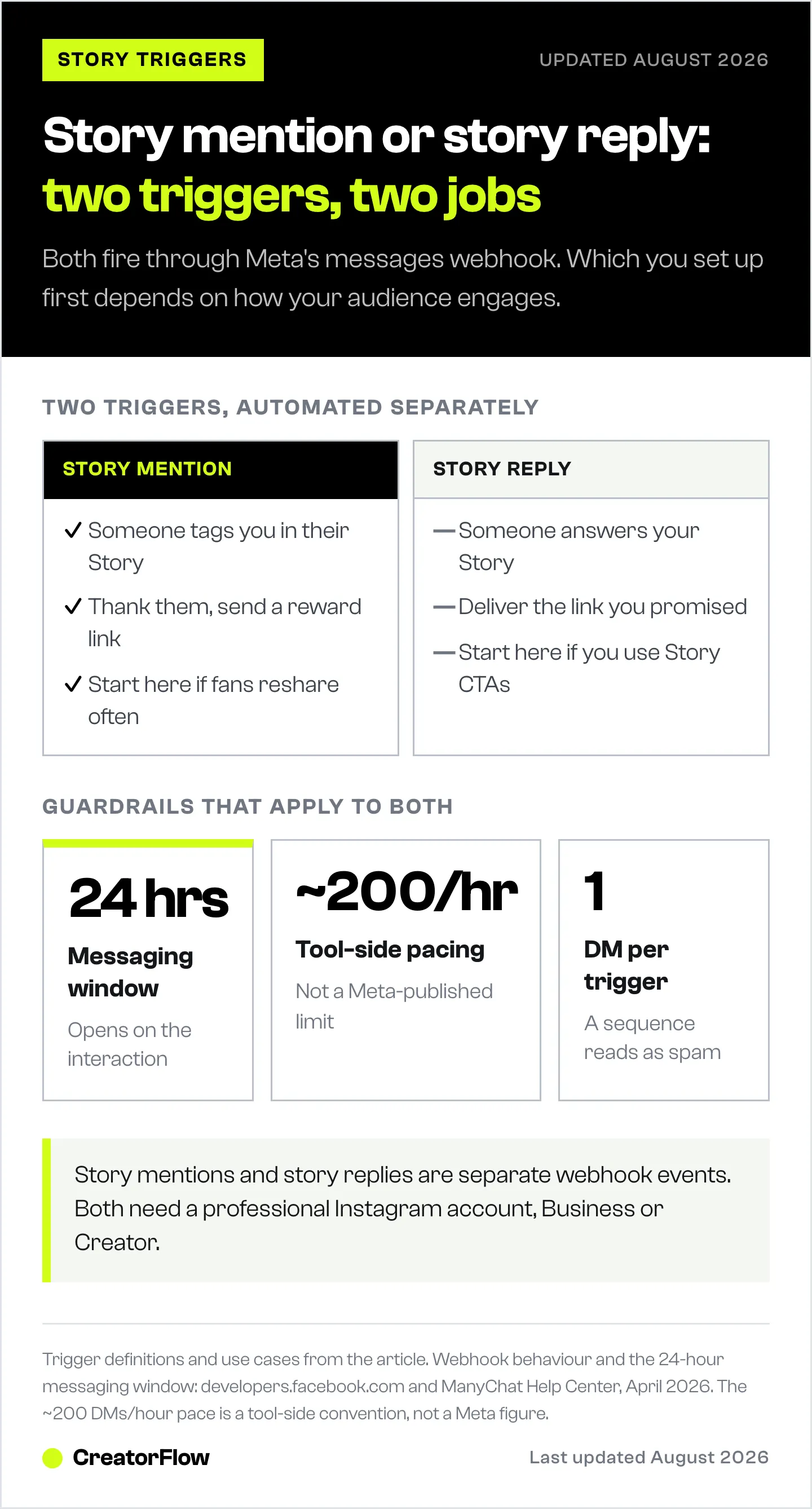
| Trigger Type | Best For | When It Fires | Priority |
|---|---|---|---|
| Story Mention | Brand awareness, thank-yous, lead capture | Someone tags you in their Story | Start here if you get tagged often |
| Story Reply | Content delivery, bookings, sales | Someone replies to your Story | Start here if you use Story CTAs |
If you’re a content creator: Start with Story Mention automation. Fans share your content regularly. Reward them instantly and you’ll get more shares.
If you’re a coach or service provider: Start with Story Reply automation. Use Stories to tease offers (“Reply BOOK for my calendar link”) and automate the delivery.
If you’re an e-commerce brand: Run both. Story mentions = thank loyal customers with discount codes. Story replies = deliver product links from Story showcases.
Story Formats That Drive the Most Automation Triggers
Not all Stories generate the same number of replies. Here’s what works best for triggering automation:
Polls (Highest Engagement, Lowest Friction)
One tap to engage. No typing required.
Automation strategy: A poll vote is not a DM, so it cannot trigger an automation by itself. Use the poll to warm people up, then ask for a reply on the next slide.
- Poll: “Struggling with Instagram growth? Yes / No”
- Next slide: “Voted yes? Reply GROW for my free growth guide”
- They reply “GROW” > DM with your free growth guide
”Reply [WORD] for [THING]” Stories
Clear instruction, zero confusion. People like following simple directions.
- Story text: “Reply RECIPE for my viral pasta recipe”
- They reply “RECIPE” > DM with recipe PDF
This format works because the CTA is explicit. Don’t assume people will figure out what to do. Food creators run this exact play daily; the Instagram Story automation guide for recipe creators shows how to auto-send recipe links and capture emails from Story replies.
Question Stickers (Best for Lead Qualification)
Open-ended responses let you learn each person’s pain point. Question sticker answers appear in your Story viewer list, not in your DMs, so they do not trigger automations. To segment by pain point with automation, ask for a reply keyword instead.
- Story text: “What’s your biggest Instagram struggle? Reply FOLLOWERS or CONTENT”
- Reply contains “followers” > DM with growth guide
- Reply contains “content” > DM with content strategy guide
Transformation/Before-After Stories
Visual proof creates curiosity. People want to know how you achieved the result.
- Post before/after photo
- Text overlay: “Reply HOW to learn my process”
- Keyword trigger on “HOW” > DM with program details
Advanced Strategies for Story Automation
The Story Mention Flywheel
When someone mentions you in their Story, your automated DM thanks them and asks a question. Their reply to your DM keeps the conversation going and builds a closer relationship with that follower.
The flywheel:
- Follower mentions you in Story
- Automation sends thank-you DM with a question
- They reply to your DM
- You (or automation) send a follow-up with a link or offer
- They share your response or mention you again
This creates a loop. Each mention starts a DM conversation, and a follower who gets a warm thank-you has a reason to share you again.
Story CTA + Reply Automation
Post a Story with a clear CTA: “Reply LINK to get my free template.” When they reply with the keyword, automation delivers the template instantly.
Why this works:
- Stories feel intimate and urgent (24-hour expiry)
- Replying is private (no public commitment needed)
- Delivery is instant (no waiting, no “check your email”)
- Every reply starts a DM conversation (future messaging opportunity)
Combine with Instagram’s interactive stickers (polls, questions, quizzes) to warm people up, then ask for the keyword reply on the next slide. The sticker taps themselves do not reach your DMs.
Segment by Trigger Type
Different story interactions signal different intent levels:
- Story Mention = advocacy (they’re promoting you)
- Story Reply with keyword = interest (they want something specific)
- Story Reply with emoji = casual engagement (low intent)
- Story Reply with question = consideration (potential lead)
Set up different response templates for each. Don’t send the same generic message to someone promoting you and someone who sent a fire emoji.
If you want the click-by-click version, follow the story automation walkthrough.
Instagram Graph API Rules for Story Automation
Story automation runs on Meta’s official Instagram Graph API. Follow these rules to stay safe:
Rate limits: Meta’s rate-limit documentation sets per-second ceilings on the Instagram API with Instagram Login: 100 calls per second for text and links, 10 per second for audio and video, and 750 private replies per hour to comments on posts and Reels (checked October 2026). Many tools also pace sends at about 200 DMs per hour. That pacing is a tool-side safety convention, not a Meta limit. Our guide to Instagram API rate limits covers the details.
24-hour messaging window: You can message someone for 24 hours after they message your account, which includes a story mention, a story reply, or a DM. Comments work differently: you get one private reply within 7 days of the comment, and the 24-hour window opens when the person replies. Outside the window, you cannot start messages (Meta’s messaging policy, checked October 2026).
One automated message per trigger: Each story interaction should trigger one DM, not a sequence. Sending multiple unprompted messages from a single trigger looks spammy to Meta’s systems.
Content restrictions: The messages webhook for story responses does not support GIF or sticker content. Ephemeral/disappearing media content is also unsupported in the webhook payload (developers.facebook.com/docs/messenger-platform/instagram/features/webhook/, April 2026).
Spam reports: Meta does not publish a trust score for Instagram messaging. People can still block you or report your messages as spam, and repeated reports can restrict an account. Genuine, relevant messages keep that risk low (How to Avoid Instagram Bans with DM Automation).
| Rule | Limit | What Happens If Exceeded |
|---|---|---|
| Meta API calls, text and links | 100 per second (Instagram Login) | Calls fail with a rate-limit error |
| Tool pacing (not a Meta rule) | About 200 DMs per hour in many tools | The tool queues the rest |
| Messaging window | 24 hours after they message you | Cannot send message |
| Messages per trigger | 1 recommended | Spam risk increases |
| Spam reports and blocks | Not published | Account can be restricted |
Safe practices:
- Use Meta-approved automation tools only (CreatorFlow, ManyChat, LinkDM)
- Never use tools that require your Instagram password
- Keep messages relevant to the interaction
- Include an opt-out option for repeated messaging
- Watch reply rates and blocks for signs your messages are unwanted
Tools That Support Story Reply Automation
Not all Instagram automation tools handle story triggers. Here’s what each lists:
| Tool | Story triggers listed | Pricing (October 2026) | Best For |
|---|---|---|---|
| CreatorFlow | Story replies and emoji reactions | $15/mo flat rate (Free plan: 500 DMs/mo) | Solo creators, simple setup |
| ManyChat | Story replies and Story mentions | $17-199/mo billed monthly (by contacts) | Agencies, multi-platform |
| LinkDM | Story replies and Story mentions | $19/mo (Pro, monthly) | Established creators |
CreatorFlow offers story reply automation on both Free and Pro plans. The story reply automation page shows text replies and emoji reactions to your Story both triggering the DM. The flat-rate pricing means your Pro cost stays the same whether you send 100 or 5,000 DMs per month; see the CreatorFlow pricing page for the exact tier breakdown. Setup takes under 5 minutes with pre-built templates for story triggers, and the story replies use case walks through the full configuration.
ManyChat has the most documented story mention and reply triggers with separate configuration for each. Pricing scales with contact count, starting at $17/mo (Essential, $14 billed annually) for up to 250 contacts, per ManyChat’s pricing page (checked October 2026). ManyChat also supports Facebook Messenger, WhatsApp, and SMS if you need multi-platform automation.
LinkDM lists separate auto-replies for story replies and story @mentions on its homepage (checked October 2026). Its Pro plan is $19/month on the pricing page.
When to choose CreatorFlow: You want flat-rate pricing, Instagram-only focus, and fast setup. Best for solo creators and small teams who want comment-to-DM automation alongside story triggers.
When to choose ManyChat: You need multi-platform automation (Instagram + Facebook + WhatsApp + SMS), advanced conditional workflows, or manage multiple client accounts.
Common Mistakes to Avoid
1. Generic messages. “Thanks for the mention!” feels like a bot. Add their name, reference what they shared, or ask a specific question.
2. Instant responses with no delay. A DM arriving 0.5 seconds after a story mention screams automation. Add a 30-60 second delay for a more natural feel.
3. Too many links. One link per message. Multiple links look like spam and reduce click-through rates.
4. Ignoring the 24-hour window. If someone mentions you and your automation is down, you can’t send a delayed DM after the window closes. Monitor uptime.
5. Same message for every trigger. Story mentions and story replies have different intent. Someone sharing your content deserves a different response than someone who typed “LINK” on your Story.
6. No follow-up strategy. The first automated DM opens the conversation. What happens next? Plan a manual or automated follow-up to nurture the lead.
7. Automating responses to every Story viewer. Only automate responses to people who actively engage (reply to your Story or tag you). DMing viewers who didn’t interact is spam and will get you flagged.
What to Track After Setup
Monitor these metrics weekly to improve performance:
Story engagement rate: Replies and interactions divided by Story views. Record your first two weeks as a baseline, then try to beat it. If it drops, your CTA isn’t clear or your offer isn’t compelling.
Automation trigger rate: Percentage of Story viewers who trigger your automation. Test different Story formats and CTAs to improve this against your own baseline.
DM click-through rate: Percentage of automated DMs where the recipient clicks your link. If it falls below your baseline, rewrite your message with a clearer reason to click.
Response rate to your DMs: How many recipients reply back to your automated message. Replies show your messages are wanted. Blocks and spam reports show the opposite.
Track weekly. Compare month-over-month, not daily fluctuations.
Related Reading
- Comment-to-DM Automation: Complete Setup Guide - Set up comment triggers alongside story automation
- Instagram API Rate Limits Explained - The real per-second limits that apply to all automation types
- Best Instagram DM Automation Tools Compared - Full comparison of all automation platforms
- How to Avoid Instagram Bans with DM Automation - Stay safe with Meta’s compliance rules
- Instagram Keyword Trigger Automation - All trigger types including story, comment, and keyword
If a client has to approve the Story before it runs, the reply message is part of what they are approving. The Story mockup and client sign-off workflow covers how to put both in one packet.
FAQ
Does story reply automation work with personal Instagram accounts?
No. You need an Instagram Business or Creator account. Instagram’s API only works with professional accounts. A Facebook Page is only needed for tools that connect through Facebook Login. Switching is free and takes 30 seconds in your account settings.
Will automation get my account banned?
The risk is low when you use tools that connect through Meta’s official API, like CreatorFlow or ManyChat. CreatorFlow is a Meta Tech Provider (since December 2025). These tools use OAuth authentication. No password sharing, no scraping, no unauthorized access. Stay within your tool’s ~200 DMs/hour pacing cap (a tool-side convention, not a Meta-published limit) and send only relevant messages. No tool can promise zero risk.
What’s the difference between Story Mention and Story Reply triggers?
Story Mention fires when someone tags your @username in their own Story. Story Reply fires when someone responds to one of your Stories with text or an emoji. They’re separate webhook events in Meta’s API and can be automated independently.
Can I automate responses to Story reactions (emoji)?
Yes, but with caution. Story Reply triggers can fire on emoji reactions. Someone sending a fire emoji on your Story isn’t necessarily asking for a link. Use keyword filters to respond only to text-based replies with specific trigger words.
How fast does the automated DM send?
With a direct connection to Meta’s API, the DM sends within 1-5 seconds of the story interaction. Most tools allow you to add an intentional delay (30-120 seconds) to make the response feel more natural.
What happens if more than 200 people reply to my Story in an hour?
Your tool queues the extra DMs and sends them as its pacing allows. The ~200/hour figure is a tool-side pacing convention, not a Meta limit. Meta’s own limits are per second (100 calls per second for text and links on the Instagram Login path). The pacing cap covers all automated DMs combined (comment triggers + story triggers + keyword triggers), so plan your volume accordingly.
Can I use different messages for different types of story interactions?
Yes. Most tools let you create separate automations for Story Mentions vs Story Replies, and filter by keywords within replies. Match your message to the interaction type for better conversion rates.
Do Story mentions from private accounts trigger automation?
This depends on the account’s privacy settings and Meta’s API permissions. If the person who mentioned you has a public account or follows you, the webhook fires. Private account mentions may not trigger webhooks in all cases.
How many DMs can I send per day with story automation?
Tools pace at about 200 DMs per hour (a tool-side convention, not an API-published limit), which translates to a theoretical maximum of 4,800 per day. Your plan’s monthly allowance usually matters more: CreatorFlow’s Free plan includes 500 DMs a month and Pro includes 5,000 per workspace. Quality matters more than volume, because relevant messages get replies and unwanted ones get reported.
Can I automate poll and question sticker responses?
Not directly. Poll votes, quiz taps and question sticker answers do not arrive as DMs, so Meta’s messaging API does not pass them to automation tools. Use the sticker to warm people up, then add a slide that says “Reply YES for the guide.” CreatorFlow’s Story Reply trigger catches that keyword reply and sends the DM.
Is there a limit on how many story automations I can run at once?
Meta sets no limit on the number of active automations. Each tool sets its own plan rules, and CreatorFlow includes unlimited automations on every plan. You can run Story Reply and keyword-filtered reply automations side by side. The practical constraints are your plan’s monthly DM allowance and your tool’s ~200 DMs/hour pacing cap across all automation types combined.
Sources
- Meta Developer Documentation: Instagram Graph API Mentioned Media endpoint (developers.facebook.com/docs/instagram-platform/instagram-graph-api/reference/ig-user/mentioned_media/, accessed April 12, 2026)
- Meta Developer Documentation: Instagram Messaging Webhooks (developers.facebook.com/docs/messenger-platform/instagram/features/webhook/, accessed April 12, 2026)
- Meta Developer Documentation: Instagram Platform Webhooks (developers.facebook.com/docs/instagram-platform/webhooks/, accessed April 12, 2026)
- Meta Developer Documentation: Rate limiting (checked October 2026)
- Meta: Messaging policy, 24-hour window (checked October 2026)
- ManyChat Help Center: Story Mention Reply Trigger (help.manychat.com/hc/en-us/articles/14281309502108, accessed April 12, 2026)
- ManyChat: Pricing (checked October 2026)
- LinkDM: Homepage feature list and pricing (checked October 2026)
- CreatorFlow: Story reply automation and pricing (checked October 2026)
- CreatorFlow: Instagram API Rate Limits Explained (creatorflow.so/blog/instagram-api-rate-limits-explained/, accessed April 12, 2026)
- CreatorFlow: Avoid Instagram Bans with DM Automation (creatorflow.so/blog/avoid-instagram-bans-dm-automation/, accessed April 12, 2026)
Disclaimer: Meta rules and tool pricing in this article were checked in October 2026. Individual results vary based on audience size, content quality, engagement rates, and niche. CreatorFlow uses Meta's official Instagram API. Instagram/Meta may change features, rate limits, or terms at any time. Instagram is a trademark of Meta Platforms, Inc. CreatorFlow is not affiliated with, endorsed by, or sponsored by Meta Platforms, Inc. ManyChat and LinkDM are trademarks of their respective owners. Users are responsible for complying with Instagram's Terms of Service and Community Guidelines.


