

When your automation sends a link in an Instagram DM, Instagram tries to build a preview card for it. It fetches the page with Meta’s crawler and reads the Open Graph tags. If there’s an og:image, the follower sees a card with a picture, a title, and a description. If there isn’t, they see a naked blue URL.
You spent weeks on the Reel that earned the comment. The automation fired in eight seconds. And then the thing that actually asks for the click is a line of grey text.
This is the least-discussed conversion surface in DM automation. Everyone optimizes the trigger word and the message copy. Almost nobody looks at what the link itself looks like when it lands.
Key Takeaways
- Instagram DMs render link previews from Open Graph tags, fetched by Meta’s crawler, the same one that builds Facebook and Threads previews.
- No og:image means no card. The DM shows a bare URL, which occupies less space and gives the follower nothing to react to.
- The spec is 1200x630 at a 1.91:1 ratio, served over absolute HTTPS with no redirect chain in the way (developers.facebook.com/docs/sharing/webmasters, July 2026).
- You inherit the destination’s branding. Send a Calendly link and the card shows Calendly’s card, not yours. That is a strategic choice, not a technical one.
- A DM funnel has five visual assets and most creators design zero of them.
- These are batch jobs, not design projects. We generate ours with the OG Image Generator in DesignerBox at one credit each.
What Instagram Actually Does With Your Link
The sequence, when someone comments your trigger word and your automation sends them a URL:
- The DM is delivered with the raw link in the message body.
- Meta’s crawler requests the destination page.
- It parses the head for og:image, og:title, and og:description.
- Instagram assembles a preview card underneath your message.
Step three is where most links fail. Not because the page is broken, but because nobody ever set the tags, or the image sits behind a redirect, or the URL is relative instead of absolute, or the file is too heavy to fetch quickly.
The failure is silent. Nothing errors. You just get less card than you could have had, on a surface where the card is doing the selling.
If your links are failing for a different reason entirely, our guide to fixing Instagram DM links on Android covers the device-side problems that look similar but aren’t.
Why a Missing Card Is a Conversion Problem
An Instagram DM is a stripped-down surface. No layout, no sections, no hierarchy. Your message is a few lines of text in a bubble.
The preview card is the only visual element you get. It’s the difference between a message that looks like a delivered product and a message that looks like a link someone pasted. When the card renders, the follower sees a title, an image, and a tappable area roughly the size of their thumb. When it doesn’t, they see a URL and have to decide whether to trust it.
Every follower who received your automation already raised their hand. They commented. They want the thing. The card’s job is to not lose them in the last two seconds.
We compared the surrounding numbers on landing pages versus DM automation if you want the funnel-level view.
The Spec
Meta documents the Open Graph requirements it reads for sharing. The parts that matter for a DM card:
| Property | What to use |
|---|---|
| Dimensions | 1200 x 630 pixels |
| Aspect ratio | 1.91:1 |
| Format | JPG, PNG, or WebP |
| URL | Absolute HTTPS, not relative |
| Redirects | None between the tag and the file |
| Weight | Compress it; slow fetches produce empty cards |
| og:title | Under about 60 characters before truncation |
| og:description | Under about 110 characters for DM display |
Source: developers.facebook.com/docs/sharing/webmasters, July 2026. Meta publishes these for sharing generally; Instagram DM cards are built by the same crawler, so the same tags govern them.
One detail worth knowing: text inside the image gets small. The card renders at a fraction of the source dimensions on a phone. A headline that reads fine at 1200px wide can be unreadable in the DM. Design at 1200x630 but check it at thumbnail size before you ship it.
The Five Assets in a DM Funnel
Here’s the part nobody maps out. A single DM automation touches up to five visual assets, and most creators have designed none of them.
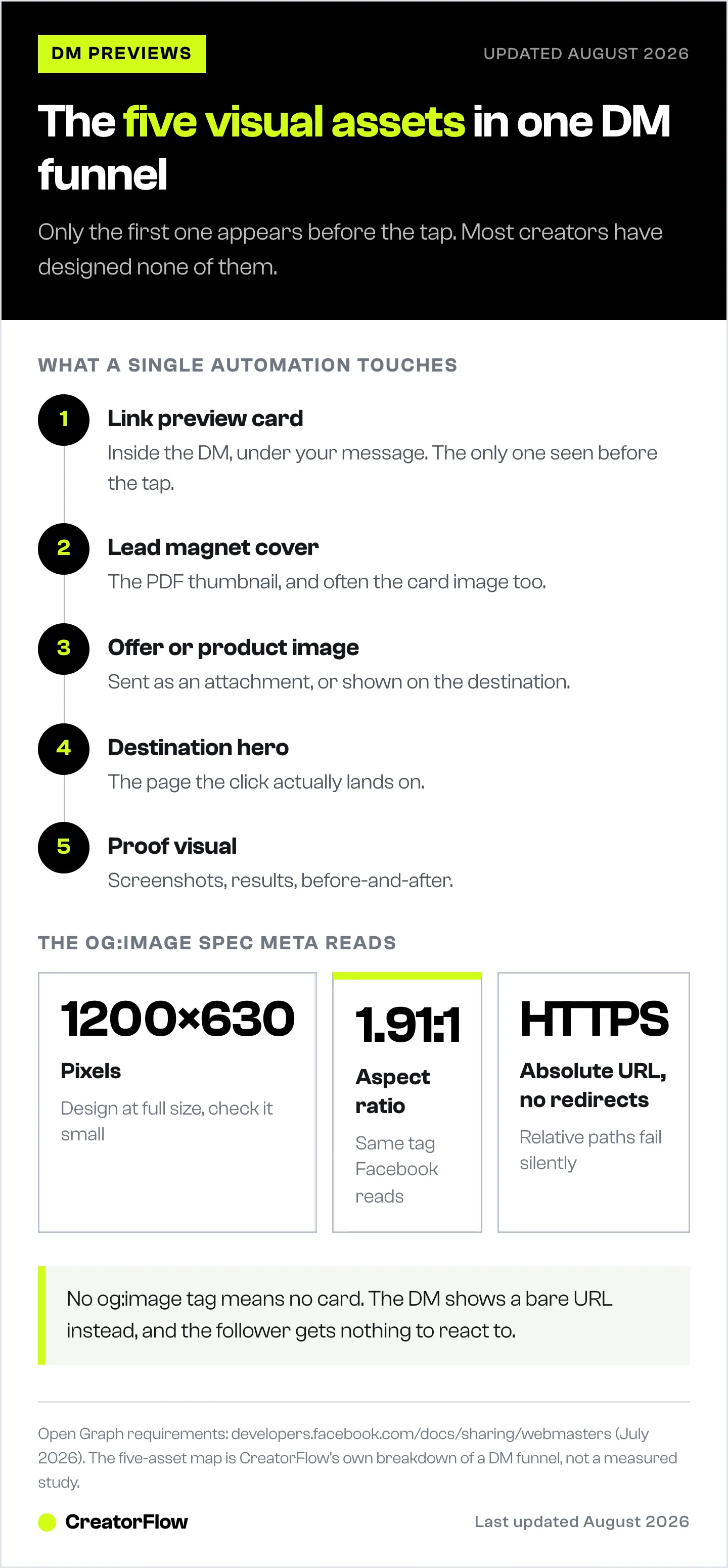
| # | Asset | Where it shows | Usual state |
|---|---|---|---|
| 1 | Link preview card | Inside the DM, under your message | Missing or inherited |
| 2 | Lead magnet cover | The PDF thumbnail, and often the card image | A Google Docs title page |
The card only matters if the file is reaching people in the first place. Which delivery method to use depends on whether you are sending once or fifty times a week. | 3 | Offer or product image | Sent as an attachment or on the destination | The same photo as the post | | 4 | Destination hero | The page the click lands on | Whatever the template shipped with | | 5 | Proof visual | Screenshots, results, before-and-after | Screenshotted at the wrong crop |
Asset 1 matters most because it’s the only one that appears before the click. Everything else has to survive the tap first.
Asset 2 is the one people underestimate. If you promise a free guide, the cover is the entire perceived value of the thing. A cover that looks made explains why the guide is worth an email address. We wrote about the delivery mechanics in Instagram lead magnet automation; this is the layer on top of it.
The Inherited-Card Problem
This is the strategic point, and it’s the one that changes what you do.
If your automation sends a link to a tool you don’t control, the preview card belongs to that tool. Send a Calendly link and the follower sees Calendly’s branding. Send a raw Gumroad or Linktree URL and they see that platform’s default card. Send an Amazon affiliate link and they see Amazon’s.
Sometimes that’s fine. Amazon’s card carries trust you can’t manufacture. But for a booking link or a lead magnet, the follower just watched your Reel, commented on your post, opened your DM, and then received a card with someone else’s logo on it. The chain of ownership breaks at the last step.
Three ways to handle it:
- Route through a page you own. Send them to your domain, which then forwards or embeds the booking tool. You control the card; you add one hop.
- Set OG tags where the platform allows it. Several link-in-bio and checkout tools expose social preview settings. Fill them in.
- Accept it deliberately. If the destination’s brand is stronger than yours in that context, inheriting it is the right call. Just make it a decision rather than a default.
Most creators are in a fourth category: they never looked, so they’re inheriting whatever the platform decided.
How We Make These
These are production jobs. Five assets per funnel, several funnels, refreshed whenever an offer changes. Doing them one at a time in a design tool is how they end up never getting done.
We use the OG Image Generator in DesignerBox for asset 1. It takes a URL and pulls the title and description automatically, or you type them in. You add a logo, brand colors, and fonts, pick from six template categories including Business & SaaS and Newsletter & Email, and it outputs a 1200x630 PNG at one credit per image. It batches, which matters when you’re regenerating cards across a whole site (designerbox.ai/apps/og-image-generator, July 2026).
For the rest of the funnel:
- Lead magnet covers: Brand Story Creator for the cover treatment, so the PDF looks like it came from the same place as the DM.
- Offer images: Product Ad Generator if there’s a physical product, or Styled Scene Generator for a context shot.
- Cutouts for the destination page: Background Remover for clean transparent files.
- The whole set at once: the DesignerBox MCP server connects the studio to Claude or ChatGPT, so regenerating a funnel’s assets is one instruction rather than five sessions in five tabs. The full apps hub has the rest.
The reason to keep them in one workspace is consistency across the chain. The card, the cover, and the destination hero should look like the same brand made them, because the follower sees all three inside about thirty seconds. We covered the broader batching setup in how we make a month of content in one day.
Diagnosing a Broken Card
Work through this in order when a preview won’t render:
- Check the tags exist. View source on the destination and search for og:image. If it’s absent, that’s your answer.
- Check the image URL is absolute. It must start with https:// and resolve on its own. Relative paths fail.
- Check for redirects. A link that bounces through a shortener or an http-to-https upgrade can lose the crawler.
- Run Meta’s Sharing Debugger. It shows exactly what the crawler sees and lets you force a re-scrape.
- Clear the cache. Meta caches OG data. If you fixed the tag but the old card still shows, the debugger’s re-scrape is what updates it.
- Check the file size. Very large images time out and produce an empty card even when everything else is right.
- Look at it on a phone. Not on desktop. The DM card is a mobile object.
Step 5 catches most “I already fixed it” cases. The tag is correct and the cache is stale.
What This Is Worth
Honestly assessed: this is a small optimization on a surface that already converts well. DM automation works because the intent is fresh, not because the card is pretty. If your automations aren’t set up at all, go do that first with the DM automation guide, because that’s the ten-times gain and this is the ten-percent one.
But it’s a ten percent that costs one credit and twenty minutes, applies to every DM your automation will ever send, and almost none of your competitors have done it. The asymmetry is the appeal.
Build the DM link itself with the free chat link generator.
FAQ
Does Instagram show link previews in DMs?
Yes. When a link is sent in an Instagram DM, Meta’s crawler fetches the destination and builds a preview card from its Open Graph tags. If the page has no og:image tag, no card appears and the message displays the raw URL instead.
What size should an Instagram DM link preview image be?
1200 x 630 pixels at a 1.91:1 aspect ratio, served as a JPG, PNG, or WebP over an absolute HTTPS URL. This is the same og:image specification Meta documents for sharing generally (developers.facebook.com/docs/sharing/webmasters, July 2026). Keep the file compressed, and check that any text in the image is legible at thumbnail size.
Why is my Instagram link preview not showing?
The most common causes, in order: the destination page has no og:image tag; the image URL is relative rather than absolute; a redirect sits between the link and the file; the image is too large to fetch quickly; or Meta has cached an older version of the page. Meta’s Sharing Debugger shows what the crawler sees and lets you force a re-scrape, which resolves the caching case.
Can I control the preview when I send a Calendly or Linktree link?
Not directly. The card is built from the destination’s tags, so you get that platform’s branding. Options are to route the click through a page you own, use whatever social preview settings the platform exposes, or accept the inherited card as a deliberate choice.
What is an OG image?
An OG image is the picture defined by the og:image Open Graph meta tag on a web page. Platforms including Instagram, Facebook, LinkedIn, and Threads read that tag to build the preview card shown when the link is shared. One image, set once per page, controls how that link looks everywhere it gets sent.
Do I need design skills to make these?
No. Tools like the OG Image Generator take a URL, a logo, and brand colors and output the correct dimensions from a template. The work is deciding what the card should say, not composing it.


