

Instagram lead magnet automation sends your free guide, checklist or template by DM when someone comments a keyword on a post or replies to a Story. The best setup asks for an email address first, then sends the download link. The email reply matters twice: you get a contact you own, and the reply opens Meta’s 24-hour window for follow-up messages.
Without automation, delivering a freebie means copying the same link into dozens of DMs by hand, hours after people asked. By then many of them have forgotten what they commented on.
This guide is for coaches, course creators and educators. It covers the setup, the rules Meta sets on automated messages, four DM templates, and what to do with the emails after.
Key Takeaways
- Comment, DM, email, link. Someone comments a keyword, the DM asks for an email, then the link arrives. Every step runs on its own.
- A comment earns one message. Meta allows one private reply to a commenter. Further messages need the person to reply first.
- The email reply opens a 24-hour window. Once someone answers, you can follow up by DM for 24 hours. After that, the follow-up belongs in email.
- A PDF can go as a file or a link. Meta’s API accepts PDF attachments up to 25MB. A tracked link shows you who opened it.
- One keyword per freebie. GUIDE for the guide, PLAN for the meal plan. Separate keywords keep the delivery and the tracking clean.
- Plan the email sequence before the post. The DM collects the email. The emails after it are where a freebie becomes a sale.
How Does Instagram Lead Magnet Automation Work?
Instagram lead magnet automation is a comment-to-DM flow with an email step. You post about a free resource and ask people to comment one word. The tool matches the word and sends a private message asking for an email. When the person replies with it, the tool sends the download link. It all runs on Meta’s official Instagram API, so you never share your password.
The flow, step by step:
- You post: “Comment GUIDE and I will send you my 5-day meal plan.”
- Someone comments GUIDE.
- The tool sends a DM within seconds asking where to send it.
- They reply with their email address.
- The tool sends the download link.
- The email goes into your contact list for the follow-up sequence.
The same flow works on Stories. A Story reply is already a message, so the person has started the conversation. For the comment trigger itself, the comment-to-DM setup guide walks through each screen.
The Meta Rules That Decide How the Flow Is Built
Two rules from Meta’s developer documentation shape every lead magnet flow.
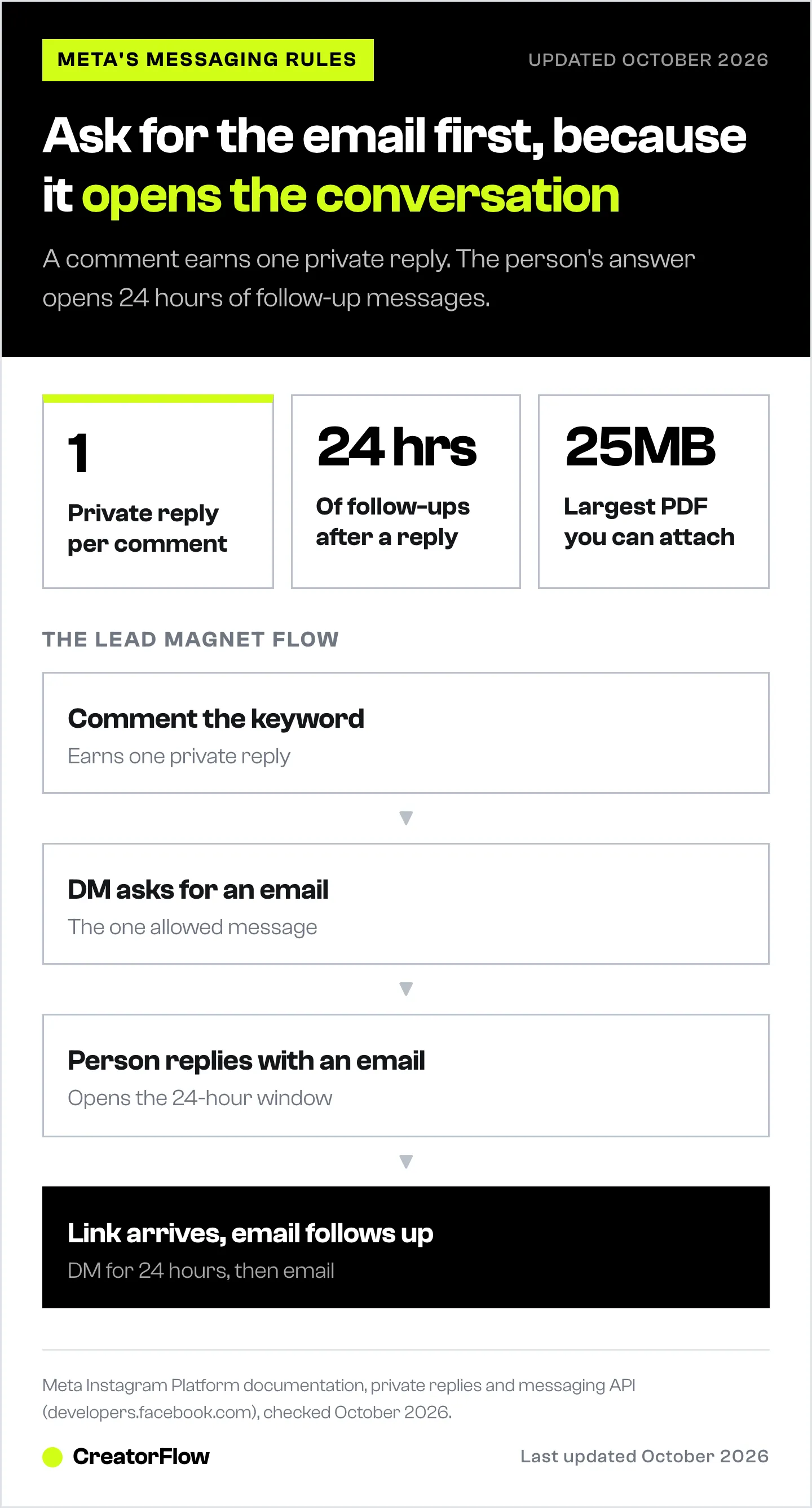
Private replies. A private reply to a comment must be sent within 7 days of the comment. Only one message can be sent to the commenter. Follow-up messages are allowed only if the person responds, and must be sent within 24 hours of that response (developers.facebook.com, private replies, October 2026).
The messaging window. A business has 24 hours to respond to any message a user sends (developers.facebook.com, Instagram messaging API, October 2026).
Put together, this is what you can send:
| Moment | What you can send by DM |
|---|---|
| Person comments the keyword | One message |
| Person replies with an email | Messages for the next 24 hours |
| 24 hours after their last reply | Nothing, until they write again |
This is why the email request comes first. A flow that sends the link straight away, then plans a “how did you like it?” DM two days later, has two problems. The commenter never replied, so the second DM is not allowed. And even after a reply, 48 hours is outside the window. Asking for the email turns a one-message exchange into a conversation, and the email covers everything after the 24 hours.
If a tool reports an error when it tries to send late, the 24-hour window error guide explains what happened.
Choose a Lead Magnet People Finish
The freebie has one job: solve a small problem fast, and point to the paid offer that solves the bigger one. Pick a format someone can use on a phone in under 15 minutes.
| Format | Example | Why it works on Instagram |
|---|---|---|
| Checklist | ”10-point Instagram profile check” | Readable on a phone in one minute |
| Template | ”5 DM scripts for discovery calls” | Copy, paste, use today |
| Short guide | ”5-day meal plan with shopping list” | Solves one problem from start to end |
| Workbook | ”30-day content planner” | Brings people back more than once |
| Resource list | ”My course creator tool stack” | Saves the reader hours of research |
Formats that usually do worse:
- Long ebooks. Fifty pages is a weekend project. Most people download it and never open it.
- Broad “ultimate guides”. If the title promises everything, it solves nothing specific.
- Anything that needs a laptop. Most of your audience opens the link on their phone.
Match the freebie to the paid offer. A meal plan leads to a nutrition coaching program. A caption template leads to a content course. If the free step and the paid step are about different problems, the email sequence has nothing to build on.
Set Up the Automation
Step 1: Host the file
You need a link that works for anyone, on any phone.
- Google Drive. Upload the PDF, set sharing to “Anyone with the link”, and copy the link. Free and familiar.
- Your email platform. Tools like Kit can deliver a file through the confirmation email. In Kit, the incentive email’s button can link to a URL or to an uploaded file (Kit help center, October 2026). The file then reaches the inbox, and the address is confirmed at the same time.
- Your own site. A simple download page on your domain. Best for tracking and for keeping the link the same if the file changes.
You can also send the PDF itself. Meta’s messaging API accepts PDF files up to 25MB (developers.facebook.com, October 2026). The guide to sending a PDF on Instagram DM compares a file attachment with a tracked link.
Step 2: Write the post
Name the freebie, the keyword and what happens next:
Want my free 5-day meal plan? Comment PLAN and I will DM it to you.
Put the keyword on screen too, not only in the caption. Many people never tap “more”.
Step 3: Create the comment-to-DM automation
In CreatorFlow:
- Create a new automation and choose the comment trigger.
- Pick the post or Reel.
- Add the keyword. CreatorFlow matches whole words and ignores capitals, so “plan please” triggers it and “planning” does not. You can add up to 20 keywords for variants.
- Turn on a public reply such as “Sent, check your DMs” (Pro). It shows other readers the offer is real.
Step 4: Turn on the Email Gate
The Email Gate asks for an email before the link is sent. It is part of the Pro plan. Write the request so it is clear why you are asking:
Happy to send it. Which email should I send the meal plan to? I will also send you the shopping list there.
When the person replies with an address, the gate releases the delivery message.
Step 5: Write the delivery message
Lead with the link. The person has waited long enough.
Here it is: LINK. Start with day 1, it takes 10 minutes. The shopping list is on its way to your inbox.
Step 6: Test from a second account
Comment the keyword from an account that does not own the automation. A test from your own account sends nothing. Check that the link opens on a phone, and that the email lands in your contacts.
Lead Magnet DM Templates
Replace the parts in capitals. Each pair is the email request, then the delivery.
Template 1: Guide
Email request: Sending you the GUIDE NAME now. Which email should it go to?
Delivery: Done. Here is your link: LINK. Page 3 has the part most people use first.
Template 2: Checklist
Email request: I will send you the 10-point checklist. What is your email?
Delivery: Here you go: LINK. It takes about 5 minutes. Which point did you fail? Reply and I will tell you what to fix first.
Template 3: Templates or scripts
Email request: The 5 scripts are ready. Where should I send them?
Delivery: Here are all 5: LINK. Script 2 is the one to try today.
Template 4: Webinar or class
Email request: I will save your seat. Which email should the link go to?
Delivery: You are registered. Here is the page: LINK. The reminder goes to your inbox the day before.
A question at the end of the delivery message is worth adding. If the person answers, the 24-hour window opens again, and the conversation can turn into a discovery call. The does an email gate cost you clicks article covers when to skip the gate and send the link straight away.
What to Do With the Emails
The DM collects the email. Selling happens in the inbox.
Get the emails into your email tool. On Pro and Growth, CreatorFlow lets you export your contacts as a CSV file. Import it into Kit, Mailchimp, MailerLite or ActiveCampaign and tag each person with the freebie they asked for.
Send a short sequence. A simple five-email shape:
| Day | Goal | |
|---|---|---|
| 0 | The freebie again, with one tip on using it | Confirm delivery |
| 2 | One idea that goes further than the freebie | Show you know the topic |
| 5 | The paid offer as the next step | First mention of the offer |
| 10 | A real client story, with permission | Show the result |
| 14 | The direct offer, with a deadline if there is a real one | Ask for the sale |
The what to send after the DM guide has examples for each email. If the freebie is part of a launch, the course creator launch funnel shows where it fits in the calendar.
Measure each step. Track four numbers for every freebie post: keyword comments, emails collected, link taps and sales. A drop between two steps tells you what to fix. Many comments and few emails means the email request is unclear. Many emails and few sales means the freebie and the offer do not connect.
Handling a Post That Takes Off
A freebie post can pull hundreds of comments in an evening. Automation tools send at a steady pace, commonly around 200 DMs an hour. That is a pace tools choose to stay well under Meta’s per-second limits, not a limit Meta publishes. On a busy post the DMs queue and go out in order.
Three things help on a busy day:
- Say it in the caption. “Busy day, the link can take an hour to arrive” stops repeat comments.
- Keep the comment window in mind. Private replies must go out within 7 days of the comment, so a queue of a few hours is fine.
- Spread the offer. A second post later in the week reaches people who missed the first one, and splits the volume.
Fixing Common Problems
Nobody gets the DM. Check that the automation is live and not a draft, that the keyword is a whole word in the comment, and that you are not testing from your own account.
Few people give an email. Make the request specific and give a reason: “Where should I send the shopping list?” works better than “What is your email?”
The link stopped working. Google Drive sharing settings change when files move between folders. Open the link from a logged-out browser once a week while the post is active.
Emails, but no sales. The freebie and the offer solve different problems, or the sequence asks for the sale too early. Fix the connection before you change the price.
If you want this flow ready to go, CreatorFlow has a file delivery use case with the setup in one place. For more ways to collect addresses, see collecting emails through Instagram DMs. The same flow also works for other freebies, like sending discount codes by DM.
Frequently Asked Questions
Can I automate lead magnet delivery on Instagram without getting banned?
Use a tool that connects through Meta’s official Instagram API, and only message people who commented or wrote to you first. Avoid browser bots and tools that ask for your password. Those break Meta’s terms and put the account at risk.
Can Instagram send a PDF file directly in a DM?
Yes. Meta’s messaging API accepts PDF files up to 25MB. Many creators still send a link, because a link can be tracked and updated without sending a new message.
Can the automation send a follow-up a few days later?
Not by DM, unless the person writes to you again. Meta allows follow-ups only within 24 hours of the person’s last reply. Send the follow-up by email instead. That is the reason to collect the email in the first place.
Do I need a Business or Creator account?
Yes. DM automation through Meta’s API needs an Instagram professional account, which means a Business or Creator account. Switching is free in Instagram’s settings.
Can I run several lead magnets at once?
Yes. Create one automation per freebie, each with its own keyword: GUIDE, CHECKLIST, PLAN. Use a different tag in your email tool for each, so you can see which freebie leads to sales.
Which email platform works best with Instagram lead magnets?
Kit, MailerLite, Mailchimp and ActiveCampaign all accept a CSV import and support tags and automated sequences. Kit is built around creators and can deliver a file through its confirmation email. Pick the one you will keep using. Switching later costs more than the difference in features.
What if someone gives a fake email?
Some will. A confirmation email that delivers a bonus, such as the shopping list or the full template pack, gives people a reason to use a real address. Clean the list every few months and remove addresses that bounce.
Messaging rules and file limits from Meta’s Instagram Platform documentation (developers.facebook.com), and Kit incentive email details from Kit’s help center, both checked October 2026. The 200 DMs per hour figure is a common tool-side send pace, not a Meta limit. CreatorFlow plan features as listed on creatorflow.so. Individual results vary.


