

An Instagram course launch funnel automates the path from comment to enrollment. When followers comment “interested” on your launch post, DM automation instantly asks for their email and sends your webinar or waitlist link. Your email tool then sends the reminders and the sales page, because Instagram only lets a business keep messaging someone within 24 hours of that person’s last message. This replaces hours of manual DMs on every launch.
Launching a course on Instagram without automation means manually DMing hundreds of people while your momentum fades. By the time you respond to everyone, many of your leads have gone cold. That is why warming up your audience before you launch matters as much as the funnel itself.
This guide shows you how to build a 5-stage automated launch funnel, from capturing interest to closing sales, with exact message templates and conversion benchmarks.
Key Takeaways
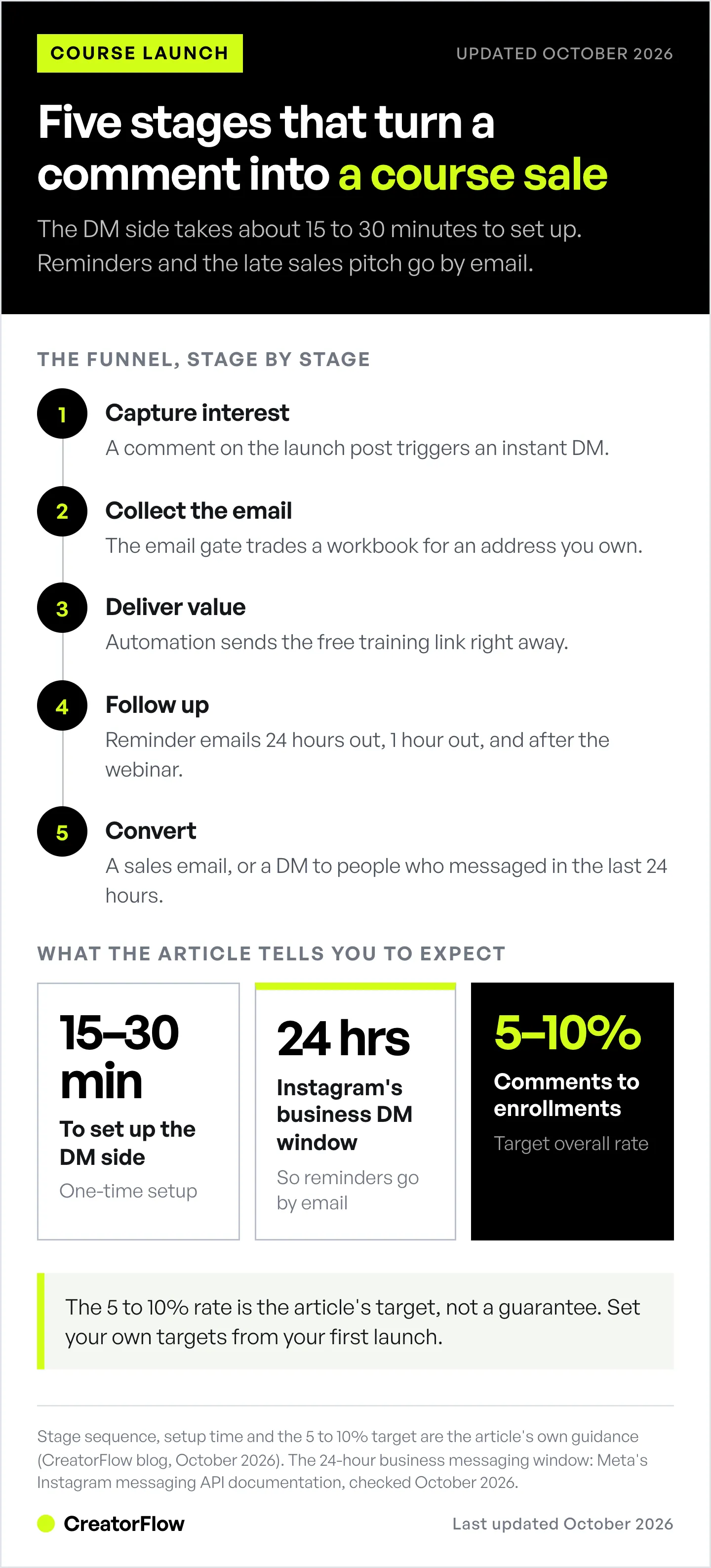
- 5-stage automated funnel: Capture interest (comment-to-DM), collect email (email gate), deliver value (webinar), follow up (reminder emails), convert (sales email or DM)
- Time savings: Automation replaces the manual DM to every commenter, and the DM side takes about 15-30 minutes to set up
- Metrics to track: Email capture rate, webinar attendance and overall comment-to-enrollment rate. Set your own targets from your first launch
- Worked example: A hypothetical $297 course launch (not a real customer) turns 347 comments into 214 emails and 29 enrollments, or $8,613
- Reminders go by email: Instagram only allows business messages within 24 hours of the person’s last message, so send the 24-hour, 1-hour and replay reminders from your email tool or webinar platform
- Bottom line: Pair comment-to-DM automation with email capture and a nurture sequence, and use a free training for higher-priced courses
The Course Creator’s Instagram Problem
If you are running an evergreen offer rather than a dated launch, the five-step system for selling a course on Instagram covers the always-on version of this.
You’re launching your online course in 7 days.
You’ve spent months creating content, filming modules, building your sales page. Your Instagram has 8,000 engaged followers who love your free content.
But here’s the problem:
- You post about your course launch → 200 people comment “interested!”
- You manually DM all 200 → takes 4 hours
- Half of them don’t see your DM for hours
- By the time they respond, your launch momentum is gone
- You convert 8 people (4% conversion rate)
What if you could automate this?
Auto-reply to every comment instantly, capture emails, send webinar links, follow up automatically-all while you focus on delivering value and closing sales.
This guide shows you exactly how to build an automated Instagram launch funnel that converts followers into course students without manual DM work.
The 5-Stage Instagram Launch Funnel Automation for Course Creators
Stage 1: Capture Interest (Comment → Auto-DM)
Goal: Turn post engagement into qualified leads
How it works:
- You post about your course launch (Reel, Story, carousel)
- Someone comments “interested,” “tell me more,” or “yes!”
- Automation instantly sends them a DM
Example DM:
Hey! Thanks for your interest in [Course Name]!

I'm hosting a free training on [specific outcome] this Thursday at 8pm EST.

Want the link? 👇

Reply "YES" and I'll send it over!
Why this works:
- Instant response (no delay = no lost interest)
- Qualifies interest (they have to reply “YES”)
- Builds anticipation (free training, not direct sale)
Tools that do this:
- CreatorFlow (comment-to-DM automation)
- LinkDM
- ManyChat
Setup time: 2-5 minutes
Stage 2: Collect Email (Email Gate)
Goal: Build your email list from Instagram leads
How it works:
- User replies “YES” to your first DM
- Automation asks for their email
- User provides email
- Automation sends the webinar link and saves the email for your email sequence
Example Email Gate DM:
Perfect! What's your email address?

I'll send you:
- ✅ Webinar link
- ✅ Workbook PDF
- ✅ Launch day reminder

(Your email stays private-I never share it)
Why this works:
- You own the email (Instagram can’t take it away)
- You can nurture leads outside Instagram
- Email still reaches people after Instagram’s 24-hour messaging window closes
Pro tip: Offer a bonus (workbook, checklist, template) in exchange for email. A specific bonus gives people a reason to type their address.
Stage 3: Deliver Value (Webinar Link)
Goal: Warm up leads with free training
How it works:
- User provides email
- Automation instantly sends webinar link
- Webinar educates + pitches course at the end
Example DM:
Got it! Here's your webinar link:

👉 [Webinar Registration Link]

You'll learn:
🎯 How to [outcome 1]
🎯 How to [outcome 2]
🎯 My exact step-by-step system

See you Thursday at 8pm EST!

PS: Can't make it live? Register anyway-I'll send the replay.
Why this works:
- Webinar builds trust and authority
- Live format creates urgency (must attend now)
- Pitch feels natural after delivering value
Alternative to webinars:
- Free mini-course (3-5 day email sequence)
- Case study PDF (show results you’ve helped others achieve)
- Free challenge (5-day Instagram challenge)
Stage 4: Follow-Up (Reminder DMs)
Goal: Increase webinar attendance and course sales
How it works:
- Send reminders by email, from your email tool or your webinar platform:
- 24 hours before webinar: “Tomorrow at 8pm!”
- 1 hour before webinar: “Starting soon!”
- After webinar: “Here’s the replay + special offer”
- Use DMs only for people who messaged you in the last 24 hours. Meta’s Instagram messaging API documentation allows business replies within 24 hours of the person’s last message (checked October 2026).
Example 24-Hour Reminder:
Hey! Quick reminder:

Your free training on [outcome] is TOMORROW at 8pm EST.

Grab your spot: [link]

See you there!
Example Post-Webinar Follow-Up:
Thanks for joining the training!

Here's your replay: [link]

Ready to join [Course Name]? Doors close in 48 hours.

Enroll here: [course link]

Questions? Just reply to this DM!
Why this works:
- Reminders bring registrants back at the right time
- Post-webinar follow-up captures people who watched but didn’t buy immediately
- Urgency (doors closing) drives action
Tools that send timed reminders:
- Your email platform (Kit, beehiiv, Mailchimp or similar)
- Your webinar platform’s own reminder emails to registrants
Stage 5: Convert (Direct Sale)
Goal: Turn engaged leads into paying students
How it works:
- After webinar, send a direct pitch by email, or by DM to people who messaged you in the last 24 hours
- Include course link, pricing, testimonials
- Address objections (FAQ, payment plans)
Example Sales DM:
Hey! I noticed you watched the training but haven't enrolled yet.

[Course Name] doors close in 24 hours.

Inside you'll get:
- ✅ [Module 1 outcome]
- ✅ [Module 2 outcome]
- ✅ [Module 3 outcome]
- ✅ Lifetime access + updates

Price: $297 (or 3 payments of $99)

Enroll here: [course link]

Questions? I'm here to help!
Why this works:
- Direct ask (clear call-to-action)
- Scarcity (doors closing creates urgency)
- Removes friction (link + payment options + FAQ)
Pro tip: Include 1-2 real student testimonials in this message. Proof from past students answers the “will this work for me?” question.
Worked Example: Amanda’s Course Launch Funnel (Hypothetical)
Amanda is a hypothetical example built to show the arithmetic. She is not a real customer, and these are not typical results.
Background:
- Course: “Instagram Growth for Health Coaches”
- Price: $297
- Audience: 6,500 Instagram followers
- Previous launch (manual): 12 students, $3,564 revenue
Automated Launch Funnel Setup:
Stage 1: Capture Interest
- Posted Reel: “3 mistakes health coaches make on Instagram”
- 347 comments (“interested,” “yes,” “tell me more”)
- Auto-DM sent to all 347 instantly
Stage 2: Collect Emails
- Asked for email + offered free workbook
- 214 provided email (61% conversion rate)
Stage 3: Deliver Value
- Sent webinar link automatically
- 147 registered for webinar (68% of email leads)
- 89 attended live webinar (60% attendance rate)
Stage 4: Follow-Up
- Sent 3 reminder emails (24hr, 1hr, post-webinar)
- 34 watched replay (didn’t attend live)
- Total viewers: 123 (89 live + 34 replay)
Stage 5: Convert
- Sent sales email after webinar
- 47 clicked course link
- 29 enrolled in course
Results:
- Revenue: $8,613 (29 students × $297)
- Conversion rate: 8.4% (29 students / 347 interested)
- Time saved: 12 hours (no manual DMing)
- 2.4X revenue compared to the previous manual launch in this scenario
The Tools You Need (and What They Cost)
This section covers the Instagram side. For the email tool, checkout and course host around it, see how to launch an online course.
Option 1: CreatorFlow (Best for Simplicity)
What it does:
- Comment-to-DM automation
- Email collection (email gate)
- Webinar link delivery
- Keyword replies in DMs and Story replies
- Real-time phone preview (see exactly what leads receive)
Pricing: Free plan with 500 DMs/month. Email Gate is on Pro at $15/month, or $12/month billed annually
Best for: Course creators who want fast setup and beautiful design
Setup time: 15-20 minutes (entire funnel)
Option 2: LinkDM (Best for Proven Reliability)
What it does:
- Comment-to-DM automation on Instagram and Facebook
- Email collection in the chat
- Link delivery
- Broadcasts to active contacts
- Reminder DMs (Pro plan)
Pricing: Free plan with 1,000 DMs/month; Pro is $19/month for 25,000 DMs, per LinkDM’s pricing page (checked October 2026)
Best for: Course creators with large audiences (10K+ followers)
Setup time: 20-30 minutes
Option 3: ManyChat (Best for Complex Funnels)
What it does:
- Advanced multi-step sequences
- A/B testing
- Segmentation (tag leads by behavior)
- Integrations with email tools such as Kit (formerly ConvertKit)
Pricing: Free for 25 contacts; paid plans run $17-$199/month billed monthly, or $14-$139/month billed annually, by contact count, per ManyChat’s pricing page (checked October 2026)
Best for: Course creators with complex funnels or multiple courses
Setup time: Depends on how many steps and branches you build
Option 4: DIY Manual Approach (Free, But Time-Consuming)
What you do:
- Manually reply to every comment
- Manually ask for emails
- Manually send webinar links
- Manually follow up
Pricing: $0/month
Time cost: Several hours per launch, more with every comment
Best for: Creators with <1,000 followers and tight budgets
Step-by-Step: Building Your Automated Funnel in CreatorFlow
Step 1: Connect Instagram (2 Minutes)
- Sign up at creatorflow.so
- Click “Connect Instagram”
- Log in to your Instagram account
- Authorize CreatorFlow
Done. Your Instagram is connected.
Step 2: Create “Comment to DM” Automation (5 Minutes)
- Click “Automations” in sidebar
- Select “Comment to DM” template
- Choose which post to monitor (a specific post, your next post, or any post)
- Add your keywords, for example “interested” and “yes”
Your trigger is ready. Steps 3 and 4 write the two DMs every commenter receives.
Step 3: Set Up Email Collection (3 Minutes)
- In the same automation, toggle ON “Email Gate”
- Write your email request:
Perfect! What's your email?

I'll send you:
- ✅ Webinar link
- ✅ Free workbook
- ✅ Launch reminders- Save
Now the automation will:
- Reply to each matching comment with your email request
- Wait for the person to type their email
- Save the email in your Contacts list
Step 4: Send Webinar Link (2 Minutes)
- After email collection, write your webinar DM:
Got it! Here's your webinar link:

👉 [Your Zoom/Webinar Link]

You'll learn:
🎯 [Outcome 1]
🎯 [Outcome 2]
🎯 My exact system

See you Thursday at 8pm EST!- Save and turn the automation on
Automation now:
- Asks for the email
- Collects email
- Sends webinar link automatically
Step 5: Schedule Reminder Emails (5 Minutes)
Webinar reminders usually land days after the first DM. Instagram only allows business messages within 24 hours of the person’s last message, so send reminders by email.
- In your email tool or webinar platform, create a reminder for 24 hours before the webinar:
Hey! Quick reminder:

Your free training is TOMORROW at 8pm EST.

Link: [webinar link]

See you there!- Add a second reminder: 1 hour before the webinar
- Add a third email after the webinar, with the replay link
Total setup time: 15-20 minutes
Your entire launch funnel is automated.
The 7 Mistakes Course Creators Make with Instagram Launch Funnels
Mistake #1: Asking for the Sale Too Early
What creators do:
- Post about course → Auto-DM with sales link immediately
- No value delivery, no trust-building
Why it fails:
- Cold audience isn’t ready to buy
- Feels pushy and salesy
Fix:
- Offer free value first (webinar, mini-course, PDF)
- Warm up leads before pitching
- Build trust, then sell
Mistake #2: Not Collecting Emails
What creators do:
- Send webinar link via DM only
- No email capture
Why it fails:
- Instagram can delete DMs or ban accounts
- No way to follow up outside Instagram
- Can’t nurture leads long-term
Fix:
- Always collect emails (use email gate)
- Build email list you own
- Nurture via email + Instagram
Mistake #3: No Follow-Up After Webinar
What creators do:
- Host webinar → pitch course → never follow up
- Assume people who didn’t buy aren’t interested
Why it fails:
- People often need several touchpoints before buying
- Life gets busy (they forget)
- No urgency to act
Fix:
- Send 2-3 follow-up emails after webinar (DM only people who messaged you in the last 24 hours)
- Include replay link
- Add urgency (doors closing, bonuses expiring)
Mistake #4: Complicated Funnel (Too Many Steps)
What creators do:
- Comment → DM #1 → Reply “YES” → DM #2 → Reply with email → DM #3 → Watch webinar → DM #4 → Answer survey → DM #5 → Finally get course link
Why it fails:
- Each step loses some leads
- Friction kills conversions
Fix:
- Keep it simple: Comment → Email → Webinar → Sales Link
- Fewer steps = higher conversion rates
Mistake #5: Generic Messages (Not Personalized)
What creators do:
- Same automated DM for everyone
- No personalization, no connection
Why it fails:
- Feels robotic and impersonal
- Doesn’t address specific pain points
Fix:
- Use first names (if possible)
- Reference their specific comment (“You asked about [topic]”)
- Speak directly to their pain point
Mistake #6: No Scarcity or Urgency
What creators do:
- Course is always open
- No reason to buy now
Why it fails:
- People procrastinate
- No urgency = no action
Fix:
- Limited enrollment window (doors close in 48 hours)
- Early bird discount (expires in 24 hours)
- Bonuses for fast action (first 50 buyers get X)
Mistake #7: Not Testing Before Scaling
What creators do:
- Set up automation → launch to 5,000 followers → realize DMs are broken
Why it fails:
- Mistakes at scale = lost revenue
- Hard to fix mid-launch
Fix:
- Test with 10-20 people first
- Comment on your test post, check DMs
- Fix issues before big launch
Advanced Strategies: Level Up Your Launch Funnel
Strategy #1: Segment by Engagement Level
What to do:
- Track who clicked webinar link but didn’t attend
- Track who attended webinar but didn’t buy
- Send different follow-ups based on behavior
Example:
- Registered but didn’t attend: “Here’s the replay-watch in next 24 hours for special bonus”
- Attended but didn’t buy: “You watched the training-what questions do you have?”
- Clicked course link but didn’t buy: “Almost there! Need help deciding? Let’s chat.”
Tools: ManyChat (tags), CreatorFlow (link click tracking on Pro and Growth), your email tool (segments)
Strategy #2: Add Social Proof to Every DM
What to do:
- Include 1-2 testimonials in your sales DM
- Show before/after results
- Highlight student wins
Example:
"[Real result in the student's words]" - [Student first name]

"[Second real testimonial]" - [Student first name]

Ready to get results like this?

Enroll here: [link]
Why it works: Real results from past students answer the buyer’s biggest doubt. Use only testimonials you have permission to share.
Strategy #3: Offer Payment Plans
What to do:
- Include payment plan option in sales DM
- Lower barrier to entry
Example:
Price: $297 one-time

OR

3 payments of $99 (total $297)

Choose what works for you: [link]
Why it works: Payment plans lower the first payment, which matters most for $200+ courses.
Strategy #4: Create Urgency with Bonuses
What to do:
- Offer bonuses that expire
- Create FOMO (fear of missing out)
Example:
Enroll in the next 24 hours and get:

🎁 Bonus #1: [Value $97]
🎁 Bonus #2: [Value $49]
🎁 Bonus #3: [Value $29]

Total value: $175 FREE

Doors close Thursday at midnight.

Enroll now: [link]
Why it works: Time-limited bonuses create urgency without discounting your course.
Strategy #5: Use Stories + DMs Together
What to do:
- Post Story: “Link in my DMs-reply ‘LINK’”
- Automation sends link when they DM you
- Captures engaged followers who watch Stories
Example Story:
[Image: Course mockup]

Text: "Want the launch day link? DM me 'LINK' right now"
Why it works: Stories reach the followers who watch you most. Each DM opens a new 24-hour window, so the link arrives while they are still interested.
Measuring Success: Launch Funnel Metrics
Track these 7 metrics to improve your funnel:
1. Comment-to-DM Conversion Rate
Formula: (DMs sent / Comments received) × 100
Target: 95%+ (most tools auto-send to every comment)
What to watch: If below 90%, check automation settings
2. Email Capture Rate
Formula: (Emails collected / DMs sent) × 100
Target: 50-70%
What to watch: If below 40%, improve your email ask (add stronger incentive)
3. Webinar Registration Rate
Formula: (Webinar registrations / Emails collected) × 100
Target: 60-80%
What to watch: If below 50%, improve webinar value proposition
4. Webinar Attendance Rate
Formula: (Webinar attendees / Registrations) × 100
Target: 40-60% (live) + 20-30% (replay)
What to watch: Send more reminder DMs if attendance is low
5. Click-to-Enroll Rate
Formula: (Course enrollments / Course link clicks) × 100
Target: 20-40%
What to watch: If below 15%, improve sales page or reduce price friction
6. Overall Conversion Rate
Formula: (Course enrollments / Initial comments) × 100
Target: 5-10%
What to watch: This is your north star metric (tracks entire funnel health)
7. Revenue Per Lead
Formula: Total revenue / Initial comments
Example: $8,613 revenue / 347 comments = $24.82 per lead
What to watch: Aim for $20-50+ per lead (depends on course price)
The Bottom Line
Course creators can automate their Instagram launch funnel in 5 stages:
- Capture Interest: Comment → Auto-DM
- Collect Email: Email gate (build list you own)
- Deliver Value: Webinar link + free training
- Follow-Up: Reminder emails (before + after webinar)
- Convert: Direct sales email or DM with urgency
Benefits:
- Save hours per launch (no manual DMing)
- Turn more interested followers into paying students
- Build email list from Instagram automatically
- Focus on delivering value, not admin work
Tools:
- CreatorFlow: Free plan, Pro $15/mo billed monthly (best for simplicity, 15-min setup)
- LinkDM: Free plan, Pro $19/mo billed monthly (best for large audiences)
- ManyChat: $17-199/mo billed monthly, or $14-139/mo billed annually (best for complex funnels)
Next step: Set up your first automation today. Test with a small post, refine your messaging, then scale for your next launch.
Your Instagram followers are already interested. Now give them a frictionless path to become your students.
FAQ
How long does it take to set up an automated launch funnel?
About 15-30 minutes for a simple comment-to-email funnel in CreatorFlow or LinkDM. Funnels with many steps, branches and tags, such as those built in ManyChat’s flow builder, take longer because there is more to configure.
Can I automate the entire launch, or do I need to do some manual work?
You can automate most of it: comment replies, email collection, webinar links and reminder emails. Manual work: hosting the webinar, answering specific questions, closing objections.
What if people don’t provide their email?
Some people will skip the email step, and a strong incentive like a workbook or bonus raises the share who type it. Track your own email capture rate on the first launch and improve the offer from there.
Should I offer a webinar or just sell the course directly?
A webinar or free training gives buyers time to trust you, which matters more as the price rises. If your course is under $50, you can skip the webinar and pitch directly.
How many reminders should I send?
Send 3-4 reminders by email: 24 hours before the webinar, 1 hour before, immediately after (with replay), and 24 hours before doors close. Instagram only allows business DMs within 24 hours of the person’s last message, so email is the reliable channel for dated reminders.
Will Instagram ban me for sending too many automated DMs?
The risk is low when you use a tool built on Meta’s official Instagram API (CreatorFlow, LinkDM and ManyChat all do) and avoid browser bots. Meta’s rate limits allow 750 private replies per hour to comments on posts and Reels (checked October 2026). Many tools pace sends below that as a safety margin.
Can I use this funnel for a free course or membership?
Yes. Adjust Stage 5 (Convert) to pitch your membership or upsell instead of a paid course. Same funnel structure works.
What’s the best time to post my launch announcement?
Check your Instagram Insights for when your audience is most active. Typically: 7-9am, 12-1pm, or 7-9pm (your local time).
Ready to automate your next course launch? CreatorFlow makes it easy. Set up the Instagram side of your funnel in about 15 minutes and spend launch week on your webinar, not your inbox. Try CreatorFlow free →
Related Articles
Want to learn more about Instagram DM automation for course creators? Check out these guides:
- The Complete Guide to Instagram DM Automation - Master all types of Instagram automation
- How to Collect Emails Through Instagram DMs - Build your email list with DM automation
- Comment-to-DM Automation Setup Guide - Step-by-step tutorial for automated comment replies
- Instagram DM Automation for Fitness Coaches - Similar high-ticket service strategies
- Instagram DM Automation for Course Creators - The 6 evergreen setups that sell your course between launches
Disclaimer: Figures in this article come from the sources cited in it. Individual results vary based on audience size, content quality, engagement rates, and niche. CreatorFlow uses Meta's official Instagram API. Instagram/Meta may change features, rate limits, or terms at any time. Instagram is a trademark of Meta Platforms, Inc. CreatorFlow is not affiliated with, endorsed by, or sponsored by Meta Platforms, Inc. ManyChat, LinkDM, and InstantDM are trademarks of their respective owners. Users are responsible for complying with Instagram's Terms of Service and Community Guidelines.
Revenue examples (such as “Amanda’s” launch) are composite scenarios created for educational purposes and do not represent specific individuals or guarantee typical results. Most course creators earn significantly less, and many earn nothing from their first launch.
Instagram automation is a tool that facilitates communication; it does not guarantee sales, engagement, or business success. Success in course creation requires quality products, effective marketing, audience trust, and ongoing effort beyond automation alone.
Instagram is a trademark of Meta Platforms, Inc. CreatorFlow is not affiliated with or endorsed by Meta. Users are responsible for complying with Instagram’s Terms of Service, Community Guidelines, and all applicable business, tax, and consumer protection laws.
Email Marketing Compliance: Users collecting emails must comply with GDPR (EU), CAN-SPAM (US), CASL (Canada), and other applicable data protection laws. Obtain explicit consent, provide clear opt-out options, and respect user privacy.
No results are guaranteed. Past performance does not indicate future results. Consult appropriate professionals (legal, tax, business) before implementing business strategies discussed in this guide.


