

Instagram DM automation lets course creators sell on autopilot by sending a course link, free lesson, or enrollment reminder the moment a follower comments or DMs a keyword. It runs through Meta’s official Instagram API, replies in seconds instead of hours, and captures emails you own. Tools like CreatorFlow ($15/month flat) and ManyChat ($17–$199/month) handle it without code.
You film a Reel about your course. Forty people comment “how do I join?” You get to your phone three hours later, paste the link into 40 separate DMs, and half of them have already scrolled on. That gap between interest and reply is where course sales quietly die.
This guide covers the six evergreen automations that close that gap, who each one is for, and the two things no DM tool can do for your course. It is written for coaches, educators, and creators selling a course, cohort, or digital program off Instagram.
Key Takeaways
- What it does: DM automation sends your course link, free lesson, or reminder automatically when someone comments a keyword or replies to a Story, using Meta’s official Instagram API
- Six evergreen setups: link delivery, lead-magnet delivery, email capture, lead qualification, non-buyer follow-up, and post-purchase onboarding, all running 24/7 without you touching the phone
- Flat vs per-contact pricing: CreatorFlow charges $15/month flat regardless of how many people you message, while ManyChat prices per active contact from $17 to $199/month ($14 to $139 billed annually) (manychat.com/pricing, July 2026), so a launch spike raises ManyChat’s bill and not CreatorFlow’s
- The hard boundary: no DM tool hosts or delivers your course. Enrollment and access still happen on Kajabi, Teachable, Thinkific, or Gumroad. DM automation runs the conversation before and after the sale, not the sale itself
- Emails are the asset: capture the email inside the DM so you own the lead even if Instagram limits your reach later
- Bottom line: point every automation at one step of the buyer journey, from the first “how do I join?” comment to the post-purchase welcome, and let it run on every post you publish
How course creators use Instagram DM automation
For the wider picture of which Instagram surfaces can carry your course link at all, see the full walkthrough on how to sell an online course on Instagram.
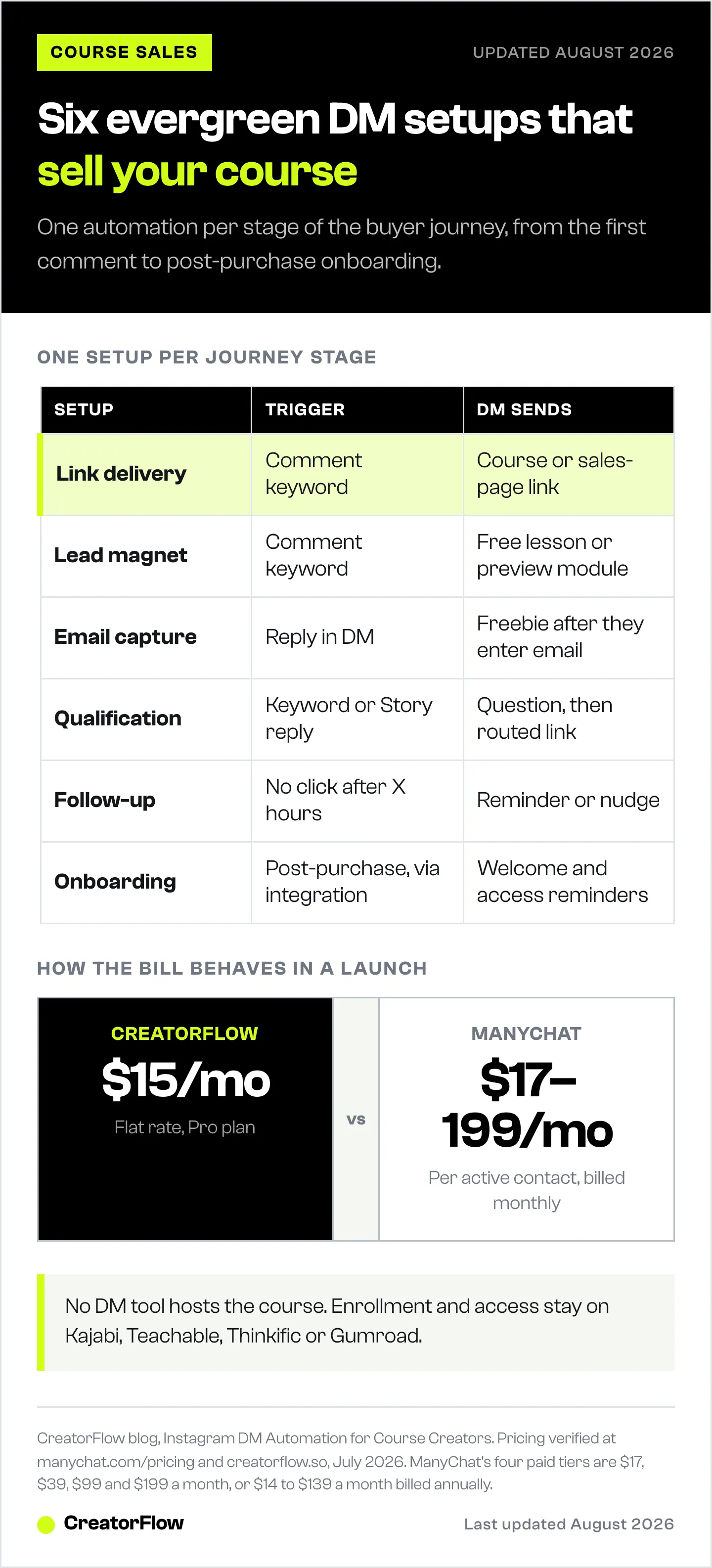
Course creators use Instagram DM automation to run the same conversation at scale: a follower signals interest, and an automated DM sends the next step. The best results come from mapping one automation to each stage of the buyer journey rather than trying to close the sale in a single message. Interest, free value, email, qualification, follow-up, and onboarding each get their own trigger.
Unlike a timed launch, these setups are evergreen. They keep working on a Reel weeks after you post it. If you are running a dated launch with a webinar and a cart-close deadline, that is a different structure, and our automated course launch funnel guide walks through the five-stage version. Below is the always-on system.
| Setup | Trigger | What the DM sends | Goal |
|---|---|---|---|
| 1. Link delivery | Comment keyword | Course or sales-page link | Cut the “link in bio” friction |
| 2. Lead magnet | Comment keyword | Free lesson or preview module | Warm up cold followers |
| 3. Email capture | Reply in DM | Freebie after they enter email | Own the lead off-platform |
| 4. Qualification | Keyword or Story reply | Question, then routed link | Send the right course |
| 5. Follow-up | No click after X hours | Reminder or nudge | Recover non-buyers |
| 6. Onboarding | Post-purchase (via integration) | Welcome and access reminders | Reduce refunds, drive completion |
Setup 1: Send your course link the second someone comments
Asking people to “click the link in my bio” and scroll a landing page loses most of them before they reach checkout. Comment-to-DM automation removes those steps. A follower comments your keyword, and the link lands in their inbox in seconds.
Post a Reel or carousel about your course and add a clear call to action, like “Comment ENROLL and I’ll send you the link.” When someone comments, the automation opens a DM with your course-page link. If you have never built one, the comment-to-DM automation setup guide covers it start to finish.
Hey! Here’s everything about [Course Name], including the syllabus and enrollment link: [link]. Any questions, just reply here.
Setup 2: Deliver a free lesson as a lead magnet
Most followers are not ready to buy the first time they hear about your course. A lead magnet gives them a taste. The strongest one for a course creator is a slice of the course itself: the first module, a worksheet, or a swipe file.
Set the DM to deliver the freebie when someone comments the keyword. On CreatorFlow’s paid plan you can add a Follow Gate, which asks the follower to follow you before the link is sent, so the automation grows your audience while it delivers value. Pair it with a Reel that names the exact freebie in the caption.
Setup 3: Grow your email list from Instagram
Turning a scroller into an email subscriber is hard until there is something in it for them. The freebie is the trade. Instead of just handing over the file, the automation asks for an email first, then sends the link.
CreatorFlow’s Email Gate collects the address inside the DM and exports it to a CSV you can load into your email platform. That matters because your email list is the one audience Instagram cannot throttle or take away. Our guide on how to collect emails through Instagram DMs breaks down the exact flow and the incentives that lift opt-in rates.
Among community-led creators surveyed for Circle’s 2026 Community Trends Report, 53% sell courses and 51% offer coaching or services (circle.so, January 2026). That sample skews toward course sellers because it is Circle’s own community audience, not a neutral census, but it shows how central owned contacts are to this group. If a paid membership or community is your core offer rather than a standalone course, our guide for membership and community owners covers join links and renewal reminders.
Setup 4: Route followers to the right course
If you sell more than one course, or a course plus coaching, new followers often do not know where to start. A qualification automation asks one or two questions, then sends the offer that fits.
Keyword triggers do this without a complex flow. Someone DMs “START,” the automation replies with a short question, and each answer maps to a different link. Set it up once with Instagram keyword triggers and it runs forever. For higher-priced programs where you want to screen before a sales call, the qualify high-ticket coaching leads approach adds a booking step.
Setup 5: Follow up with people who didn’t buy
Most sales need more than one touch. Someone clicks your course link, gets distracted, and never returns. A follow-up automation sends a gentle nudge when the first message does not lead to action.
Use it sparingly and helpfully: a single reminder that answers the most common objection or points to a testimonial does more than three “just checking in” messages. Keep the tone useful, not pushy, so the follower stays opted in for your next post.
Setup 6: Handle post-purchase onboarding
Once someone buys, the DM channel is still useful for the welcome, the “where do I log in?” question, and reminders to actually start the course. This is where the boundary matters, covered in the next section, because delivery happens on your course platform, not in the DM tool.
For a course under $50 sold as a simple digital file, you can deliver the download link straight from the DM. Our guide on how to sell digital products on Instagram covers that instant-delivery case.
What DM automation cannot do for your course
No DM automation tool hosts, delivers, or processes payment for your course. Enrollment, logins, video hosting, and access control live on your course platform, such as Kajabi, Teachable, Thinkific, or Gumroad. If you have not settled on one yet, the entry prices and plan limits of nine course and coaching platforms are compared separately. DM automation runs the conversation that surrounds the sale. It gets the right link in front of the right person and follows up, but the transaction happens off Instagram.
The messaging window sets a second boundary on the same conversation, which is why an AI DM agent starts a course sale rather than finishing it. This is the fact both CreatorFlow and ManyChat share, and it is the one most product tours skip. Treat the DM tool as the top and middle of your funnel, not the checkout. If you want post-purchase messages to fire automatically the moment someone buys, you need your course platform to talk to your DM tool. ManyChat connects to Kajabi, Teachable, and Thinkific only through Zapier or Make, since it has no direct integration with them (manychat.com/integrations, July 2026). Plan for that extra connector if automated onboarding is a must-have.
CreatorFlow vs ManyChat for course creators
Both tools use Meta’s official Instagram API and both handle comment-to-DM, keyword triggers, and Story replies. ManyChat does more channels: it covers Instagram, Facebook Messenger, WhatsApp, TikTok, Telegram, SMS, and email, with a visual flow builder and an AI assistant that suit multi-platform sellers and agencies (manychat.com, July 2026). If you sell across several platforms or want branching quiz logic, that depth is a real advantage.
The difference that matters most for a solo course creator is pricing structure. ManyChat prices per active contact, so the bill climbs with the number of people you message in a month. A launch that sends thousands of DMs can push you into a higher tier. CreatorFlow charges one flat rate no matter how many people you reach, which makes launch-week spikes predictable.
| CreatorFlow | ManyChat | |
|---|---|---|
| Pricing model | Flat rate | Per active contact |
| Entry paid price | $15/month | $17/month, or $14/month billed annually (Essential, 250 contacts) |
| Top self-serve price | $30/month (Growth) | $199/month, or $139/month billed annually (Advanced, 25,000 contacts) |
| Channels | Instagram only | Instagram, Messenger, WhatsApp, TikTok, Telegram, SMS, email |
| Follow gate + email gate | Built in | Built with flow blocks |
| Course platform delivery | Via your platform | Via Zapier/Make for Kajabi/Teachable/Thinkific |
Pricing verified at manychat.com/pricing and creatorflow.so, July 2026. If you want a wider field, see our roundup of the best Instagram DM automation tools. CreatorFlow fits solo educators who sell on Instagram and want flat, predictable pricing. ManyChat fits creators who need multi-channel reach or complex branching and are comfortable managing per-contact costs.
Is Instagram DM automation safe for course selling?
Yes, when the tool uses Meta’s official Instagram API rather than a browser bot. Meta’s published messaging limits are per second, not per hour: on the Instagram Login path, 100 calls per second for text and links, and 750 per hour for private replies to comments (developers.facebook.com, July 2026). Reputable tools pace sends well under those limits and respect the 24-hour window for continuing a conversation.
The widely repeated “200 DMs per hour” figure is a tool-side pacing convention, not a Meta-published rule. What actually governs your automation is that a follower has to message or comment first, and you then have a set window to reply. For comment replies, that window is up to seven days; for ongoing DM threads, it resets to 24 hours each time the follower responds.
How to set it up in under 10 minutes
- Connect your Instagram professional account to your DM tool through the official login. No password sharing.
- Pick one setup from the six above. Start with link delivery, since it is the fastest to prove value.
- Choose your trigger keyword and write the DM. Keep it to two sentences plus the link.
- Turn on the Follow Gate or Email Gate if you want to grow followers or capture emails at the same time.
- Post a Reel or carousel that names the keyword in the call to action, then test it yourself before you promote it.
Add the next setup only once the first is working. Stacking all six on day one makes it harder to see which message needs fixing.
FAQ
Can Instagram DM automation deliver my course after someone buys?
Not on its own. The course itself is hosted and delivered by your course platform, such as Kajabi, Teachable, or Gumroad. DM automation can send a welcome message, an access reminder, and onboarding tips after the sale, but only if your course platform is connected to your DM tool so a purchase can trigger the message.
Does CreatorFlow integrate with Kajabi, Teachable, or Thinkific?
CreatorFlow focuses on the Instagram side of the funnel: comment-to-DM, follow gate, email gate, and CSV export of the emails you capture. You load those emails into your email platform or connect through your course platform’s own tools. ManyChat also has no direct Kajabi, Teachable, or Thinkific integration and reaches them through Zapier or Make (manychat.com/integrations, July 2026).
How many followers do I need to sell a course this way?
There is no hard minimum. What matters is engaged followers who comment and DM, not raw follower count. Creators with a few hundred genuinely engaged followers can run every setup here. For realistic conversion expectations at smaller scale, see our course launch DM funnel benchmarks.
What is the difference between this and a launch funnel?
These six setups are evergreen and run continuously on every post. A launch funnel is a timed sequence built around a specific enrollment window, usually with a webinar and a cart-close deadline. Use the evergreen setups for steady sales and layer a launch funnel on top when you run a dated promotion.
Is ManyChat or CreatorFlow cheaper for a course creator?
It depends on volume. ManyChat’s Essential plan starts at $17/month ($14 billed annually) for up to 250 active contacts, while CreatorFlow is $15/month flat with no per-contact cap (manychat.com/pricing and creatorflow.so, July 2026). Once your monthly reach climbs, ManyChat moves you up tiers toward $199/month, while the flat plan stays the same.
How fast can I set up my first automation?
Most creators get link delivery live in under 10 minutes: connect the account, pick a keyword, write two sentences, and go. Adding email capture or qualification takes a few minutes more per setup.
Do I need to know how to code?
No. Every setup here is built from templates and keyword triggers inside the tool. You write the messages and choose the triggers. The only place a technical step appears is connecting a course platform for post-purchase onboarding, which uses a no-code connector like Zapier.
Competitor pricing, channel coverage, and Meta API limits verified from manychat.com, developers.facebook.com, and creatorflow.so as of July 2026. Individual results vary.


