
Instagram Shop is Meta’s storefront system that lets you tag physical products in posts, Stories, and Reels. 70% of Instagram users shop through the platform and 81% use it to research products. But discovery and conversion are two different problems. Instagram Shop handles discovery. DM automation handles conversion by following up with interested buyers.
That’s the reality for most Instagram Shops. Meta built a discovery engine. It shows your products to the right people at the right time. But discovery and conversion are two different problems. Instagram Shop solves the first one. The second one is on you. Brands planning the whole channel will want our Instagram strategy for ecommerce brands alongside this setup guide.
This guide covers the full picture: how to set up Instagram Shop from scratch, connect Shopify, tag products, and meet Meta’s eligibility requirements. Then we’ll cover what most guides skip - how to turn product interest into actual sales using DM automation to follow up with every person who shows interest.
Key Takeaways
- Instagram Shop is discovery, not checkout: Meta removed in-app checkout in June 2025. All purchases now happen on your website, giving you full control over the customer relationship and zero transaction fees to Meta.
- 70% of Instagram users shop through the platform: 81% use it to research products and 29% have made a direct purchase (Capital One Shopping, 2026).
- Physical products only: Digital products, services, and subscriptions are not eligible for Instagram Shop. Coaches and course creators should use DM automation instead.
- Shopify syncs automatically: The Facebook and Instagram by Meta sales channel is free with Shopify and product changes reflect within minutes.
- The conversion gap is where sales die: Instagram Shop has no built-in way to follow up with browsers, answer questions in real-time, or recover lost interest. DM automation fills that gap.
- Bottom line: Set up Instagram Shop for product discovery and tagging, then pair it with comment-to-DM automation to answer questions, send product links, and capture emails from interested browsers.

What Is Instagram Shop?
Instagram Shop is Meta’s storefront and product-tagging system for businesses. It lets you display products directly on your Instagram profile and tag items in posts, Stories, and Reels so people can tap and buy.
The key distinction: Instagram Shop is a discovery layer, not a full e-commerce platform. Customers find your products on Instagram, but complete the purchase on your website. Meta removed in-app checkout in June 2025, shifting all transactions to your own domain (help.instagram.com, April 2026).
What Instagram Shop includes:
- Product catalog displayed on your profile’s Shop tab
- Product tags in feed posts, Reels, and Stories
- Product detail pages with pricing, descriptions, and images
- Collections to organize products into categories
- Shoppable posts that appear in the Instagram Shop discovery tab
What Instagram Shop does not include:
- In-app checkout (Meta removed this in 2024 for non-US sellers; phased out for US shops in 2025)
- Automated follow-up with interested browsers
- Cart abandonment recovery
- Lead capture from product interest
- DM conversations about products
That gap between “browsed your product” and “bought your product” is where most sales are lost.
Instagram Shopping by the Numbers
The scale of Instagram commerce makes the setup worth the effort:
- 70% of Instagram users shop through the platform in some way, from browsing to purchasing (Capital One Shopping, 2026)
- 81% of users use Instagram to research new products or brands (Dataopedia, 2026)
- 29% of consumers have made a direct purchase through Instagram (Capital One Shopping, 2026)
- 87% of Instagram users worldwide say they’ve taken action after seeing a product on the platform (Dataopedia, 2026)
- Instagram commerce generated approximately $37.2 billion in revenue in 2024 (Capital One Shopping, 2026)
The audience is there. The purchase intent is there. The question is whether your setup captures it.
Instagram Shop Eligibility Requirements
Before you start the setup, confirm you meet Meta’s requirements. Failing any of these means your shop application gets rejected.
Required:
- Account type: Business or Creator account (not personal)
- Physical products: You must sell physical goods that require shipping. Digital products, services, and subscriptions are not eligible (help.instagram.com/1627591223954487, April 2026)
- Supported country: Your business must be in one of 40+ supported countries including the US, UK, Canada, Australia, and most of Europe (help.instagram.com/549256849084694, April 2026)
- Own domain: Products must be available for purchase from your verified website
- Facebook Page: Your Instagram must be connected to a Facebook Page
- Meta commerce policies: Comply with Meta’s commerce eligibility standards
- Accurate representation: Your profile must accurately represent your business and domain
Not eligible:
- Personal accounts (switch to Business or Creator first)
- Digital products (ebooks, courses, templates, software)
- Services (coaching, consulting, freelancing)
- Businesses in unsupported countries
- Accounts that violate Meta’s commerce policies
If you sell digital products or services: Instagram Shop isn’t the path. But you can still sell through Instagram using DM automation to send links when people comment or reply to your stories. Coaches, course creators, and service providers use this approach daily.
Instagram Shop Setup: Step by Step
Step 1: Switch to a Business or Creator Account
If you’re on a personal account, switch first.
- Go to Settings > Account > Switch to Professional Account
- Choose Business (if you sell products) or Creator (if you’re a personal brand selling merch)
- Select your category (e.g., “Shopping & Retail,” “Clothing Store”)
- Connect your Facebook Page
Step 2: Go to Commerce Manager
Commerce Manager is Meta’s backend for your product catalog and shop.
- Open Commerce Manager on desktop
- Click Get Started > Create a Shop
- If you use Shopify, BigCommerce, or another partner platform, select it. Otherwise choose “I don’t use these platforms”
Step 3: Set Up Your Checkout Method
Since June 2025, all Instagram and Facebook Shops use website checkout (Meta Business Help Center, April 2026).
- Select Checkout on your website as your checkout method
- Enter your website URL
- Verify your domain through Meta Business Settings > Brand Safety > Domains
Step 4: Connect Your Product Catalog
Your catalog contains every product you want to sell through Instagram.
Option A: Manual catalog (no e-commerce platform)
- In Commerce Manager, go to Catalog > Add Products
- Add each product manually: name, price, description, image, product URL, availability
- Organize into collections (e.g., “New Arrivals,” “Best Sellers”)
Option B: Connect Shopify or another platform (see next section for detailed Shopify steps)
Option C: Data feed upload
- Create a CSV or XML feed with your products
- Upload to Commerce Manager under Catalog > Data Sources
- Schedule automatic updates
Each product needs: product name, at least one image, price, description, product URL, availability status, and a unique product ID.
Step 5: Connect Your Instagram Account
- In Commerce Manager, go to Shop > Settings
- Under Sales Channels, select your Instagram Business account
- Also connect your Facebook Page for cross-platform selling
Step 6: Submit for Review
- Review all your shop details in Commerce Manager
- Agree to Meta’s Seller Agreement
- Click Submit for Review
- Meta states review takes up to 4 weeks (help.instagram.com, April 2026)
You can check your review status in Commerce Manager under Shop > Overview.
Step 7: Start Tagging Products
Once approved, tag products in your content:
In feed posts:
- Create a new post
- Tap Tag Products
- Tap on the product in your image
- Select the product from your catalog
- Share the post
In Reels:
- Create your Reel
- Before sharing, tap Tag Products
- Select products that appear in your Reel
- Publish
In Stories:
- Create your Story
- Tap the Sticker icon
- Select the Product sticker
- Choose the product from your catalog
- Position the sticker and share
How to Connect Shopify to Instagram Shop
Shopify’s integration syncs your entire product catalog automatically. Product updates reflect within minutes (help.shopify.com, April 2026).
Requirements
- Shopify Basic plan or higher
- A published online store (not password-protected)
- Facebook Page connected to Meta business portfolio
- Products that comply with Meta’s commerce policies
Setup Steps
- In your Shopify admin, go to Settings > Sales Channels
- Click Shopify App Store and search for “Facebook and Instagram by Meta”
- Click Add channel
- Click Start setup > Connect account
- Sign in to your Facebook account
- Connect your Facebook Page, Meta business portfolio, and Instagram account
- Accept terms and conditions
- Click Finish setup
Your products sync automatically to your Instagram catalog. Changes in Shopify (price updates, new products, inventory changes) appear in your Instagram Shop within minutes.
Cost: The Facebook and Instagram by Meta sales channel is free with eligible Shopify plans (help.shopify.com/en/manual/online-sales-channels/facebook-instagram-by-meta, April 2026).
Tax note: As of August 2025, you are responsible for collecting taxes on orders from the Facebook and Instagram sales channel. Meta no longer acts as marketplace tax facilitator (help.shopify.com, April 2026).
What Changed: Website Checkout (June 2025)
This is the biggest shift in Instagram Shopping in years. Meta began phasing out in-app checkout on June 5, 2025 and completed the removal for US merchants on August 4, 2025. The storefront and product catalog remain, but the actual transaction happens on your website (help.instagram.com, April 2026; ppc.land, July 2026). The same retreat from native commerce affects live broadcasts too; if you sell on camera, see how creators now run Instagram Live Shopping with comment-to-DM automation.
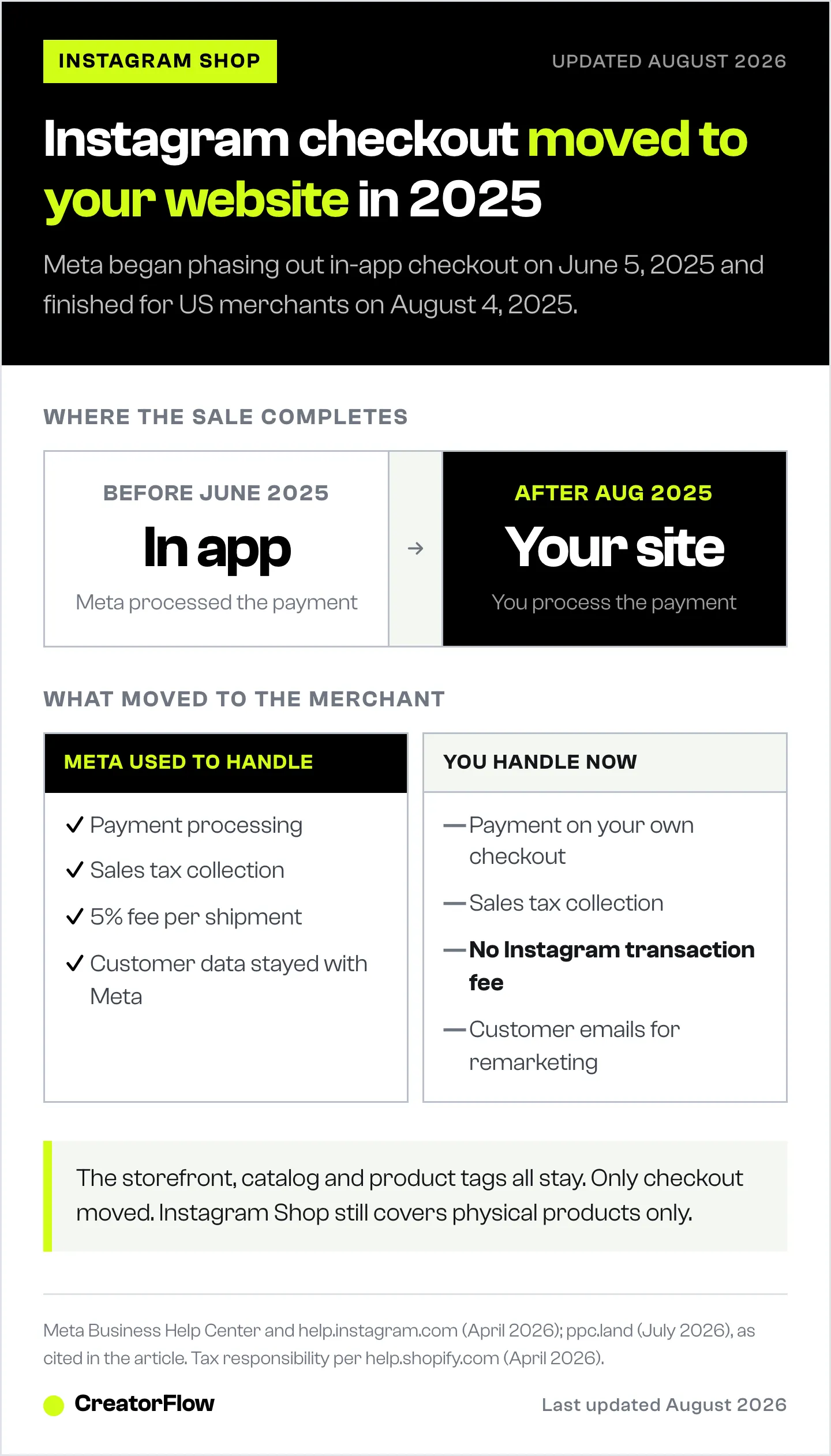
What this means for you:
| Before June 2025 | After June 2025 |
|---|---|
| Checkout inside Instagram app | Checkout on your website |
| Meta handled payment processing | You handle payment processing |
| Meta collected sales tax | You collect sales tax |
| 5% transaction fee per shipment | No Instagram transaction fee |
| Customer data stayed with Meta | Customer data goes to your store |
The upside: You own the customer relationship. No transaction fees to Meta. Full control over the checkout experience. Access to customer emails for remarketing.
The downside: Your website checkout must be fast, mobile-optimized, and trustworthy. A clunky checkout page kills conversions that Instagram delivered to your door.
The Conversion Gap: Discovery vs. Purchase
Here’s what most Instagram Shop guides miss. Setting up the shop is the easy part. Converting browsers into buyers is the hard part.
The typical Instagram Shop funnel:
- Someone sees your product tagged in a Reel (high reach)
- They tap to view the product page (moderate interest)
- They browse your shop or website (active interest)
- They leave without buying (most people, most of the time)
The drop-off between steps 3 and 4 is where revenue disappears. Instagram Shop has no built-in way to:
- Follow up with someone who viewed your product
- Answer product questions in real-time
- Send size guides or shipping info on request
- Recover interest after they leave
This is where DM automation fills the gap.
How DM Automation Turns Product Interest into Sales
DM automation doesn’t replace Instagram Shop. It works alongside it. Your shop handles product discovery and browsing. DM automation handles the conversation that leads to purchase.
Strategy 1: Comment-to-DM for Product Questions
When you post a product Reel, people comment with questions: “How much?”, “What sizes?”, “Link?”, “Does this ship to UK?”
With comment-to-DM automation, you set trigger keywords. When someone comments “PRICE” or “LINK,” they instantly receive a DM with the product link, pricing, and any details they need.
Example workflow:
- You post a Reel showing your product
- Caption says: “Comment SHOP for the direct link”
- Someone comments “SHOP”
- They get a DM within seconds: product link + current price + free shipping info
- Follow-up message 24 hours later: “Still thinking about it? Here’s 10% off for the next 24 hours”
Strategy 2: Story Reply Automation for Flash Sales
Use Stories to showcase products with urgency. When someone replies to your Story, story reply automation sends them the purchase link instantly.
Example: Post a Story with your product and text: “Reply DEAL for early access pricing.” Every reply triggers an automated DM with the link and discount code.
Strategy 3: Keyword Triggers for Always-On Support
Set up keyword triggers so anyone who DMs you with product-related questions gets instant answers.
- “SIZING” triggers your size guide
- “SHIPPING” triggers delivery times and costs
- “RETURNS” triggers your return policy
- “BESTSELLER” triggers your top-selling product link
This runs 24/7 without you being online.
Strategy 4: Email Capture from Product Interest
The biggest advantage of combining Instagram Shop with DM automation: building an email list from product interest.
When someone engages with your product content, your automation captures their email in the DM conversation. Now you can remarket via email, which has a 36:1 average ROI (Litmus, 2025).
Learn more about building an email list through Instagram DMs.
Instagram Shop + DM Automation: What Handles What
| Task | Instagram Shop | DM Automation |
|---|---|---|
| Display products on profile | Yes | No |
| Tag products in posts/Reels/Stories | Yes | No |
| Show up in Instagram Shop tab | Yes | No |
| Answer product questions instantly | No | Yes |
| Send product links via DM | No | Yes |
| Follow up with interested browsers | No | Yes |
| Capture email addresses | No | Yes |
| Track which posts drive sales | Limited | Yes (with UTM tracking) |
| Works for digital products/services | No | Yes |
Bottom line: Instagram Shop makes your products discoverable. DM automation makes them purchasable. Use both.
Common Instagram Shop Issues and Fixes
”My shop is under review for weeks”
Meta states review takes up to 4 weeks. If it’s been longer:
- Check Commerce Manager for any policy violations flagged
- Verify your domain is confirmed in Meta Business Settings
- Ensure all products comply with Meta’s commerce policies
- Re-submit if your initial submission was rejected
”Products aren’t showing up after Shopify sync”
- Check that products are published and available in Shopify
- Confirm your Shopify store isn’t password-protected
- Verify the Facebook and Instagram sales channel is connected
- Wait a few minutes. Product changes sync within minutes, but initial catalogs may take longer
”I sell digital products and can’t use Instagram Shop”
Instagram Shop only supports physical products. For digital products, courses, and services, use DM automation instead:
- Post content about your offer
- Add a CTA: “Comment INFO for details”
- Set up comment-to-DM automation to send your sales page link
- Capture emails for nurture sequences
This approach works for coaches, course creators, consultants, and any service-based business. See our guide on DM automation for coaches.
FAQ
Is Instagram Shop free?
Yes. There’s no setup fee, no listing fee, and no monthly cost from Meta. Since checkout now happens on your website (not inside Instagram), there’s no transaction fee from Meta either. Your only costs are your e-commerce platform (Shopify, WooCommerce, etc.) and any tools you add like DM automation.
How long does Instagram Shop approval take?
Meta states up to 4 weeks. Some businesses get approved in days, others wait the full month. You can track your status in Commerce Manager under Shop > Overview. Make sure your domain is verified and all products comply with Meta’s commerce policies to avoid delays.
Can I sell digital products on Instagram Shop?
No. Instagram Shop requires physical products that ship to customers. Digital products (courses, ebooks, templates, software), services, and subscriptions are not eligible. For digital products, use DM automation to send links when people comment or DM specific keywords.
Which countries support Instagram Shop?
Instagram Shopping is available in 40+ countries including the United States, United Kingdom, Canada, Australia, and most of Europe. Check Meta’s full list of supported countries at help.instagram.com/549256849084694 (April 2026).
Do I need Shopify to use Instagram Shop?
No. Shopify is one option for managing your product catalog, but you can also add products manually through Commerce Manager or use other platforms like BigCommerce, WooCommerce, or Magento. Shopify’s integration automates catalog syncing, which saves time if you have many products.
What happened to Instagram Checkout?
Meta removed in-app checkout in June 2025. All purchases now redirect to the seller’s website. This means no more 5% transaction fee from Meta, but you’re responsible for your own payment processing and tax collection.
How do I get more sales from my Instagram Shop?
Product tagging gets you discovered. Converting browsers into buyers requires follow-up. Pair Instagram Shop with DM automation to answer questions instantly, send product links, capture emails, and follow up with interested browsers. Products tagged in Reels get the most visibility - combine that with a comment-to-DM trigger for maximum conversion. For the full playbook on shoppable content for creators, see how formats and DM delivery work together.
Can I use Instagram Shop with DM automation?
Yes, and you should. Instagram Shop handles product display and discovery. DM automation handles the conversation that leads to purchase. Tools like CreatorFlow ($15/mo) let you set up comment triggers, story reply automation, and keyword-based DMs that work alongside your shop to convert interest into sales.
Sources verified as of May 2026: Meta Commerce Help Center (help.instagram.com), Shopify Help Center (help.shopify.com), Capital One Shopping Research (capitaloneshopping.com), Dataopedia (dataopedia.com).


