
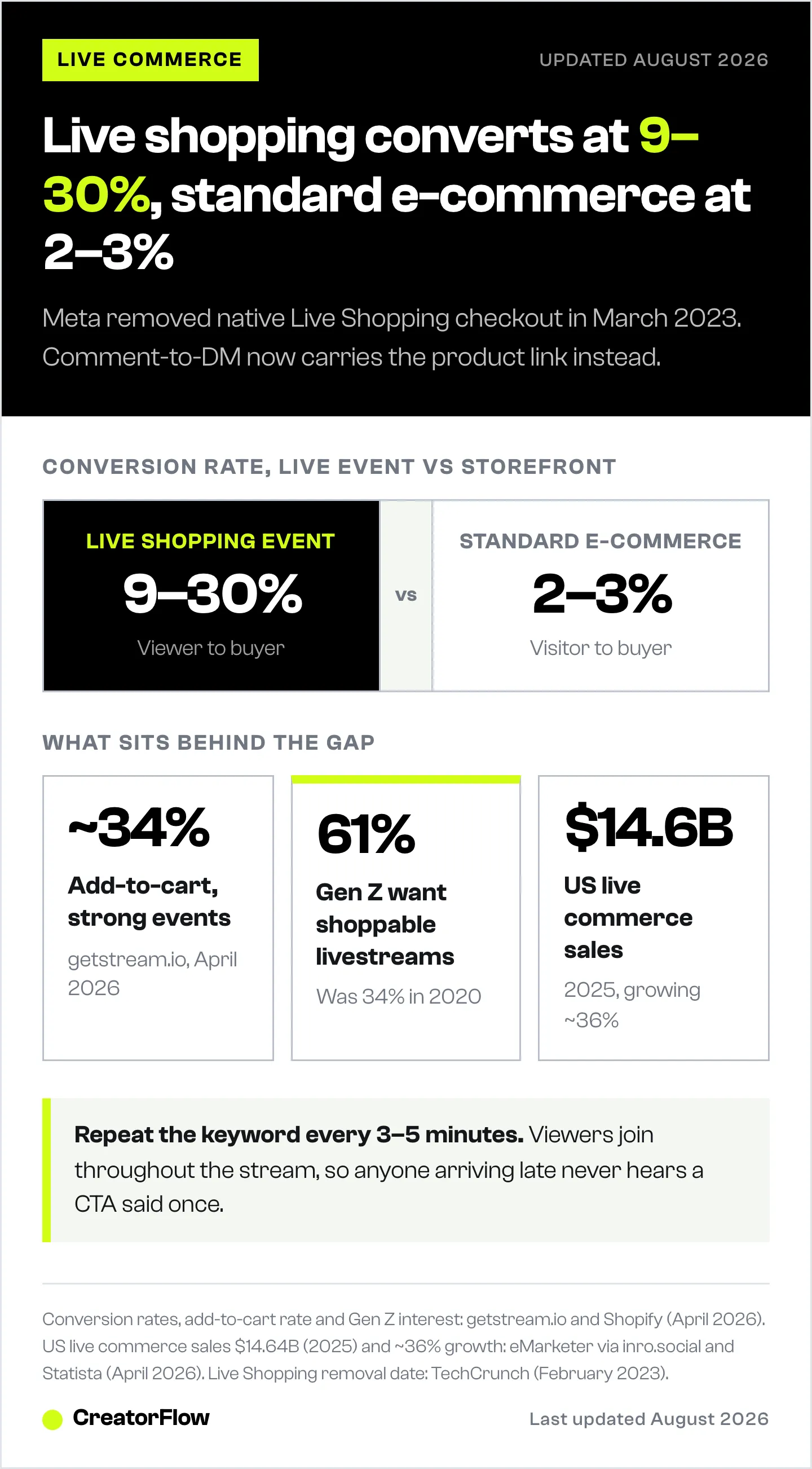
Meta removed native Instagram Live Shopping checkout in March 2023, but live commerce conversion rates still hit 9-30% versus 2-3% for standard e-commerce. The US live commerce market reached $14.64 billion in 2025. The replacement workflow: comment-to-DM automation sends product links instantly when viewers type a keyword during your broadcast, while you stay on camera and keep selling.
You can’t type DMs while holding a product up to the camera. By the time your live ends 40 minutes later, half those viewers have closed the app. The buying intent? Gone.
This is the reality of selling on Instagram Live in 2026. Meta killed native Live Shopping checkout in March 2023. But the opportunity is bigger than ever — if you use the right workflow.
Key Takeaways
- Instagram Live Shopping is gone: Meta removed native product tagging during broadcasts on March 16, 2023 (TechCrunch, February 2023).
- Comment-to-DM is the replacement: Viewers comment a keyword during Lives, and automation sends product links via DM instantly while you stay on camera.
- Live commerce conversion rates: 9-30% for live shopping events, versus 2-3% for standard e-commerce (getstream.io, April 2026).
- US live commerce market: $14.64 billion in 2025, growing at roughly 36% year over year (eMarketer/Statista, April 2026).
- Instagram vs TikTok for selling: Instagram reaches higher-income audiences (60% penetration among $100K+ households vs 30% on TikTok), making it better for products over $50.
- Bottom line: Set up keyword triggers before going Live, repeat the CTA every 3-5 minutes, and send follow-up DMs with time-limited discounts within 24 hours.
What Happened to Instagram Live Shopping?
Instagram Live Shopping let creators tag products during broadcasts. Viewers could tap, browse, and checkout without leaving the app. Meta removed it on March 16, 2023 (TechCrunch, February 2023).
The full timeline:
| Date | What Changed |
|---|---|
| 2020 | Instagram launches Live Shopping during COVID |
| March 2023 | Live Shopping removed — no more product tagging during lives |
| 2023 | Instagram Shop tab removed from main navigation |
| August 2025 | Native in-app checkout phased out for most US merchants |
| 2026 | Instagram Shops still exist, but all checkout redirects to merchant websites |
Meta’s stated reason: focusing on “products and features that provide the most value.” The real reason? Livestream shopping never gained mainstream traction in the US the way it did in China, where the market hit $682 billion in 2023 (Statista, via getstream.io, April 2026).
Instagram Live broadcasting still works. You can still go live, engage your audience, and showcase products. You can’t tag products or enable in-app checkout during the stream anymore.
The workaround? Comment-to-DM automation.
How to Sell During Instagram Lives in 2026
The native checkout is gone. The replacement workflow is better.
Here’s how creators and e-commerce brands sell during lives now:
Step 1: Set up keyword triggers before going live
Create automation rules that detect specific keywords in live comments. When someone comments “LINK” or “BUY” or your product name, they get an instant DM with the purchase link.
With CreatorFlow’s keyword trigger system, you set this up in under 5 minutes. No coding. No complex workflows.
Step 2: Go live and direct viewers to comment
During your broadcast, tell viewers exactly what to do:
- “Comment LINK to get the product page sent to your DMs”
- “Type PRICE and I’ll DM you the full pricing breakdown”
- “Drop BOOK in the comments to get my calendar link”
Repeat the CTA every 3-5 minutes. New viewers join throughout the stream and need to hear it.
Step 3: Automation handles the volume
While you’re on camera demonstrating products, the automation tool sends DMs in real time. 200 people comment “LINK” in 10 minutes? All 200 get the product page instantly.
This is physically impossible to do manually while live.
Step 4: Follow up after the stream
Send follow-up messages to everyone who engaged but didn’t purchase:
- Replay link for viewers who joined late
- Time-limited discount code (expires in 24 hours)
- Related product recommendations
This post-live window is where a significant chunk of conversions happen. Understanding how Instagram DM automation works at a technical level helps you optimize this flow.
Why Live Selling Still Works (The Data)
Instagram removed the native feature, but live commerce as a category is exploding globally.
Market Growth
| Metric | Figure | Source |
|---|---|---|
| US live commerce sales (2025) | $14.64 billion | eMarketer, via inro.social (April 2026) |
| US projected YoY growth | ~36% | Statista (April 2026) |
| Global live commerce market (2024) | ~$128 billion | Grand View Research (April 2026) |
| Global projected market (2033) | $2.47 trillion | Grand View Research (April 2026) |
Conversion Performance
| Metric | Figure | Source |
|---|---|---|
| Live shopping conversion rate | 9-30% | getstream.io (April 2026) |
| Standard e-commerce conversion rate | 2-3% | getstream.io (April 2026) |
| Well-executed events add-to-cart rate | ~34% | getstream.io (April 2026) |
| Gen Z interest in shoppable livestreams | 61% (up from 34% in 2020) | Shopify (April 2026) |
Real Case Studies
| Brand | Result | Source |
|---|---|---|
| Three Ships Beauty | 1,200 viewers, 356 orders in 1 hour, 26% conversion, $25K revenue | Shopify (April 2026) |
| Made by Mitchell | $2M+ in sales, 500K follower growth via live selling | Shopify (April 2026) |
| Eidon Swim | 318% sales increase, 19,000 reach from live giveaway + selling | Shopify (April 2026) |
The conversion rates speak for themselves. Live selling creates urgency, builds trust through real-time interaction, and shortens the path from discovery to purchase.
Instagram Live vs TikTok Shop: Where Should You Sell?
TikTok Shop has native in-stream checkout. Instagram doesn’t. So why not move to TikTok?
| Factor | Instagram Live | TikTok Shop |
|---|---|---|
| In-stream checkout | No (removed 2023) | Yes (native) |
| Selling mechanism | Comment-to-DM automation | In-app checkout + comment triggers |
| Audience income | 60% penetration among $100K+ households | 30% penetration among $100K+ households |
| Best for | Higher-ticket products, coaches, premium brands | Impulse buys, mass-market products |
| Audience relationship | Deeper creator-follower relationship | Discovery-driven, algorithm-dependent |
| Setup complexity | DM automation tool needed | Built into TikTok Shop |
(Audience income data: inro.social, April 2026)
Instagram’s audience skews higher-income. If you’re selling premium products, coaching services, or anything over $50, Instagram’s audience has more purchasing power.
TikTok Shop wins on friction — native checkout means fewer steps. But Instagram wins on audience quality and creator-follower relationships.
The smart play? Use both. But if you’re choosing one, match the platform to your price point and audience.
The Comment-to-DM Workflow (Step by Step)
Here’s the exact setup for selling during Instagram Lives with CreatorFlow:
Before the Live
- Create your automation rule — Set keyword triggers like “LINK,” “BUY,” or your product name
- Write your DM message — Include product link, price, and a clear CTA. Keep it under 3 sentences
- Test the trigger — Post a test comment on a regular post to verify the DM sends correctly
- Prepare your product links — Use trackable links so you know exactly which live generated sales
- Promote the live session — Post Stories, Reels, and send emails announcing the time and what you’ll showcase
During the Live
- Open with value — Spend the first 2-3 minutes building context, not selling
- Demonstrate the product — Show it in action, answer questions, address objections
- Drop the keyword CTA — “Comment LINK and I’ll send the product page to your DMs right now”
- Repeat every 3-5 minutes — New viewers join constantly throughout the stream
- Engage by name — Welcome viewers, respond to questions, create a personal connection
- Create urgency — “This discount is only available during today’s live”
After the Live
- Check your DM analytics — How many triggers fired? How many links were clicked?
- Send follow-up messages — Target viewers who received the link but haven’t purchased
- Repurpose clips — Cut the best 30-60 second moments into Reels
- Post a Story recap — “Missed today’s live? Comment LINK on my latest post for the product page”
- Review and optimize — Which keyword performed best? What time drove the most viewers?
This workflow replaces what Instagram Live Shopping used to do natively — and adds tracking and follow-up capabilities the native feature never had.
5 Instagram Live Selling Strategies That Convert
1. The Product Launch Live
Go live when dropping a new product. Build anticipation with 3-5 Stories in the days before. During the live, unbox or demo the product. Tell viewers to comment a keyword for early access or a launch discount.
Works best for: e-commerce brands, digital product creators, course launches.
2. The Q&A + Soft Sell
Host a weekly Q&A in your niche. Answer questions for 20-30 minutes, then naturally transition to your product as the solution. “I get this question every week — that’s exactly why I built [product]. Comment LINK if you want to check it out.”
Works best for: coaches, consultants, educators. See how to automate booking flows for coaches.
3. The Affiliate Product Showcase
Review 3-5 products in your niche during a live. Give honest opinions. Set different keyword triggers for each product. “Comment SERUM for the skincare link, comment TOOL for the hair tool link.”
Works best for: affiliate marketers, Amazon influencers. Learn more about scaling affiliate marketing with DM automation.
4. The Flash Sale Live
Announce a 30-minute flash sale exclusively during your live. The discount code only works for 1 hour after the stream. Comment-to-DM delivers the code + product link instantly.
Works best for: Shopify store owners, DTC brands, seasonal promotions.
5. The Collaboration Live
Go live with another creator whose audience overlaps with yours. Cross-pollinate audiences. Both creators promote their products with different keyword triggers.
Works best for: growing your audience while selling. Doubles your reach and introduces your product to a warm (but new) audience.
Equipment Checklist for Instagram Live Selling
You don’t need a studio. You need reliability.
Must-have:
- Smartphone with decent camera (iPhone 12+ or equivalent)
- Ring light or window with natural light
- Stable internet connection (WiFi 5GHz or wired via adapter)
- Quiet environment with minimal background noise
Nice-to-have:
- External microphone (Rode Wireless Go or similar lavalier mic)
- Phone tripod or mount (keeps framing steady)
- Second device for monitoring comments and DM analytics
- Backdrop or clean background
Skip these:
- Professional cameras (Instagram Live only streams from the mobile app)
- Complex multi-camera setups (not supported natively)
- Expensive lighting rigs (a $30 ring light is enough)
Common Mistakes to Avoid
1. Not setting up automation before going live
If 100 people comment “LINK” and you don’t have keyword triggers active, you’ll spend the next 2 hours manually sending DMs. Set up and test your automation before hitting “Go Live.”
2. Forgetting to repeat the CTA
Viewers join and leave throughout a live stream. If you only say “comment LINK” once at minute 5, everyone who joins at minute 15 misses it. Repeat every 3-5 minutes.
3. Going live without promotion
Instagram’s algorithm doesn’t guarantee your followers see your live notification. Promote across Stories, Reels, email, and other channels 24-48 hours before.
4. Making the live all about selling
The best-performing lives deliver value first. Teach something, answer questions, entertain. Then sell. A 70/30 split (value/pitch) keeps viewers engaged without feeling like a QVC rerun.
5. Not tracking results
If you’re not tracking link clicks from your live DMs, you have no idea what’s working. Use UTM parameters on every product link.
How CreatorFlow Powers Live Selling
CreatorFlow’s comment-to-DM automation handles the entire live selling workflow:
- Keyword triggers — Set up unlimited keywords that activate during your live
- Instant DM delivery — Product links sent within seconds of a comment
- Link tracking — Know exactly how many viewers clicked and purchased
- Email capture — Collect emails within the DM conversation for follow-up marketing
- Follow-up messages — Send post-live reminders to viewers who didn’t convert
Pricing: CreatorFlow Free includes 500 DMs/month. Pro at $15/month gives you 5,000 DMs/month with link tracking and email capture (as of May 2026).
No per-contact fees. No complex workflow builders. Set up your live selling automation in under 5 minutes.
Pre-Live, During-Live, and Post-Live Checklist
48 Hours Before
- Choose products to showcase (max 3-5 per live)
- Set up keyword triggers in CreatorFlow for each product
- Create trackable links (UTM parameters) for each product URL
- Write DM messages — clear, concise, with product link and price
- Test triggers by commenting on a regular post
- Post a Story announcing the live date/time
- Send email to your list about the upcoming live
1 Hour Before
- Check lighting and audio setup
- Confirm internet connection is stable
- Have products ready and within reach
- Open CreatorFlow dashboard to monitor in real time
- Post a final Story reminder: “Going live in 1 hour!”
During the Live
- Welcome viewers by name as they join
- Deliver value for the first 3-5 minutes before selling
- Demonstrate each product with clear benefits
- Drop keyword CTA every 3-5 minutes
- Engage with questions and comments
- Announce any livestream-exclusive offers
- Thank viewers and preview your next live
Within 1 Hour After
- Check DM delivery stats in CreatorFlow
- Send follow-up DMs to engaged viewers who didn’t purchase
- Save the live replay (if Instagram offers the option)
- Clip best moments into 30-60 second Reels
Within 24 Hours After
- Post Reel clips from the live with comment-to-DM triggers
- Review analytics: viewers, keyword triggers, link clicks, sales
- Send time-limited follow-up: “Last chance — discount expires tonight”
- Document what worked and what to improve for next time
FAQ
Is Instagram Live Shopping still available in 2026?
No. Instagram removed native Live Shopping (product tagging during broadcasts) on March 16, 2023. You can still go live and sell products, but you need a comment-to-DM automation tool to send product links to viewers who comment keywords during the stream.
Can I still sell products during Instagram Lives?
Yes. The selling mechanism changed from native checkout to comment-to-DM automation. Viewers comment a keyword like “LINK” during your live, and an automation tool sends them the product page via DM instantly. Purchases happen on your website.
What replaced Instagram Live Shopping?
Comment-to-DM automation replaced the native checkout. Tools like CreatorFlow detect keyword comments during lives and send automated DMs with product links. This workflow adds capabilities the native feature never had: link tracking, email capture, and post-live follow-ups.
How do I set up live selling on Instagram?
Set up keyword triggers in a DM automation tool before going live. During the broadcast, tell viewers to comment a specific word. The tool sends product links via DM automatically. See our complete setup guide for step-by-step instructions.
Is comment-to-DM automation safe for my Instagram account?
Yes, when using tools built on Meta’s official Instagram Graph API. CreatorFlow is a Meta Tech Provider that uses the official API — no password sharing, no third-party access, and minimal ban risk when you respect Meta’s rate limits and messaging rules.
How many DMs can I send during a live?
Automation tools pace sends at roughly 200 DMs per hour as a tool-side safety cap. For most live sessions (15-60 minutes), this covers the volume. If you’re expecting higher engagement, stagger your keyword CTAs or run multiple shorter lives.
Instagram Live vs TikTok Shop — which is better for selling?
TikTok Shop has native in-stream checkout, making it easier for impulse purchases. Instagram reaches a higher-income audience (60% penetration among $100K+ households vs 30% on TikTok). Choose TikTok for mass-market products under $50. Choose Instagram for premium products, coaching, and services.
What equipment do I need for Instagram Live selling?
A smartphone, ring light, and stable WiFi connection. That’s it. Instagram Live streams from the mobile app only — no professional cameras needed. An external microphone improves audio quality but isn’t required.
How long should my selling live be?
30-60 minutes works for most creators. Shorter sessions (15-20 minutes) work for single-product drops. Longer sessions (60+ minutes) work for product showcases with 5+ items. The key is repeating your keyword CTA every 3-5 minutes for new viewers joining the stream.
Can I use DM automation for live selling with Shopify?
Yes. Set your keyword trigger to send a DM containing your Shopify product URL. Viewers click the link, land on your product page, and purchase through your Shopify checkout. Add UTM parameters to track which live generated the sale. Read our Shopify automation guide for the full setup.
How do I track sales from Instagram Lives?
Use UTM parameters on every product link sent via DM. CreatorFlow’s link tracking shows click-through rates for each automation. Compare DM sends to website conversions in your Shopify/analytics dashboard. Read our DM link tracking guide for setup instructions.


