

Salons, spas, and local appointment businesses use Instagram DM automation to reply the moment someone comments “price?” or replies to a story asking to book. A tool sends your Calendly, Square, or Fresha link into the DM automatically, day or night, so interested clients get the booking page in seconds instead of waiting for your front desk to catch up.
Your busiest booking hours are not your open hours. A client sees your fresh-balayage Reel at 11pm, comments “how much and when are you free?”, and by the time the front desk opens at 9am the message is buried under 40 others. That slot stays empty. Multiply that across every after-hours comment and story reply, and the gap between “people who wanted to book” and “people who actually booked” gets expensive.
This guide is for hair salons, barbershops, nail and beauty studios, med-spas, gyms and fitness studios, and clinics that use Instagram to fill the calendar. The pattern is the same across all of them: turn a comment or story reply into a booking link, capture the ones who are not ready to book yet, and stop losing warm leads to a slow inbox.
Key Takeaways
- DM automation sends your booking link instantly. When someone comments a keyword or replies to a story, the tool DMs your Calendly, Square, Fresha, Vagaro, or Acuity link in seconds, 24/7.
- CreatorFlow sends the link, your booking tool takes the appointment. It moves interested clients from Instagram to your existing booking page automatically.
- After-hours demand is real. More than 150 million people message a business on Instagram every month, and 1 in 3 of those conversations leads to a purchase (facebook.com/business, July 2026).
- No-shows and missed messages cost salons real money. The beauty industry loses roughly 30% of appointments a year, with the average salon’s revenue dropping about $67,000 (bookeo.com, July 2026).
- The Email Gate builds a client list. Collect an email before sending the booking link, then export contacts by CSV for reminder and rebooking campaigns.
- Geographic analytics helps multi-location owners. See which city or neighborhood your booking clicks come from to route clients to the right studio.
- Setup takes under 5 minutes. CreatorFlow runs on Meta’s official Instagram API, so there is no password sharing and minimal ban risk.
How does Instagram DM automation work for salons and spas?
Instagram DM automation watches your comments and story replies for a trigger, then sends a pre-written direct message with your booking link. A client comments “BOOK” on a Reel or replies “price” to a story, and the tool DMs them your Fresha or Square page within seconds. You set the keywords and the message once, and it runs on every post without you touching the phone.
The important distinction: the tool handles the conversation-to-link step, not the calendar itself. Your booking software still owns availability, deposits, and confirmations. DM automation closes the gap between someone raising their hand in a comment and landing on the page where they pick a time. For a deeper walkthrough of the mechanics, see the complete guide to Instagram DM automation.
The comment and story-reply to booking-link flow
Two triggers do most of the work for appointment businesses.
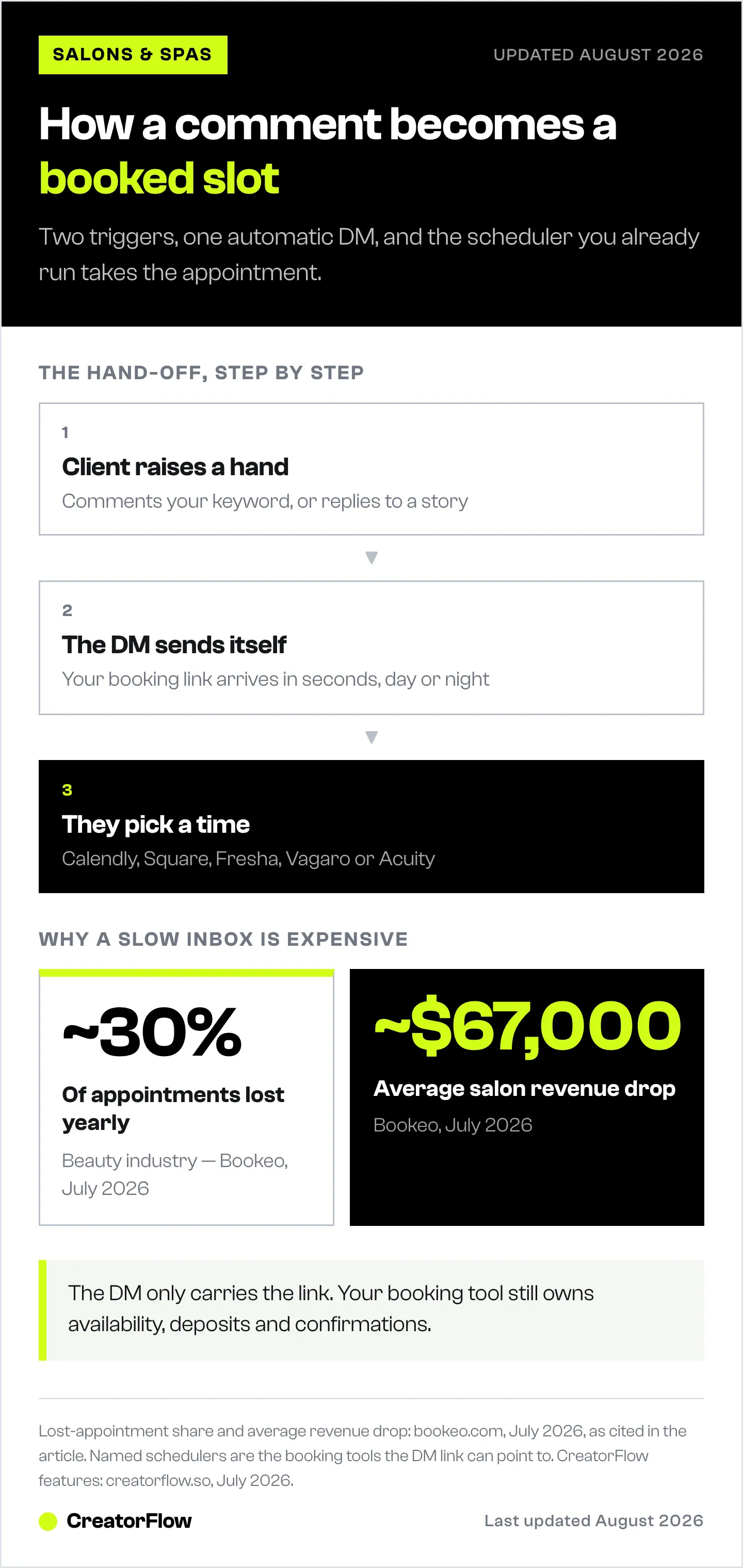
Comment-to-DM: You post a Reel of a fresh fade, a lash set, or a class schedule and add “Comment BOOK for the link” in the caption. Everyone who comments the keyword gets an automatic DM with your booking page. The public comment also boosts the post’s reach, so the same content that drives bookings also grows the account.
Story-reply automation: You run a story with “This week only, 3 slots left” and a “Reply to book” prompt. Every reply triggers a DM with the link. Stories are where a lot of local booking intent shows up, because clients treat them like a quick text to a business they already follow.
Both flows keep the conversation inside Instagram, where the client already is, and hand them off to your scheduler in one tap. For the full build, our comment-to-DM automation setup guide covers keywords, message copy, and testing.
Setting up your booking automation: step by step
- Connect your Instagram professional account to CreatorFlow through Meta’s official login. No password sharing, and setup runs under 5 minutes.
- Pick your keywords. Choose the words clients actually type: BOOK, PRICE, SLOTS, APPT, or your service names like BALAYAGE or LASHES.
- Write the DM. Keep it short and human, then paste your booking link. Example: “So glad you want in. Grab a time here and I’ll see you soon: [your link].”
- Add the booking link. Drop in your Calendly, Square Appointments, Fresha, Vagaro, or Acuity URL.
- Turn on the Email Gate (optional). Collect an email before the link sends, so you keep the lead even if they do not book right away.
- Publish content that names the keyword. Every Reel, post, and story caption should tell people exactly what to comment or reply.
- Check link tracking. Watch which posts drive the most booking clicks and make more of what works.
Which booking tools can the DM link point to?
CreatorFlow sends whatever booking link you paste, so it works alongside the scheduler you already run. It feeds clients straight into the calendar you already use.
| Booking tool | Common fit | What CreatorFlow does |
|---|---|---|
| Calendly | Clinics, coaches, consultations | DMs your Calendly link on the trigger keyword |
| Square Appointments | Salons, barbershops, studios | DMs your Square booking page automatically |
| Fresha | Salons, spas, beauty studios | Sends your Fresha profile link in the DM |
| Vagaro | Salons, spas, fitness studios | Delivers your Vagaro booking URL |
| Acuity Scheduling | Med-spas, clinics, wellness | Auto-sends your Acuity link on comment or reply |
Each of these tools handles availability, deposits, and reminders on its own. CreatorFlow’s job is getting the client from an Instagram comment to that page without a human replying by hand.
Capturing after-hours leads with the Email Gate
Not everyone who comments is ready to pick a time. Some want the price first, some are comparing two studios, some are browsing at midnight. The Email Gate captures those people before they drift off.
When a client triggers the automation, CreatorFlow can ask for an email before sending the booking link. You get the link to the ready-to-book client and an email address for the ones who need a nudge. Export those contacts by CSV into your email tool and run reminder or first-visit-offer campaigns. Over a few months that becomes a client list you own, not one you rent from the algorithm. Our Email Gate guide shows the full setup, and converting Instagram DMs into leads covers what to do with the list afterward.
Geographic analytics for multi-location businesses
If you run more than one location, you need to know where booking demand comes from. CreatorFlow’s geographic analytics (on Pro and above) shows clicks by country and city, so a two-studio salon can see whether a viral Reel is pulling clients toward the downtown chair or the suburb one.
That data helps you route people to the right booking page and decide where to spend on content. A gym with three branches can tell which neighborhood is responding and staff accordingly.
What does Instagram DM automation cost for a local business?
CreatorFlow pricing is flat, not per-contact, so a busy weekend of comments does not spike your bill.
| Plan | Price | DMs / month | Workspaces | Best for |
|---|---|---|---|---|
| Free | $0 | 500 | 1 | A single studio testing automation |
| Pro | $15/mo or $144/yr | 5,000 | 2 | One salon or spa with steady DM volume |
| Growth | $30/mo or $288/yr | 10,000 | 5 | Multi-location or high-engagement accounts |
| Agency | Custom | Custom | Custom | Groups managing many client accounts |
The Free plan covers a small studio that wants to try the comment-to-booking flow. Pro adds the Follow Gate, Email Gate, CSV export, and geographic analytics, which is where most single-location salons and spas land. Growth fits owners running several locations or team members who share the inbox. To compare options across the market, see our roundup of the best Instagram DM automation tools.
FAQ
How does CreatorFlow work with my booking calendar?
CreatorFlow sends your booking link into the DM automatically, and your scheduler takes the actual appointment. It moves a client from an Instagram comment or story reply to your Calendly, Square, or Fresha page, and that tool handles times, deposits, and confirmations.
Does it work with Fresha, Square, Calendly, Vagaro, or Acuity?
Yes. CreatorFlow sends whatever booking URL you paste in, so any scheduler that gives you a shareable link works. That includes Fresha, Square Appointments, Calendly, Vagaro, and Acuity. You keep your current booking system and just automate the hand-off.
Is Instagram DM automation safe for my business account?
CreatorFlow runs on Meta’s official Instagram API and is a Meta Tech Provider (since December 2025). There is no password sharing, and it connects through official login. Sends are paced conservatively at around 200 DMs per hour to stay well within platform norms, which keeps ban risk minimal.
Will the automated DM feel robotic to clients?
Only if you write it that way. You control the message text, so keep it short and in your own voice. A line like “Can’t wait to see you, grab a time here” reads like a busy owner replying fast, not a bot. The client gets the link in seconds, which most people prefer to waiting hours.
How is this different from restaurant reservation automation?
Restaurants automate table reservations and menu links, which is a different flow. If that is your business, see our guide to Instagram automation for restaurants and local businesses. This guide covers appointment-based services like salons, spas, gyms, and clinics, where the goal is booking a personal time slot.
Can I capture emails from people who are not ready to book?
Yes. The Email Gate asks for an email before sending the booking link, so you keep the lead even if they do not book right away. Export those contacts by CSV and run reminder or first-visit-offer campaigns to bring them back.
What does it cost to start?
The Free plan is $0 and includes 500 DMs a month on one account, enough to test the comment-to-booking flow. Pro is $15/month and adds the Email Gate, CSV export, and geographic analytics that most single-location salons and spas want.
Ready to turn Instagram comments and story replies into booked appointments? CreatorFlow is the distribution engine that sends your booking link the moment a client raises their hand, so no warm lead sits in an unread inbox. Get started free and connect your account in under 5 minutes.
Local booking tactics and CreatorFlow features verified from creatorflow.so and cited sources as of July 2026. Individual results vary.


