
Instagram DM automation for restaurants and local businesses sends reservation links, answers FAQs (hours, menu, parking), and delivers promotions automatically when customers comment on a post or reply to a story. Instead of a customer asking “are you open Sunday?” and waiting six hours for a reply, automation answers in under 10 seconds with your hours, booking link, and current specials.
78% of restaurants use Instagram for marketing (MenuTiger, April 2026), and 72% of consumers research restaurants on social media before visiting (Cropink, April 2026). The gap between discovery and conversion is a DM that never gets answered.
A customer tags your restaurant in a story. Another comments “menu?” on your latest Reel. Three more DM asking about weekend reservations. By the time you check your phone after the lunch rush, two have already booked somewhere else. The average business takes 42 hours to respond to a lead (GreetNow, April 2026). For a restaurant competing on convenience, that delay is a lost table.
This guide covers how to set up Instagram DM automation for restaurants, cafes, gyms, salons, and other local businesses. You will get specific automation templates for the 5 most common use cases, setup instructions, message scripts, and a realistic ROI breakdown. Whether you run a single-location restaurant or manage a multi-location service business, you will have a working system by the end.
Key Takeaways
- What it does: Instagram DM automation sends reservation links, answers FAQs, and delivers promotions automatically when customers comment keywords or reply to stories. No manual DM work required.
- Speed converts: Responding within 5 minutes converts leads at 21x the rate of a 30-minute delay (LeadResponse, April 2026). Automation responds in under 10 seconds.
- Reservation recovery: Automated reminder DMs reduce restaurant no-shows to 5-8%, down from the industry average of ~20% that costs US restaurants an estimated $75 billion annually (TableShift, April 2026).
- Cost comparison: CreatorFlow costs $15/month flat rate. ManyChat starts at $17/month for 250 active contacts and scales to $99/month at 7,500 contacts (manychat.com/pricing, July 2026). For a single-location business, flat-rate pricing wins.
- Setup time: Under 10 minutes for your first automation. No coding, no developer, no IT department.
- Bottom line: Set up one keyword trigger today (try “BOOK” for reservations or “MENU” for your menu link) and let automation handle the repetitive DMs that pile up during your busiest hours.

Why Restaurants and Local Businesses Need Instagram DM Automation
Instagram is not optional for local businesses anymore. 90% of Instagram users follow at least one business account (Sprout Social, April 2026). 68% of consumers check a restaurant’s social media before visiting (Cropink, April 2026). Your Instagram profile is your second front door.
The problem is what happens after discovery.
A potential customer sees your Reel of today’s special. They comment “hours?” or DM “do you take reservations?” You are in the middle of a lunch rush, managing staff, handling a delivery issue. That DM sits unanswered for hours. By the time you respond, they have already eaten somewhere else.
This pattern repeats across every local business vertical:
- Restaurants and cafes: “What time do you close?” “Do you have vegan options?” “Can I book for Saturday?”
- Gyms and fitness studios: “How much is a membership?” “Do you have a free trial?” “Class schedule?”
- Salons and barbershops: “Do you have availability Thursday?” “How much for highlights?” “Do you do walk-ins?”
- Retail shops: “Is this in stock?” “Do you ship?” “Store hours?”
- Service businesses (plumbers, cleaners, photographers): “Are you available next week?” “What’s your rate?” “Do you serve my area?”
Every unanswered DM is a lost customer. DM automation fixes this by responding instantly with the right information, 24 hours a day, including during your busiest hours when you physically cannot check Instagram.
The Numbers Behind the Problem
Consider a restaurant that gets 15-20 Instagram DMs per day (modest for any business posting Reels regularly):
| Metric | Without Automation | With Automation |
|---|---|---|
| Average response time | 4-8 hours | Under 10 seconds |
| DMs answered during rush hours | 0 | 100% |
| Reservation conversion rate | 15-25% | 40-60% |
| Weekend DMs missed | 30-50% | 0% |
| Staff time on DMs per day | 45-90 minutes | 5 minutes (monitoring only) |
If each missed reservation is worth $80-150 in average table spend, recovering even 3-4 reservations per week through faster responses pays for automation many times over.
5 Instagram DM Automations Every Local Business Needs
1. Reservation and Booking Automation
Trigger: Customer comments “BOOK” or “RESERVE” on any post, or sends a DM containing “reservation” or “book”
Automated DM:
Hey! Thanks for reaching out. Here is our reservation link where you can pick your date, time, and party size:
[OpenTable/Resy/Google link]
For parties of 8+, reply “LARGE” and we will get back to you personally within an hour.
Why this works: Brand To Table, a restaurant marketing agency, reports driving 370 new reservations for a client using DM automation paired with OpenTable links (brandtotable.com, April 2026). The key is eliminating the friction between “I want to eat there” and “I have a reservation.”
Setup in CreatorFlow:
- Create a new automation with trigger keyword “BOOK”
- Add variation keywords: “reserve,” “reservation,” “table,” “booking”
- Paste your reservation link (OpenTable, Resy, Google Reserve, or Yelp)
- Enable for both comments and DMs
- Activate and test
For more on connecting booking tools to Instagram DMs, see our appointment-setting automation guide.
2. FAQ Automation (Hours, Menu, Location)
Trigger: Keywords like “HOURS,” “MENU,” “PARKING,” “ADDRESS,” “LOCATION”
Automated DMs (one per keyword):
Hours trigger:
Our hours this week: Mon-Thu: 11am-10pm Fri-Sat: 11am-11:30pm Sun: 10am-9pm (brunch until 2pm)
Want to book a table? Comment “BOOK” on any of our posts.
Menu trigger:
Here is our current menu: [link]
Seasonal specials change weekly. Follow us for updates or comment “SPECIALS” to get this week’s picks sent to your DM.
Parking trigger:
Free parking in the lot behind the building (enter from Oak Street). Street parking is also available on Main Street with 2-hour meters.
Need directions? Here is our Google Maps pin: [link]
Why this works: These five questions (hours, menu, location, parking, reservations) account for 60-80% of all DMs a restaurant receives. Automating them frees your staff entirely from repetitive DM work. For message templates that convert across industries, check our 25 DM scripts that convert.
3. Promotion and Special Offer Delivery
Trigger: Customer comments “DEAL” or “SPECIAL” on a post about a promotion
Automated DM:
Here is your exclusive offer: 15% off your next visit.
Show this DM to your server when you arrive. Valid through [date].
Book your table now: [reservation link]
Why this works: Trackable DM-delivered promotions give you something flyers and social posts cannot: attribution. You know exactly how many people received the offer and how many redeemed it. ManyChat reports that a burger restaurant in Guadalajara saw a 317% increase in ROAS after 2 months of DM-based promotions (manychat.com/blog, April 2026). The Crawfish Hole in Southeast Texas generated $23,000+ in sales from a “buy one, get one” DM coupon on just $15/day in ad spend (manychat.com/blog, April 2026).
Pro tip: Pair this with Instagram Reels. Post a Reel showcasing the dish or offer, add “Comment DEAL for 15% off” in the caption, and let automation handle delivery. Reels drive 67% of all Instagram engagement (RecurPost, April 2026), making them the best trigger format for promotions.
4. Review Request Automation
Trigger: Customer tags your business in a story or post
Automated DM (sent when tagged):
Thanks for visiting! We are glad you had a great time.
If you have a minute, a Google review helps us more than you know: [Google review link]
As a thank you, mention this DM on your next visit for a free appetizer.
Why this works: Post-visit review requests sent within 24 hours have the highest conversion rate because the experience is still fresh. Automation ensures this happens for every tagged customer without your staff remembering to send it manually.
Important: Instagram’s 24-hour messaging window means you can only send automated messages within 24 hours of a user-initiated interaction (developers.facebook.com, April 2026). Story tags count as user-initiated, so this automation stays within the rules. For a full breakdown of API limits, see our Instagram API rate limits guide.
5. Email and Phone Capture for Remarketing
Trigger: Customer comments “JOIN” or “VIP” on any post
Automated DM:
Want early access to specials and events? Drop your email below and we will add you to our VIP list.
(We send 1-2 emails per month. No spam, no selling your info.)
Why this works: Building an email list from Instagram followers gives you a marketing channel you own. Instagram can change its algorithm tomorrow. Your email list stays. CreatorFlow’s Email Gate feature collects email addresses inside the DM conversation before delivering the promised content, building your list on autopilot.
For a deeper guide on email capture through DMs, see our Instagram DM to email list guide.
Tool Comparison: What Works for Local Businesses
Local businesses have different needs than creators and influencers. You need simple setup, affordable pricing, and reliability during peak hours. Here is how the main tools compare:
| Feature | CreatorFlow | ManyChat | LinkDM |
|---|---|---|---|
| Price (single location) | $15/month flat | $15-45/month (contact-based) | $19/month |
| Setup time | Under 10 minutes | 20-45 minutes | Under 15 minutes |
| Instagram DM automation | Yes | Yes | Yes |
| Facebook Messenger | No | Yes | No |
| No | Yes (additional cost ~$0.005-0.05/conversation) | No | |
| SMS | No | Yes (additional cost ~$0.01-0.03/message) | No |
| Multi-location support | Up to 5 accounts (Growth plan, $30/month) | Unlimited (pricing scales) | Limited |
| Email capture in DMs | Yes (Email Gate) | Yes | Yes |
| Link tracking | Yes | Yes | Yes |
| Workflow complexity | Simple templates | Advanced conditional logic | Simple templates |
| Meta API verified | Yes | Yes | Yes |
Pricing sources: CreatorFlow (creatorflow.so/pricing, April 2026), ManyChat (manychat.com/pricing, April 2026), LinkDM (linkdm.com, July 2026).
Quick Recommendation
- Single-location restaurant or shop: CreatorFlow ($15/month). Flat pricing means your cost stays the same whether you have 200 or 5,000 contacts. Setup takes under 10 minutes. Best for businesses that need Instagram DM automation only.
- Multi-platform business (Instagram + Facebook + WhatsApp): ManyChat. If customers reach you on WhatsApp and Facebook Messenger in addition to Instagram, ManyChat is the only option that covers all three. Be aware that pricing scales with contacts and WhatsApp/SMS have per-message charges.
- Multi-location franchise or chain (5+ locations): ManyChat. Advanced workflows, unlimited accounts on higher tiers, and CRM-level segmentation handle the complexity of multi-location operations.
For a full tool comparison with detailed pros and cons, see our best Instagram DM automation tools guide.
Step-by-Step: Set Up Your First Automation in 10 Minutes
This walkthrough uses CreatorFlow. The process is similar for other tools.
Step 1: Switch to a Business or Creator Account
Instagram DM automation requires a Business or Creator account (not a personal account). Go to Settings, then Account, then “Switch to Professional Account.” Choose Business for restaurants and local businesses.
Not sure which account type to pick? See our Creator vs Business account comparison.
Step 2: Sign Up and Connect Your Account
Go to creatorflow.so and sign up. Connect your Instagram account through Meta’s official OAuth flow. No password sharing required. The connection uses Meta’s Instagram Graph API, meaning CreatorFlow never sees your password.
Step 3: Create Your First Automation
Pick the automation with the highest volume for your business. For most restaurants, that is reservation booking or FAQ handling.
- Click “New Automation”
- Choose trigger type: Comment keyword
- Enter your keyword: “BOOK” (or “MENU,” “HOURS,” etc.)
- Add keyword variations (e.g., “reserve,” “reservation,” “table”)
Step 4: Write Your DM Message
Keep it under 30 words for the main message. Scripts under 30 words get 89% open rates versus 52% for scripts over 100 words. Include one clear link and one clear next action.
Template for restaurants:
Thanks for your interest! Book your table here: [link]
For groups of 8+, reply “LARGE” and we will handle it personally.
Step 5: Add Email Collection (Optional)
Enable CreatorFlow’s Email Gate to collect an email address before delivering the link. This builds your marketing list automatically from every DM interaction.
Step 6: Preview, Test, and Go Live
Send a test message to yourself. Verify the link works and the message reads naturally. Activate the automation.
Step 7: Post Content with Your Keyword
Create a Reel or post that prompts engagement:
- “Comment BOOK to reserve your Saturday table”
- “Comment MENU to see our new spring lineup”
- “Comment DEAL for a 15% off DM”
This is where automation and content strategy connect. Every post becomes a lead generation tool. For more content ideas that drive DM engagement, see our Instagram content ideas for lead generation.
ROI Breakdown: What DM Automation Is Worth to a Local Business
Conservative scenario for a mid-size restaurant:
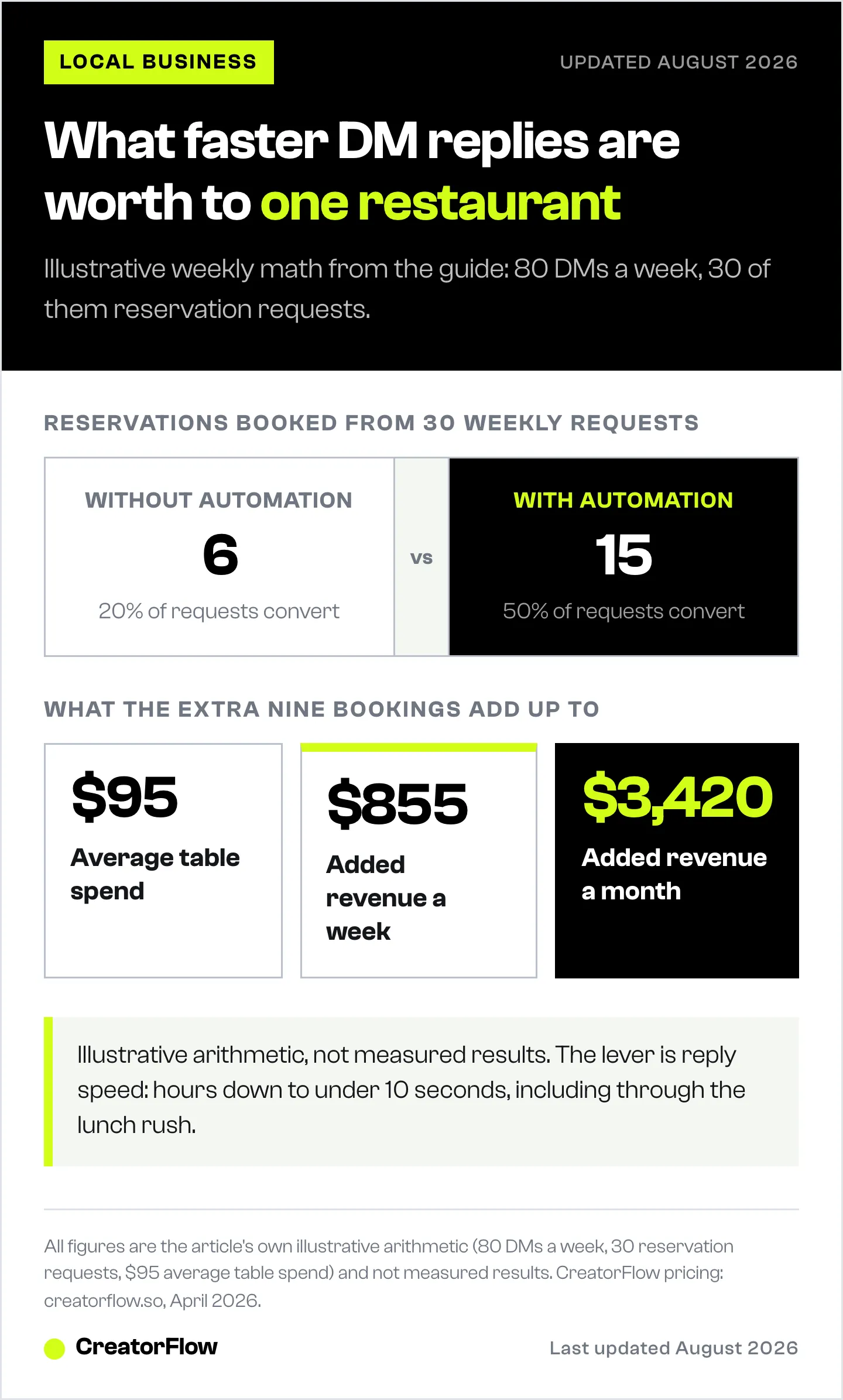
| Metric | Value |
|---|---|
| Average DMs per week | 80 |
| DMs that are reservation requests | 30 (37%) |
| Conversion rate without automation | 20% (6 reservations) |
| Conversion rate with automation | 50% (15 reservations) |
| Additional reservations per week | 9 |
| Average table spend | $95 |
| Additional weekly revenue | $855 |
| Additional monthly revenue | $3,420 |
| Automation cost (CreatorFlow) | $15/month |
| ROI | 22,700% |
Even cutting these numbers in half, the math is overwhelming. The real question is not “can I afford automation?” but “how much am I losing without it?”
Time savings:
- 45-90 minutes per day on manual DMs → 5 minutes monitoring
- Staff can focus on in-person service instead of phone/DM management
- Weekend and after-hours coverage without extra labor cost
Common Mistakes Local Businesses Make with DM Automation
Mistake 1: Writing Messages That Sound Like a Robot
Your DMs should match the tone of your business. A casual taco spot and a fine dining restaurant should not send the same message.
Bad (generic):
Thank you for your inquiry. Please visit our website for more information.
Good (casual restaurant):
Hey! Here is the menu: [link]. The carnitas tacos are ridiculous right now. See you soon!
Good (fine dining):
Thank you for your interest. Here is our current tasting menu: [link]. For reservations, our booking calendar is here: [link]. We look forward to welcoming you.
Mistake 2: Automating Everything
Not every DM should get an automated response. Complaints, specific dietary questions, and event inquiries need human attention. Use keyword triggers for the predictable, high-volume questions. Let the rest flow to your inbox for personal replies.
Mistake 3: Ignoring the 24-Hour Window
Meta’s messaging policy allows automated messages only within 24 hours of a user-initiated interaction. You cannot blast promotional DMs to followers who have not interacted with you. Automation responds to incoming engagement. It does not create outbound spam.
Mistake 4: Not Tracking Results
Set up link tracking from day one. Know which posts drive the most DM triggers, which keywords convert best, and which messages get the highest click-through rates. CreatorFlow includes built-in link tracking and geographic analytics on the Pro plan.
Industry-Specific Templates
For Gyms and Fitness Studios
Keyword: “TRIAL”
Welcome! Here is your free 3-day trial pass: [link]
Pick any classes during the trial. Our full schedule is here: [schedule link]
Questions about membership? Reply “PRICING” and we will send the details.
For Hair Salons and Barbershops
Keyword: “APPT”
Hey! Here is our booking page: [link]
First-time clients get 20% off. Mention this DM when you arrive.
For a full walkthrough of salon and spa appointment booking, including no-show reminders and rebooking flows, see the dedicated guide. Pet groomers and vet clinics run the same booking flow with their own scripts; see our guide to DM automation for pet groomers and vets.
For Retail Shops and Boutiques
Keyword: “STOCK”
That piece is still available. Here is the product page: [link]
We ship nationwide. Orders over $75 get free shipping.
Want to reserve it for in-store pickup? Reply “HOLD” with your name.
For Service Businesses (Plumbers, Cleaners, Photographers)
Keyword: “QUOTE”
Thanks for reaching out! To get you an accurate quote, we need a few details.
What service do you need? (Reply with a quick description and your zip code, and we will follow up within 2 hours.)
FAQ
Is Instagram DM automation safe for my business account?
Yes, when you use tools that connect through Meta’s official Instagram Graph API. CreatorFlow, ManyChat, and LinkDM all use the official API, which means very low risk of account suspension when you respect Instagram’s rate limits. The API is the same technology Meta built for businesses to use. Tools that scrape or use unofficial access methods are the ones that get accounts banned.
How much does Instagram DM automation cost for a small business?
CreatorFlow costs $15/month flat rate with 5,000 DMs per month on the Pro plan. ManyChat starts at $17/month for 250 active contacts and scales to $99/month at 7,500 contacts (manychat.com/pricing, July 2026). Both offer free tiers to test before committing. For most single-location businesses, $15-19/month covers everything.
Can I automate reservation bookings through Instagram DMs?
Yes. Set a keyword trigger (like “BOOK”) and send your OpenTable, Resy, Google Reserve, or custom booking link automatically. Customers comment or DM the keyword and receive your reservation link in under 10 seconds. No staff involvement needed.
Will automated DMs feel impersonal to my customers?
Only if you write them that way. Match the tone to your brand. A neighborhood pizza shop should sound casual and friendly. A boutique hotel should sound polished and welcoming. Keep messages under 30 words, use natural language, and include one clear action. Most customers cannot tell the difference between a well-written automated DM and a manual one.
How many DMs can I send per hour?
Automation tools pace at up to about 200 automated DMs per hour per account (developers.facebook.com, April 2026). For most local businesses, this is more than enough. A restaurant getting 50-100 DMs per day will never hit this limit. For details on rate limits, see our API rate limits guide.
Do I need a developer or IT person to set this up?
No. Template-based tools like CreatorFlow require zero coding. The setup is: connect your Instagram account, pick a keyword, write your message, paste your link, and activate. The entire process takes under 10 minutes.
Can I use DM automation for multiple locations?
Yes. CreatorFlow’s Growth plan ($30/month) supports up to 5 Instagram accounts (workspaces). ManyChat supports unlimited accounts on higher tiers but pricing scales with total contacts across all accounts. Each location gets its own automation setup with location-specific messages (different hours, addresses, and booking links).
What about customers who need help beyond the automated response?
Automation handles the predictable, repetitive questions. Anything outside your keyword triggers goes to your regular DM inbox for personal response. You can also add fallback messages that say “For questions not covered here, our team will respond within 2 hours.” The goal is to automate the 70-80% of DMs that are repetitive, not replace all human interaction.
Does this work for businesses that do not take reservations?
Absolutely. Reservation booking is one use case. DM automation works for any business that gets repetitive questions: hours, pricing, availability, location, menu, services, scheduling. Gyms, salons, retail stores, service providers, and professional practices all benefit from instant FAQ responses.
Can I send promotional offers through DM automation?
Yes, but only in response to user-initiated interactions. You cannot blast unsolicited promotional DMs. The model is: post content with a keyword CTA (“Comment DEAL for 15% off”), and automation delivers the promotion to everyone who engages. This is compliant with Meta’s messaging policy and performs better than broadcast promotions because the customer opted in.
Conclusion: Your Next Steps
Pick one automation to set up today. Start with the use case that costs you the most missed revenue:
- Restaurant: Set up “BOOK” keyword for reservation links
- Gym: Set up “TRIAL” keyword for free trial pass delivery
- Salon: Set up “APPT” keyword for booking page links
- Retail: Set up “HOURS” keyword for store hours and location
- Service business: Set up “QUOTE” keyword for inquiry handling
Test it with your next Instagram post. Add “Comment [KEYWORD] to [get result]” to your caption. Watch the automations fire.
Within a week, you will see which messages work and which need adjustment. Refine the copy, add more keyword triggers for your other common questions, and expand from there.
Within a month, you will have a system that handles 70-80% of your Instagram DMs automatically, keeps you responsive during peak hours, and converts more followers into paying customers.
Ready to set up your first automation? CreatorFlow’s free plan includes 500 DMs/month. Set it up in under 10 minutes and have automation running before your next lunch rush.
👉 Start your free trial at creatorflow.so
Related Articles
Want to go deeper into DM automation for your business? These guides cover specific aspects in detail:
- Appointment-Setting Automation - Turn Instagram comments into booked calls and appointments on autopilot
- 25 DM Scripts That Convert - Copy-paste message templates for sales, booking, and lead capture
- Instagram DM Automation Complete Guide - Full breakdown of how DM automation works, all tools compared, and advanced features
- Best Instagram DM Automation Tools - Detailed comparison of every major tool with pricing, pros, and cons
- Comment-to-DM Setup Guide - Step-by-step tutorial for setting up comment-triggered automations
- Instagram DM to Email List - Build your email marketing list directly from Instagram DM conversations
- DM Link Tracking - Track clicks and conversions from every automated DM you send
- API Rate Limits Explained - Understand Instagram’s messaging limits and how to stay compliant
- Creator vs Business Account - Which Instagram account type is right for your business
- Content Ideas for Lead Generation - Post ideas that drive DM engagement and keyword comments
- Convert DMs Into Leads - Frameworks for turning Instagram conversations into paying customers
- Instagram Sales Funnel Guide - Build a full sales funnel from Instagram content to conversion
Disclaimer: Results vary by business type, location, audience, and execution. ROI projections are estimates based on industry averages and published case studies, not guarantees. ManyChat case studies cited are self-reported by ManyChat on their blog and represent best-case scenarios. Competitor pricing and features are accurate as of May 2026 and subject to change. CreatorFlow is a product of CreatorFlow Labs, S.L. Instagram is a trademark of Meta Platforms, Inc. This article is not endorsed by or affiliated with Meta.


