

Instagram DM link tracking measures which posts, messages, and products drive actual clicks and sales from your automated DMs. Instagram’s native Insights doesn’t track link clicks inside DM conversations, so you need external methods: manual UTM parameters with Google Analytics, automation tools with built-in dashboards, or both. UTMs show what happened on your site; a tool dashboard shows which message got the click.
You’re sending hundreds of DMs with links going out daily. But you can’t tell which posts drive sales, which messages convert, or which products get the most interest. Without tracking, you’re flying blind.
This guide covers all three tracking methods, shows you how to set each one up, and explains which approach gives you the most actionable data.
Key Takeaways
- Instagram hides DM link data: Native Insights does not track clicks on links shared inside DM conversations.
- Set your own CTR baseline: No independent study publishes click-through benchmarks for DM links, so your first 30 days of data is the number to beat.
- Response speed matters: An automated DM goes out in seconds, while the person still wants the link. The widely quoted “391% higher conversions within 1 minute” comes from a 2013 Velocify study of sales calls to web-form leads, not Instagram DMs.
- Three tracking methods: Native Instagram (no DM tracking), manual UTM parameters with GA4, or automation tools with built-in analytics dashboards.
- Bottom line: Pair UTM parameters with automation tool analytics for redundant tracking, and test every link on Android before launching campaigns.

Why Instagram DM Link Tracking Matters
Three reasons you need this:
1. Know which posts actually drive sales. You might think your Reels are the money-makers. But maybe it’s that carousel from two weeks ago. Without tracking, you’re guessing.
2. Optimize content strategy with data. When you know Post A generated $500 and Post B generated $50, you make more content like Post A. Simple math.
3. Prove ROI to yourself or brand partners. Brands pay more when you show conversion data. “This sponsored post drove 847 link clicks and 23 sales” wins deals.
The problem? Instagram hides this data. So you need to track it yourself.
The 3 Ways to Track Instagram DM Links
There are three. Instagram’s own Insights covers Story link taps and bio link clicks, but not links sent inside a DM conversation. UTM parameters on every link push the data into GA4, where you can see sessions and sales by post. A DM automation tool with a click dashboard reports clicks per message and per automation. Run UTMs and a tool dashboard together so each one checks the other.
Method 1: Native Instagram (No Tracking)
Instagram’s built-in analytics cover Stories, Reels, and profile metrics. They don’t cover DM link clicks.
What you can see:
- Story link clicks (tappable links in Stories)
- Profile visits and bio link taps
- How many times posts were shared via DM
What you can’t see:
- Clicks on links you send in DM conversations
- Which DMs led to purchases
- Click-through rate per message
Meta has also retired metrics from its API: plays and impressions went in April 2025, replaced by views. The trend runs away from granular tracking, not toward it.
Bottom line: Native Instagram analytics won’t help you track DM link performance. You need another method.
Method 2: Manual UTM Parameters
UTM parameters let you track link clicks in Google Analytics 4 (GA4). You add parameters to your URLs that identify the traffic source.
Example:
https://yourstore.com/product?utm_source=instagram&utm_medium=dm&utm_campaign=fitness_reel_jan9When someone clicks this link, GA4 records:
- Source: Instagram
- Medium: DM
- Campaign: fitness_reel_jan9
Now you know that specific Reel drove traffic to that product page.
UTM Parameter Structure:
| Parameter | Purpose | Example |
|---|---|---|
| utm_source | Traffic source | |
| utm_medium | Channel type | dm |
| utm_campaign | Campaign name | fitness_reel_jan9 |
| utm_content | Specific message variant | link_in_first_dm |
| utm_term | Keyword trigger | comment_link |
The Problem: Manual UTM tracking requires you to create a unique UTM for every post, every message, every campaign. If you’re sending 50+ DMs daily, this gets tedious fast.
Pro tip: Use Bitly to shorten UTM-tagged URLs. Long parameter strings look spammy in DMs. Bitly preserves the tracking while hiding the ugly URL.
Android Compatibility Warning: On Android devices, Instagram DM links sometimes appear as plain black text instead of clickable blue links. Workaround: add a blank line before your link in the message, then test it on an Android phone.
Method 3: Automation with Built-In Tracking
DM automation tools like CreatorFlow, ManyChat, and others include built-in analytics dashboards. No manual UTM tagging required.
How it works:
- You set up an automation (e.g., “Send product link when someone comments LINK”)
- The tool tracks every DM sent and every link clicked
- You see data in a dashboard: clicks, CTR, conversions by post
Metrics these tools report (each tool shows a different set):
- Sent: Total DMs with links
- Delivered: DMs that reached the recipient
- Opened: DMs that were read
- Clicked: Link clicks from each DM
- CTR: Click-through rate per campaign
This is the approach that scales. No spreadsheets. No unique UTMs per post. Just set up your automation and let the tool track everything.
If you’re already using DM automation, you likely have access to this data. Check your tool’s analytics section.
Tool Comparison: Link Tracking Features
| Tool | Price | Link Click Tracking | Analytics Dashboard | Best For |
|---|---|---|---|---|
| CreatorFlow | Free $0; Pro $15/mo; Growth $30/mo (billed monthly) | Yes, on Pro and Growth | Link clicks, clicks by country and city | Solo creators, affiliates |
| ManyChat | $17-$199/mo billed monthly ($14-$139 billed annually) | Yes | Sent, delivered, opened, clicked per message | Agencies, complex workflows |
| LinkDM | Free; Pro $19/mo | Yes (Click Analytics) | Link clicks on DMs sent | Creators starting on a free plan |
| Inro | From €12.99/mo | Yes | Open rates, clicks, CRM | Mid-size creators |
ManyChat offers detailed message analytics: sent, delivered, read and clicked, across flows and campaigns. Pricing scales with contacts. ManyChat’s pricing page lists Essential at $17/month billed monthly for up to 250 contacts and Advanced at $199/month for 25,000 (checked October 2026).
CreatorFlow uses flat-rate pricing based on DM volume, not contacts. The Pro plan ($15/month, or $12/month billed annually) adds link click tracking and clicks by country and city. That suits creators who want predictable costs.
LinkDM lists “Click Analytics” on its homepage, described as tracking link clicks on DMs sent (checked October 2026). It also has a free plan with 1,000 DMs a month.
For affiliate marketers, built-in link tracking is non-negotiable. You need to know which products convert.
A tracked link is also the only way to attach a number to customer content, since the reach and engagement figures on posts you did not publish carry no click. Our guide to UGC tracking works through which of those metrics hold up.
What to Track: Key Metrics
Click-Through Rate (CTR)
Formula: Link Clicks ÷ DMs Opened × 100
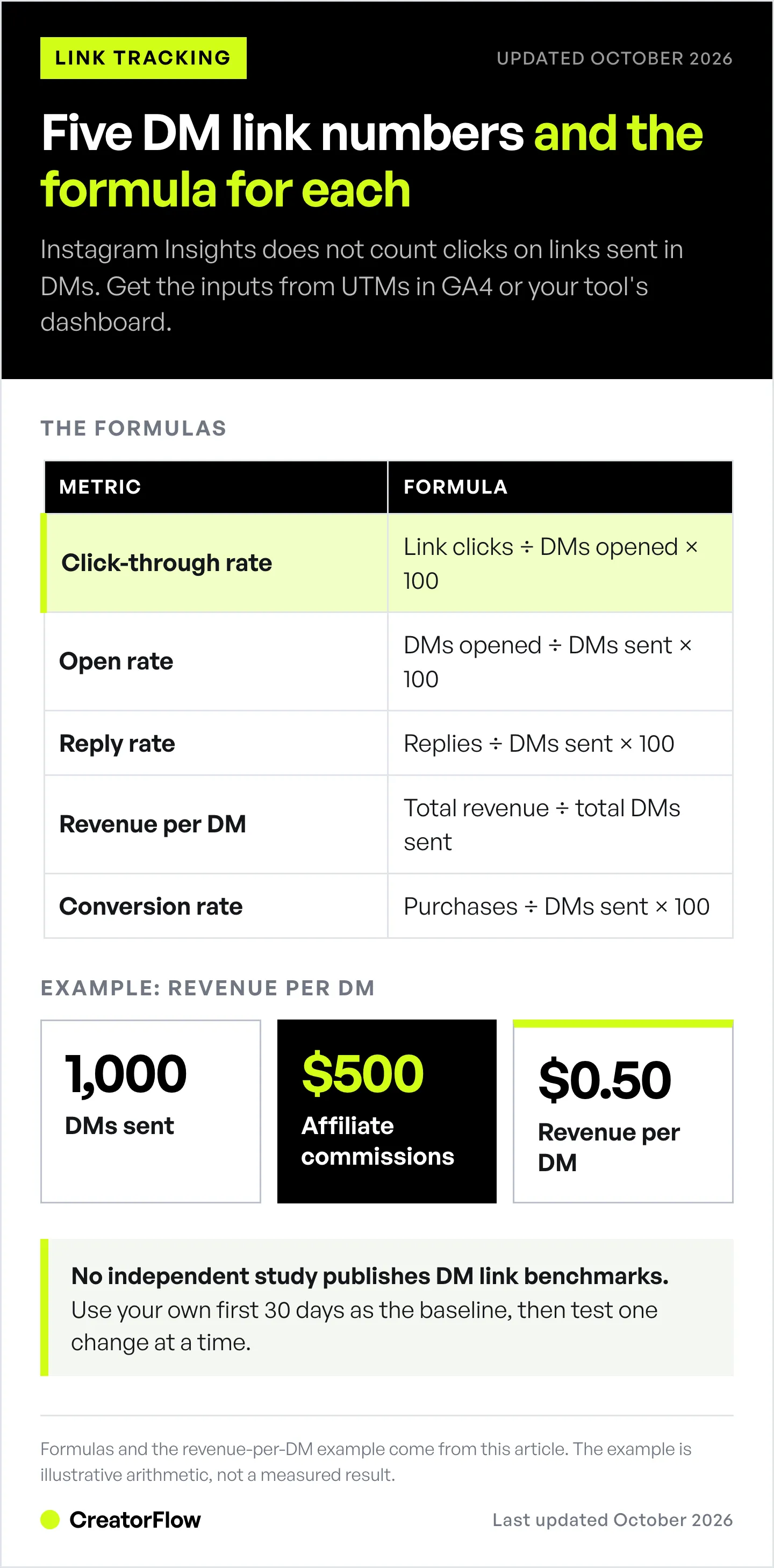
Benchmarks: No independent study publishes click-through rates for Instagram DM links. Use your own first 30 days as the baseline, then test one change at a time against it. If CTR drops below your baseline, test a different call-to-action first.
Open Rate
Formula: DMs Opened ÷ DMs Sent × 100
If your open rate falls, check your first-line preview text. That is what shows in the inbox before someone opens.
Reply Rate
Formula: Replies ÷ DMs Sent × 100
Reply rate indicates engagement quality. High replies mean your message resonates. Low replies might mean you’re sending to disengaged followers.
Revenue Per DM
Formula: Total Revenue ÷ Total DMs Sent
This is the metric that matters most. If you sent 1,000 DMs and generated $500 in affiliate commissions, your revenue per DM is $0.50.
Track this monthly. If it’s declining, your audience might be saturated or your offers need refreshing.
Conversion Rate
Formula: Purchases ÷ DMs Sent × 100
Compare this number across your own posts and offers rather than against other accounts. Price, product and audience move it more than follower count does. If one offer converts at half the rate of your others, work on that offer’s sales funnel.
Response Time Impact
The most quoted figure, “391% higher conversion when you respond within 1 minute”, comes from a 2013 Velocify white paper on sales calls to web-form leads. It did not measure Instagram DMs. The direction still holds: the person who comments “LINK” wants the link now. Automation sends it in seconds, not hours.
Setting Up Link Tracking: Step-by-Step
Option A: UTM Parameters + Google Analytics 4
Step 1: Build your UTM link using Google’s Campaign URL Builder or a tool like Bitly.
Required parameters:
- utm_source=instagram
- utm_medium=dm
- utm_campaign=[your campaign name]
Step 2: Shorten the URL. Long UTM strings look sketchy.
Step 3: Use the shortened link in your DM automation or manual responses.
Step 4: Check GA4 under Reports → Traffic Acquisition. Filter by Source/Medium = instagram/dm.
Step 5: Create a custom report to compare campaign performance.
Time investment: 5-10 minutes per campaign setup, plus ongoing GA4 checks.
Option B: Built-In Automation Tracking
Step 1: Set up your DM automation in CreatorFlow, ManyChat, or your tool of choice. Here’s our complete guide to comment-to-DM automation.
Step 2: Add your product/affiliate links to the automated messages.
Step 3: Let it run for 7+ days to gather data.
Step 4: Check your analytics dashboard. Look for:
- Which automations have highest CTR
- Which posts trigger the most DM conversations
- Which links get the most clicks
Step 5: Double down on what works. Pause what doesn’t.
Time investment: Initial setup only. Dashboard updates automatically.
Option C: Dual Tracking (Recommended)
Use both methods for redundancy:
- Add UTM parameters to your automation links
- Track in your automation tool’s dashboard
- Cross-reference with GA4
If UTM data fails (broken link, browser privacy settings), you still have automation data. If automation data seems off, you have GA4 as backup.
Need a direct link into your DMs? The free Instagram chat link generator creates one.
Analyzing Your Data: What to Do Next
High CTR, Low Conversions
Your links get clicked but people don’t buy.
Possible causes:
- Landing page doesn’t match DM promise
- Pricing too high for your audience
- Checkout process too complicated
Fix: A/B test landing pages. Match your DM copy to page headlines.
Low CTR, High Audience Engagement
People reply but don’t click links.
Possible causes:
- Link not prominent enough in message
- Call-to-action unclear
- Wrong product for this audience
Fix: Move link higher in message. Add urgency: “Only 12 left at this price.”
Declining CTR Over Time
Your CTR was 18% last month. Now it’s 10%.
Possible causes:
- Audience fatigue (seeing same offers)
- Follower quality declining
- Competitors copying your approach
Fix: Rotate offers monthly. Segment audience by engagement level. Test new DM templates.
One Post Massively Outperforms
Post A: 500 link clicks. Post B: 12 link clicks.
Action: Make more content like Post A. Same format, same topic angle, same CTA style. Don’t reinvent, replicate what works.
Best Practices for 2026
1. Track every link. No exceptions. Even “quick” campaigns need tracking.
2. Use consistent naming. utm_source=instagram (not Instagram, insta, or IG). GA4 treats these as separate sources.
3. Test response times. Set up instant automation for your highest-converting offers.
4. Pair UTMs with discount codes. If someone uses code REEL50, you know that Reel drove the sale, even if UTM data fails.
5. Check Android compatibility. Test your DM links on Android before launching campaigns. Add blank lines before links if needed.
6. Stay within API rate limits. Tools pace sends at ~200 DMs/hour, a tool-side convention rather than a Meta-published cap. Meta’s own limits are 100 calls a second for text and 750 private replies an hour to comments.
7. Update privacy policy. If you’re using UTM tracking, mention it. Transparency builds trust.
FAQ
Does Instagram show DM link clicks in Insights?
No. Instagram Insights tracks Story link clicks, profile visits, and bio taps. It doesn’t track clicks on links shared within DM conversations.
What’s the best free way to track DM links?
UTM parameters with Google Analytics 4. It’s free but requires manual work, you need unique UTMs for each campaign.
Which automation tool has the best link tracking?
The answer comes down to what you need to see. ManyChat offers detailed message analytics (sent, delivered, read, clicked) across flows. CreatorFlow Pro and Growth track link clicks and clicks by country and city at a flat monthly price. LinkDM lists Click Analytics for links sent in DMs.
What CTR should I expect from DM links?
There is no reliable industry benchmark. No independent study publishes click-through rates for Instagram DM links, so the figures you see online are vendor estimates. Track your own first 30 days, use that as your baseline, and test message copy against it.
How does iOS privacy affect DM link tracking?
iOS privacy changes killed third-party cookies but don’t affect UTM tracking. UTMs are first-party data collected by your own site. They still work fine.
Can I track conversions from DM links to purchases?
Yes, if you use UTM parameters and set up conversion tracking in GA4. You can also use unique discount codes as backup attribution.
How quickly should I respond to DM requests?
As fast as you can, ideally within a minute. The person who asks for a link wants it now, and interest fades while they wait. The “391% higher conversion” figure often quoted here comes from a 2013 study of sales calls to web-form leads, not DMs. Automation is the practical way to reply in seconds at scale.


