
UGC tracking is the practice of monitoring content customers create about your brand, then tying each piece to the person who made it and the revenue it produced. Instagram’s API returns tagged posts and @mentions with the posting account attached. Hashtag results arrive with the username stripped out. That split decides which UGC you can attribute and which you can only count.
Most brands set this up, watch the mention count climb for a quarter, and still cannot answer the one question finance asks: did any of it sell anything. The dashboard reports 340 tagged posts and 2.1 million potential reach. Nobody can name a single order that came from one.
This guide covers what the three UGC channels actually return, which numbers are measurable and which are estimates, and how to instrument the one path that connects a customer photo to a purchase. Every API claim below is checked against Meta’s own developer reference.
Key Takeaways
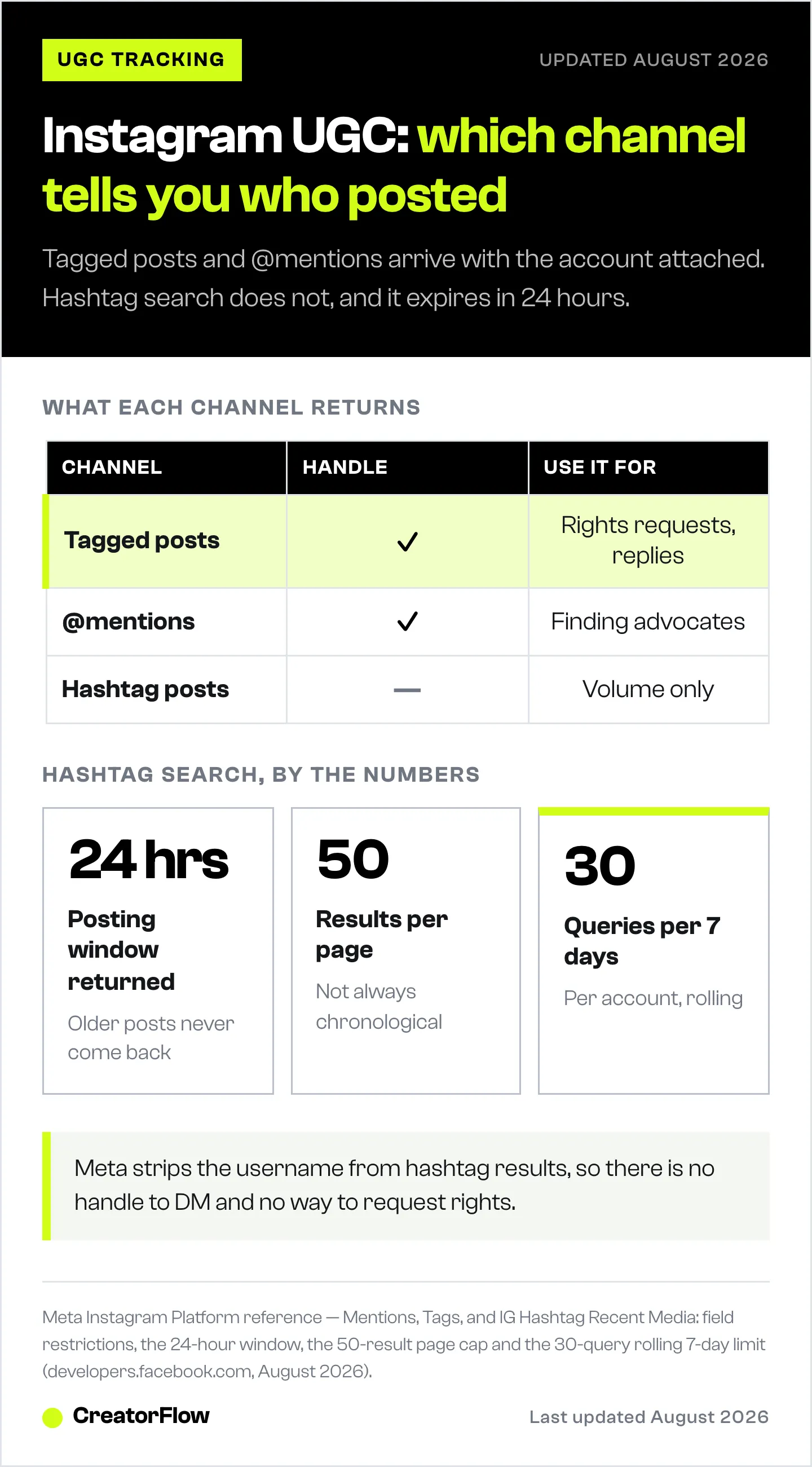
- Three channels, two identity models: tagged posts and @mentions come with the posting account attached. Hashtag search does not. Meta’s reference states plainly that you cannot request the username field on media returned by the hashtag edge (developers.facebook.com, August 2026)
- Hashtag data expires fast: the recent media edge only returns posts published within 24 hours of the query, capped at 50 results per page, and you get 30 unique hashtag queries per rolling 7 days (developers.facebook.com, August 2026)
- Potential reach is an estimate, not a measurement: it sums the follower counts of everyone who tagged you. It counts nobody who saw the post
- Track creators as states, not as one count: new, rising, repeat and lapsed are four different jobs. Klaviyo’s Social Insights agent surfaces top, rising and lapsed creators as separate card types, which is the right shape whether or not you buy the tool (help.klaviyo.com, August 2026)
- UGC does move revenue when it is placed well: Emplifi measured UGC-driven conversions at 6.73x non-UGC content in Q1 2026, up from 4.27x in Q4 2025, across thousands of US brand accounts on its platform (emplifi.io, April 2026)
- The only UGC metric that ties to money is one you instrument: a tracked link, sent in a reply, on content you control
- Story mentions sit outside the Mentions API: Meta’s documentation states mentions on Stories are not supported by that endpoint. They arrive in your DM inbox instead
- Bottom line: use tags and mentions to find your advocates, use hashtags for volume only, and put a tracked link in the conversation that follows
What Is UGC Tracking?
UGC tracking means monitoring the photos, videos, reviews and posts your customers publish about your brand, and recording who made each piece. It differs from social listening, which counts sentiment and volume across the web. Tracking attaches content to a named person so you can reply to them, request rights, segment them, and measure what they drive. That named author is also what makes the content persuasive, a point covered in our breakdown of which types of Instagram social proof convince buyers.
The distinction matters because the two produce different outputs. Listening produces a chart. Tracking produces a list of people. A chart tells you the quarter was up. A list tells you which 40 customers to send a discount code to this week.
Commissioned content sits outside this entirely, because you already know who made it and what you are allowed to do with it. That is settled in the brief you send a UGC creator, not recovered from the API afterwards.
Klaviyo’s product page for this category makes the same argument, framing UGC tracking as connecting each piece of content to a real person and their history rather than adding to a running total (klaviyo.com, August 2026). That framing is correct. What no vendor page explains is that Instagram’s API only lets you do it for two of the three channels.
The Three Ways UGC Reaches You on Instagram
Instagram exposes UGC through three separate surfaces, and they are not interchangeable. Tagged media and @mentions carry the posting account. Hashtag search does not. Any tool that promises a unified UGC feed is merging data with two very different levels of usefulness underneath.
| Channel | What it returns | Account attached | Meta endpoint |
|---|---|---|---|
| Tagged posts and Reels | Media where your account is tagged in the content itself | Yes | GET /{ig-user-id}/tags |
| Caption mentions | Media where someone typed your @handle in a caption | Yes | mentioned_media, plus the mentions webhook |
| Comment mentions | Comments where someone typed your @handle | Yes | mentioned_comment |
| Hashtag posts | Public photos and videos carrying a hashtag you queried | No | ig_hashtag_search, then recent_media or top_media |
Source: Meta Instagram Platform reference, Mentions and IG Hashtag Recent Media (developers.facebook.com, August 2026).
Three limitations on the mentions side are worth knowing before you build a process on it. Meta’s documentation states that mentions on Stories are not supported by this API, that commenting on photos you were tagged in is not supported, and that webhooks will not fire when the media comes from an account set to private (developers.facebook.com, August 2026).
The Story exclusion surprises people, because Story mentions are the single most common way a customer references a brand. They do reach you. They land in your DM inbox as a message rather than through the mentions endpoint, which is why tools describe Story mention capture and the Mentions API as separate features.
Why Hashtag Tracking Returns Anonymous Posts
Branded hashtag campaigns are the most-recommended UGC tactic in the category, and the API behind them returns the least usable data. Meta’s IG Hashtag Recent Media reference lists the constraints directly: only public photos and videos, only media published within 24 hours of the query, no promoted or boosted media, a maximum of 50 results per page, results not always in chronological order, and no username field.
That last line is the one that matters. From Meta’s reference: you cannot request the username field on returned media objects (developers.facebook.com, August 2026). Instagram removed personally identifiable information from hashtag responses in December 2018 to stop unauthorised data collection, and the restriction has held since.
The practical effect on a branded hashtag campaign:
- You can see the photo. You cannot see who posted it through the API
- You cannot DM them, because you have no handle to DM
- You cannot request usage rights programmatically
- You get 30 unique hashtag queries per rolling 7 days, per account, so continuous monitoring of more than a handful of tags is not possible
- Anything posted more than 24 hours before your query does not come back
- The endpoint is only available on the Facebook Login for Business path, not the Instagram Login path
None of this makes branded hashtags worthless. It makes them a volume signal rather than a lead source. If your campaign plan assumes you will collect entrants by hashtag and follow up individually, the follow-up step has to happen a different way. Asking people to comment a keyword on your post, or to DM you the hashtag, produces the same participation with an actual conversation attached.
Which UGC Metrics Are Worth Tracking
A typical UGC dashboard reports unique creators, total posts, engagement rate, likes and comments, and potential reach. Klaviyo’s Social Content Library, for example, calculates engagement per post as likes plus comments divided by the creator’s follower count at the time of the mention, then averages across posts (help.klaviyo.com, August 2026). Those five numbers describe activity honestly. Two of them get misread constantly.
Unique creators is the most useful number in the set. It is a count of distinct people who advocated for you without being asked. Track it monthly. Rising unique creators with flat total posts means your base is widening. Flat creators with rising posts means a small group is carrying you, which is a concentration risk.
Potential reach sums the follower counts of everyone who tagged you. It is a ceiling, not an audience. A creator with 40,000 followers posting a Story that 900 people see contributes 40,000 to the number. Report it as a ceiling or drop it, because presenting it as reach overstates results by roughly an order of magnitude and the correction always arrives at the worst moment.
Engagement rate on UGC measures how the creator’s audience responded to the creator, not to you. A high figure tells you that person has an engaged following, which makes them a good ambassador candidate. It says nothing about purchase intent among their followers.
Creator state beats creator count. A single unique-creators number hides four situations that each need a different response. Split the list into people who tagged you for the first time this month, people whose tagging is accelerating, people who tag you regularly, and people who used to tag you and have gone quiet. The first group needs a thank-you and a rights request. The second is your ambassador shortlist. The third is reliable inventory. The fourth is a win-back message, and it is the group most dashboards miss, because a lapsed creator shows up as an absence rather than an event.
Klaviyo’s Social Insights agent is built on the same split, surfacing top creator, rising creator, lapsed creator, emerging theme, performance format and watchout as separate insight cards on the content library (help.klaviyo.com, August 2026). You do not need an agent to run the split. A monthly list of handles with a tag count and a last-tagged date does the same work in a spreadsheet.
Why UGC Reach Numbers Do Not Prove Revenue
Every number in the previous section describes content you did not publish, on posts you do not control, seen by people you cannot identify. There is no click in that data. Without a click there is no path from the customer photo to the order, which is why UGC reporting so often stops at reach.
The revenue case for UGC is real and measurable in a different place. Emplifi’s Q1 2026 benchmark analysis, drawn from aggregated data across thousands of US brand accounts on its platform between January 1 and March 31, 2026, found UGC-driven conversions at 6.73x non-UGC content, up from 4.27x the previous quarter, with website visits to pages featuring UGC running 4.11x higher (emplifi.io, April 2026).
Read where that lift is measured. It is measured on pages the brand owns, running content the brand placed. The conversion lift comes from putting customer photos on a product page, in an email, or in an ad. It does not come from the photo existing on the customer’s own profile.
That reframes the job. UGC tracking on Instagram is a sourcing function. It finds the content and the advocates. The measurement happens downstream, once you have placed that content somewhere with instrumentation on it.
How to Track UGC That Leads to a Sale
One tracked link, sent inside a conversation, on a post you control. That is the entire measurable path. Everything else is inventory management for content you will place elsewhere.
The setup runs in four steps.
1. Source the content and the person together. Work from tagged media and @mentions, since both return the posting account. Treat the hashtag feed as a volume metric you review monthly, not a queue you work through.
2. Open a conversation on your own posts. A keyword trigger on a post asking customers to share their photo turns a passive tag into an inbound DM with a named sender. Instagram keyword triggers run this on autopilot, and the reply is where the tracked link goes. Our guide to comment keywords that convert covers which words produce the most replies.
3. Put a tracked link in the reply. This is the only step that creates attribution. The click carries a timestamp, a source, and on CreatorFlow a country and city breakdown. Instagram DM link tracking walks through reading those numbers. Now a UGC campaign has a click count and a destination, which your analytics platform can join to orders.
4. Clear rights before you place anything. Placement is where the conversion lift lives, so the content has to be legally usable. A tag is not permission. Our full walkthrough of how to collect user-generated content on Instagram covers the rights request, what to record, and the FTC disclosure rules that apply once you offer something in exchange.
Step three is what separates a UGC report that survives a budget review from one that does not. Reach and engagement come from the platform and describe other people’s audiences. The click comes from your automation and describes yours.
What UGC Tracking Costs
Pricing in this category follows three models, and the model matters more than the sticker price because each one scales on something different.
Per-view or per-source display tools aggregate UGC into website widgets and galleries. EmbedSocial publishes tiers from €29 a month for 3 sources and 5,000 monthly views up to €99 for 15 sources and 100,000 views, with a free tier at 1 source and 500 views (embedsocial.com/pricing, August 2026). These solve display, not identity.
Contact-based CRM pricing bills on the size of your list. Klaviyo bills on active profiles, with a free plan covering up to 250 profiles and 500 emails a month; its Social Content Library requires the paid Social Marketing plan and a Facebook Login connection (klaviyo.com and help.klaviyo.com, August 2026). Three details shape what you get on day one. Klaviyo back-populates up to 200 recently tagged posts and Reels when you connect Instagram, so the library opens with a window rather than your full history. The connection has to be Facebook Login, because Instagram Login connections do not populate the library. And content is viewed in place rather than downloaded or exported today (help.klaviyo.com, August 2026). This fits a store, where every contact has a purchase behind it and the library sits beside the email programme that will place the content.
Enterprise UGC suites quote on request and bundle rights management, retail syndication and creator workflows. They are built for large catalogues rather than a single Instagram account.
Flat-rate DM tools bill the same regardless of list size. CreatorFlow is $15 a month on Pro with click tracking, geographic analytics and CSV export included, plus a free plan. For a brand whose UGC bottleneck is the conversation rather than the gallery, that is the layer that gets instrumented.
We compared the tools that touch this job side by side in the UGC collection guide, and covered what Klaviyo’s social product ships if you are weighing the CRM route.
A UGC Tracking Setup for a Team of One
A single operator does not need a platform to run this well. The reporting that survives scrutiny needs four inputs, and three of them are free.
- Weekly, 10 minutes: open the tagged and mentions tabs in your Instagram inbox. Save the posts worth reusing. Note the handles
- In the moment: reply to every tag. A reply opens a 24-hour messaging window and turns an anonymous tag into a thread you can return to
- Monthly: count unique creators and repeat taggers. Repeat taggers are your ambassador shortlist, and enrolling them through a DM is a short step from there
- Always: one tracked link per campaign, sent in the automated reply, so the campaign has a number attached to it that is not reach
Graduate to a platform when the manual pass takes more than an hour a week, or when more than one person needs to see the same content library. Below that threshold the platform mostly gives you a nicer view of numbers you already have.
FAQ
What is UGC tracking?
UGC tracking is monitoring the content customers create about your brand, such as tagged posts, @mentions, hashtag posts and reviews, and connecting each piece to the person who made it. It differs from social listening, which measures volume and sentiment without attaching content to an identifiable individual you can contact.
How do I track UGC on Instagram for free?
Use the tagged tab on your profile and the mentions section of your inbox. Both are native, both show the posting account, and both cost nothing. Reply to each one to open a messaging window. This covers the two channels that carry an identity, which is most of what a paid tool surfaces anyway.
Can you see who posted content with your branded hashtag?
Not through Instagram’s API. Meta’s reference states you cannot request the username field on media returned by the hashtag recent media edge, and responses exclude personally identifiable information (developers.facebook.com, August 2026). You can see the post in the Instagram app by browsing the hashtag manually, but no tool can pull the handle programmatically.
What UGC metrics should I track?
Unique creators, repeat taggers, and clicks on links you sent. Unique creators shows whether advocacy is widening. Repeat taggers identifies your ambassador candidates. Clicks is the only one that connects to revenue. Treat potential reach as a ceiling rather than an audience figure, because it counts follower totals, not viewers.
How do you measure the ROI of UGC?
Measure it where you place the content, not where it was posted. Put customer photos on product pages, in email, or in ads, and compare conversion against the same placement without UGC. Emplifi measured UGC-driven conversions at 6.73x non-UGC content in Q1 2026 across thousands of US brand accounts on its platform (emplifi.io, April 2026).
Does Instagram notify you when someone tags your brand?
Yes for posts and Reels, which appear in your tagged tab and in notifications. Story mentions arrive in your DM inbox. Meta’s Mentions API documentation states that mentions on Stories are not supported by that endpoint and that webhooks will not fire when the posting account is private (developers.facebook.com, August 2026).
How far back can you track Instagram hashtag posts?
Twenty-four hours. Meta’s IG Hashtag Recent Media reference states the edge only returns media published within 24 hours of query execution, with a maximum of 50 results per page and a cap of 30 unique hashtag queries per rolling 7 days (developers.facebook.com, August 2026). Historical hashtag data is not retrievable through the API.
How far back does a UGC tool see your tagged posts?
It depends on the tool’s back-population window rather than on Instagram. Klaviyo back-populates up to 200 recently tagged posts and Reels when you first connect an Instagram account, then tracks new ones from that point forward (help.klaviyo.com, August 2026). Assume any platform starts roughly the day you connect it, and connect it before a campaign rather than after.
Is UGC tracking the same as social listening?
No. Social listening measures conversation volume and sentiment across platforms, usually in aggregate. UGC tracking records specific pieces of content alongside the person who created them, so you can reply, request usage rights, and reuse the content. Listening answers what people say. Tracking answers who said it and what you can do next.
Where to Start
Open your tagged tab and count how many posts are sitting there unanswered. That number is the size of the opportunity, and clearing it costs nothing. Reply to each one, ask the ones worth reusing for permission, and put a tracked link in the next campaign so the following quarter’s report has a click count in it.
CreatorFlow runs the reply layer on Instagram: comment triggers, Story reply triggers and keyword triggers that respond in seconds, with click tracking and geographic analytics on every link you send. Flat $15 a month on Pro, free plan available.
Instagram API behaviour verified against Meta’s Instagram Platform reference (Mentions, IG Hashtag, IG Hashtag Recent Media) as of August 2026. Conversion benchmarks from Emplifi’s Q1 2026 Social Media Marketing Benchmarks, April 2026. Klaviyo Social Content Library and Social Insights behaviour verified at help.klaviyo.com, August 2026. Pricing verified at klaviyo.com, help.klaviyo.com and embedsocial.com/pricing, August 2026. Individual results vary.


