

AI influencer DM templates are short, prewritten messages that an AI character’s account sends automatically when people comment a keyword, reply to a story, or send a DM. A good template does three things in three lines: it says the account is AI-run, it delivers what the person asked for, and it discloses any commission. Below are 12 templates you can copy and edit.
An AI character account gets different messages from a human creator’s account. People ask whether the character is real. Other creators ask which tool made the video. Buyers ask for the link. One generic auto-reply cannot answer all three, and a reply that pretends the character is human creates a disclosure problem.
This guide gives you a template for each situation, explains when each one fires, and shows how to set them up as comment-to-DM and keyword automations.
Key Takeaways
- Every template states that the account is AI-run. Instagram has limited reach for unlabeled AI-person profiles since August 31, 2026, and the DM should match the profile label.
- Every affiliate link carries a disclosure. The FTC’s Endorsement Guides cover virtual influencers as endorsers (infolawgroup.com, August 2023).
- One keyword maps to one template. Each message asks the person to do one thing, so the next step is clear.
- Meta sets the timing. A private reply to a comment must go out within 7 days, and follow-ups need the person to reply first (developers.facebook.com, October 2026).
- Tool questions are a second audience. People asking “what app is this?” are creators, and they want a guide, not the product in the video.
- Keep the character’s voice, not a human backstory. The character can be grumpy or funny. It should not claim it tried the product.
Why AI Influencer Accounts Need Their Own DM Templates
AI character accounts get three types of messages that human creators rarely get in the same volume: questions about whether the character is real, questions about how the video was made, and link requests from viewers who saw a product. Each needs a different reply, and each reply has to be honest about what the account is.
Viral AI characters draw large comment volumes. The first viral clip from Jean Phil, the AI shadowboxer, showed 53,175 comments on Instagram by October 14, 2026 (instagram.com, October 2026). Nobody answers that by hand. Our breakdown of how the Jean Phil AI influencer grew shows what that volume looks like.
The templates below assume you run the account with comment-to-DM and keyword automation. For the full monetization logic behind them, see our guide on how to monetize AI influencer comments.
The Three Rules Every Template Follows
Every template in this guide follows three rules. Edit the wording freely, but keep these.
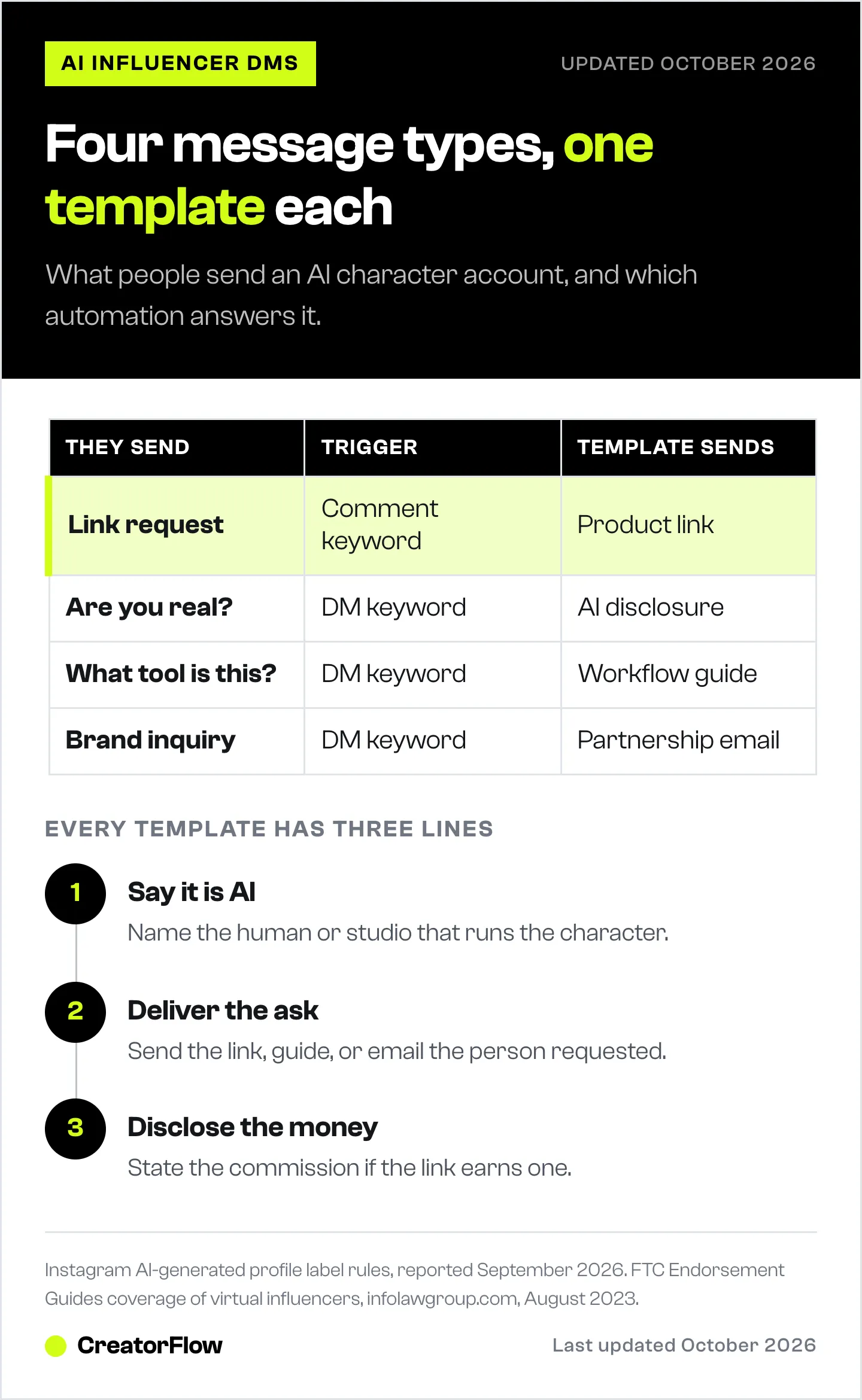
- Say it is AI. Use a short line such as “I’m an AI character run by [your name or studio].” It matches the AI-generated profile label and answers the most common question before anyone asks.
- Disclose the money. If a link earns a commission, say so in the same message: “I earn a commission if you buy.”
- Do not invent experience. The character has not slept on the mattress or used the dumbbells. Say what the product does, not how it felt.
Link Delivery Templates
These fire when someone comments the keyword from your caption. They are the templates that earn money, so keep them short.
1. Affiliate product link
Here’s the wall station from the video: [link]
Heads up: I’m an AI character run by [name], and I earn a commission if you buy.
Want more gear like this? Comment GYM on any post.
Trigger: comment keyword “GYM” on the post.
2. Free guide with Email Gate
I’ll send the 7-day plan to your inbox.
What’s your email?
(I’m an AI character run by [name]. No spam, unsubscribe anytime.)
Trigger: comment keyword “PLAN”. On CreatorFlow Pro, Email Gate asks for the email before the link goes out, so you keep the contact even if the account loses reach. See the Email Gate guide for setup.
3. Digital product
Here’s the full guide to how I’m made: [link]
It’s $9 and covers the character, the motion and the posting plan.
Made by [name], the human behind this AI account.
Trigger: comment keyword “HOW”. This one answers the creator audience in the comments.
4. Product sold out or link expired
That one is out of stock right now.
Here’s the closest option I found: [link]
I’m an AI character and I earn a commission if you buy.
Use: swap this text into template 1 when the original product goes out of stock. Do not leave a dead link running.
”Are You Real?” Templates
These answer the identity question. Answering it plainly builds more trust than playing along, and it keeps the DM consistent with the profile label.
5. Direct question in DMs
Nope, I’m an AI character.
A human named [name] designs me and writes my posts.
The products I share are real, and the links are in my bio.
Trigger: DM keywords such as “real”, “AI”, “fake”, “human”.
6. Comment asking if the character is AI
Good eye. I’m an AI character, made by [name].
Ask me anything about the products in my videos.
Use: a public comment reply or a DM sent from a comment keyword such as “REAL”. Keep it light; the person is curious, not angry.
”What Tool Made This?” Templates
People asking how the video was made are creators. They will not buy the product in the clip, but they might buy a guide or follow for more.
7. Tool question
I’m made with [tool names].
The full workflow, step by step, is here: [link]
Comment HOW on any post and I’ll send it again.
Trigger: DM keywords such as “app”, “tool”, “how”, “made”. If you use Higgsfield, our walkthrough of Higgsfield AI Influencer Studio covers the character builder and motion tool.
8. Prompt request
I don’t share exact prompts, but here’s the character sheet I start from: [link]
It’s free. Follow along for new ones each week.
Trigger: DM keyword “prompt”. Give something useful even if the prompt stays private.
Story Reply Templates
Story replies come from people who already follow the account. They are warmer than comment traffic, so you can ask a question back.
9. Poll or question sticker reply
Thanks for voting! The winner goes up Friday.
Want the link to tomorrow’s product early? Reply YES.
Trigger: any story reply. If they reply YES, a keyword automation on “YES” can send the link. Meta allows follow-ups only within 24 hours of the person’s reply (developers.facebook.com, October 2026).
10. Emoji reaction reply
Yes, that’s my normal face.
The gym gear from today’s story is here: [link]
(AI character, commission link.)
Trigger: story reply with an emoji. Use the character’s personality here; this is where the voice works hardest. Our story reply automation guide covers the setup.
Brand and Collaboration Templates
Brands and agencies contact AI characters too. Answer fast, and send them to an inbox you check.
11. Brand inquiry
Thanks for reaching out.
I’m an AI character run by [name]. For partnerships, email [email] with your product and budget.
We reply within [number] working days.
Trigger: DM keywords such as “collab”, “partnership”, “brand”, “sponsor”.
12. Media kit request
Here’s our media kit with audience and reach numbers: [link]
Every sponsored post is labeled as AI-generated and as a paid partnership.
Trigger: DM keywords “media kit”, “rates”. Telling brands the disclosure rules up front saves a round of questions.
How to Set These Up as Automations
Each template becomes one automation with one trigger. In CreatorFlow, the setup takes four steps.
| Template type | Trigger | Where you set it |
|---|---|---|
| Link delivery (1-4) | Comment keyword on a post | Comment-to-DM |
| ”Are you real?” (5-6) | DM keyword or comment keyword | Keyword trigger |
| Tool questions (7-8) | DM keyword | Keyword trigger |
| Story replies (9-10) | Any story reply, or a keyword | Story reply automation |
| Brand inquiries (11-12) | DM keyword | Keyword trigger |
- Pick the trigger. Choose a post and a comment keyword, a DM keyword, or story replies.
- Paste the template. Replace the brackets with your name, link and keyword.
- Check the preview. Read the message as it will appear in the DM before you turn it on.
- Turn it on and track clicks. Link tracking shows which template gets clicks, so you can rewrite the weak ones.
Keep keywords different from each other. If “HOW” sends the guide and “HOWTO” sends something else, comments that contain both words can trigger the wrong one. Our guide to Instagram keyword trigger automation explains how matching works. For templates outside the AI niche, see our Instagram DM automation templates.
FAQ
What should an AI influencer say in DMs?
Say that the account is an AI character, give the person what they asked for, and disclose any commission. Keep it to three short lines. Use the character’s personality, but do not claim the character has used the product.
Do AI influencers have to disclose they are AI in DMs?
Instagram requires the AI-generated profile label on profiles built around an AI-generated person, and can limit recommendations for unlabeled ones since August 31, 2026. Saying it in the DM as well keeps the message consistent with the profile and answers the most common question.
Do AI influencers need to disclose affiliate links?
Yes. The FTC’s 2023 update to its Endorsement Guides covers virtual influencers as endorsers. An affiliate link from an AI character needs the same clear disclosure as a link from a human creator.
How fast should an AI influencer reply to comments?
Within seconds is best, because the person is still on the post. Meta allows a private reply to a comment within 7 days of the comment, and only one message per commenter. Automation sends it right away.
Can I send follow-up messages after the first DM?
Only if the person replies. Meta allows follow-up messages within 24 hours of the person’s response. A keyword such as “YES” in your first message gives them an easy way to reply.
How many DM templates does an AI influencer account need?
Start with three: one link-delivery template for your current offer, one “are you real?” reply, and one tool-question reply. Add story reply and brand templates once those three run without problems.
Can I use the same template for every post?
Use one template per offer. If two posts promote the same product, they can share a keyword and template. If the products differ, give each post its own keyword so the link matches the video.
Meta messaging rules from developers.facebook.com, checked October 2026. Instagram AI-generated profile label rules as reported September 2026. FTC Endorsement Guides coverage of virtual influencers per infolawgroup.com, August 2023. Jean Phil comment count checked on Instagram on October 14, 2026. Templates are examples; edit them for your own offers.


