

Higgsfield AI Influencer Studio is a character builder at higgsfield.ai/ai-influencer-studio. You choose a character from 20 option groups, from character type and build to head shape and accessories, and it generates the character for you. You can then pick a motion preset or a trending video and have the character perform it. Paid plans include 10 to 30 free AI Influencer generations (higgsfield.ai, October 2026).
The tool solves the hard part of the old workflow: getting the same face every time without writing long prompts. It does not solve what happens after a clip gets views. A character that gets 50,000 views and no clicks earns nothing.
This guide walks through the studio step by step, explains how Genjutsu puts your character in motion, shows what each plan includes, and then connects the account to comment-to-DM automation so viewers who ask for a link receive it.
Key Takeaways
- The studio is a menu, not a prompt box. You build the character from 20 option groups, including 9 character types, 26 hairstyles and 25 features (higgsfield.ai, October 2026).
- Character types go beyond humans. The list includes Average, Bold and Extreme people, plus Insect, Frog, Cat, Dog, Rodent and Bird.
- Motion comes from existing videos. Genjutsu keeps the movement, camera and timing of a clip and rebuilds the rest from your character (higgsfield.ai/genjutsu, October 2026).
- Free generations depend on the plan. Starter includes 10 AI Influencer generations and no Genjutsu ones; Plus and Ultra include 30 AI Influencer and 3 Genjutsu generations (higgsfield.ai/pricing, October 2026).
- Odd beats perfect for reach. The fastest-growing AI character of 2026, Jean Phil, is built on a strange look, not on beauty.
- The money step is outside Higgsfield. A comment keyword plus an automated DM is what turns a viewer into a tracked click.
What Is Higgsfield AI Influencer Studio?
Higgsfield AI Influencer Studio is a tool inside Higgsfield that builds an AI character from preset options and then animates it. The page describes it as a way to “build your AI influencer with the face, body, and style you want,” then choose a motion preset and get a video (higgsfield.ai, October 2026). You can also upload your own photo as a starting point.
The page has three places to find motion: AI Influencers made by other users, Higgsfield Presets, and Community Trends. Each item has a Recreate button that swaps your character into that clip.
Higgsfield is a paid platform with a credit system. If you are still comparing tools, our ranking of Higgsfield AI alternatives sorts them by the type of video you make.
How to Build a Character in the Studio
You build a character by working through the option groups from top to bottom, then pressing Generate. Each group is a list of presets. Every choice is a click, so you can rebuild a character in a few minutes if the first result is wrong.
| Option group | Number of choices |
|---|---|
| Character type | 9 |
| Gender | 5 |
| Build | 7 |
| Hairstyle | 26 |
| Hair color | 13 |
| Style | 8 |
| Ethnicity | 6 |
| Age | 3 |
| Skin color | 8 |
| Height | 3 |
| Proportions | 5 |
| Head shape | 10 |
| Neck | 4 |
| Eye shape | 11 |
| Eye color | 8 |
| Features | 25 |
| Facial hair | 8 |
| Distinctive features | 14 |
| Accessories | 6 |
Source: higgsfield.ai/ai-influencer-studio, checked October 14, 2026. A 20th group, Motion, is optional.
Follow this order:
- Pick the character type. Choose Bold or Extreme if you want a face people remember. Animal types suit comedy accounts.
- Set the body. Choose gender, build, height and proportions. Unusual proportions are where most of the “stop scrolling” effect comes from.
- Choose the head and face. Choose head shape, neck, eye shape and eye color, then add features and facial hair.
- Add one distinctive detail. One strong detail, like a moustache, glasses or a bowl cut, is easier to recognise than five small ones.
- Dress the character. Pick the style and accessories. Keep the same outfit in every clip so viewers recognise the account.
- Generate and save. If the result is wrong, change one group at a time so you know which choice caused it.
For the broader workflow, including persona notes, niche choice and voice, see our guide on how to create an AI influencer on Instagram.
Why Odd Characters Grow Faster Than Perfect Ones
A perfect face looks like every other AI model in the feed, so viewers scroll past it. A strange face makes them stop and ask what they are looking at. That pause is watch time, and the question often turns into a comment.
Jean Phil is the clearest example from 2026. He has a blonde bob, a curled moustache and a houndstooth suit, and he shadowboxes in Paris streets. His account went from a first post on September 17 to 244,000 Instagram followers by October 14, with 12 posts (instagram.com, October 2026). Our breakdown of how the Jean Phil AI influencer grew covers the timeline and what came after the spike.
The studio’s options make this kind of design easy: a long head, a short neck, tiny legs or a bald senior in a suit. Pick one or two odd traits and keep everything else normal. Too many odd traits can make the character hard to read, not memorable.
How to Put Your Character in Motion With Genjutsu
Genjutsu is Higgsfield’s motion tool. It takes an existing video and keeps “the motion, camera, and timing,” then rebuilds the character, wardrobe and setting from your references (higgsfield.ai/genjutsu, October 2026). It also offers Object Swap, which replaces one element and keeps the rest.
There are two ways in:
- Recreate a preset or trend. Open Higgsfield Presets or Community Trends, press Recreate, and swap in your character. This is the fastest route and uses clips already built for the tool.
- Upload your own clip. Film yourself on your phone, or use a video you have the rights to, and swap your character in. This gives you motion nobody else has.
Add a short prompt that says to keep your character exactly as designed. Without it, small details such as hair can drift between clips. Use clips you have the rights to: swapping a character into another creator’s video does not make the motion yours.
What Higgsfield Costs for an AI Influencer Account
Higgsfield charges a monthly plan with a fixed credit allowance. Each plan includes a set number of free AI Influencer and Genjutsu generations. The pricing page opens on annual billing, so check the Monthly toggle before you compare.
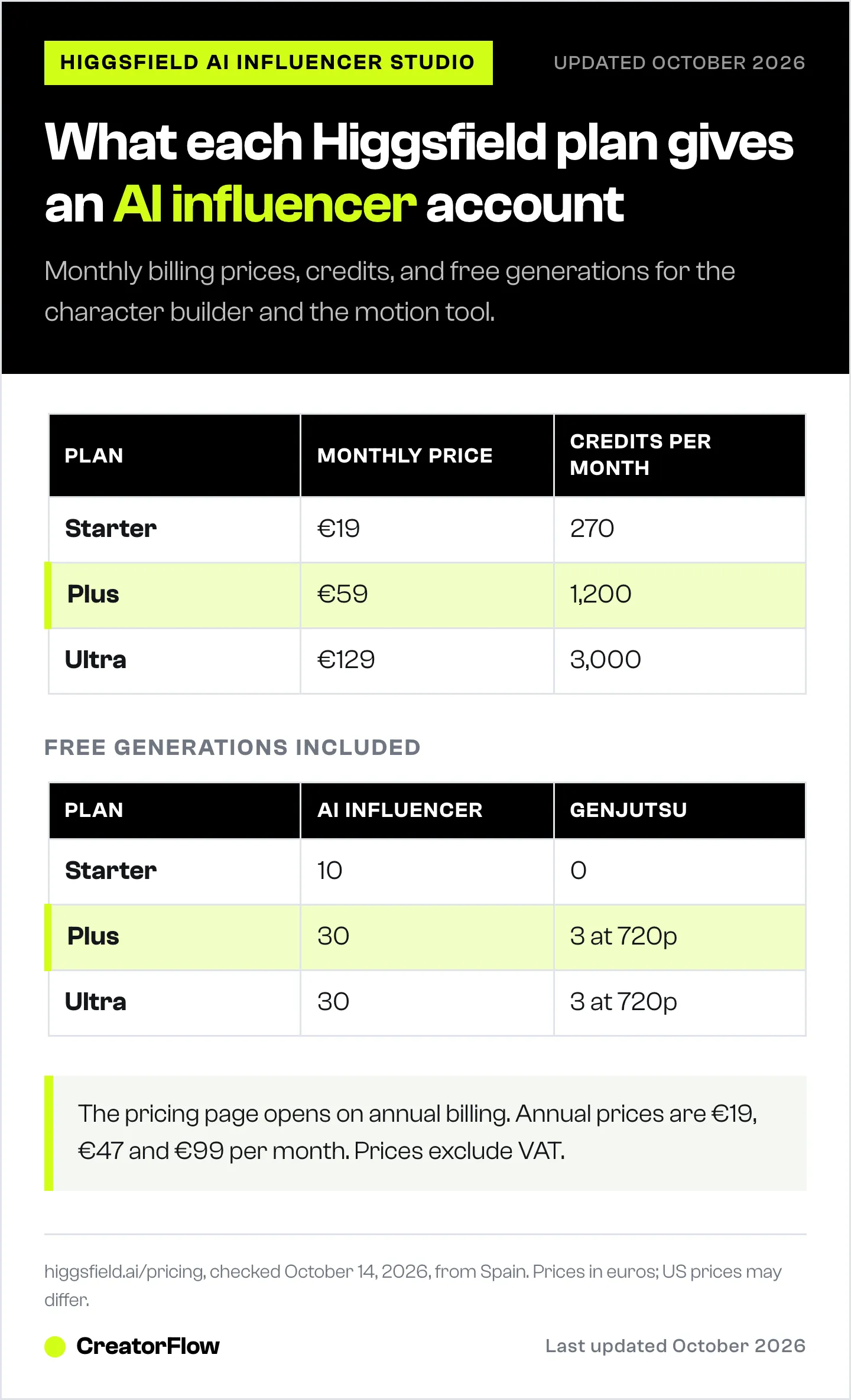
| Plan | Monthly billing | Annual billing (per month) | Credits per month | Free AI Influencer gens | Free Genjutsu gens |
|---|---|---|---|---|---|
| Starter | €19 | €19 | 270 | 10 | 0 |
| Plus | €59 | €47 | 1,200 | 30 | 3 (720p) |
| Ultra | €129 | €99 | 3,000 | 30 | 3 (720p) |
Source: higgsfield.ai/pricing, checked October 14, 2026, from Spain. Prices exclude VAT and are shown in euros; US prices may differ.
For a full cost-per-post comparison across tools, see what an AI influencer costs to run.
How to Connect DM Automation to Your AI Influencer
The studio gives you the clips. Comment-to-DM automation gives you the clicks. The setup takes four steps and works the same for an AI character as for a human creator.
- Choose one offer per post. Pick one affiliate product, guide or link that fits the clip. A workout clip points to one piece of equipment, not a whole store.
- Pick one keyword. Use a short word tied to the offer, such as “GYM” or “LINK”. Put it in the caption and on screen: “Comment GYM and I’ll send the link.”
- Write the DM. Say who the account is, give the link, and disclose the commission. Keep it to three short lines.
- Turn on the automation. In CreatorFlow, select the post, add the keyword and paste the message. CreatorFlow sends the DM to everyone who comments the keyword, and link tracking shows who clicked.
Meta’s rules decide the limits here. A private reply to a comment must go out within 7 days of the comment, and each commenter can receive one message. Follow-ups are only allowed if the person replies, and must go out within 24 hours of their reply (developers.facebook.com, October 2026).
On CreatorFlow Pro, Email Gate asks for an email before sending the link. That builds a list you can reach again if the account loses reach. For ready-to-use messages, see our AI influencer DM templates.
Rules to Follow Before You Post
Three rules apply to every AI character account on Instagram.
- Add the AI-generated profile label. Since August 31, 2026, Instagram can remove unlabeled AI-person profiles from Reels and Explore recommendations. It says labeled profiles see no change in reach. Our guide to the Instagram AI-generated profile label shows how to add it.
- Disclose affiliate links. The FTC’s 2023 update to its Endorsement Guides covers virtual influencers as endorsers, so an AI character’s affiliate link needs a clear disclosure (infolawgroup.com, August 2023).
- Do not claim the character used the product. An AI character has not tried the workout station. Show the product and say what it does.
FAQ
What is Higgsfield AI Influencer Studio?
It is a character builder on higgsfield.ai. You pick options from 20 groups, such as character type, hairstyle, proportions and accessories, and it generates an AI character. You can then animate the character with a motion preset or a trending video.
Is Higgsfield AI Influencer Studio free?
Not fully. Higgsfield has no free plan on its pricing page. Paid plans include free AI Influencer generations: 10 on Starter and 30 on Plus and Ultra, as of October 2026. Higgsfield sometimes runs extra promotions, so check the page for current offers.
What is Higgsfield Genjutsu?
Genjutsu is Higgsfield’s motion tool. It keeps the movement, camera and timing of an existing video and rebuilds the character and setting from your references. You can recreate a preset, a community trend, or a clip you upload.
Was Jean Phil made with Higgsfield?
That is not confirmed. Reports say Higgsfield has featured Jean Phil in its own promotion, and many tutorials use Higgsfield to copy his style, but nobody has confirmed which tool made the original videos.
How do I make money from a Higgsfield AI influencer?
Pick a niche with products, post clips that show one product each, and ask viewers to comment a keyword. Comment-to-DM automation sends the affiliate link to each person who comments. Disclose the commission and label the profile as AI-generated.
Can I use any video with Genjutsu?
Use videos you have the rights to, such as your own footage or Higgsfield’s presets. Swapping your character into another creator’s video copies their work, and platforms can remove it.
Do I need the Instagram AI label for a Higgsfield character?
Yes, if the profile is built around an AI-generated person. Since August 31, 2026, Instagram can limit recommendations for unlabeled AI-person profiles. It says labeled profiles see no change in reach.
Higgsfield AI Influencer Studio options, Genjutsu features and plan prices checked on higgsfield.ai on October 14, 2026, from Spain; prices are in euros and exclude VAT. Meta messaging rules from developers.facebook.com, October 2026. Jean Phil figures checked on Instagram on October 14, 2026.


