
AI tools for social media content creation split into three jobs: writing and planning (ChatGPT, Gemini), still images and brand assets (Krea, DesignerBox), and video (Higgsfield, Pika, Kling, HeyGen). Most meter usage in credits rather than posts, and a credit buys different amounts of output at every vendor. As of July 2026, paid entry points run from roughly $8 to $49 per month.
Every roundup in this category ranks tools on their monthly sticker price. That ranking breaks the moment you try to spend the money, because the number on the pricing page is attached to a unit that only exists inside that one product. Higgsfield sells credits. HeyGen sells credits that behave like video minutes. ChatGPT sells a seat with a rate limit you find by hitting it. None of those convert into each other.
This guide prices nine tools on the only unit that transfers between them: what one finished post costs. It covers which tool owns which production stage, where two subscriptions are paying for the same underlying model, and what a month of content runs across three real setups. Building a synthetic persona rather than posting as yourself? The cost of running an AI influencer prices that stack the same way.
Disclosure: DesignerBox is a product I build. It is included here because it covers a stage the other eight do not, and its pricing is stated from the same public page as everyone else’s.
Key Takeaways
- Three metering units, one category: these tools charge in credits (Higgsfield, Pika, Kling, Krea, DesignerBox), in output units like videos or minutes (HeyGen), or as flat seat access with soft rate limits (ChatGPT, Gemini). The unit decides your bill.
- A credit is not a portable unit: Kling prices credits at roughly $1 for 66 credits, and a single 5-second clip can cost anywhere from a handful of credits to several dozen depending on the model and resolution you pick (kling.ai, July 2026).
- The cheapest sticker price is often the most expensive output: Pika’s Standard plan is $8 per month billed yearly, but 700 credits at 1080p buys a fraction of what the same money buys at 720p (pika.art, July 2026).
- You are probably paying twice for the same model: Higgsfield, DesignerBox and Krea all route to overlapping third-party models such as Kling, Nano Banana and Seedream. Two subscriptions can bill you separately for the same generation.
- Free tiers are real but carry licence terms: Pika’s free plan watermarks output and excludes commercial use, and DesignerBox’s free 112 credits are personal-use only (pika.art and designerbox.ai, July 2026).
- Talking-head video prices per minute, not per credit: HeyGen’s free plan is capped at 3 videos of up to 1 minute, and Creator at $29 per month includes 600 credits (heygen.com, July 2026).
- Generation is not distribution: every tool here ends at a rendered file. The stage that turns a finished post into a conversation is a separate system entirely.
What counts as an AI social content tool
An AI social content tool generates or edits a publishable asset from a prompt, a reference image, or a rough draft. That covers four production stages: the idea and script, the still image, the moving clip, and the person on camera.
It does not cover scheduling, analytics, or replies. Those are a different category with different economics, priced per channel or per seat rather than per generation. If that is the half you are solving, social media management tools priced by real account setup breaks down the seven main options.
The nine tools below are grouped by stage, not ranked against each other, because a script tool and a video model are not substitutes.
The three metering units, and why credits do not compare
Credits are the default unit in this category, and they are deliberately incomparable across vendors. Each company sets its own credit-to-generation rate, changes that rate per model, and revises it when model costs move. There is no exchange rate.
Unit one: credits. Higgsfield, Pika, Kling, Krea and DesignerBox all sell a monthly credit pool. The pool means nothing until you know the burn rate for the specific model you plan to use, and that rate is usually published in a tooltip rather than on the pricing table.
Unit two: output units. HeyGen counts credits that map closely to finished video length, and its free tier counts whole videos: 3 per month, up to 1 minute each (heygen.com, July 2026). This is the most honest unit in the category because it matches what you are buying.
Unit three: flat seat access. ChatGPT and Gemini charge a fixed monthly fee and govern usage with rate limits rather than a visible balance. You do not run out of credits. You run into a cap, usually mid-task.
The practical consequence: two tools at the same monthly price can differ by 5x in finished output. Compare the burn rate, not the sticker.
Scripts and planning: ChatGPT and Gemini
These two do the stage that costs nothing to render and determines whether the rest is worth rendering.
ChatGPT handles hooks, scripts, caption variants, and repurposing one idea across formats. Its paid consumer tiers run $8 per month for Go, $20 for Plus, and $100 or $200 for the two Pro tiers, with video generation limited to the Plus tier and above (widely reported across pricing trackers including costbench.com and suprmind.ai, July 2026; OpenAI’s own pricing page blocks automated access, so treat these as corroborated rather than first-party).
Gemini is the stronger option if you are already inside Google’s stack, and its paid plans bundle image and video generation directly. Google lists AI Plus at €4.99 per month, AI Pro at €21.99, and AI Ultra from €99.99, with the higher tiers adding expanded access to Nano Banana Pro for images and Veo for video (gemini.google/subscriptions, July 2026; prices shown in EUR, and the figure varies by region).
The buying logic here is different from the rest of the list. You are not choosing between them on output quality. You are choosing based on which one already sits in your workflow, because the marginal value of a second general-purpose assistant is close to zero. For prompt structures that produce usable output rather than generic filler, 21 copy-paste AI prompts for Instagram covers the patterns.
Images and brand assets: Krea and DesignerBox
This is the stage where most creators lose their week. Ideas take ninety minutes. Producing thirty images that look like they came from the same brand is what eats the rest.
Krea is a multi-model playground with real-time generation and a wide model roster. Its free tier gives 100 daily compute units with no card required, and paid plans run $9 per month for Basic with 5,000 credits and a commercial licence, $35 for Pro with 20,000 credits and video model access, and $70 for Max with 60,000 credits (reported consistently across costbench.com and tooljunction.io, July 2026; Krea’s pricing page blocks automated access). Commercial use starts at the Basic tier, which matters if you are producing brand work.
DesignerBox covers the product and brand side of the same stage: on-model shots, flat lays, virtual try-on, photo angles, and ad creative generated from a single source photo, plus saved workflows so a repeatable pipeline stays repeatable. Its published plans are Free with 112 credits on a personal-use licence, Basic at €6 per month with 500 credits, Pro at €15 with 1,000 credits and a commercial licence, Premium at €30 with 2,500 credits plus video and virtual try-on, and Ultra at €100 with 8,000 credits plus API access (designerbox.ai, July 2026).
The split between them is scope. Krea is a general image and video surface across many models. DesignerBox is built around a product photo becoming a set of consistent brand assets. If your content is you and your ideas, Krea covers it. If your content is a thing you sell, the second workflow saves more time. The full batching pipeline is written up in how we make a month of Instagram content in one day.
Video: Higgsfield, Pika and Kling
Three tools, three genuinely different buying cases, and the widest price spread on this list.
Higgsfield sells cinematic motion presets and camera control, and it aggregates a large roster of third-party models behind one subscription. Verified from its live pricing configuration in July 2026: Plus is $49 per month billed monthly or $39 per month billed annually, with 1,000 credits; Ultra is $129 per month billed monthly or $99 billed annually, with 3,000 credits. Higgsfield’s own estimate puts 1,000 credits at roughly 200 Kling 3.0 videos or 600 Nano Banana Pro images, and 3,000 credits at roughly 500 videos (higgsfield.ai, July 2026).
Pika is the cheapest entry point and the one whose pricing page needs reading twice. It lists Free with 80 credits, Standard at $8, Pro at $28, and Fancy at $76, with 700, 2,300 and 6,000 credits respectively. Those dollar figures are the annual-billed monthly rate, not the month-to-month price, and the page defaults to the yearly toggle. The free plan watermarks output and excludes commercial use (pika.art, July 2026).
Kling publishes the clearest credit economics of the three. Standard is $10 per month or $79.20 per year for 660 credits, Pro is $37 per month or $293.04 per year for 3,000 credits, Premier is $92 per month or $728.64 per year for 8,000 credits, and Ultra is $180 per month for 26,000 credits. Kling also states its base credit rate directly at $1 for 66 credits (kling.ai, July 2026).
Note what the numbers say when you convert them. Higgsfield Plus at $49 for roughly 200 Kling videos and Kling Pro at $37 for roughly 150 standard videos land in the same neighbourhood per clip. You are not paying Higgsfield a large premium for the model. You are paying for the preset library and the aggregation. Whether that is worth it depends on how much direction you want to write yourself. For a wider set of options at this stage, Higgsfield AI alternatives compared by video job sorts them by what the clip is for.
Talking-head video: HeyGen
HeyGen occupies a stage the others do not: a presenter who says your script without you filming. It prices in the most legible unit in this roundup.
Free covers 3 videos per month at up to 1 minute each. Creator is $29 per month billed monthly or $24 billed annually, with 600 credits, 1080p export, and voice cloning. Pro is $49 per month or $40.75 billed annually, with 1,000 credits and 4K export. Business runs $149 per month plus $20 per seat with 1,500 credits (heygen.com, July 2026).
This is the tool to reach for when the bottleneck is you being on camera rather than the footage itself. If you are building a recurring presenter rather than one-off clips, AI avatar generators for Instagram covers the consistency problem across a whole series.
What a month of AI content costs
Here is the same question priced three ways. Each row assumes month-to-month billing where the vendor publishes it, and the vendor’s own output estimates where they publish those.
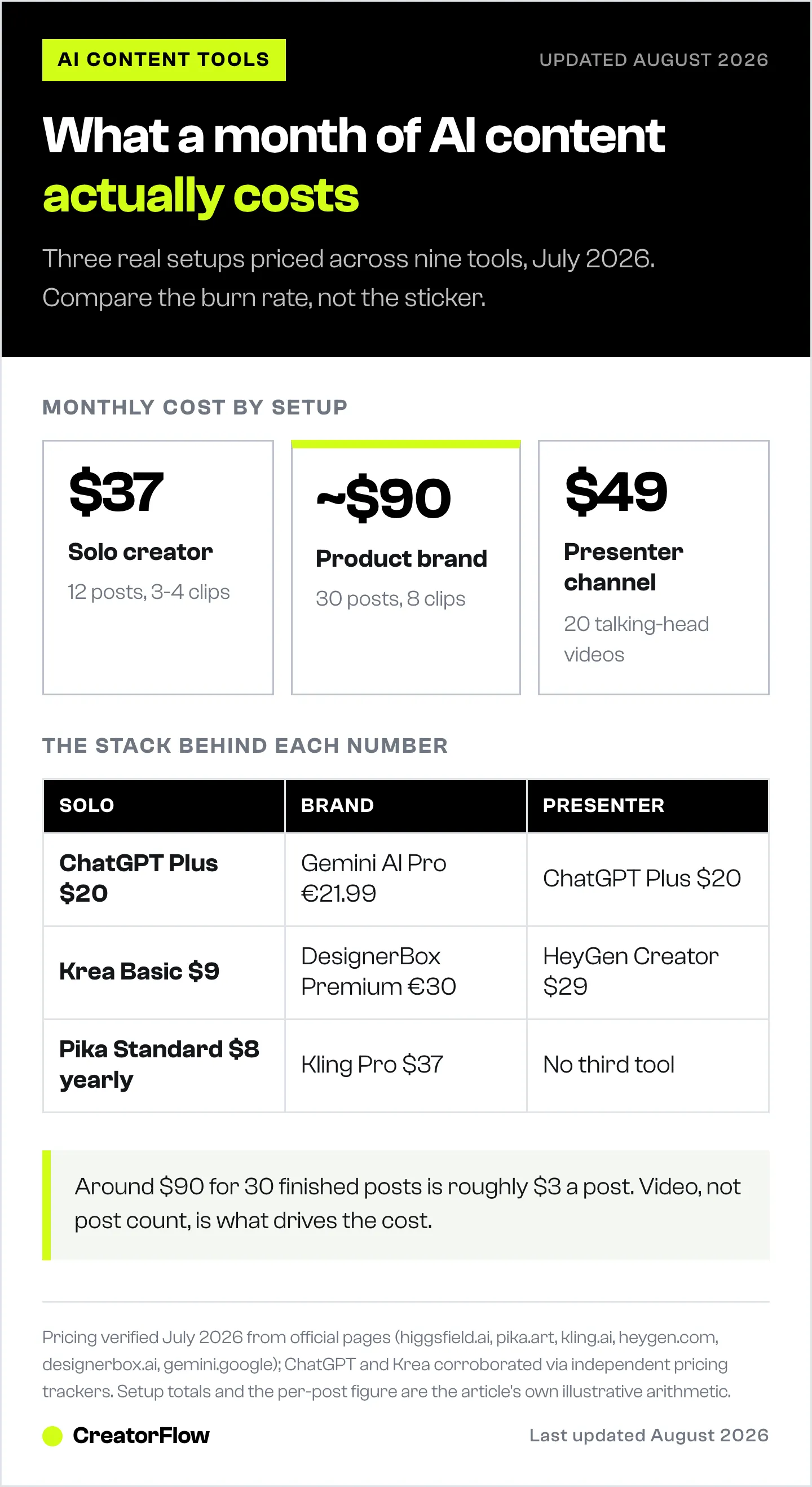
| Setup | Monthly output | Sensible stack | Rough monthly cost |
|---|---|---|---|
| Solo creator | 12 posts, mostly stills, 3-4 short clips | ChatGPT Plus + Krea Basic + Pika Standard | $37 |
| Product brand | 30 posts, on-model shots, 8 clips | Gemini AI Pro + DesignerBox Premium + Kling Pro | Around $90 |
| Faceless or presenter channel | 20 talking-head videos | ChatGPT Plus + HeyGen Creator | $49 |
Three things fall out of this table.
The cheap setup is cheap because stills are cheap. Video is where the cost lives, and it scales with resolution and clip count rather than with post count.
The mid setup looks expensive until you divide it. Around $90 for 30 finished posts is roughly $3 per post, which is below the cost of a single stock photo licence on most platforms.
The presenter setup is the only one where the price is genuinely predictable, because HeyGen sells minutes rather than credits. If budget certainty matters more than flexibility, that unit is the reason to pick it.
How to avoid paying twice for the same model
The aggregation layer in this category creates a specific trap. Higgsfield, DesignerBox and Krea all route to overlapping third-party models, including Kling for video and Nano Banana and Seedream for images. Subscribing to an aggregator and to the underlying model separately bills you twice for the same generation.
Check this before you buy the second subscription:
- List the models you use. Not the ones on the feature list. The two or three you reach for weekly.
- Find which of your current tools already routes to them. Aggregators publish their model rosters; the overlap is usually larger than you expect.
- Keep the aggregator only if you use its layer. Presets, workflows, character consistency and batching are real value. Model access on its own is not, because you can buy that direct.
- Buy direct when you use one model heavily. Kling Pro at $37 for 3,000 credits is cheaper than reaching Kling through a subscription you bought for other reasons.
- Re-check quarterly. Rosters and credit rates in this category change faster than any other software you buy.
For the Instagram-specific version of this stack question, AI marketing tools organised by Instagram job maps tools to the six jobs rather than to production stages.
The stage no tool on this list covers
Every tool here ends at the same place: a rendered file on your machine. The post goes live, the comments arrive, and the pipeline stops.
That gap is where the economics of the whole stack get decided. Thirty AI-generated posts that nobody can act on cost the same to produce as thirty that route every interested viewer somewhere useful. The production spend is identical. The return is not.
The missing stage is delivery: when someone comments asking for the link, the file, or the price, something has to answer while they are still paying attention. CreatorFlow handles that stage, turning comments and story replies into DMs that carry the link, capture the email, or book the call. It is the piece that makes the generation budget worth spending, because it connects a finished post to a conversation rather than to a view count.
FAQ
What are the best AI tools for social media content creation?
The strongest options by stage as of July 2026 are ChatGPT or Gemini for scripts and planning, Krea and DesignerBox for still images and brand assets, Higgsfield, Pika and Kling for generated video, and HeyGen for talking-head clips. There is no single best tool because these stages are not substitutes for each other. Build a stack of two or three rather than looking for one product that covers everything.
How much do AI content creation tools cost per month?
Paid entry points run from roughly $8 to $49 per month per tool as of July 2026. Pika starts at $8 per month billed yearly, Krea at $9, Kling at $10, HeyGen at $29, and Higgsfield at $49 billed monthly. A working stack of two or three tools typically lands between $35 and $90 per month depending on how much video you generate.
Are there free AI tools for social media content?
Yes, and most carry licence restrictions worth reading. Pika’s free plan gives 80 credits with a watermark and no commercial use, DesignerBox offers 112 credits on a personal-use licence, Krea provides 100 daily compute units, and HeyGen allows 3 videos of up to 1 minute per month. Free tiers are built for testing output quality, not for producing client or brand work.
What is the difference between credits and monthly limits?
Credits are a vendor-internal currency that converts to output at a rate the vendor sets per model, so the same 1,000 credits buys different amounts at different companies. Monthly limits count finished output directly, such as videos or minutes. Credit systems give you flexibility across models; output limits give you budget predictability. Neither is better, but they cannot be compared side by side without doing the conversion first.
Can AI-generated content be used commercially?
It depends on the plan, not the tool. Commercial licences generally start at the first paid tier: Krea Basic at $9 per month, DesignerBox Pro at €15, and any paid Pika plan. Free tiers across this category commonly restrict output to personal use and add watermarks. Check the licence terms before using generated assets in paid ads or client deliverables.
Do AI video tools work for Instagram Reels and TikTok?
Yes. Higgsfield, Pika and Kling all export vertical formats suitable for Reels, TikTok and Shorts, and HeyGen handles vertical talking-head clips. The practical limit is clip length rather than format, since most models generate 5 to 10 seconds per generation, so a 30-second Reel means stitching several clips and paying credits for each.
Which AI tool is best for product-based businesses?
Tools built around a source product photo save the most time, because consistency across thirty assets matters more than raw generation quality. DesignerBox generates on-model shots, flat lays, virtual try-on and ad creative from a single product image, with saved workflows for repeat runs. Pair it with a video tool for motion, since product stills and product video are separate stages.
Should I pay for both an aggregator and a direct model subscription?
Only if you use the aggregator’s own layer, meaning its presets, workflows, character consistency or batching. Aggregators like Higgsfield and Krea route to third-party models including Kling and Nano Banana, so subscribing to both an aggregator and the underlying model bills you twice for the same generation. If you use one model heavily, buying it direct is usually cheaper.
Pricing verified in July 2026. Higgsfield figures come from its live pricing configuration; Pika, HeyGen, Kling, DesignerBox and Google AI figures come from each vendor’s public pricing page. ChatGPT and Krea prices are corroborated across independent pricing trackers because both official pages block automated access, so confirm those two directly before purchase. Credit rates and model rosters in this category change frequently.


