

The best AI marketing tools for Instagram creators fall into six jobs: ideation, captions and hooks, image and graphic design, Reels and video editing, scheduling and analytics, and DM automation for lead capture. Match one tool to each job rather than buying an all-in-one suite. The goal is a stack that cuts production time without making your content sound generic. For the platform-agnostic version priced by output rather than by job, see 9 AI tools for social media content creation.
You do not have a content problem. You have a time problem. Ideas, scripts, captions, edits, covers, posting, and replying to every comment add up to hours a day, and most creators do all of it alone. AI does not replace your taste. It removes the busywork around it, so the part only you can do gets more of your attention.
This guide maps the AI tools worth using to the specific job each one does best, shows where they fit in a real Instagram workflow, and flags where AI helps versus where it quietly hurts your reach. It is built for solo creators and small teams, not enterprise marketing departments.
Key Takeaways
- Stack by job, not by brand: Pick one tool each for ideas, captions, images, video, scheduling, and DM automation. Six focused tools beat one bloated suite.
- AI is already standard: Over 80% of marketers now use AI for content creation, and roughly 60% use AI tools daily (typeface.ai and Social Media Examiner via adobe.com, 2026).
- Use AI for drafts, not voice: AI is strongest at first drafts, variations, and edits. Your hook, opinion, and story are what stop the scroll, so keep those human.
- Reels editing is the biggest time-saver: AI auto-captions, cuts, and clip selection turn an hour of editing into minutes.
- AI-generated reach still needs follow-through: A great AI-made Reel that pulls new viewers is wasted if you cannot answer every comment. That is the DM automation job.
- Watch the originality line: Instagram rewards original content and suppresses recycled or fully synthetic posts that add nothing, so use AI to speed up your ideas, not to mass-produce filler.

What Are AI Marketing Tools for Instagram Creators?
AI marketing tools are software that uses generative or predictive AI to do marketing work for you: writing captions, generating images, editing video, suggesting post times, or replying to messages. For Instagram creators specifically, the useful ones target the repetitive parts of content production and audience management.
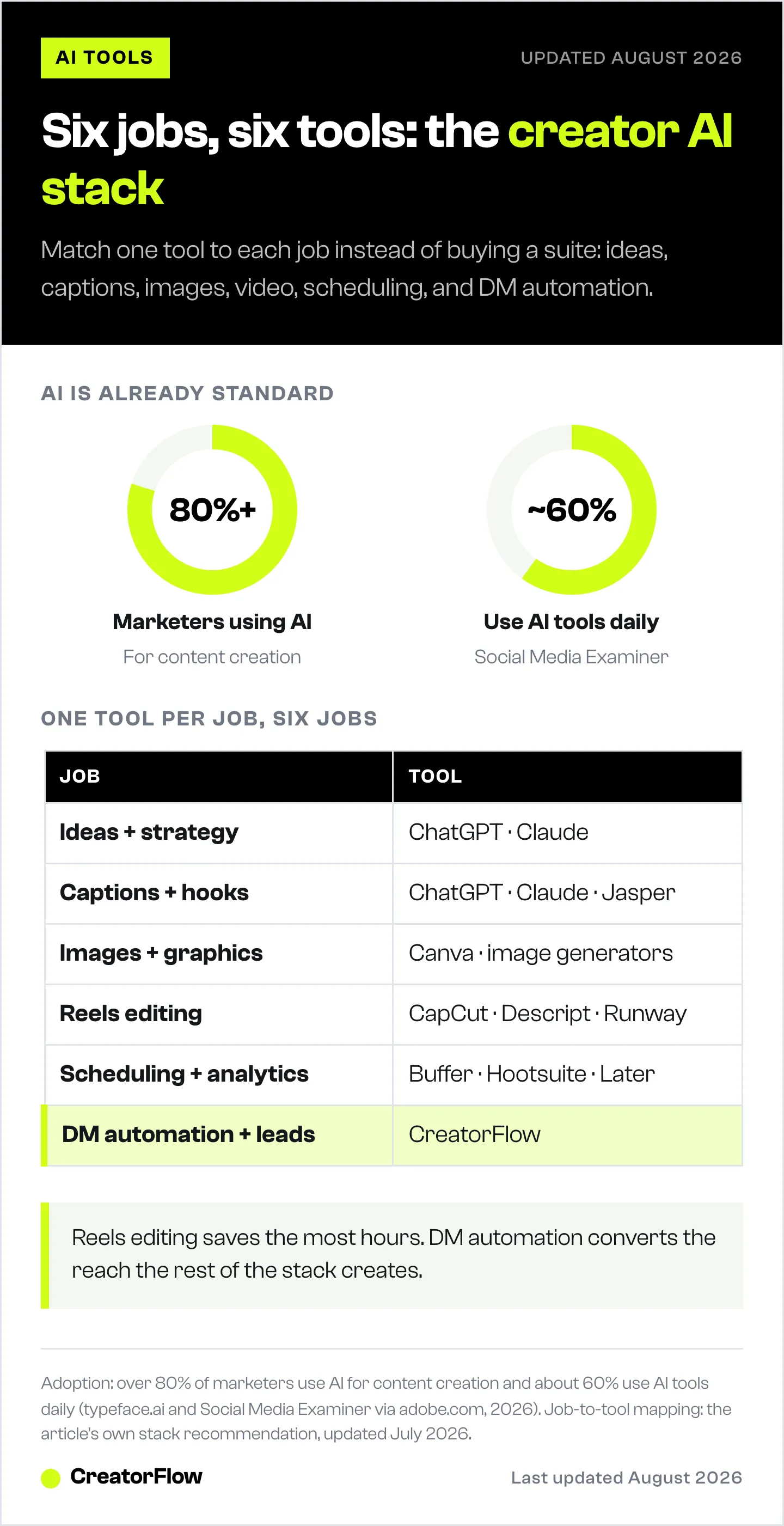
Adoption is no longer early. Over 80% of marketers use AI for content creation, and about 60% reach for an AI tool every day (typeface.ai and Social Media Examiner via adobe.com, 2026). The creators who win are not the ones who use the most tools. They are the ones who use AI to ship more of their own ideas, faster. If you are new to the concept, start with what AI marketing is and how creators use it.
The table below maps each job to the kind of tool that does it and what to expect.
| Job | What the AI does | Examples |
|---|---|---|
| Ideas and strategy | Brainstorm angles, outline series, analyze what works | ChatGPT, Claude |
| Captions and hooks | Draft and vary captions, generate hook lines | ChatGPT, Claude, Jasper |
| Images and graphics | Design posts, Reel covers, carousels | Canva, AI image generators |
| Reels and video | Auto-caption, cut, select clips, generate B-roll | CapCut, Descript, Runway |
| Scheduling and analytics | Suggest times, queue posts, summarize performance | Buffer, Hootsuite, Later |
| DM automation and leads | Reply to comments, capture emails, send links | CreatorFlow |
AI Tools for Content Ideas and Strategy
The blank page is where most creators lose the most time. General-purpose assistants are strong here.
ChatGPT is the default brainstorming partner: feed it your niche and ask for angles, series outlines, or ten variations on a topic. Claude handles longer, more structured thinking well, which makes it useful for planning a full content series or turning a long idea into a carousel. The skill is in the prompt, not the tool. For a creator-specific walkthrough, see how to use Claude for Instagram creators and ChatGPT for Instagram content creation.
Use these for the first draft and the divergent thinking. Then edit hard in your own voice, because the unedited output is what makes content sound like everyone else.
AI Tools for Captions and Hooks
Your caption earns the save and the share, and your hook earns the first second. AI is good at producing many options quickly so you can pick and sharpen the best.
Ask an assistant for several hook variations on one idea, then test them rather than trusting the AI to know which wins. ChatGPT and Claude both do this well, and dedicated copy tools like Jasper are built around marketing templates if you want more structure. The winning pattern is the same everywhere: generate five, cut to one, rewrite it so it sounds like you. For ready-made starting points, see these proven Instagram content hooks.
AI Tools for Images and Graphics
You do not need a designer for most posts anymore.
Canva is the workhorse: its AI features design feed posts, Reel covers, and carousels from a prompt or a template, and it stays on brand once you set your colors and fonts. For original, photo-style or concept imagery, AI image generators produce backgrounds, mockups, and illustrations from a text description. The trade-off is consistency, so build a few reusable templates instead of generating every graphic from scratch. For more on sourcing visuals, see the best AI-generated images and stock photos and using Claude to build Instagram carousels.
Consistency is the whole problem with prompt-based image tools, and it gets worse the more you generate. A general AI image generator has no memory of your brand: every prompt starts from zero, so your colors drift, your product looks slightly different each time, and a feed built from twenty separate generations reads as twenty separate brands.
The fix is a tool that loads your brand up front instead of asking you to re-describe it in every prompt. DesignerBox, an AI creative studio built around a brand kit works this way: you set a brand kit once (colors, logo, fonts, recurring characters), and product shots, video, and UGC-style ads are generated against it, with campaigns saved as reusable workflows you rerun for the next drop. Free tier is 112 credits a month with no card; paid runs €6 to €100 per month on annual billing (designerbox.ai/pricing, July 2026).
To be clear about where it sits on this list: it is not an all-in-one marketing suite. It does not schedule, write captions, or handle DMs. It is a deep tool for exactly one of the six jobs here, which is the visual production job. That is the point of the one-tool-per-job rule, not an exception to it.
Disclosure: DesignerBox is built by the same team as CreatorFlow.
AI Tools for Reels and Video Editing
This is where AI saves the most hours. Editing is the bottleneck for short-form video, and AI removes most of the manual work.
CapCut is the editor most short-form creators learn on. It runs on mobile and desktop, the free tier is generous, and its AI handles auto-captions, cuts, and clip selection (blotato.com, 2026). Descript edits video by editing the transcript, which makes removing filler words and rough takes fast. Runway generates and transforms video clips with AI when you need B-roll or effects you cannot film. Auto-captions alone are worth it, since most Reels are watched on mute and captioned videos hold attention longer.
AI Tools for Scheduling and Analytics
Posting at the right time and reading your numbers are jobs AI can assist, even if they feel less glamorous.
Schedulers like Buffer, Hootsuite, and Later queue your posts and increasingly add AI features that suggest send times and summarize performance in plain language. The value is consistency: a filled queue means you post on schedule even in a busy week. Pair this with an understanding of the best times to post on Instagram so the AI suggestions have context.
AI Tools for DM Automation and Lead Capture
Here is the gap every other tool leaves open. AI helps you make content that reaches new people. None of it answers the people who respond.
A Reel takes off, the comments fill with “link please” and “how much,” and a solo creator cannot reply fast enough. The interest cools before you get to it. This is the job DM automation does. Set a keyword, and the moment someone comments it or sends it in a DM, they get an instant reply with your link, guide, or booking page.
CreatorFlow handles this layer. It connects through Meta’s official Instagram API, sends the reply in seconds when someone comments your keyword, can require a follow before the link goes out, and captures emails inside the DM so the lead is reachable later. The Free plan covers 500 DMs a month and Pro is $15 a month flat. It is the piece that turns AI-driven reach into followers and customers instead of views that scroll away. For the full setup, see the Instagram DM automation guide. If you want the bigger picture of how these pieces fit a strategy, start with AI marketing for creators.
How to Choose AI Tools for Your Instagram Workflow
More tools is not the goal. A working stack is. Choose with three questions.
- Which job costs you the most time? Start there. If editing eats your evenings, fix video first. If you never reply to comments in time, fix DM automation first.
- Does it have a free tier? Most of these do. Test on the free plan before paying, and only upgrade for the one or two tools you use daily.
- Does it keep your voice? If a tool’s output needs so much rewriting that it saves no time, drop it. The right tool removes work without removing you.
Build the stack one job at a time. Add a tool, use it for two weeks, keep it only if it earned its place. The same thinking applies at the business level: this guide on future-proofing your creator business in the AI era covers which skills and assets hold their value as the tools change.
Zooming out from individual tools, our guide to AI social media management covers which of these tasks to automate and which to keep human.
FAQ
What are the best AI marketing tools for Instagram creators?
The most useful stack covers six jobs: ChatGPT or Claude for ideas and captions, Canva for graphics, CapCut for Reels editing, a scheduler like Buffer or Later for posting, and CreatorFlow for DM automation and lead capture. Match one tool to each job rather than buying a single all-in-one suite, and only pay for the ones you use daily.
What is the best AI tool for Instagram captions?
General assistants like ChatGPT and Claude write strong caption drafts and generate multiple hook variations fast. Dedicated copy tools such as Jasper add marketing templates. Whichever you use, generate several options, pick the best, and rewrite it in your own voice. Unedited AI captions tend to sound generic, which hurts engagement.
Can AI write Instagram Reels scripts?
Yes. AI assistants draft Reel scripts well when you give them the hook, the goal, and your tone. They are best for structure and first drafts. Keep the opening line and any personal story human, since those are what stop the scroll. Treat the AI script as a starting point to perform, not a final word to read.
Are AI-generated Instagram posts penalized?
Instagram rewards original content and suppresses recycled or low-effort posts that add nothing new. Using AI to speed up your own original ideas is fine. Mass-producing generic, fully synthetic filler is what risks reduced reach. The line is whether the post adds something only you would make, not whether AI touched it.
What AI tools do Instagram creators use to save the most time?
Reels editing tools save the most hours, because AI auto-captions, cuts, and clip selection replace the slowest manual task. After that, caption and idea generation removes the blank-page delay, and DM automation removes the impossible job of replying to every comment by hand. Start with whichever currently costs you the most time.
Is there an AI tool to automate Instagram DMs?
Yes. CreatorFlow automates Instagram DMs through Meta’s official API. It sends an instant reply when someone comments a keyword or messages you, can apply a follow gate, and captures emails inside the conversation. This converts the reach your other AI tools create into actual leads, instead of letting interested commenters slip away.
Are AI marketing tools worth it for small creators?
For most solo creators, yes, because the time saved goes straight back into making content. Start free: nearly all of these tools have a free tier good enough to test with. Add paid plans only for the one or two tools you reach for every day. The goal is a lean stack that removes busywork, not a shelf of subscriptions.
AI adoption figures verified from typeface.ai, adobe.com (citing Social Media Examiner), and shopify.com; tool capabilities from blotato.com and current creator roundups, as of June 2026. Tool features change frequently. Individual results vary.


