
AI social media management uses artificial intelligence to speed up repeatable social tasks: generating content ideas, drafting captions, predicting the best time to post, spotting trends early, and auto-replying to comments and DMs. It does not replace the social media manager. It shortens the gap between deciding what to post and actually shipping it, so you handle more volume while keeping human judgment on brand voice, timing, and community.
Here is the part most guides skip. Almost every “AI for social media” roundup obsesses over the create side: captions, images, scheduling. Meanwhile the response side, the comments and DMs piling up under every post, stays manual. That is backwards. The response side is higher volume, more repeatable, and it is the only side that turns a like into a lead.
This guide splits AI social media management into the two jobs it does, the create side and the respond side. You will get a task-by-task view of where AI saves real time, where it quietly makes your brand worse, and how to build a workflow that uses AI as a speed layer without flattening your voice.
Key Takeaways
- AI is a speed layer, not a replacement: 89.7% of social media marketers now use AI at least several times a week, and 71.1% say time savings is the biggest gain (sociality.io 2026 AI in Social Media report). It shortens execution time; it does not make the strategic calls.
- The create side is crowded, the respond side is open: ideation, captions, timing, and trend-spotting are well covered by tools. The comment and DM inbox, where engagement becomes revenue, is where most creators still work by hand.
- 69.2% of social marketers already use chatbots or conversational AI (sociality.io, 2026), yet on Instagram the response layer is usually the last thing anyone automates.
- Automate the mechanical, keep the human on judgment: 78.4% of teams still edit AI output before publishing (sociality.io, 2026). Brand voice, cultural timing, strategy, and community relationships stay human.
- CreatorFlow handles the Instagram response side: comment-to-DM, keyword triggers, and Story replies fire in seconds through Meta’s official API, so every post becomes a lead-capture surface without a person watching the inbox.
- Match the tool to the job: general assistants for drafting, integrated platforms for scheduling, and dedicated DM automation for the inbox. One tool rarely does all three well.
What Is AI Social Media Management?
AI social media management is the practice of using AI tools to run the repeatable parts of a social workflow: coming up with post ideas, writing first-draft copy, choosing posting times from your own audience data, surfacing trends, reading sentiment at scale, and responding to routine comments and messages.
The honest framing, echoed across the industry in 2026, is that AI does not replace social strategy. It executes strategy faster. A manager who spent three hours generating ideas and drafting captions can do a first pass in under an hour, then spend the rest of the time on the work AI cannot do. HubSpot’s 2026 data shows about 94% of marketers plan to use AI in their content creation this year (hubspot.com, 2026), so the question is no longer whether to use it. It is where to point it.
Adoption is already near-universal among social teams. In the sociality.io 2026 survey, 89.7% of social media marketers reported using AI daily or several times a week, and 28.2% said more than half their posts are now AI-assisted (sociality.io, 2026). This is the baseline, not the frontier.
The Two Sides of AI Social Media Management
Every social workflow has two jobs, and AI behaves differently on each. Both sit inside the wider category of social media marketing automation, which also covers the measurement layer.
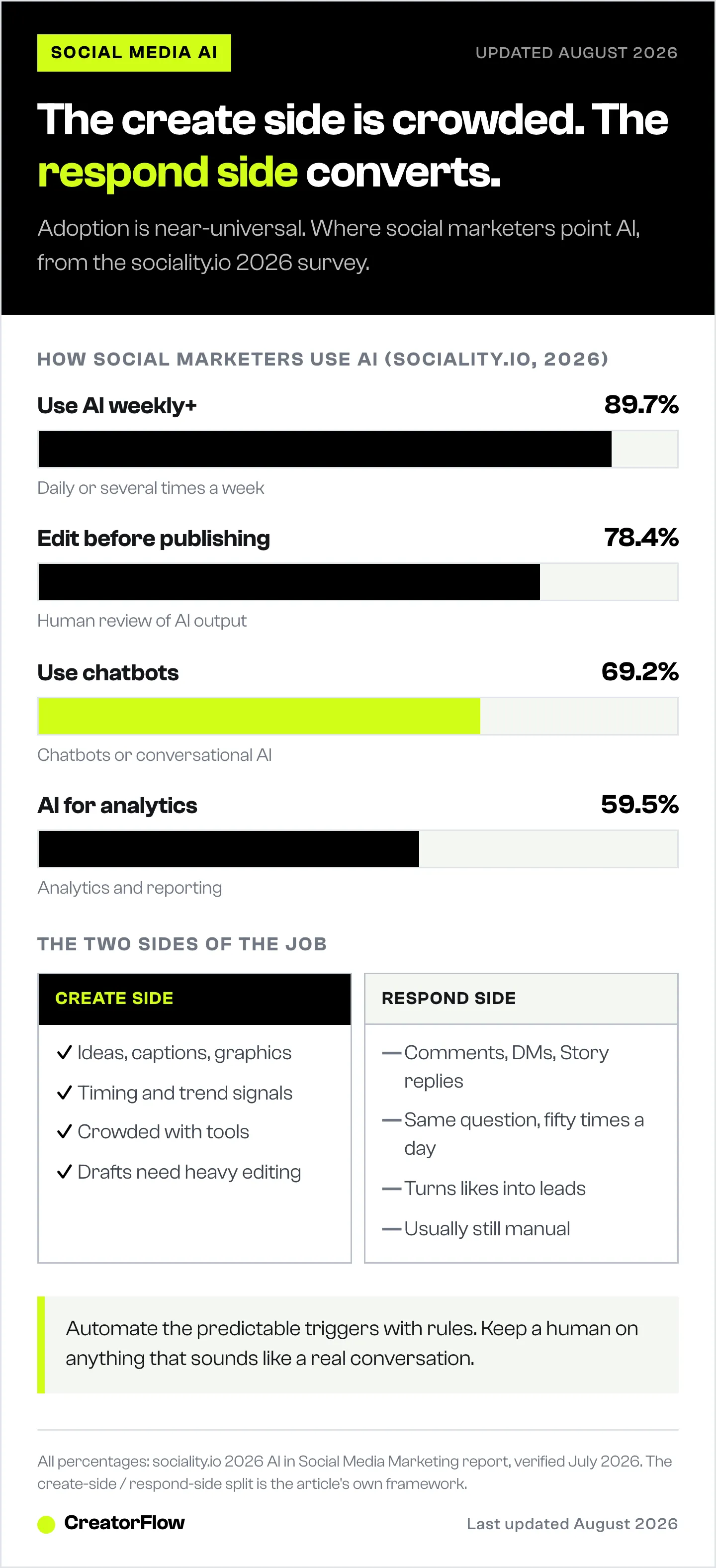
The create side is everything that happens before you publish: ideas, captions, graphics, video edits, and scheduling. This is where AI writing and image tools shine, and where nearly every “AI social media” tool competes. It is also crowded and increasingly generic, which is exactly why the output needs heavy editing.
The respond side is everything that happens after you publish: comments, DMs, Story replies, and the follow-ups that decide whether an engaged follower ever hears from you. This is higher volume, more repetitive, and far more tied to revenue than another caption variation. It is also the side most creators still run manually, refreshing the app to catch “link please” before the person loses interest.
AI sits inside a wider practice; the four jobs of social media marketing frame where it helps and where it does not. The teams getting the most out of AI treat these separately. On the create side, AI drafts and you edit. On the respond side, automation handles the predictable triggers instantly and you step in for real conversations. Get both right and the same person can run more accounts with better results. Point everything at the create side and you end up with a faster way to make average content while your inbox rots.
Where AI Saves the Most Time (Create Side)
These are the create-side tasks where AI earns its place. None of them are new, but the quality ceiling has risen enough that first drafts need less rework than they did two years ago.
Content ideation at volume. The blank-screen problem is real when you are producing across formats and accounts. Give an AI tool your content pillar or campaign theme and it returns fifteen angles in seconds. Not all will fit, but evaluating twenty directions beats starting from zero. Our roundup of AI marketing tools for Instagram creators breaks these down by job.
Caption drafting. Captions are the highest-volume writing task in social. AI drafting works as a first pass: generate a contextually relevant draft, then edit for voice, specificity, and current context. The catch is input quality. A generic prompt gives generic output, so feed it the platform, the audience, the tone, and the CTA. Our library of copy-paste AI prompts for Instagram is built for exactly this.
Timing optimization. Generic “post Tuesday at 10am” advice has limited value because the right time varies by account, audience, and format. AI timing tools work from your own engagement history instead of platform averages. See our guide to the best times to post on Instagram for how to read your own data.
Trend identification. Trend cycles have compressed to days on Instagram and TikTok. AI trend tools process large volumes of signal and surface momentum before a format peaks, giving you a data-backed starting point for the “should we act on this?” call.
Analytics and social listening. Reading sentiment, tracking brand mentions, and spotting a product issue before it hits support are pattern-recognition tasks AI does well at scale. In the sociality.io 2026 data, 59.5% of social marketers already use AI for analytics and reporting, and another 59.5% for ideation and trend research.
Later, one of the better-known scheduling platforms, builds several of these into its editor: an Ideas tab, a Caption Writer, Best Time to Post, and trend prediction, all in the compose flow (later.com, July 2026). That integration is the right instinct. AI you have to remember to open in a separate tab is AI you stop using.
The Response Side: Where AI Turns Engagement Into Revenue
Here is where the standard playbook goes quiet, and where the biggest time savings live.
Every post generates responses. A Reel with 300 comments asking “where do you get this?” is 300 warm leads, and if you answer four hours later, most have moved on. Manual response does not scale, and it is the single most repetitive task in the whole job. On the create side you write a caption once. On the respond side the same question arrives fifty times a day.
This is why 69.2% of social media marketers already use chatbots or conversational AI (sociality.io, 2026). On Instagram specifically, the mechanism is comment-to-DM and keyword automation: someone comments your trigger word, and they get your link, lead magnet, or booking page in seconds instead of hours.
CreatorFlow runs this response layer for Instagram. It watches for comment triggers, keyword DMs, and Story replies, then sends your pre-written message instantly through Meta’s official Instagram API. A follow gate can ask for a follow before the link goes out. An email gate can capture the address first. The result is that every post becomes a lead-capture surface that works while you are offline, without a person babysitting the inbox. For the full mechanics, see our Instagram DM automation guide.
Where this shades into true AI is generative reply handling: tools that draft or send conversational responses rather than fixed templates. Brands running higher-touch inboxes increasingly layer this on top of rule-based triggers, a pattern we cover in AI agents for Instagram DMs. The rule of thumb: automate the predictable triggers with rules, reserve generative AI for the genuinely open-ended messages, and keep a human on anything that sounds like a real conversation.
The point is not that the inbox replaces the feed. It is that the inbox is where AI and automation deliver the clearest return, and it is the part almost every “AI social media management” guide leaves on manual.
Where AI Still Falls Short
Being clear about limits is what prevents over-relying on AI in the places it produces the worst results. Four areas stay firmly human.
Authentic brand voice. AI produces grammatically correct, tonally consistent, pleasantly generic copy. Brand voice is the opposite of generic. It is the specific, recognizable personality that makes content feel like it could only come from you. AI gives you the draft; you supply the distinctiveness. That is why 78.4% of teams still edit AI output before it goes live (sociality.io, 2026).
Cultural context and timing. Knowing whether to engage with a cultural moment, and how, requires reading a room AI cannot read. This is the highest-risk area for automation. Human review of anything touching sensitive topics or current events is not optional.
Strategic positioning. AI can generate ideas inside a strategy. It cannot decide the strategy: how you position against competitors, which audiences to prioritize, what narrative to build over months. Use AI to execute strategy faster, and human judgment to set it.
Community relationships. The manager who shows up consistently, remembers past conversations, and responds like a person builds something automation cannot fake. AI can draft replies to routine comments. It cannot be the human presence that makes a community feel like one.
How to Build an AI Social Media Workflow
You do not need a new stack. You need to point AI at the right tasks and keep yourself in the loop where it counts.
- Treat AI as a speed layer. AI gets you to a draft, surfaces more ideas, and processes data you could not by hand. You decide what publishes, in what voice, with what intent. Speed and volume for the machine; judgment and quality for you.
- Feed it specific context, not generic prompts. “Write a caption for this image” gives filler. “Write a confident, direct caption for an Instagram audience of small business owners, with a soft CTA to try a free tool” gives something you can edit and use. Prompt quality compounds.
- Automate the response triggers. Set comment-to-DM and keyword rules so the predictable questions answer themselves in seconds. This is the highest-volume, highest-return automation available to an Instagram account.
- Keep a human review step before publish. No AI-assisted content or sensitive reply should go live unchecked. Build the review into the workflow explicitly.
- Measure what saves time. After 30 days, look at where the gains are real. Are captions faster? Are you using more of the ideas? Is the inbox handling itself? Double down on what works and drop what does not.
AI Social Media Management Tools by Job
No single tool does the whole job well. Match the tool to the side of the workflow it is built for.
| Job | What it handles | Example tools | Human still owns |
|---|---|---|---|
| Drafting and ideation | Captions, ideas, copy variations | General AI assistants (ChatGPT, Claude, Gemini) | Voice, edit, final call |
| Scheduling and planning | Calendar, timing, trend signals | Integrated platforms (Later, and similar) | What to publish and why |
| Images and video | Graphics, thumbnails, edits | AI image and video tools (Canva AI, Midjourney, Adobe Firefly) | Brand consistency |
| Instagram response layer | Comment-to-DM, keyword DMs, Story replies | CreatorFlow (Instagram-first) | Real conversations |
| Multi-channel messaging | DMs across IG, WhatsApp, SMS | ManyChat ($17–$199/mo across four paid tiers, or $14–$139/mo billed annually, manychat.com, July 2026) | Escalations and tone |
For Instagram-only creators and solo managers, the practical stack is thin: a general assistant for drafts, a scheduler you already use, and a dedicated response tool for the inbox. CreatorFlow sits in that last slot at a flat $15/month on the Pro plan (creatorflow.so, July 2026), Instagram-first by design. Teams running many channels at once tend toward broader platforms like ManyChat; creators who live on Instagram do not need the extra surface area. If you want to wire up that response layer, our comment-to-DM automation setup guide walks through it step by step, and Instagram’s own built-in AI covers the features already inside the app.
Turn Your Comments Into Conversations
The create side of AI social media management is crowded. The response side is where the time and the revenue are. CreatorFlow puts your Instagram inbox on autopilot, so every comment and keyword becomes a warm lead delivered in seconds. Start free and let your posts do the follow-up.
If you are still choosing the underlying platform, our comparison of social media management tools and what they cost prices seven of them across four common setups.
FAQ
What is AI social media management?
AI social media management is using artificial intelligence to run the repeatable parts of a social workflow: generating post ideas, drafting captions, choosing posting times from audience data, spotting trends, reading sentiment, and auto-replying to comments and DMs. It accelerates execution rather than replacing strategy. The manager still owns brand voice, cultural judgment, positioning, and community, while AI handles the volume and speed underneath those decisions.
What is the best AI tool for social media management?
There is no single best tool, because the workflow has distinct jobs. General assistants like ChatGPT or Claude are strong for drafting captions and ideas. Integrated schedulers build AI into planning and timing. For the Instagram response layer, dedicated tools like CreatorFlow handle comment-to-DM and keyword automation. The best setup usually combines a drafting tool, a scheduler, and a response tool rather than forcing one platform to do everything.
Can AI manage social media completely on its own?
No. AI can automate the predictable, high-volume parts, first-draft captions, timing, trend signals, and rule-based responses to comments and DMs, but full autonomy fails on brand voice, cultural timing, strategy, and real community conversations. Around 78% of teams still edit AI output before publishing (sociality.io, 2026). Treat AI as a speed layer with a human review step, not a set-and-forget replacement for the manager.
What social media tasks should you automate with AI?
Automate the tasks that are high-volume and low-judgment: caption first drafts, content ideation, best-time-to-post scheduling, trend monitoring, analytics reporting, and routine responses to comments and DMs. On Instagram, comment-to-DM and keyword automation deliver the clearest return because they answer repetitive “send me the link” requests instantly. Keep human control over anything touching sensitive topics, strategic positioning, or genuine one-to-one relationships.
Does AI social media management work for Instagram?
Yes, especially on the response side. Instagram generates a high volume of comments and DMs that follow predictable patterns, which is ideal for automation. Tools like CreatorFlow use Meta’s official Instagram API to send links, lead magnets, and booking pages the moment someone comments a trigger word or DMs a keyword. Combine that with AI drafting for captions and a scheduler for timing, and a solo creator can run Instagram like a small team.
Will AI replace social media managers?
No. AI accelerates and scales the repeatable parts of the job, ideation, drafting, analysis, timing, and routine responses, but it does not replace the judgment that makes the work valuable. Managers who adopt AI tend to handle more volume at the same or better quality and free time for strategy and community. The risk is over-relying on AI where it is weak: brand voice, cultural context, and human presence.
How do you use AI without sounding generic?
Be specific in your prompts and always edit before publishing. Feed the tool your brand tone, the exact audience, the platform, the campaign context, and examples of content that worked. Then rewrite the output for the voice markers that make your brand recognizable: the phrases you reach for and the references your community gets. AI produces a structurally sound draft; your editing makes it distinctly yours.
Statistics and tool details verified from HubSpot’s 2026 marketing report, the sociality.io 2026 AI in Social Media Marketing report, and official product pages (Later, ManyChat, CreatorFlow) as of July 2026. Individual results vary.


