
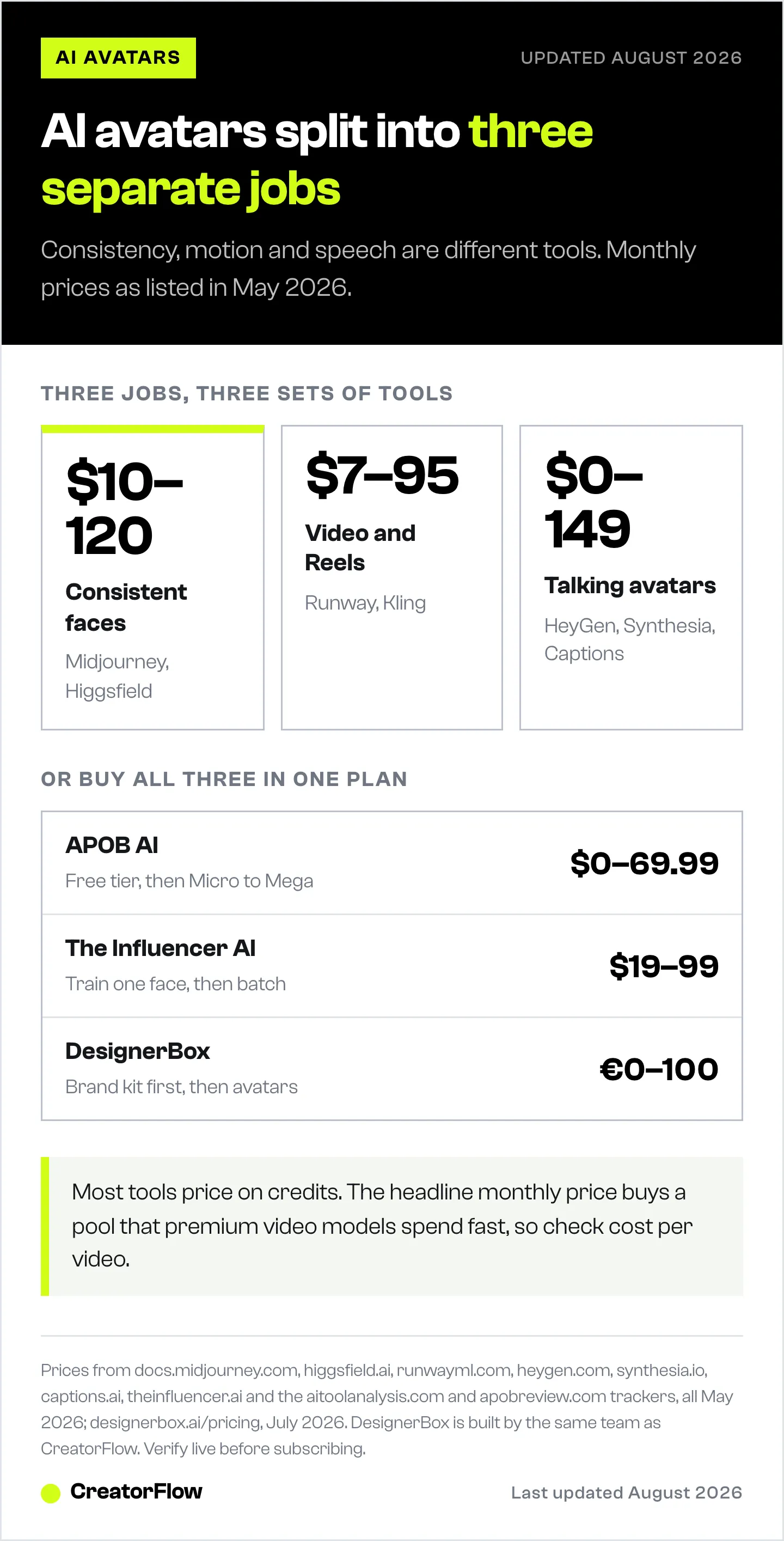
The best AI avatar generators for Instagram in 2026 are Midjourney and Higgsfield for consistent faces, Runway and Kling for animating those faces into Reels, and HeyGen for talking avatars. All-in-one builders like APOB and The Influencer AI bundle every step into one subscription. Pricing runs from $10 to $99 per month depending on how much video you generate.
There is no single “AI avatar generator.” The job splits into three tasks: making a consistent face, putting that face into motion, and making it talk. Most tools are strong at one and weak at the others, which is why creators stack them or buy an all-in-one. This guide sorts the main options by what they actually do best.
If you are building a virtual persona from scratch, pair this with our step-by-step on how to create an AI influencer on Instagram. For the wider context on virtual creators, see AI influencers on Instagram.
Key Takeaways
- Pick by job, not hype. Consistent stills, video, and talking avatars are three different tasks with different best-in-class tools.
- Consistency tools first. Midjourney ($10 to $120/month) and Higgsfield ($15 to $99/month) keep the same face across posts.
- Video tools animate the stills. Runway, Kling, and Google Veo turn images into Reels.
- Talking avatars are optional. HeyGen, Synthesia, and Captions lip-sync a face to a script.
- All-in-one builders trade flexibility for simplicity. APOB and The Influencer AI cover every step under one plan.
- Most tools price on credits. The headline monthly price buys a credit pool that premium video models spend fast, so check effective cost per video before committing. Our breakdown of AI influencer cost turns those plans into a per-post figure.
Quick Comparison Table
| Tool | Price (May 2026) | Best for | What it does |
|---|---|---|---|
| Midjourney | $10 to $120/mo | Consistent faces | High-quality AI image stills |
| Higgsfield | $15 to $99/mo | Persona + video | Image and video, character creation |
| Runway | $12 to $95/mo | AI Reels | Gen-4 image and video generation |
| Kling AI | $6.99 to $64.99/mo | Budget video | Text and image-to-video |
| HeyGen | $0 to $149/mo | Talking avatars | Lip-synced talking-head video |
| Synthesia | $0 to $29+/mo | Presenter avatars | Studio-style AI presenter video |
| Captions | $0 to $24.99/mo | Mobile editing | AI creators, actors, mobile editor |
| The Influencer AI | $19 to $99/mo | All-in-one persona | Train a face, batch photos and Reels |
| APOB AI | $0 to $69.99/mo | All-in-one budget | Consistent model, image and video |
| DesignerBox | €0 to €100/mo | Brand avatars for ads | Brand-kit avatars, product shots, UGC-style video |
Sources: heygen.com, synthesia.io, higgsfield.ai, captions.ai, runwayml.com, docs.midjourney.com, theinfluencer.ai, plus aitoolanalysis.com and apobreview.com trackers, all May 2026; designerbox.ai/pricing, July 2026. Verify live before subscribing; several tiers shift often.
How AI Avatar Generators Work
All of them follow the same loop: you describe or upload a character, the model generates output, and you refine. The differences are in consistency (does the face stay the same?), motion (can it move?), and speech (can it talk?).
For a persona to read as real on Instagram, you almost always need at least two tools: one to lock the face, one to make Reels. The single most common mistake is generating gorgeous one-off images that never look like the same person twice.
Best for Consistent Faces
This is the foundation. If the face drifts, nothing else matters.
Midjourney produces the highest-quality still images and supports character referencing so you can anchor new images to one face. Pricing is Basic $10, Standard $30, Pro $60, and Mega $120 per month, with about 20 percent off annually (docs.midjourney.com, May 2026). It is image-only, so you pair it with a video tool.
Higgsfield combines image and video and markets character and AI-influencer creation directly. Tiers are Starter $15, Plus $39, and Ultra $99 per month billed annually (higgsfield.ai, May 2026). It is a strong choice if you want fewer subscriptions. If it is not the right fit, compare the best Higgsfield AI alternatives for creators.
Need supporting scenery and props rather than the persona itself? Our AI stock photo sites guide covers cheaper sources for backgrounds.
Best for AI Video and Reels
Once the face is locked, animate it.
Runway is a leading AI video tool with its Gen-4 models. Plans are Free, Standard ($12/month annual, $15 monthly), Pro ($28/month annual, $35 monthly), and Unlimited ($76/month annual) (runwayml.com, May 2026).
Kling AI is the budget-friendly option, with a free tier plus Standard $6.99, Pro $25.99, and Premier $64.99 per month for text and image-to-video (aitoolanalysis.com, May 2026; verify on the live page).
Google Veo is not sold standalone. Access comes through Google AI Plus $7.99, Pro $19.99, or Ultra $249.99 per month, with per-second API rates for heavier use (mindstudio.ai, May 2026).
Best Talking Avatars
If your persona needs to appear to speak, these lip-sync a face to a script.
HeyGen is the most popular talking-avatar tool, with Free, Creator $29 ($24 annual), Pro $49, and Business $149 per month (heygen.com, May 2026).
Synthesia focuses on presenter-style video for explainers and training, starting free with a Starter plan at $29 per month (synthesia.io, May 2026).
Captions is mobile-first and bundles AI creators and AI actors into an editor, at Free, Pro $9.99, and Max $24.99 per month (captions.ai, May 2026). It is the easiest if you edit on your phone.
Use talking clips in moderation. Lip-sync is where AI personas most often look artificial, so short lines beat long speeches.
Best All-in-One Builders
If juggling subscriptions is the blocker, an all-in-one builder handles the persona end to end.
The Influencer AI lets you train a face once, then batch photos, Reels, and lip-sync from it. Tiers are Starter $19, Creator $39, and Professional $99 per month (theinfluencer.ai, May 2026).
APOB AI offers a free tier (80 credits a day) plus Micro $14.99, Macro $29.99, and Mega $69.99 per month, with annual billing roughly halving those (apobreview.com, May 2026).
Glambase is another all-in-one persona-and-monetization builder. Its pricing mixes subscriptions, per-influencer creation fees, and token packs, and it shifts often, so check the live site before relying on a specific number.
DesignerBox approaches the avatar from the brand side rather than the persona side. You load a brand kit first (colors, logo, fonts, recurring characters), then generate avatars, product shots, and UGC-style ad video that all match it, and save the sequence as a workflow to rerun on the next product. Free tier is 112 credits a month with no card; paid runs €6 (Basic), €15 (Pro), €30 (Premium), and €100 (Ultra) per month on annual billing, a 40% discount on the annual toggle, with recurring characters from Pro and AI video from Premium up (DesignerBox pricing, July 2026). It is the right shape if the avatar exists to sell a product, and the wrong shape if you are building a standalone AI persona with its own following, which is what The Influencer AI and APOB are built for. Create consistent brand characters in DesignerBox.
Disclosure: DesignerBox is built by the same team as CreatorFlow.
All-in-ones trade ceiling for convenience. Output quality usually trails a tuned Midjourney-plus-Runway stack, but the workflow is far simpler for a first persona.
Before you pay for any of these, settle the category the account will sell in. AI influencer niches scores each one on proof, delivery and the AI label.
How to Choose
Match the tool to where you are:
- First persona, low budget: an all-in-one like APOB or The Influencer AI.
- Quality-first: Midjourney for faces plus Runway or Kling for video.
- Talking content: add HeyGen or Captions on top.
- Already on Instagram, just need conversion: the avatar tool is upstream; the money comes from the conversion layer below.
Whichever stack you pick, the avatar is only the content engine. Turning reach into clicks is a separate job. CreatorFlow runs that layer through Meta’s official Instagram API, sending the right link by automated DM the moment someone comments a keyword, starting free with 500 DMs a month.
FAQ
What is the best AI avatar generator overall?
There is no single winner because the job splits into stills, video, and speech. For most Instagram creators, Midjourney for consistent faces plus Runway or Kling for video covers the core, with HeyGen added if the persona needs to talk. All-in-one builders win on simplicity, not peak quality.
What is the cheapest way to generate AI avatars?
Start with free tiers on Runway, Kling, HeyGen, and Captions, or an all-in-one budget plan like APOB Micro ($14.99 per month, less on annual billing). Free tiers watermark output and cap volume, so they suit testing a persona rather than running it daily.
Can AI avatar generators make video, not just photos?
Yes. Runway, Kling, and Google Veo generate video from a still and a prompt. Higgsfield and the all-in-one builders include video too. Pure image tools like Midjourney do not, so you pair them with a video tool.
How do I keep the same AI face across every avatar?
Use character referencing (Midjourney) or train a dedicated character model (Higgsfield, The Influencer AI). Generate one face you like, then anchor all future images to it instead of re-prompting from scratch, which produces a different person each time.
Do AI avatar generators work for Instagram Reels?
Yes, and Reels are where the reach is. Generate stills, animate them into short clips with a video tool, then assemble several into one Reel with a hook. Mobile editors like Captions make the assembly step quick.
Are AI avatars allowed on Instagram?
Yes. Instagram permits AI-generated content but may apply an “AI Info” label to realistic AI images, and you should disclose AI use (about.fb.com, April 2024). A voluntary “AI Creator” profile tag also exists (socialmediatoday.com, May 2026). Disclosure keeps the account compliant.
Tool pricing verified from official pages and trackers as of May 2026. Many AI tools price on credits and change tiers frequently; confirm current pricing on each vendor’s site before subscribing. Individual results vary.


