

AI prompts for Instagram content creation help creators plan posts, write captions, brainstorm Reels, analyze performance, and build content calendars using tools like ChatGPT, Gemini, Claude, and Perplexity. The key to getting useful output: give the AI specific context about your niche, audience, and content pillars. Generic prompts produce generic content. Specific prompts produce content you can post today.
You open ChatGPT. Type “give me Instagram post ideas.” Get back 10 suggestions so generic they could apply to any account on the planet.
That’s not the AI’s fault. It’s a prompt problem. In McKinsey’s State of AI survey, 71% of organizations said they regularly use generative AI in at least one business function (McKinsey, March 2025). The difference between creators who get value from AI and those who don’t comes down to one thing: prompt specificity.
This guide gives you 21 copy-paste prompts organized by use case. Each prompt works with ChatGPT, Gemini, Claude, or Perplexity. If you run them in Claude, which Claude model to use for content creation covers which tier fits each prompt type. Swap in your niche, audience, and goals. Use them to plan a month of content in one sitting.
For 105 ready-to-use prompts with placeholder variables, check out our free Instagram AI Prompt Vault (no signup required).
Here are 5 of our favorite content-creation prompts in action:
Key Takeaways
- AI prompts for Instagram content creation are only as good as the context you give them. Specify your niche, audience, content pillars, and goals in the first message
- Four AI tools that work best: ChatGPT ($0-20/mo) for captions, scripts, and brainstorming; Gemini (free to $19.99/mo) for image generation; Claude ($0-20/mo) for long-form strategy and content calendars; Perplexity (free plan, paid Pro) for competitor research and trend analysis with cited sources
- Generic prompts give generic output. Always include your niche, content pillars, target audience, and what you want to avoid
- Use one master context prompt at the start of every session so the AI treats every follow-up as part of your brand
- Let AI ask YOU questions before generating content, it consistently produces the best results
- 21 copy-paste prompts in this guide cover content planning, captions, Reels, analytics, and monetization (as of September 2026)

The Golden Rule: Context Before Prompts
Every AI tool runs on the same principle: better input produces better output. Before using any prompt in this guide, set up your AI with a context prompt first.
Here’s the template:
I'm a [your niche] content creator on Instagram with [follower count] followers.
My content pillars are: [pillar 1], [pillar 2], [pillar 3].
My audience is [demographic] who want to [their goal].
My tone is [casual/professional/witty/educational].
I post [X] times per week: [X Reels, X carousels, X stories].
My monetization: [affiliate links/coaching/digital products/brand deals].

When giving me content ideas, avoid: [generic advice/mindset content/overused trends].
Keep responses practical and specific to my niche.
Why this works: Instead of guessing your context from scratch, the AI now operates like an assistant who knows your brand. Every prompt that follows will be filtered through this context.
Pro tip: Save this as a custom instruction in ChatGPT (Settings > Personalization) or start every Claude/Gemini session with it. In Perplexity, paste it at the beginning of your first query.
Which AI Tool for What
ChatGPT, Gemini, Claude and Perplexity each fit a different Instagram job. Use the table to pick the tool before you pick the prompt.
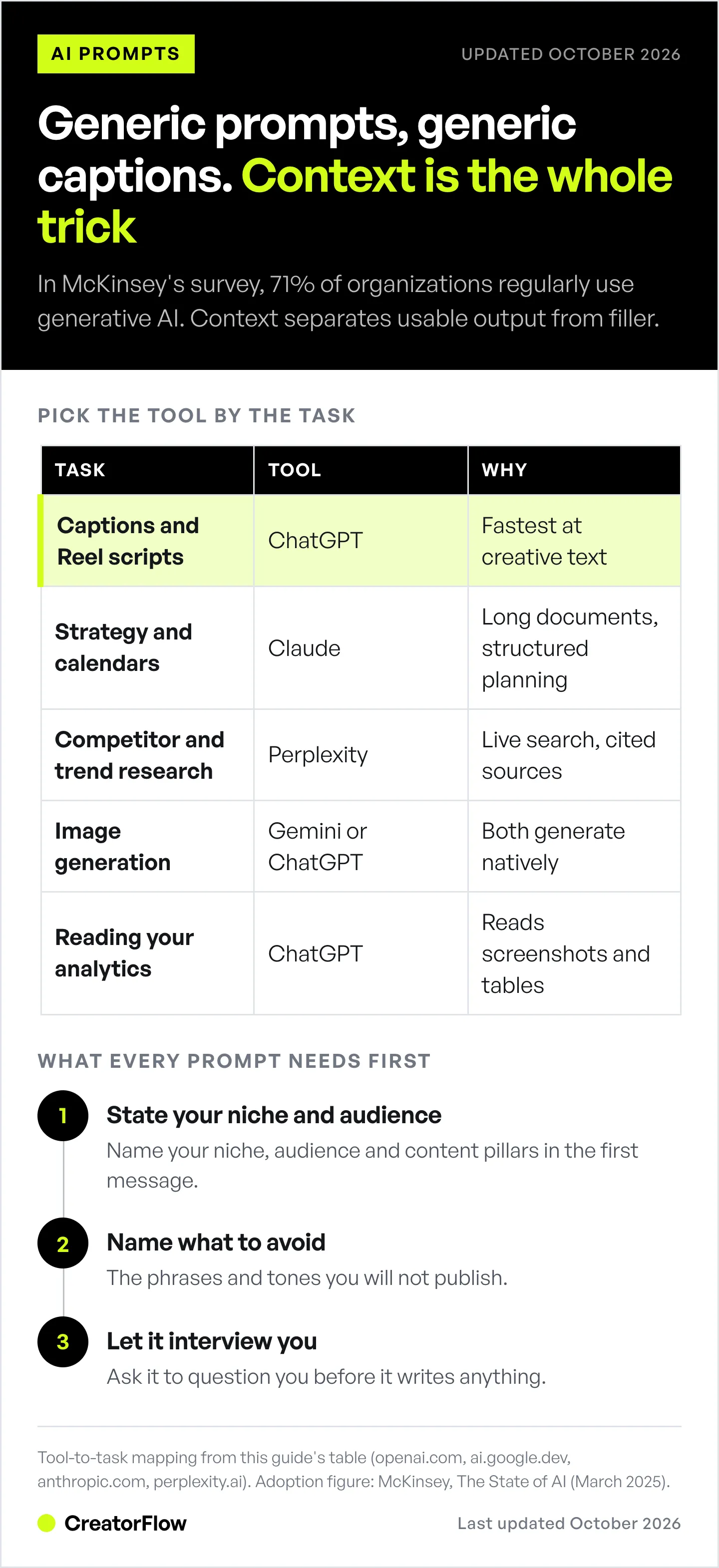
| Task | Best Tool | Why |
|---|---|---|
| Caption writing & scripts | ChatGPT | Fastest at creative text, Custom GPTs for Instagram |
| Image generation | Gemini / ChatGPT | Both generate high-quality images natively |
| Content strategy & calendars | Claude | Handles long documents, strong at structured planning |
| Competitor & trend research | Perplexity | Real-time web search with cited sources |
| Hashtag research | Perplexity | Searches the web and cites every source |
| Repurposing content | ChatGPT / Claude | Both strong at format adaptation |
| Analytics interpretation | ChatGPT | Can analyze screenshots and data tables |
| Product and brand visuals | DesignerBox | Works from your own product photo, so the item stays identical across posts |
Quick Pricing Comparison (as of October 2026)
| Tool | Free Tier | Paid Plans |
|---|---|---|
| ChatGPT | Free plan with usage limits | Go $8/mo, Plus $20/mo, Pro $100, $200 or $500/mo (billed monthly) |
| Gemini | Free plan with usage limits | Google AI Plus $4.99/mo, Google AI Pro $19.99/mo (US prices) |
| Claude | Sonnet and Haiku; limits reset on a rolling 5-hour window | Pro $20/mo, or $17/mo billed annually |
| Perplexity | Free search with usage limits | Paid Pro plan (check perplexity.ai for the current price) |
(Sources: learn.chatgpt.com/docs/pricing, one.google.com, claude.com/pricing, all checked October 2026)
For most creators, the free tiers are enough to start. Upgrade when you hit the usage limits.
Instagram Prompts to Copy and Paste
Short, ready-to-use versions of the prompts in this guide. Copy one, swap the bracketed placeholders for your niche and details, and paste it into ChatGPT, Gemini, Claude, or Perplexity.
Content calendar:
Create a 30-day Instagram content calendar for a [niche] creator. Include a specific post title, format (Reel/carousel/static), content pillar, and a one-line hook for each day.Comment-driving caption:
Write 5 Instagram captions for a [niche] creator that drive comments. Each under 150 words, ending with a "comment [KEYWORD] and I'll send you [resource]" CTA.Reel hooks:
Give me 8 Instagram Reel hooks about [topic]. Each under 10 words, written to work as both spoken audio and text overlay.30-second Reel script:
Write a 30-second Instagram Reel script about [topic]: hook (0-3s), problem (3-8s), solution in 3 steps (8-25s), CTA (25-30s). Add on-screen visual notes.Educational carousel:
Write a 7-slide Instagram carousel about [topic]. Slide 1 hook (max 8 words), slides 2-6 one point each, slide 7 a follow/save/share CTA. Use examples, not theory.Story ideas that drive DMs:
Give me 10 Instagram Story ideas for a [niche] creator that drive DMs: 3 polls, 3 question-sticker prompts, 2 "DM me [keyword] for [resource]" formats, 2 behind-the-scenes ideas.Repurpose one idea:
Turn this idea "[your idea]" into 4 formats: a 30-second Reel script, a 7-slide carousel outline, a caption under 150 words, and 3 Story slides.DM sequence for lead capture:
Write a 3-message Instagram DM sequence for [offer]: deliver the promised resource, qualify the lead when they reply, then soft-pitch with a link. Each message under 100 words.Notice where the caption, Story, and DM-sequence prompts land: they all end with someone commenting or replying with your keyword and expecting the resource in their DMs. That last step is not a prompt, it is an automation.
A keyword CTA only works if the DM sends
Write the caption with the prompts above, then set that trigger word once. Every comment that matches gets your PDF, link, or booking page in seconds, on every post and Reel from then on, whether you are online or asleep.
Start free500 DMs a month · Cancel anytime · Set up in under 5 minutes
Want to compare what each tool gives away first? See the free auto DM tool comparison, or the comment-to-DM setup guide for the step-by-step.
Content Planning Prompts
These prompts help you plan an entire month of content in one session. For a full content calendar template, see our Instagram content calendar guide.
Prompt 1: 30-Day Content Calendar
Act as an Instagram content strategist. I'm a [niche] creator.
My content pillars are: [pillar 1], [pillar 2], [pillar 3].
I post 5x/week: 3 Reels, 1 carousel, 1 static post.

Create a 30-day content calendar with:
- Specific post titles (not generic)
- Format for each (Reel/carousel/static)
- Which content pillar it maps to
- A one-line hook for each post

Avoid generic motivational content. Focus on actionable tips and storytelling.
Prompt 2: Content Gap Analysis
Here are the titles of my last 20 Instagram posts:
[paste your titles]

Based on my content pillars ([pillar 1], [pillar 2], [pillar 3]):
1. Which pillar am I neglecting?
2. What content formats am I underusing?
3. What topics would diversify my feed without straying from my niche?
4. Give me 10 post ideas that fill these gaps.
Prompt 3: Niche-Down Your Content
I create content about [broad topic]. I want to find a specific angle
that's underserved on Instagram. Ask me 10 questions to help me identify
a unique niche position. After I answer, suggest 3 niche angles with
example content ideas for each.
This prompt uses the “let AI ask you questions” technique. Instead of guessing what the AI needs, you let it determine what context matters most. Works with all four tools.
Caption Writing Prompts
Captions drive engagement. These prompts generate captions organized by goal. For more templates, check our Instagram content hooks templates.
Prompt 4: Comment-Driving Captions
Write 5 Instagram captions for a [niche] creator that will drive comments.
Use these techniques:
- Ask a specific question (not "what do you think?")
- Use a polarizing statement that invites debate
- Include a "comment [KEYWORD] and I'll send you [resource]" CTA

Niche: [your niche]
Audience: [who they are]
Tone: [your brand voice]
Keep each caption under 150 words.
The “comment KEYWORD” technique pairs with comment-to-DM automation. When someone comments your trigger word, your automation sends the resource instantly. Set this up once and it runs 24/7.
Prompt 5: Storytelling Captions
Turn this story from my life into an Instagram caption:
[paste your rough story - speak naturally, don't worry about grammar]

Structure it as:
- Hook (first line that stops the scroll)
- Conflict (what went wrong or what I struggled with)
- Resolution (what I learned or changed)
- CTA (question or call to action)

Keep it under 200 words. My voice is [casual/professional/witty].
Prompt 6: Educational Carousel Copy
I want to create a carousel about [topic].
Write the text for a 7-slide Instagram carousel:

Slide 1: Hook/title slide (max 8 words, attention-grabbing)
Slide 2-6: One key point per slide (2-3 sentences each)
Slide 7: CTA slide (follow + save + share prompt)

Target audience: [who]
Make it specific to [niche]. Use examples, not theory.
Reels and Video Prompts
Short-form video is where reach happens. These prompts help with scripting, hooks, and B-roll planning.
Prompt 7: Hook Variations
I'm creating a Reel about: [your topic]

Give me 8 alternative hooks using these formats:
1. Curiosity gap: "I [unexpected result] by doing [unexpected method]"
2. Problem callout: "If you're still [common mistake], stop"
3. Social proof: "[Number] of [people] already do this"
4. Controversy: "Unpopular opinion: [statement]"

Make each hook under 10 words. They need to work as both
spoken audio AND text overlay.
For 50 more hook openings sorted by format, see our Instagram hook templates, or get fresh variations from the free Instagram hook generator.
Prompt 8: 30-Second Reel Script
Write a 30-second Instagram Reel script about [topic].

Structure:
- Hook (0-3 seconds): Stop the scroll
- Problem (3-8 seconds): State what's going wrong
- Solution (8-25 seconds): 3 actionable steps
- CTA (25-30 seconds): Follow for more / comment KEYWORD

Include notes for visual hooks (what to show on screen).
Write it conversational, like I'm talking to a friend.
Prompt 9: B-Roll Shot List
I'm batch filming content this weekend for these 5 Reels:
1. [Reel idea 1]
2. [Reel idea 2]
3. [Reel idea 3]
4. [Reel idea 4]
5. [Reel idea 5]

Create a B-roll shot list I can film in one session:
- Which shots can be reused across multiple Reels
- Specific angles and settings for each shot
- Any props I need
- Shots I can film at home vs. outside
Analytics and Research Prompts
AI tools can help you interpret your data and research what’s working in your niche.
Prompt 10: Post Performance Analysis
Best tool: ChatGPT (can read screenshots) or Perplexity (for competitor analysis)
Here are the stats from my top 3 performing Instagram posts this month:

Post 1: [title] - [views, likes, comments, saves, shares]
Post 2: [title] - [views, likes, comments, saves, shares]
Post 3: [title] - [views, likes, comments, saves, shares]

And my 3 worst performing:
Post 4: [title] - [views, likes, comments, saves, shares]
Post 5: [title] - [views, likes, comments, saves, shares]
Post 6: [title] - [views, likes, comments, saves, shares]

Analyze the patterns:
- What do the top posts have in common (format, topic, hook style)?
- What do the worst posts have in common?
- What should I do more of? Less of?
- Give me 5 content ideas based on what's working.
Prompt 11: Competitor Content Audit
Best tool: Perplexity (real-time web access with sources)
Analyze the top-performing content from these Instagram creators
in the [niche] space: [@handle1, @handle2, @handle3]

For each creator, identify:
- Their most common content formats
- Posting frequency
- Caption style and length
- Types of hooks they use
- Engagement tactics (polls, questions, CTAs)
- What they do differently from each other

Then give me 5 content ideas I can adapt (not copy) for my own brand.
Cite your sources.
Perplexity suits this job because it searches the web and cites every claim. ChatGPT and Gemini can search the web too, so ask them to cite their sources and open each link before you trust it.
Prompt 12: Hashtag Strategy
Best tool: Perplexity
Since December 2025, Instagram has allowed a maximum of 5 hashtags on a post or Reel (@creators on Instagram, December 2025). This prompt asks for a small pool of tags and then builds sets of five you can rotate.
Research current Instagram hashtag performance for [your niche].

Give me:
- 5 high-volume hashtags (500K+ posts) for reach
- 5 medium-volume hashtags (50K-500K) for discoverability
- 5 low-volume hashtags (under 50K) for ranking
- 3 branded or community hashtags in my niche

Then build 3 sets of 5 hashtags I can rotate across posts,
because Instagram allows a maximum of 5 hashtags per post.
For each hashtag, note whether it's growing, stable, or declining if possible.
Story and Engagement Prompts
Stories drive DMs and keep your audience engaged between posts. If the prompt output feels thin, our list of instagram story ideas that pull replies gives the model better examples to work from.
Prompt 13: Story Engagement Ideas
Give me 10 Instagram Story ideas for a [niche] creator that drive
engagement and DMs. Include:
- 3 poll ideas (this or that, slider, quiz)
- 3 question sticker prompts that invite genuine responses
- 2 "DM me [keyword] for [resource]" story formats
- 2 behind-the-scenes ideas that build connection

Each should take under 5 minutes to create.
Story DM triggers pair with story reply automation to capture leads automatically.
Prompt 14: Weekly Posting Schedule
Based on my content pillars and the fact that I post:
- 5x/week on Instagram (3 Reels, 1 carousel, 1 static)
- Daily stories

Build a weekly posting schedule that includes:
- Best day for each content type
- Theme for each day
- Story ideas that complement the feed post
- One engagement activity per day (reply to comments, engage in niche, etc.)
Monetization and Strategy Prompts
Use AI to plan how your content connects to revenue. For a full monetization roadmap, see our Instagram monetization guide for influencers.
Prompt 15: Content-to-Revenue Mapping
I monetize my Instagram through [affiliate links/coaching/digital products].
Here are my current content pillars: [list them].

Map each content pillar to a monetization path:
- Which posts naturally lead to affiliate link shares?
- Which posts position me for coaching inquiries?
- Which posts build demand for a digital product?

Give me a weekly content mix that balances growth content
(reach/followers) with conversion content (sales/leads).
Prompt 16: DM Script for Lead Capture
I want to use Instagram DM automation to capture leads for [your offer].
Write a 3-message DM sequence:

Message 1: Deliver the promised resource (triggered by keyword comment)
Message 2: Follow-up question to qualify the lead (sent when they reply)
Message 3: Soft pitch for [your paid offer] with a link

Keep each message under 100 words. Conversational tone, not salesy.
For setting up automated DMs, see our complete DM automation guide. CreatorFlow is an Instagram DM automation tool that replies for you when someone comments a keyword, answers your story, or DMs you a keyword. Here, it sends Message 1 the moment someone comments your keyword. Meta lets a business send a follow-up only after the person replies, and only within 24 hours of that reply (developers.facebook.com, October 2026), so send Messages 2 and 3 once they answer.
Prompt 17: Freebie and Lead Magnet Ideas
Based on my niche ([your niche]) and audience ([who they are,
what they struggle with]):

Give me 10 lead magnet ideas I can create in under 2 hours each.
For each idea, include:
- Title (under 50 characters)
- What problem it solves
- Format (PDF, template, checklist, swipe file)
- How to promote it via Instagram content

Prioritize ideas that naturally connect to [your paid offer].
For more on delivering lead magnets through DMs, check our Instagram lead magnet automation guide.
Image Generation Prompts
Both ChatGPT and Gemini generate images natively as of September 2026.
Prompt 18: Carousel Cover Design
Best tool: ChatGPT or Gemini
Generate an Instagram carousel cover image for a post titled
"[your post title]"

Style: Clean, modern, bold typography
Colors: [your brand colors]
Text on image: "[short title, max 6 words]"
Dimensions: Square (1080x1080)
Prompt 19: AI-Generated Trend Images
Best tool: Gemini
Gemini’s image model, nicknamed “Nano Banana”, is good at stylized images, including the viral 3D figurine trend and similar AI art styles. The Gemini app now runs Nano Banana 2 (blog.google, 2026). For AI image alternatives, check our best AI stock photo sites guide.
Create a [art style] image of [subject description] for an Instagram post.
The image should convey [mood/feeling].
Use [color palette] colors.
Style reference: [minimalist/3D render/illustration/photorealistic]
Bonus Prompt: On-Brand Product Shots
Best tool: an image tool that starts from your photo, not from your description
This is the one image job a text prompt cannot do well. ChatGPT and Gemini build the picture from your words, so they invent a product that looks approximately like yours. For a shop account or an affiliate post, approximately is a problem: the label is wrong, the shape drifts, and it drifts differently in every generation.
Tools that start from an uploaded photo keep the item itself fixed and change only the scene around it. DesignerBox works this way, turning one product photo into packshots, flat lays, styled scenes, and on-model shots that all show the same product. Free accounts get 112 credits, and their results carry a watermark. Paid runs €15/month for Basic and €35/month for Pro, which is where the commercial licence starts, or €6 and €15 per month billed yearly (designerbox.ai/pricing, October 2026).
Upload: one clear photo of [your product] on a plain background

Generate: [flat lay / on a marble surface / held in-hand / on a model]
Lighting: [soft daylight / studio softbox / warm golden hour]
Background: [your brand color] with [prop 1] and [prop 2]
Output ratio: 4:5 for feed, 9:16 for Stories and Reels
Keep the product, label, and proportions exactly as uploaded.
Disclosure: DesignerBox is built by the same team as CreatorFlow.
Same principle applies to video. If the clip has to show your actual product, see the B-roll options for Reels, and for stills that are not product-specific, the best AI stock photo sites covers the generic case.
Repurposing Prompts
One good idea can become 5 pieces of content.
Prompt 20: One Idea, Four Formats
Take this content idea: "[your idea]"

Turn it into 4 Instagram formats:
1. A 30-second Reel script with hook
2. A 7-slide carousel outline
3. An Instagram caption (under 150 words)
4. 3 Story slides with engagement prompts

Keep the core message consistent. Adapt the delivery for each format.
Prompt 21: Blog Post to Instagram Content
Here's a section from my blog post:
[paste 300-500 words]

Extract the key takeaways and turn them into:
1. A carousel (1 takeaway per slide, max 7 slides)
2. A Reel script (30 seconds, conversational)
3. 3 standalone caption posts

Each should work independently without reading the blog post.
Advanced: Let AI Ask YOU Questions
The interview prompt asks the AI to question you before it writes anything. Instead of trying to engineer the perfect prompt, you let the AI collect the context it needs first.
In a minute, I'm going to ask you to help me [your task:
create a content calendar / write Reel scripts / plan my strategy].

But before you do, ask me as many questions as you need
to better understand my account, audience, and goals.
The AI will ask 8-12 targeted questions. Answer them honestly (the more specific, the better). Then it performs the task with full context.
This technique works with every AI tool and consistently produces the best results. You’re letting the AI determine what information it needs rather than guessing yourself.
5 Mistakes Creators Make with AI Prompts
-
Using generic prompts. “Give me Instagram ideas” will give you content anyone could post. Always include your niche, audience, and content pillars.
-
Copy-pasting AI output directly. AI is your starting point, not your finished product. Rewrite in your voice. Your audience follows you for your personality, not ChatGPT’s default tone.
-
Ignoring the context prompt. Skip the setup prompt and every response will miss the mark. Spend 5 minutes on context upfront, save hours of back-and-forth.
-
Using only one tool. ChatGPT is strong at writing. Perplexity is built for research with cited sources. Use each tool for the task it does best.
-
Not iterating. If the first output isn’t great, refine the prompt. Add constraints. Share examples of what you like. Say “make it more casual” or “shorter” or “more specific to [niche].” AI improves with feedback within the same conversation.
FAQ
Are AI prompts safe to use for Instagram content?
Yes. Using AI to brainstorm, draft, and plan content is safe and increasingly standard. 71% of organizations regularly use generative AI in at least one business function (McKinsey, March 2025). The key is making AI output your own. Don’t post AI-generated text word-for-word. Use it as a starting draft, then rewrite in your voice and add your personal experiences. Instagram does not penalize content that was planned or drafted with AI assistance. One exception applies to AI-generated people: since August 31, 2026, an account whose main persona is AI-generated needs Instagram’s AI-generated profile label, or it can lose reach in Reels and Explore (creators.instagram.com, September 2026).
Which AI tool is best for Instagram creators?
No single tool wins every task, so pick by job. ChatGPT ($0-20/mo) is best for caption writing, Reel scripts, and brainstorming. Gemini ($0-19.99/mo) is best for image generation. Claude ($0-20/mo) handles long-form content calendars and strategy documents. Perplexity (free plan, paid Pro) is best for competitor research with cited sources. Most creators use 2-3 tools. Start with ChatGPT’s free tier and add tools as you need them (as of October 2026).
What should I include in an AI prompt for an Instagram post?
Include six things in every Instagram prompt: your niche, your audience, the goal of the post, the format (Reel, carousel or single image), your tone, and what to avoid. Add a length limit, such as “under 150 words” for a caption or “under 10 words” for a hook. A prompt with all six gets a usable first draft. A prompt with none gets the generic list every other account already posts.
How do I make AI-generated content sound like me?
Start every session with a context prompt that describes your niche, audience, content pillars, and tone of voice. Include examples of captions you’ve written that you like. Tell the AI what to avoid (corporate jargon, motivational fluff, specific phrases you don’t use). After the AI generates output, rewrite at least 30-40% in your own words, add personal anecdotes, and adjust phrasing to match how you talk.
Can AI replace human content creation?
No. AI saves time on planning, drafting, and research, but cannot replace your unique perspective, personal stories, or authentic connection with your audience. According to the Artlist AI Trend Report 2026, only 24% of creators use AI across the full creative process. The majority use it for ideation (37%) and faster editing (26%). Think of AI as an assistant that handles the blank-page problem so you can focus on making content uniquely yours.
Do I need to pay for AI tools to create Instagram content?
No, you can start free. ChatGPT, Gemini, Claude and Perplexity all have free plans with usage limits. Claude Free, for example, includes Sonnet and Haiku with limits that reset on a rolling five-hour window (claude.com/pricing, October 2026). Free plans are enough for planning a week or two of content. If you hit the limits, paid plans start at $4.99/month (Google AI Plus), and most sit between $17 and $20 a month (as of October 2026).
Sources: McKinsey, The State of AI (mckinsey.com, March 2025), Artlist AI Trend Report 2026 (artlist.io, November 2025), ChatGPT pricing (learn.chatgpt.com/docs/pricing, October 2026), Google AI plans (one.google.com, October 2026), Claude pricing (claude.com/pricing, October 2026), DesignerBox pricing (designerbox.ai/pricing, October 2026), Instagram’s 5-hashtag limit (@creators on Instagram, December 2025), Instagram AI-generated profile label (creators.instagram.com, September 2026), Meta private replies (developers.facebook.com, October 2026).


