
B-roll is the extra footage that plays over your main Reel: cutaways, close-ups, and establishing shots layered on top of you talking to camera. On Instagram Reels it does more than add polish. Because Instagram ranks Reels partly on whether people watch all the way through, B-roll that holds attention buys you reach. Short 2 to 5 second clips cover your cuts, add context, and keep viewers watching to the end.
You film a talking-head Reel, nail the hook, and post it. It runs for 300 views and stalls. Same script that pulled 30,000 for a bigger creator last quarter. The difference often is not your idea. It is that their video never sits still. Every couple of seconds the shot changes, so there is always a reason to keep watching. Yours is one static frame of your face, and viewers swipe.
This guide is about B-roll for Instagram Reels specifically, not film sets or long YouTube edits. You will get shot ideas broken down by niche, how to capture B-roll on your phone alone, how to cut it into a Reel, where to find footage you did not film, and the mistakes that quietly cost you watch time. It is written for solo creators, affiliates, and coaches who record most of their content on a phone.
Key Takeaways
- B-roll is a reach lever, not decoration: Instagram names “watch a reel all the way through” as one of its most important Reels predictions (about.instagram.com, 2023), and B-roll is the cheapest way to hold that attention
- Keep clips short: 2 to 5 seconds per B-roll shot. Longer than that and the video stalls, and viewers treat a frozen visual like no B-roll at all
- Match the visual to the words: every B-roll clip should show what you are saying at that moment. A mismatch breaks trust faster than almost any other edit
- You can shoot it solo on a phone: lock the phone on anything steady, then grab close-ups before and after your main take while the setup is still staged
- No footage? Three routes: free real-footage libraries (Pexels, Pixabay), a paid subscription library (Storyblocks), or AI-generated B-roll (Captions). Pick by how specific and on-brand the shot needs to be
- B-roll earns the view, not the sale: once a tighter Reel earns reach and comments, you still need a way to deliver the link. That final step is comment-to-DM automation, not the editor
What B-Roll Is in Instagram Reels (and How It Differs from A-Roll)
A-roll is your main footage: you talking to camera, the interview, the core take that carries the message. B-roll is everything layered over or between those moments, like a close-up of the product, a wide shot of the room, or hands doing the thing you are describing. A-roll holds the story. B-roll holds attention. On a Reel you rarely need much B-roll, but the few clips you add do heavy lifting. If A-roll is carrying almost everything, yapping on Instagram covers how talking to camera holds attention on its own.
On Reels the constraint is different from YouTube. A Reel is vertical, shot at a 9:16 ratio and 1080 x 1920 pixels as Meta recommends (facebook.com/business, July 2026), watched on a phone with sound sometimes off, in a feed where the next video is one thumb-flick away. So B-roll on a Reel is less about cinematic storytelling and more about giving the eye a reason to stay for another two seconds.
Length matters here too. Instagram lets you upload Reels up to 20 minutes, but it will not recommend Reels over 3 minutes to new audiences (help.instagram.com, July 2026). For most creators that means the reach ceiling sits well under three minutes, and every second inside that window has to earn its place. B-roll is how you keep those seconds moving.
Why B-Roll Drives Reels Reach, Not Just Polish
B-roll drives reach because Instagram distributes Reels based partly on how people engage, and watch-through is one of the signals it names directly. Instagram’s own ranking explainer lists “watch a reel all the way through” among its most important predictions for Reels (about.instagram.com, 2023). A video that holds viewers to the end gets read as worth showing to more people, and B-roll is the simplest tool for holding them.
Adam Mosseri, who runs Instagram, has repeatedly pointed to a small set of signals. In a January 2025 breakdown he named average watch time, likes per reach, and sends per reach as the ones to watch (Mosseri, via Future Social, January 2025). He has also said that “sends per reach correlate more with overall reach than anything else” (socialmediatoday.com, May 2024). B-roll feeds the first of those directly, because a video that keeps changing keeps people watching, which lifts average watch time. It feeds the others indirectly, because a Reel that feels finished and easy to watch is one people are more willing to send to a friend.
The honest version: Instagram has not published the exact weight it puts on watch-through, and it says it uses thousands of signals ranked only roughly in order of importance. So treat this as direction, not a formula. The direction is clear enough to act on. Dead air and one static frame lose viewers, while varied, relevant B-roll keeps them. If your Reels are stalling for reasons that go beyond editing, read why your Instagram Reels aren’t getting views.
B-Roll Ideas for Reels, by Niche
The best B-roll for a Reel is the specific thing you are talking about, shot close and from an angle you would not use for your main take. The rule underneath every idea below is the same: show the noun. If you say the word “serum,” the viewer should see the serum within a second.
| Niche | A-roll (you talking) | B-roll to layer over it |
|---|---|---|
| Fitness | Explaining a movement | The rep in close-up, foot placement, the setup, a form fix side by side |
| Food | Describing a recipe | Knife on the board, steam off the pan, the pour, the finished plate |
| Fashion / affiliate | Reviewing an outfit | Fabric texture, the fit turning, the shoes, the brand tag |
| Coaching | Making a point | A whiteboard scribble, a stat card, a screen recording of the tool |
| Product / e-commerce | Talking about a feature | The button, the unboxing, hands using it, the before and after |
| Travel | Telling the story | A wide establishing shot of the place, a street detail, movement |
Across niches, four kinds of shot do most of the work on Reels. The establishing shot is a wide frame that answers “where are we” in 2 to 3 seconds. The detail shot is a tight close-up that says “look here.” The process shot is hands doing the thing, and it is the most persuasive kind because it shows instead of tells. The cutaway is a quick related visual you drop over a cut in your talking-head. You do not need all four in one Reel. You need whichever ones show what you are saying.
For affiliates, product and outfit B-roll is what turns a review into a click, because the viewer sees exactly what they might buy. Pair that footage with a clear path to the link using the Reels to DM affiliate funnel.
How to Shoot B-Roll on Your Phone (Solo)
To shoot B-roll alone on a phone, leave the camera where your main take was set up, then film close-ups and cutaways before and after you record your A-roll while the light and props are still in place. Lock the phone on a tripod or any steady surface, frame the shot, and let it run while you perform the action. Most of your B-roll can come from the same five minutes as your main video.
- Shoot in the same session. Your setup and lighting are already right. The first and last few minutes of a shoot are the cheapest B-roll you will ever get.
- Steady beats fancy. A phone on a tripod, a stack of books, or propped against a wall gives you clean, watchable footage. Shaky handheld reads as unfinished.
- Get variety, not repeats. Shoot the same action from two distances and two angles. Reusing one clip twice in a Reel signals low effort, and viewers notice.
- Use slow motion. Filming at 240fps, which most modern phones support, makes a plain shot look intentional and stretches a 3-second action into 8 to 10 usable seconds.
- Frame vertical. Shoot for 9:16 so you are not cropping later and losing resolution.
Capture more than you think you need. A good habit is filming three or four options for every clip you expect to use. You will keep a fraction of it, and having spares is what makes the edit fast instead of frustrating. The reason creators run short is that footage feels like enough on the day, then in the edit every option turns out to be a slight variation of the same shot.
How to Edit B-Roll Into a Reel
Cut your A-roll first so the audio and pacing are locked, then lay B-roll on top to cover your cuts and illustrate your words. Keep each B-roll clip between 2 and 5 seconds, make sure it matches what you are saying at that moment, and drop a cutaway over every jump cut so the edit feels smooth instead of jumpy.
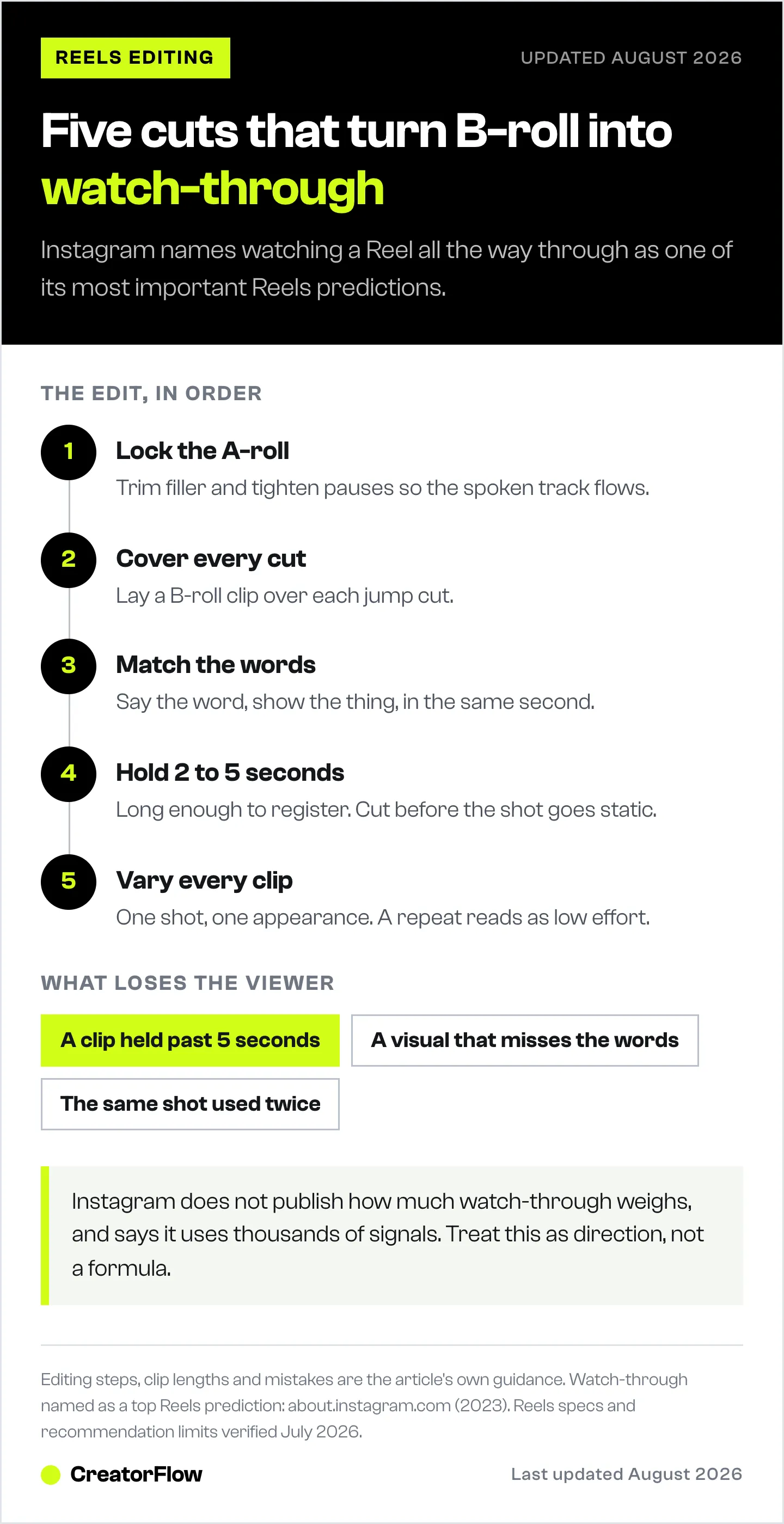
- Lock the A-roll. Trim filler, tighten pauses, and get the spoken track flowing. Every place you cut leaves a jump cut behind.
- Cover the cuts. Place a B-roll clip over each jump so the viewer sees footage, not a jarring splice. This is the single most common use of B-roll.
- Match the words. Line each clip up with the moment you name it. Say “the strap,” show the strap.
- Hold 2 to 5 seconds. Long enough to register, short enough to keep moving. Cut before the shot goes static.
- Vary every clip. A different shot each time, with no repeats.
You can do all of this in most Reels editors. For a rundown of the main options and what each one is good at, see Edits vs CapCut vs Captions. Once you have a repeatable edit, an Instagram Reels testing system shows you which cuts actually earn saves and sends, so you know the B-roll is doing its job.
Where to Get B-Roll When You Didn’t Film It
When you do not have the shot, you have three options: free stock libraries like Pexels and Pixabay for real footage, a paid subscription like Storyblocks for a deeper professional library, or an AI B-roll generator like Captions for footage that does not exist as stock. Pick based on how specific and on-brand the clip needs to be.
- Free real footage. Pexels and Pixabay both offer free stock video with no attribution required and commercial use allowed under their own licenses (pexels.com, pixabay.com, July 2026). They are best for generic context shots such as a city street, a laptop, or nature. Pexels is owned by Canva.
- Paid subscription. Storyblocks is subscription-based with unlimited downloads, running from about $21/month on its Essentials plan up to $30/month for Unlimited All Access, both billed annually (storyblocks.com/pricing, July 2026). It is worth it if you use a lot of stock and want a broader, more cinematic library.
- AI-generated. Captions has an AI B-roll generator that creates footage from a text prompt or auto-adds clips matched to your video (captions.ai, July 2026). Its plans run from $9.99/month on Pro, with a $24.99/month Max tier that surfaces generative B-roll, priced for iOS and variable by region (captions.ai/pricing, July 2026). It is useful when the exact shot you need does not exist as stock.
- AI-generated, but on-brand. If the B-roll has to show your product, generic stock and generic AI both fail: neither knows what your item looks like. DesignerBox, which generates video from a brand kit works from a brand kit (your colors, logo, fonts, and product), so the clips it generates match the rest of your feed instead of looking borrowed. Free tier is 112 credits a month with no card; AI video is available on the €30 Premium plan and up, billed annually (designerbox.ai/pricing, July 2026). Disclosure: DesignerBox is built by the same team as CreatorFlow.
One caution on stock: Instagram now leans toward content that looks genuinely yours, and generic stock can undercut a Reel that otherwise feels personal. Footage you shot yourself, even on a phone, almost always outperforms a polished clip a thousand other accounts have used. Use stock to fill gaps, not to carry the video. When AI or stock is the faster call, make it with AI on purpose rather than defaulting to it.
B-Roll Mistakes That Cost You Watch Time
The three B-roll mistakes that cost the most reach are holding a clip too long, using a visual that does not match the audio, and reusing the same shot. Each one gives the viewer a reason to swipe, which drops your watch-through, which is the exact signal Instagram uses to decide how far your Reel travels.
- Holding too long. An 8-second static B-roll clip is nearly as dull as no B-roll. Keep it to 2 to 5 seconds and cut before it freezes.
- Mismatched visuals. If you say “our team moves fast” over a shot of someone slumped at a desk, the mismatch reads as sloppy and the viewer disengages. Show the thing you are actually saying.
- Repeated clips. The same shot used twice signals low effort even when everything else is strong. One clip, one appearance.
- B-roll with no plan. The worst version is realizing in the edit that you have 20 seconds of talking and nothing to cut to. Note your B-roll while you script. A bracket in your notes that reads “B-roll: hands opening the box” means you actually capture it on the day.
From Reach to Revenue: The Step B-Roll Can’t Do
B-roll can win you the view and the comment. It cannot deliver the link. When a tighter Reel earns reach and 80 people comment “where did you get that,” something still has to send each of them the URL, and doing it by hand means most of them are gone before you reply.
This is where most B-roll guides stop, because most of them are written by editing tools, and the edit is upstream of the money rather than the money itself. A Reel that holds attention travels further, which means more comments, more “link please,” and more people you could convert. But the link options inside a Reel are limited, and a caption link is easy to miss. The reliable path is simple: a viewer comments your trigger word, and an automated DM sends them the link, the lead magnet, or the booking page in seconds.
That is what CreatorFlow does. It watches your Reels for a keyword and delivers your link by DM the moment someone comments, so the reach your B-roll earned turns into clicks instead of a comment section you cannot keep up with. For the full setup, see how comment-to-DM automation works, and for the numbers behind the whole flow, read how creators turn Reels views into DM sales.
The Instagram Reel analyzer gives you a read on an individual Reel before you decide what to change.
FAQ
What is B-roll in a Reel?
B-roll is any footage that is not your main shot: cutaways, close-ups, and establishing shots layered over you talking to camera. On a Reel its job is to hold attention. Your main footage, called A-roll, carries the message, while B-roll keeps the viewer watching by giving the eye something new every few seconds.
How much B-roll should a Reel have?
Less than a YouTube video. Short-form talking-head Reels can work with only two or three B-roll clips, dropped over your cuts and your key claims. There is no fixed ratio for Reels the way the 60/40 guideline gets used for longer YouTube edits. The test is simpler: is there ever a stretch where the screen sits still and the viewer has no reason to stay? If so, add a clip there.
How long should B-roll clips be in a Reel?
Between 2 and 5 seconds each. Long enough for the viewer to register what they are seeing, short enough that the video keeps moving. A B-roll clip that holds for 8 seconds while you talk over it stalls the Reel almost as much as having no B-roll at all.
Do you need B-roll for talking-head Reels?
Not strictly, but it helps. Plenty of short Reels are pure A-roll and still perform. B-roll earns its place the moment your Reel runs longer than about 15 seconds or you have cuts to hide. It covers jump cuts, illustrates your claims, and stops a single static frame of your face from losing viewers.
Can you use AI to generate B-roll for Reels?
Yes. Tools like Captions include an AI B-roll generator that creates footage from a text prompt or auto-adds clips matched to your video (captions.ai, July 2026). It is useful when the exact shot you need does not exist as stock. Describe the specific point your audio is making for a closer match, and check that the AI clip still looks on-brand rather than generic.
Does B-roll help Reels get more views?
Indirectly, yes. B-roll helps people watch your Reel all the way through, and watch-through is one of the predictions Instagram names as most important for ranking Reels (about.instagram.com, 2023). More watch-through tends to mean more reach, and more reach means more views. B-roll does not add views on its own. It protects the retention that earns them.
What is the difference between A-roll and B-roll?
A-roll is your primary footage, the main take where the story and message live, usually you speaking to camera. B-roll is supplementary footage layered over or between those moments to add context and hold attention. A-roll can stand alone, while B-roll usually cannot, because it is not a complete story by itself.
Instagram ranking signals and Reels specs verified from about.instagram.com, help.instagram.com, and facebook.com/business; tool details from captions.ai and storyblocks.com as of July 2026. Instagram uses many signals and does not publish exact weights, and individual results vary.


