

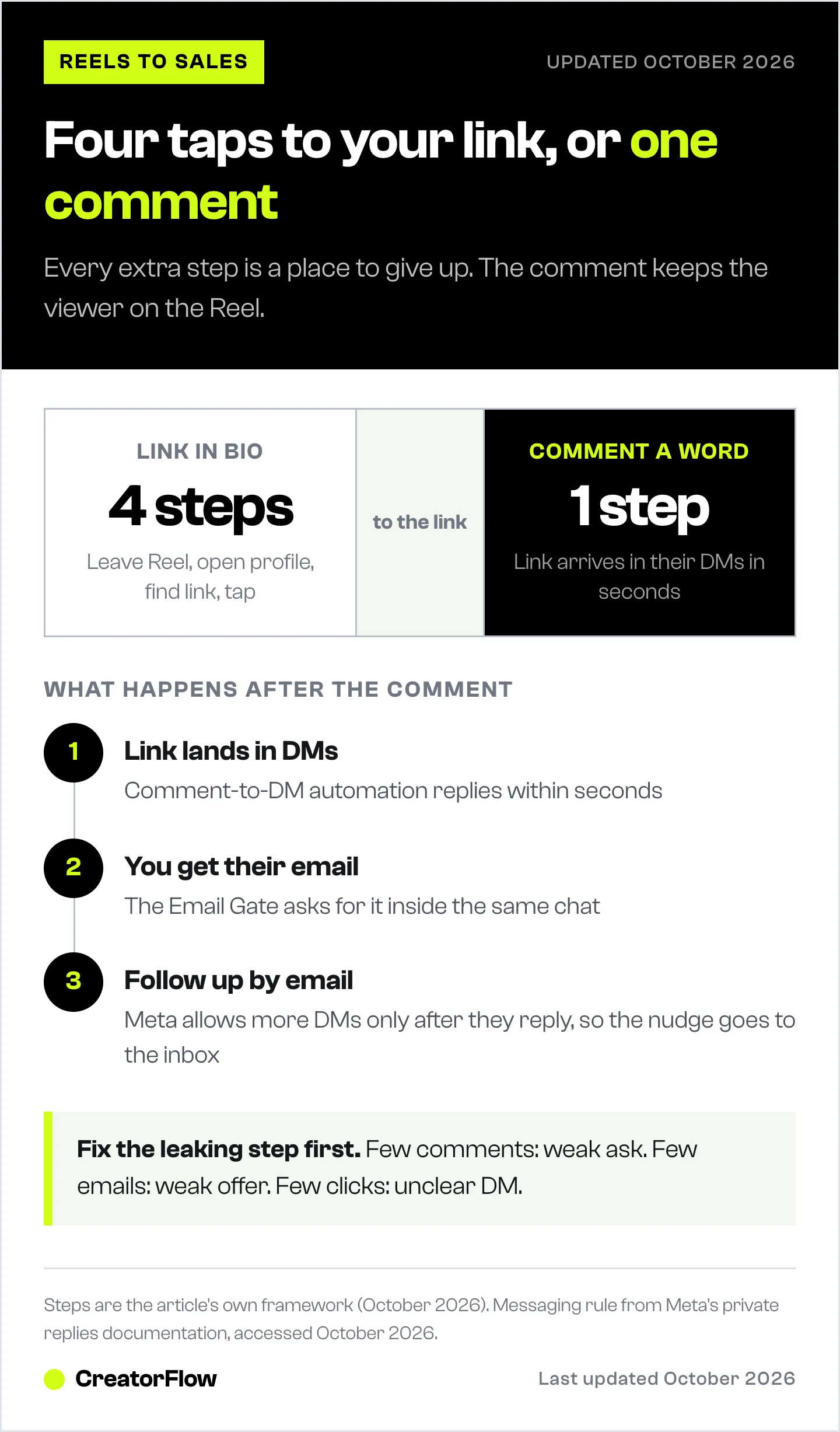
Reels get views but no sales when viewers have nowhere to go next. They watch, like and scroll away, because “link in bio” asks them to leave the Reel, open your profile, find the link and tap it. Turning Reels views into sales takes four steps instead: give viewers one word to comment, send the link to their DMs in seconds, collect their email, and follow up by email with anyone who did not buy.
Your Reel has 48,000 views. Your sales page has zero orders. The Reel worked. It reached people, and some of them wanted what you sell. Nothing caught them when the video ended.
This guide covers why that happens and how to fix it with comment-to-DM automation. It is for creators, coaches and small brands who post Reels and have something to sell, from an affiliate link to a course.
Key Takeaways
- Views do not equal buyers. A Reel reaches people who do not follow you yet. Without a next step, they leave.
- Link in bio is four steps. Leave the Reel, open the profile, find the link, tap it. Every step loses people.
- Give viewers one word to comment. Say it out loud and put it on screen.
- Send the link to their DMs in seconds. Comment-to-DM automation replies while the person still wants the thing.
- Collect the email in the same DM. You keep the lead even if they do not buy today.
- Follow up by email. Meta only allows more DMs after the person replies, so the nudge belongs in the inbox.
- Find the leaking step. Comments, emails, clicks and sales each tell you a different thing to fix.
Why Reels Get Views but No Sales
A view is not a visit. Someone watches your Reel, likes it, and the next Reel starts. Unless you give them something to do in those few seconds, the view ends there.
Reels make this gap bigger. Meta has reported more than 200 billion Reels plays per day across Facebook and Instagram (Meta Q2 2023 earnings call, July 2023). Your Reel is one of those plays, and the next one is a thumb movement away.
Reels also reach people who do not know you. That is why they are good for growth. It also means most viewers have no reason to visit your profile. A follower might go looking for your link. A stranger usually will not.
Three things decide whether a view becomes a sale:
- A clear next step. The viewer knows exactly what to do when the Reel ends.
- A short path. The thing they want arrives with as few taps as possible.
- A second chance. If they do not buy today, you can reach them again.
Most Reels that get views but no sales are missing all three.
Why “Link in Bio” Loses the People Who Wanted It
“Link in bio” asks a viewer to do four things:
- Stop watching the Reel
- Go to your profile
- Find the right link
- Tap it
Each step is a place to give up. The Reel keeps playing the next video. The profile shows twelve other posts. The link page has six buttons. People who wanted your product get lost on the way to it.
We compared bio links and DM automation on the same posts for affiliate links. The shorter path is the reason DMs win.
Link in bio still has a job. It suits people who visit your profile on purpose. It is a weak exit for a Reel, because most Reel viewers never open your profile.
The Fix: Give Viewers One Word to Comment
Replace “link in bio” with one word. The viewer types it under the Reel, which takes two seconds and keeps them on the video.
How to pick the word
- Name the thing. GUIDE, RECIPE, PLAN or SHOES tells the viewer what they get. LINK works too, but it says less.
- Keep it short. One word, easy to spell on a phone.
- Make it unusual enough. People should not type it by accident in a normal comment.
Our list of comment keywords that convert has more examples by niche.
What to say in the Reel
Say three things: the word, what they get, and where it arrives.
“Comment GUIDE and I’ll send you the full checklist in your DMs.”
Say it out loud and put it on screen as text. Meta says more than 75% of Instagram Reels views include sound (Meta for Developers, November 2024), so the spoken line reaches most viewers. The text catches everyone else, and it stays visible if they replay the Reel.
Put the ask in the caption’s first line too. Some people read the caption before they decide to comment.
Send the Link to Their DMs in Seconds
The comment is the moment the person wants your thing. A comment-to-DM automation sends the link to their DMs within seconds, through Meta’s official Instagram API. You set it up once, and it answers every comment on that Reel, day or night.
In CreatorFlow, you pick the Reel, add the keyword and write the message. Keywords match whole words and ignore capitals, so “guide” and “GUIDE” both work, and you can add up to 20 keywords to one automation for common spellings. The keyword trigger guide walks through every setting.
A DM that works:
Here’s the checklist you asked for: [link]
Start with step 1. It takes ten minutes.
Keep it short. Deliver the thing first, with one link. A DM full of links and offers makes the person choose, and choosing is where they stop.
Timing matters. Meta lets a business send one private reply within 7 days of a comment (developers.facebook.com, October 2026). Turn the automation on before you post, so the first wave of comments gets the fastest replies.
Collect the Email So You Keep the Lead
Most people will not buy the first time they see your link. That is normal. The question is whether you can reach them again.
Turn on the Email Gate in the automation. The person comments, gets a DM asking for their email address, types it into the chat, and then receives the link. They never leave Instagram, and the address goes to your Contacts with the automation it came from. Our Email Gate guide shows the setup step by step.
Want the checklist? What’s the best email to send it to? I’ll add the bonus template too.
Make the trade clear. People give an email for something specific, like “the checklist plus a template”. “Join my newsletter” gives them no reason.
Export your Contacts as a CSV file and import them into your email tool on a fixed day each week. Then the follow-up in the next step reaches everyone.
Follow Up by Email, Not by DM
Some people open the link and do not buy. A reminder a few hours or a day later brings some of them back. Where you send that reminder matters.
Meta’s rules decide it. After a private reply to a comment, a business can send more messages only if the person responds, and only within 24 hours of that response (developers.facebook.com, October 2026). A DM to someone who went quiet is not allowed. An email is.
So the nudge goes to the inbox. Send it the same day or the next morning, while they still remember the Reel:
Subject: Your spot is still open
Hi [name], you asked for the checklist yesterday. If you want help putting it into practice, the workshop is open until Friday: [link]
One reminder, one link, a real reason to act. Our guide to what to send a list built from DMs has the full three-email sequence.
If the person does reply in the DM, you can answer them there. A reply opens a new 24-hour window, and that is a normal conversation.
The Whole Funnel on One Page
| Step | What the viewer does | What you set up | Number to watch |
|---|---|---|---|
| 1. Reel gets views | Watches the Reel | Hook plus a spoken and on-screen ask | Views |
| 2. They comment a word | Types GUIDE | Keyword on the Reel | Comments with the keyword |
| 3. Link lands in DMs | Opens the DM | Comment-to-DM automation | Link clicks |
| 4. You get their email | Types their email | Email Gate | Emails collected |
| 5. Follow-up | Opens your email, buys | Reminder email the same day or next morning | Sales |
The whole setup takes one automation and one email. You build it once and reuse it on every Reel that sells the same thing.
How to Tell Which Step Is Leaking
When sales are low, one step is usually the problem. Find it before you change anything else.
| What you see | What it means | What to change |
|---|---|---|
| High views, few comments | The ask is weak or too late | Say the word earlier, name the thing they get |
| Many comments, few emails | The offer is not worth an email | Offer something more specific, or skip the Email Gate on this Reel |
| Many emails, few link clicks | The DM is unclear | One link, one sentence on why to tap it |
| Many clicks, few sales | The page or the price does not fit | Check the page matches what the Reel promised |
| Sales on day one, none after | No follow-up | Send the reminder email |
Change one step at a time. If you change the Reel, the word and the offer together, you will not know which one worked.
CreatorFlow shows clicks and the countries and cities they come from for each automation. Use that next to your sales numbers to see which Reels bring buyers, not only viewers. For the Reel itself, our hook templates help with the first three seconds, and the free Instagram Reel analyzer scores a Reel and shows what holds it back.
FAQ
Why do my Reels get views but no sales?
Usually because viewers have no easy next step. “Link in bio” asks them to leave the Reel and find your link, and most do not. Give them one word to comment, send the link to their DMs automatically, and collect their email so you can follow up.
Is comment-to-DM better than link in bio?
For Reels, yes. It replaces four steps with one comment, and the link arrives where the person already is. Link in bio still works for people who visit your profile on purpose, so keep both.
What word should I ask people to comment?
A short word that names what they get, like GUIDE, RECIPE or PLAN. Say it out loud and show it on screen. One word per offer also tells you which Reel brought in which buyers.
Can I send a follow-up DM to people who did not buy?
Only if they reply. Meta allows one private reply to a comment, and more messages only after the person responds, within 24 hours of that response (developers.facebook.com, October 2026). That is why the follow-up goes by email.
Is comment-to-DM automation allowed on Instagram?
Yes, when the tool uses Meta’s official Instagram API and only messages people who commented or messaged you first. CreatorFlow is a Meta Tech Provider and connects through Instagram login, with no password sharing.
How many DMs can I send?
Meta publishes per-second limits. On the Instagram API with Instagram Login it is 100 calls per second for text and links, and 750 private replies per hour to comments on posts and Reels (developers.facebook.com, July 2026). Tools also pace their sends to stay well below those limits. Our Instagram API rate limits guide explains the details.
How long does the setup take?
One automation and one email. In CreatorFlow you pick the Reel, add the keyword, write the DM and turn on the Email Gate. The follow-up email is written once in your email tool.
Turn Your Next Reel Into a Sales Path
The next Reel you post will get views. Decide before you post where those viewers go: one word, a link in their DMs, an email, and a reminder. CreatorFlow handles the comment, the DM and the email capture, so every viewer who wants your thing gets it in seconds. For the bigger system, see how to turn DM conversations into leads, or the three-step funnel for talking-head Reels.
Reels plays from Meta’s Q2 2023 earnings call. Sound figure from Meta for Developers, November 2024. Messaging rules from Meta’s private replies and Instagram messaging documentation, accessed October 14, 2026. The Email Gate and CSV export are CreatorFlow Pro plan features. Individual results vary.


