
Instagram DM automation converts casual conversations into qualified leads by responding instantly, qualifying interest, and following up automatically. DMs achieve ~90% open rates and ~60% reply rates compared to ~20% open and 1-5% reply for email (LeadResponse, April 2026). Responding within 1 minute increases conversion by 391% compared to waiting 30 minutes (Teamgate, April 2026). The channel is warm and the attention is there.
You’re getting DMs, Story replies, and Reel comments. But none of that turns into leads, sales, or booked calls. The gap is speed, qualification, and follow-up consistency.
This guide breaks down the exact framework: 5 trigger types, a 3-message qualification sequence, and automated follow-ups that close deals while you sleep.
Key Takeaways
- DM open rates vs email: Instagram DMs achieve ~90% open rates and ~60% reply rates, compared to ~20% open and 1-5% reply for email (LeadResponse, April 2026)
- Speed wins deals: Responding within 1 minute increases conversion by 391% compared to waiting 30 minutes, lead qualification drops 80% after 5 minutes (Teamgate, April 2026)
- Monthly reach: 150 million users message businesses on Instagram every month (Meta, cited by LeadResponse, April 2026)
- Flat-rate vs per-contact pricing: CreatorFlow costs $15/month flat regardless of audience size, while ManyChat’s Advanced tier costs $199/month at 25,000 contacts
- 5 trigger types ranked: Comment-to-DM generates the highest volume; keyword message triggers generate the highest-intent leads, use both for balanced lead flow
- Bottom line: Set up a 3-message qualification sequence (deliver value, qualify interest, offer next step) and track click-through rates to double down on what converts

How to Convert Instagram DMs into Leads
Converting Instagram DMs into leads takes three moves. Catch the intent: a comment keyword, a Story reply, or a DM keyword fires an automated reply in 2 to 5 seconds, while the person is still in the app. Qualify: one question about their situation sorts buyers from browsers. Then follow up on a delay with the next step, a booking link, a product link, or an email ask.
Why DMs Are Your Highest-Converting Channel
Instagram DMs outperform every other channel for lead conversion. Not by a small margin, by multiples.
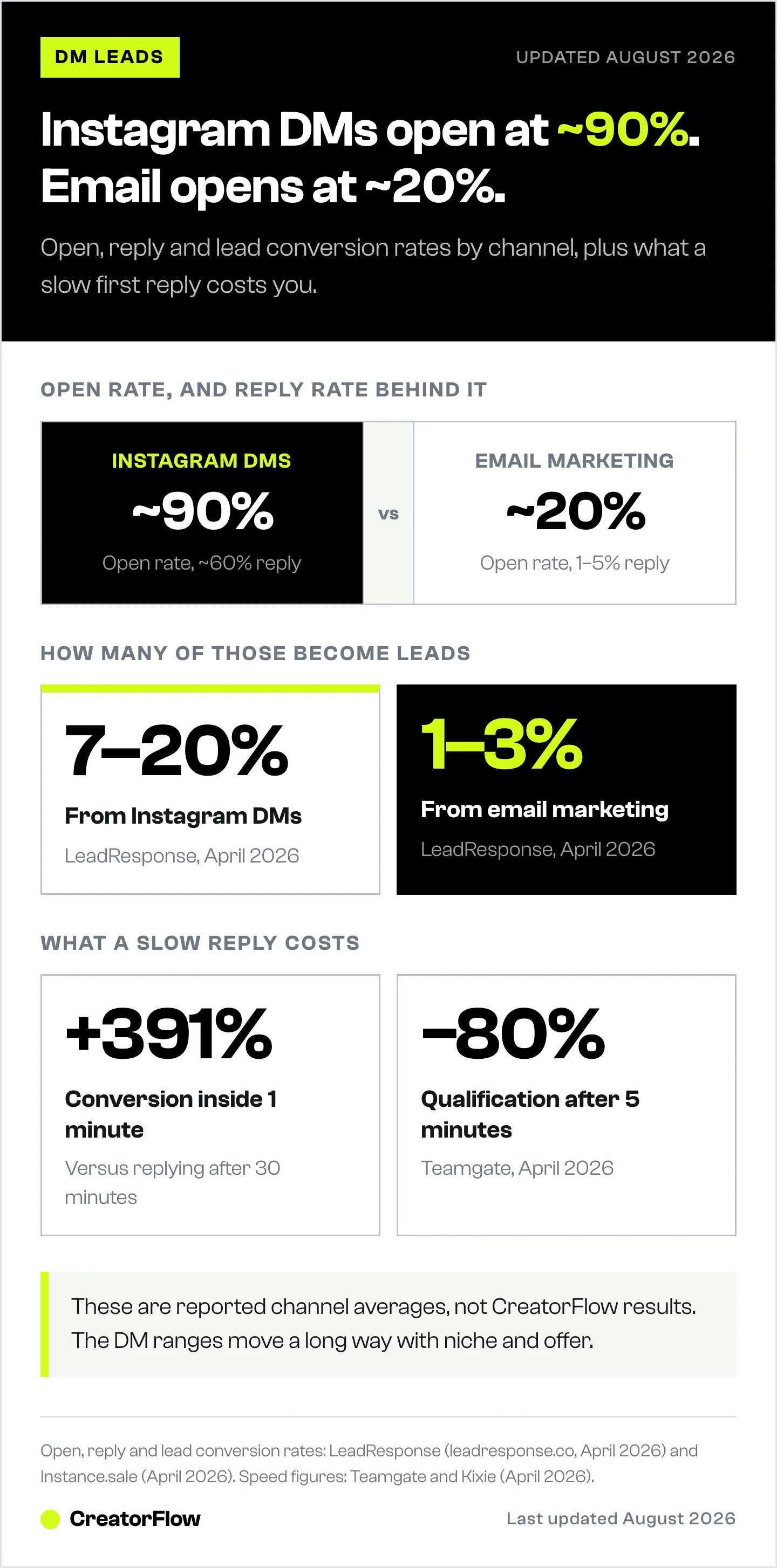
| Channel | Open Rate | Reply Rate | Lead Conversion Rate |
|---|---|---|---|
| Instagram DMs | ~90% | ~60% | 7-20% |
| Email marketing | ~20% | 1-5% | 1-3% |
| Facebook ads | N/A | N/A | 1-3% |
| Cold outreach | ~25% | 2-5% | 1-2% |
Sources: LeadResponse (leadresponse.co, April 2026), Instance.sale (April 2026)
150 million users message businesses on Instagram every month (Meta, cited by LeadResponse, April 2026). The demand for DM conversations already exists. The question is whether you can convert those conversations at scale, without being glued to your phone 16 hours a day.
If you’re new to automating DMs, start with our complete guide to Instagram DM automation for the foundational setup. Three factors make DMs uniquely powerful for lead generation:
1. The conversation is private. People ask questions in DMs they’d never post publicly. “How much does your coaching cost?” or “Does this work for my situation?” Private context = higher intent.
2. The response is immediate. When someone comments “LINK” on your Reel and gets a DM in 3 seconds, you’ve captured their attention at peak interest. That window closes fast, lead qualification drops 80% after 5 minutes (Teamgate, April 2026).
3. The friction is zero. No forms to fill out. No landing pages to load. No email verification. They’re already in the app, already engaged, already messaging you.
The 5 DM Triggers That Generate Leads
Not all DM conversations start the same way. Each trigger type captures a different level of intent and requires a different automation response.
1. Comment-to-DM Triggers
Someone comments a specific keyword on your post, and an automated DM fires instantly.
How it works:
- You post a Reel with CTA: “Comment GUIDE for the free checklist”
- Follower comments “GUIDE”
- Automated DM delivers within 2-5 seconds
Best for: Lead magnets, affiliate links, free resources, product links
Why it converts: The user took a public action (commenting) which is a micro-commitment. Public commitments increase follow-through by 3x (Freedman & Fraser, 1966). The comment also boosts engagement signals, increasing your post’s reach.
Setup in CreatorFlow:
- Create new automation → Comment trigger
- Set trigger word (e.g., “GUIDE”)
- Write your DM message with the link
- Enable on specific post or all posts
- Test it, takes under 5 minutes total
2. Story Reply Triggers
When someone replies to your Instagram Story with a specific keyword or any message, automation handles the response.
How it works:
- You post a Story with a poll, question sticker, or CTA
- Follower replies or sends a keyword
- Automated DM responds with your offer/link
Best for: Time-sensitive offers, flash sales, event registrations, building conversation
Why it converts: Story replies signal high engagement. Someone who actively responds to your Story is already warmed up. Stories also create urgency (24-hour expiration) which drives faster action.
3. Keyword Message Triggers
When someone sends you a DM containing a specific keyword, without you prompting on a post, automation kicks in.
How it works:
- Someone DMs you “pricing” or “booking”
- Automation detects the keyword
- Sends a tailored response with relevant information
Best for: FAQ handling, pricing inquiries, booking requests, product questions
Why it converts: These are the highest-intent leads. They came to YOU. They typed out a question. They want an answer. Responding in seconds instead of hours (or days) is the difference between winning and losing the lead.
4. Content CTA Triggers
Your Reel, carousel, or post includes a CTA that drives DM conversation, not “link in bio” but an action that starts dialogue.
How it works:
- Caption says: “DM me PLAN for the full breakdown”
- Follower sends a DM with “PLAN”
- Automation delivers the resource + starts qualification
Best for: Coaches, educators, service providers who want to qualify before selling
Why it converts: This positions you as accessible. “DM me” feels personal. It opens a conversation thread where you can nurture the lead over time.
5. Ad Interaction Triggers (Advanced)
Instagram ad click-to-DM campaigns route ad traffic directly into your DMs instead of a landing page.
How it works:
- Run Instagram ad with “Send Message” objective
- User clicks → lands in your DM inbox
- Automation handles the first response and qualification
Best for: Higher-budget campaigns, product launches, webinar registrations
Why it converts: Removes the landing page step entirely. No form abandonment, no page load time, no bounced traffic. The conversation starts immediately in a familiar interface.
The Lead Qualification Framework
Getting DMs is step one. Qualifying those DMs into leads worth your time is step two.
Not every person who comments “LINK” is a buyer. Some are curious. Some are competitors. Some will never convert. Automation helps you sort signal from noise before you invest time.
The 3-Message Qualification Sequence
Message 1: Deliver value (instant)
“Hey! Here’s the free guide you asked for: [link]. It covers [specific topic]. Let me know if you have questions!”
Purpose: Fulfill the promise. Build trust immediately.
Message 2: Qualify interest (2-4 hours later)
“Quick question, are you currently [doing the thing your product/service solves]? Just want to make sure I send you the right resources.”
Purpose: Segment leads. Someone who says “yes, I’m struggling with X” is a warm lead. Someone who doesn’t reply is cold.
Message 3: Offer next step (24 hours later)
“A lot of people who grabbed that guide ended up booking a free call to get personalized advice. Want me to send you available times?”
Purpose: Move qualified leads to the next stage (call, purchase, signup).
Qualification by Persona
Different leads need different qualification paths:
| Lead Type | Qualifying Question | Next Step |
|---|---|---|
| Coaching prospect | ”What’s your biggest challenge with [topic] right now?” | Book discovery call |
| Affiliate buyer | ”Have you tried [product category] before?” | Send comparison or recommendation |
| Course buyer | ”Where are you in your [journey/skill level]?” | Send relevant module or offer |
| E-commerce shopper | ”Which [product type] are you looking for?” | Send product link with discount |
| Agency prospect | ”How many accounts are you managing?” | Send pricing or schedule call |
Lead Scoring Inside DMs
Track engagement signals to prioritize your time:
- Hot lead (follow up personally): Replied to 2+ messages, asked specific questions, mentioned budget or timeline
- Warm lead (nurture via automation): Replied once, clicked the link, hasn’t committed
- Cold lead (low priority): Opened but didn’t reply, no link clicks after 48 hours
CreatorFlow’s link tracking lets you see who clicked and who didn’t, so you know which leads are active without guessing.
Converting Qualified Leads: Channel-Specific Playbooks
For Coaches and Service Providers
Goal: Book discovery calls
DM flow:
- Comment trigger → Deliver free resource (PDF, video, template)
- Follow-up → Ask qualifying question about their situation
- Qualified response → Send Calendly/booking link
- No-show follow-up → “Hey, noticed you didn’t make it, want to reschedule?”
Conversion benchmark: Pre-qualified prospects who exchange 3+ DMs accept sales calls 25-30% of the time (LeadResponse, citing Napolify, April 2026).
CreatorFlow integrates with Calendly and Acuity for direct booking link delivery. Once a qualified lead is in conversation, the qualify-first method for closing sales in Instagram DMs covers what to say without sounding pushy.
For Affiliate Marketers
Goal: Drive clicks and commissions
DM flow:
- Comment trigger → Send affiliate link with context
- Track clicks → CreatorFlow’s link tracking shows who clicked
- Follow-up for non-clickers → “Hey, did you find what you needed? Here’s a quick comparison of the top 3 options: [link]”
Conversion benchmark: DM-delivered affiliate links see 20%+ click-through rates vs 2-5% from bio links (industry reports, April 2026).
For E-commerce
Goal: Drive traffic to product pages
DM flow:
- Comment trigger or keyword → Send product link
- Follow-up → “Did you find the right size/color? Happy to help you pick”
- Abandon recovery → “That [product] is selling fast, want me to hold your spot?”
Conversion benchmark: 54% of Instagram users have purchased a product after seeing it on the platform (Maedix, citing internal data, April 2026).
For Course Creators
Goal: Sell digital products and courses
DM flow:
- Comment trigger → Deliver free chapter/module/sample
- Qualify → “What’s your experience level with [topic]?”
- Recommend → Send relevant course link based on their answer
- Overcome objections → Address common questions in follow-up
Setting Up Your Automation Stack
Option 1: CreatorFlow ($15/month flat rate)
Best for: Solo creators, coaches, affiliates, small teams
- Pricing: $15/month regardless of audience size (as of May 2026, creatorflow.so/pricing)
- DMs per month: 5,000 on Pro plan
- Setup time: Under 5 minutes
- Key features: Comment-to-DM, story replies, keyword triggers, email capture, link tracking, follow-up sequences
- API: Meta’s official Instagram Graph API (minimal ban risk when using the official API)
- Scope: Instagram, end to end, every feature built around how Instagram behaves
Option 2: ManyChat ($17-199/month)
Best for: Multi-platform needs, agencies, complex workflows
- Pricing: Starts at $17/month for 250 contacts (Essential), scales to $199/month for 25,000 contacts (Advanced). Manychat AI is bundled into Pro and above (manychat.com/pricing, August 2026)
- Setup time: 30-60 minutes for full workflow
- Key features: Multi-platform (Instagram + Facebook + WhatsApp + SMS), advanced workflow builder, GPT-powered AI responses, Shopify integration
- API: Meta’s official Instagram Graph API
- Scope: Contact-tier pricing that scales with list size; the flow builder is built for multi-channel automation
Quick Comparison
| Feature | CreatorFlow | ManyChat |
|---|---|---|
| Starting price | $15/month flat | $17/month (250 contacts) |
| 10K contacts cost | $15/month | $199/month (Advanced) |
| Platforms | Instagram only | Instagram, Facebook, WhatsApp, SMS |
| Setup time | Under 5 min | 30-60 min |
| Workflow complexity | Simple, template-first | Advanced, drag-and-drop builder |
| Email capture | Yes (Pro plan) | Yes |
| Link tracking | Yes (Pro plan) | Yes |
| Message style | Template-first, exact text you write | AI-generated replies ($29/mo add-on) |
| API type | Official Meta API | Official Meta API |
Sources: creatorflow.so/pricing, manychat.com/pricing, Featurebase (featurebase.app, April 2026)
Choose CreatorFlow when you want flat pricing, fast setup, and Instagram-focused simplicity. Choose ManyChat when you need multi-platform support or advanced conditional workflows.
Compliance and Safety Rules
Automation that violates Instagram’s policies gets your account restricted. Follow these rules:
Rate limits (verified April 2026):
- Meta publishes per-second limits (100 calls/sec for text and links) plus 750 private replies per hour to post and reel comments (developers.facebook.com/docs/graph-api/overview/rate-limiting, July 2026); the ~200 DMs/hour figure is tool-side pacing
- Exceeding this returns HTTP 429 errors, your automation pauses for 1 hour, no account ban
- Both CreatorFlow and ManyChat handle rate limiting automatically
The 24-hour messaging window:
- After someone sends you a message or interacts with your content, you have 24 hours to respond
- After 24 hours without user interaction, you cannot send new messages
- This is Meta’s policy, enforced at the API level (developers.facebook.com/docs/instagram-platform)
Permission-based messaging:
- Only send DMs to people who initiated contact (commented, replied, messaged)
- Never send unsolicited mass DMs
- Always deliver what you promised in the CTA
Data privacy:
- If collecting emails in DMs, ensure GDPR/CCPA compliance
- CreatorFlow is GDPR-compliant (CreatorFlow Labs, S.L., Madrid, Spain)
- Disclose data collection practices in your privacy policy
5 Mistakes That Kill DM Lead Conversion
Mistake 1: Slow responses without automation. 78% of buyers go with whoever responds first (Verse.ai, April 2026). Average business response time is 47 hours. If you’re manually checking DMs twice a day, you’re losing leads to creators who respond in seconds.
Mistake 2: Generic, robotic messages. “Thanks for your interest! Here’s our link!” sounds automated even when it’s manual. Write DMs how you’d text a friend. Use their name if possible. Reference what they commented on.
Mistake 3: No qualification step. Sending the same link to everyone wastes your follow-up time on unqualified leads. Add one qualifying question to segment hot leads from browsers.
Mistake 4: Skipping the follow-up. One DM is not a lead generation strategy. It’s a starting point. The follow-up within 24 hours is where 30-40% of conversions happen. Set it up once and let automation handle it.
Mistake 5: Ignoring analytics. If you don’t track which triggers, posts, and DM sequences generate leads, you can’t improve. Use link tracking to measure click-through rates. Double down on what works.
FAQ
What is Instagram DM lead generation?
Instagram DM lead generation is the process of converting direct message conversations into qualified leads, people who are interested in your product, service, or offer and have taken a step toward purchasing. It uses triggers (comments, story replies, keywords) to start automated conversations that qualify and convert prospects.
How many leads can I generate from Instagram DMs?
It depends on your engagement rate and content quality. A creator with 10K followers and 3% engagement who posts 4 Reels per week with comment CTAs can realistically capture 50-200 leads per month. DM-to-lead conversion rates range from 7-20% depending on niche and offer quality (LeadResponse, April 2026).
Is Instagram DM automation safe for my account?
Yes, when using tools built on Meta’s official Instagram Graph API. CreatorFlow and ManyChat both use the official API with OAuth authentication (no password sharing). This means minimal ban risk when operating within the roughly 200 DMs/hour pacing convention these tools enforce. Avoid tools that use unofficial methods like browser scraping.
How fast should I respond to DMs for lead conversion?
As fast as possible. Responding within 1 minute increases conversion by 391% compared to responding after 30 minutes (Kixie, April 2026). After 5 minutes, lead qualification odds drop 80% (Teamgate, April 2026). Automation responds in 2-5 seconds, that speed gap is where you win.
What’s the best trigger type for lead generation?
Comment-to-DM triggers generate the highest volume because they’re visible, create social proof, and boost engagement metrics. Keyword message triggers generate the highest-intent leads because those people came to you with a specific question. Use both: comment triggers for volume, keyword triggers for quality.
Can I capture emails through Instagram DMs?
Yes. CreatorFlow’s Pro plan and ManyChat both support email collection inside DM conversations. After delivering your resource, follow up with: “Want me to email you the full pack? Drop your email below.” This builds your email list directly from Instagram engagement.
Related Articles
- DM Funnel: The Complete Guide to Instagram Sales Funnels, Full breakdown of DM funnel architecture
- Instagram DM Scripts That Convert: 15 Proven Templates, Copy-paste message templates for your automation
- Qualify Instagram Leads Before Discovery Calls, Advanced lead qualification strategies
- Collect Emails from Instagram DMs with Automation, Step-by-step email capture setup
- Instagram Lead Magnet Automation: Deliver Free PDFs via DM, Lead magnet delivery workflows
- AI Chatbot Lead Generation: Turn DMs Into Qualified Leads, How chatbots capture, qualify, score, and route leads
- Real Estate Leads on Social Media: The 24-Hour Rule, Why social leads expire and how agents capture them in time
Information verified as of May 2026. Competitor pricing and platform policies may change, check official sources for the latest details.
Sources: LeadResponse (leadresponse.co), Instance.sale (instance.sale), Maedix (maedix.com), Meta Developer Documentation (developers.facebook.com), Verse.ai (verse.ai), Kixie (kixie.com), Teamgate (teamgate.com), Featurebase (featurebase.app), Dealism (dealism.ai), Napolify (napolify.com).
This article is for informational purposes only. CreatorFlow is built by CreatorFlow Labs, S.L. (Madrid, Spain). Always verify current pricing and features at creatorflow.so before purchasing.


