

Before your next yap video goes live, set up three things. Start an email list. Put a comment keyword on the video that sends a DM, asks for an email address and then delivers what you promised. Close that DM with one question about what the person is stuck on, and send the product that matches their answer. The video earns attention. These three steps turn it into sales.
A yap video is a selfie-style video you talk through with no script and light editing, usually with subtitles and a text hook on screen. The format works because it feels like a person talking to you. Sprout Social’s 2026 trends report quotes a creator saying “raw, unedited yap videos” are one of the two styles doing well right now (sproutsocial.com, April 2026).
The trouble starts after you post. Two hundred comments arrive, you reply to a few, and a week later the video has done its job for the algorithm and nothing for your business. This guide covers the setup that runs behind every yap video you post, built with Instagram comment-to-DM automation. It is for creators and coaches who sell something now, or plan to.
Key Takeaways
- The video’s job is one typed word. Ask for a comment keyword, not a sale.
- Build the email list first. Kit’s free plan covers up to 10,000 subscribers (kit.com/pricing, October 2026).
- Collect the email inside the DM. The person types their address in the chat they are already in, then gets the link.
- Ask one question at the end of the DM. Give three one-word answers. Each word triggers its own DM with the matching product.
- Turn the week’s videos into one newsletter. The week’s yap videos become one email, so the list hears from you every week.
- Measure clicks, not opens. Apple Mail marks emails as opened automatically, which inflates open rates (mailerlite.com, April 2026).
What to Do After You Post a Yap Video
A yap video that lands gives you comments. Comments are not customers. Between the two sits a short window where the person who typed the word still remembers why.
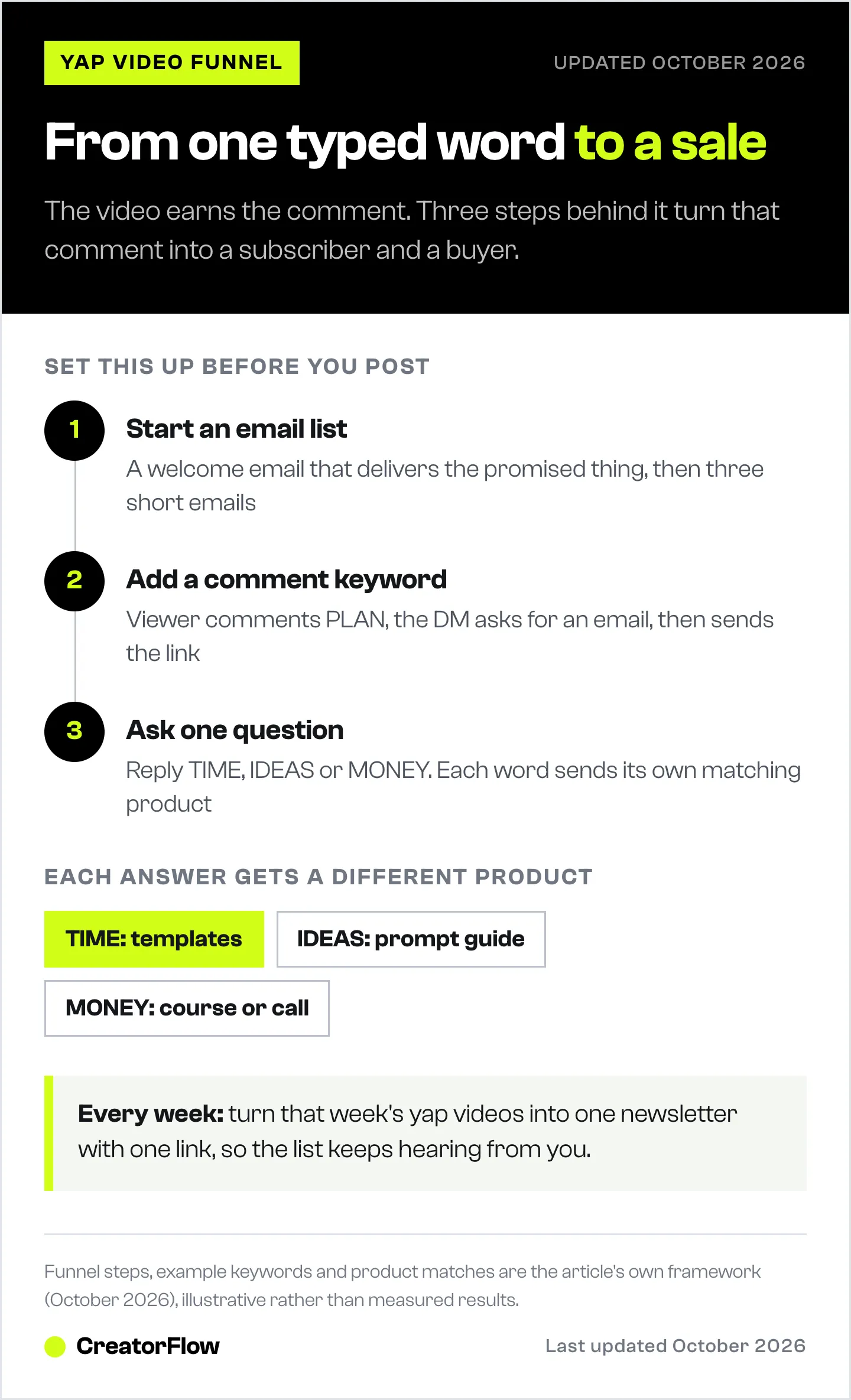
The setup has three parts, and each one does a single job:
- The email list keeps the people you reach. Instagram can change what it shows. Your list stays yours.
- The comment keyword automation catches every comment within seconds and turns it into an email address.
- The question sorts the people by what they need, so each one gets the product that fits them.
Then a weekly habit keeps the list warm: you turn the week’s posts into one newsletter.
Why a Yap Video Needs a Funnel Behind It
Reach on Instagram is a small share of your followers. Socialinsider’s 2026 study of 872,075 posts estimates that a Reel reaches 4.10% of an account’s followers on average, with carousels at 4.50% and images at 4.00% (socialinsider.io, September 2026).
Email works on a different number. MailerLite’s benchmark across 3.6 million campaigns reports a 43.46% median open rate (mailerlite.com, December 2025, updated April 2026). The figure runs high, because Apple Mail Privacy Protection marks emails as opened before anyone reads them, so real open rates are lower than reported. Even so, an email lands in an inbox the person chose to give you. A Reel competes with every other Reel.
That is the case for the list. The yap video finds the people. The list is how you reach them again on your schedule, not the algorithm’s.
Step 1: Start an Email List Before the Video Goes Live
Pick an email tool and set it up before you post. If you wait until the comments arrive, the first wave of people gets nothing.
You need three things in place:
- An account with an email tool. Kit’s free plan covers up to 10,000 subscribers, and its paid Creator plan starts at $33/month billed yearly at 1,000 subscribers (kit.com/pricing, October 2026). Beehiiv, MailerLite and Flodesk also work.
- A welcome email. It delivers the thing you promised in the video, and nothing else.
- A short sequence after that. Three emails is enough to start. Our guide on what to send a list built from DMs has the timing and the templates.
Your list in CreatorFlow lives on the Contacts page. Export it as a CSV file and import it into your email tool on a fixed day each week, so new subscribers get their welcome email on time.
Step 2: Put a Comment Keyword on the Yap Video
This is the step that turns attention into an email address. You give viewers one word to comment. A comment-to-DM automation sends each person a DM within seconds, through Meta’s official Instagram API.
What to say in the video
Say the keyword out loud, and put it on screen as text. Most people watch with the sound off.
A line that works: “Comment PLAN and I’ll send you the exact checklist I use.” Name the keyword, name the thing, and say where it arrives. Keep the keyword short and unusual enough that people do not type it by accident.
In CreatorFlow, keywords match whole words and ignore capitals. “plan” in a comment triggers the automation. “planning” does not. You can add up to 20 keywords to one automation, so add the common spellings.
The DM that collects the email
Turn on the Email Gate in the automation. The person comments, gets a DM asking for their email address, types it in the chat, and then receives the link. They never leave Instagram, and the address lands in your Contacts with the automation it came from.
A DM that works:
Here’s the checklist! What’s the best email to send it to? I’ll put a bonus template in there too.
Ask for the email in exchange for something specific. “Join my newsletter” gives people no reason. “The checklist plus a bonus template” does. If you are unsure whether asking for an email will cost you clicks, read what an email gate does to click-through.
One timing rule matters here. Meta lets a business send a private reply within 7 days of a comment (developers.facebook.com, October 2026). Set the automation up before you post, so every comment from the first hour gets its DM.
Step 3: Ask One Question, Then Send the Matching Product
You probably have something to sell, or you are planning it. This step is where the sale happens, and it starts with a question.
At the end of the delivery DM, ask what the person is stuck on. Give them three answers, each one a single word:
One quick question: what’s hardest for you right now? Reply TIME, IDEAS or MONEY.
Then build one keyword trigger automation per answer word. When someone replies TIME, the TIME automation sends the product that solves a time problem. IDEAS gets a different one. MONEY gets a third. Each automation is short and you can check every message before it goes out.
| They reply | What they told you | What you send |
|---|---|---|
| TIME | ”I can’t fit this in” | Your templates or done-for-you pack |
| IDEAS | ”I don’t know what to post” | Your prompt guide or content calendar |
| MONEY | ”I’m not earning from this yet” | Your course, coaching call or paid product |
The reply also matters for Meta’s rules. When the person sends a DM, your account has 24 hours to respond to it (developers.facebook.com, October 2026). The keyword automation answers in seconds, so the window is never a problem.
Two rules keep this step working:
- Three answers, no more. Every extra option makes the reply harder to type. If you only sell one product, use two answers: one for people ready to buy, one for people who want the free version first.
- Match the product to their words, not to your price list. Someone who said TIME will not buy a 12-week course. They will buy the thing that saves them an evening.
The answers also tell you what your audience needs. After a month, count which word comes back most. That is your next product or your next yap video.
The Weekly Loop: Turn Your Yap Videos Into a Newsletter
A list you never write to goes cold. The fix costs you about an hour a week, because the writing is already done.
Every week, take the videos you posted and turn them into one email:
- Pick the best idea from each video. Write it in two or three sentences, the way you said it on camera.
- Add one thing the videos did not include. A tip you cut for time, a reader question, a result.
- End with one link. A product, a booking page or your latest video. One link, not five.
Write it the way you talk. Your subscribers joined because of how you sound on camera, so the email should sound the same.
The loop feeds itself. The newsletter sends people back to your videos. The videos send new people to the list. The question in step 3 tells you what to make next.
What to Measure
Four numbers tell you if the funnel works. Check them each week for every yap video with a keyword.
| Number | Where to find it | What it tells you |
|---|---|---|
| Comments with the keyword | The automation’s activity | Whether the video’s call to action landed |
| Emails collected | CreatorFlow Contacts | Whether the offer was worth an email address |
| Replies to the question | Each keyword automation | Which problem your audience has most |
| Product link clicks | CreatorFlow link tracking | Whether the matched product fits |
Skip open rate as your main signal. Apple Mail marks emails as opened automatically, so opens overstate how many people read (mailerlite.com, April 2026). Clicks are harder to fake.
If comments are high and emails are low, the offer in the DM is too weak. If emails are high and replies are low, the question is too hard to answer. Fix the weakest step first. For more on the video side, our guide to yapping on Instagram covers the format, the structure and how to practise talking to camera.
FAQ
What is a yap video?
A yap video is a selfie-style video where you talk to the camera with no script and little editing. Most add subtitles and a text hook at the top. Creators use them for opinions, tips and stories because they feel personal and take minutes to film.
How do I make money from yap videos?
Ask viewers to comment a keyword. An automation sends each one a DM that collects their email address and delivers a free resource. The same DM asks what they are stuck on and sends the product that matches. The sale happens in the DM and the email list, not in the video.
What should I say at the end of a yap video?
Say one keyword, one thing they get, and where it arrives. For example: “Comment PLAN and I’ll DM you my checklist.” Put the keyword on screen too, because many viewers watch with the sound off.
Do I need an email list if I already sell in DMs?
Yes. A DM conversation stays open only 24 hours after the person last messages you, under Meta’s rules. An email list lets you reach the same person next week, next month and at every product launch.
Which email tool should I use?
Any tool you will write to every week. Kit has a free plan for up to 10,000 subscribers (kit.com/pricing, October 2026). Beehiiv, MailerLite and Flodesk are other common choices. Export your CreatorFlow contacts as a CSV and import them on a fixed day each week.
How many answers should the question have?
Three at most, each a single word. One word is easy to type on a phone. If you sell only one product, use two answers: one for buyers and one for people who want the free version first.
Can I use the same keyword on every yap video?
You can, but separate keywords per offer tell you which video brought in which subscribers. CreatorFlow records the automation each contact came from, so different keywords give you cleaner numbers.
Kit pricing verified at kit.com/pricing. Email benchmark from MailerLite’s industry benchmarks. Reach rates from Socialinsider’s Instagram reach study. Messaging windows from Meta’s Instagram messaging and private replies documentation. Trend quote from Sprout Social. All accessed October 14, 2026. The Email Gate, link click tracking and CSV export are CreatorFlow Pro and Growth features. Individual results vary.


