
An Instagram commenting strategy in 2026 means leaving substantive, on-topic comments on a small set of accounts in your niche, 8-15 per day, paced naturally and never copy-pasted. The goal is profile visits, not likes on the comment itself. Combined with a comment-trigger CTA on your own posts, it turns curious profile visitors into automated DM conversations and conversions.
Most “Instagram comment ideas” lists you find online are 200+ generic copy-paste lines. They don’t tell you which comments actually drive profile visits, which ones get accounts shadowbanned, or how to comment differently if you’re a coach versus an affiliate. That’s the gap this guide closes.
You’ll get the type of comments that earn profile visits, exact scripts for four niches, the pacing that keeps you out of trouble, and a measurement framework so you stop guessing whether commenting is even working.
Key Takeaways
- Comments work because of interaction history. Instagram’s algorithm uses interaction frequency between accounts as a ranking signal, so comments make you more visible to that creator and their audience (buffer.com, May 2026).
- Generic comments are the trap. Repetitive comments and copy-paste patterns are explicitly named in Meta’s Community Guidelines as inauthentic behavior (facebook.com/help/instagram, May 2026).
- There are no published comment limits. Meta does not publish daily comment caps for organic accounts, so all numbers you see online are third-party consensus, not policy (metricool.com, May 2026).
- Quality > quantity. 10 substantive comments on the right accounts beats 50 emoji comments scattered everywhere.
- The first comment matters more. Comments left in the first 5-10 minutes of a post sit at the top of the comment section and get the most secondary engagement.
- Commenting alone is not a growth strategy. It only converts when paired with a profile and feed that gives the visitor a reason to follow and engage.
- Closing the loop = automation. A comment-trigger CTA on your own posts plus DM automation turns the profile visits commenting earns into conversations.

What Is an Instagram Commenting Strategy?
An Instagram commenting strategy is a repeatable outreach routine. You build a daily list of 30 to 50 accounts split across peers, creators one tier up, and an adjacent niche. You comment early, inside the first 5 to 10 minutes of a post, write something specific to what you read, and spread your comments across the day instead of firing them in bursts. The metric you watch is profile visits, not likes on the comment.
Why Commenting Still Works in 2026
Instagram engagement is down roughly 24% year over year, and follower growth is slowing across most niches (socialinsider.io, May 2026). The accounts still growing are the ones being seen by adjacent audiences, and commenting is one of the few free ways to put yourself in front of those audiences without paying for ads.
The mechanism is interaction history. Instagram’s algorithm gives weight to how often two accounts interact, which is why people who comment on your posts start seeing more of your content, and vice versa (buffer.com, May 2026). When you leave a thoughtful comment on a creator’s post, three things happen: their followers see your username, the creator’s brain starts to recognize you, and the algorithm logs the interaction.
None of that is groundbreaking. What’s changed is the difficulty curve. With engagement down across the board, hashtags weaker than they were two years ago, and Reels saturation high, lateral discovery (being seen on someone else’s post) has become disproportionately valuable.
The Spam Trap: What Actually Gets Flagged
Most “comment more” advice ignores the part where Instagram aggressively detects bot-like behavior. Meta’s Community Guidelines explicitly prohibit repetitive comments, copy-pasted content, and inauthentic engagement patterns (facebook.com/help/instagram, May 2026). The platform doesn’t publish exactly which patterns trigger action, but the consensus among social media tool vendors lines up on the same red flags.
What gets accounts flagged or shadowbanned:
- Posting the same comment text on multiple posts (the fastest way to get caught)
- Commenting from a brand-new account at high volume
- Emoji-only or one-word comments at scale
- Comments with a link to your profile or another site
- Comments that mention multiple accounts (perceived as spam tagging)
- Comments posted in tight bursts (10 comments in 90 seconds)
What is fine:
- Substantive comments specific to the post
- Asking a real question related to the content
- Sharing a relevant experience in 1-3 sentences
- Replying to other commenters in the thread
- Using emoji as accent, not as the comment itself
The pattern Meta cares about is “does this look like a human reading the post.” Anything that looks like a script will eventually get throttled. Repeat offenders see their comments hidden, their account reach reduced, or in worse cases, action limits applied for 24-72 hours.
For more on what gets accounts in trouble, see how to avoid Instagram bans with DM automation — the same principles apply.
Comment Types That Drive Profile Visits
Not all comments earn the click. The ones that do share three traits: they show you read the post, they say something other commenters can react to, and they hint at a perspective worth investigating.
The “specific reaction”
Reference something specific from the post. The frame from second 12 of the Reel. The number the creator put in the carousel. The one line in the caption that landed.
“The bit at 0:14 about pricing as positioning, not a tactic, is the part most people miss. Stealing this for our next launch.”
This works because it proves you watched, names a specific moment, and adds your own micro-take. Other commenters can reply to it.
The “build on the idea”
Take what the creator said and add one observation or example.
“Same thing happens in B2B sales calls. Whoever names the price first usually loses the negotiation. Saving this.”
The creator often replies because you extended their thinking. Their reply puts your comment back at the top.
The “honest pushback”
Disagree on a specific point, kindly. The creator’s audience often shows up to debate, which keeps the comment alive.
“Curious what you think about doing the opposite — giving the price upfront. We’ve found it filters out the wrong-fit buyers earlier.”
This is high-risk, high-reward. Done well, it earns multiple replies. Done badly, it reads as combative.
The “small story”
A 2-sentence experience that mirrors the post’s point.
“Tried this exact framing on our last launch page. Conversion went from 2.1% to 3.4% in two weeks.”
Specific numbers. Personal experience. Easy to engage with.
What to skip
Drop these from your habits:
- “Great post!” or any version of it
- “Love this 🔥🔥🔥”
- “DM me about [your offer]”
- Comments that don’t reference the post
- Long monologues that hijack the conversation
Niche-by-Niche Comment Scripts
Generic scripts get generic results. Here’s what works in four niches.
Coach (business, fitness, life)
Comment on potential client posts and on bigger creators in your space.
On a peer’s client win post:
“The reframe from ‘I want more clients’ to ‘I want a clearer offer’ is the real shift here. Most coaches I talk to skip that step.”
On a bigger creator’s post:
“We did this exact exercise with our last cohort and the people who hated it the most ended up with the cleanest niches. Curious if you see the same pattern.”
The goal: profile visit → bio link to a free assessment or a “comment AUDIT for the workbook” CTA on your most recent post.
Affiliate creator (Amazon, LTK, Mavely)
Comment on related-niche creators with similar audience size, not on mega-creators where you’ll get buried.
On a haul or review post:
“Have you tried the dupe version? Half the price, similar quality, the only thing missing is the brand name on the tag. Posted a comparison on my page last week.”
On a “what’s in my cart” post:
“The hand cream in slot 3 is the one I keep restocking. Stopped reaching for the more expensive brand entirely.”
The goal: profile visit → see your latest post → comment-to-DM CTA delivers the affiliate link via DM automation.
Fashion creator
Comment on micro-influencers in adjacent aesthetics (not direct competitors).
On an outfit post:
“The styling on the second look — belt over the jacket — is doing all the work here. Trying this with my camel coat this week.”
On a wishlist post:
“The boots are the best pair I’ve ever owned. Wide-foot friendly, true to size, hold up in rain. Worth the splurge.”
The goal: profile visit → “comment LINK on my outfit posts to get the exact items DM’d” CTA → automation closes the loop.
Ecommerce / DTC brand
Comment as the founder, not the brand. People click on humans more than logos.
On a customer’s UGC about your category:
“Founder of [brand] here — this is exactly the use case we built for. The thing nobody tells you is the strap length matters more than the bag size. Glad you found one that works.”
On a competitor’s post:
“Different brand, but we obsess over the same problem. The hardest part of designing for travel is the trade-off between weight and durability. There’s no clean answer.”
The goal: profile visit → bio link to your store → optional comment-to-DM “comment CODE for 10% off.”
Where to Comment: Account Selection
Most creators comment on whoever Instagram shows them. That’s the wrong account list.
Build a daily comment list of 30-50 accounts split into three buckets:
| Bucket | Who | Why | Comments per day |
|---|---|---|---|
| Peers | Similar size, same niche | Reciprocal engagement, peer recognition | 5-7 |
| One tier up | 5-10x your size, same niche | Lateral exposure to bigger audience | 3-5 |
| Adjacent niche | Similar size, complementary topic | New audience pools | 2-3 |
Avoid the “one mega-creator a day” trap. Your comment buried under 800 others does nothing. Better to be the third comment on a 5K-follower peer’s post than the 287th on a 500K creator’s post.
For a deeper breakdown of how this layers into a small-account growth plan, see growing from 0 to 1,000 followers using comment-to-DM CTAs.
Safe Pacing: How Many Comments Per Day
Meta does not publish official comment limits for organic accounts. The numbers below are widely reported by social media tool vendors as the safe range, not Meta policy (metricool.com, socialchamp.com, May 2026). Treat them as the current consensus, not a guarantee.
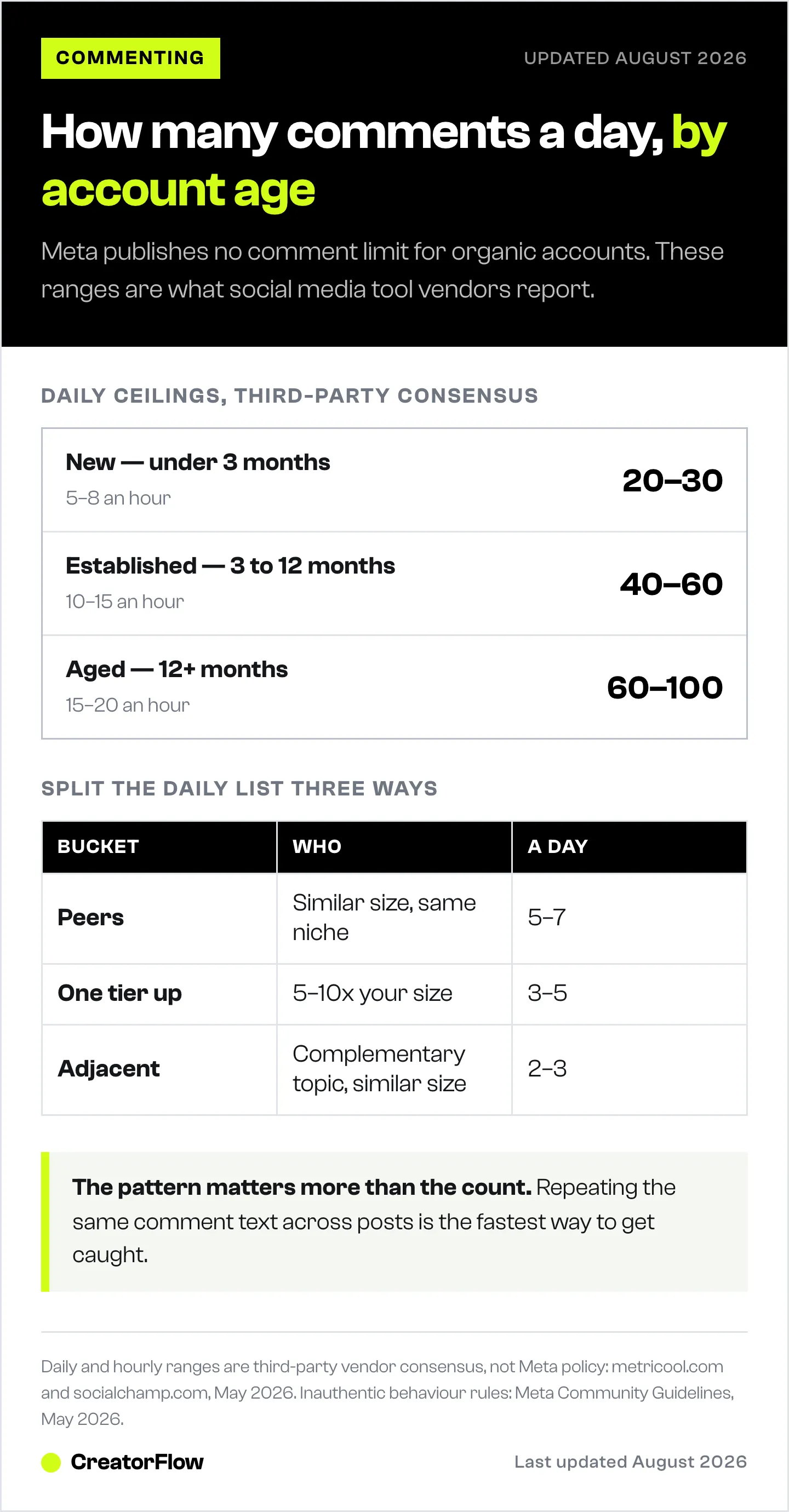
| Account age | Daily comment range | Per-hour ceiling |
|---|---|---|
| New (under 3 months) | 20-30 | 5-8 |
| Established (3-12 months) | 40-60 | 10-15 |
| Aged (12+ months) | 60-100 | 15-20 |
A few rules that hold across account ages:
- Spread comments across the day, not in 90-second bursts
- Mix in your own posting, story views, and DM replies in between
- Vary comment length (some 1 sentence, some 3-4 sentences)
- Never use the same opening word twice in a row (“Love this”, “Love this”, “Love this” is the bot signature)
If you hit an action block, stop all activity for 24 hours, then resume at half pace. Don’t try to “push through” an action block.
How to Measure if It’s Actually Working
The biggest reason creators give up on commenting is they can’t tell if it works. Profile visits and follower lift from commenting are slow and noisy.
Track these every week:
- Profile visits (Insights → Total followers → Profile visits). Baseline a 7-day average before you start commenting. Look for a 15-30% lift over four weeks.
- New follower source breakdown. Instagram Insights shows where new followers came from. The “from posts” and “from your profile” numbers should grow.
- Comments received on your posts. Reciprocal commenting builds. If your average comments per post doesn’t move in 30 days, your comment outreach isn’t reaching the right accounts.
- DMs from new accounts. The clearest signal. If commenting is working, strangers start DMing you because they checked your profile and saw your CTA.
- Comment-trigger DM volume. If you have automation set up on your own posts, the volume of triggered DMs is a direct downstream metric.
Don’t track “likes on my comment.” A comment can earn you 50 profile visits and zero likes. The likes are vanity, the visits are the point.
Closing the Loop: Commenting Plus DM Automation
Commenting earns profile visits. The visit is wasted unless your profile and feed give the visitor a reason to act.
The full loop:
- You leave a substantive comment on a peer or one-tier-up creator’s post.
- A small percentage of their audience clicks through to your profile.
- Your bio and pinned posts make it obvious what you do and why to follow.
- Your most recent post has a comment-trigger CTA: “Comment LINK for the guide.”
- The visitor comments the trigger word.
- DM automation sends them the resource in 8 seconds.
- The DM thread becomes a conversation, often a sale.
The first four steps are manual. Steps 5-7 are where automation matters, because doing them by hand means you’ll either burn out or respond too late. CreatorFlow uses Meta’s official Instagram Graph API to handle the trigger and the DM, which keeps the flow safe at scale. The same setup logic is in the comment-to-DM setup guide and 50+ Instagram CTA examples.
Without the automation, your commenting effort drives profile visits that don’t convert. With it, every comment you leave on someone else’s post is a top-of-funnel action that has a working bottom-of-funnel waiting.
FAQ
How many comments can I leave on Instagram per day without getting flagged?
Meta does not publish an official limit. Social media tool vendors widely report 20-30 comments per day for new accounts and 60-100 for aged accounts as the safe range, with hourly ceilings of 5-8 and 15-20 respectively (metricool.com, socialchamp.com, May 2026). The bigger risk is the pattern, not the count. Repetitive copy-paste comments will trigger action faster than 80 substantive ones spread across the day.
Are emoji-only comments worth leaving?
No. They’re easy to leave at scale, which is exactly why Instagram’s spam detection treats them as a signal of bot-like behavior. If you want the engagement signal without the writing, leave a 1-sentence comment that references the post specifically.
Should I comment on bigger accounts or peers?
Both, in roughly a 1:2 ratio. Peer accounts give you reciprocal engagement and visibility to a relevant audience. One-tier-up accounts give you lateral exposure to a bigger audience. Avoid mega-creators where your comment is buried in the 300th position.
What’s the best time to comment on Instagram?
In the first 5-10 minutes after a post goes live. Early comments sit at the top of the comment section, get the most secondary engagement, and are the ones the creator is most likely to reply to. Turn on post notifications for 5-10 accounts you want to be early on.
Does Instagram penalize “engagement bait” comments?
Meta’s Community Guidelines don’t name a specific “engagement bait” rule for commenters (separate from the older one for captions). But repetitive, generic, or spammy commenting falls under the broader inauthentic behavior policy and will get accounts throttled (facebook.com/help/instagram, May 2026).
How do I track if my commenting strategy is working?
Track profile visits, new follower source breakdown, comments received on your own posts, and DMs from new accounts. Baseline a 7-day average before you start, then look for a 15-30% lift on profile visits over four weeks. Don’t track likes on your comment, that number is meaningless.
Can I automate Instagram commenting?
You can, but you shouldn’t. Auto-commenting tools violate Meta’s Community Guidelines on inauthentic behavior and are the fastest way to get an account action-blocked or banned. Automation is fine on your own posts (DM automation triggered by comments on your content), because the trigger is opt-in and uses the official Instagram Graph API. Going out and auto-commenting on other people’s posts is a different category and a bad idea.
How long until I see results from commenting?
Four to eight weeks of consistent daily commenting before profile visits and follower lift become obvious in Instagram Insights. Faster if you’re commenting in the first 10 minutes on the right accounts and pairing it with a comment-trigger CTA on your own content. Slower if you’re commenting at random or on mega-accounts.
Comment limits and policy framing verified against Meta Community Guidelines, Buffer, Metricool, SocialChamp, and Socialinsider as of May 2026. Comment limits are third-party consensus, not official Meta policy. Individual results vary.


