
Instagram DM automation responds to comments in seconds, sending personalized messages through Meta’s official Graph API. It matches trigger keywords to pre-written responses that deliver links, lead magnets, or booking calendars. Each automated reply creates two engagement signals (comment + DM conversation) that tell the algorithm your account is worth promoting, compounding your reach without additional effort.
You open your DMs three hours later. Most of those people have already scrolled past, followed a competitor, or forgotten they asked. The engagement spike that could have snowballed into algorithm momentum? Gone.
This is the growth problem DM automation solves. Not by spamming followers with sales pitches, but by turning every comment, story reply, and keyword into an instant, personalized conversation that tells Instagram’s algorithm your account is worth promoting.
Key Takeaways
- Growth mechanism: Each automated DM creates two engagement signals (comment + DM conversation) that Instagram’s algorithm uses to push your content to more people
- Response speed: Responding within 1 minute can increase conversion by up to 391% compared to a 30-minute response (LeadResponse, April 2026)
- Platform data: Over 150 million users message businesses on Instagram every month (Meta, 2025), and DMs have approximately 90% open rates
- Rate limits: Most tools pace sends at around 200 DMs/hour and Meta enforces a 24-hour messaging window from the last user interaction
- Tool pricing: CreatorFlow costs $15/month flat rate, ManyChat starts at $17/month (Essential, 250 contacts) and scales through Pro $39 (2,500), Business $99 (7,500), and Advanced $199 (25,000), with annual billing dropping those to $14/$29/$69/$139, and LinkDM Pro is $19/month (all verified July 2026)
- Bottom line: Pair DM automation with strong content that invites interaction. The automation handles response speed while your content drives the initial engagement

How Do You Automate Instagram DMs?
Connect your Instagram account to a tool built on Meta’s official API. The connection runs through OAuth, so you never share a password. Pick a trigger keyword people already type in your comments, like “link” or “guide”. Write one short message that delivers what they asked for and ends with a question. Turn it on and test it from a second account. Setup takes about five minutes.
Why Instagram DM Automation Drives Account Growth
Most creators think of DM automation as a monetization tool. Send an affiliate link. Book a call. Capture an email.
Those are valid uses. But the real power of DM automation is what it does to your growth metrics.
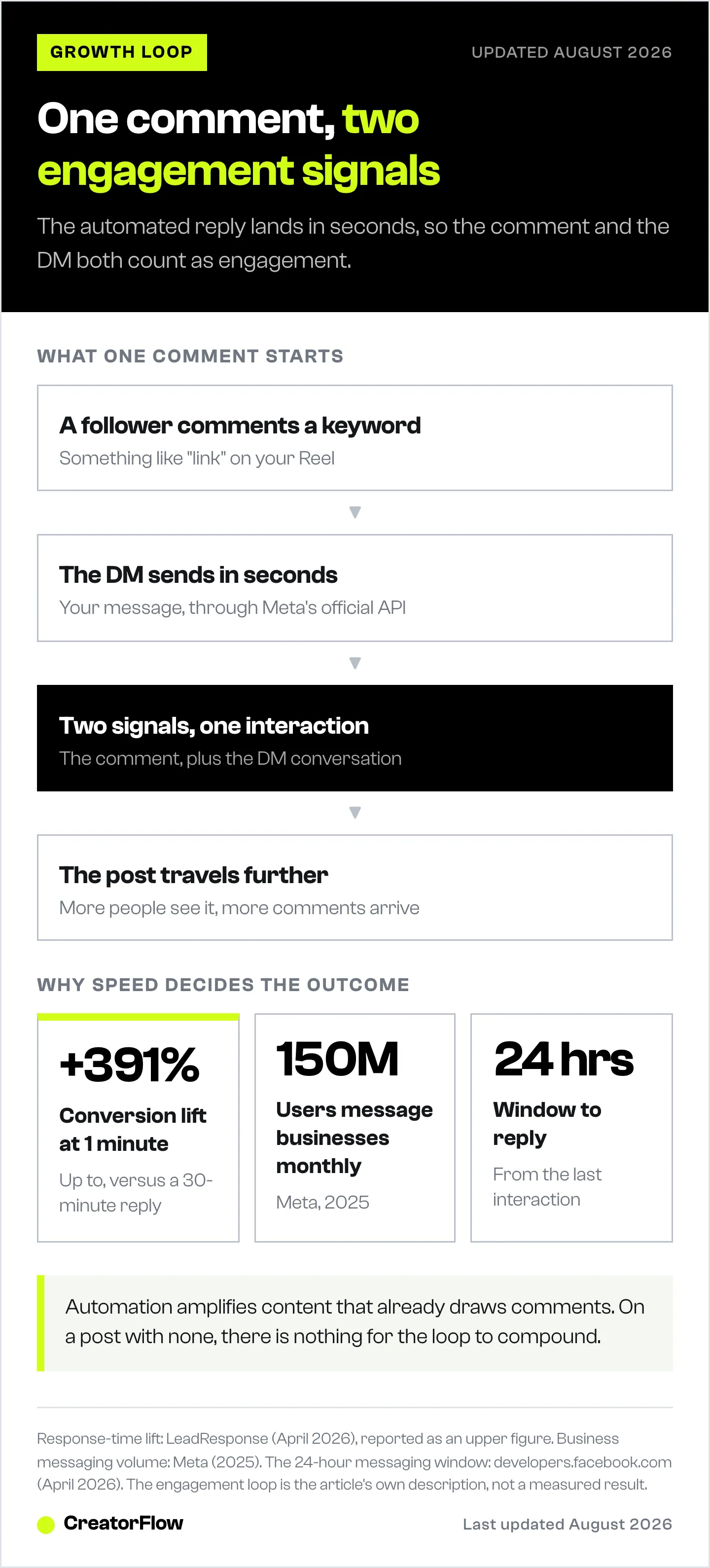
Here’s the chain reaction:
- Someone comments on your post
- Automation sends a DM within seconds
- That person opens the DM, replies, maybe follows you
- Instagram registers two signals: a comment AND a DM conversation
- The algorithm sees high engagement and pushes your content to more people
- More people see your post, more comments come in, more DMs go out
This is a compounding engagement loop. Every automated DM creates additional touchpoints that Instagram’s algorithm counts as meaningful interactions. For small accounts, this loop is the engine behind growing from 0 to 1K followers with DM automation.
Meta reports over 150 million users message businesses on Instagram every month (Meta, 2025). The platform is actively pushing private messaging as a core engagement channel. Creators who respond quickly, within minutes, not hours, ride that wave.
Research shows responding within 1 minute can increase conversion by up to 391% compared to a 30-minute response (LeadResponse, April 2026). When you’re managing hundreds of comments per post, doing that manually isn’t realistic.
How Instagram’s Algorithm Rewards DM Engagement
Instagram’s ranking signals in 2026 prioritize relationship depth over vanity metrics. Likes matter less than they used to. What matters more:
- DM conversations, direct messages signal a real relationship between accounts
- Comment-to-DM sequences, a user who comments AND then DMs shows high intent
- Story replies, each reply is an engagement signal that boosts your story reach
- Time spent on your content: DM conversations extend session time on your profile
- Return visits, automated follow-ups bring people back to your profile
When someone comments “link” on your Reel and immediately gets a DM with the resource they asked for, you’ve created two engagement signals from one interaction. Multiply that by 50 comments and you’ve generated 100+ algorithm-positive signals from a single post.
Compare that to replying manually 4 hours later. Half the commenters have moved on. The algorithm already decided your post wasn’t engaging enough to push further.
The 24-Hour Engagement Window
Meta’s Instagram Graph API enforces a 24-hour messaging window (developers.facebook.com, April 2026). You can only send automated DMs to users who engaged with your account in the last 24 hours.
This constraint is a feature for growth. It means:
- Every automated DM is contextually relevant (the person engaged recently)
- Messages don’t feel random or spammy
- You’re replying during peak interest, when the follower is most likely to respond
The creators who grow fastest are the ones who capture engagement within that 24-hour window, not the ones who respond a day later.
Types of Growth-Focused DM Automation
Not all automation is equal. Different triggers serve different growth goals.
Comment-to-DM Automation
What it does: When someone comments a specific keyword on your post (e.g., “link,” “how,” “info”), they automatically receive a DM.
Growth impact: Highest. Every comment-to-DM creates two engagement signals. The commenter gets instant value, making them more likely to follow, save the post, and comment again next time. Follow our comment-to-DM automation setup guide to get started in under 5 minutes.
Example setup:
- Trigger keyword: “guide”
- Auto-DM: “Here’s the free guide you asked for! [link], I put this together based on what worked for me over the last 6 months. Let me know what you think!”
- Follow-up (optional): “Did the guide help? I’m working on a Part 2, anything specific you’d want me to cover?”
Story Reply Automation
What it does: When someone replies to your Instagram Story, they get an automatic DM response.
Growth impact: Strong. Story replies are one of the strongest engagement signals on Instagram. Automating responses keeps the conversation going and trains followers to engage with your stories regularly.
Example setup:
- Story: Poll sticker asking “Want my content calendar template?”
- Auto-reply to “Yes” votes: “Here’s the template! [link] What niche are you in? I can give you specific tips.”
Keyword Trigger DMs
What it does: When someone sends you a specific keyword in DMs (e.g., “pricing,” “free,” “coaching”), they get an instant reply.
Growth impact: Moderate. Reduces response time for common questions. Keeps conversations flowing. Followers learn they get fast, helpful responses from your account, which builds a reputation that drives word-of-mouth growth.
Example setup:
- Keyword: “pricing”
- Auto-DM: “Here’s what I offer: [pricing link]. The most popular option is [X], want me to walk you through how it works?”
Compliance, Safety, and Platform Rules
Using DM automation safely means using tools built on Meta’s official Instagram Graph API. This is non-negotiable.
What Makes Automation Safe
| Factor | Safe (API-Based) | Risky (Unofficial) |
|---|---|---|
| Authentication | OAuth (no password sharing) | Requires your Instagram password |
| Rate limits | ~200 DMs/hour (tool pacing) | No limits (triggers spam detection) |
| Ban risk | Minimal (official API) | High (violates Instagram TOS) |
| Data handling | GDPR-compliant | Unknown |
| Messaging window | 24-hour window enforced | Can message anyone anytime |
Tools That Use Meta’s Official API
CreatorFlow, $15/month flat rate. Supports comment-to-DM, story reply automation, keyword triggers, and email capture. Meta Tech Provider. Setup under 5 minutes. No per-contact pricing (creatorflow.so, April 2026).
ManyChat: Essential at $17/month for 250 contacts ($14 billed annually). Price scales with contact count ($39/month for 2,500 contacts (Pro), $99/month for 7,500 contacts (Business), $199/month for 25,000 contacts (Advanced)). Supports Instagram, Facebook Messenger, WhatsApp, SMS, and TikTok. Advanced workflow builder with conditional logic (manychat.com/pricing, July 2026).
LinkDM, $19/month for Pro. Free tier with 1,000 DMs/month. Reports 50,000+ creators on the platform. Focused on Instagram DM automation (linkdm.com, July 2026).
Rate Limits You Need to Know
- ~200 DMs per hour per Instagram account (tool-side pacing convention)
- 24-hour messaging window, can only message users who engaged in the last 24 hours
- 1 automated message per trigger event per user, no spam chains
For most creators (even those with 100K+ followers), 200 DMs/hour is more than enough. For a deeper dive, read our Instagram Graph API rate limits explained. If you’re consistently hitting that limit, it means your content is performing well and you should consider upgrading your plan for higher volume.
Risks and How to Avoid Them
DM automation isn’t without downsides. Here’s what can go wrong and how to prevent it.
Risk 1: Robotic-Sounding Messages
The problem: Generic, templated messages feel impersonal. Followers can tell when a message wasn’t written by a human.
The fix:
- Write messages in your voice (use your actual phrases and tone)
- Include the follower’s context (“Since you asked about [topic]…”)
- Add variation to templates (rotate between 2-3 versions)
- Keep messages short and conversational
- Ask a genuine question at the end to invite a reply
Risk 2: Over-Automating
The problem: Automating every interaction removes the human connection that makes Instagram work.
The fix:
- Automate the first touch only (the initial reply)
- Follow up personally for high-value conversations
- Don’t automate sensitive topics (complaints, refund requests)
- Review your automated messages weekly, update anything that feels stale
Risk 3: Using Unofficial Tools
The problem: Tools that scrape Instagram or use unofficial APIs can get your account flagged, shadowbanned, or permanently disabled.
The fix:
- Only use tools built on Meta’s official Instagram Graph API
- Verify the tool is a Meta Tech Provider, see our guide on how to avoid Instagram bans with DM automation
- Never share your Instagram password with any tool (OAuth authentication only)
- If a tool promises “unlimited DMs” or “no restrictions,” that’s a red flag
Risk 4: Ignoring Analytics
The problem: Running automation without tracking results means you don’t know what’s working.
The fix:
- Track DM open rates (aim for 80%+, DMs average ~90%)
- Monitor reply rates (healthy: 30-50%)
- Check follower growth rate before and after enabling automation
- Use UTM parameters on links to track click-throughs
- Review which trigger keywords generate the most conversations
Manual Messaging vs. DM Automation: The Real Comparison
| Factor | Manual DMs | Automated DMs |
|---|---|---|
| Response time | 30 min - 4 hours | Under 10 seconds |
| Consistency | Depends on your schedule | 24/7 availability |
| Personalization | High (you write each one) | Medium (template-based with variables) |
| Scalability | Limited by your time | Handles hundreds per hour |
| Algorithm impact | Low (slow responses = fewer signals) | High (instant responses = more signals) |
| Cost | Your time (2-4 hours/day) | $15-19/month |
| Error risk | Typos, missed messages | Wrong template sent to wrong trigger |
The smart approach: Use automation for the first response, then jump into conversations personally when someone replies with genuine interest. This hybrid model gives you speed AND authenticity.
A creator with 50K followers who gets 100+ comments per Reel can’t manually respond to each one within minutes. Automation handles the first touch. You handle the relationship.
How to Set Up Growth-Focused DM Automation
Step 1: Choose Your Tool
Pick a tool that uses Meta’s official API. For solo creators and small teams, CreatorFlow offers flat-rate pricing at $15/month without per-contact fees. If you need multi-platform support (WhatsApp, SMS, Facebook), ManyChat starts at $17/month (Essential, 250 contacts; $14 billed annually).
Step 2: Connect Your Instagram Account
All API-based tools use OAuth authentication. You’ll:
- Click “Connect Instagram”
- Log in to your Instagram account
- Grant permissions through Meta’s official dialog
- No password sharing required
Step 3: Set Up Your First Automation
Start with comment-to-DM. It has the highest growth impact:
- Pick your highest-performing Reel (most comments in the last 30 days)
- Identify the most common comment (“link,” “how,” “info” are typical)
- Write your DM template, keep it under 300 characters, conversational, and end with a question
- Set the trigger keyword, match it to what people naturally comment
- Test it, comment on your own post from a friend’s account to verify
Step 4: Add Story Reply Automation
Once comment-to-DM is running:
- Post a Story with an engagement sticker (poll, question, quiz)
- Set up auto-replies for common responses
- Include a CTA that drives followers to comment on your latest post (this creates a cross-channel engagement loop)
Step 5: Monitor and Optimize
After your first week:
- Check which keywords trigger the most DMs
- Review reply rates, if below 30%, your messages need rewriting
- Look at follower growth rate, it should tick up within 2-3 weeks
- A/B test different message templates
For a detailed setup walkthrough, check out our complete Instagram DM automation guide.
When DM Automation Won’t Help You Grow
Automation amplifies what’s already working. If your content isn’t getting engagement, automating DMs won’t fix that.
DM automation works when:
- Your posts regularly get comments (even 10-20 per post is enough to start)
- You have a clear call-to-action in your content (“Comment LINK for the free template”)
- You’re creating content that generates questions or requests
DM automation won’t help when:
- Your posts get zero engagement (fix your content first)
- You don’t have a clear offer or resource to share
- You’re trying to cold-message people who didn’t engage with you (this is spam, and the 24-hour window prevents it anyway)
The creators who get the most growth from DM automation are the ones who pair it with strong content that invites interaction. The automation handles the response speed. Your content handles the interest.
FAQ
Is Instagram DM automation safe?
Yes, when you use tools built on Meta’s official Instagram Graph API. These tools authenticate through OAuth (no password sharing), pace sends at the ~200 DMs/hour convention most tools enforce, and operate within the 24-hour messaging window. CreatorFlow, ManyChat, and LinkDM all use Meta’s official API. Unofficial tools that require your password or promise “unlimited” messaging put your account at risk.
Will DM automation get my Instagram account banned?
Minimal ban risk if you use an API-compliant tool. Meta Tech Providers like CreatorFlow operate within Instagram’s Terms of Service and pace sends inside the official Instagram Graph API’s limits. The accounts that get banned are typically using unofficial bots, scrapers, or tools that violate Meta’s developer policies.
How does DM automation help me grow on Instagram?
Automated DMs create additional engagement signals that Instagram’s algorithm uses to rank content. When someone comments and then receives a DM, that’s two interactions from one post. Fast response times keep engagement momentum alive, leading to more Explore page appearances and higher reach. Over 150 million users message businesses on Instagram monthly (Meta, 2025), and DMs have ~90% open rates (LeadResponse, April 2026).
How much does Instagram DM automation cost?
Pricing varies by tool. CreatorFlow costs $15/month flat rate regardless of audience size (creatorflow.so, May 2026). ManyChat tiers (post-March 2026 restructure): Essential $17/250 contacts, Pro $39/2,500, Business $99/7,500, Advanced $199/25,000 billed monthly ($14/$29/$69/$139 billed annually) (manychat.com/pricing, July 2026). LinkDM Pro is $19/month with a free tier offering 1,000 DMs/month (linkdm.com, July 2026). All three offer free plans or trials to test before committing.
Can I personalize automated DMs?
Yes. Most tools support variables (follower name, trigger keyword, post reference) and let you write multiple message variations. The best practice is to write messages in your natural voice, keep them short (under 300 characters), and end with a question to invite a reply. Rotate between 2-3 template versions to keep messages feeling fresh.
What’s the difference between CreatorFlow and ManyChat for growth?
CreatorFlow is built for solo creators and small teams who need Instagram-only automation with flat-rate pricing ($15/month). ManyChat is better for agencies and businesses that need multi-platform support (Instagram, Facebook, WhatsApp, SMS, TikTok) and advanced workflow builders, but pricing scales with contacts. For pure Instagram growth, CreatorFlow’s simplicity and flat pricing make it the more practical choice for creators under 100K followers.
Sources verified as of April 12, 2026:
- ManyChat pricing: manychat.com/pricing
- LinkDM pricing and user count: linkdm.com/pricing
- Instagram API rate limits: Meta developer documentation (developers.facebook.com)
- DM engagement statistics: LeadResponse (leadresponse.co/blog/instagram-dm-statistics)
- Instagram business messaging data: Meta (2025), cited by Outfame and Sinch
- Response time conversion data: LeadResponse, IceKulfi


