

Google Search Console for Instagram is a free report that shows how your Instagram posts, Reels and profile perform in Google Search. Since July 2026 you can add an Instagram account as its own “platform property” in Search Console, with no website needed. You verify the account, wait a few days, and then see clicks, impressions, average position and the exact words people typed on Google before they reached your posts.
Until this summer, a creator had no way to see that data. Instagram Insights shows what happens inside the app. It does not tell you that a stranger typed “easy high protein breakfast” into Google, saw your Reel in the results, and tapped it. Those visits were invisible, so nobody wrote captions for them.
This guide shows how to add Instagram to Search Console, what each report means for an Instagram account, and a 15-minute weekly routine that turns the query list into better captions. It is written for creators, coaches and small businesses who already post on Instagram and want Google to send them more of the right people.
Key Takeaways
- Instagram is now a Search Console property: Google launched platform properties on July 7, 2026 and opened them to everyone on July 29, 2026, for Instagram, TikTok, X and YouTube.
- No website needed: you prove you own the Instagram account by signing in to it. Each account is a separate property.
- Only public professional accounts get Google traffic: Instagram lets Google show posts from public Business and Creator accounts held by people over 18, so a personal account will have little or no data.
- The query list is the prize: it shows the words strangers type on Google before they open your post. Those words belong in your captions.
- Data starts on the day you add it: there is no history before that day, so add the account now even if you plan to read it later.
- Search Console does not count views inside Instagram: use it for Google traffic and Instagram Insights for everything that happens in the app.
What Is Google Search Console for Instagram?
Google Search Console for Instagram is a “platform property”: a Search Console account built around your Instagram handle instead of a website. It reports how your posts, Reels, stories and profile appear in Google Search, and in Discover and Google News when they reach those places. You get the same Performance and Insights reports a website owner gets, filtered to your Instagram content.
Google announced the feature in a Search Central blog post on July 7, 2026. The goal, in Google’s words, is to give site owners and creators “even those without their own website” a single view of how people find their content. On July 29, a second post said platform properties were “globally available to everyone”.
When you open “Add property” today, the dialog shows “Add a website” at the top and a section marked “New” under it, with Instagram, TikTok, X and YouTube, each with its own “Add” button.
This is a separate tool from Instagram search. Our Instagram SEO guide covers how people find you inside the app. This article covers how people find you from Google, and how to measure it.
Which Instagram Accounts Can Use It?
Search Console will report on any Instagram account you can verify. But the report only fills up if Google is allowed to show your posts in the first place, and Instagram decides that.
Since July 10, 2025, Instagram has let search engines show posts from accounts that meet three conditions, according to Instagram’s help center and reporting from The Week (checked November 2026):
| Condition | What it means for you |
|---|---|
| Professional account | A Business or Creator account. Personal accounts are not shown on Google. |
| Public account | A private account has nothing Google can show. |
| Over 18 | Accounts of younger users are not included. |
There is also a switch you control. In your account privacy settings, the toggle “Allow public photos and videos to appear in search engine results” must stay on. If you turned it off at some point, Search Console will stay close to empty.
Posts from January 1, 2020 onward are eligible, per the same coverage. So an older account can already have years of posts sitting in Google results today.
How Do You Add Instagram to Google Search Console?
You add Instagram to Search Console by choosing it as a new property and signing in to the Instagram account to prove you own it. The whole process takes a few minutes. Google’s help page on platform properties lists these steps (checked November 2026):
- Open Search Console at search.google.com/search-console and sign in with the Google account that should own the property.
- Click the property selector in the top left, then click “Add property”. New users see the same choice on the welcome screen.
- Click “Add” next to Instagram.
- Follow the prompts to sign in and approve the connection. This is how you prove the account is yours. There is no code to paste and no DNS record.
- Click “Go to property” once ownership is confirmed.
Three details from Google’s help pages that most setup guides skip:
- One account, one property. If you run a personal brand account and a shop account, add each one separately. A Google account can hold up to 1,000 properties, per Google’s page on adding a property.
- You may already have it. If you have claimed a Google Search profile, your verified accounts are added as properties for you, according to Google’s guide to social and video content.
- Access can pause. Google checks ownership from time to time. If the Instagram login expires, the reports lock until you verify again. Your data stays, and you do not have to wait for it to rebuild.
Expect empty charts for the first few days. Google says metrics need a few days to be collected and processed, and charts only show the days since collection started.
What Does the Instagram Report Show?
The Instagram property has three parts. Each one answers a different question.
| Report | What you see | The question it answers |
|---|---|---|
| Performance | Clicks, impressions, average CTR and average position, by post, query, country, device and date | Which posts and words bring Google visitors? |
| Insights | Recent traffic trends, top posts, top countries and query groups that are rising or falling | What changed this month? |
| Achievements | Milestones such as a new number of Google clicks in 28 days | Is Google traffic growing? |
Two counting rules matter for Instagram. Google’s help page says an Instagram story shown in Google results counts as an impression, and a click on it counts as a click. A video shown in Search or Discover counts as an impression, and a click counts even when it opens in Google’s own video player instead of on Instagram.
The default date range is 28 days. Discover and Google News tabs only appear if your posts got traffic from those places.
What it does not show
Search Console only measures Google. It does not count how many times a Reel was played inside Instagram, likes, saves, shares, follows or DMs. Google’s help page says it plainly: platform properties do not track views on the platform itself.
So you need both tools. Instagram Insights tells you what your followers did. Search Console tells you what strangers on Google did before they ever followed you. For the in-app side, our guide to the Instagram metrics that matter for creators walks through each number.
How to Use the Report for Instagram SEO
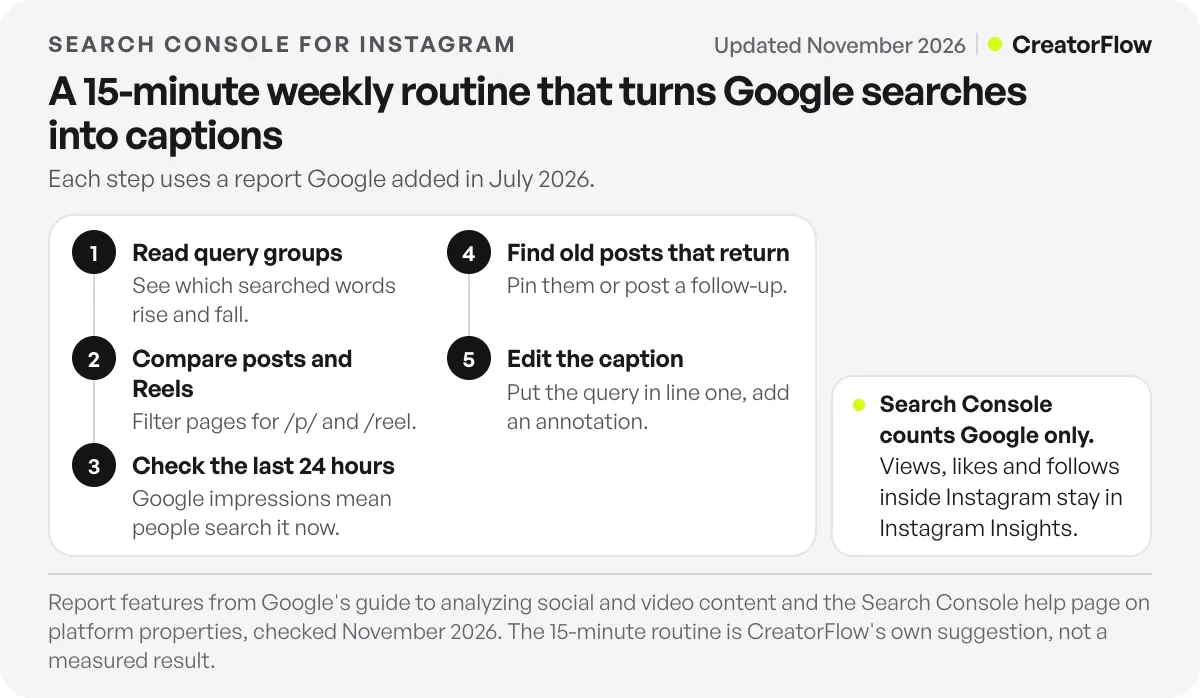
The report is only useful if it changes what you post. Here is a routine that takes about 15 minutes once a week. Each step uses a feature Google describes in its guide to analyzing social and video content.
1. Read the query groups first
Open Insights and look at the query groups card. It sorts the words people searched into top, trending up and trending down. This is the closest thing to a list of questions your audience asks Google about your topic.
Look for two things. Words you expected to see that are missing, and words you never planned for that bring clicks anyway. Google’s guide asks the same question: “Are there any search terms that you would expect to get traffic from that you’re not?“
2. Compare posts and Reels
In the Performance report, add a page filter. Filter for URLs that contain “/p/” to see feed posts and carousels, then for URLs that contain “/reel” to see Reels. Google’s guide suggests this exact comparison for Instagram.
If one format gets most of the Google clicks for your topic, make more of that format when you target a search word.
3. Check the last 24 hours after a new post
The Performance report has a 24-hour view. Open it a day after you publish. If a new post already gets Google impressions, people are searching for it now. Google suggests using that moment: post a story about the same topic so the interest reaches your followers too.
4. Find old posts that come back
Sort pages by clicks over the last 28 days and look for posts that are months old. When an old post starts getting Google traffic again, pin it to your profile, mention it in a story, or make a follow-up post on the same question.
5. Edit the caption, then mark the date
When a post ranks for a word that is not in its caption, edit the caption so its first line answers that query in plain words. Then add an annotation in Search Console on the day you made the change. After two to four weeks, compare clicks and position before and after the annotation. That tells you if the edit helped, instead of guessing.
The first line of the caption matters most because it is the text both Google and Instagram search read first. Our guide to getting Reels into Google search results covers which other fields Google reads, such as alt text and on-screen text.
Search Console vs Instagram Insights
| Question | Search Console | Instagram Insights |
|---|---|---|
| How many people saw my Reel in the app? | No | Yes |
| What did people type on Google before they found me? | Yes | No |
| Which country and device do Google visitors use? | Yes | No |
| How many followers did a post bring? | No | Yes |
| Did my caption edit change Google clicks? | Yes, with annotations | No |
| How many people shared or saved a post? | No | Yes |
Use Search Console to choose words. Use Insights to judge content. A post can win on Google and stay quiet in the feed, and the reverse. Both results are useful, because they reach different people.
What to Do When a Post Gets Google Clicks
A Google visitor is a stranger. They searched a question, opened your post, and will leave the moment they have the answer. Most do not follow, and many do not have a reason to come back.
Give them one next step on the post itself. The simplest is a comment keyword: “Comment GUIDE and I will send you the full checklist.” Pick the post with the most Google clicks in Search Console, add that line to its caption, and set up a comment trigger so everyone who comments GUIDE gets the checklist in a DM within seconds.
With CreatorFlow’s comment-to-DM automation this works on every plan, including Free, and setup takes under 2 minutes. The analytics page then shows how many people tapped the link you sent. Search Console tells you which post brings the visitors, and the DM gives each visitor who asks a reason to stay. For keyword ideas, see our list of comment keywords that convert.
FAQ
Can I add Instagram to Google Search Console?
Yes. Since July 29, 2026, platform properties are available to everyone. Open Search Console, click “Add property”, choose Instagram, and sign in to the account to prove you own it. Each Instagram account is added as a separate property.
Do I need a website to use Google Search Console for Instagram?
No. Platform properties were built for creators without their own website. You verify ownership by signing in to Instagram, not with a website file or DNS record. If you do have a website property, Google lists a connection through it as a second way to verify.
Why does my Instagram property show no data?
There are three common reasons. The property is new, and Google needs a few days to collect data. Your account is personal or private, so Google cannot show your posts. Or the “Allow public photos and videos to appear in search engine results” toggle is off in your privacy settings.
Does Search Console show Instagram Reel views?
No. It shows impressions and clicks in Google Search, Discover and Google News only. Views, likes, shares, saves and follows inside Instagram stay in Instagram Insights.
Can I see data from before I added my Instagram account?
No. Charts start on the day Google began collecting data for the property. Google’s help page says collection starts once anyone adds the property, even before verification is finished, so adding the account early gives you a longer history.
Is Google Search Console free for Instagram accounts?
Yes. Search Console is a free Google tool, and platform properties cost nothing to add or use.
Which other platforms can I add?
TikTok, X and YouTube, as of November 2026. Each account or channel is its own property. Google’s guide suggests exporting the data from each one into a single spreadsheet to compare which topics work on which platform.
Sources and checks
Feature details from Google’s Search Central posts of July 7, 2026 and July 29, 2026, the Search Console help pages on platform properties and adding a property, and Google’s guide to analyzing social and video content. Instagram’s search engine rules from Instagram’s help center and The Week, July 2025. All checked November 2026. The 15-minute routine is our own suggestion, not a measured result.





