
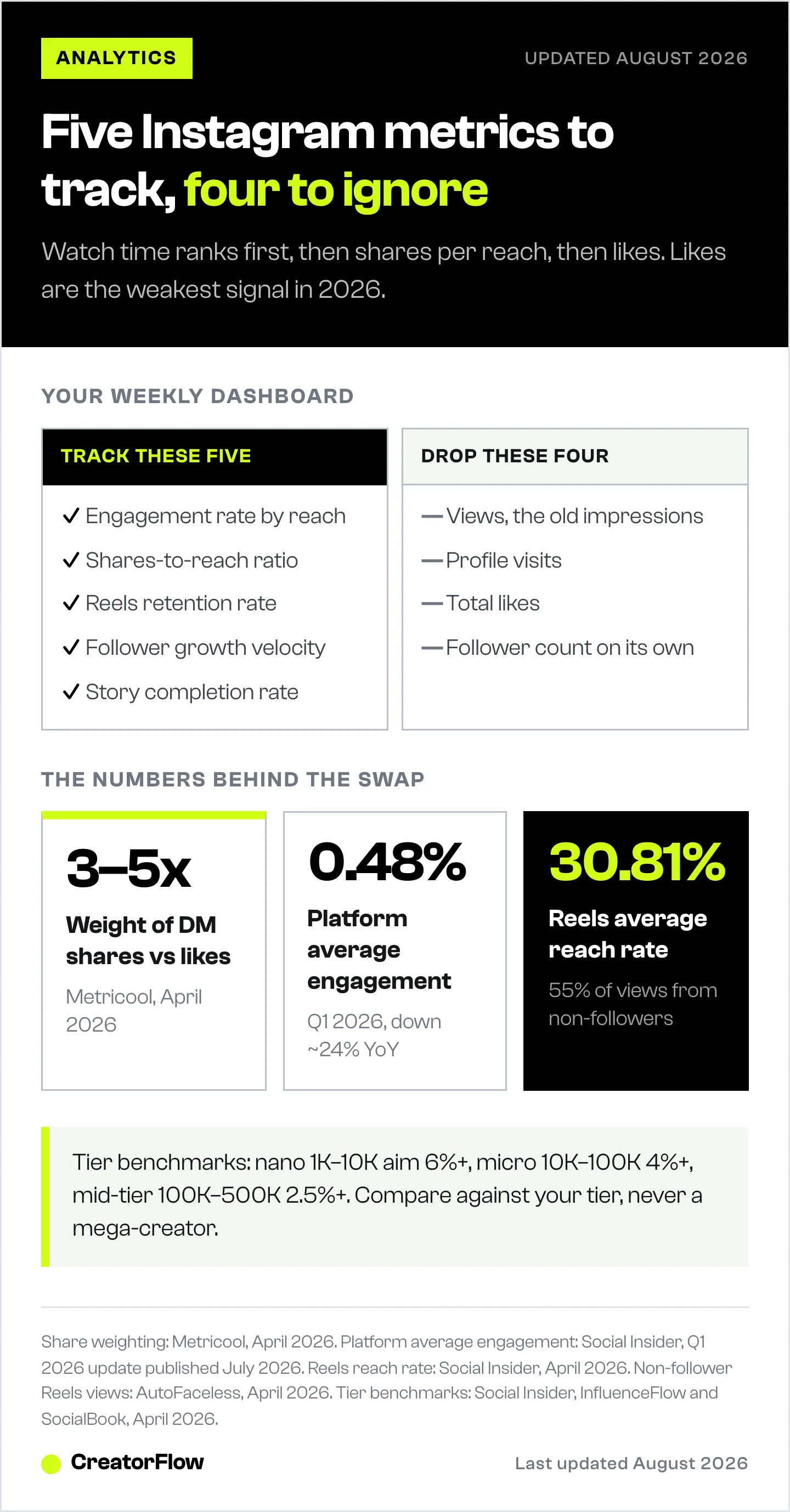
Instagram analytics for creators comes down to 5 metrics that matter in 2026: engagement rate by reach, shares-to-reach ratio, Reels retention rate, follower growth velocity, and Story completion rate. DM shares carry 3-5x more algorithmic weight than likes. Overall engagement fell to 0.48% in early 2026, and Instagram folded impressions into a single “Views” number. Everything else is noise that distracts from growth decisions.
Most creators open Instagram Insights, glance at likes and follower count, and close the app again. That’s not analytics. That’s vanity scrolling.
Creators who grow steadily use analytics differently. They track 4-5 specific metrics, ignore everything else, and make content decisions based on patterns, not gut feelings. This guide shows you which metrics those are, what benchmarks to aim for, and how to turn numbers into growth. Pair analytics with Instagram DM automation and you can act on the data automatically.
Key Takeaways
- 5 metrics that matter in 2026: Engagement rate by reach, shares-to-reach ratio, Reels retention rate, follower growth velocity, and Story completion rate
- Shares are king: DM shares carry 3-5x more algorithmic weight than likes. A post with 50 likes and 50 shares outperforms one with 500 likes and 2 shares
- Engagement rate benchmarks: Nano (1K-10K) should target 6%+, micro (10K-100K) should target 4%+, mid-tier (100K-500K) should target 2.5%+
- Reels dominate discovery: Reels average 30.81% reach rate with 55% of views from non-followers, more than 2x higher than carousels or images
- Platform average declining: Overall Instagram engagement fell to 0.48% in Q1 2026, down ~24% year-over-year (Social Insider, July 2026)
- Metrics changed in 2026: Instagram consolidated impressions, plays, and Story/Reel views into a single “Views” metric. If you still track “impressions,” that data now lives under Views (Social Media Today, July 2026)
- Bottom line: Stop tracking likes and follower count. Focus on shares-to-reach ratio and Reels retention, and spend 15 minutes weekly on a structured analytics review

Why Most Creators Misread Their Analytics
Instagram Insights gives you dozens of metrics. Follower count, impressions, accounts reached, profile visits, website clicks. The problem: most of these are lagging indicators. They tell you what already happened, not what to do next.
The average Instagram engagement rate fell to 0.48% across all account sizes in Q1 2026 (Social Insider, July 2026). That’s down ~24% year-over-year. Platform-wide averages like this pool every account size and use a different denominator from the tier benchmarks further down, so read them as a trend line rather than a target. If you’re only tracking total likes, you’re watching a number that’s been falling for two years straight.
The shift: Instagram’s algorithm in 2026 ranks content based on shares and sends above everything else. Adam Mosseri confirmed the signal hierarchy in January 2025: watch time first, then likes per reach, then sends/shares per reach (Hootsuite, April 2026). Likes are now the weakest engagement signal.
Translation: the metrics that mattered in 2024 (likes, comments, follower count) are not the metrics that drive distribution in 2026. You need a different dashboard.
What Changed in Instagram Insights in 2026: “Views” Replaced Impressions
In 2026, Instagram consolidated most of its reach-style metrics into one number: Views. Meta deprecated media impressions, Reel plays, Story impressions, and carousel impressions through 2025, and its API dropped profile views, website clicks, and phone-call clicks (Social Media Today, July 2026). If you still look for “impressions” in your dashboard, that data now surfaces as Views across posts, Reels, and Stories.
Here’s the practical difference that still matters. Reach counts unique accounts that saw your content. Views counts every display, including the same person watching five times. Reach tells you how many real people you touched, so it stays the better awareness number. Views replaces the old impressions and plays counts.
Two other limits shape what you can see. Instagram Insights retains roughly 90 days of profile-level data, so anything older is gone unless you export it. That 90-day memory is the main reason Instagram comment tracking has to be recorded outside the app. And regional privacy rules block some messaging and share metrics for viewers in Europe and Japan, which is why your share counts can read lower than reality (Instagram Help, July 2026).
The 5 Metrics That Drive Growth in 2026
Ignore most of what Instagram shows you. Focus on these five.
1. Engagement Rate by Reach (Not by Followers)
Most calculators divide engagements by followers. That’s misleading because it penalizes high-reach content. Engagement rate by reach divides total engagements (likes + comments + saves + shares) by the number of unique accounts your post reached.
Benchmarks by follower count:
| Follower Tier | Avg Engagement Rate | Target |
|---|---|---|
| Nano (1K-10K) | 5.2-6.23% | 6%+ |
| Micro (10K-100K) | 3-6% | 4%+ |
| Mid-tier (100K-500K) | 1.5-3% | 2.5%+ |
| Macro (500K+) | 1-3% | 1.5%+ |
(Sources: Social Insider, InfluenceFlow, SocialBook, April 2026)
How to find it: Instagram Insights > Content You Shared > Select post > Accounts Reached vs. total interactions. Or calculate manually: (likes + comments + saves + shares) / reach x 100. The free Instagram engagement rate calculator does the arithmetic for you.
What to do with it: If your engagement rate by reach is consistently below your tier’s benchmark, the content itself is the issue (not the algorithm, not the time you posted). Test different hooks, formats, and topics.
2. Shares-to-Reach Ratio
This is the single most important metric for algorithmic distribution in 2026. Shares via DM carry 3-5x more weight than likes in Instagram’s ranking system (Metricool, April 2026).
How to calculate: Shares / Reach x 100
Benchmark: A 1-2% shares-to-reach ratio is strong. Anything above 3% means your content is going viral through DMs.
Where to find it: Instagram Insights > Select post > Interactions > Sends (this is the share count).
What to do with it: Content that gets shared is content people want their friends to see. Identify your top 5 shared posts. Find the pattern. Double down on that format.
3. Reels Retention Rate
Instagram added retention rate to Reels analytics in 2025. It shows the percentage of viewers who watched through specific points in your Reel and exactly where they dropped off.
Why it matters: Watch time is the #1 ranking signal for Reels (Adam Mosseri, confirmed via Hootsuite, April 2026). If 80% of viewers drop off at second 3, your hook is failing. If they drop at second 15, your middle content is weak.
New metrics to track:
- Skip rate: Percentage of viewers who leave within the first 3 seconds
- Average watch time: How long the typical viewer watches
- Rewatch rate: Percentage who watch multiple times
Where to find it: Instagram Insights > Select Reel > Retention graph
Benchmark: Keep your 3-second skip rate under 30%. Aim for average watch time above 50% of your Reel duration.
What to do with it: If your skip rate is high, test different hooks. Our 50 Instagram hook templates give you candidates to run against this exact metric. The first 1.5 seconds determine whether someone watches or scrolls. If viewers drop at a consistent point mid-Reel, that’s where your content loses momentum. Cut the dead weight.
4. Follower Growth Velocity
Raw follower count is meaningless without context. Follower growth velocity measures net new followers per week as a percentage of total followers.
How to calculate: (New followers - Unfollows) / Total followers x 100 per week
Benchmark: 1-2% weekly growth is solid for accounts under 100K. Above 100K, 0.5-1% weekly is healthy.
New feature (2026): Instagram now shows which specific post or Reel brought each new follower (Instagram Help, April 2026). This is the most underused feature in Insights. Check it weekly to see exactly which content drives follows.
Where to find it: Instagram Insights > Total Followers > See All > Growth breakdown by content
What to do with it: If your follower growth stalls, check two things. First: are you posting Reels? Reels reach non-followers at 2x the rate of other formats (Social Insider, April 2026). Second: does your profile convert visitors to followers? If reach is high but follows are low, your bio and pinned posts need work.
5. Story Completion Rate
Story completion rate measures what percentage of viewers who started your Story watched it all the way through without exiting.
Benchmarks:
| Account Type | Avg Completion Rate |
|---|---|
| Overall average | 70-87% |
| Sports accounts | ~90% |
| Entertainment accounts | ~88% |
(Sources: Dash Social, Marketing Agent Blog, April 2026)
Story reach rate by account size:
- Small accounts (<10K followers): ~7.5% of followers see your Story
- Large accounts (500K+): ~1% of followers see your Story
(Source: Social Insider, April 2026)
Where to find it: Instagram Insights > Stories > Individual Story > Exits vs. Impressions
What to do with it: Completion rate tells you if your Stories are engaging or if people are tapping away. If completion drops below 70%, you’re posting too many frames, the content is repetitive, or you’re not hooking viewers in frame 1. Aim for 3-5 Story frames maximum per sequence. The best creators treat each frame like a mini-Reel hook.
Metrics That Don’t Matter (Stop Tracking These)
Not everything in Instagram Insights deserves your attention.
Views (the old impressions): Instagram folded impressions into Views in 2026, and total Views counts every display, including repeat views from the same person. It inflates your numbers without telling you what to do next. Track reach (unique accounts) instead.
Profile visits: A high number means people are curious. But if profile visits don’t convert to follows, the metric is hollow. Track the profile-visit-to-follow ratio instead, and see our guide to Instagram profile optimization for the four changes that move it.
Total likes: Likes are the weakest signal in Instagram’s 2026 algorithm. A post with 500 likes and 2 shares performs worse algorithmically than a post with 50 likes and 50 shares (Hootsuite, April 2026).
Follower count (absolute): A 50K account with 0.5% engagement is weaker than a 5K account with 6% engagement. Growth rate and engagement quality beat total count every time.
Where to Find Your Analytics (Free vs. Paid)
Free: Instagram Insights + Meta Business Suite
Every Business or Creator account gets Instagram Insights for free. You can access it through your profile (Professional Dashboard) or via Meta Business Suite on desktop. To turn those exports into a stakeholder-ready summary, see how to build a social media report.
What you get free:
- Per-post metrics (reach, engagement, saves, shares, follows gained)
- Audience demographics (age, gender, location, active times)
- Follower growth trends
- Story and Reel-specific metrics (retention, skip rate, completion rate)
- Content comparison across formats
- Post-level follower attribution (which post brought each new follower)
New in 2026: Carousel slide-level analytics, pinnable metric cards, and enhanced demographics per post (Instagram Help, April 2026).
For most creators with 1 account, Instagram’s native analytics cover 90% of what you need. The main limitation: data retention is limited (typically 90 days) and you can’t easily export or compare across longer periods.
Paid: When Free Isn’t Enough
Third-party tools add value when you manage multiple accounts, need competitor benchmarking, or want longer data history.
| Tool | Price | Best For |
|---|---|---|
| Buffer | $5-6/mo per channel | Budget-friendly scheduling + analytics |
| Pallyy | ~$9/mo | Instagram-focused analytics |
| Later | $25/mo | Visual planning + analytics |
| Iconosquare | $39-49/mo | Deep Instagram analytics, benchmarks |
| Social Status | $99/mo | Dedicated analytics-only |
| Sprout Social | $199/mo per seat | Enterprise teams, agencies |
(Sources: buffer.com, later.com, iconosquare.com, sproutsocial.com, accessed April 12, 2026)
When to upgrade from free:
- You manage 3+ Instagram accounts
- You need competitor benchmarking data
- You want automated PDF reports for clients
- You need more than 90 days of historical data
When free is enough:
- You’re a solo creator with 1 account
- You track 4-5 key metrics weekly (the ones above)
- You don’t need competitor comparisons
Content Format Performance: What the Data Says
Not all formats perform equally. Here’s what 2026 data shows:
| Format | Avg Reach Rate | Engagement Rate | Discovery Potential |
|---|---|---|---|
| Reels | 30.81% | 0.52% overall | 55% of views from non-followers |
| Carousels | ~15% | 6.90% per reach | Highest save rate, strong for education |
| Single Images | ~12% | Declining (17% YoY drop) | Weakest format in 2026 |
| Stories | 1-7.5% (varies by size) | 70-87% completion rate | Followers only |
(Sources: Social Insider, Buffer, CreatorsJet, Dash Social, April 2026)
Read the engagement column carefully. The Reels number is measured against total views, the carousel number against reach, so the two are not directly comparable. Compare each format against its own history instead.
The recommended 2026 content mix:
- 60-70% Reels (discovery and reach)
- 20-30% Carousels (saves, engagement depth)
- 10% or less single images
Posting frequency matters:
- 3x/week posting: 4.1% average engagement
- Daily posting: 3.2% average engagement (lower per-post, but more total engagement)
- 5+ Reels/week: up to 2.1x higher reach vs. fewer than 2 Reels/week
(Source: Buffer, April 2026)
The takeaway: if you’re not posting Reels, you’re leaving the majority of your potential reach on the table. Non-follower views rose from 30% to 49% of total Instagram views between 2024 and the end of 2025 (Dash Social, April 2026). No other format offers that level of discovery.
Best Posting Times Based on Data
Global studies analyzing millions of posts point to consistent patterns:
Overall best times (Buffer, 9.6M posts analyzed, April 2026):
- Thursday 9 AM
- Wednesday 12 PM
- Wednesday 6 PM
By content type:
- Reels: 8 AM-12 PM, 2-4 PM, 6-9 PM
- Stories: 11 AM-1 PM, 6-9 PM (evening performs best)
(Sources: Buffer, Iconosquare, SocialPilot, April 2026)
The caveat: Your audience is unique. Instagram Insights shows when your specific followers are most active (Insights > Total Followers > Most Active Times). Use that data over any global benchmark. These times are starting points for new accounts that don’t have enough data yet.
Turning Analytics Into DM Conversions
Analytics tell you what’s working. Automation turns that knowledge into leads.
Here’s the connection: you identify your highest-performing Reels (high shares, high retention, strong hook). You add a comment-trigger CTA to those formats. CreatorFlow sends the DM automatically when someone comments your keyword.
The DM numbers that matter: Meta does not publish DM open or reply rates. The 80-90% open rates quoted online come from automation vendors, so measure your own. Two numbers per automation tell you most of what you need: how many DMs went out, and how many people clicked the link inside them.
The workflow:
- Check your Reels analytics weekly. Identify the top 3 by shares-to-reach ratio
- Note the content pattern (topic, hook style, format)
- Create similar content with a comment-trigger CTA (“Comment LINK for…”)
- Set up CreatorFlow automation with your keyword, link, and DM message
- Track which keywords and posts drive the most DMs sent and link clicks
CreatorFlow tracks DMs sent and link clicks so you can see which content + keyword combinations convert best. $15/month flat rate, 5,000 DMs/month on Pro (creatorflow.so/pricing, August 2026), worth weighing against what other Instagram chatbots charge before you commit.
Learn how to set up comment-to-DM automation
Weekly Analytics Routine (15 Minutes)
You don’t need to live in your analytics dashboard. A weekly 15-minute check-in is enough to spot trends and adjust.
Monday review (15 min):
-
Follower growth velocity (2 min): Net followers gained this week. Which post drove the most follows? More of that format.
-
Top performing content (5 min): Sort last week’s content by shares. Your top 2-3 shared posts reveal what your audience wants more of.
-
Engagement rate check (3 min): Are you above or below your tier benchmark? Trending up or down over the last 4 weeks?
-
Reels retention (3 min): Check your top Reel’s retention curve. Where do people drop off? Fix that for next week’s content.
-
Story completion (2 min): Did completion rate stay above 70%? If not, reduce frame count or improve hooks.
Monthly review (30 min):
- Compare this month’s engagement rate by reach vs. last month
- Identify your top 5 posts by shares. Find the content pattern
- Check audience demographics for shifts (are you attracting the right people?)
- Review which Reels brought the most new followers
- Adjust your content mix based on what the data shows
Common Analytics Mistakes
Checking daily instead of weekly. Daily fluctuations are noise. Weekly trends are signal. A post that “flopped” on day 1 might pick up steam on day 3-5 through shares.
Comparing yourself to accounts 10x your size. A 5K account and a 500K account have fundamentally different benchmarks. Use the tier-specific benchmarks in this guide, not what you see from mega-creators.
Chasing likes. Likes are one of Instagram’s top three ranking signals, but sends matter more for reaching people who don’t follow you yet (Adam Mosseri, January 2025). A post people send to friends travels further than one they only double-tap. Aim for shares and saves.
Ignoring Reels retention data. Instagram added retention curves specifically to help creators improve. If you’re not checking where viewers drop off, you’re missing the most actionable data point available.
Treating all followers as equal. 1,000 engaged followers who DM you, comment, and share your content are worth more than 100,000 passive followers who never interact. Track engagement quality, not follower quantity. Even small accounts can monetize effectively, see how to make money on Instagram for proven methods at every follower count.
FAQ
What is a good Instagram engagement rate in 2026?
It depends on your follower count. Nano-creators (1K-10K followers) should aim for 5-6% engagement rate. Micro-creators (10K-100K) should target 3-6%. Mid-tier accounts (100K-500K) average 1.5-3%. The overall platform average fell to 0.48% in Q1 2026, down ~24% year-over-year (Social Insider, July 2026). Calculate engagement rate by dividing total interactions by reach, not followers.
What happened to impressions on Instagram?
Instagram replaced impressions with Views in 2026. Meta deprecated media impressions, Reel plays, and Story impressions through 2025 and folded them into one Views metric across posts, Reels, and Stories (Social Media Today, July 2026). Reach, which counts unique accounts, is unaffected and stays the better awareness number. If a third-party tool still shows “impressions,” it is mapping that old label onto Views data.
How do I access Instagram analytics?
Switch to a Business or Creator account (free in Settings > Account > Switch to Professional Account). Not sure which to pick? Read our guide on Instagram creator vs business account. Then go to your profile > Professional Dashboard > Insights. You can also access analytics on desktop through Meta Business Suite at business.facebook.com. Both are free with no paid upgrade required (Instagram Help, April 2026).
Which Instagram metric matters most for the algorithm?
Watch time is the #1 ranking signal, followed by shares/sends per reach, then likes per reach. Adam Mosseri confirmed this hierarchy in early 2025 (Hootsuite, April 2026). The practical takeaway: create content people watch all the way through and share via DM. Shares carry 3-5x more algorithmic weight than likes.
How often should I check my Instagram analytics?
Weekly is the right cadence for most creators. Daily checking creates anxiety over normal fluctuations. Set a 15-minute Monday review: check follower growth velocity, top shared posts, engagement rate trend, Reels retention, and Story completion rate. Do a deeper 30-minute review monthly to spot bigger patterns and adjust your content strategy.
Are free Instagram analytics tools enough?
For solo creators managing 1 account, Instagram’s native Insights plus Meta Business Suite cover 90% of what you need. You get per-post metrics, audience demographics, follower growth attribution, Reels retention data, and Story analytics for free. Paid tools ($5-199/month) add value when you manage multiple accounts, need competitor benchmarking, automated reports, or more than 90 days of historical data.
What’s the best Instagram content format for reach in 2026?
Reels, by a wide margin. Reels average a 30.81% reach rate, more than 2x higher than carousels (~15%) and images (~12%). Across Instagram, views from non-followers climbed from 30% of total views in 2024 to 49% by the end of 2025, measured across 3,363 accounts (Dash Social, April 2026), and Reels are the format carrying most of that discovery. Post 5+ Reels per week to maximize reach, up to 2.1x higher than accounts posting fewer than 2 per week (Buffer, April 2026).
Sources Verified (April 12, 2026; benchmarks and metric changes re-verified July 7, 2026):
- Social Insider - 2026 Instagram Organic Engagement Benchmarks, Q1 2026 update (socialinsider.io)
- Social Media Today - Meta Merges More Data Points Into Views (socialmediatoday.com)
- Meta for Developers - Instagram Platform Insights reference (developers.facebook.com)
- InfluenceFlow - Instagram Engagement Rate Benchmark 2026 (influenceflow.io)
- SocialBook - Instagram Engagement Rates by Follower Size 2026 (socialbook.io)
- Hootsuite - Instagram Algorithm Tips 2026 (blog.hootsuite.com)
- Buffer - Best Time to Post on Instagram 2026 (buffer.com)
- Buffer - State of Social Media Engagement 2026 (buffer.com)
- Instagram Help - View Account and Content Insights (help.instagram.com)
- Dash Social - Instagram Stories Engagement Benchmarks 2026 (dashsocial.com)
- Marketing Agent Blog - Story Completion Rate 2026 (marketingagent.blog)
- Metricool - Instagram Reel Analytics 2026 (metricool.com)
- AutoFaceless - Instagram Reels Statistics 2026 (autofaceless.ai)
- CreatorsJet - Reels vs Carousels vs Images Study (creatorsjet.com)
- Iconosquare - Best Time to Post on Instagram 2026 (iconosquare.com)
- SocialPilot - Best Time to Post on Instagram 2026 (socialpilot.co)
- Sprout Social - Instagram Algorithm 2026 (sproutsocial.com)
- LeadResponse - Instagram DM Statistics 2026 (leadresponse.co)
- Napolify - Instagram DM Conversion Rates (napolify.com)
- Blogging Wizard - Instagram Analytics Tools 2026 (bloggingwizard.com)
- CreatorFlow Pricing (creatorflow.so/pricing, August 2026)

