

Auto DM on Instagram sends a direct message automatically when someone comments a trigger word, replies to your story, or messages you a keyword. It runs on Meta’s official Instagram Graph API, so no password sharing is involved, and it delivers affiliate links, lead magnets, or booking calendars within seconds. Setup takes about 5 minutes on a Business or Creator account.
You’re getting 30+ comments asking for links. You can’t respond fast enough. By the time you copy-paste your link to everyone, half have moved on.
Auto DM on Instagram fixes this. Someone comments your trigger word, they get your link in seconds. No manual work. No missed opportunities. Your automation runs 24/7 while you create content, sleep, or live your actual life.
This guide shows you exactly how to set up Instagram auto DM in 5 minutes. No technical skills required. You’ll have your first automation sending messages before you finish reading.
Key Takeaways
- What it is: Auto DM sends Instagram direct messages automatically when someone comments a trigger word, replies to your story, or DMs a keyword, using Meta’s official Instagram Graph API
- Setup time: 5 minutes from account creation to your first live automation, no technical skills required
- Requirements: an Instagram Business or Creator account and an automation tool (CreatorFlow $15/month, ManyChat $17-$199/month monthly billing, or LinkDM $19/month as of October 2026). A linked Facebook Page is needed only for tools that connect through Facebook Login
- Rate limits: Meta allows up to 750 private replies to comments per hour on the Instagram Login API; many tools pace lower, around 200 DMs/hour, as their own safety margin
- Best use cases: Affiliate link distribution, lead magnet delivery, discovery call booking, story reply responses, and contest entries
- Bottom line: Start with one comment-to-DM automation on your best-performing post, test it, then scale to all content once you see results
How Auto DM Works on Instagram
Auto DM sends Instagram direct messages automatically based on triggers you set. When someone comments a specific word on your post, replies to your story, or sends you a DM with a keyword, the automation fires. They receive your pre-written message within seconds.
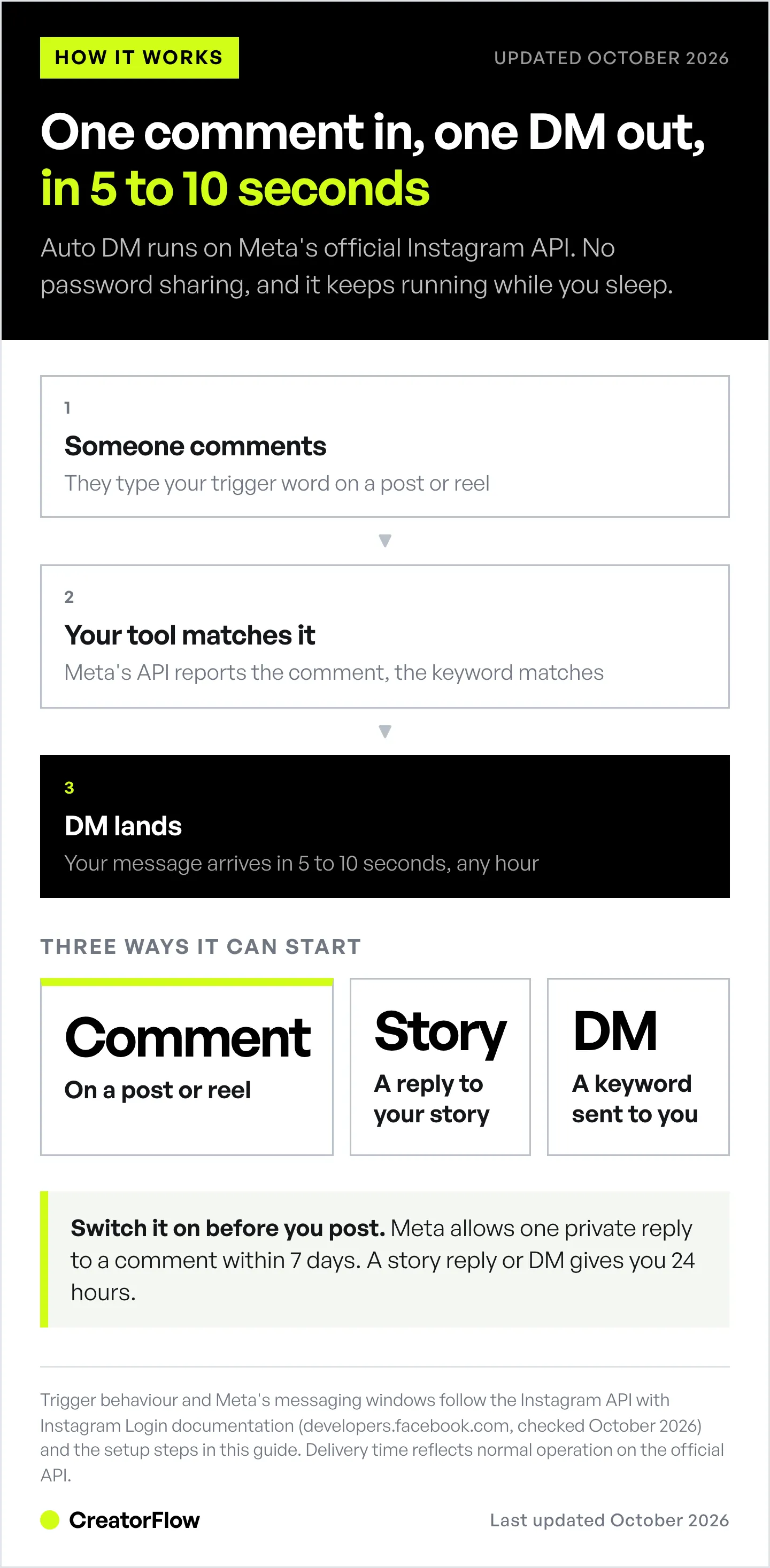
The technology behind it: Meta’s Instagram Graph API. This is Instagram’s official system for approved third-party tools. Your auto DM tool connects to Instagram through this API, watches for your triggers, and sends messages on your behalf.
The trigger → action flow:
- You set a trigger word (like “LINK” or “INFO”)
- Someone comments that word on your post
- Instagram notifies your auto DM tool
- Tool sends your pre-written message to their inbox
- They receive your link in 5-10 seconds
This works 24/7. Someone comments at 3am while you’re asleep? They still get the message instantly. For the full system end to end, read our complete guide to Instagram DM automation.
What auto DM can do:
- Send affiliate links when someone comments “link”
- Deliver lead magnets (PDFs, guides) automatically
- Send booking calendar links (Calendly, Acuity)
- Respond to story replies with personalized messages
- Collect email addresses before sending the main link
- Send a follow-up after the person replies, inside Meta’s 24-hour window
What auto DM can’t do:
- Send unsolicited messages to random followers (that’s spam)
- Go past Meta’s rate limits, such as 750 private replies to comments per hour
- Message people who haven’t engaged with you first
- Work with Personal accounts (Business/Creator only)
If you want the click-by-click version inside the app, follow the first automation walkthrough. To work out whether the time saved justifies a paid plan, run the numbers through the free Instagram DM ROI calculator.
What You Need Before Starting
Five things must be in place before setting up auto DM. Missing any of these will block your setup.
1. Instagram Business or Creator Account
Auto DM only works with Business or Creator accounts. Personal accounts don’t have API access.
To switch (30 seconds):
- Open your profile and tap the menu (three lines)
- Tap “Account type and tools”
- Tap “Switch to professional account”
- Choose Business or Creator
- Done
You can switch back to Personal anytime, but your automations stop working when you do.
2. A Facebook Page, if Your Tool Connects Through Facebook Login
This one depends on the tool. Tools built on the Instagram API with Instagram Login connect your Instagram professional account directly. Tools built on the older Messenger API for Instagram sign you in through Facebook and need a Facebook Page linked to your Instagram account.
If you need a Page and don’t have one, Instagram prompts you to create it when you switch to Business or Creator. It takes 2 minutes. You never need to post on the Page. It just needs to exist.
3. Auto DM Tool
Pick one:
CreatorFlow (Free for 500 DMs/mo, Pro $15/mo for 5,000 DMs, creatorflow.so)
- What it is: an Instagram-only auto DM tool and Meta Tech Provider (since December 2025). It sends your DM when someone comments a keyword, replies to your Story, or messages you a keyword
- Best for: solo creators who want simple setup
- Scope: Instagram, end to end, at a flat rate that does not move with your contact count
ManyChat (Free for 25 active contacts, then $17-$199/mo across four paid tiers billed monthly, or $14-$139/mo billed annually, manychat.com/pricing, October 2026)
- Best for: multi-platform needs (Instagram, Facebook, WhatsApp, SMS, TikTok, Telegram, email)
- Scope: deep flow builder and multi-channel coverage; billing is metered by contact count, so the price moves with your audience
LinkDM (Free for 1,000 DMs/mo, Pro $19/mo for 25,000 DMs, linkdm.com, October 2026)
- Best for: creators who want a long-running platform with a large free allowance
- Scope: Instagram-first, priced by monthly DM volume; LinkDM reports 60,000+ creators, brands, and agencies (linkdm.com, October 2026)
For this guide, I’ll use steps that work across all tools. The buttons look different but the concepts are identical.
4. Your Link or Content to Send
Have your destination ready:
- Amazon/LTK affiliate link
- Google Drive or Dropbox PDF
- Calendly booking link
- Shopify product page
- Landing page for email capture
Test your link before putting it in automation. Sending people broken links wastes their engagement.
5. A Post with Comments (or New Post Ready)
You need content to attach your automation to:
- Existing post that’s still getting comments
- New post you’re about to publish
- Reel with engagement
Start with one post. Once it works, scale to all your content.

Setting Up Auto DMs (5-Minute Guide)
Setting up an Instagram auto DM takes seven steps and about 5 minutes in most tools.
Step 1: Create Account and Connect Instagram (2 minutes)
Go to your chosen tool’s website. Create an account.
Click “Connect Instagram” or “Add Account.” You’ll see Meta’s official authorization screen. This is Instagram’s login system, you’re not sharing your password with anyone.
Log in with your Instagram credentials. Grant the requested permissions (read comments, send DMs).
Your account is now connected. You’ll see your profile photo and follower count in the dashboard.
Step 2: Create New Automation (30 seconds)
Click “New Automation” or “Create Flow.”
Select “Comment-to-DM” or “Post Comment Trigger.”
Name your automation something descriptive:
- “Skincare Routine Links”
- “Free Meal Plan Delivery”
- “Discovery Call Booking”
Step 3: Choose Your Trigger Post (30 seconds)
Select which post triggers this automation.
Option A: Pick an existing post Browse your recent posts. Click the one you want. Posts with existing engagement work well for testing.
Option B: Apply to next post Some tools let you auto-activate on your next post. Publish content, automation starts immediately.
For your first test, use an existing post with some comments already.
Step 4: Set Your Trigger Keyword (30 seconds)
Enter the word people will comment to receive your DM.
Good trigger words:
- LINK
- INFO
- GUIDE
- FREE
- RECIPE
- WORKOUT
- PRICE
Bad trigger words:
- PLEASESENDMETHECOMPLETEGUIDEWITHALLLINKS (too long)
- link pls (spelling variations cause problems)
- Single emojis (inconsistent triggering)
Settings to enable:
- Case insensitive: “link,” “LINK,” and “Link” all work
- Contains match: Triggers on “yes link!” not just “LINK”
- Multiple keywords: Add variations (LINK, LINKS, SEND LINK)
In CreatorFlow these rules are built in: a keyword matches as a whole word and ignores letter case, so “link” fires on “yes link!” but not on “linked”. One automation takes up to 20 keywords.
Step 5: Write Your Auto DM Message (2 minutes)
This determines whether people click your link or ignore it.
Message structure that converts:
Hey! [Acknowledge their request]

[Deliver what they asked for with link]

[One bonus tip or extra value]

[Soft invitation to reply]
Example for affiliate links:
Hey! Here's my full skincare routine with product links:
[your-affiliate-link]

Pro tip: Start with the vitamin C serum. You'll see results in 2-3 weeks.

Let me know what you think!
Example for lead magnets:
Hey! Sending you the Instagram growth guide now:
[your-google-drive-link]

It's the exact strategy I used to [your result].

Questions? Just reply!
Example for booking links:
Hey! You asked about working together.

Here's my calendar to book a free 15-min call:
[your-calendly-link]

I only take 5 clients per month. Talk soon!
Keep it under 100 words. People skim DMs on phones. Deliver value fast.
Step 6: Test Your Automation (1 minute)
Before going live:
- Go to your trigger post
- Comment your trigger word from another account (or have a friend test)
- Wait 5-30 seconds
- Check DMs
You should receive the automated message exactly as written. Click your link to verify it works.
If message didn’t send:
- Is automation toggled ON?
- Did you spell trigger word correctly?
- Is your Instagram connected properly?
- Are you using Business/Creator account?
Step 7: Activate and Go Live (10 seconds)
Click “Activate” or “Publish” or “Go Live.”
Your auto DM is now running. Every time someone comments your trigger word, they get your message automatically.
Auto DM Templates That Convert
These six Instagram auto DM templates cover affiliate links, lead magnets, bookings, courses, products and recipes. Copy one and replace the brackets with your details.
Amazon/LTK Affiliate Template
Hey! Here's my [product category] favorites with links:
[your-affiliate-link]

Everything ships with Prime.

Let me know which products you grab!
Free Lead Magnet Template
Hey! Your [lead magnet name] is ready:
[your-download-link]

This is exactly what I used to [result you achieved].

Let me know how it works for you!
Coaching/Booking Template
Hey! Thanks for your interest in [service name].

Here's my calendar for a free 15-min call:
[your-calendly-link]

We'll talk about your goals and see if my program is a fit.
Course/Digital Product Template
Hey! Here's what you get in [course name]:
[your-sales-page-link]

Use code SAVE40 for 40% off (expires in 48 hours).

Any questions? I'm here!
E-commerce Product Template
Hey! Here's the [product] everyone's asking about:
[your-product-link]

We have sizes [X-X] in stock. Ships same day!

Use code INSTA15 for 15% off.
Recipe/Tutorial Template
Hey! Here's the full [recipe/tutorial]:
[your-link]

The secret is [one quick tip].

Tag me when you try it!
When to Use Auto DMs (Best Use Cases)
Instagram auto DM works best for six jobs:
1. Affiliate Link Distribution
Every “link?” comment is a potential commission. Auto DM sends your affiliate link instantly, before they lose interest.
Best trigger words: LINK, SHOP, BUY, PRODUCT Message focus: Deliver link immediately, add one helpful tip
2. Lead Magnet Delivery
Build your email list while sleeping. Someone wants your free guide? Auto DM delivers it and asks for their email.
Best trigger words: FREE, GUIDE, DOWNLOAD, PDF Message focus: Deliver value first, ask for email second
3. Discovery Call Booking
Coaches and consultants: Stop manually sending Calendly links. Auto DM sends your booking link within seconds.
Best trigger words: INFO, COACHING, WORK, BOOK Message focus: Create urgency (limited spots), make booking easy
4. Story Reply Responses
Stories get quick engagement. Auto DM responds to story replies with relevant links or offers.
Trigger: Someone replies to your story Message focus: Personalized response + relevant offer
5. Keyword-Based Customer Service
Common questions get instant answers. “PRICE” triggers your pricing info. “HOURS” triggers your availability.
Best trigger words: PRICE, HOURS, SIZE, SHIPPING Message focus: Answer the question directly, include next step
6. Contest/Giveaway Entries
Run engagement campaigns. Comment to enter → Auto DM confirms entry and shares additional content.
Best trigger words: ENTER, WIN, GIVEAWAY Message focus: Confirm entry, encourage sharing for bonus entries

Common Mistakes to Avoid
Avoid these ten Instagram auto DM mistakes:
Mistake #1: Using Complicated Trigger Words
Wrong: “PLEASESENDMETHEINSTAGRAMGROWTHGUIDE2025” Right: “GUIDE”
People type fast on phones. Make it easy. One short word.
Mistake #2: Writing Robot Messages
Wrong: “Your requested link has been processed. Please find the resource at the following URL:” Right: “Hey! Here’s your link”
Sound like a human. Use casual language. Skip the formality.
Mistake #3: Burying Your Link
Wrong: Three paragraphs of intro before the link appears Right: Link in the first 2-3 lines
People scroll fast. Get to the point. Deliver the link immediately.
Mistake #4: No Call-to-Action
Wrong: Just dropping a link with no context Right: “Grab yours before they sell out!” or “Let me know what you think!”
Tell them what to do next. Create urgency when appropriate.
Mistake #5: Sending Broken Links
Test every link before activating automation. Click it yourself. Make sure it loads fast and goes to the right page.
Mistake #6: Ignoring Meta’s Messaging Windows
Meta lets automation message someone only inside a set window, and the window depends on how the chat started (developers.facebook.com, October 2026):
| How the person reached you | When automation can message them |
|---|---|
| Commented on your post or Reel | One private reply within 7 days of the comment; more only after they reply |
| Replied to your Story or sent you a DM | Within 24 hours of their last message |
| Tapped a Click-to-Direct ad and sent a message | Up to 7 days from that first message (since 28 September 2026) |
Set up automation before you post, so every commenter gets the DM while the window is open. Comments that arrived before setup can still get a DM while Meta’s 7-day window is open: CreatorFlow’s Rewind (Pro and Growth) goes back and DMs everyone who already commented on your recent posts.
Mistake #7: Spam-Level Follow-Ups
Wrong: 5 follow-up messages over 3 days Right: One reply, then a follow-up only when the person answers
Meta allows one private reply per comment. You can send more only after the person replies, and only within 24 hours of their last message. If they don’t answer, move on.
Mistake #8: Bait-and-Switch Content
Wrong: Caption promises “free guide,” DM sends $297 course sales page Right: Deliver exactly what you promised
Bait-and-switch destroys trust and gets you reported for spam.
Mistake #9: Using Browser Bots
Wrong: Tools that log into Instagram and simulate human clicks Right: API-based tools (CreatorFlow, ManyChat, LinkDM)
Browser bots violate Instagram’s Terms of Service and are the fastest route to a restriction. Our guide on how to avoid Instagram bans with DM automation covers how to check a tool before you connect it. Only use official API tools.
Mistake #10: Not Tracking Results
Check your analytics weekly:
- How many triggers fired?
- How many DMs sent successfully?
- What’s your click-through rate (clicks ÷ messages sent × 100)?
Compare each week against your own previous weeks. When the click rate falls on the same offer, the message needs work. Test a different version.
What Moves the Number on Your Bill
Auto DM tools bill on one of three meters, so two tools with the same entry price can cost different amounts at the same volume.
Some count the people who interact with you, so a post that performs well raises the bill on its own. Some count the messages you send. Some charge a fixed monthly rate for a set allowance, so the number holds regardless of how your month goes.
CreatorFlow is the fixed kind. Free runs 500 DMs a month, Pro is $15/month for 5,000, and Growth is $30/month for 10,000 (billed monthly; $12 and $24 a month billed annually). On Pro and Growth, DM top-up packs add messages if you need more before the next cycle. See the current plans.
One thing worth doing before you subscribe to anything: locate the cancellation path and the refund policy while you are still deciding, rather than while you are trying to leave.
FAQ
Is auto DM safe for my Instagram account?
Yes, if you use tools that work through Meta’s official Instagram API. CreatorFlow, ManyChat, and LinkDM all use this official system, and Instagram allows automation through approved tools. What’s NOT safe: browser bots that log into your account and pretend to be you. Those break Instagram’s Terms of Service and can get your account restricted or banned.
How much does Instagram auto DM cost?
Tools range from free to $199/month. CreatorFlow charges $15/mo flat with 5,000 DMs per workspace (creatorflow.so/pricing, October 2026). ManyChat offers free up to 25 contacts, then $17-$199/mo billed monthly based on contact count, or $14-$139/mo billed annually (manychat.com/pricing, October 2026). LinkDM Pro costs $19/mo for 25,000 DMs (linkdm.com, October 2026). For one account, the entry paid plans of these three tools sit between $15 and $19 a month, billed monthly.
Can I auto DM Instagram for free?
Yes, with limits. CreatorFlow’s Free plan covers 500 DMs a month, LinkDM’s 1,000 DMs, ReplyRush’s 1,500 DMs on one account, and ManyChat’s free plan 25 active contacts (vendor pricing pages, October 2026). Follower count does not matter. A small account that gets ten “link?” comments a post saves ten manual replies on every post. Our free Instagram DM automation tools comparison puts every free tier side by side.
How many auto DMs can I send per hour?
Meta’s published limit for private replies to comments on posts and Reels is 750 per hour on the Instagram API with Instagram Login (developers.facebook.com, October 2026). Many tools pace lower, around 200 DMs an hour, as their own safety margin. That 200 figure is a tool convention, not a Meta rule.
Will people know my DM is automated?
Done well, no. The message comes from your account, not a bot account. If you write naturally and personalize where possible (using variables like {{first_name}}), messages feel human. Avoid robotic language. Sound like yourself.
Can I collect emails with auto DM?
Yes. Most tools let you add an email collection step before delivering the main content. Flow: trigger word, then a DM that asks for the email, then the reply, then you send the link and store the address. In CreatorFlow this is the Email Gate on Pro and Growth. Meta turned off the email quick-reply button in Instagram messaging on 5 October 2026, so people now type their address into the chat (developers.facebook.com, October 2026). See the full walkthrough on how to collect emails from Instagram DMs automatically.
What happens if someone replies to my auto DM?
You can reply normally. The reply lands in your Instagram inbox, and you answer it there. Auto DM handles the first response; the rest of the conversation is manual unless you set up more keyword triggers. A reply also opens Meta’s 24-hour window, so any follow-up has to go out within a day.
Can I use auto DM for multiple Instagram accounts?
Yes. CreatorFlow Pro supports 2 accounts and Growth supports 5 (creatorflow.so/pricing, October 2026). LinkDM Pro covers 3 accounts and Platinum+ covers 10 (linkdm.com/pricing, October 2026). Each account needs its own automations set up.
Ready to Set Up Auto DM?
You now know exactly how Instagram auto DM works, what you need, and how to set it up in 5 minutes.
Start with one automation. Test it on one post. Watch your analytics.
Once it is handling the link requests for you, you’ll wonder why you ever copy-pasted them by hand.
Setup takes about 5 minutes, and the automation keeps running on every post you attach it to.
Get started: creatorflow.so, Free plan includes 500 DMs/month.
Related Articles:
- Comment-to-DM Automation: Complete Setup Guide - Full guide to comment triggers
- Instagram DM Automation Templates - 25 copy-paste message templates
- How Instagram DM Automation Works - Technical guide to Meta’s API
- Instagram Story Reply Automation - Auto-respond to story mentions
Disclaimer: Prices, plan limits and Meta messaging rules were checked in October 2026. Individual results vary based on audience, content quality, and niche. CreatorFlow uses Meta's official Instagram Graph API. Instagram/Meta may change features, limits, or terms at any time. Instagram is a trademark of Meta Platforms, Inc. CreatorFlow is not affiliated with, endorsed by, or sponsored by Meta Platforms, Inc. ManyChat and LinkDM are trademarks of their respective owners. Users are responsible for complying with Instagram's Terms of Service and Community Guidelines.


