

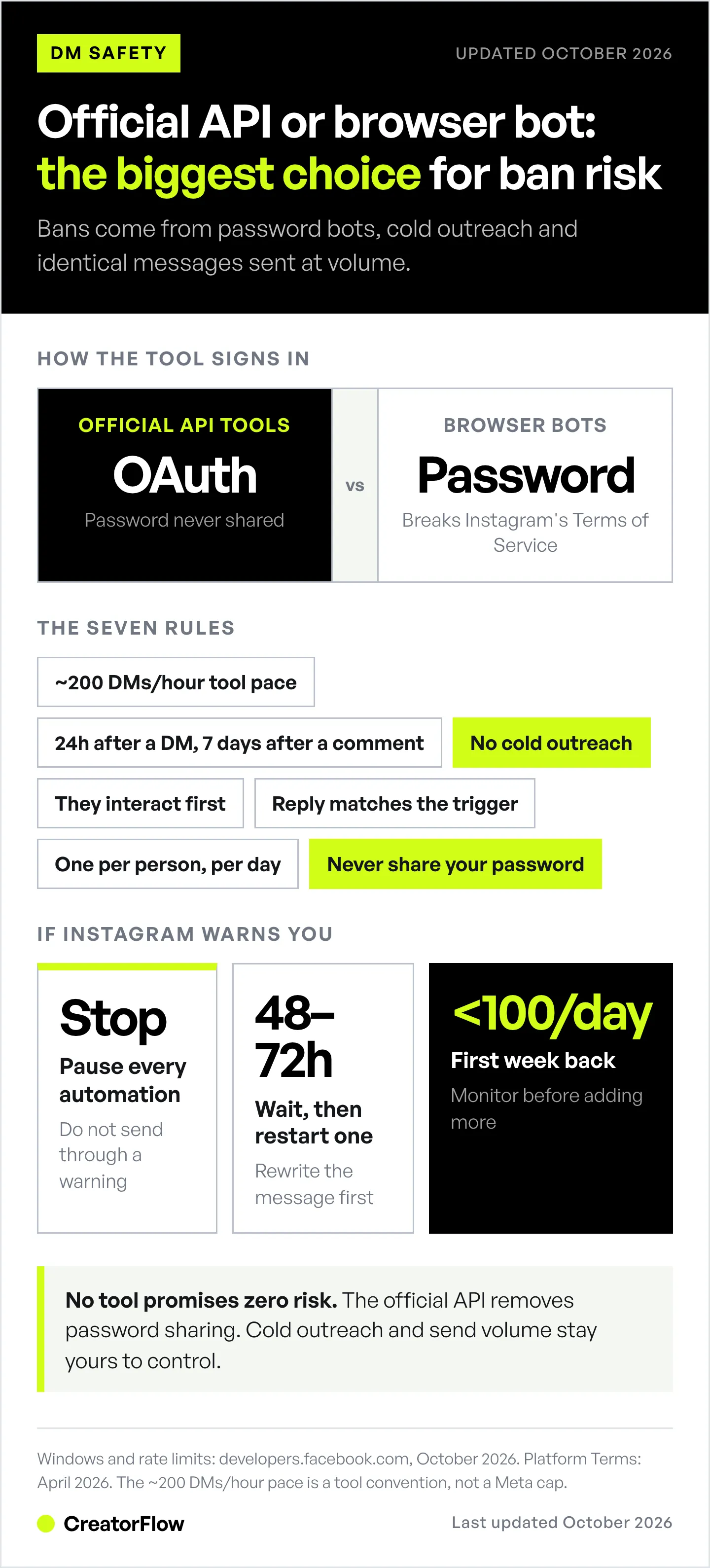
Yes, Instagram can restrict or ban an account over DMs, and the cause is almost always how the messages are sent. Instagram DM automation through tools built on Meta’s official Instagram API, like CreatorFlow, ManyChat, or LinkDM, carries minimal ban risk. No tool can promise zero risk. Bans come from browser bots that ask for your password, cold outreach to people who never engaged with you, and identical messages sent at high volume.
You set up DM automation. Three days later, your account is suspended. No warning. No explanation. This happens when you use the wrong tools or break Instagram’s rules. The right tools and the right approach remove almost all of that risk.
This guide covers 7 rules for safe DM automation, 8 mistakes that trigger bans, and how to verify your tool uses the official API.
Key Takeaways
- Official API tools carry minimal risk: CreatorFlow, ManyChat, and LinkDM use Meta’s Instagram Graph API, which Instagram explicitly allows
- Tool pacing: roughly 200 automated DMs per hour, a convention approved tools apply themselves (Meta publishes per-second ceilings instead)
- Messaging windows: A comment gets one private reply within 7 days. A DM or Story reply opens a 24-hour window. Chats started from a Click-to-Direct ad get up to 7 days (since September 28, 2026)
- No cold outreach: Messaging people who didn’t interact with you first is the fastest route to a ban
- Browser bots get you banned: Chrome extensions and tools that ask for your password violate Instagram’s Terms of Service
- Bottom line: Use official API tools and follow the 7 rules in this guide. That removes almost all of the ban risk, though no tool can promise zero
Is Instagram DM Automation Safe, or Against the Rules?
Not if you use Instagram’s official system.
Instagram allows automated DMs through Meta’s official Instagram API. This is the same system that powers tools like ManyChat, LinkDM, and CreatorFlow. When you use approved tools that connect through the official API, you’re following their rules.
CreatorFlow is an Instagram-only DM automation tool and a Meta Tech Provider (since December 2025). It replies by DM when someone comments a keyword on your post or Reel, replies to your Story, or messages you a keyword, and it connects through Instagram’s own login screen, so it never sees your password.
What Instagram allows:
- Automated DMs to users who comment on your posts
- Automated DMs to users who reply to your stories
- Automated keyword-triggered DMs (when someone DMs you first)
- Automated follow-up messages within 24 hours
What Instagram prohibits:
- Browser automation bots (Chrome extensions that fake human behavior)
- Cold DM outreach to people who didn’t engage with you
- Messaging people outside Meta’s messaging window
- Sending at volumes that trip spam detection (tools pace at ~200 DMs/hour for this reason)
- Mass messaging hundreds of people with identical generic messages
According to Meta’s Platform Terms (https://developers.facebook.com/terms, verified April 2026), automation through approved API access is compliant as long as you follow their rate limits and messaging rules.
The #1 Reason Accounts Get Banned: Using the Wrong Tools
Most Instagram bans happen because people use unofficial automation tools.
Browser Automation Bots (The Dangerous Ones)
What they are: Chrome extensions or desktop apps that control Instagram through your browser. They mimic human clicking and typing to send DMs.
Why they’re dangerous:
- Instagram’s anti-spam systems detect bot-like behavior patterns
- They violate Instagram’s Terms of Service
- No rate limiting (they’ll spam until you’re banned)
- Require your Instagram password (security risk)
Red flags to spot them:
- “Unlimited DMs with no restrictions”
- “Undetectable by Instagram”
- Requires installing browser extension
- Asks for your Instagram username and password directly
- Cheap one-time payment (too good to be true pricing)
What happens when you use them: Instagram may flag the account for automated behavior, limit actions such as messaging, ask you to confirm your identity, or disable the account. Repeat violations raise the risk of a permanent ban.
Official API Tools (The Safe Ones)
What they are: Apps that connect to Instagram through Meta’s official Instagram API. The API itself only lets them message people inside Meta’s rules.
Why the risk is low:
- Built-in pacing (tools commonly cap themselves at around 200 DMs/hour)
- The API blocks messages outside the messaging window
- Meta knows which app is sending, because the app passed Meta’s App Review for messaging
- No password sharing required (OAuth login)
How to identify them:
- Connect through “Login with Facebook/Instagram” button
- Never ask for your password directly
- Show a Meta program designation. CreatorFlow is a Meta Tech Provider (since December 2025); ManyChat and LinkDM are Meta Business Partners
- Explain how they pace sends
- Transparent pricing (monthly subscription)
Official-API Instagram DM automation tools (October 2026):
| Tool | Free plan | Paid plans, billed monthly | How it connects |
|---|---|---|---|
| CreatorFlow | 500 DMs/month | Pro $15/month, Growth $30/month ($12 and $24/month billed annually) | OAuth, official Instagram API |
| ManyChat | 25 active contacts | $17-$199/month ($14-$139/month billed annually) | OAuth, official Instagram API |
| LinkDM | 1,000 DMs/month | Pro $19/month, Platinum+ $99/month | OAuth, official Instagram API |
Prices from creatorflow.so, manychat.com/pricing and linkdm.com/pricing (October 2026).
Instagram’s 7 DM Automation Rules (Follow These or Get Banned)
Approved tools handle most of these automatically. Rules 2 to 4 come from how Meta’s messaging API works, rule 1 is pacing the tools set themselves, and rules 5 to 7 keep spam reports and login flags down.
Which limits are Meta’s and which are your tool’s:
| Limit | Number | Set by |
|---|---|---|
| Text and link messages | 100 API calls per second | Meta |
| Private replies to post and Reel comments | 750 per hour | Meta |
| Private replies per comment | 1, sent within 7 days of the comment | Meta |
| Reply window after a DM or Story reply | 24 hours from the person’s last message | Meta |
| Chats started from a Click-to-Direct ad | Up to 7 days (since September 28, 2026) | Meta |
| About 200 automated DMs per hour | Pacing convention | Your tool |
Sources: Meta’s rate-limit, private-replies and messaging-policy pages (developers.facebook.com, October 2026).
Rule 1: Roughly 200 Messages Per Hour (Tool-Side Pacing)
The pacing cap: roughly 200 automated DMs per hour, per Instagram account. Tools set this pace themselves; Meta publishes per-second ceilings instead (developers.facebook.com/docs/graph-api/overview/rate-limiting, October 2026).
How to stay compliant:
- Use a tool that queues messages when it reaches its pace instead of dropping them
- Don’t try to get around the pace by connecting the same account to several tools
- Monitor your DM volume during viral posts
What happens when your tool reaches its pace: a well-built tool holds the extra messages and sends them later. That is normal, not a violation.
Worked example: a Reel gets 1,500 comments with your keyword in one hour. At 200 DMs an hour, the queue takes 7.5 hours to clear. That is well inside Meta’s 7-day window for replying to a comment, so nobody misses the link.
Rule 2: 24-Hour Messaging Window
The rule: You can only send automated DMs to people who recently engaged with you. After a DM or Story reply, you have 24 hours from their last message. After a comment, you can send one private reply within 7 days, and more messages only once the person replies.
Valid engagement:
- Commented on your post or Reel
- Replied to your story
- Sent you a DM
- Mentioned you in their story
Why it exists: Prevents cold outreach spam.
How to stay compliant:
- Only automate responses to recent interactions
- Don’t try to message old followers who haven’t engaged recently
- Use Instagram Stories to refresh the 24-hour window (when someone replies, window reopens)
What happens if you violate: Instagram’s API won’t deliver messages outside the window. The message fails silently. You’re not automatically banned, but repeated attempts to bypass this could flag your account.
Rule 3: No Cold Outreach
The rule: Don’t DM people who haven’t interacted with you.
What’s allowed:
- ✅ Someone comments “link?” → You auto-send link
- ✅ Someone replies to your story → You auto-respond
- ✅ Someone DMs you “price” → You auto-send pricing
What’s prohibited:
- ❌ Scraping followers from another account → Mass DMing them
- ❌ DMing everyone who follows you (they didn’t ask for it)
- ❌ Sending DMs to commenters on other people’s posts
Why it matters: Cold outreach is the fastest way to get reported for spam, and spam reports are one of the signals Instagram uses to review an account.
Rule 4: User-Initiated Interactions Only
The rule: Someone must interact with you first before automation kicks in.
How this works:
- User comments on your post or replies to your story (they initiate)
- Your automation detects the trigger
- Automation sends your pre-written DM
- This is compliant because they started the conversation
What’s not allowed: Sending automated DMs to followers who haven’t engaged recently, even if they followed you voluntarily.
Rule 5: No Generic Spam Messages
The rule: Messages must be relevant to the user’s request.
Good automation:
- User comments “link please” → You send product link
- User replies to transformation story → You send program details
- User DMs “price” → You send pricing info
Bad automation:
- User comments “Nice post!” → You send unrelated sales pitch
- User likes your post → You send promotional message (likes don’t open DM window)
- User follows you → You send sales funnel (they didn’t ask)
Why it matters: Generic spam messages get reported. Too many reports = account review.
Rule 6: One Automation Per User Per 24 Hours
The rule: Don’t spam the same person repeatedly with multiple automations.
Why it matters: Meta allows one private reply per comment. If the same person comments on 3 posts in an hour, each comment can get its reply, but three near-identical DMs in an hour read as spam and invite reports.
Best practice:
- Set up automation priority (high-value keywords like “price” or “buy” take precedence)
- Use follow-up sequences sparingly (one follow-up max per 24 hours)
- Don’t have overlapping trigger words across multiple automations
Rule 7: No Credential Sharing
The rule: Never give your Instagram password to third-party tools.
Why this matters: Instagram’s Terms of Use forbid soliciting, collecting or using other people’s login credentials, which is what a password-based tool does. If Instagram detects suspicious login patterns (tools logging in from multiple IPs), your account can be suspended for security reasons.
Safe authentication:
- Use OAuth (“Login with Facebook/Instagram” button)
- Connects your account without sharing password
- You can revoke access anytime from Instagram settings
- Instagram knows which apps you’ve authorized
Unsafe authentication:
- Tool asks you to enter username and password directly
- Browser extension that “logs you in automatically”
- Services that require your password to “set up automation”
8 Common Mistakes That Get Accounts Banned
These are the most frequent mistakes creators make, and how to avoid them.
Mistake 1: Using “Unlimited DM” Tools
The trap: Tool claims “unlimited DMs with no restrictions!”
Why it’s dangerous: Official-API tools still work inside Meta’s limits, so “unlimited” on their pricing page means no monthly DM cap. The warning sign is “unlimited” paired with “undetectable”, a password login, or a browser extension.
Safe alternative: Use tools that explain how they pace sends and queue messages when they reach that pace.
Mistake 2: Buying Follower Lists and Mass DMing
The trap: “Buy 10K Instagram followers + send them your pitch!”
Why it’s dangerous:
- These followers didn’t engage with you
- They’ll report you for spam
- Instagram detects mass messaging to purchased lists
- This is the fastest route to a permanent ban
Safe alternative: Grow your audience organically. Only message people who engage with your content.
Mistake 3: Copy-Pasting the Same Message to Everyone
The trap: Same generic message sent to 500 people in one day.
Why it’s dangerous: Instagram’s spam detection identifies identical messages sent repeatedly.
Safe alternative:
- Use message variables (include their name if available)
- Create 2-3 message variants and rotate them
- Personalize based on trigger context
Mistake 4: Ignoring Instagram’s Warnings
The trap: You get a warning notification from Instagram and keep doing the same thing.
Why it’s dangerous: Instagram gives warnings before bans. Ignoring them leads to suspension. One you may see is “We suspect automated behavior on your account”, which points to a tool holding your login.
What to do:
- Stop your automation immediately
- Review what triggered the warning
- Wait 48 hours before restarting automation
- Change your approach (different message, fewer DMs, better targeting)

Mistake 5: Automating Messages Outside Your Niche
The trap: You sell fitness programs but auto-DM people commenting on your food posts.
Why it’s risky: Irrelevant messages get reported as spam.
Safe alternative: Only automate DMs for content directly related to what you’re offering. Keep it relevant.
Mistake 6: Using Multiple Tools on the Same Account
The trap: Running ManyChat + LinkDM + another tool on the same Instagram account simultaneously.
Why it’s risky:
- All tools draw on the same account, so their ~200/hour pacing caps don’t stack
- Tools may conflict (send duplicate messages)
- Instagram sees erratic behavior patterns
- Higher chance of hitting rate limits accidentally
Safe alternative: Choose one automation tool and stick with it.
Mistake 7: Setting Up Automation and Forgetting It
The trap: You set up automation 3 months ago and never check it.
Why it’s risky:
- Instagram’s rules change
- Your message may no longer be relevant
- You won’t notice if it’s flagged
- Broken links or outdated offers look spammy
Safe alternative: Review your automations monthly. Update messages, check analytics, verify everything works.
Mistake 8: Automating Every Single Interaction
The trap: “I’ll automate everything so I never have to check my DMs!”
Why it’s risky:
- Followers notice when every response is robotic
- Important messages get generic automated replies
- People report you for being a bot
- Instagram rewards genuine engagement
Safe alternative: Automate repetitive requests (“link please”, “price?”). Respond manually to personalized questions and relationship-building DMs.
How to Check If Your Automation Tool Is Safe
Use this checklist before connecting any automation tool to your Instagram account.
Safety Checklist
✅ Green Flags (Safe to Use):
- Connects via OAuth (“Login with Facebook” button)
- Never asks for your Instagram password directly
- Explains how it paces sends
- Says what happens to messages when it reaches that pace (queued, not dropped)
- Sends only inside Meta’s messaging windows
- Shows a Meta program designation (Meta Tech Provider or Meta Business Partner) or similar trust signal
- Has real customer reviews (Trustpilot or G2)
- Transparent pricing (monthly subscription, not suspicious “lifetime deals”)
- Clear documentation about Instagram’s rules
- You can revoke access from Instagram settings
❌ Red Flags (Avoid These):
- Claims “no restrictions” or “no limits from Instagram”
- Asks for your Instagram username and password
- Requires browser extension installation
- Advertised as “undetectable” by Instagram
- One-time payment with lifetime access (too cheap to be real)
- No information about rate limits
- Promotes cold outreach or follower scraping
- Poor or fake reviews
- Website looks sketchy or unprofessional
- Unclear about how they connect to Instagram
If you see 8+ green flags: Tool is likely safe.
If you see 2+ red flags: Do not use this tool.
What to Do If Your Account Gets Flagged
Sometimes Instagram flags accounts even when you’re following the rules. Here’s how to respond. Before you restart anything, run an Instagram account health check to spot restrictions and shadowban signals, then use our free Instagram audit tool to see what to fix first.
Step 1: Stop All Automation Immediately
Don’t wait to see if it’s a false alarm. Pause your automations right away.
How to do this:
- Go to your automation tool dashboard
- Pause or turn off all active automations
- Don’t send any automated DMs for 48-72 hours
- Continue posting organic content (no automation)
Step 2: Check What Triggered the Flag
Common triggers:
- Sudden spike in DM volume (viral post)
- Multiple spam reports from users
- Exceeded rate limits repeatedly
- Connected to suspicious third-party tool
- Login from unusual location
How to identify: Check Instagram notifications, email from Instagram, or your automation tool’s dashboard for warnings.
Step 3: Review Your Messages
Go through your recent automated DMs:
- Are they relevant to what users requested?
- Do they sound spammy or salesy?
- Are you sending too many follow-ups?
- Is the message longer than it needs to be?
Step 4: Make Adjustments
Before restarting automation:
- Rewrite messages to be more helpful, less salesy
- Reduce DM frequency
- Tighten trigger words (more specific = less spam reports)
- Add personalization (use their name if available)
Step 5: Restart Slowly
After 48-72 hours:
- Start with one automation (your most important)
- Monitor for 1 week
- If no issues, gradually add more automations
- Keep daily DM volume under 100 for first week back
Step 6: If You Get Suspended
Temporary restriction (for example, a limit on messaging):
- Check Account Status for the date the restriction ends, and wait it out
- Don’t try to create new accounts
- When access returns, follow steps above
- Be more conservative with automation
Disabled account:
- Request a review from the notice Instagram shows when you try to log in
- Explain that you used an official-API tool, and name it
- Remove access for any tool you no longer use
- Don’t open a new account to replace it. Instagram’s Terms of Use say you can’t use Instagram if it previously disabled your account for breaking the law or its policies
Safe Automation Best Practices for 2026
Follow these guidelines to stay compliant long-term.
Best Practice 1: Start Small, Scale Gradually
Don’t: Set up 10 automations on day one and blast 200 DMs per hour immediately.
Do:
- Week 1: Set up one simple automation (comment-to-DM)
- Week 2: Add keyword triggers
- Week 3: Add story reply automation
- Month 2: Add follow-up sequences
Gradual scaling looks more natural to Instagram’s systems.
Best Practice 2: Keep Messages Helpful, Not Salesy
Bad message:
“BUY NOW! Limited time offer! Click here: [link] Only 24 hours left! Don’t miss out!!!”
Good message:
“Hey! Here’s the link you asked for: [link]
It comes in 5 colors and ships in 2-3 days. Let me know if you need sizing help!”
The good message answers their request without being pushy.
Best Practice 3: Monitor Your Analytics
Check your automation dashboard weekly:
- DMs sent (stay well under 200/hour average)
- Response rate (how many people reply back)
- Report rate (if tool shows this)
- Deliverability (what percentage of messages actually send)
If you notice drops in deliverability or increases in reports, adjust your approach.
Best Practice 4: Use Official Tools Only
Stick to tools with proven track records:
- CreatorFlow (best for Instagram-only creators)
- ManyChat (best for brands and agencies that also automate Facebook, WhatsApp or TikTok)
- LinkDM (60,000+ creators, brands and agencies, per linkdm.com, October 2026)
All three connect through Meta’s official API, pace their own sends, and work inside Meta’s messaging windows. Don’t experiment with new, unproven tools on your main account.
Best Practice 5: Keep Up with Instagram’s Policy Changes
Instagram updates their rules periodically. Stay informed:
- Follow Instagram’s creators blog (creators.instagram.com)
- Check Meta for Developers documentation quarterly
- Join creator communities where people discuss changes
- Your automation tool should notify you of major changes
Best Practice 6: Have a Backup Plan
Don’t put all your eggs in one basket:
- Build an email list (Instagram can’t take that away)
- Diversify to other platforms (TikTok, Pinterest, YouTube)
- Keep a backup Instagram account (post occasionally, keep it warm)
- Download your Instagram data monthly (Accounts Center > Your information and permissions)
If your main account gets suspended, you’re not starting from zero.
Before You Connect Any Tool to Your Instagram Account
Five checks, in the order they matter. Each takes under a minute on any vendor’s site, and together they remove most of the risk in this article.
- Official API or password login? Tools built on Meta’s official Instagram API connect through OAuth and never ask for your Instagram password. Anything that wants your password is operating outside Meta’s rules and is the single largest risk factor for your account.
- What permissions does it request? Read the OAuth screen instead of clicking through it. You are granting messaging access to your account.
- How do you disconnect? Know the path out before you need it.
- Can you export your contacts? If not, every lead you collect stays inside that tool.
- What happens to your automations if you stop paying? Paused and recoverable is very different from deleted.
CreatorFlow is a Meta Tech Provider (since December 2025) and connects only through Meta’s official Instagram API using OAuth, so no password is ever shared. Contacts export to CSV on Pro and Growth, and automations pause rather than delete when a plan ends. Account safety detail lives in the help centre, and own your audience covers portability.
FAQ
Can Instagram detect if I’m using automation?
Yes, and that’s okay. When you use official API tools like CreatorFlow or ManyChat, Instagram knows you’re automating. That’s allowed. What’s not allowed is using unofficial browser bots that try to hide their activity.
Will my followers know I’m using automation?
Your automated messages look exactly like regular DMs. Followers might notice if your messages are generic or repetitive, which is why personalization matters. But automation through official tools doesn’t show “sent by bot” or any indicator.
How many DMs per day is safe?
Meta publishes no safe number of DMs per day. Its ceilings are 100 API calls a second for text and 750 private replies to comments per hour. Tools pace themselves at about 200 DMs an hour, and that pace is theirs, not Meta’s. The reason for each DM matters more: 50 replies to people who asked beat 200 generic messages.
What if someone reports my automated message as spam?
Instagram does not publish how many reports lead to a review. Reports are one of the signals it uses, so every automated DM should answer something the person asked for. If you see a warning, check Account Status and pause the automation that sent the reported message.
Can I use automation on a new Instagram account?
Yes, once it is a Creator or Business account, but waiting about 30 days is a cautious habit, not an Instagram rule. Spend the first month posting organically, engaging manually, and building a real audience. Then introduce automation gradually. You need a Business or Creator account for API access. Not sure which one to pick? See our Instagram Creator vs Business account comparison for the full breakdown.
Can Instagram ban you for DMs?
Yes. Instagram can limit or disable an account for DMs if you use unofficial tools, send cold outreach to people who never engaged with you, or ignore repeated warnings. Sending automated DMs through official API tools like CreatorFlow or ManyChat carries minimal ban risk, because the API only delivers messages inside Meta’s rules. The ban risk comes from how you send messages, not from sending messages itself.
Can you get banned from sending messages on Instagram?
Yes, you can get banned from sending messages on Instagram if you violate their policies. Common triggers include mass messaging strangers, using browser automation bots, sharing your password with unauthorized tools, and ignoring repeated warnings. Even manual messaging can trigger a temporary messaging block if you send identical messages to dozens of non-followers in a short time. Official-API tools keep the risk low because they only reply to people who contacted you first.
How do I revoke access if I want to stop using an automation tool?
Go to your profile, tap Menu, and below Your app and media tap Website permissions > Apps and websites > Active. Find your automation tool and tap Remove (help.instagram.com, September 2026). The tool loses access to your account straight away. If it also has a dashboard or subscription, cancel that separately. To switch tools, remove the old one first, then connect the new one, so two tools never answer the same comment.
Disclaimer: Figures in this article come from the sources cited in it. Individual results vary based on audience size, content quality, engagement rates, and niche. CreatorFlow uses Meta's official Instagram API. Instagram/Meta may change features, rate limits, or terms at any time. Instagram is a trademark of Meta Platforms, Inc. CreatorFlow is not affiliated with, endorsed by, or sponsored by Meta Platforms, Inc. ManyChat and LinkDM are trademarks of their respective owners. Users are responsible for complying with Instagram's Terms of Service and Community Guidelines.
Related guides:


