
“We suspect automated behavior on your account” is a warning Instagram shows when activity on your account looks like a bot. The usual causes are an app you gave your password to, or likes, follows and comments sent faster than a person would. It is a warning, not a ban. Change your password, remove apps you do not use, turn on two-factor authentication, and check Account Status.
The message tends to appear after something that felt harmless: a growth app that promised followers, a browser extension, a tool that asked for your login, or an evening of liking and following at speed. The screen gives you one button, Dismiss, and no explanation, which is why so many people search the exact words.
This guide quotes what Instagram’s own help pages say triggers the warning, walks through the fix in the current app, explains how long limits last, and shows why tools on Meta’s official API connect differently from apps that log in with your password. It is written for creators and small businesses, including anyone who uses DM automation.
Key Takeaways
- A warning comes first: Instagram is telling you it may restrict or disable the account if the activity continues.
- The top cause, in Instagram’s words: giving your username and password to a third-party app, “like apps that offer likes or followers”. Fast manual activity triggers it too.
- Fix it in five steps: change your password, remove unknown apps, turn on two-factor authentication, check Account Status, then slow down for a while.
- No published time limit: Instagram does not say how long action limits last. Account Status shows any restriction on your account and how long it runs.
- Official API tools work differently: you sign in on Instagram’s own screen, the app never sees your password, and Meta reviews apps that serve other businesses.
- Bottom line: remove anything that holds your password, keep your activity at a human pace, and use only tools that connect through Meta’s official login.
What “We Suspect Automated Behavior on Your Account” Means
The warning means Instagram’s systems saw activity that looks automated: actions that come too fast, too regularly, or from a tool logged in as you. Instagram shows it before taking stronger action, so treat it as a notice and act on it the same day.
The web version that users have posted reads: “To prevent your account from being temporarily restricted or permanently disabled, ensure that no other users or tools have access to your account and that you’re following our Terms of Use. Also consider changing your password to a stronger one.” Instagram does not publish the screen on its help pages, so check the wording against your own app. The same message also appears on Facebook, with British spelling in some regions.
Is it real or a scam? A warning inside the Instagram app or on instagram.com while you are signed in is real. A warning that arrives by email from any address other than @mail.instagram.com, or one that asks you to click a link and “verify” your password, is phishing (help.instagram.com, September 2026). Instagram’s help pages also warn that fake messages may threaten to ban or delete your account.
What Triggers the Warning, in Instagram’s Own Words
Instagram names three causes on its help pages: third-party apps that hold your login, automated access to the app, and activity at a pace no person keeps up. The table quotes each one from the source. None of them requires you to have run a bot yourself. Sharing a password once with a follower app is enough.
| Trigger | What Instagram says | Source |
|---|---|---|
| Password shared with an app | ”You may have provided your username and password to a third-party app or website (like apps that offer likes or followers on Instagram).” | Instagram data scraping help page |
| Automated access | ”Your account is automating access to, or collecting information in an automated way without our permission.” | Instagram data scraping help page |
| Fake engagement | Non-Instagram apps “create automated likes, comments and follows to make an account appear more popular than it is.” | Instagram inauthentic activity help page |
| High frequency | Posting, sharing or engaging “either manually or automatically, at very high frequencies” is not allowed. | Meta Community Standards, Spam policy |
Instagram’s Terms of Use (effective January 1, 2025) add the legal line: you cannot access or collect information “in an automated way without our express permission”. Meta has enforced this for years. In November 2018 Instagram began removing likes, follows and comments made by growth apps, and told affected users to change their password to cut the app’s access (about.instagram.com). Between 2019 and 2020, Meta sued several companies that sold fake likes and followers or ran automation software that mimicked the Instagram app (about.fb.com).
The high-frequency line matters because it covers people who use no tools at all. Meta’s Spam policy also allows restrictions on accounts acting at lower frequencies when other spam signals are present, such as posting the same comment again and again.
How to Fix It: 5 Steps in the Current App
Work through these in order. They follow Instagram’s own security checklist, and the first two remove the access that usually causes the warning. Meta is renaming Accounts Center to “Meta Account” in stages between April 2026 and 2027, so your app shows one name or the other. The steps are the same.
- Change your password. Go to your profile, tap the menu, then Password and security > Change password. On newer versions it sits inside Accounts Center or Meta Account. Every device signed in to your account is logged out, including any app that used your old password. That is the point.
- Remove apps you do not use. From the menu, find Website permissions > Apps and websites > Active, and tap Remove next to anything you do not recognise or no longer use. On a computer, open instagram.com/accounts/manage_access.
- Turn on two-factor authentication. Accounts Center (or Meta Account) > Password and security > Two-factor authentication. Instagram recommends an authentication app over text messages.
- Check Account Status. Menu > Account Status. It lists removed content, any “features you can’t use”, and whether your content can be recommended to people who do not follow you. If you think a restriction is a mistake, request a review there.
- Slow down for a while. Stop mass liking, following or commenting. Remove any growth app, “engagement pod” tool or browser extension that acts for you.
If a tool you trust stops working after the password change, reconnect it through its own login screen. Tools on the official API send you to Instagram’s login screen to approve access again. They never ask for your password themselves.
How Long Do Instagram’s Action Limits Last?
Instagram does not publish a time. Its help pages say only that you “may not be able to send more direct messages for a period of time” after a messaging warning. The one reliable place to see a limit and its length is Account Status, which Meta says shows “some restrictions your account might have and how long they’ll last” (transparency.meta.com, November 2024).
Two numbers circulate that you should not rely on. The “24 to 48 hours” in many guides has no Meta source. The 1, 3, 7 and 30-day restriction ladder that Meta publishes applies to Facebook accounts only: Meta says it counts strikes on both apps, “these restrictions only apply to Facebook accounts”.
If the account is disabled rather than limited, Instagram shows on-screen steps to request a review when you log in. If you are locked out or think someone else has your login, start at instagram.com/hacked.
Password Apps vs Official API Tools
The difference is how the app gets in. A password app signs in as you and gets the same access you have. An official API tool sends you to Instagram’s own login screen, receives a token for the permissions you approve, and never sees your password. Meta’s Platform Terms forbid apps from collecting your login details at all (developers.facebook.com, February 2026).
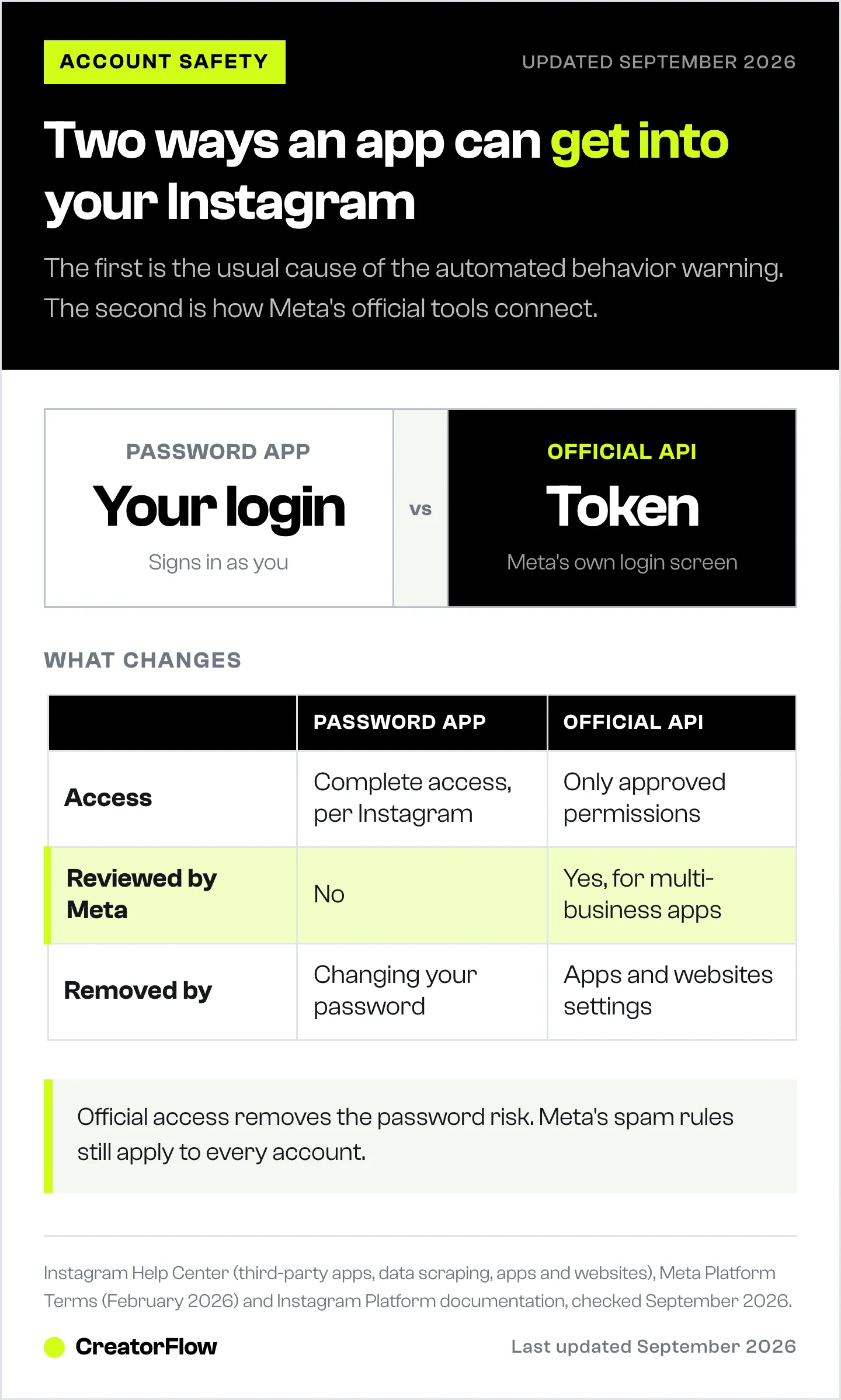
| Password-based app | Official API tool | |
|---|---|---|
| How it signs in | Your username and password | Instagram’s own login screen (OAuth) |
| What it can reach | ”Complete access to your account”, per Instagram | Only the permissions you approve |
| Who checks it | No one at Meta | Meta App Review and Business Verification for tools that serve other businesses |
| Speed limits | Whatever the app decides | Meta’s per-account limits, such as 750 private replies an hour to comments on posts and reels |
| How to remove it | Change your password | Remove it in Apps and websites |
Official access has limits of its own, and they are part of why it is safer. A private reply to a comment goes to each commenter once, within 7 days of the comment, and the person has to reply before you message again (developers.facebook.com, June 2026). Meta’s developer policies also list limits and pauses for messaging that gets “excessive negative feedback”. So an official tool removes the password risk, but it does not make spam acceptable.
CreatorFlow is built on this model. It connects through the Instagram API with Instagram Login, has been a Meta Tech Provider since December 2025, and replies only to people who commented, replied to a story or sent a keyword first. Our security page explains how the connection works. For the wider rules, see whether Instagram automation is safe in 2026.
How to Keep the Warning From Coming Back
Never give your password to anything but Instagram. If a service asks for it, it is not using Meta’s official login. That single habit removes the most common cause.
Automate replies, not actions. Tools that answer people who contacted you first follow Meta’s messaging rules. Tools that like, follow or comment on your behalf copy the behaviour Instagram removes.
Keep your pace human. Instagram publishes few hard numbers. One it does publish: it does not allow anyone to follow more than 7,500 accounts. Beyond that, avoid bursts and identical comments.
Write DMs people want to receive. Messages that people report or ignore are the negative feedback Meta’s policies mention. Our rules for automated DMs that stay within Meta’s limits cover message design in detail.
Check your account every few weeks. Account Status catches a restriction early, and our account health check walks through the rest. If you see “Action blocked” or “Try again later” instead, these fixes for blocked automation cover that message.
FAQ
Is “We suspect automated behavior on your account” a ban?
No. It is a warning. The message itself says it is there to prevent the account from being temporarily restricted or permanently disabled. Act on it the same day to lower the chance of a restriction.
Why did I get the warning if I never used a bot?
Three common reasons: an app you once gave your password to is still logged in, you liked, followed or commented at a pace Instagram reads as automated, or a browser extension acted on your behalf. Changing your password ends access for any app that used it.
How long does the automated behavior warning last?
The warning itself goes away when you tap Dismiss. Any restriction that follows has no published length. Check Account Status in your menu, which shows current restrictions and when they end.
Can I ignore the warning and tap Dismiss?
You can, but the cause is still there. If an app still holds your password, the activity continues, and a restriction is the next step the warning names. Change the password first, then dismiss.
Will DM automation trigger the warning?
Tools that log in with your password are a common cause. Tools on Meta’s official API reply only to people who contacted you first and follow Meta’s per-account limits, so they avoid the behaviour this warning targets. They still need messages people welcome, because Meta limits messaging that gets heavy negative feedback.
Does the same warning appear on Facebook?
Yes. Users report the same message on Facebook, and it points to the same fixes: secure your login and remove access you did not mean to give.
How do I know the warning is not phishing?
A real warning appears inside the Instagram app or on instagram.com while you are signed in. Instagram’s emails come only from @mail.instagram.com. Never enter your password on a page you reached from a message.
Triggers, security steps and paths from Instagram’s Help Center (data scraping, third-party apps, inauthentic activity, password, two-factor authentication and Account Status pages), Instagram Terms of Use (effective January 1, 2025) and Meta’s Community Standards Spam policy, checked September 2026. Enforcement history from about.instagram.com (November 2018) and about.fb.com (2019-2020). API login, permissions, rate limits and private-reply rules from Meta’s Platform Terms and Instagram Platform documentation on developers.facebook.com, checked September 2026. The warning text is as users have published it; Instagram does not publish the screen.


