

To DM someone on Instagram, tap Messages at the bottom of the app, tap Compose in the top right, pick the person, type your message and tap Send. You can also open their profile and tap Message. On a computer, click Messages on the left, then Compose. If the person does not follow you, your DM arrives as a message request and can only hold text until they accept it.
Sending the message takes five taps. The confusing part is what happens after: the DM that sits unseen in a Requests folder, the photo that will not send, and the profile with no Message button.
This guide covers every way to start a new message, where your DM lands, and why some do not go through. The steps follow Instagram’s Help Center as checked in November 2026.
Key Takeaways
- New message: tap Messages at the bottom, then Compose in the top right, pick the person, type and send. iPhone and Android use the same steps.
- From a profile: tap Message on the profile of someone you follow. No button? Start the chat from Compose and search their username.
- On a computer: click Messages on the left, then Compose in the top left, select the person and click Chat.
- No follow needed: you can message anyone. If they do not follow you, your DM is a message request with text only until they accept.
- When a DM cannot arrive: the person turned off message requests, or it is a Teen Account that only gets messages from accounts it follows or has connected with.
- For creators: when people DM you a keyword like PRICE, an automation can send your answer in seconds.
How to DM someone on Instagram on iPhone or Android
Open the Instagram app and tap Messages at the bottom of the screen. Tap Compose in the top right, select the person you want to message, type your message and tap Send. The steps are the same on iPhone and Android. The message is private: it does not appear in your feed, in search or on your profile.
The steps from Instagram’s guide to sending a message (checked November 2026):
- Tap Messages at the bottom of the app.
- Tap Compose in the top right.
- Select the person. Type a name in the search box if they are not in the list.
- Type your message. You can add a photo or video from your library, or tap Camera for a disappearing photo or video.
- Tap Send.
Select two or more people in step 3 to start a group chat. You can also schedule a message to send later. If you do not see Messages at the bottom, update the app: older versions show the messages icon at the top right of the feed.
How to message someone from their profile
Instagram gives a second way to message someone you follow: open their profile and tap Message. It is the quickest route when you are already looking at their posts.
- Tap the search icon and type their username.
- Open their profile.
- Tap Message.
- Type your message and tap Send.
Instagram describes this button for people you follow. If a profile shows no Message button, go to Messages, tap Compose and search their username instead.
How to DM someone on Instagram from a computer
Go to instagram.com, sign in, and use the menu on the left. The steps from Instagram’s computer help:
- Click Messages on the left.
- Click Compose in the top left.
- Select the people you want to message, then click Chat.
- Type your message. Click Add photo or video to attach a file.
- Click Send.
How to send a post or Reel to someone in a DM
Tap the Share icon below the post or Reel, pick the person from the list or tap Search, add an optional message under Write a message, and tap Send. It arrives as a message in your chat, per Instagram’s page on sharing a post to a chat.
The person who posted it is not notified. If the post comes from a private account, only people who follow that account can see it in the chat. You can also forward a message you received to up to 5 chats at a time.
Can you DM someone on Instagram without following them?
Yes. Instagram says you can send a message to anyone, and you do not need to follow them. What matters is whether they follow you. If they do not follow you and you are not already connected, your DM arrives as a message request. Until they accept it, it can only contain text, so photos, videos and voice notes cannot be sent.
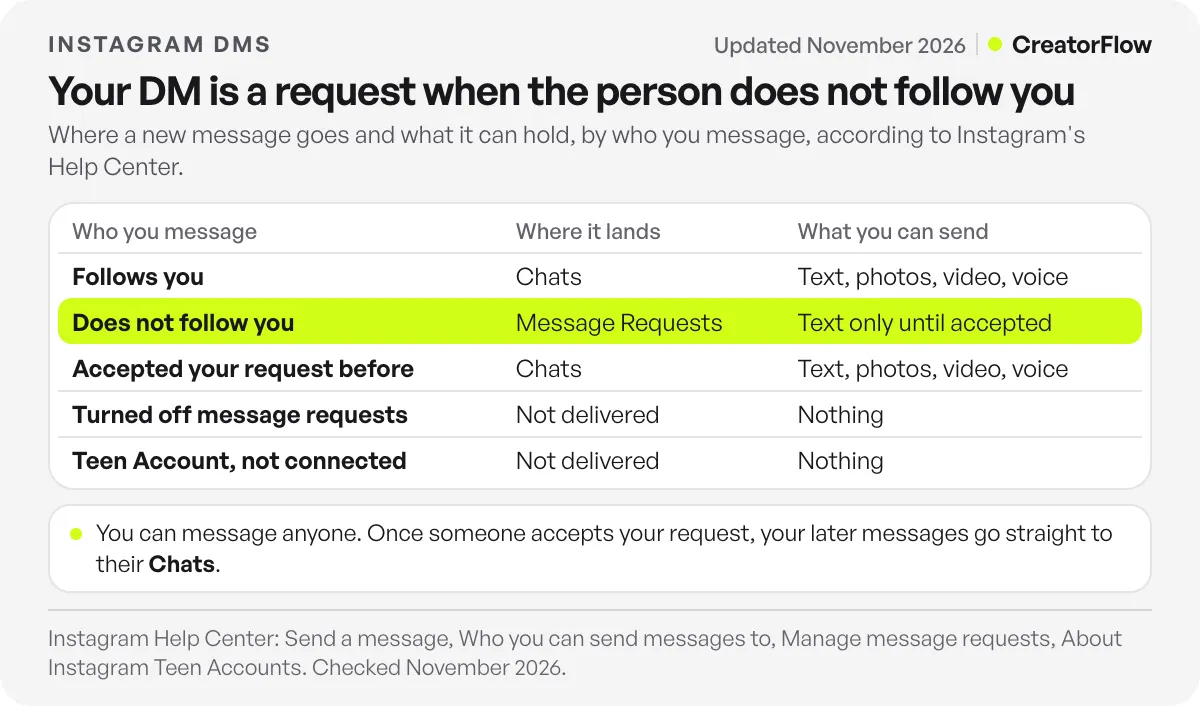
Instagram’s page on who you can send messages to adds that once someone accepts your request, your future messages go straight to their inbox. The other person also decides where requests go: in Message controls, each user chooses whether requests reach their Message Requests folder or are not received at all, per Instagram’s page on managing message requests (checked November 2026).
| Who you message | Where your DM lands | What you can send |
|---|---|---|
| Someone who follows you | Their Chats list | Text, photos, videos, voice notes |
| Someone who does not follow you | Their Message Requests folder | Text only, until they accept |
| Someone who accepted your request before | Their Chats list | Text, photos, videos, voice notes |
| Someone who turned off message requests | Not delivered | Nothing, until they follow you or message you |
| A Teen Account you are not connected to | Not delivered | Nothing, unless they follow you or have connected with you |
The Teen Account rule comes from About Instagram Teen Accounts: accounts for teens aged 13 to 17 only receive messages from accounts they follow or have previously connected with. Teens under 16 need a parent’s or guardian’s permission to change that.
Why is there no Message button, or why didn’t my DM go through?
A missing Message button or a DM that does not arrive has a short list of causes. You may not follow the person, so their profile shows no Message button. They may have turned off message requests, or they may have a Teen Account. A photo in a first message also fails, because requests hold text only until the person accepts.
Check these in order:
- No Message button. Start the chat from Messages, then Compose, and search their username.
- Requests turned off. Your DM is not received. Ask them to message you first, or reply publicly on their post.
- A Teen Account. It only gets messages from accounts it follows or has connected with.
- Media in a request. Send text first, and the photo or video after they accept.
- Too many messages. Instagram has limits to stop direct messages people may not want, like spam. If you were warned and kept going, you may not be able to send DMs for a period of time, says Instagram’s page on why there are limits for sending messages.
- An old app. Instagram’s troubleshooting steps: update the app, restart your phone, try Wi-Fi and mobile data, then reinstall.
When people DM you a keyword, answer automatically
Creators have the opposite job: the same message arriving fifty times a week. For answering by hand, see how to reply to a DM on Instagram. For the repeat questions, an automation does the work.
With CreatorFlow you can auto reply to keyword DMs. Tell people which word to DM you, like PRICE. When someone sends it, CreatorFlow sends your saved answer in seconds from your own account, with up to 3 link buttons. It works on every plan, including Free with 500 DMs a month. Pro is a flat $15 a month, and setup takes under 2 minutes.
CreatorFlow is a Meta Tech Provider and uses Instagram’s official API, so you never share your password. It only answers people who messaged, commented or replied to your story first. The keyword trigger guide has words and answers to copy, and the Instagram auto reply guide covers Instagram’s own instant replies and away messages.
Timing matters. Instagram’s API lets a tool answer a DM within 24 hours of the person’s last message, so an answer in seconds beats a reply tomorrow. The 24-hour reply window explains the rule and the error you see after it.
When the comments came before your automation
Sometimes a Reel takes off before your automation is ready, and 300 people comment GUIDE overnight. Meta’s private replies documentation allows one private message to each commenter within 7 days of their comment (checked November 2026).
CreatorFlow Rewind works inside that window. Set up the comment-to-DM automation on the post, open Rewind and pick it. Rewind sends your DM to people who commented on that post in the last 7 days, and skips anyone who already got it, so nobody gets it twice. Run it soon, because the newest comments are the most likely to get the DM. Rewind is on the Pro and Growth plans. For the rest of the comment side, see replying to comments on Instagram.
FAQ
What does it mean to DM someone on Instagram?
DM stands for direct message. To DM someone means to send them a private message in Instagram’s Messages. Only the people in the chat see it, and it does not appear in your feed, in search or on your profile.
Can you DM someone on Instagram without following them?
Yes. Instagram lets you message anyone, and you do not need to follow them. If they do not follow you, your message arrives as a message request with text only. Once they accept, your later messages go straight to their inbox.
Can you DM a private account on Instagram?
Yes. A private account hides posts from people who do not follow it, but you can still send it a message. If the person does not follow you, your DM goes to their message requests.
Why can’t I send a photo in my Instagram DM?
Your message is probably a message request. Requests to people who do not follow you can only contain text. You can send photos, videos and voice notes after they accept.
How many DMs can you send on Instagram?
Instagram does not publish a daily number. It says it limits messages to stop DMs people may not want, like spam, and an account that keeps sending after a warning may not be able to send DMs for a period of time. You can forward a message to up to 5 chats at a time.
Will the person see my message request?
If they allow requests, it appears in their Message Requests folder, where they can accept or delete it. If they turned off message requests, they do not receive it. If they accept, your later messages land in their main Chats list.
Sources and checks
Message steps, message requests, Message controls, sharing a post, messaging limits, Teen Account message settings and troubleshooting checked on Instagram’s Help Center (send a message, who you can message, message requests, share a post, limits, Teen Accounts, troubleshooting) on November 9, 2026. The 7-day private reply rule and the 24-hour messaging window checked in Meta’s private replies documentation the same day. CreatorFlow plan details from creatorflow.so. Instagram changes its app layout often, so button names and positions can differ on your screen.





