

To set up auto reply on Instagram, open Meta Business Suite, go to Inbox, click Automations, choose Instant Reply, Away Message, or Custom Keywords, select Instagram as the channel, write your message, and save. That covers greetings and keyword replies for free. Instant comment-to-DM replies need a third-party tool on Meta’s official API. The tools compared below all have a free plan, and their first paid plans cost $12 to $19 a month on monthly billing.
Most guides stop at the button clicks. The part that decides whether the free route works for you is the fine print: Meta Business Suite holds keyword replies for 15 minutes, caps you at five case-sensitive keywords, and runs comment automation on desktop only. If you post a Reel that says “comment LINK,” a 15-minute delay means the person has scrolled past by the time your reply lands.
This guide walks through all three setup paths in order, cheapest first, and gives you the published numbers behind each one so you can pick before you pay. Auto replies handle the repetitive part of community management on Instagram, your comments, DMs, and Story replies at scale.
Key Takeaways
- Three setup paths exist: Saved Replies in the Instagram app (manual insert), Meta Business Suite Automations (free, delayed), and third-party tools on the official API (instant comment-to-DM)
- The free keyword route runs on a timer: Meta Business Suite sends a keyword automation only after 15 minutes with no reply from you, caps each automation at five keywords, and treats “link” and “Link” as separate triggers (facebook.com/business/help, July 2026)
- Comment automation is desktop-only in Business Suite: Custom Keywords and Comment to Message do not appear in the mobile app
- Meta publishes the real ceiling: 750 private replies per hour per account for comments on posts and reels, a 7-day window to reply to a comment, and one private reply per comment (developers.facebook.com, October 2026)
- The widely-quoted “200 DMs per hour Meta limit” does not exist: it is a pacing convention tools apply voluntarily, not a published Meta figure
- Cost for instant comment-to-DM: every tool compared here has a free plan, and first paid plans run $12 to $19 a month billed monthly, with CreatorFlow Pro at $15/month flat and ManyChat from $17/month scaling by contact count
- Bottom line: free native tools handle greetings and slow keyword replies well; instant comment-to-DM requires a third-party tool
What Is an Instagram Autoresponder?
An Instagram autoresponder is a tool that answers DMs, comments, and Story replies automatically, so someone who messages at 2am still gets a reply. Three things can trigger it: a keyword in a DM, a comment on a post or Reel, or a Story reply. Meta Business Suite includes a free version that sends on a delay. Tools built on Meta’s official API reply within seconds.
Autoresponder, auto reply, and auto DM all describe the same thing on Instagram. What separates them is speed, which events can trigger a send, and whether comment replies are covered at all.
The Three Ways to Set Up Instagram Auto Reply
Instagram auto reply is any system that sends a message without you typing it. Three systems exist, and they differ by how much of your presence they replace. Saved Replies remove typing but still need you to open the chat. Meta Business Suite Automations send on their own but run on a delay. Third-party tools on Meta’s API send within seconds of a trigger.
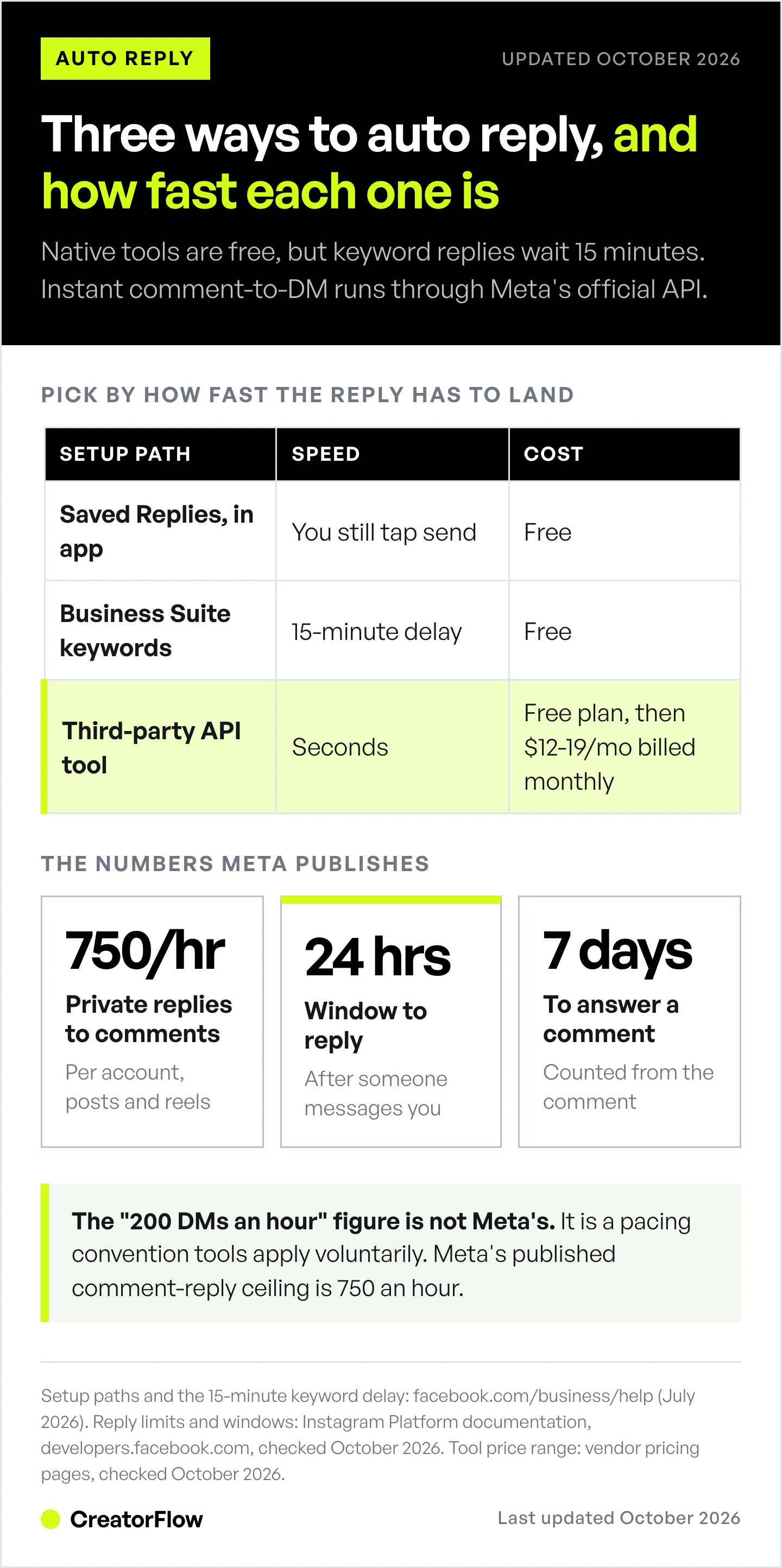
Pick by what you are trying to remove from your day:
| Setup path | Sends without you | Speed | Replies to comments | Cost |
|---|---|---|---|---|
| Saved Replies (Instagram app) | No | Manual | No | Free |
| Meta Business Suite Automations | Yes | 15-minute delay on keywords | Desktop only | Free |
| Third-party API tools | Yes | Seconds | Yes | Free plan, then $12-19/mo |
Every path below requires a Business or Creator account. Personal accounts cannot use any of them. If you are still on a personal profile, switching to a professional account takes about a minute and is reversible.
How to Set Up Auto Reply in Meta Business Suite (Free)
Meta Business Suite is where Instagram’s real automation lives. It sends four types of automatic message: Instant Reply for first-time messagers, Away Message for outside your hours, Custom Keywords for messages containing words you choose, and Comment to Message for replies to post comments. All four are free. Custom Keywords and Comment to Message are available on the desktop version only.
Set up Instant Reply
- Open Meta Business Suite and click Inbox in the left column
- Click the Automations icon
- Click Create automation and pick Instant Reply
- Tick Instagram as the channel
- Write your greeting, keeping it under two lines
- Click Save changes
Instant Reply fires once, on the first message a person ever sends you. It sends the same text to everyone, so write it as a greeting rather than an answer.
Set up Away Message
- In Automations, choose Away Message
- Select Instagram and click Add time
- Set the hours you are unavailable
- Write the message and save
Set up Custom Keywords
- In Automations on desktop, choose Custom Keywords
- Select Instagram
- Enter up to five keywords or phrases for this automation
- Write the reply that should send when someone uses one
- Save
Two things catch people out here. Keywords are case-sensitive and match exactly, so you need “link”, “Link”, and “LINK” as separate entries if you want to catch all three. And the reply is held: Meta’s documentation states the inbox sends a keyword automation after 15 minutes unless you personally respond before then (facebook.com/business/help, July 2026).
That delay is deliberate. It gives you a chance to answer as a human first. It also makes native keywords a poor fit for the “comment a word, get the link instantly” pattern that drives most creator sales. For the full inventory of what Meta ships free and where it stops, see our guide to Instagram’s built-in automation.
How to Add a Quick Reply on Instagram (Saved Replies)
Quick replies on Instagram are called Saved replies, and you add them in the Instagram mobile app. Send the message once in any DM, press and hold it, tap More, then Save, and give it a short shortcut such as “price” or “link1”. Typing that shortcut in any chat fills the whole message in.
Saved Replies store a message behind a shortcut so you can insert it in two taps. They do not send on their own. You still open every conversation, one at a time, using the manual reply paths Instagram gives you. Setup happens inside the Instagram mobile app rather than Business Suite.
- Open any DM conversation and send the message you want to reuse
- Press and hold the message you sent
- Tap More, then Save
- Assign a short shortcut such as “price” or “link1”
- To use it, type the shortcut in any chat and tap the suggestion to autofill
| Reply type | Where you add it | Sends on its own |
|---|---|---|
| Quick reply (Saved reply) | Instagram mobile app, inside a DM | No, you insert it in two taps |
| Instant Reply and Away Message | Meta Business Suite Automations, mobile or desktop | Yes |
| Custom Keywords | Meta Business Suite Automations, desktop only | Yes, 15 minutes after the message (facebook.com/business/help, July 2026) |
| Comment-to-DM | Third-party tool on Meta’s official API | Yes, within seconds |
Saved Replies suit anyone under roughly 20 DMs a day, or anyone whose replies need real personalisation before sending. The detailed side-by-side is in saved replies versus DM automation, and the switching signals are covered in five signs quick replies are no longer enough.
How to Set Up Comment-to-DM Auto Reply
Comment-to-DM is the setup most creators are looking for. Someone comments a trigger word on your post, and within seconds they receive a DM containing your link. It runs through Meta’s official API, so it needs a third-party tool rather than Business Suite. Setup takes about five minutes per automation.
CreatorFlow is a comment-to-DM tool for Instagram built on Meta’s official API: you pick a post, set your trigger words, and it DMs each person who comments one of them. Using CreatorFlow, the steps are:
- Create your account at creatorflow.so. New accounts start on a 14-day Pro trial (a card is needed to start it), then move to the permanent free tier of 500 DMs per month
- Connect Instagram through Meta’s official authorisation screen. You approve permissions inside Meta, so no password is shared with the tool
- Create a new automation and pick Comment-to-DM as the trigger
- Choose the post you want it to watch, or apply it to future posts
- Set your trigger words. One word, easy to type on a phone: LINK, RECIPE, GUIDE, PRICE. CreatorFlow matches whole words and ignores capitals, with up to 20 trigger words per automation, so “link” catches “LINK” and “link please” but not “linked”
- Write the DM. Under 100 words, containing the thing you promised in the caption
- Add the Email Gate (Pro and Growth) if you want the address before the link. This asks inside the DM thread, so the person never leaves Instagram
- Preview and test by commenting your trigger word on your own post
- Activate it, and on Pro or Growth check the link click data
The caption does half the work. “Comment ROUTINE for all the products” tells people exactly what to type. Vague captions produce vague comments that never match your trigger. The step-by-step with screenshots lives in the comment-to-DM setup guide.
Set up Story reply and keyword auto replies
The same tools handle two more triggers. A Story reply automation responds when someone replies to your Story or answers a poll. A DM keyword automation responds when someone sends a word directly to your inbox, which is how you handle repeat questions about pricing, shipping, or booking.
Both follow the pattern above: pick the trigger type, set the words, write the message, test, activate. Story specifics are covered in Story reply automation, and keyword naming that stays readable past twenty automations is in the keyword system for multiple offers.
The Auto Reply Rules Meta Publishes
Meta allows automated replies to people who contacted you first. Once someone comments, replies to your Story, or sends a DM, you have a 24-hour window to respond automatically, and promotional content is allowed inside it. Automated DMs to people who never interacted with you are not allowed. Automated experiences must also disclose that the person is talking to an automated service. One exception to the 24 hours started on September 28, 2026: a chat that begins when someone taps a Click-to-Direct ad and sends a message stays open for up to 7 days from that first message (developers.facebook.com, October 2026).
Most guides describe these rules in prose. Meta publishes them as numbers, and they apply identically to every tool on the official API:
| Rule | Meta’s published limit |
|---|---|
| Reply window after someone messages you | 24 hours, promotional content allowed |
| Reply window for a chat started from a Click-to-Direct ad | Up to 7 days from the first message (since September 28, 2026) |
| Follow-up by a human agent | Up to 7 days, using the human agent tag |
| Private replies to comments on posts and reels | 750 per hour per account |
| Time to send a private reply after a comment | 7 days from the comment |
| Private replies per comment | One message |
| Messages with text, links, reactions, stickers | 100 calls per second per account |
| Messages with audio or video | 10 calls per second per account |
| Private replies to Instagram Live comments | Only while the broadcast is running |
Source: Instagram Platform documentation and messaging policy (developers.facebook.com, October 2026). The 300-calls-per-second figure quoted in some comparisons belongs to the separate Messenger Platform path, not the Instagram Login path these tools use.
The “200 DMs per hour” number is not Meta’s
You will see it repeated across auto reply guides, usually phrased as a hard API-enforced limit. It appears nowhere in Meta’s documentation. It is a pacing convention that tools apply voluntarily to stay well clear of the published ceilings. The number that does exist for comment replies is 750 per hour per account. Knowing which is which matters when a post takes off and you are trying to work out whether your tool or the platform is the constraint.
The disclosure rule most guides skip
Meta’s messaging policy requires automated chat experiences to disclose that a person is interacting with an automated service at the beginning of a conversation, after a significant lapse of time, or when a chat moves from human interaction to an automated experience (developers.facebook.com, July 2026).
In practice that is one line at the top of your first automated message. “Auto-reply here, but I read everything” satisfies it and costs you nothing. The same policy notes that if an issue is raised and you do not respond or make changes within 7 days, your sending ability may be limited.
For the full allowed-versus-banned breakdown, app review, and what happens when an account is flagged, see the Instagram DM compliance guide.
Auto Reply Tool Pricing Compared
Instagram auto reply tools run from free (Meta Business Suite) to $19/month for the first paid plan of the third-party tools below. Prices were checked on each vendor’s public pricing page in October 2026 and are monthly-billed unless stated. Every tool listed connects through Instagram’s official API rather than password-based login.
| Tool | Price (billed monthly) | Best for | Notable feature |
|---|---|---|---|
| Meta Business Suite | Free | Greetings, slow keyword replies | Native, no third-party tool |
| InstantDM | Free plan; Legend Pro $12/mo ($9.99/mo billed annually) | Flat-rate high volume | Legend Pro: unlimited automations, up to 800 DMs/hour |
| CreatorFlow | Free plan; Pro $15/mo ($12/mo billed annually) | Solo creators, affiliates | Follow Gate, Email Gate, geo analytics |
| ManyChat | Free plan; $17-199/mo | Agencies, multi-platform | Instagram, WhatsApp, SMS, TikTok, email |
| LinkDM | Free plan; Pro $19/mo | Established creators | 60,000+ creators, brands, and agencies |
CreatorFlow (creatorflow.so/pricing, October 2026): Free at 500 DMs per month and 1 workspace. Pro at $15/month, or $12/month billed annually, for 5,000 DMs and 2 workspaces. Growth at $30/month, or $24/month annually, for 10,000 DMs, 5 workspaces, and priority support. A payment method is required to start the 14-day trial and nothing is charged during it.
ManyChat (manychat.com/pricing, October 2026): Free up to 25 active contacts. Essential $17/month for 250 contacts, Pro $39/month for 2,500, Business $99/month for 7,500, Advanced $199/month for 25,000. Billed annually those become $14, $29, $69, and $139 per month. Pricing scales with active contacts. Manychat AI is bundled into Pro and above (manychat.com/pricing, August 2026).
LinkDM (linkdm.com/pricing, October 2026): Free at 1,000 DMs per month. Pro $19/month for 25,000 DMs and 3 accounts. Platinum+ $99/month for 300,000 DMs and 10 accounts.
InstantDM (instantdm.com/pricing, October 2026): Free plan with 500 automations a month. Legend Pro $12/month, or $9.99/month billed annually, listed as unlimited automation up to 800 DMs per hour. Trendsetter $29.99/month, or $24.99/month billed annually, for one account at up to 2,000 DMs per hour. Trendsetter Pro $59.99/month, or $49.99/month billed annually, with no hourly cap. Paid plans include a 7-day trial.
What “unlimited DMs” means here
Unlimited describes billing, not delivery. Every tool sending private replies to comments through the official API shares the same 750-per-hour ceiling set by Meta. Some tools also publish their own hourly figures, such as InstantDM’s 800 DMs per hour on Legend Pro (instantdm.com/pricing, October 2026). A higher number on a pricing page does not raise Meta’s own limit on private replies to comments.
Here is what the ceiling means for a Reel that takes off. If 3,000 people comment your trigger word in the first hour, Meta’s 750 private replies per hour means the last of them gets the DM about 4 hours after the first one goes out (3,000 / 750 = 4). That is true on every tool, free or paid. So unlimited means your bill stays flat whether you send 100 DMs or 100,000. Volume is rarely the deciding factor between tools, because the ceiling belongs to the platform. What differs is what happens inside the window: whether you can gate on a follow, capture an email, or see which post drove the click.
How to Write an Auto Reply That Converts
The auto reply message matters more than the trigger. Your auto reply arrives at the moment someone’s interest peaks, seconds after they commented. What you ask for in that moment decides whether you gained a subscriber or handed a link to someone you will never reach again.
Sound like a person. Compare “Thank you for your interest. Here is the link you requested” against “Hey! Here’s that skincare routine you asked about: [URL]. Quick tip: start with the vitamin C serum, it made the biggest difference for me.”
Deliver exactly what the caption promised. If you said “comment RECIPE for my 5-ingredient dinner,” send the recipe. A sales pitch instead of the promised thing costs you the next comment too.
Keep it under 100 words. People read DMs on a phone, mid-scroll.
Ask for the email before the link. The Email Gate on CreatorFlow Pro requests the address inside the DM thread. Klaviyo Social Marketing takes the other route, sending a DM with a signup link that routes to a form (klaviyo.com, August 2026). Both work. The in-thread ask has fewer steps; the form route suits a brand whose customer records already sit in a CRM.
Use a different keyword on every post. When the trigger word is stored against the contact, your export tells you which Reel produced subscribers rather than which Reel produced likes. Reuse one word everywhere and the record tells you nothing.
Send one follow-up at most. If someone does not respond to your auto reply, they are not interested.
Wording that gets an address typed, plus the consent record you keep, is covered in collecting emails through Instagram DMs.
Which Setup Fits Your Volume
Under 20 DMs a day, no comment automation needed: Saved Replies plus Meta Business Suite Instant Reply. Cost: nothing. Set up three to five Saved Replies for your most common answers and a greeting for first-time messagers.
Steady DMs, questions repeat, timing is not critical: add Meta Business Suite Custom Keywords on desktop. The 15-minute delay is fine for pricing and shipping questions. It is not fine for a link someone asked for on a Reel.
You post calls to action that ask for comments: you need a third-party tool. Native comment automation runs on the same timer, and the window between someone commenting and losing interest is much shorter than 15 minutes. Start on a free plan, then budget $12 to $19 a month on monthly billing.
You want to know which post produced which subscriber: third-party tool with per-keyword tracking and email capture. This is the difference between an auto reply that ends when the link is tapped and one that ends with a contact you can reach again.
FAQ
How do I set up auto reply on Instagram for free?
Use Meta Business Suite. Open Inbox, click Automations, click Create automation, and pick Instant Reply, Away Message, or Custom Keywords. Select Instagram as the channel, write your message, and save. Instant Reply and Away Message work on mobile and desktop. Custom Keywords and Comment to Message are desktop only. Saved Replies inside the Instagram app are also free, but you insert them manually.
Can Instagram auto reply to comments on my posts?
Partly, for free. Meta Business Suite includes a Comment to Message feature on desktop, but it runs on the same 15-minute timer and five exact-match keywords as other keyword automations. For a DM that lands within seconds of the comment, you need a third-party tool on the official API. Meta allows one private reply per comment, sent within 7 days of the comment (developers.facebook.com, October 2026).
Why is my Meta Business Suite auto reply delayed?
That is by design. Meta’s documentation states the inbox sends a keyword automation after 15 minutes unless you personally respond first (facebook.com/business/help, July 2026). The delay gives you a chance to answer as a human. It cannot be shortened, which is the main reason creators running comment campaigns move to a third-party tool.
Do I need a Business or Creator account for Instagram auto reply?
Yes, for every method. Personal accounts cannot use Meta Business Suite automations, Saved Replies, or any API-based tool. Switching is free and takes about a minute: go to Settings and activity, then For professionals, then Account type and tools. You can switch back later.
How much does Instagram auto reply cost?
Native options cost nothing: Meta Business Suite automations and Saved Replies are free. The first paid plans of third-party tools cost $12/month for InstantDM Legend Pro ($9.99/month billed annually), $15/month for CreatorFlow Pro, $17/month for ManyChat Essential at 250 contacts, and $19/month for LinkDM Pro. All four tools also have a free plan, so you can test comment-to-DM before you pay (vendor pricing pages, October 2026).
Will auto reply get my account banned?
Risk is low when you use a tool on Instagram’s official API and reply only to people who contacted you first. No API guarantees absolute safety, so message quality still matters. Risk rises sharply with browser bots, tools that ask for your Instagram password, or messages sent to people who never engaged. Meta also notes that if an issue is raised and you do not fix it within 7 days, sending ability may be limited (developers.facebook.com, July 2026).
How many auto replies can I send per hour?
For replies to comments on posts and reels, Meta publishes 750 per hour per account. Messages containing text and links run at 100 calls per second per account, and audio or video at 10 per second (developers.facebook.com, October 2026). Meta does not publish a 200-per-hour DM limit. That figure is a tool-side pacing convention applied voluntarily to stay clear of the ceilings.
Can I collect emails with an auto reply?
Yes, with a third-party tool. CreatorFlow (on Pro and Growth), ManyChat, and others ask for an email before sending your content: the automation requests the address, the person types it, and the tool stores it while delivering what you promised. The person has to type it, because Meta stopped supporting one-tap email and phone-number quick replies in Instagram messaging on October 5, 2026 (developers.facebook.com, October 2026).
Your Next Steps
Starting free: switch to a Business or Creator account, save three to five Saved Replies, then turn on Instant Reply and one Custom Keyword automation in Business Suite. Run it for two weeks and count how many replies you still send by hand.
Ready for instant comment-to-DM: start on CreatorFlow’s free tier, build one automation for your next Reel, test it by commenting your own trigger word, then add Story reply and keyword triggers once the first one is producing clicks.
Meta Business Suite keyword rules and Meta’s disclosure policy verified from the Meta Business Help Center and developers.facebook.com in July 2026. Messaging windows, private-reply rules, API rate limits and the October 5 quick-reply change re-checked on developers.facebook.com in October 2026. CreatorFlow, ManyChat, LinkDM and InstantDM pricing re-checked on their public pricing pages in October 2026. Individual results vary.
Related guides:
- Instagram DM Automation Complete Guide - how automation works end to end
- Comment-to-DM Automation Setup Guide - step-by-step with screenshots
- Instagram Built-In Automation - everything Meta ships free
- Instagram Keyword Trigger Automation - advanced keyword setups
- Instagram DM Compliance: Meta’s Rules - allowed versus banned, in full
Ready to automate your Instagram replies? CreatorFlow turns the comments you already get into a distribution channel you control. Set up your first comment-to-DM automation in about five minutes.


