
Instagram comment auto reply sends an instant DM to anyone who comments a trigger keyword on your post, ensuring you never miss a sales opportunity from unanswered comments. Auto reply tools respond in under 5 seconds compared to the average 5-hour brand response time, and 73% of consumers switch to a competitor when ignored on social media. Setting up comment-to-DM automation takes under 5 minutes and runs 24/7.
Comments pile up while you sleep, work out, or film content. Each unanswered comment is a potential customer who asked for your link, your price, or your booking page and never got a response. By the time you check your notifications, they’ve already bought from someone who replied faster.
This guide covers why missed comments cost you money, how to set up auto replies with free and paid tools, and the message templates that convert commenters into customers.
Key Takeaways
- Cost of missed comments: 73% of consumers switch to a competitor when ignored on social media (Sprout Social Index, 2025)
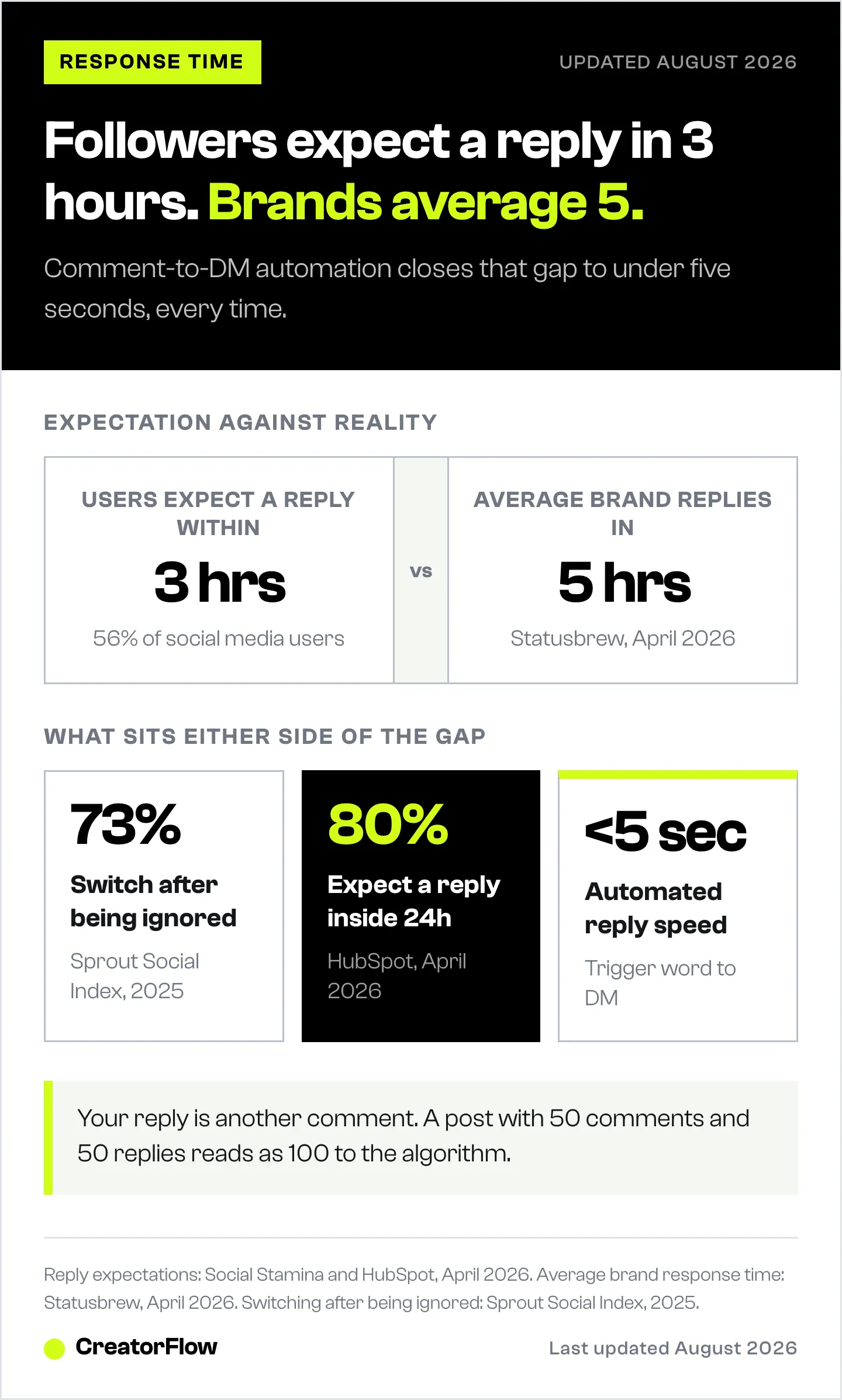
- Response time gap: 56% of users expect a reply within 3 hours, but average brand response time is 5 hours (Social Stamina and Statusbrew, April 2026)
- Auto reply speed: Comment-to-DM automation tools respond in under 5 seconds, closing the response gap entirely
- Best free option: CreatorFlow offers 500 free DMs/month and LinkDM offers 1,000 for comment-triggered automation, while Instagram’s native tools lack comment-to-DM capability
- Compounding effect: Responding to every comment doubles your comment count (your reply counts too), training followers to engage more and boosting algorithmic reach
- Bottom line: Set up comment-to-DM automation once, and every keyword comment gets an instant response 24/7 without manual effort

Why Missed Instagram Comments Cost You Money
Every comment on your post is an engagement signal. When someone comments, Instagram’s algorithm reads that as “this content is worth showing to more people.” But the algorithm also watches whether the creator responds.
Responding to comments does three things:
- Doubles the comment count. Your reply is another comment. A post with 50 comments and 50 replies shows 100 total comments to the algorithm.
- Signals an active creator. Instagram prioritizes accounts that engage back. Adam Mosseri confirmed in January 2025 that replying to comments directly influences how widely your content gets distributed (Hootsuite, April 2026).
- Keeps the conversation going. When you reply, the original commenter often replies again. That’s 3 comments from one interaction instead of 1.
Now flip it. When you miss a comment:
- The algorithm sees lower engagement (no reply = missed signal)
- The follower feels ignored (73% will switch to a competitor, Sprout Social 2025)
- The sale dies (they asked for a link, you never sent it)
- Future reach drops (lower engagement rate = less distribution)
The Response Time Gap
Here’s the disconnect:
| What users expect | What creators deliver |
|---|---|
| 56% expect a reply within 3 hours (Social Stamina, April 2026) | Average brand response time is 5 hours (Statusbrew, April 2026) |
| 80% expect a reply within 24 hours (HubSpot, April 2026) | Many creators check comments once a day or less |
| Fastest converters respond within 5 minutes | Manual responses average 30-60 minutes at best |
Auto reply tools close this gap to under 5 seconds. Every time.
The 5 Reasons Comments Get Missed
Before fixing the problem, understand why it happens:
1. Notification overload. Once you pass 5K followers, Instagram notifications become unmanageable. New comments push older ones off your notification screen within minutes.
2. Comments on older posts. Someone finds your Reel from 3 weeks ago through Explore or Google Search. They comment “How much?” You never see it because you’re focused on your latest post.
3. Peak-time floods. A Reel goes semi-viral and gets 200 comments in 2 hours. You can’t manually respond to all of them. By the time the surge slows down, the earliest commenters have been waiting hours.
4. Off-hours engagement. Your audience is in a different timezone, or they’re active at 11 PM when you’re asleep. Those comments sit unanswered for 8-10 hours minimum.
5. DM requests mixed in. “Link?” comments need a DM response, not a public reply. That means opening each profile, composing a message, pasting a link. Multiply by 30 per day and you’ve lost 45 minutes.
How to Never Miss an Instagram Comment
Three approaches, from free to full automation:
Option 1: Instagram’s Native Auto Replies (Free)
Instagram offers two built-in features:
Quick Replies (Saved Replies):
- Save pre-written messages for common responses
- Tap to insert them when replying to DMs
- Limitation: You still need to manually open each DM and send it. Not truly automatic.
Meta Business Suite Automated Responses:
- Set up instant replies for first-time DMs
- Create away messages for off-hours
- Custom Keywords and Comment to Message do trigger on keywords, including on comments
- Limitation: keyword automations fire only after a 15-minute delay, cap at 5 exact-match case-sensitive keywords, and run on Meta Business Suite desktop only (facebook.com/business/help, July 2026). See the full breakdown of Meta’s free native automation tools.
Instagram’s AI Auto Replies (New in 2025-2026):
- AI-generated responses to common DM questions
- Available for Business and Creator accounts
- Limitation: Handles simple greetings and FAQs only. No custom flows, no affiliate links, no comment triggers (help.instagram.com, April 2026).
Best for: Accounts with under 20 daily DMs and no need for comment-triggered automation.
Option 2: Comment-to-DM Automation (Recommended)
This is the approach that solves missed comments directly. Here’s how it works:
- You set a trigger keyword (e.g., “LINK”, “INFO”, “PRICE”)
- Someone comments that keyword on your post or Reel
- Within seconds, they receive a DM with your link, offer, or booking page
- You didn’t lift a finger
Setup with CreatorFlow (under 5 minutes):
- Sign up at creatorflow.so and connect your Instagram Business/Creator account via OAuth (no password sharing)
- Create a new automation and select the post or Reel
- Set your trigger keyword (e.g., “LINK”)
- Write your DM response with your link, offer, or call-to-action
- Preview the message, activate, and you’re done
Every future comment containing your keyword triggers an instant DM. You can review what was sent anytime in the dashboard.
Why comment-to-DM works better than public replies:
- DMs feel personal (higher conversion rates)
- You can include clickable links (comments can’t have links)
- You can capture email addresses within the DM flow
- You can track link clicks and conversions
For a deeper setup walkthrough, see our comment-to-DM automation setup guide.
Option 3: Advanced Multi-Platform Automation
If you need automation across Instagram, Facebook, WhatsApp, and SMS, tools like ManyChat offer broader coverage at a higher price point.
ManyChat starts at $17/month (Essential, or $14 billed annually) and scales up to $199/month based on your active contact count. The free plan is limited to 25 active contacts (manychat.com/pricing, July 2026). Advanced conditional logic, branching workflows, and CRM-level segmentation are available on higher tiers.
Best for: Agencies, large teams, or creators who need automation beyond Instagram.
Best Tools for Instagram Comment Auto Reply (2026)
| Tool | Price | Best For | Key Differentiator |
|---|---|---|---|
| CreatorFlow | $15/mo flat rate | Solo creators, affiliates, coaches | Flat pricing, 5-min setup, Meta-approved |
| ManyChat | $17-199/mo (scales by contacts) | Agencies, multi-platform needs | Instagram + FB + WhatsApp + SMS |
| LinkDM | $19/mo flat rate | Established creators | 50,000+ creators, brands, and agencies (linkdm.com, July 2026) |
| Instagram Native | Free | Low-volume accounts | Built-in, no setup cost |
Pricing note: ManyChat’s free plan now limits you to 25 active contacts (manychat.com/pricing, July 2026). CreatorFlow’s free plan includes 500 DMs/month with no contact limit. LinkDM’s free plan includes 1,000 DMs/month (linkdm.com/pricing, July 2026).
All three paid tools use Meta’s official Instagram Graph API, meaning they follow Instagram’s automation guidelines and carry minimal ban risk when used correctly.
For a complete comparison, read our best Instagram DM automation tools guide.
5 Auto Reply Templates You Can Copy
These templates work for comment-to-DM automation. Set the trigger keyword and paste the message:
Template 1: Affiliate Link Drop
Trigger keyword: LINK
Hey! Here’s the link you asked for: [YOUR LINK]. I personally use this daily and it’s made a huge difference. Let me know if you have any questions!
Template 2: Coaching Discovery Call
Trigger keyword: COACHING
Thanks for your interest! Here’s my calendar to book a free 15-min discovery call: [CALENDLY LINK]. No pressure, we’ll figure out if we’re a good fit. Talk soon!
Template 3: Free Resource / Lead Magnet
Trigger keyword: GUIDE
Here’s your free guide: [LINK]. Quick favor: what’s your email so I can send you the bonus material too? Reply with your email address.
Template 4: Product Inquiry
Trigger keyword: PRICE
Great question! The [PRODUCT] is currently [PRICE]. Here’s the direct link to grab it: [SHOP LINK]. We ship within 2-3 business days. Let me know if you need help with sizing!
Template 5: Waitlist / Launch
Trigger keyword: WAITLIST
You’re in! I’ll DM you the moment we launch. Want early access? Drop your email below and I’ll add you to the VIP list for [BENEFIT].
For more conversion-focused templates, check out our guide on automated DM scripts that convert.
How to Recover Comments You Already Missed
Already have a backlog of unanswered comments from last week? Two approaches:
Manual recovery (free):
- Open each post individually
- Scroll through comments for unanswered questions
- Reply publicly, then DM if they asked for a link
- Focus on comments from the last 7 days (older comments have lower conversion probability)
Automated recovery:
Some automation tools offer backtracking features that scan older posts for comments matching your keywords and send DMs retroactively. This catches the engagement you missed before setting up automation.
The key insight: recovery is a one-time fix. Prevention is the real solution. Set up auto replies now so you stop accumulating missed comments going forward.
The Compounding Effect of Never Missing a Comment
When you respond to every comment within seconds, three things compound over time:
1. Higher engagement rate. More replies = more total comments = higher engagement rate. Instagram shows your content to more people.
2. Trained audience behavior. Followers learn that commenting on your posts gets them an instant, valuable response. They comment more often. Your engagement rate climbs further.
3. Revenue on autopilot. Every “LINK?” comment converts to a DM with your affiliate link, product page, or booking calendar. At 50 keyword comments per day with a 10% conversion rate, that’s 5 sales per day you’d otherwise miss.
The creators who “blow up” on Instagram aren’t making better content. They’re capturing every interaction while others let comments die in their notification tab.
FAQ
Is it safe to auto reply to Instagram comments?
Yes, when using tools that connect through Meta’s official Instagram Graph API. CreatorFlow, ManyChat, and LinkDM all use the official API, which means minimal ban risk when using the official API. Avoid tools that require your Instagram password or use unofficial methods. See our guide on how Instagram DM automation works for technical details.
How fast should I respond to Instagram comments?
Within 5 minutes for best conversion rates. 56% of social media users expect a response within 3 hours (Social Stamina, April 2026). Auto reply tools respond in under 5 seconds, well within any expectation window.
Can I auto reply to comments on Reels?
Yes. Comment-to-DM automation works on Reels, feed posts, and carousel posts. Reels tend to generate the most “LINK?” and keyword comments because of their higher reach.
Does auto reply work on old posts?
Auto reply automation works on new comments going forward from the moment you activate it. For comments on older posts, some tools offer backtracking features that scan for missed keyword comments. Manual recovery is also an option for high-value missed comments.
Will auto replies feel spammy to followers?
Not if you write them well. The templates above are conversational and deliver genuine value. The follower asked for something, and you’re delivering it instantly. That’s not spam. That’s good service.
What’s the best free option for auto replying to comments?
Instagram’s native Quick Replies and Meta Business Suite automation are free but don’t support comment-triggered DMs. For comment-to-DM automation, CreatorFlow offers a free plan with 500 DMs/month, and LinkDM offers 1,000 free DMs/month (linkdm.com/pricing, July 2026).


