

Instagram’s built-in automation covers six free tools: FAQs, Saved Replies, Instant Reply, Away Message, Custom Keywords, and Comment to Message, plus AI Auto Replies now rolling out. The keyword and comment automations run from Meta Business Suite on desktop only, cap at five exact-match keywords, and Meta documents a 15-minute delay before they send (facebook.com/business/help, July 2026).
Most guides on this topic still say Instagram has no native keyword automation and no native comment-to-DM. That was true a while ago. It is not true now, and if you are paying for a tool on that assumption, you are paying for the wrong reason. For the paid side of the same picture, see every Instagram automation feature and the limit on each.
This guide inventories every automation Meta ships free for Instagram professional accounts as of July 2026, quotes the limit Meta publishes for each one, and shows exactly where the free stack runs out. Every claim here comes from Meta’s own help pages and developer docs, not from third-party summaries.
Key Takeaways
- Six native tools exist, not two: FAQs and Saved Replies live in the Instagram app; Instant Reply, Away Message, Custom Keywords, and Comment to Message live in Meta Business Suite (help.instagram.com and facebook.com/business/help, July 2026)
- Native keyword automation is real: Meta Business Suite sends automated replies to messages containing your keywords, capped at five keywords or phrases per automation
- The 15-minute delay is the catch: Meta’s documentation states inbox will send a keyword automation “after 15 minutes unless you personally respond before then”
- Keywords are case-sensitive and exact: Meta warns an automated message “will not be sent unless the keywords match exactly,” so “link” and “Link” are different triggers
- Desktop only: custom keyword and comment automations are available on Meta Business Suite desktop, not the mobile app
- AI Auto Replies is the newest piece: a free generative DM responder for creators, on a staged rollout, marked “AI + your name” in the thread
- Everything is bound by the 24-hour window: Meta gives your account 24 hours to respond after a user messages you, native tools and third-party tools alike
What Instagram’s Built-In Automation Includes in 2026
Instagram professional accounts get seven free automation features spread across two places: the Instagram mobile app and Meta Business Suite on desktop. Four of them fire on their own. Two require you to be present and typing. One is a generative AI responder still rolling out. Nothing here costs money.
Here is the full inventory with the limits Meta publishes for each.
| Tool | Where it lives | Fires automatically? | Keyword-triggered? | Published limit |
|---|---|---|---|---|
| FAQs | Instagram app | Yes, on tap | No | 4 questions maximum |
| Saved Replies | Instagram app | No, manual insert | No | No published cap |
| Instant Reply | Business Suite | Yes, first message only | No | One greeting |
| Away Message | Business Suite | Yes, off-hours | No | Set by schedule |
| Custom Keywords | Business Suite desktop | Yes, after 15 minutes | Yes, exact match | 5 keywords or phrases |
| Comment to Message | Business Suite desktop | Yes | Yes | Desktop only |
| AI Auto Replies | Instagram app | Yes, generative | No | Staged rollout |
Two notes on that table. Meta’s own pages disagree on what Comment to Message matches: one page says comments containing specific hashtags, another says comments containing specific keywords or phrases. And Meta states that turning on Meta Business Agent pauses your existing automations, including away messages and instant replies.
The Two Manual Tools: FAQs and Saved Replies
FAQs and Saved Replies are the two features people usually mean by “Instagram automation,” and neither runs a workflow. FAQs show up to four preset questions to someone about to message you, each with an optional canned answer. Saved Replies store messages behind a keyboard shortcut you type yourself. One is a prompt, the other is text expansion.
FAQs: four questions, and a Requests folder problem
FAQs are available to both business and creator accounts. You set them in the Instagram app under Messages, then the more-actions icon, then Tools, then Frequently asked questions. Meta caps you at four: “You can select up to four questions to be displayed to people” (help.instagram.com, July 2026).
The questions appear before a conversation starts, which is the useful part. They also surface in dormant threads to restart a stalled conversation.
The catch is buried in Meta’s own note. When someone taps one of your FAQs, “their message will go to your Requests in Chats. You’ll need to accept their message request in order to reply to their question.” So the canned answer can fire, but the thread parks in a folder you have to manually clear before the conversation continues.
Saved Replies: fast, but only when you are there
Saved Replies work by long-pressing a message you sent, tapping More, then Save, then assigning a keyboard shortcut. Type the shortcut later and the full message autofills.
This is genuinely useful and it is the single best free tool for a creator handling 10 to 20 DMs a day. It also cannot do anything while you sleep. Meta publishes no cap on how many you can store, so ignore any article that quotes one. We break down saved replies against full DM automation in a separate comparison.
The Automations That Fire on Their Own
Instant Reply and Away Message are the two set-and-forget automations in Meta Business Suite. Instant Reply sends a greeting the first time someone messages you. Away Message sends outside the business hours you set. Both work across Messenger, Instagram, and WhatsApp from one console, and both are free.
Meta calls these Inbox Automations. The setup page names them slightly differently depending on which help article you land on: the desktop page calls Instant Reply “Auto reply,” describing the identical function. Same feature, two names, two Meta pages.
One eligibility detail worth knowing before you plan around this. Meta’s Inbox Automations page says the feature covers “Facebook Pages, Instagram business accounts and WhatsApp Business accounts connected to Meta Business Suite.” Its Creator Tools page separately says creators can “set message automations.” Meta’s documentation is not consistent on whether creator accounts qualify, so check your own Business Suite before committing to a workflow. If you are still deciding which account type to run, creator and business accounts differ in more places than this one.
Yes, Instagram Has Native Keyword and Comment Automation
Meta Business Suite includes Custom Keywords, which replies automatically to messages containing keywords you choose, and Comment to Message, which sends a DM in response to comments on your posts. Both are free. Both are documented by Meta. This is the part the rest of the category gets wrong, and it changes what you should actually be paying a third-party tool for.
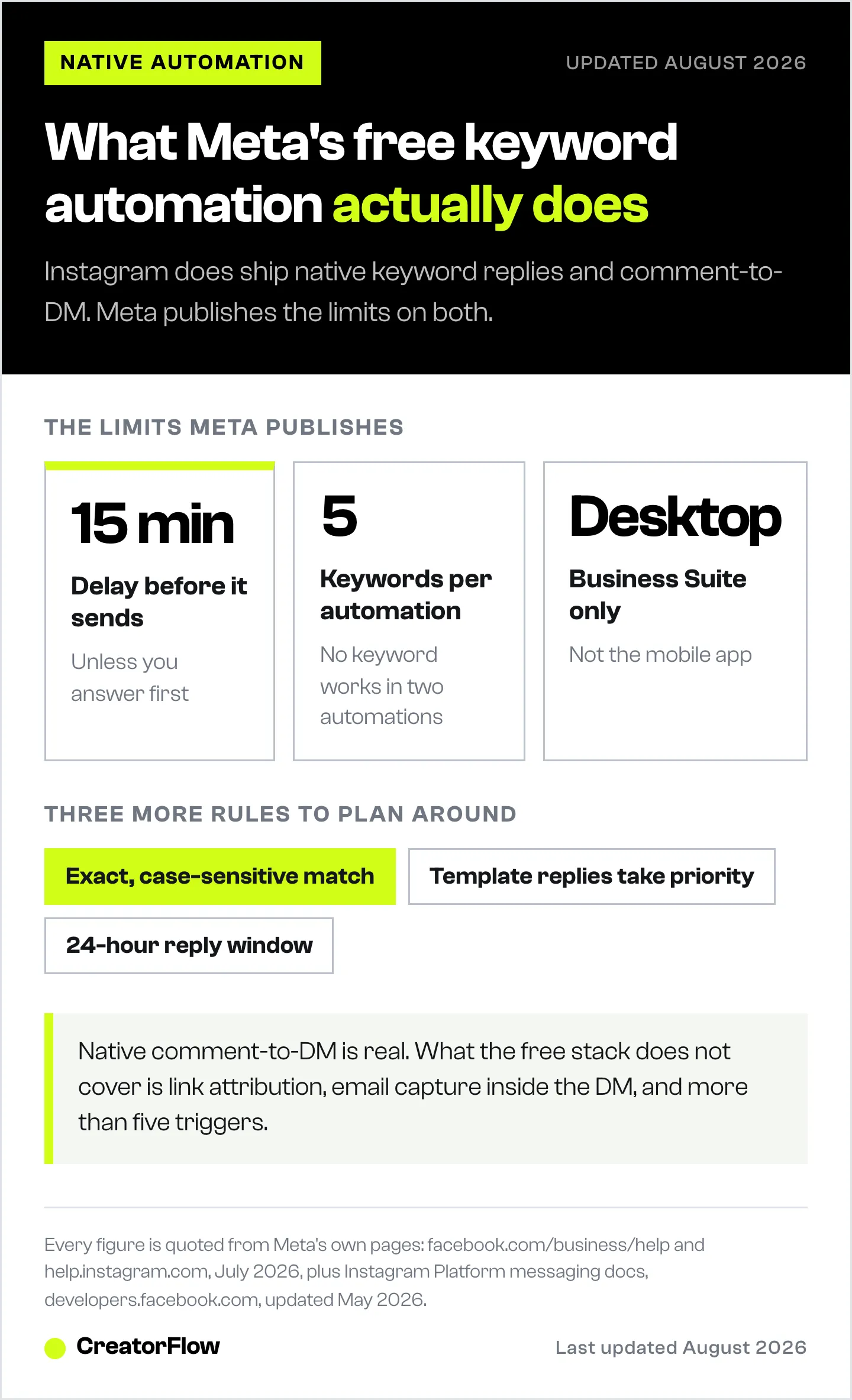
Here is Meta’s wording, verbatim: “Custom keywords: Reply to a message that contains specific keywords. Note: This feature is only available on Meta Business Suite desktop.” And: “Comment to message: Send a message reply to comments on your posts that contain specific keywords or phrases” (facebook.com/business/help, July 2026).
So native comment-to-DM exists. The honest question is not whether Instagram can do it. The question is what Meta’s version does differently, and Meta documents that too.
The five constraints Meta publishes:
- A 15-minute delay. “Inbox will automatically send a keyword automation to a message after 15 minutes unless you personally respond before then.” This is the big one. The entire argument for automation is speed, and Meta’s free version waits a quarter of an hour by design.
- Five keywords maximum. “You can create your own customized Inbox automations to messages that include up to 5 specific keywords or phrases.” The same keyword cannot be reused across two automations.
- Exact, case-sensitive matching. “Note that keywords are case-sensitive, and an automated message will not be sent unless the keywords match exactly.” Someone commenting “Link” when your trigger is “link” gets nothing.
- Desktop only. Custom keyword automations “are only available on the Meta Business Suite desktop experience at this time.”
- Templates silently win. “When both a custom keyword automation and a template automation are turned on and triggered, we’ll send the template response but not the custom keyword automated response.”
None of that makes the free tools bad. It makes them predictable, which is more than most people writing about them can say. If you want the third-party version of the same job, our Instagram auto reply setup guide walks through both paths.
AI Auto Replies: Meta’s Free Generative Responder
AI Auto Replies is a creator AI feature that answers DMs automatically using generative AI rather than keyword matching. You pick which audience it responds to: people you do not follow, followers you do not follow back, or a list you choose. Replies are labeled “AI + your name” in the thread. Meta describes it as “being gradually introduced,” so it may not have reached your account yet.
This is the most consequential free feature on the list and almost nobody has written about it accurately. It is automatic, it is generative, it requires no keyword setup, and it is aimed directly at creators.
Two limits from Meta’s own page. The AI “will pause responses while you respond, and will resume responding after a period of time has passed,” so it defers to you rather than talking over you. And Meta states plainly that “messages generated by AI may not be accurate or appropriate.” It is trained on English.
The practical read: AI Auto Replies is good at conversation and bad at commerce. It answers a question in your general voice. It does not send a specific affiliate link to a specific person who typed a specific word, and it does not tell you which post drove the click.
Where Instagram’s Built-In Automation Stops
The free native stack handles greetings, off-hours coverage, four preset questions, and up to five exact-match keyword replies on a 15-minute timer from a desktop console. It does not handle link tracking, email capture, follow gating, conditional flows, or per-post attribution. Those are the four jobs that separate answering people from selling to them. Meta ships a parallel free stack for Facebook Pages, with a different set of gaps, covered in what Facebook auto reply tools add over Meta Business Suite.
Mapped against what creators actually do:
| Job to be done | Native tools | What is missing |
|---|---|---|
| Greet a first-time messenger | Instant Reply covers it | Nothing |
| Cover yourself overnight | Away Message covers it | Nothing |
| Answer the same four questions | FAQs cover it | Threads land in Requests |
| Reply to “link” comments instantly | Comment to Message, partly | 15-minute delay, exact-match only |
| Send different links per post | Not covered | Five-keyword ceiling across the account |
| Know which Reel drove the clicks | Not covered | No link-level attribution |
| Collect emails inside the DM | Not covered | No capture step |
| Require a follow before the link | Not covered | No gating |
That last block is the actual buying case for a paid tool, and it is a much narrower and more honest case than “Instagram cannot automate.” CreatorFlow covers those four at $15/month flat with 5,000 DMs per workspace, and the free plan includes comment-to-DM, story replies, keyword triggers, and link tracking at 500 DMs a month. If you would rather compare every free option first, we ranked the free Instagram DM automation tools by what each one caps you at.
The 24-Hour Rule That Applies to Every Tool
Meta gives your account 24 hours to respond after someone messages you, and no tool changes that. The rule sits at the API level, so it binds Instagram’s native automations, Meta Business Suite, and every third-party platform identically. Anyone promising to message your followers whenever they like is describing something Meta’s documentation does not permit.
Meta’s messaging documentation, updated May 6, 2026, states it directly: “Only after an Instagram user has sent your app user’s Instagram professional account a message can your app send a message to the Instagram user. Your app has 24 hours to respond to any message sent from an Instagram user to your app user.”
There is one documented extension. The human_agent tag allows a reply “within 7 days of a user’s message,” and Meta scopes its allowed use narrowly: “to provide human agent support in cases where a user’s issue cannot be resolved in the standard messaging window.” Read the name literally. It covers a person answering late, not a seven-day automated sequence.
Worth knowing alongside this: Meta publishes no “200 DMs per hour” or “1,000 DMs per day” limit anywhere in its documentation. The published messaging limits are per second, with one hourly figure of 750 calls per hour for private replies to comments on posts and reels. The hourly numbers you see quoted around the web are tool-side pacing conventions, not Meta rules. We cover the real numbers in Instagram API rate limits.
One compliance note from the same page: where local law requires it, automated chat experiences must disclose that a person is talking to an automated service, at the start of a thread or when a conversation moves from a human to automation. Meta names California and Germany.
When Free Native Tools Are Enough
Run the free stack if you get fewer than roughly 20 DMs a day, sell one thing, and can live with a 15-minute reply delay. Add a paid tool when you need instant replies, more than five triggers, link-level attribution, or an email captured inside the conversation. Volume alone is a weak reason to upgrade. The four missing jobs are the real reason.
Stay native if:
- Your questions are repetitive and few, so four FAQs genuinely cover them
- You sell one product with one link, so five keywords is not a ceiling you will hit
- You are at a desktop often enough to manage Business Suite
- A 15-minute reply feels fine for your audience, which for most local businesses it does
Move to a paid tool if:
- You run different links on different posts and need more than five triggers
- You need to know which Reel produced the clicks, not that clicks happened
- You want the email address, not only the conversation
- The 15-minute delay is losing you the sale to whoever answered first
- You want the whole thing running from your phone
The hybrid setup is the one most creators land on: keep Away Message and Instant Reply native since they cost nothing and work, and move the money-making triggers to a tool built for them. If that is where you are heading, here is how to set up comment-to-DM automation end to end.
Ready to turn every post into a distribution channel? Start free with CreatorFlow and connect your Instagram account in under five minutes.
FAQ
Does Instagram have built-in automation?
Yes. Instagram professional accounts get FAQs and Saved Replies in the mobile app, plus Instant Reply, Away Message, Custom Keywords, and Comment to Message through Meta Business Suite. AI Auto Replies, a generative DM responder, is rolling out gradually. All of it is free (help.instagram.com and facebook.com/business/help, July 2026).
Can Instagram send an automatic DM when someone comments?
Yes, natively. Meta Business Suite includes Comment to Message, which sends a DM in reply to comments on your posts. It runs on desktop only. Meta’s help pages are inconsistent about whether it matches hashtags or keywords, so test your setup before relying on it.
Why does my Instagram keyword automation take 15 minutes?
That is by design. Meta’s documentation states that inbox “will automatically send a keyword automation to a message after 15 minutes unless you personally respond before then.” The delay exists so you get a chance to answer personally first. It is not a bug and there is no setting to shorten it.
How many keywords can Instagram automation use?
Five. Meta caps custom keyword automations at “up to 5 specific keywords or phrases,” and the same keyword cannot be reused across two different automations. Matching is exact and case-sensitive, so plan your triggers as a small set of precise words rather than variations of one.
Is Instagram’s built-in automation available on mobile?
Partly. FAQs, Saved Replies, and AI Auto Replies work in the Instagram mobile app. Custom Keywords and Comment to Message are documented as available on the Meta Business Suite desktop experience only, so those two require a computer to configure.
What is the difference between Instagram FAQs and Saved Replies?
FAQs are up to four preset questions shown to someone before they message you, each with an optional automatic answer. Saved Replies are messages you store behind a keyboard shortcut and insert yourself while typing. FAQs can fire without you. Saved Replies cannot.
Do I still need a third-party tool if Instagram automates natively?
Only for four jobs the native tools do not do: instant replies without the 15-minute delay, more than five triggers, link-level attribution showing which post drove clicks, and capturing an email inside the DM. If none of those matter to your setup, the free native stack is enough.
Does Meta Business Agent affect my automations?
Yes. Meta states that turning on Meta Business Agent pauses existing automations, including away messages and instant replies. If your automations stop firing after you enable it, that is the cause, not a broken setup.
Sources:
- About frequently asked questions on Instagram, help.instagram.com, July 2026
- About professional features in Instagram Direct professional inbox, facebook.com/help/instagram, July 2026
- About Inbox automations in Meta Business Suite, facebook.com/business/help, July 2026
- Set up automated responses in Meta Business Suite, facebook.com/business/help, July 2026
- About AI Auto Replies for Instagram, help.instagram.com, July 2026
- Instagram API with Instagram Login: Messaging, developers.facebook.com, updated May 6, 2026
- Human Agent feature reference, developers.facebook.com, July 2026
- Instagram Platform overview and rate limits, developers.facebook.com, updated June 30, 2026
Native Instagram automation features and limits verified against Meta’s Instagram Help Center, Meta Business Help Center, and Instagram Platform developer documentation as of July 2026. Meta ships changes to these tools frequently and AI Auto Replies is on a staged rollout, so confirm availability in your own account. Individual results vary.


