

Facebook auto reply tools send automatic responses to Page comments and Messenger messages. Meta Business Suite covers instant replies, away messages, FAQs and keyword-triggered private messages for free. Paid tools add what those native automations do not do: post a public reply under the comment, cover comments on ads, and moderate many Pages at once. Start by naming the surface you need.
Every ranked guide to this topic sorts the same way. Seven tools, a price next to each, a verdict at the bottom. That order hides the decision that actually saves money, because a Facebook Page has four separate places a reply can fire, Meta governs each one differently, and half of them are already covered by software you are paying nothing for.
This guide sorts by surface first. You will see which of the four replies you need, what Meta’s own documentation permits on each, how far the free native automations reach, and where a paid tool starts earning its fee. Pricing is quoted from each vendor’s own page with the month it was checked.
Key Takeaways
- Four surfaces, not one product: a Page can reply publicly under a comment, privately to a commenter, inside the Messenger inbox, and under comments on ads. Different rules apply to each
- The free tier is larger than most guides admit: Meta Business Suite ships instant replies, away messages, FAQs, follow-ups, comment-to-message and custom keywords at no cost (facebook.com/business/help, August 2026)
- Meta’s native comment automations send a private message, not a public reply. A visible reply under the comment is the clearest reason to add a paid tool
- You get one private reply per comment, inside 7 days. Meta’s Private Replies documentation allows a single message, which automatically carries a link back to the comment (developers.facebook.com, August 2026)
- The 24-hour window governs everything after that. The conversation continues only once the person answers; the Human Agent tag extends manual replies to 7 days (developers.facebook.com, August 2026)
- Bots have a 30-second response requirement. Meta’s Messenger Platform policy states automated bots must respond to user input within 30 seconds
- Price scales on different axes: moderation tools charge per comment, chat-marketing tools charge per active contact, and inbox tools charge per user seat
The Four Facebook Replies You Can Automate
Someone comments “price?” on a Page post. Four different things can happen, and they are four different products.
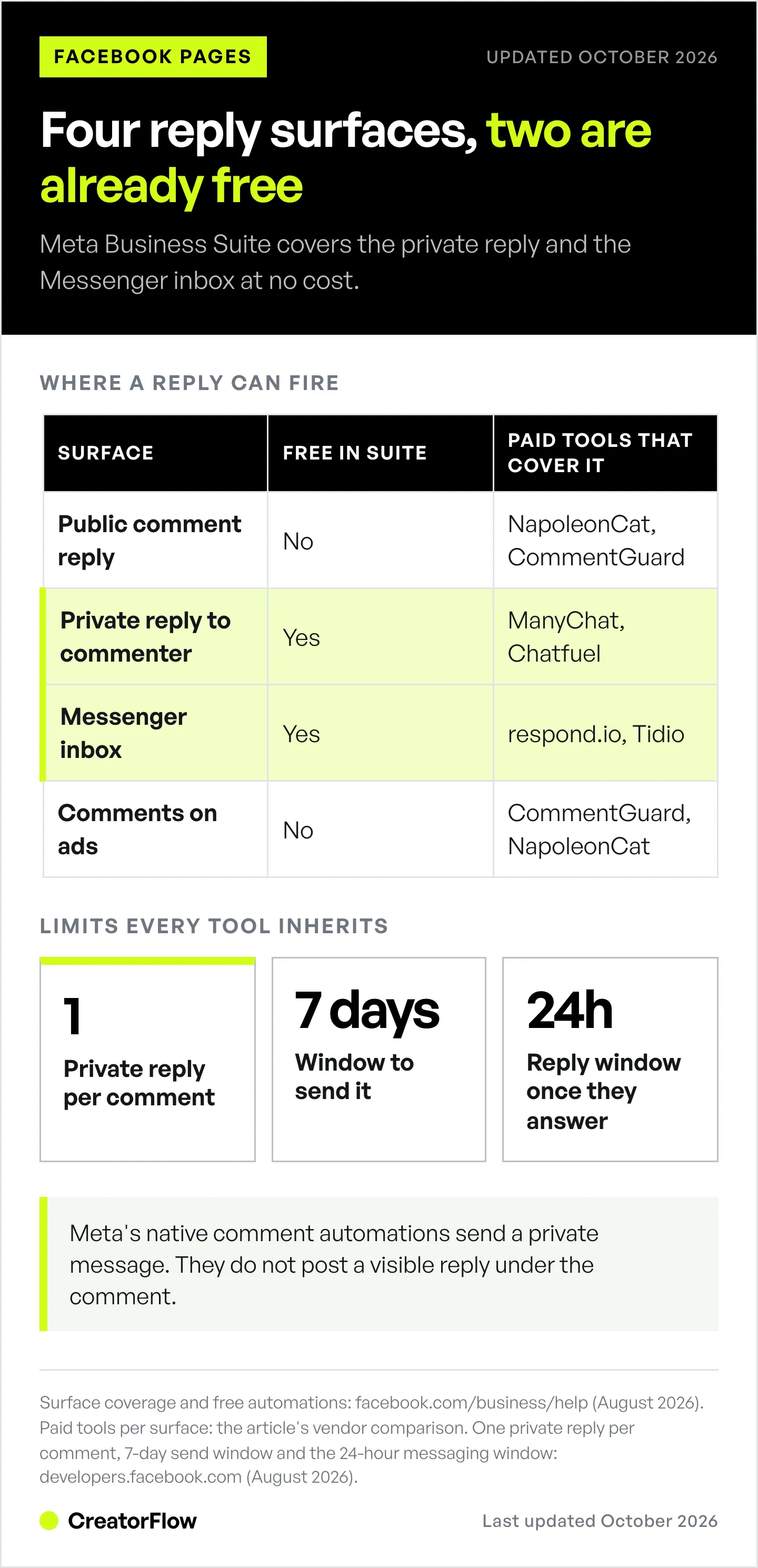
1. A public reply under the comment. Everyone scrolling the post sees it. This is the one that makes a Page look staffed, and the one Meta’s free tools do not do.
2. A private reply to that commenter. Meta calls this a Private Reply. The person receives a Messenger message that automatically links back to the comment they left. One message, once.
3. A reply inside the Messenger inbox. Someone opens a chat with the Page rather than commenting. Instant replies, away messages and keyword responses live here.
4. A reply under a comment on an ad. Ad comments sit on dark posts and high-spend creative. They behave like post comments but arrive faster and carry more spam.
Most Pages need one or two of these. Buying a platform that covers all four when comments only arrive on organic posts is where the money goes.
| Surface | Free in Meta Business Suite | Paid tools that cover it |
|---|---|---|
| Public reply under a comment | No | NapoleonCat, CommentGuard |
| Private reply to a commenter | Yes, via Comment to message | ManyChat, Chatfuel |
| Messenger inbox auto-reply | Yes, via Instant reply and Custom keywords | respond.io, Tidio |
| Comments on ads | Not covered | CommentGuard, NapoleonCat |
What Can You Auto Reply on Facebook for Free?
Meta Business Suite Inbox holds the native automations, and they cost nothing on any Page. The set as of August 2026 (facebook.com/business/help, August 2026):
- Instant reply fires the moment someone starts a new conversation with the Page
- Away message runs on a schedule, for hours when the Page is marked offline
- Frequently asked questions suggest tappable questions and answer each with pre-written text
- Follow ups send a scheduled message after a conversation
- Comment to message sends a private Messenger message to anyone who comments a keyword
- Custom keywords answer incoming messages that contain your trigger words
Two constraints decide whether this is enough. Neither of the comment automations posts anything publicly, so the comment thread still reads as unanswered to everyone else scrolling. And the keyword automations are exact-match: Meta’s help center states an automated message will not send unless the keywords match exactly, so “Price” and “price” are separate triggers.
For the equivalent inventory on the other Meta platform, see what Instagram’s built-in automation covers free.
What Meta’s Rules Allow a Facebook Auto Reply to Do
Every tool on this page, free or paid, runs on the same Messenger Platform and inherits the same limits. Reading these first tells you what no amount of spend will buy.
One private reply per comment, within 7 days. Meta’s Private Replies documentation is explicit: only one message can be sent to the person who commented, and it must be sent within 7 days from when the post or comment was created. The message automatically contains a link to the post or comment (developers.facebook.com, August 2026).
The conversation continues only if they answer. Meta’s wording: only when a person responds to the private message can you continue the conversation within the 24-hour messaging window.
24 hours is the standard window. After it closes, a Page needs an approved message tag. The Human Agent tag allows a manual response inside 7 days, and One-Time Notification lets a Page request a single follow-up (developers.facebook.com, August 2026).
Bots answer in 30 seconds. Meta’s Messenger Platform policy states automated bots must respond to user input within 30 seconds, covering text, quick replies, buttons and persistent menu taps.
The practical consequence of the one-message rule is that your private reply carries the whole job. There is no drip, no second nudge, no follow-up unless they write back. Link, context and a reason to answer all fit in that one message or they do not happen.
That changes how the message should be written. A private reply reading “Hi, thanks for commenting, check your DMs” spends the single send on an instruction rather than on the thing the person asked for. A reply that names the product, gives the link and ends on a question does the delivery and opens the 24-hour window in one move, because the window only starts once they answer. Treat the question at the end as the mechanism, not a pleasantry.
The same one-shot discipline applies to public versus private comment replies on Instagram, where the split works the same way.
Facebook Auto Reply Tools Compared
The table below sorts on the variable that changes your bill. Moderation tools meter comments, chat-marketing tools meter contacts, and shared inboxes meter seats. A Page with 300 comments a month and one operator pays a very different amount depending on which axis it lands on.
| Tool | Priced by | Free option | Entry price, billed monthly | Billed annually |
|---|---|---|---|---|
| Meta Business Suite | Not priced | Full feature set | $0 | $0 |
| ManyChat | Active contacts | 25 active contacts | $17, Essential, 250 contacts | $14/month |
| Chatfuel | Plan, with AI credits | Free trial only | $20, Business | $18/month ($216/year) |
| CommentGuard | Comments per month | 7-day trial, no card | $29, Starter, 5,000 comments | Two months free |
| Tidio | Billable conversations | 50 conversations | $29, Starter, 100 conversations | $24.17/month |
| respond.io | Users and active contacts | 7-day trial | $99, Starter, 5 users | $79/month ($948/year) |
| NapoleonCat | Profiles and seats | 14-day trial, all features | From $79, Standard (billing period not labelled) | See napoleoncat.com/pricing |
Meta Business Suite
Best for a single Page whose comment volume is manageable and whose goal is moving commenters into Messenger. It handles instant replies, away messages, FAQs, follow-ups, comment-to-message and custom keywords, on every Page, at no cost. Custom keyword and comment automations are configured on desktop. The gap it leaves is the visible reply under the comment.
ManyChat
Best for chat-marketing funnels that run across several Meta surfaces at once. ManyChat covers Instagram, Facebook Messenger, WhatsApp, SMS, TikTok, Telegram and email, with a visual flow builder, tagging and branching logic behind it.
Its five tiers, billed month to month, are Free at 25 active contacts, Essential $17 for 250, Pro $39 for 2,500, Business $99 for 7,500 and Advanced $199 for 25,000. Billed annually those paid tiers become $14, $29, $69 and $139 per month, per ManyChat’s pricing page (checked October 2026). The pricing page opens on the annual toggle, which is why most comparison guides quote the $14 figure as if it were the monthly rate. Active-contact billing started March 2, 2026 and applies to accounts created on or after that date.
An active contact is anyone who interacted with your automation during the billing period, so the bill follows audience activity rather than seat count. For a closer read on how those tiers behave as volume grows, see the ManyChat pricing breakdown by contact tier.
Chatfuel
Best for no-code bot building with an AI layer on top. Chatfuel builds conversational flows for Facebook, Instagram, WhatsApp and website chat without code.
Chatfuel has no free plan; every plan starts with a free trial. Business is $20/month billed monthly, or $18/month billed yearly ($216/year), and includes $20 of AI credits a month, per Chatfuel’s pricing page (checked October 2026). Chatfuel’s prices changed more than once during 2026, so confirm the current figure and your expected volume before committing.
NapoleonCat
Best for agencies moderating many Pages from one queue. NapoleonCat covers all four surfaces, including automatic moderation rules that reply to, hide or delete comments, and it extends to comments on ads. Its 14-day free trial includes the full feature set with 5 seats, 10 social profile slots and a 25,000-message capacity (napoleoncat.com, August 2026). NapoleonCat’s pricing page lists Standard at $79, Pro at $89 and Expert at $209 a month, excluding VAT, without labelling the billing period (checked October 2026). The page has a profile slider, so the price may change with the number of profiles you connect.
CommentGuard
Best for high comment volume on posts and ads. Pricing scales on comments processed per month rather than on features, and every tier carries unlimited Facebook and Instagram Pages: Starter $29/month for 5,000 comments, Growth $49 for 10,000, Pro $99 for 25,000, Elite $199 for 50,000. A 7-day trial runs without a card, and annual billing takes two months off (commentguard.io, August 2026).
respond.io
Best for a support team that wants Facebook, Messenger and other channels in one shared inbox with assignment and routing. Starter is $99/month billed monthly, or $79/month billed yearly, for 5 users with unlimited monthly active contacts. Growth is $199/month, or $159/month billed yearly, for 10 users starting at 1,000 active contacts. Advanced is $349/month, or $279/month billed yearly, per respond.io’s pricing page (checked October 2026). The 7-day trial opens the Growth feature set for 5 users, and extra seats run $12 to $24/month depending on tier (respond.io, August 2026). respond.io documents a Facebook comment auto-reply workflow that sends a private Messenger message to the commenter.
Tidio
Best for pairing website live chat with Messenger, so a site visitor and a Page commenter land in the same agent view. Facebook Messenger is included on every plan, including the free one, which carries 50 billable conversations and 10 seats. Starter is $29/month for 100 conversations, or $24.17/month billed annually; Growth starts at $59/month for 250 conversations, or $49.17 annually. Plus starts at $300/month plus usage. Annual billing is two months free across the paid tiers (tidio.com, August 2026).
How to Set Up a Facebook Auto Reply in Meta Business Suite
Before paying for anything, turn on the free layer and see what is left over. This takes under ten minutes on desktop.
- Open Meta Business Suite and select the Page you manage
- Go to Inbox, then Automations
- Choose Instant reply, switch it on, select Messenger as the channel and write the message
- Add an Away message and set the hours your Page is offline
- Open Comment to message, add the keyword commenters actually type, and write the private message it sends
- Add Custom keywords for incoming Messenger messages, matching case exactly
- Send yourself a test comment and a test message from a second account, and time both
Run it for two weeks, then look at what is left over. If the gap is a visible reply under each comment, a moderation tool closes it. If there is no gap, the free tier was the answer and you are done.
Which Facebook Auto Reply Tool Should You Pick?
Sort by the surface, then by volume.
- Comments arrive on organic posts and you want them moved into Messenger: Meta Business Suite, at no cost
- The comment thread has to look answered in public: a moderation tool, NapoleonCat or CommentGuard
- You run ads and the comments under them need handling: CommentGuard for volume pricing, NapoleonCat for agency-scale queues
- You are building a sales funnel across Messenger and WhatsApp: ManyChat or Chatfuel
- A support team shares the inbox: respond.io or Tidio
- You manage Pages for clients: NapoleonCat, for the multi-profile seat model
The decision most Pages get wrong is buying a chat-marketing platform to solve a moderation problem. Funnel builders are priced per contact and are strong at what happens after the private message lands. Moderation tools are priced per comment and are strong at what appears under the post. Naming which of those you need is worth more than any feature table.
If Your Comments Come From Instagram Instead
Plenty of Pages shopping for this category find that Instagram is where the comments actually arrive. Reels get commented on, the cross-posted Facebook copies do not, and the tool being evaluated is aimed at the quieter surface.
Worth checking before you buy: open Meta Business Suite Inbox and compare comment counts by platform for the last 30 days. If Instagram carries most of the volume, an Instagram-first tool will cover the traffic that exists.
CreatorFlow is built for Instagram, end to end, and has been a Meta Tech Provider since December 2025. Comment-to-DM, story replies and keyword triggers run on Meta’s official Instagram API, with a follow gate, an email gate, link tracking and clicks by country on the Pro plan. Pricing is flat at $15/month rather than scaled by contacts, and the Free plan includes 500 DMs a month. Current tiers are on the CreatorFlow pricing page.
For a side-by-side of the Instagram options, see the best Instagram DM automation tools compared and the Instagram auto reply setup guide.
FAQ
What is the best free Facebook auto reply tool?
Meta Business Suite. It is built into every Facebook Page at no cost and covers instant replies, away messages, FAQs, follow-ups, comment-to-message and custom keywords (facebook.com/business/help, August 2026). Its ceiling is the public comment thread: the native comment automations send a private Messenger message and do not post a visible reply under the comment.
Can you auto reply to Facebook comments for free?
Partly. Meta Business Suite sends a free automated private message to someone who comments a keyword. Posting an automatic public reply under that comment requires a third-party moderation tool such as NapoleonCat or CommentGuard. Both connect through Meta’s official API rather than logging into your account.
How many times can a Facebook auto reply message someone who commented?
Once. Meta’s Private Replies documentation allows only one message to the person who commented, sent within 7 days of the post or comment being created, and it automatically includes a link to the comment. The conversation can continue only after the person replies, inside the 24-hour messaging window (developers.facebook.com, August 2026).
What is the 24-hour rule for Facebook Messenger?
A Page can message a person freely for 24 hours after their last message. After that window, sending requires an approved message tag. The Human Agent tag allows a manual reply within 7 days, and One-Time Notification lets a Page request a single follow-up message (developers.facebook.com, August 2026). Since 28 September 2026, a chat that starts when someone taps a Click-to-Messenger ad and sends a message stays open for up to 7 days from that first message (developers.facebook.com, October 2026).
Do these tools risk your Facebook Page?
Tools that connect through Meta’s official Messenger Platform with an authorised Page access token operate inside Meta’s rules. Risk comes from tools that ask for account passwords or simulate a logged-in browser session. Meta’s policy also requires automated bots to respond to user input within 30 seconds. The same distinction applies on the Instagram side, covered in Meta’s allowed and banned DM automation.
Can one tool handle both Facebook and Instagram comments?
Yes. NapoleonCat, CommentGuard, ManyChat and Chatfuel all cover both platforms, and Meta Business Suite handles both natively for Pages linked to an Instagram professional account. Whether you need both depends on where the comments land, which the Business Suite Inbox will show you for the last 30 days.
How fast does an automated Facebook reply send?
Native instant replies fire when a conversation starts. Meta documents a delay on keyword automations, which hold before sending unless you respond personally first, so a Page that is actively staffed will answer before the automation does. Third-party tools receive Meta’s webhook and typically deliver within seconds of the comment.
ManyChat, Chatfuel, respond.io and NapoleonCat prices and Meta’s Click-to-Messenger ad window were re-checked in October 2026. Other pricing and platform rules were verified from vendor pricing pages, facebook.com/business/help and developers.facebook.com in August 2026. Meta may change features, limits or terms at any time. Individual results vary.


